2014 INFINITI Q60 COUPE trunk
[x] Cancel search: trunkPage 149 of 458

3-18Pre-driving checks and adjustments
WARNING
.Do not drive with the trunk lid open. This
could allow dangerous exhaust gases to
be drawn into the vehicle. See “Exhaust
gas (carbon monoxide)” (P.5-3) of this
manual.
. Closely supervise children when they are
around cars to prevent them from play-
ing and becoming locked in the trunk
where they could be seriously injured.
Keep the car locked, with the trunk
closed, when not in use, and prevent
children’s access to Intelligent Keys.
SPA2307
TRUNK LID RELEASE SWITCH
The trunk lid release switch*Ais located
on the instrument panel.
To open the trunk lid, push the release
switch down as illustrated. To close, push
the trunk lid down.
You can open the trunk lid with Intelligent
Key. (See “Intelligent Key system” (P.3-6)
or “Remote keyless entry system” (P.3-14).)
SPA2404
TRUNK OPEN REQUEST SWITCH
The trunk lid can be opened by pushing the
trunk open request switch when the
Intelligent Key is within the operating
range of the trunk lock/unlock function
regardless of the inside lock knob position.
(See“Intelligent Key system” (P.3-6).)
TRUNK LID
Page 150 of 458

SPA2308
TRUNK RELEASE POWER CANCEL
SWITCH
When the switch located inside the glove
box is in the OFF position
*A, the power to
the trunk lid will be canceled and the trunk
lid cannot be opened by the trunk lid
release switch, the trunk open request
switch or the TRUNK button on the
Intelligent Key.
When you have to leave the vehicle with a
valet and want to keep your belongings
safe in the glove box and the trunk, push
this switch to OFF and lock the glove box
with the mechanical key. Then leave the vehicle and the Intelligent Key with the
valet and keep the mechanical key with
you.
See
“Keys” (P.3-2).
To connect the power to the trunk lid, push
the switch to the ON
*Bposition.
SPA2402
INTERIOR TRUNK LID RELEASE
WARNING
Closely supervise children when they are
around cars to prevent them from playing
and becoming locked in the trunk where
they could be seriously injured. Keep the car
locked, with the trunk lid securely latched,
when not in use, and prevent children’s
access to Intelligent Keys.
The interior trunk lid release mechanism
allows opening of the trunk lid in the event
Pre-driving checks and adjustments3-19
Page 151 of 458

3-20Pre-driving checks and adjustments
that people become locked inside the trunk
or in the event of the loss of electrical
power such as a discharged battery.
Releasing inside the trunk
To open the trunk lid from the inside, pull
the release handle
*1until the lock
releases and push up on the trunk lid.
The release lever is made of a material that
glows in the dark after a brief exposure to
ambient light.
The handle is located on the back of the
trunk lid as illustrated.
Releasing from the rear seat
You can access the release handle by
folding the rear seat.
Pull the strap, located at the center bottom
of the seatback, and then fold down the
seatback. (See “Rear seats”(P.1-7).)
To open the trunk lid from the rear seat,
pull the release handle towards front of
vehicle until the lock releases.
SPA2834
INFINITI Performance Line model
The INFINITI Performance Line model has
unique exhaust pipes. These parts are
close to the ground and may be damaged
if they contact objects such as parking
blocks, etc.
CAUTION
Reduce vehicle speed to decrease the
possibility of damaging these parts when:
. driving on bumpy or rutted roads
. entering or exiting parking garages and
driveways .
driving over speed bumps.
UNIQUE FRONT AND REAR PARTS (INFINITI
Performance Line model)
Page 186 of 458
file.
.
(Previous)
Select the “
”key to display the
previous file.
Setting the Image Viewer:
The Image Viewer setting display will
appear when selecting the “Settings”key
on the full screen display. The following
settings are available for the full screen
display.
. Slideshow Speed
Select the “Slideshow Speed” key.
From the following display, select the
changing time from 5, 10, 30, 60
seconds or “No Auto Change”.
. Slideshow Order
Select the “Slideshow Order” key. From
the following display, select “Random”
or “Order List”. For “Order List”, the
image order is the order of the files as
stored on the USB memory.
Operating tips:
. Only files that meet the following
conditions will be displayed.
— Image type: JPEG
— File Extensions: *.jpg, *jpeg —
Maximum Resolution: 2048 61536
pixels
— Maximum Size: 2-MB
— Colors: 32768 (15-bit)
— Maximum File Name lengths: 253-
Bytes
— Maximum Folders: 500
— Maximum Images per Folder: 1024
. If an electronic device (such as a digital
camera) is directly connected to the
vehicle using a USB cable, no image
will be displayed on the screen.
. If the file name is too long, some file
names may not be entirely displayed.
. When the total number of characters in
the file name exceeds 100 or if 1 file
name in a directory exceeds 100
characters, all files will show a shor-
tened 8-character version. The image
will still be displayed when selected. The system is designed as an aid to the
driver in situations such as slot parking or
parallel parking.
When the shift lever is shifted into the R
(Reverse) position, the monitor display
shows view to the rear of the vehicle.
WARNING
.
The RearView Monitor is a convenience
but it is not a substitute to check behind
the vehicle when backing up.
. The driver is always responsible for
safety during parking and other maneu-
vers.
. Objects viewed in the RearView Monitor
differ from actual distance because a
wide-angle lens is used. Objects in the
RearView Monitor will appear visually
opposite like ones viewed in the inside
and outside mirrors.
. Make sure that the trunk is securely
closed when backing up.
. Underneath the bumper and the corner
areas of the bumper cannot be viewed on
the RearView monitor because of its
monitoring range limitation.
Monitor, climate, audio, phone and voice recognition systems4-23
REARVIEW MONITOR (if so equipped)
Page 296 of 458
WARNING
.Do not leave children or adults who
would normally require the support of
others alone in your vehicle. Pets should
not be left alone either. They could
accidentally injure themselves or others
through inadvertent operation of the
vehicle. Also, on hot, sunny days,
temperatures in a closed vehicle could
quickly become high enough to cause
severe or possibly fatal injuries to
people or animals.
. Closely supervise children when they are
around cars to prevent them from play-
ing and becoming locked in the trunk
where they could be seriously injured.
Keep the car locked, with the rear
seatback and trunk lid securely latched
when not in use, and prevent children’s
access to car keys.
EXHAUST GAS (carbon monoxide)
WARNING
.Do not breathe exhaust gases; they
contain colorless and odorless carbon
monoxide. Carbon monoxide is danger-
ous. It can cause unconsciousness or
death.
. If you suspect that exhaust fumes are
entering the vehicle, drive with all
windows fully open, and have the
vehicle inspected immediately.
. Do not run the engine in closed spaces
such as a garage.
. Do not park the vehicle with the engine
running for any extended length of time.
. Keep the trunk lid closed while driving,
otherwise exhaust gases could be drawn
into the passenger compartment. If you
must drive with the trunk lid open,
follow these precautions:
1) Open all the windows.
2) Set the
air recirculation to off
and the fan control to high to
circulate the air. .
If electrical wiring or other cable con-
nections must pass to a trailer through
the seal on the trunk lid or the body,
follow the manufacturer’s recommenda-
tion to prevent carbon monoxide entry
into the vehicle.
. The exhaust system and body should be
inspected by a qualified mechanic when-
ever:
—The vehicle is raised for service.
—You suspect that exhaust fumes are
entering into the passenger compart-
ment.
—You notice a change in the sound of
the exhaust system.
—You have had an accident involvingdamage to the exhaust system,
underbody, or rear of the vehicle.
Starting and driving5-3
PRECAUTIONS WHEN STARTING AND
DRIVING
Page 303 of 458
5-10Starting and driving
SSD0872
OPERATING RANGE FOR ENGINE
START FUNCTION
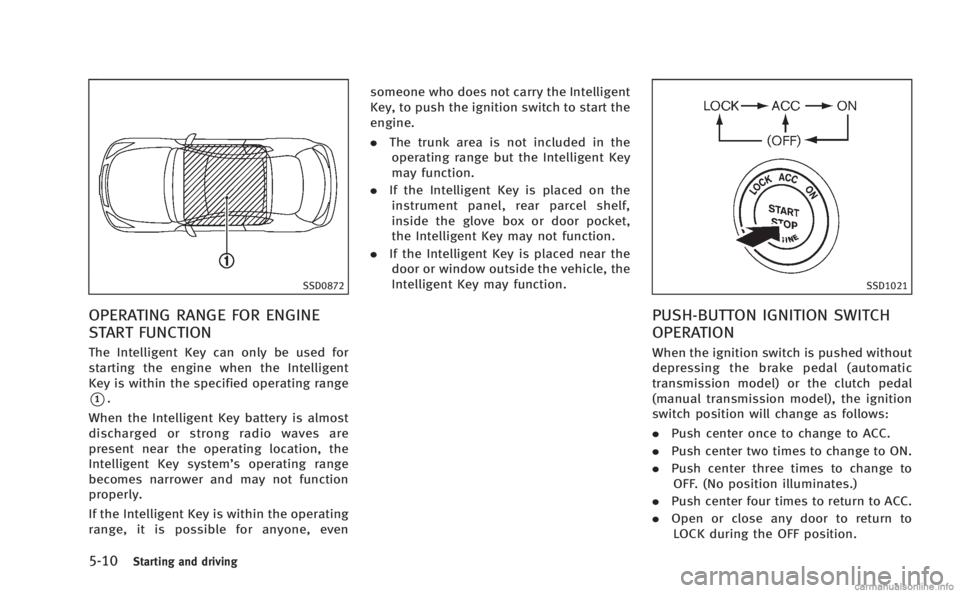
The Intelligent Key can only be used for
starting the engine when the Intelligent
Key is within the specified operating range
*1.
When the Intelligent Key battery is almost
discharged or strong radio waves are
present near the operating location, the
Intelligent Key system’s operating range
becomes narrower and may not function
properly.
If the Intelligent Key is within the operating
range, it is possible for anyone, even someone who does not carry the Intelligent
Key, to push the ignition switch to start the
engine.
.
The trunk area is not included in the
operating range but the Intelligent Key
may function.
. If the Intelligent Key is placed on the
instrument panel, rear parcel shelf,
inside the glove box or door pocket,
the Intelligent Key may not function.
. If the Intelligent Key is placed near the
door or window outside the vehicle, the
Intelligent Key may function.
SSD1021
PUSH-BUTTON IGNITION SWITCH
OPERATION
When the ignition switch is pushed without
depressing the brake pedal (automatic
transmission model) or the clutch pedal
(manual transmission model), the ignition
switch position will change as follows:
. Push center once to change to ACC.
. Push center two times to change to ON.
. Push center three times to change to
OFF. (No position illuminates.)
. Push center four times to return to ACC.
. Open or close any door to return to
LOCK during the OFF position.
Page 321 of 458

5-28Starting and driving
SSD1170
Type A
SSD1169
Type B
VEHICLE-TO-VEHICLE DISTANCE
CONTROL MODE OPERATION
Always pay attention to the operation of
the vehicle and be ready to manually
control the proper following distance. The
vehicle-to-vehicle distance control mode of
the Intelligent Cruise Control (ICC) system
may not be able to maintain the selected
distance between vehicles (following dis-
tance) or selected vehicle speed under
some circumstances.
The vehicle-to-vehicle distance control
mode uses a sensor
*Alocated on the
front of the vehicle to detect vehicles
traveling ahead. The sensor generally
detects the signals returned from the
reflectors on a vehicle ahead. Therefore, if
the sensor cannot detect the reflector on
the vehicle ahead, the ICC system may not
maintain the selected distance.
The following are some conditions in which
the sensor cannot detect the signals:
. When the reflector of the vehicle ahead
is positioned high on the vehicle
(trailer, etc.)
. When the reflector on the vehicle ahead
is missing, damaged or covered .
When the reflector of the vehicle ahead
is covered with dirt, snow and road
spray
. When the snow or road spray from
traveling vehicles reduces the sensor’s
visibility
. When dense exhaust or other smoke
(black smoke) from vehicles reduces
the sensor’s visibility
. When excessively heavy baggage is
loaded in the rear seat or the trunk of
your vehicle
The ICC system is designed to automati-
cally check the sensor’s operation within
the limitations of the system. When the
sensor is covered with dirt or obstructs, the
system will automatically be canceled. If
the sensor is covered with ice, a transpar-
ent or translucent vinyl bag, etc., the ICC
system may not detect them. In these
instances, the vehicle-to-vehicle distance
control mode may not cancel and may not
be able to maintain the selected following
distance from the vehicle ahead. Be sure to
check and clean the sensor regularly.
The vehicle-to-vehicle distance control
mode is designed to maintain a selected
distance and reduce the speed to match
the slower vehicle ahead; the system will
Page 360 of 458

SCE0695
Jacking tools
SCE0702
Spare
Getting the spare tire and tools
Raise the trunk floor cover*1using the
tab
*A.
Remove jacking tools located inside the
trunk as illustrated.
The spare tire is located under the jacking
tools. Remove the cap
*2holding the
spare tire.
Jacking up the vehicle and remov-
ing the damaged tire
WARNING
. Never get under the vehicle while it is
supported only by the jack. If it is
necessary to work under the vehicle,
support it with safety stands.
. Use only the jack provided with your
vehicle to lift the vehicle. Do not use the
jack provided with your vehicle on other
vehicles. The jack is designed for lifting
only your vehicle during a tire change.
. Use the correct jack-up points. Never use
any other part of the vehicle for jack
support.
. Never jack up the vehicle more than
necessary. .
Never use blocks on or under the jack.
. Do not start or run the engine while
vehicle is on the jack, as it may cause
the vehicle to move. This is especially
true for vehicles with limited slip differ-
entials.
. Do not allow passengers to stay in the
vehicle while it is on the jack.
Carefully read the caution label attached to
the jack body and the following instruc-
tions.
In case of emergency6-5