2014 INFINITI Q60 COUPE instrument panel
[x] Cancel search: instrument panelPage 266 of 458

SAA2531
1. Push the INFO button on the instrumentpanel.
2. Select the “Others”key.
3. Select the “Voice Recognition” key.
4. Select the “User Guide”key.
5. Select a preferred item.
You can skip steps 1 and 3 above if you say
“Help”.
Available items:
. Getting Started
Describes the basics of how to operate
the INFINITI Voice Recognition system. .
Let’s Practice
Mode that allows practicing by follow-
ing the instructions of the system voice.
. Using the Address Book
Tutorial for entering a destination by
using the Address Book.
. Finding a Street Address (if so
equipped)
Tutorial for entering a destination by
street address.
. Placing Calls
Tutorial for making a phone call by
voice command operation.
. Help on Speaking
Displays useful tips of speaking for
correct command recognition by the
system.
Note that the Command List feature is only
available when Alternate Command Mode
is active.
SAA2532
Getting Started
Before using the INFINITI Voice Recognition
system for the first time, you can confirm
how to use commands by viewing the
Getting Started section of the User Guide.
1. Select the “Getting Started” key.
2. You can confirm the page by scrolling the screen using the INFINITI controller.
Tutorials on the operation of the INFINITI
Voice Recognition system
If you choose “Using the Address Book”,
“ Finding a Street Address” or“Placing
Calls”, you can view tutorials on how to
perform these operations using INFINITI
Monitor, climate, audio, phone and voice recognition systems4-103
Page 278 of 458

SAA2529
Activating Alternate Command
Mode
When the Standard Mode is active, perform
the following steps to switch to the
Alternate Command Mode.
1. Push the SETTING button on the instru-ment panel.
2. Highlight the “Others”key.
3. Highlight the “Voice Recognition” key.
SAA2543
4. Highlight the“Alternate Command
Mode” key.
5. The confirmation message is displayed on the screen. Push the “OK”key to
activate the Alternate Command Mode.
Displaying command list
If you are controlling the system by voice
commands for the first time or do not know
the appropriate voice command, perform
the following procedure for displaying the
voice command list (available only in
Alternate Command Mode).
SAA2544
1. Push the INFO button on the instrument
panel.
2. Select the “Others”key.
3. Select the “Voice Recognition” key.
4. Select the “Command List” key.
Monitor, climate, audio, phone and voice recognition systems4-115
Page 286 of 458

SAA2547
Displaying user guide
You can confirm how to use voice com-
mands by accessing a simplified User
Guide, which contains basic instructions
and tutorials for several voice commands.
1. Push the INFO button on the instrumentpanel.
2. Select the “Others” key using the
INFINITI controller and push the ENTER
button.
3. Highlight the “Voice Recognition” key
using the INFINITI controller and push
the ENTER button. 4. Highlight the
“User Guide”key using
the INFINITI controller and push the
ENTER button.
5. Highlight an item using the INFINITI controller and push the ENTER button.
Available items:
. Getting Started
Describe the basics of how to operate
the INFINITI Voice Recognition system.
. Let’s Practice
Mode that allows practicing by follow-
ing the instructions of the system voice.
. Using the Address Book
Refer to Navigation System Owner’s
Manual.
. Finding a Street Address (if so
equipped)
Refer to Navigation System Owner’s
Manual.
. Placing Calls
Tutorial for making a phone call by
voice command operation.
. Help on Speaking
Displays useful tips for how to correctly
speak commands in order for them to
be properly recognized by the system. .
Voice Recognition Settings
Describes the available voice recogni-
tion settings.
. Adapting the System to Your Voice
Tutorial adapting the system to your
voice.
USING THE SYSTEM
Initialization
When the ignition switch is pushed to the
ON position, INFINITI Voice Recognition is
initialized, which may take up to one
minute. When completed, the system is
ready to accept voice commands. If the
TALK
switch is pushed before the
initialization completes the display will
show the message: “System not ready”
or a beep sounds.
Before starting
To get the best performance from INFINITI
Voice Recognition, observe the following.
. Keep the interior of the vehicle as quiet
as possible. Close the windows to
eliminate the surrounding noises (traf-
fic noises, vibration sounds, etc.),
which may prevent the system from
recognizing the voice commands cor-
rectly.
Monitor, climate, audio, phone and voice recognition systems4-123
Page 303 of 458
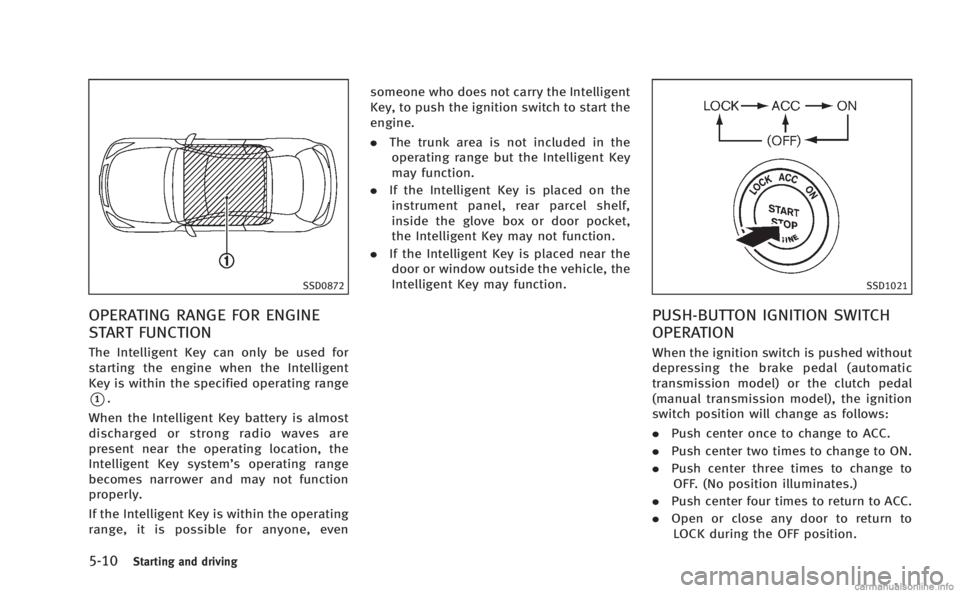
5-10Starting and driving
SSD0872
OPERATING RANGE FOR ENGINE
START FUNCTION
The Intelligent Key can only be used for
starting the engine when the Intelligent
Key is within the specified operating range
*1.
When the Intelligent Key battery is almost
discharged or strong radio waves are
present near the operating location, the
Intelligent Key system’s operating range
becomes narrower and may not function
properly.
If the Intelligent Key is within the operating
range, it is possible for anyone, even someone who does not carry the Intelligent
Key, to push the ignition switch to start the
engine.
.
The trunk area is not included in the
operating range but the Intelligent Key
may function.
. If the Intelligent Key is placed on the
instrument panel, rear parcel shelf,
inside the glove box or door pocket,
the Intelligent Key may not function.
. If the Intelligent Key is placed near the
door or window outside the vehicle, the
Intelligent Key may function.
SSD1021
PUSH-BUTTON IGNITION SWITCH
OPERATION
When the ignition switch is pushed without
depressing the brake pedal (automatic
transmission model) or the clutch pedal
(manual transmission model), the ignition
switch position will change as follows:
. Push center once to change to ACC.
. Push center two times to change to ON.
. Push center three times to change to
OFF. (No position illuminates.)
. Push center four times to return to ACC.
. Open or close any door to return to
LOCK during the OFF position.
Page 316 of 458

SSD0600
1. ACCELERATE/RESUME switch
2. COAST/SET switch
3. CANCEL switch
4. MAIN (ON·OFF) switch
CRUISE CONTROL OPERATIONS
The cruise control allows driving at a speed
between 25 to 89 MPH (40 to 144 km/h)
without keeping your foot on the accel-
erator pedal.
To turn on the cruise control,push the
MAIN switch on. The CRUISE indicator will
come on.
To set cruising speed, accelerate your
vehicle to the desired speed, push the COAST/SET switch and release it. (The
CRUISE SET indicator will come on in the
instrument panel.) Take your foot off the
accelerator pedal. Your vehicle will main-
tain the set speed.
.
To pass another vehicle, depress the
accelerator pedal. When you release
the pedal, the vehicle will return to the
previously set speed.
. The vehicle may not maintain the set
speed on winding or hilly roads. If this
happens, drive without the cruise con-
trol.
To cancel the preset speed, follow any of
these methods:
a) Push the CANCEL button. The SET indicator will go out.
b) Tap the brake pedal. The SET indicator will go out.
c) Move the shift lever to the N (Neutral) position. The SET indicator will go out.
d) Turn the MAIN switch off. Both the CRUISE indicator and SET indicator
will go out.
. If you depress the brake pedal while
pushing the ACCELERATE/RESUME or
COAST/SET switch and reset at the
cruising speed, the cruise control will disengage. Turn the MAIN switch off
once and then turn it on again.
. The cruise control will automatically
cancel if the vehicle slows more than
8 MPH (13 km/h) below the set speed.
. If you depress the clutch pedal (Manual
Transmission models) or move the shift
lever to N (Neutral) position (Automatic
Transmission models), the cruise con-
trol will be canceled.
To reset at a faster cruising speed, use one
of the following methods:
. Depress the accelerator pedal. When
the vehicle attains the desired speed,
push and release the COAST/SET
switch.
. Push and hold the ACCELERATE/RE-
SUME switch. When the vehicle attains
the speed you desire, release the
switch.
. Push, then quickly release the ACCEL-
ERATE/RESUME switch. Each time you
do this, the set speed will increase by
about 1 MPH (1.6 km/h).
To reset at a slower cruising speed, use
one of the following methods:
. Lightly tap the brake pedal. When the
vehicle attains the desired speed, push
Starting and driving5-23
Page 346 of 458

SSD0929
SONAR SYSTEM OFF SWITCH
The sonar system OFF switch on the
instrument panel allows the driver to turn
the sonar system on and off. To turn the
sonar system on and off, the ignition
switch must be in the“ON”position. The
indicator light
*1on the switch will
illuminate when the system is turned off.
If the indicator light flashes when the
sonar system is not turned off, it may
indicate a malfunction in the sonar system.
WARNING
If the engine is not running or is turned off
while driving, the power assist for the
steering will not work. Steering will be
harder to operate.
The power assisted steering uses a hy-
draulic pump, driven by the engine, to
assist steering.
If the engine stops or the drive belt breaks,
you will still have control of the vehicle.
However, much greater steering effort is
needed, especially in sharp turns and at
low speeds.
BRAKING PRECAUTIONS
The brake system has two separate hy-
draulic circuits. If one circuit malfunctions,
you will still have braking at two wheels.
Vacuum assisted brakes
The brake booster aids braking by using
engine vacuum. If the engine stops, you
can stop the vehicle by depressing the
brake pedal. However, greater foot pres-
sure on the brake pedal will be required to
stop the vehicle and the stopping distance
will be longer.
When the brake pedal is depressed slowly
and firmly, you may hear a clicking noise
and feel a slight pulsation. This is normal
and indicates that the Brake Assist System
is operating.
Wet brakes
When the vehicle is washed or driven
through water, the brakes may get wet.
As a result, your braking distance will be
longer and the vehicle may pull to one side
during braking.
To dry brakes, drive the vehicle at a safe
speed while lightly tapping the brake pedal
to heat-up the brakes. Do this until the
brakes return to normal. Avoid driving the
Starting and driving5-53
POWER STEERING BRAKE SYSTEM
Page 350 of 458

ANTI-LOCK BRAKING SYSTEM (ABS)
WARNING
.The Anti-lock Braking System (ABS) is a
sophisticated device, but it cannot pre-
vent accidents resulting from careless or
dangerous driving techniques. It can
help maintain vehicle control during
braking on slippery surfaces. Remember
that stopping distances on slippery
surfaces will be longer than on normal
surfaces even with ABS. Stopping dis-
tances may also be longer on rough,
gravel or snow covered roads, or if you
are using tire chains. Always maintain a
safe distance from the vehicle in front of
you. Ultimately, the driver is responsible
for safety.
. Tire type and condition may also affect
braking effectiveness.
—When replacing tires, install the
specified size of tires on all four
wheels.
—When installing a spare tire, make
sure that it is the proper size and
type as specified on the Tire and
Loading Information label. See “Tireand Loading Information label”
(P.9-
12) of this manual.
—For detailed information, see “Wheels and tires” (P.8-30) of this
manual.
The Anti-lock Braking System (ABS) con-
trols the brakes so the wheels do not lock
during hard braking or when braking on
slippery surfaces. The system detects the
rotation speed at each wheel and varies
the brake fluid pressure to prevent each
wheel from locking and sliding. By pre-
venting each wheel from locking, the
system helps the driver maintain steering
control and helps to minimize swerving
and spinning on slippery surfaces.
Using the system
Depress the brake pedal and hold it down.
Depress the brake pedal with firm steady
pressure, but do not pump the brakes. The
ABS will operate to prevent the wheels
from locking up. Steer the vehicle to avoid
obstacles.
WARNING
Do not pump the brake pedal. Doing so may
result in increased stopping distances.
Self-test feature
The ABS includes electronic sensors, elec-
tric pumps, hydraulic solenoids and a
computer. The computer has a built-in
diagnostic feature that tests the system
each time you start the engine and move
the vehicle at a low speed in forward or
reverse. When the self-test occurs, you may
hear a “clunk” noise and/or feel a pulsa-
tion in the brake pedal. This is normal and
does not indicate a malfunction. If the
computer senses a malfunction, it switches
the ABS off and illuminates the ABS
warning light on the instrument panel.
The brake system then operates normally,
but without anti-lock assistance.
If the ABS warning light illuminates during
the self-test or while driving, have the
vehicle checked by an INFINITI retailer.
Starting and driving5-57
Page 351 of 458

5-58Starting and driving
Normal operation
The ABS operates at speeds above 3 to 6
MPH (5 to 10 km/h).
When the ABS senses that one or more
wheels are close to locking up, the actuator
rapidly applies and releases hydraulic
pressure. This action is similar to pumping
the brakes very quickly. You may feel a
pulsation in the brake pedal and hear a
noise from under the hood or feel a
vibration from the actuator when it is
operating. This is normal and indicates
that the ABS is operating properly. How-
ever, the pulsation may indicate that road
conditions are hazardous and extra care is
required while driving.The Vehicle Dynamic Control (VDC) system
uses various sensors to monitor driver
inputs and vehicle motion. Under certain
driving conditions, the VDC system helps
to perform the following functions.
.
Controls brake pressure to reduce
wheel slip on one slipping drive wheel
so power is transferred to a non
slipping drive wheel on the same axle.
. Controls brake pressure and engine
output to reduce drive wheel slip based
on vehicle speed (traction control func-
tion).
. Controls brake pressure at individual
wheels and engine output to help the
driver maintain control of the vehicle in
the following conditions:
— understeer (vehicle tends to not
follow the steered path despite
increased steering input)
— oversteer (vehicle tends to spin due
to certain road or driving condi-
tions).
The VDC system can help the driver to
maintain control of the vehicle, but it
cannot prevent loss of vehicle control in
all driving situations.
When the VDC system operates, the VDC
warning light
in the instrument panel flashes so note the following:
.
The road may be slippery or the system
may determine some action is required
to help keep the vehicle on the steered
path.
. You may feel a pulsation in the brake
pedal and hear a noise or vibration
from under the hood. This is normal
and indicates that the VDC system is
working properly.
. Adjust your speed and driving to the
road conditions.
See “Vehicle Dynamic Control (VDC) warn-
ing light” (P.2-17).
If a malfunction occurs in the system, the
VDC warning light
illuminates in the
instrument panel. The VDC system auto-
matically turns off.
The VDC OFF switch is used to turn off the
VDC system. The VDC off indicator
illuminates to indicate the VDC system is
off. When the VDC switch is used to turn off
the system, the VDC system still operates
to prevent one drive wheel from slipping by
transferring power to a non slipping drive
wheel. The VDC warning light
flashes if
this occurs. All other VDC functions are off,
and the VDC warning light
will not
flash. The VDC system is automatically
VEHICLE DYNAMIC CONTROL (VDC) SYSTEM