2014 INFINITI Q50 tire pressure
[x] Cancel search: tire pressurePage 201 of 394

5-26Starting and driving
PRECAUTIONS ON ACTIVE LANE
CONTROL
WARNING
.Active Lane Control will not always steer
the vehicle to keep it in the lane. It is not
designed to prevent loss of control. It is
the driver’s responsibility to stay alert,
drive safely, keep the vehicle in the
traveling lane, and be in control of
vehicle at all times.
. Active Lane Control is primarily intended
for use on well-developed freeways or
highways. It may not detect the lane
markers for certain roads, weather or
driving conditions.
. Using Active Lane Control under some
conditions of road, lane marker or
weather, or if you attempt to change
lanes without using the lane change
signal could lead to an unexpected
system operation. In such conditions,
you need to correct the vehicle’s direc-
tion with your steering operation to
avoid accidents.
. When Active Lane Control is operating,
avoid excessive or sudden steering maneuvers. Otherwise, you could lose
control of the vehicle.
. Active Lane Control will not operate at
speeds below approximately 45 MPH (70
km/h) or if it cannot detect lane markers.
. Active Lane Control may not operate
properly under the following conditions,
and do not use Active Lane Control:
—During bad weather (rain, fog, snow,
wind, etc.).
—When driving on slippery roads,such as on ice or snow, etc.
—When driving on winding or uneven roads.
—When there is a lane closure due toroad repairs.
—When driving in a makeshift lane.
—When driving on roads where the
lane width is too narrow.
—When driving with a tire that is notwithin normal tire conditions (for
example, tire wear, low tire pressure,
installation of spare tire, tire chains,
non-standard wheels).
—When the vehicle is equipped withnon-original steering parts or sus- pension parts.
. If Active Lane Control malfunctions, it
will cancel automatically. The chassis
control warning will appear in the
vehicle information display.
. If the chassis control warning appears,
pull off the road to a safe location and
stop the vehicle. Turn the engine off and
restart the engine. If the chassis control
warning continues to illuminate, have
Active Lane Control checked by an
INFINITI retailer.
The functions of Active Lane Control may or
may not operate properly under the follow-
ing conditions:
.On roads where there are multiple
parallel lane markers; lane markers
that are faded or not painted clearly;
yellow painted lane markers; non-stan-
dard lane markers; lane markers cov-
ered with water, dirt, snow, etc.
. On roads where discontinued lane
markers are still detectable.
. On roads where there are sharp curves.
. On roads where there are sharply
contrasting objects, such as shadows,
snow, water, wheel ruts, seams or lines
Page 208 of 394

LANE DEPARTURE PREVENTION
(LDP) SYSTEM
Precautions on LDP system
WARNING
.The LDP system will not always steer the
vehicle to keep it in the lane. It is not
designed to prevent loss of control. It is
the driver’s responsibility to stay alert,
drive safely, keep the vehicle in the
traveling lane, and be in control of
vehicle at all times.
. The LDP system is primarily intended for
use on well-developed freeways or high-
ways. It may not detect the lane markers
in certain roads, weather or driving
conditions.
. Using the LDP system under some
conditions of road, lane marker or
weather, or when you change lanes
without using the lane change signal
could lead to an unexpected system
operation. In such conditions, you need
to correct the vehicle’s direction with
your steering operation to avoid acci-
dents. .
When the LDP system is operating, avoid
excessive or sudden steering maneu-
vers. Otherwise, you could lose control
of the vehicle.
. The LDP system will not operate at
speeds below approximately 45 MPH
(70 km/h) or if it cannot detect lane
markers.
. The LDP system may not function
properly under the following conditions,
and do not use the LDP system:
—During bad weather (rain, fog, snow,
wind, etc.).
—When driving on slippery roads,
such as on ice or snow, etc.
—When driving on winding or uneven roads.
—When there is a lane closure due to
road repairs.
—When driving in a makeshift lane.
—When driving on roads where thelane width is too narrow.
—When driving with a tire that is notwithin normal tire conditions (for
example, tire wear, low tire pressure,
installation of spare tire, tire chains, non-standard wheels).
—When the vehicle is equipped with
non-original steering parts or sus-
pension parts.
. If the LDP system malfunctions, it will
cancel automatically. The LDP “malfunc-
tion” message will appear in the vehicle
information display.
. If the “malfunction” message appears,
pull off the road to a safe location and
stop the vehicle. Turn the engine off and
restart the engine. If the “malfunction”
message continues to appear, have the
LDP system checked by an INFINITI
retailer.
. Excessive noise will interfere with the
warning chime sound, and the chime
may not be heard.
The functions of the LDP system (warning
and steering control assist) may or may not
operate properly under the following con-
ditions:
.On roads where there are multiple
parallel lane markers; lane markers
that are faded or not painted clearly;
yellow painted lane markers; non-stan-
dard lane markers; lane markers cov-
Starting and driving5-33
Page 216 of 394
![INFINITI Q50 2014 Owners Manual The BSI system turns on when the dynamic
driver assistance switch on the steering
wheel is pushed when the [Blind Spot
Intervention] is enabled in the settings
menu on the lower display. The driver
as](/manual-img/42/41080/w960_41080-215.png "INFINITI Q50 2014 Owners Manual The BSI system turns on when the dynamic
driver assistance switch on the steering
wheel is pushed when the [Blind Spot
Intervention] is enabled in the settings
menu on the lower display. The driver
as")
The BSI system turns on when the dynamic
driver assistance switch on the steering
wheel is pushed when the [Blind Spot
Intervention] is enabled in the settings
menu on the lower display. The driver
assist system blind spot indicator (green)
in the vehicle information display illumi-
nates when the BSI system is turned on.
The BSI system provides an audible warn-
ing and flashes the side indicator light
when BSI is activated even if the BSW
system is off.
JVS0246X
How to enable/disable the BSI system:
Perform the following steps to enable or
disable the BSI system.
1. Push the MENU button
*1and touch
[Driver Assistance] on the lower dis-
play.
2. Touch [Blind Spot Assist].
3. Touch [Blind Spot Intervention] to enable or disable the system.
WARNING
. Do not use the BSI system under the
following conditions because the system may not function properly.
—During bad weather (for example,
rain, fog, snow, wind, etc.)
—When driving on slippery roads,such as on ice or snow, etc.
—When driving on winding or uneven
roads.
—When there is a lane closure due toroad repairs.
—When driving in a makeshift lane.
—When driving on roads where thelane width is too narrow.
—When driving with a tire that is notwithin normal tire conditions (for
example, tire wear, low tire pressure,
installation of spare tire, tire chains,
non-standard wheels).
—When the vehicle is equipped with
non-original steering parts or sus-
pension parts.
. Excessive noise (for example, audio
system volume, open vehicle window)
will interfere with the chime sound, and
it may not be heard.
Starting and driving5-41
Page 229 of 394

5-54Starting and driving
.The brake engagement by the BCI
system is not as effective on a slope as
it is on flat ground. When on a steep
slope the system may not function
properly.
. Do not use the BCI systems under the
following conditions because the system
may not function properly.
—When driving with a tire that is not
within normal tire conditions (for
example, tire wear, low tire pressure,
installation of spare tire, tire chains,
non-standard wheels).
—When the vehicle is equipped with
non-original brake parts or suspen-
sion parts.
. Excessive noise (for example, audio
system volume, open vehicle window)
will interfere with the chime sound, and
it may not be heard.
BCI temporarily not available
When the following message appears in
the vehicle information display, a chime
will sound and the BCI system will be
turned off automatically. .
“Unavailable High Accelerator Temp.”:
When the accelerator pedal actuator
detects that the internal motor tem-
perature is high.
Action to take:
Turn on the BCI system again when the
above condition no longer exists.
. “Unavailable Side Radar Obstruction”:
When side radar blockage is detected.
Action to take:
If the warning message appears, park
the vehicle in a safe place, turn the
engine off. Check for and remove
objects obscuring the radar sensors
on the rear bumper, and restart the
engine. If the BSW or BSI system
operates normally, the BCI system will
also operate normally. (See “BSW/BSI
temporarily not available” (P.5-47).)
BCI malfunction
When the BCI system malfunctions, it will
be turned off automatically, a beep will
sound and BCI system “malfunction”
warning message will appear in the vehicle
information display.
Stop the vehicle in a safe location, turn the
engine off and restart the engine. If the
warning message continues to appear, have the system checked by an INFINITI
retailer.
Page 275 of 394

5-100Starting and driving
6. Plan for the shortest route..Utilize a map or navigation system todetermine the best route to save
time.
7. Avoid idling.
.Shutting off your engine when safe for stops exceeding 30-60 seconds
saves fuel and reduces emissions.
8. Buy an automated pass for toll roads.
.Automated passes permit drivers to use special lanes to maintain cruis-
ing speed through the toll and avoid
stopping and starting.
9. Winter warm up.
.Limit idling time to minimize impact to fuel economy.
.Vehicles typically need no more than30 seconds of idling at start-up to
effectively circulate the engine oil
before driving.
.Your vehicle will reach its ideal
operating temperature more quickly
while driving versus idling.
10. Keeping your vehicle cool.
.Park your vehicle in a covered
parking area or in the shade when-
ever possible.
.When entering a hot vehicle, open- ing the windows will help to reduce
the inside temperature faster, result-
ing in reduced demand on your A/C
system. .
Keep your engine tuned up.
. Follow the recommended scheduled
maintenance.
. Keep the tires inflated to the correct
pressure. Low tire pressure increases
tire wear and lowers fuel economy.
. Keep the wheels in correct alignment.
Improper alignment increases tire wear
and lowers fuel economy.
. Use the recommended viscosity engine
oil. (See “Engine oil and oil filter
recommendation” (P.9-6).)
INCREASING FUEL ECONOMY
Page 276 of 394
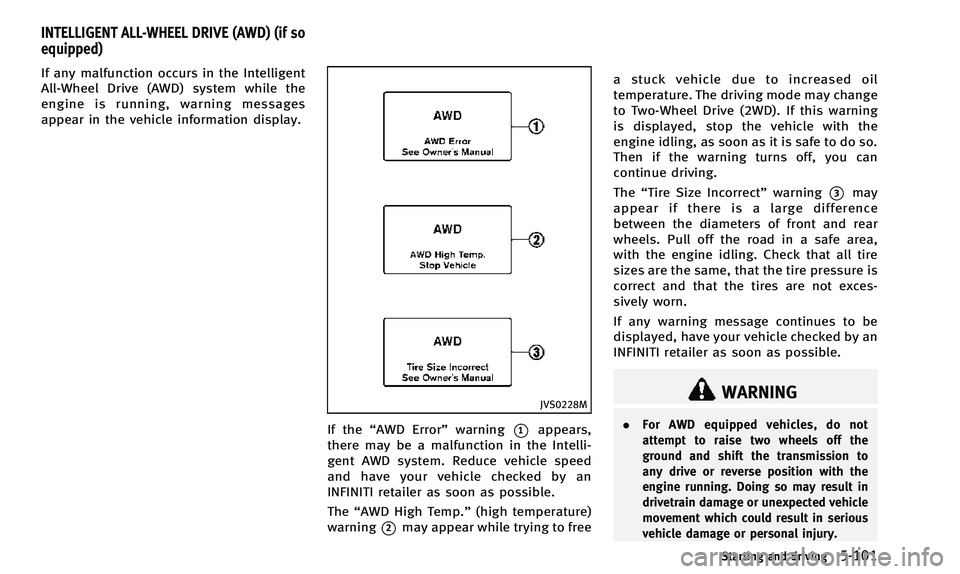
If any malfunction occurs in the Intelligent
All-Wheel Drive (AWD) system while the
engine is running, warning messages
appear in the vehicle information display.
JVS0228M
If the“AWD Error” warning*1appears,
there may be a malfunction in the Intelli-
gent AWD system. Reduce vehicle speed
and have your vehicle checked by an
INFINITI retailer as soon as possible.
The “AWD High Temp.” (high temperature)
warning
*2may appear while trying to free a stuck vehicle due to increased oil
temperature. The driving mode may change
to Two-Wheel Drive (2WD). If this warning
is displayed, stop the vehicle with the
engine idling, as soon as it is safe to do so.
Then if the warning turns off, you can
continue driving.
The
“Tire Size Incorrect” warning
*3may
appear if there is a large difference
between the diameters of front and rear
wheels. Pull off the road in a safe area,
with the engine idling. Check that all tire
sizes are the same, that the tire pressure is
correct and that the tires are not exces-
sively worn.
If any warning message continues to be
displayed, have your vehicle checked by an
INFINITI retailer as soon as possible.
WARNING
. For AWD equipped vehicles, do not
attempt to raise two wheels off the
ground and shift the transmission to
any drive or reverse position with the
engine running. Doing so may result in
drivetrain damage or unexpected vehicle
movement which could result in serious
vehicle damage or personal injury.
Starting and driving5-101
INTELLIGENT ALL-WHEEL DRIVE (AWD) (if so
equipped)
Page 282 of 394

BRAKE ASSIST
When the force applied to the brake pedal
exceeds a certain level, the Brake Assist is
activated generating greater braking force
than a conventional brake booster even
with light pedal force.
WARNING
The Brake Assist is only an aid to assist
braking operation and is not a collision
warning or avoidance device. It is the
driver’s responsibility to stay alert, drive
safely and be in control of the vehicle at all
times.
ANTI-LOCK BRAKING SYSTEM (ABS)
WARNING
.The Anti-lock Braking System (ABS) is a
sophisticated device, but it cannot pre-
vent accidents resulting from careless or
dangerous driving techniques. It can
help maintain vehicle control during
braking on slippery surfaces. Remember
that stopping distances on slippery
surfaces will be longer than on normal surfaces even with ABS. Stopping dis-
tances may also be longer on rough,
gravel or snow covered roads, or if you
are using tire chains. Always maintain a
safe distance from the vehicle in front of
you. Ultimately, the driver is responsible
for safety.
. Tire type and condition may also affect
braking effectiveness.
—When replacing tires, install the
specified size of tires on all four
wheels.
—When installing a spare tire, make sure that it is the proper size and
type as specified on the Tire and
Loading Information label. See “Tire
and loading information label” (P.9-
13) of this manual.
—For detailed information, see “Wheels and tires” (P.8-29) of this
manual.
The Anti-lock Braking System (ABS) con-
trols the brakes so the wheels do not lock
during hard braking or when braking on
slippery surfaces. The system detects the
rotation speed at each wheel and varies
the brake fluid pressure to prevent each wheel from locking and sliding. By pre-
venting each wheel from locking, the
system helps the driver maintain steering
control and helps to minimize swerving
and spinning on slippery surfaces.
Using the system
Depress the brake pedal and hold it down.
Depress the brake pedal with firm steady
pressure, but do not pump the brakes. The
ABS will operate to prevent the wheels
from locking up. Steer the vehicle to avoid
obstacles.
WARNING
Do not pump the brake pedal. Doing so may
result in increased stopping distances.
Self-test feature
The ABS includes electronic sensors, elec-
tric pumps, hydraulic solenoids and a
computer. The computer has a built-in
diagnostic feature that tests the system
each time you start the engine and move
the vehicle at a low speed in forward or
reverse. When the self-test occurs, you may
hear a
“clunk” noise and/or feel a pulsa-
Starting and driving5-107
BRAKE ASSIST
Page 292 of 394

6 In case of emergency
Hazard warning flasher switch ............................. 6-2
Roadside assistance program .............................. 6-2
Emergency engine shut off .................................. 6-3
Flat tire................................................................ 6-3 Tire Pressure Monitoring System (TPMS).......... 6-3
Run-flat tires ................................................... 6-4
Changing a flat tire ......................................... 6-4 Jump starting ...................................................... 6-9
Push starting .................................................... 6-11
If your vehicle overheats ................................... 6-12
Towing your vehicle .......................................... 6-13
Towing recommended by INFINITI ................. 6-14
Vehicle recovery (freeing a stuck vehicle) ..... 6-16