4-25
Multimedia System
4
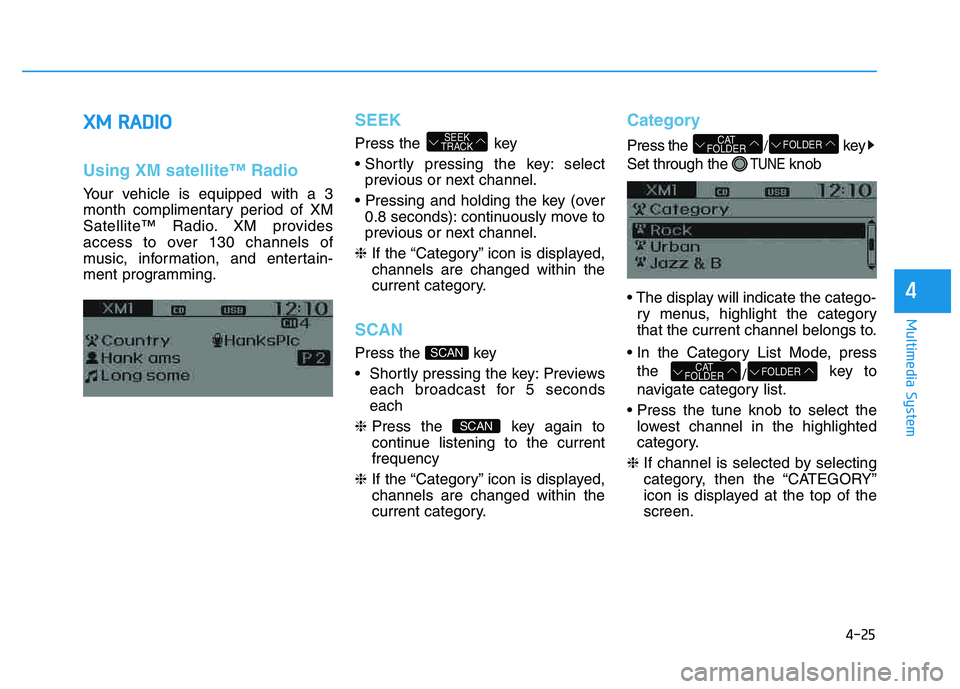
XXMM RR AA DDIIOO
Using XM satellite™ Radio
Your vehicle is equipped with a 3
month complimentary period of XM
Satellite™ Radio. XM provides
access to over 130 channels of
music, information, and entertain-
ment programming.
SEEK
Press the key
select
previous or next channel.
0.8 seconds): continuously move to
previous or next channel.
❈ If the “Category” icon is displayed,channels are changed within the
current category.
SCAN
Press the key
Previews
each broadcast for 5 seconds each
❈ Press the key again to
continue listening to the currentfrequency
❈ If the “Category” icon is displayed,channels are changed within the
current category.
Category
Press the /key
Set through the
TUNEknob
ry menus, highlight the category
that the current channel belongs to.
the /key to
navigate category list.
lowest channel in the highlighted
category.
❈ If channel is selected by selecting
category, then the “CATEGORY”
icon is displayed at the top of thescreen.
FOLDERCAT
FOLDER
FOLDERCAT
FOLDER
SCAN
SCAN
SEEK
TRACK
Page 237 of 542
4-26
Multimedia System
Preset
Press the ~ key
Plays the frequency saved in the correspon-
ding key.
0.8 seconds): Pressing and holding
the desired key from ~
will save the current broadcast to
the selected key and sound a
BEEP.
Tune
Rotate TUNE knob : Changes thechannel number or scrolls category list.
TUNE knob : Selects the menu.
Menu
Select category menu through the TUNE knob Press the key
Select [ Info] through the TUNE
knob or key
Info (Information)
Displays the Artist/Song info of the current song.
1
RPT
MENU
61
61
Page 238 of 542
4-27
Multimedia System
4
BBAA SSIICC MM EETT HH OO DD OO FF UU SSEE ::
A
A uuddiioo CC DD // MM PP33 CC DD // UU SSBB //
i
i PP oodd ®®
// MM yy MM uussiicc
Press the key to change the mod mode in order of CD ➟ USB(iPod®)
➟ AUX ➟ My Music ➟ BT Audio.
The folder/file name is displayed on the screen.
Page 239 of 542
4-28
Multimedia System
MP3 CD, USB mode: FLD.RDM on screen
Plays all files within the current fold-
er in random order.
iPod
®mode: ALB RDM on screen
Plays all files within albums of the
current category in random order.
MP3 CD, USB, iPod mode: ALL RDMon screen
Plays all files in random order.
❈ Press the key again to turn off repeat.
Changing Song/File
While song (file) is playing key
Plays the
current song from the beginning.
❈ If the key is pressed
again within 3 second, the previ-
ous song is played.
0.8 seconds): Rewinds the song.
While song (file) is playing key
Plays the next song.
0.8 seconds): Fast forwards the song.
Scan
While song (file) is playing key
Scans all
songs from the next song for 10seconds each.
❈ Press the key again to turn
off.
❈ The SCAN function is not support-
ed in iPod
®mode.
Folder Search : MP3 CD, USB Mode
While file is playing / (Folder Up) key
While file is playing / (Folder Down) key
❈
If a folder is selected by pressing
the TUNE knob, the first file
within the selected folder will be
played.
❈ In iPod
®mode, moves to the
Parent Folder.
Searching Songs (File)
TUNEknob : Searches
for songs (files)
TUNE knob : Plays selected song (file).
FOLDER
CAT
FOLDER
FOLDER
CAT
FOLDER
SCAN
SCAN
SEEK
TRACK
SEEK
TRACK
SEEK
TRACK
2
RDM
Page 240 of 542
4-29
Multimedia System
4
MENU : Audio CD
Press the CD MP3 mode key to set the Repeat, Random,
Information features.
Repeat
Press the key Set [ RPT] through the TUNEknob or
key to repeat the current song. ❈ Press RPT again to turn off.
Random
Press the key Set [ RDM] through the
TUNEknob or
key to randomly play songs within
the current folder. ❈ Press RDM again to turn off.
Information
Press the key Set [ Info] through the
TUNEknob or
key to display information of the cur-rent song. ❈ Press the key to turn off
info display
.
MENU : MP3 CD / USB
Press the CD MP3 mode key
to set the Repeat, Folder Random,
Folder Repeat, All Random,
Information, and Copy features.
Repeat
Press the key Set [ RPT] through the
TUNEknob or
key to repeat the current song. ❈ Press RPT again to turn off.1
RPTMENU
MENU
MENU
3
MENU
2 RDM
MENU
1 RPT
MENU
MENU
Page 241 of 542
4-30
Multimedia System
Folder Random
Press the key Set [ F.RDM] through the
TUNEknob or
key to randomly play songs within the
current folder. ❈ Press F.RDM again to turn off.
Folder Repeat
Press the key Set [ F.RPT] through the
TUNEknob or
key to repeat songs within the cur-
rent folder. ❈ Press F.RPT again to turn off.
All Random
Press the key Set [ A.RDM] through the
TUNEknob or key
to randomly play all songs within the
CD. ❈ Press A.RDM again to turn off.
Information
Press the key Set [ Info] through the
TUNEknob or
key to display information of the cur-rent song. ❈ Press the key to turn off
info display.
Copy
Press the key Set [ Copy] through the
TUNEknob or
key.
song into My Music. You can play the copied Music in My Music
mode.
❈ If another key is pressed while
copying is in progress, a pop up
asking you whether to cancel
copying is displayed.
❈ If another media is connected or
inserted (USB, CD, iPod
®, AUX)
while copying is in progress, copy- ing is canceled.
❈ Music will not be played while
copying is in progress.
MENU : iPod®
In iPod®mode, press the key
to set the Repeat, Album Random, All
Random, Information and Search fea-
tures.
Repeat
Press the key Set [ RPT] through the
TUNEknob or
key to repeat the current song. ❈ Press RPT again to turn repeat off.
Album Random
Press the key Set [ Alb.RDM] through the TUNEknob or key.
Plays albums within the currently
playing category in random order. ❈ Press Alb.RDM again to turn off.
2
RDMMENU
1
RPTMENU
MENU
6
MENU
MENU
5
MENU
4
MENU
3
MENU
2
RDMMENU
Page 242 of 542
4-31
Multimedia System
4
All Random
Press the key Set [ A.RDM] through the TUNEknob
or key.
Plays all songs within the currently
playing category in random order. ❈ Press A.RDM again to turn off.
Information
Press the key Set [ Info] through the
TUNEknob or
key.
Displays information of the current song. ❈ Press the key to turn off
info display.
Search
Press the key Set [ Search] through the
TUNEknob or
key.
Displays iPod
®category list.
❈ Searching iPod
®category is
key pressed, move to par-
ent category.MENU
5
MENU
MENU
4
MENU
3
MENU
Page 243 of 542
4-32
Multimedia System
MENU : My Music Mode
In My Music mode, press the
key to set the Repeat, Random,
Information, Delete, Delete All, and
Delete Selection features.
Repeat
Press the key Set [ RPT] through the TUNEknob or
key.
Repeats the currently playing song.❈ Press RPT again to turn repeat
off.
Random
Press the key Set [ RDM] through the TUNEknob or
key.
Plays all songs in random order.❈ Press RDM again to turn random off.
Information
Press the key Set [ Info] through the
TUNEknob or key.
Displays information of the currentsong. ❈ Press the key to turn off
info display.
Delete
Press the key Set [ Delete] through the TUNEknob or
key.
In the play screen, pressing delete
will delete the currently playing song. ➀ Select the file you wish to delete
by using the TUNE knob.
➁ Press the key and select
the delete menu to delete the
selected file.
Delete All
Press the key Set [ Del.All] through the TUNEknob or key.
Deletes all songs of My Music.
5
MENU
MENU
4
MENU
MENU
3
MENU
2 RDM
MENU
1 RPT
MENU
MENU


![HYUNDAI TUCSON 2014 Owners Manual 4-29
Multimedia System
4
MENU : Audio CD
Press the CD MP3 mode key to set the Repeat, Random,
Information features.
Repeat
Press the key Set [ RPT] through the TUNEknob or
key to repeat the current](/manual-img/35/56203/w960_56203-239.png "HYUNDAI TUCSON 2014 Owners Manual 4-29
Multimedia System
4
MENU : Audio CD
Press the CD MP3 mode key to set the Repeat, Random,
Information features.
Repeat
Press the key Set [ RPT] through the TUNEknob or
key to repeat the current")
![HYUNDAI TUCSON 2014 Owners Manual 4-30
Multimedia System
Folder Random
Press the key Set [ F.RDM] through the
TUNEknob or
key to randomly play songs within the
current folder. ❈ Press F.RDM again to turn off.
Folder Repeat
Press](/manual-img/35/56203/w960_56203-240.png "HYUNDAI TUCSON 2014 Owners Manual 4-30
Multimedia System
Folder Random
Press the key Set [ F.RDM] through the
TUNEknob or
key to randomly play songs within the
current folder. ❈ Press F.RDM again to turn off.
Folder Repeat
Press")
![HYUNDAI TUCSON 2014 Owners Manual 4-31
Multimedia System
4
All Random
Press the key Set [ A.RDM] through the TUNEknob
or key.
Plays all songs within the currently
playing category in random order. ❈ Press A.RDM again to turn off](/manual-img/35/56203/w960_56203-241.png "HYUNDAI TUCSON 2014 Owners Manual 4-31
Multimedia System
4
All Random
Press the key Set [ A.RDM] through the TUNEknob
or key.
Plays all songs within the currently
playing category in random order. ❈ Press A.RDM again to turn off")
