2014 HYUNDAI TUCSON brake
[x] Cancel search: brakePage 208 of 542
3-122
Convenient features of your vehicle
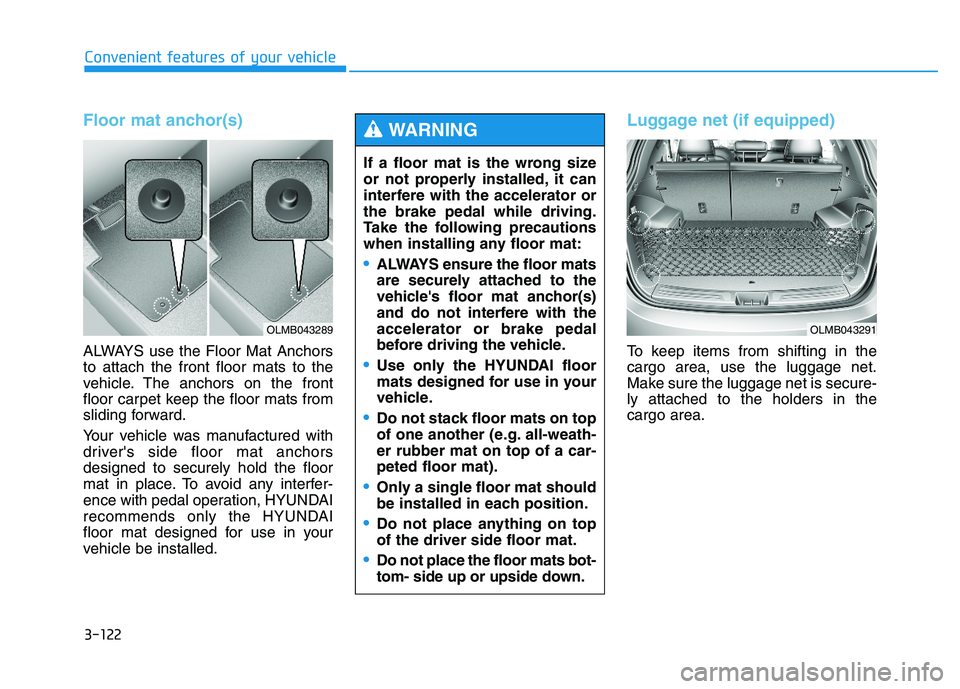
Floor mat anchor(s)
ALWAYS use the Floor Mat Anchors to attach the front floor mats to the
vehicle. The anchors on the front
floor carpet keep the floor mats from
sliding forward.
Your vehicle was manufactured with
driver's side floor mat anchorsdesigned to securely hold the floor
mat in place. To avoid any interfer-
ence with pedal operation, HYUNDAI
recommends only the HYUNDAI
floor mat designed for use in your
vehicle be installed.
Luggage net (if equipped)
To keep items from shifting in the cargo area, use the luggage net.
Make sure the luggage net is secure-ly attached to the holders in the cargo area.
If a floor mat is the wrong size
or not properly installed, it can
interfere with the accelerator orthe brake pedal while driving.
Take the following precautions
when installing any floor mat:
ALWAYS ensure the floor mats
are securely attached to the
vehicle's floor mat anchor(s)
and do not interfere with theaccelerator or brake pedal
before driving the vehicle.
Use only the HYUNDAI floor
mats designed for use in your
vehicle.
Do not stack floor mats on top
of one another (e.g. all-weath-er rubber mat on top of a car-peted floor mat).
Only a single floor mat should
be installed in each position.
Do not place anything on top of the driver side floor mat.
Do not place the floor mats bot-
tom- side up or upside down.
WARNING
OLMB043289OLMB043291
Page 337 of 542

Driving your vehicle
BEFORE DRIVING ..................................................5-3
Before entering the vehicle ..........................................5-3
Before starting .................................................................5-3
IGNITION SWITCH .................................................5-5
Key ignition switch .........................................................5-5
Engine Start/Stop button ................................................5-8
AUTOMATIC TRANSAXLE ..................................5-13
Automatic transaxle operation ...................................5-13
Parking ...............................................................................5-18
Good driving practices ..................................................5-19
ALL WHEEL DRIVE (AWD) ..................................5-21
AWD operation ................................................................5-22
Emergency precautions .................................................5-26
BRAKING SYSTEM ..............................................5-28
Power brakes ..................................................................5-28
Disc brakes wear indicator ..........................................5-29
Parking brake ..................................................................5-29
Anti-lock Brake System (ABS) ....................................5-32
Electronic Stability Control (ESC)................................5-35
Vehicle Stability Management (VSM).........................5-38
Hill-Start Assist Control (HAC) ...................................5-40
Downhill Brake Control (DBC) ......................................5-41
Good braking practices ................................................5-43
DRIVING ASSIST SYSTEM ...................................5-44
Active ECO system ........................................................5-44
Rear view camera ...........................................................5-45
CRUISE CONTROL SYSTEM ................................5-47
Cruise control operation................................................5-47
SPECIAL DRIVING CONDITIONS..........................5-51
Hazardous driving conditions.......................................5-51
Rocking the vehicle ....................................................5-51
Smooth cornering ...........................................................5-52
Driving at night ................................................................5-52
Driving in the rain ...........................................................5-53
Driving in flooded areas ................................................5-54
Reducing the risk of a rollover ...................................5-54
WINTER DRIVING .................................................5-55
Snow or icy conditions ..................................................5-55
TRAILER TOWING.................................................5-58
If you decide to pull a trailer? .....................................5-59
Trailer towing equipment ..............................................5-61
Driving with a trailer ......................................................5-62
Maintenance when trailer towing ...............................5-65
VEHICLE LOAD LIMIT ..........................................5-66
Tire loading information label......................................5-67
5
Page 341 of 542

5-5
Driving your vehicle
Key ignition switch
IIGG NN IITT IIOO NN SS WW IITT CCHH
5
(Continued)
Before leaving the driver’s seat,
always make sure the shift lever
is in position, apply the parking
brake, and turn ignition switchto the LOCK position.
Unexpected vehicle movement
may occur if these precautions
are not followed.
To reduce the risk of SERIOUS
INJURY or DEATH, take the fol-
lowing precautions:
NEVER allow children or any
person who is unfamiliar with
the vehicle to touch the igni-
tion switch or related parts.
Unexpected and sudden vehi-
cle movement can occur.
NEVER reach through the
steering wheel for the ignition
switch, or any other control,
while the vehicle is in motion.
The presence of your hand or
arm in this area may cause a
loss of vehicle control result-ing in an accident.
WARNING
NEVER turn the ignition switch
to the LOCK or ACC position
while the vehicle is in motion
except in an emergency. Thiswill result in the engine turning
off and loss of power assist forthe steering and brake systems.
This may lead to loss of direc-
tional control and braking func-
tion, which could cause an acci-dent.
(Continued)
WARNING
OLMB053001
Page 343 of 542

5-7
Driving your vehicle
Starting the engine 1.Make sure the parking brake isapplied.
2.Make sure the shift lever is in P (Park).
3.Depress the brake pedal.
4.Turn the ignition switch to the START position. Hold the key
(maximum of 10 seconds) until the
engine starts and release it.
✽✽ NOTICE
Whether the engine is cold or warm, always start the vehicle
with your foot on the brake pedal.
Do not depress the accelerator
while starting the vehicle. Do not
race the engine while warming it
up.
In extremely cold weather (below -18°C / 0°F) or after the vehicle
has not been operated for several
days, let the engine warm up with-
out depressing the accelerator
pedal.
5
Always wear appropriate shoes
when operating your vehicle.
Unsuitable shoes, such as high
heels, ski boots, sandals, flip-
flops, etc., may interfere with
your ability to use the brake,
accelerator and clutch pedals.
WARNING To prevent damage to the vehi-
cle:
Do not hold the ignition key in
the START position for more
than 10 seconds. Wait 5 to 10
seconds before trying again.
If traffic and road conditions
permit, you may put the shift
lever in the N (Neutral) posi-
tion while the vehicle is still
moving and turn the ignition
switch to the START position
in an attempt to restart the
engine.
Do not push or tow your vehi-
cle to start the engine.
CAUTION
Page 344 of 542

5-8
Engine Start/Stop button
Whenever the front door is opened,
the Engine Start/Stop button will illu-minate and will go off 30 secondsafter the door is closed.
Driving your vehicle
OLMB053004
To turn the engine off in an
emergency: Press and hold the Engine
Start/Stop button for more than
two seconds OR Rapidly pressand release the Engine
Start/Stop button three times(within three seconds).
If the vehicle is still moving, you
can restart the engine without
depressing the brake pedal by
pressing the Engine Start/Stop
button with the shift lever in theN (Neutral) position.
WARNING
NEVER press the Engine
Start/Stop button while the
vehicle is in motion except in
an emergency. This will resultin the engine turning off and
loss of power assist for thesteering and brake systems.
This may lead to loss of direc-
tional control and braking
function, which could causean accident.
Before leaving the driver’s
seat, always make sure the
shift lever is in the P (Park)
position, set the parking
brake, press the Engine
Start/Stop button to the OFF
position, and take the Smart
Key with you. Unexpected
vehicle movement may occurif these precautions are not
followed.
WARNING
Page 345 of 542
5-9
Driving your vehicle
5
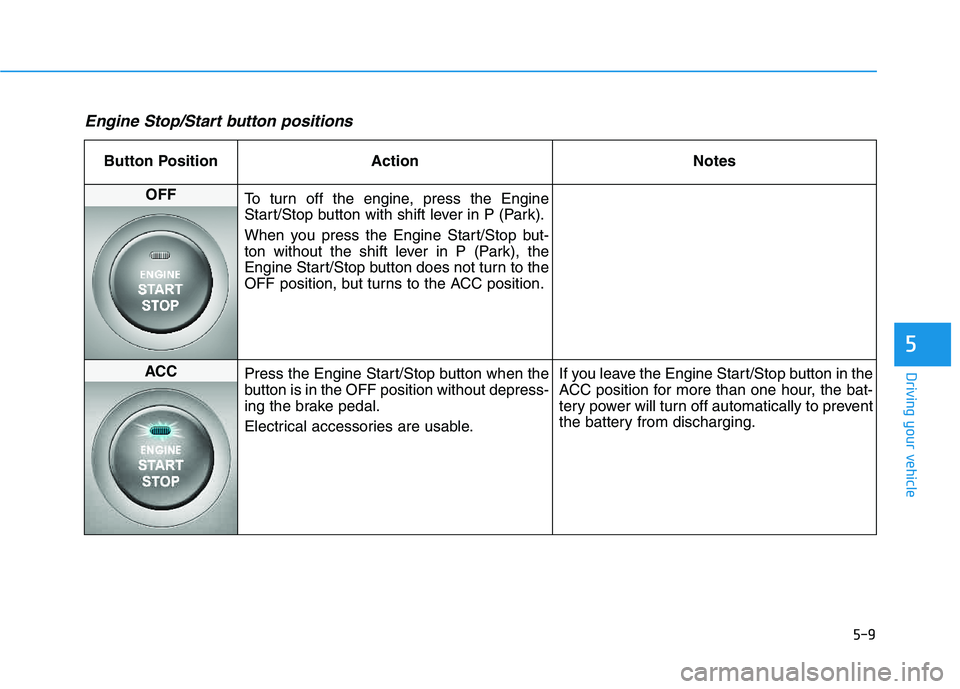
Engine Stop/Start button positions
Button Position ActionNotes
OFF
To turn off the engine, press the Engine
Start/Stop button with shift lever in P (Park).
When you press the Engine Start/Stop but-
ton without the shift lever in P (Park), the
Engine Start/Stop button does not turn to the
OFF position, but turns to the ACC position.
ACC Press the Engine Start/Stop button when the
button is in the OFF position without depress-
ing the brake pedal.
Electrical accessories are usable. If you leave the Engine Start/Stop button in the
ACC position for more than one hour, the bat-
tery power will turn off automatically to prevent
the battery from discharging.
Page 346 of 542

5-10
Driving your vehicle
Button Position ActionNotes
ON
Press the Engine Start/Stop button while it is
in the ACC position without depressing the
brake pedal.
The warning lights can be checked before
the engine is started. If you leave the Engine Start/Stop button in the
ON position for more than one hour, the bat-
tery power will turn off automatically to prevent
the battery from discharging.
START
To start the engine, depress the brake pedal
and press the Engine Start/Stop button with
the shift lever in the P (Park) or in the N
(Neutral) position.
For your safety, start the engine with the shift
lever in the P (Park) position. If you press the Engine Start/Stop button with-
out depressing the brake pedal, the engine
does not start and the Engine Start/Stop but-
ton changes as follows: OFF
ACC
ON
OFF
Page 347 of 542

5-11
Driving your vehicle
5
Starting the engine ✽✽NOTICE
The engine will start by pressing the Engine Start/Stop button, only
when the smart key is in the vehi-
cle.
Even if the smart key is in the vehicle, if it is far away from the
driver, the engine may not start.
When the Engine Start/Stop but- ton is in the ACC or ON position,
if any door is open, the system
checks for the smart key. If the
smart key is not in the vehicle, the
" " indicator and the “KEY
OUT” indicator will blink, and if
all doors are closed, the chime will
also sound for about 5 seconds.
The indicator will turn off while
the vehicle is moving. Keep the
smart key in the vehicle when
using the ACC position or if the
vehicle engine is ON.1.Always carry the smart key withyou.
2.Make sure the parking brake is applied.
3.Make sure the shift lever is in P (Park).
4.Depress the brake pedal.
5.Press the Engine Start/Stop button.
✽✽ NOTICE
Whether the engine is cold or warm, always start the vehicle
with your foot on the brake pedal.
Do not depress the accelerator
while starting the vehicle. Do not
race the engine while warming it
up.
In extremely cold weather (below -18°C / 0°F) or after the vehicle
has not been operated for several
days, let the engine warm up with-
out depressing the accelerator
pedal.
Always wear appropriate shoes
when operating your vehicle.
Unsuitable shoes, such as high
heels, ski boots, sandals, flip-
flops, etc., may interfere with
your ability to use the brake,
accelerator and clutch pedals..
WARNING