Page 203 of 542
3-117
Convenient features of your vehicle
3
Glove box
The glove box can be locked and
unlocked with a key. (1)
To open the glove box:
Pull the handle (2) and the glove box will automatically open (3).
Sunglass holder
To open the sunglass holder:
Press the cover and the holder will
slowly open. Place your sunglasses
in the compartment door with the
lenses facing out.
To close the sunglass holder:
Push back into position. Make sure the sunglass holder is closed while
driving.
ALWAYS close the glove box
door after use. An open glove
box door can cause serious
injury to the passenger in an
accident, even if the passengeris wearing a seat belt.
WARNING
OLMB043279OLMB043280
Page 205 of 542
3-119
Convenient features of your vehicle
3
Cup holderSunvisor
To use a sunvisor, pull it downward.
To use a sunvisor for a side window,
pull it downward, unsnap it from the
bracket (1) and swing it to the side (2).
To use the vanity mirror, pull down the
sunvisor and slide the mirror cover (4).
Adjust the sunvisor forward or back-
ward (3) as needed. Use the ticket
holder (5) to hold tickets.
✽✽
NOTICE
Always have the vanity mirror lamp
switch in the OFF position when the
vanity mirror lamp is not in use.
OLMB043284
■
Rear (if equipped)
OLMB043283N
■Front
Avoid abrupt starting and braking when the cup holder
is in use to prevent spilling
your drink. If hot liquid spills,
you could be burned. Such a
burn to the driver could cause
loss of vehicle control result-ing in an accident.
Only use soft cups in the cup
holders. Hard objects can
injure you in an accident.
WARNING
OLMB043285
Page 206 of 542
3-120
Convenient features of your vehicle
Power outlet
The power outlets are designed to
provide power for mobile telephones
or other devices designed to operate
with vehicle electrical systems. The
devices should draw less than 10
amps with the engine running.
OLMB043287
■Rear (if equipped)OLMB043286
■ Front
For your safety, do not block
your view when using the sunvi-
sor.
WARNING
Always use the sunvisor exten-
sion, after swinging the sunvi-
sor to the side.
CAUTION
Avoid electrical shocks. Do not
place your fingers or foreign
objects (pin, etc.) into a power
outlet or touch the power outletwith a wet hand.
WARNING
To prevent damage to the Power Outlets:
Use the power outlet only when the engine is running
and remove the accessory
plug after use. Using the
accessory plug for prolongedperiods of time with theengine off could cause the
battery to discharge.
(Continue)
CAUTION
Page 207 of 542

3-121
Convenient features of your vehicle
3
Digital clock
To set the time:
The ignition switch must be in the
ACC position or the ON position.
- With Audio off
1. Press the CLOCK button until theclock display blinks.
2. Set the clock by using the TUNE knob.
(Continue)
Only use 12V electrical acces-
sories which are less than
10A in electric capacity.
Adjust the air-conditioner or
heater to the lowest operating
level when using the poweroutlet.
Close the cover when not in
use.
Some electronic devices can
cause electronic interference
when plugged into a vehicle’s
power outlet. These devices
may cause excessive audiostatic and malfunctions in
other electronic systems or
devices used in your vehicle.
Push the plug in as far as it
will go. If good contact is not
made, the plug may overheator the internal temperature
fuse may open.
OLMB043288
Clock setting
Do not adjust the clock while
driving, you may lose steering
control and cause an accident
that results in severe personal
injury or death.
WARNING
Page 208 of 542
3-122
Convenient features of your vehicle
Floor mat anchor(s)
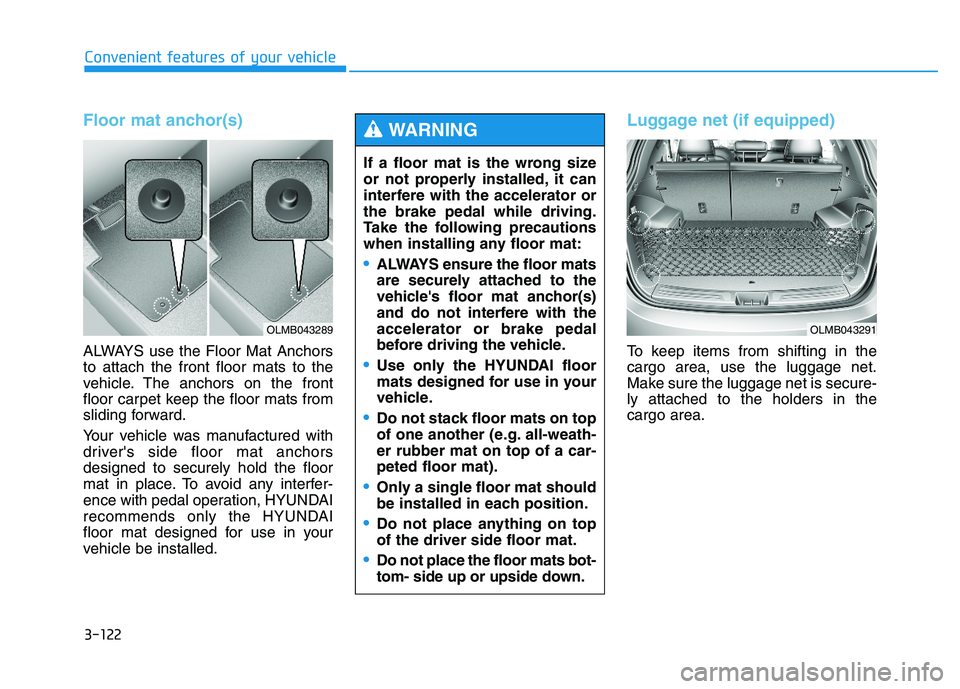
ALWAYS use the Floor Mat Anchors to attach the front floor mats to the
vehicle. The anchors on the front
floor carpet keep the floor mats from
sliding forward.
Your vehicle was manufactured with
driver's side floor mat anchorsdesigned to securely hold the floor
mat in place. To avoid any interfer-
ence with pedal operation, HYUNDAI
recommends only the HYUNDAI
floor mat designed for use in your
vehicle be installed.
Luggage net (if equipped)
To keep items from shifting in the cargo area, use the luggage net.
Make sure the luggage net is secure-ly attached to the holders in the cargo area.
If a floor mat is the wrong size
or not properly installed, it can
interfere with the accelerator orthe brake pedal while driving.
Take the following precautions
when installing any floor mat:
ALWAYS ensure the floor mats
are securely attached to the
vehicle's floor mat anchor(s)
and do not interfere with theaccelerator or brake pedal
before driving the vehicle.
Use only the HYUNDAI floor
mats designed for use in your
vehicle.
Do not stack floor mats on top
of one another (e.g. all-weath-er rubber mat on top of a car-peted floor mat).
Only a single floor mat should
be installed in each position.
Do not place anything on top of the driver side floor mat.
Do not place the floor mats bot-
tom- side up or upside down.
WARNING
OLMB043289OLMB043291
Page 210 of 542
3-124
Convenient features of your vehicle
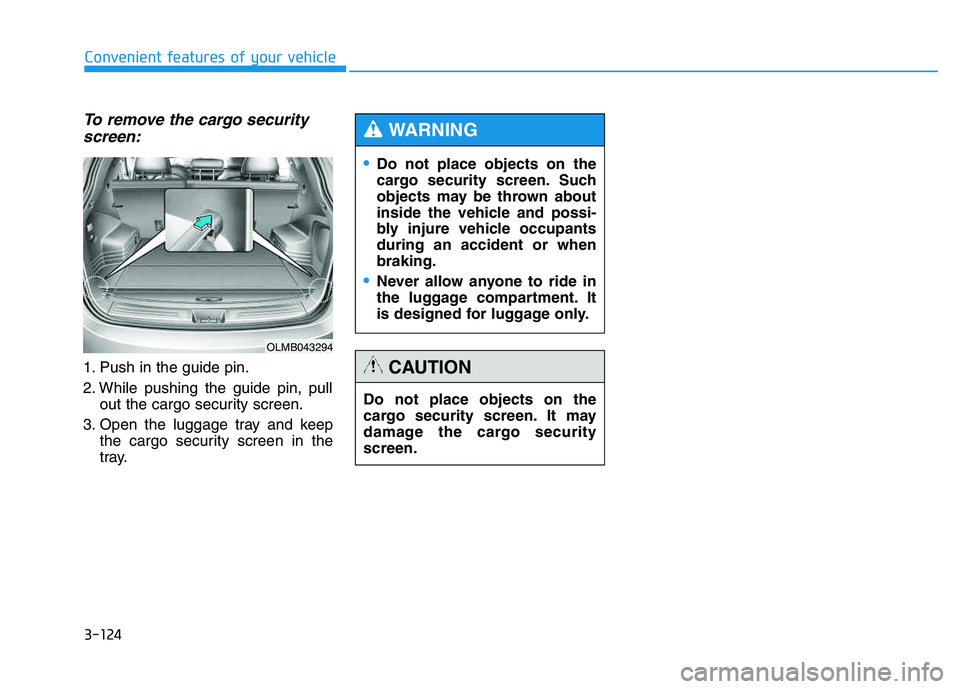
To remove the cargo securityscreen:
1. Push in the guide pin.
2. While pushing the guide pin, pull out the cargo security screen.
3. Open the luggage tray and keep the cargo security screen in the
tray.
Do not place objects on the
cargo security screen. Such
objects may be thrown about
inside the vehicle and possi-
bly injure vehicle occupantsduring an accident or whenbraking.
Never allow anyone to ride in
the luggage compartment. It
is designed for luggage only.
WARNING
Do not place objects on the
cargo security screen. It may
damage the cargo securityscreen.
CAUTION
OLMB043294
Page 211 of 542

3-125
Convenient features of your vehicle
3
If the vehicle has a roof rack, you can
load cargo on top of your vehicle.
The following specification is the
maximum weight that can be loaded
onto the roof rack. Distribute the load
as evenly as possible onto the roof
rack and secure the load firmly.
✽✽NOTICE
If the vehicle is equipped with a sun-
roof, be sure not to position cargo
onto the roof rack in such a way that
it could interfere with sunroof oper-
ation.
RR OO OO FF RR AA CCKK (( IIFF EE QQ UUIIPP PPEEDD ))
ROOF 220 lbs. (100 kg)
RACK EVENLY DISTRIBUTED
OLMB043295
When carrying cargo on the
roof rack, take the necessaryprecautions to make sure the
cargo does not damage the roof
of the vehicle.
Do not load cargo or luggage
in excess of the specifiedweight limit.
When carrying large objects
on the roof rack, make sure
they do not exceed the overall
roof length or width.
CAUTION
The vehicle center of gravity will be higher when items are
loaded onto the roof rack.
Avoid sudden starts, braking,
sharp turns, abrupt maneu-
vers or high speeds that may
result in loss of vehicle con-
trol or rollover resulting in anaccident.
(Continue)
WARNING
(Continue)
Always drive slowly and turn
corners carefully when carry-
ing items on the roof rack.
Severe wind updrafts, caused
by passing vehicles or natural
causes, can cause sudden
upward pressure on items
loaded on the roof rack. This
is especially true when carry-
ing large, flat items such as
wood panels or mattresses.This could cause the items to
fall off the roof rack and cause
damage to your vehicle or
others around you.
To prevent damage or loss of
cargo while driving, check fre-
quently to make sure the
items on the roof rack are
securely fastened.
Page 217 of 542

4-6
Multimedia System
Fading - As your vehicle movesaway from the radio station, the
signal will weaken and sound will
begin to fade. When this occurs,
we suggest that you select anotherstronger station.
Flutter/Static - Weak FM signals or large obstructions between the
transmitter and your radio can dis-turb the signal causing static or
fluttering noises to occur. Reducing
the treble level may lessen this
effect until the disturbance clears. Station Swapping - As an FM sig-
nal weakens, another more power-ful signal near the same frequency
may begin to play. This is because
your radio is designed to lock onto
the clearest signal. If this occurs,select another station with astronger signal.
Multi-Path Cancellation - Radio signals being received from sever-
al directions can cause distortion
or fluttering. This can be caused bya direct and reflected signal from
the same station, or by signals
from two stations with close fre-
quencies. If this occurs, selectanother station until the conditionhas passed.
Using a cellular phone or a two-
way radio
When a cellular phone is used inside
the vehicle, noise may be produced
from the audio system. This does notmean that something is wrong with
the audio equipment. In such a case,
try to operate mobile devices as far
from the audio equipment as possible.
Do not use a cellular phone
while driving. Stop at a safe
location to use a cellular phone.
WARNING
When using a communication
system such as a cellular phone
or a radio set inside the vehicle,
a separate external antenna
must be fitted. When a cellularphone or a radio set is used
with an internal antenna alone,
it may interfere with the vehi-
cle's electrical system and
adversely affect safe operation
of the vehicle.
CAUTIONJBM005JBM004