Page 310 of 665
4-52
SYSTEM CONTROLLERS AND FUNCTIONS - 4.3 INCH COLOR TFT LCD (EXCEPT EUROPE)
Multimedia System
❈Display and settings may differ depending on the
selected audio
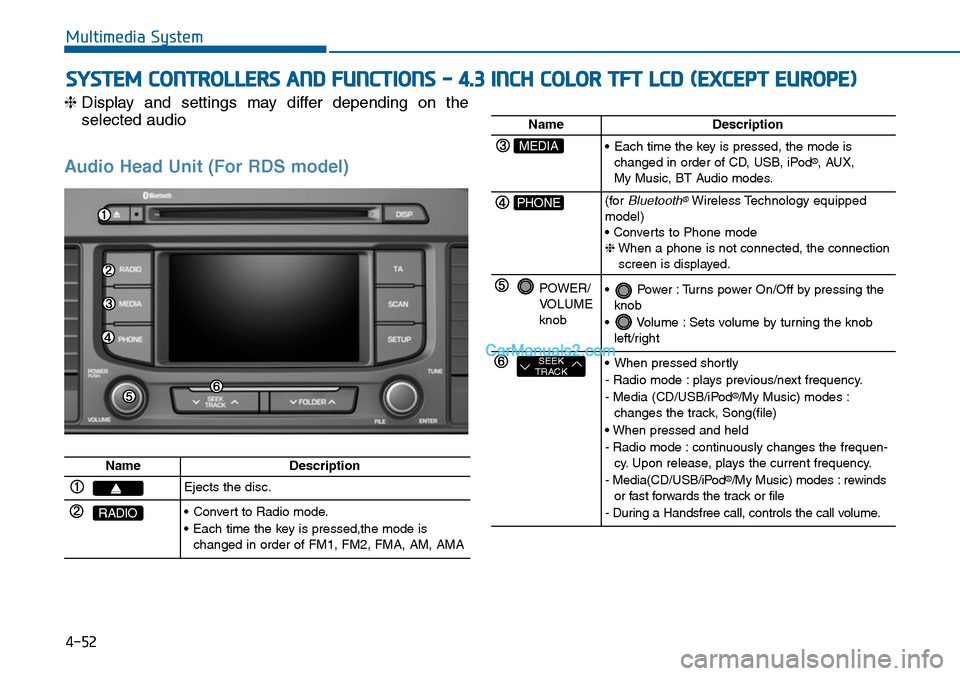
Audio Head Unit (For RDS model)
NameDescription
Ejects the disc.
RADIO•Convert to Radio mode.
•Each time the key is pressed,the mode ischanged in order of FM1, FM2, FMA, AM, AMA
NameDescription
MEDIA•Each time the key is pressed, the mode ischanged in order of CD, USB, iPod®, AUX, My Music, BT Audio modes.
PHONE(forBluetooth®Wireless Technology equippedmodel)• Converts to Phone mode❈When a phone is not connected, the connectionscreen is displayed.
POWER/VOLUMEknob
•Power :Turns power On/Off by pressing theknob
•Volume :Sets volume by turning the knobleft/right
SEEKTRACK•When pressed shortly
- Radio mode : plays previous/next frequency.
- Media (CD/USB/iPod®/My Music) modes :changes the track, Song(file)
• When pressed and held
- Radio mode : continuously changes the frequen-cy. Upon release, plays the current frequency.
- Media(CD/USB/iPod®/My Music) modes : rewindsor fast forwards the track or file
- During a Handsfree call, controls the call volume.
Page 312 of 665
4-54
Multimedia System
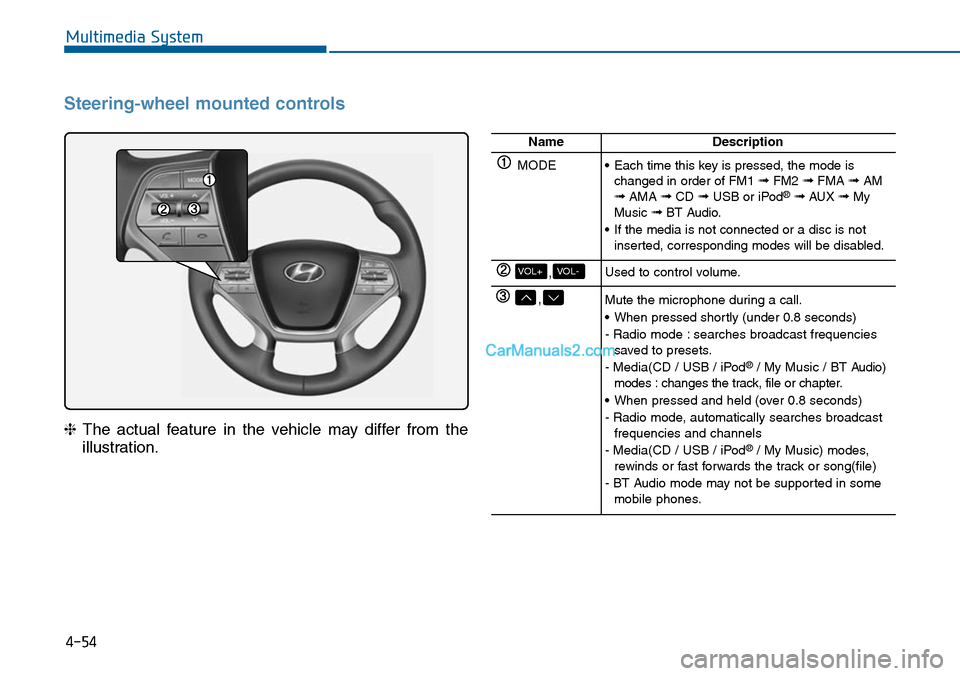
Steering-wheel mounted controls
❈The actual feature in the vehicle may differ from the
illustration.
NameDescription
MODE•Each time this key is pressed, the mode ischanged in order of FM1 ➟FM2 ➟FMA ➟AM➟AMA ➟CD ➟USB or iPod®➟ AUX ➟MyMusic ➟BT Audio.
•If the media is not connected or a disc is notinserted, corresponding modes will be disabled.
,VOL-VOL+Used to control volume.
,Mute the microphone during a call.
•When pressed shortly (under 0.8 seconds)
- Radio mode : searches broadcast frequenciessaved to presets.
- Media(CD / USB / iPod®/ My Music / BT Audio)modes : changes the track, file or chapter.
•When pressed and held (over 0.8 seconds)
- Radio mode, automatically searches broadcastfrequencies and channels
- Media(CD / USB / iPod®/ My Music) modes,rewinds or fast forwards the track or song(file)
- BT Audio mode may not be supported in somemobile phones.
Page 320 of 665
4-62
Multimedia System
MEDIA MODE
Pressing the key will change
the operating mode in order of CD ➟
USB(iPod®) ➟ AUX ➟ My Music ➟BT
Audio.
If [Mode Pop up] is turned on within
[Display], then pressing the
key will display the Media
Pop-up Mode screen.
Turn the TUNE knob to move the
focus. Press the knob to select.
Information
The media mode pop up screen can be
displayed only when there are two or
more media modes turned on.
Title Icon
When a Bluetooth®Wireless
Te c h n o l o g y, i P o d®, USB, or AUX
device is connected or a CD is
inserted, the corresponding mode
icon will be displayed.
Icon Title
Bluetooth®Wireless Technology
CD
iPod®
USB
AUX
i
MEDIA
SETUP
MEDIA
Page 333 of 665
4-75
List
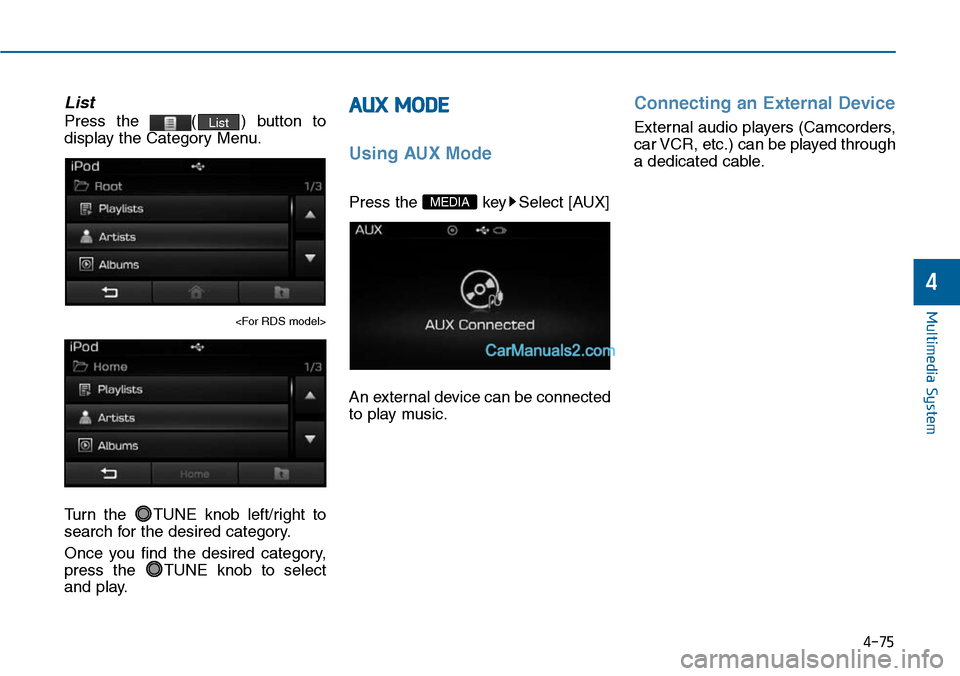
Press the ( ) button to
display the Category Menu.
Turn the TUNE knob left/right to
search for the desired category.
Once you find the desired category,
press the TUNE knob to select
and play.
AUX MODE
Using AUX Mode
Press the key Select [AUX]
An external device can be connected
to play music.
Connecting an External Device
External audio players (Camcorders,
car VCR, etc.) can be played through
a dedicated cable.
MEDIA
List
Multimedia System
4
Page 361 of 665
4-103
Multimedia System
4
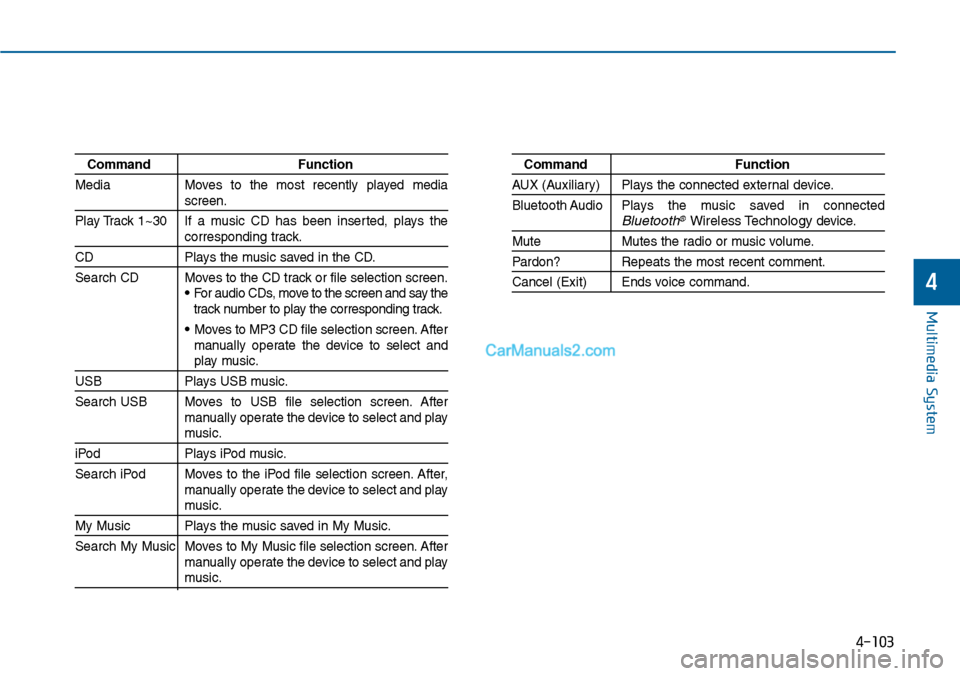
Command Function
Media Moves to the most recently played mediascreen.
Play Track 1~30 If a music CD has been inserted, plays thecorresponding track.
CD Plays the music saved in the CD.
Search CD Moves to the CD track or file selection screen.•For audio CDs, move to the screen and say thetrack number to play the corresponding track.
• Moves to MP3 CD file selection screen. Aftermanually operate the device to select andplay music.
USB Plays USB music.
Search USB Moves to USB file selection screen. Aftermanually operate the device to select and playmusic.
iPod Plays iPod music.
Search iPod Moves to the iPod file selection screen. After,manually operate the device to select and playmusic.
My Music Plays the music saved in My Music.
Search My Music Moves to My Music file selection screen. Aftermanually operate the device to select and playmusic.
Command Function
AUX (Auxiliar y) Plays the connected exter nal device.
Bluetooth Audio Plays the music saved in connectedBluetooth®Wireless Technologydevice.
Mute Mutes the radio or music volume.
Pardon? Repeats the most recent comment.
Cancel (Exit) Ends voice command.
Page 384 of 665
4-126
SYSTEM CONTROLLERS AND FUNCTIONS - 3.8 INCH MONO TFT (FOR EUROPE)
Multimedia System
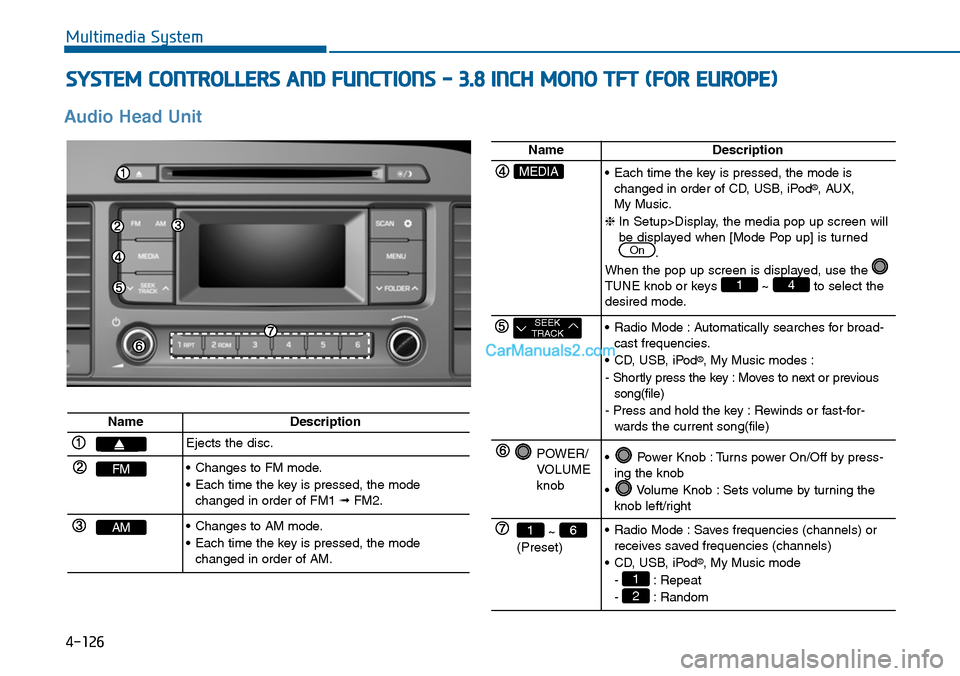
Audio Head Unit
NameDescription
Ejects the disc.
FM•Changes to FM mode.
•Each time the key is pressed, the modechanged in order of FM1 ➟FM2.
AM•Changes to AM mode.
•Each time the key is pressed, the modechanged in order of AM.
NameDescription
MEDIA•Each time the key is pressed, the mode ischanged in order of CD, USB, iPod®, AUX, My Music.
❈In Setup>Display, the media pop up screen willbe displayed when [Mode Pop up] is turned.
When the pop up screen is displayed, use the TUNE knob or keys ~ to select thedesired mode.
41
On
SEEKTRACK•Radio Mode :Automatically searches for broad-cast frequencies.
•CD, USB, iPod®, My Music modes :
- Shortly press the key : Moves to next or previoussong(file)
- Press and hold the key : Rewinds or fast-for-wards the current song(file)
POWER/VOLUMEknob
•Power Knob :Turns power On/Off by press-ing the knob
•Volume Knob :Sets volume by turning theknob left/right
~ (Preset)
61•Radio Mode :Saves frequencies (channels) orreceives saved frequencies (channels)
•CD, USB, iPod®, My Music mode
- : Repeat
- : Random2
1
Page 393 of 665
![Hyundai Sonata 2014 Owners Manual Folder Repeat
Set [ F.RPT] through the TUNE
knob or key to repeat songs
within the current folder.
❈Press F.RPT again to turn off.
All Random
Set [ A.RDM] through the TUNE
knob or key to](/manual-img/35/16805/w960_16805-392.png "Hyundai Sonata 2014 Owners Manual Folder Repeat
Set [ F.RPT] through the TUNE
knob or key to repeat songs
within the current folder.
❈Press F.RPT again to turn off.
All Random
Set [ A.RDM] through the TUNE
knob or key to")
Folder Repeat
Set [ F.RPT] through the TUNE
knob or key to repeat songs
within the current folder.
❈Press F.RPT again to turn off.
All Random
Set [ A.RDM] through the TUNE
knob or key to randomly play all
songs within the CD / USB.
❈Press A.RDM again to turn off.
Information
Set [ Info] through the TUNE
knob or key to display informa-
tion of the current song.
❈Press the key to turn off
info display.
Copy
Set [ Copy] through the TUNE
knob or key.
❈This is used to copy the current
song into My Music. You can play
the copied Music in My Music
mode.
❈If another key is pressed while
copying is in progress, a pop up
asking you whether to cancel
copying is displayed.
❈If another media is connected or
inserted (USB, CD, iPod®, AUX)
while copying is in progress, copy-
ing is canceled.
❈Music will not be played while
copying is in progress.
MENU : iPod®
In iPod mode, press key.
Repeat
Set [ RPT] through the TUNE
knob or key to repeat the cur-
rent song.
❈ Press RPT again to turn repeat off.
Random
Set [ RDM] through the TUNE
knob or key.
Plays all songs within the currently
playing category in random order.
❈Press RDM again to turn off.
2 RDM
1 RPT
MENU
6
MENU
5
4
3
4-135
Multimedia System
4
Page 395 of 665
![Hyundai Sonata 2014 Owners Manual Delete
Set [ Delete] through the TUNE
knob or key.
•Deletes currently playing file
In the play screen, pressing delete
will delete the currently playing song.
•Deletes file from list
➀S](/manual-img/35/16805/w960_16805-394.png "Hyundai Sonata 2014 Owners Manual Delete
Set [ Delete] through the TUNE
knob or key.
•Deletes currently playing file
In the play screen, pressing delete
will delete the currently playing song.
•Deletes file from list
➀S")
Delete
Set [ Delete] through the TUNE
knob or key.
•Deletes currently playing file
In the play screen, pressing delete
will delete the currently playing song.
•Deletes file from list
➀Select the file you wish to delete by
using the TUNE knob.
➁Press the key and select
the delete menu to delete the
selected file.
Delete All
Set [ Del.All] through the TUNE
knob or key.
Deletes all songs of My Music.
Delete Selection
Press the key Set [ Del.Sel]
through the TUNEknob or key.
Songs within My Music are selected
and deleted.
➀Select the songs you wish to
delete from the list.
➁After selecting, press the
key and select the delete menu.
AUX
AUX is used to play exter nal MEDIA
currently connected with the AUX
terminal.
AUX mode will automatically star t
when an external device is connect-
ed to the AUX terminal.
If an external device is connected,
you can also press the key to
change to AUX mode.
❈AUX mode cannot be star ted
unless there is an external device
connected to the AUX terminal.
Information
- USING THE AUX
Fully insert the AUX cable into the
AUX terminal for use.
i
MEDIA
MENU
6
MENU
5
MENU
4
4-137
Multimedia System
4
![Hyundai Sonata 2014 Owners Manual 4-62
Multimedia System
MEDIA MODE
Pressing the key will change
the operating mode in order of CD ➟
USB(iPod®) ➟ AUX ➟ My Music ➟BT
Audio.
If [Mode Pop up] is turned on within
[Display](/manual-img/35/16805/w960_16805-319.png "Hyundai Sonata 2014 Owners Manual 4-62
Multimedia System
MEDIA MODE
Pressing the key will change
the operating mode in order of CD ➟
USB(iPod®) ➟ AUX ➟ My Music ➟BT
Audio.
If [Mode Pop up] is turned on within
[Display")