Page 432 of 665
4-174
Multimedia System
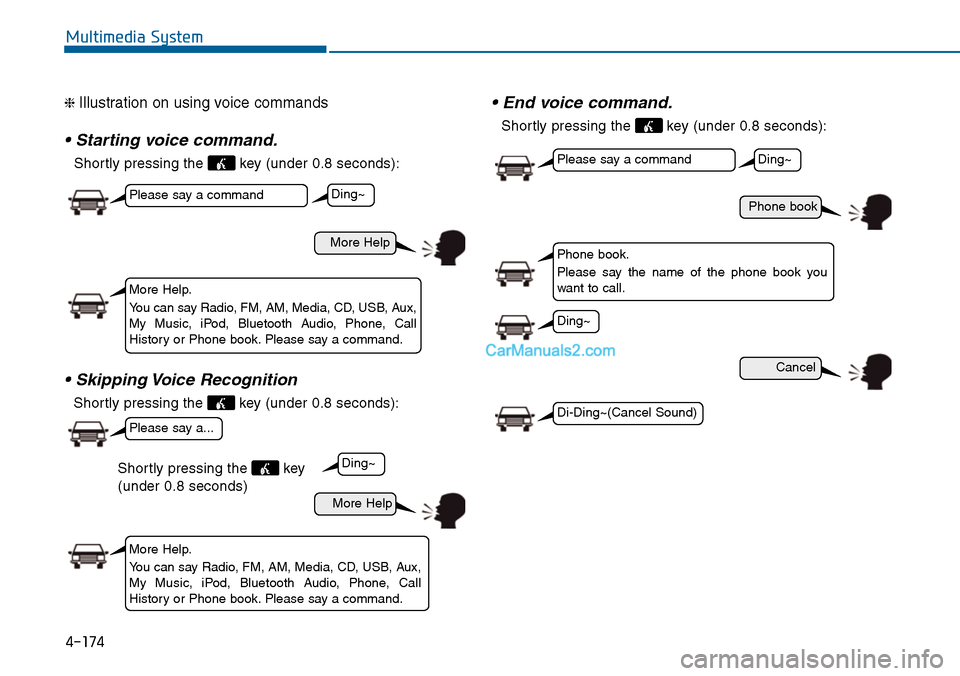
❈ Illustration on using voice commands
• Starting voice command.
Shortly pressing the key (under 0.8 seconds):
• Skipping Voice Recognition
Shortly pressing the key (under 0.8 seconds):
• End voice command.
Shortly pressing the key (under 0.8 seconds):
More Help
Phone book
Cancel
More Help
Please say a command
Please say a command
Please say a...
More Help.
Yo u c a n s a y R a d i o , F M , A M , M e d i a , C D , U S B , A u x ,My Music, iPod, Bluetooth Audio, Phone, CallHistory or Phone book. Please say a command.
Phone book.
Please say the name of the phone book youwant to call.
More Help.
Yo u c a n s a y R a d i o , F M , A M , M e d i a , C D , U S B , A u x ,My Music, iPod, Bluetooth Audio, Phone, CallHistory or Phone book. Please say a command.
Ding~
Ding~
Ding~
Di-Ding~(Cancel Sound)
Ding~
Shortly pressing the key
(under 0.8 seconds)
Page 438 of 665
SETUP
(for Bluetooth®Wireless
Technology equipped model)
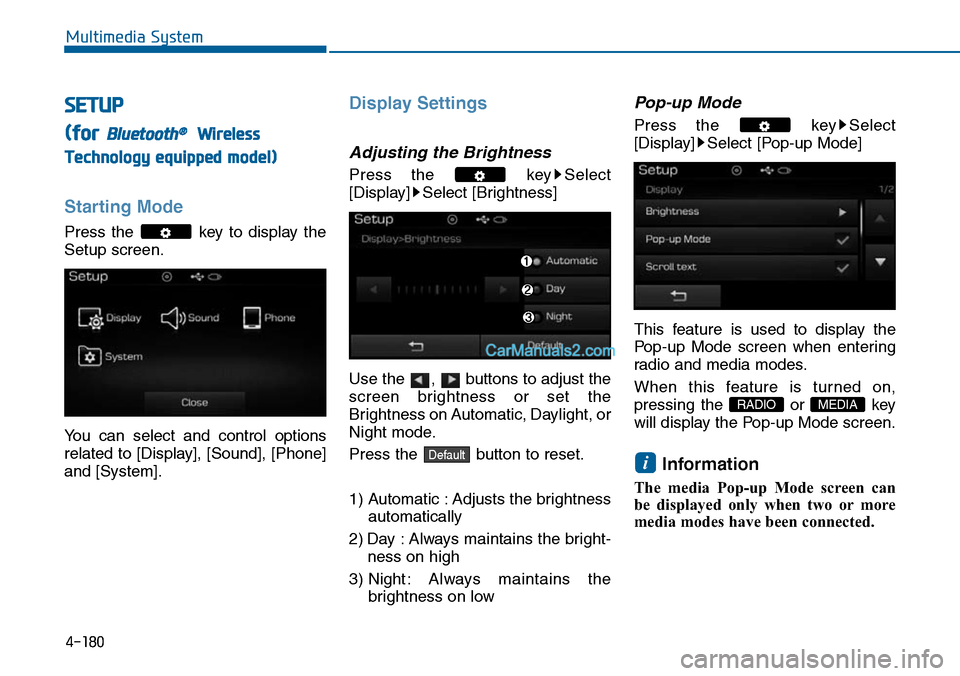
Starting Mode
Press the key to display the
Setup screen.
Yo u c a n s e l e c t a n d c o n t r o l o p t i o n s
related to [Display], [Sound], [Phone]
and [System].
Display Settings
Adjusting the Brightness
Press the key Select
[Display] Select [Brightness]
Use the , buttons to adjust the
screen brightness or set the
Brightness on Automatic, Daylight, or
Night mode.
Press the button to reset.
1) Automatic : Adjusts the brightness
automatically
2) Day : Always maintains the bright-
ness on high
3) Night : Always maintains the
brightness on low
Pop-up Mode
Press the key Select
[Display] Select [Pop-up Mode]
This feature is used to display the
Pop-up Mode screen when enter ing
radio and media modes.
When this feature is turned on,
pressing the or key
will display the Pop-up Mode screen.
Information
The media Pop-up Mode screen can
be displayed only when two or more
media modes have been connected.
i
MEDIA RADIO
Default
4-180
Multimedia System
Page 439 of 665
Scroll text
Press the key Select
[Display] Select [Scroll text]
This feature is used to scroll text dis-
played on the screen when it is too
long to be displayed at once.
When turned on, the text is repeat-
edly scrolled. When turned off, the
text is scrolled just once.
MP3 Information Display
Press the key Select
[Display] Select [Song Info]
This feature is used to change the
information displayed within USB
and MP3 CD modes.
1) Folder File : Displays file name
and folder name
2) Album Ar tist Song : Displays
album name/artist name/song
Sound Settings
Audio Settings
Press the key Select
[Sound] Select [Audio Setting]
Use the , , , buttons to
adjust the Fader/Balance settings.
Use the , buttons to adjust the
Bass/Middle/Treble settings.
Press the button to reset.Default
4-181
Multimedia System
4
Page 440 of 665
SDVC (Speed Dependent
Vo l u m e C o n t r o l )
Press the key Select
[Sound] Select [Speed Dependent
Vo l . ]
The volume level is controlled auto-
matically according to the vehicle
speed. SDVC can be set by selecting
from on/off.
Vo l u m e D i a l o g u e
Press the key Select
[Sound] Select [Volume Dialogue]
Touch Screen Beep
Press the key Select
[Sound] Select [Touch Screen
Beep]
This feature is used to turn the touch
screen beep on/off.
4-182
Multimedia System
Page 441 of 665
![Hyundai Sonata 2014 Owners Manual Bluetooth®Wireless
Technology Setting
Pairing a New Device
Press the key Select
[Phone] Select [Pair Phone]
Bluetooth®Wireless Technology
devices can be paired with the audio
system.
For more](/manual-img/35/16805/w960_16805-440.png "Hyundai Sonata 2014 Owners Manual Bluetooth®Wireless
Technology Setting
Pairing a New Device
Press the key Select
[Phone] Select [Pair Phone]
Bluetooth®Wireless Technology
devices can be paired with the audio
system.
For more")
Bluetooth®Wireless
Technology Setting
Pairing a New Device
Press the key Select
[Phone] Select [Pair Phone]
Bluetooth®Wireless Technology
devices can be paired with the audio
system.
For more infor mation, refer to the
“Pairing through Phone Setup” sec-
tion within Bluetooth®Wireless
Technology.
Viewing Paired Phone List
Press the key Select
[Phone] Select [Paired Phone List]
This feature is used to view mobile
phones that have been paired with
the audio system. Upon selecting a
paired phone, the setup menu is dis-
played.
For more infor mation, refer to the
“Setting Bluetooth®Wireless
Te c h n o l o g y C o n n e c t i o n ” s e c t i o n w i t h -
in Bluetooth®Wireless Technology.
1) : Moves to the previous
screen
2) Connect/Disconnect Phone :
Connect/disconnects currently
selected phone
3) Delete : Deletes the currently
selected phone
4) Change Priority : Sets currently
selected phone to highest connec-
tion priority
Information
- BEFORE DOWNLOADING
Phone books
• Only Phone books within connected
phones can be downloaded. Also
check to see that your mobile phone
supports the download feature.
• To learn more about whether your
mobile phone supports Phone books
downloads, refer to your mobile
phone user’s manual.
• The Phone books for only the con-
nected phone can be downloaded.
Before downloading, check to see
whether your phone supports the
download feature.
i
4-183
Multimedia System
4
Page 442 of 665
![Hyundai Sonata 2014 Owners Manual Downloading Phone books
Press the key Select
[Phone] Select [Phonebooks Download]
The Phone books is downloaded
from the mobile phone and the
download progress is displayed.
Information
â€](/manual-img/35/16805/w960_16805-441.png "Hyundai Sonata 2014 Owners Manual Downloading Phone books
Press the key Select
[Phone] Select [Phonebooks Download]
The Phone books is downloaded
from the mobile phone and the
download progress is displayed.
Information
â€")
Downloading Phone books
Press the key Select
[Phone] Select [Phonebooks Download]
The Phone books is downloaded
from the mobile phone and the
download progress is displayed.
Information
• Up to 1,000 Phone books entries can
be copied into car Phone books.
• Up to 1,000 Phone books entries can
be saved for each paired device.
•Upon downloading Phone books
data, previously saved Phone books
data will be deleted. However,
Phone books entries saved to other
paired phones are not deleted.
Auto Download (Phone books)
Press the key Select
[Phone] Select [Auto Download]
This feature is used to automatically
download mobile contacts entries
once a Bluetooth®Wireless
Technology phone is connected.
Information
•The Auto Download feature will
download mobile phone books
entries every time the phone is con-
nected. The download time may dif-
fer depending on the number of
saved contacts entries and the com-
munication state.
• When downloading a Phone books,
first check to see that your mobile
phone supports the Phone books
download feature.
Audio Streaming
Press the key Select
[Phone] Select [Audio Streaming]
When Streaming Audio is turned on,
you can play music files saved in
your Bluetooth®Wireless Technology
device from the car.
ii
4-184
Multimedia System
Page 443 of 665
Outgoing Volume
Press the key Select
[Phone] Select [Outgoing Volume]
Use the , buttons to adjust the
outgoing volume level.
Turning Bluetooth System Off
Press the key Select
[Phone] Select [Bluetooth System
Off]
Once Bluetooth®Wireless Technology
is turned off, Bluetooth®Wireless
Te c h n o l o g y r e l a t e d f e a t u r e s w i l l n o t b e
supported within the audio system.
Information
To t u r n Bluetooth®Wireless
Technology back on, go to
[Phone] and press “Yes”.
System Setting
Memory Information
Press the key Select
[System] Select [Memory Information]
This feature displays information
related to system memory.
1) Using : Displays capacity currently
in use
2) Capacity : Displays total capacity
i
4-185
Multimedia System
4
Page 444 of 665
![Hyundai Sonata 2014 Owners Manual 4-186
Multimedia System
Vo i c e R e c o g n i t i o n M o d e S e t t i n g
(if equipped)
Press the key Select
[System] Select [Voice Recognition
System]
This feature is used to select](/manual-img/35/16805/w960_16805-443.png "Hyundai Sonata 2014 Owners Manual 4-186
Multimedia System
Vo i c e R e c o g n i t i o n M o d e S e t t i n g
(if equipped)
Press the key Select
[System] Select [Voice Recognition
System]
This feature is used to select")
4-186
Multimedia System
Vo i c e R e c o g n i t i o n M o d e S e t t i n g
(if equipped)
Press the key Select
[System] Select [Voice Recognition
System]
This feature is used to select the
desired prompt feedback option from
Normal and Expert.
1) Normal : When using voice recog-
nition, provides detailed guidance
prompts
2) Expert : When using voice recog-
nition, omits some guidance
prompts
Information
Voice Recognition is depend on the
Audio System.
Language
Press the key Select
[System] Select [Language]
This feature is used to change the
system and voice recognition lan-
guage.
If the language is changed, the sys-
tem will restart and apply the select-
ed language.
REAR VIEW CAMERA
(if equipped)
• The system has been equipped
with a rear view camera for user
safety by allowing a wider rear
range of vision.
•The rear view camera will automat-
ically operate when the ignition key
is turned ON and the transmission
lever is set to R.
•The rear view camera will automat-
ically stop operating when set to a
different lever.
The rear view camera has been
equipped with an optical lens to
provide a wider range of vision and
may appear different from the actu-
al distance. For safety, directly
check the rear and left/right sides.
NOTICE
i
![Hyundai Sonata 2014 Owners Manual Scroll text
Press the key Select
[Display] Select [Scroll text]
This feature is used to scroll text dis-
played on the screen when it is too
long to be displayed at once.
When turned on, t](/manual-img/35/16805/w960_16805-438.png "Hyundai Sonata 2014 Owners Manual Scroll text
Press the key Select
[Display] Select [Scroll text]
This feature is used to scroll text dis-
played on the screen when it is too
long to be displayed at once.
When turned on, t")
![Hyundai Sonata 2014 Owners Manual SDVC (Speed Dependent
Vo l u m e C o n t r o l )
Press the key Select
[Sound] Select [Speed Dependent
Vo l . ]
The volume level is controlled auto-
matically according to the vehicle
sp](/manual-img/35/16805/w960_16805-439.png "Hyundai Sonata 2014 Owners Manual SDVC (Speed Dependent
Vo l u m e C o n t r o l )
Press the key Select
[Sound] Select [Speed Dependent
Vo l . ]
The volume level is controlled auto-
matically according to the vehicle
sp")
![Hyundai Sonata 2014 Owners Manual Outgoing Volume
Press the key Select
[Phone] Select [Outgoing Volume]
Use the , buttons to adjust the
outgoing volume level.
Turning Bluetooth System Off
Press the key Select
[Phone] Select [Blu](/manual-img/35/16805/w960_16805-442.png "Hyundai Sonata 2014 Owners Manual Outgoing Volume
Press the key Select
[Phone] Select [Outgoing Volume]
Use the , buttons to adjust the
outgoing volume level.
Turning Bluetooth System Off
Press the key Select
[Phone] Select [Blu")