2014 Hyundai Sonata battery
[x] Cancel search: batteryPage 120 of 665

3-24
Convenient features of your vehicle
The Driver Position Memory System
is provided to store and recall the fol-
lowing memory settings with a sim-
ple button operation.
- Driver's seat position
- Outside rearview mirror position
- Instrument panel illumination intensity
Information
• If the battery is disconnected, the
memory settings will be erased.
•If the Driver Position Memory
System does not operate normally,
we recommend that you have the
system checked by an authorized
HYUNDAI dealer.
Storing memory positions
1. Move the shift lever into P (for
Automatic transaxle) or Neutral (for
manual transaxle) while the ignition
switch or the Engine Star t/Stop but-
ton is in the ON position.
2. Adjust the driver's seat position,
outside rearview mirror position
and instrument panel illumination
intensity to the desired position.
3. Press the SET button. The system
will beep once and notify you
"Press button to save settings"on
the LCD display.
4. Press one of the memory buttons
(1 or 2) within 5 seconds. The sys-
tem will beep twice when the mem-
ory has been successfully stored.
5.
"Driver 1 (or 2) settings saved" will
appear on the LCD display.
i
DRIVER POSITION MEMORY SYSTEM (IF EQUIPPED)
OLF044013
Never attempt to operate the driv-
er position memory system while
the vehicle is moving.
This could result in loss of con-
trol, and an accident causing
death, serious injury, or property
damage.
WARNING
OLF044403L/OLF044404L
Page 129 of 665
3-33
Convenient features of your vehicle
3
Center (AUTO):
The mirror will fold or unfold auto-
matically as follows:
•Without smart key system
- The mirror will fold or unfold when
the door is locked or unlocked by
the transmitter.
•With smart key system
- The mirror will fold or unfold when
the door is locked or unlocked by
the smart key.
- The mirror will fold or unfold when
the door is locked or unlocked by
the button on the outside door
handle.
- The mirror will unfold when you
approach the vehicle (all doors
closed and locked) with a smart
key in possession. (if equipped)
The electric type outside rearview
mirror operates even though the
ignition switch is in the OFF posi-
tion. However, to prevent unnec-
essary battery discharge, do not
adjust the mirrors longer than
necessary while the engine is not
running.
Do not fold the electric type out-
side rearview mirror by hand. It
could cause motor failure.
Reverse parking aid function
(if equipped)
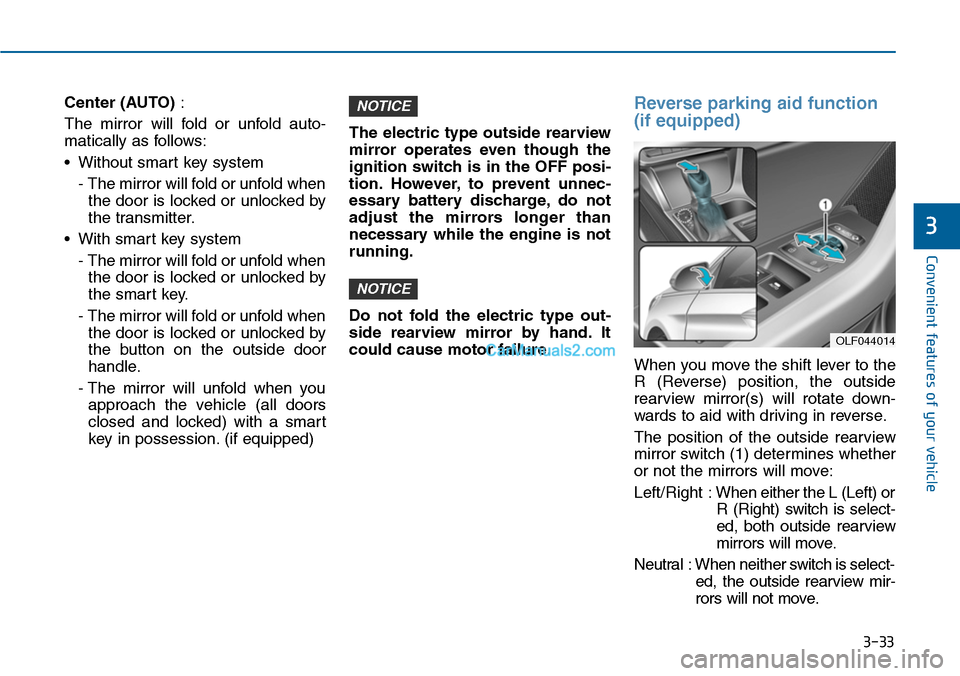
When you move the shift lever to the
R (Reverse) position, the outside
rearview mirror(s) will rotate down-
wards to aid with driving in reverse.
The position of the outside rearview
mirror switch (1) determines whether
or not the mirrors will move:
Left/Right :When either the L (Left) or
R (Right) switch is select-
ed, both outside rearview
mirrors will move.
Neutral : When neither switch is select-
ed, the outside rearview mir-
rors will not move.
NOTICE
NOTICE
OLF044014
Page 141 of 665
3-45
Convenient features of your vehicle
3
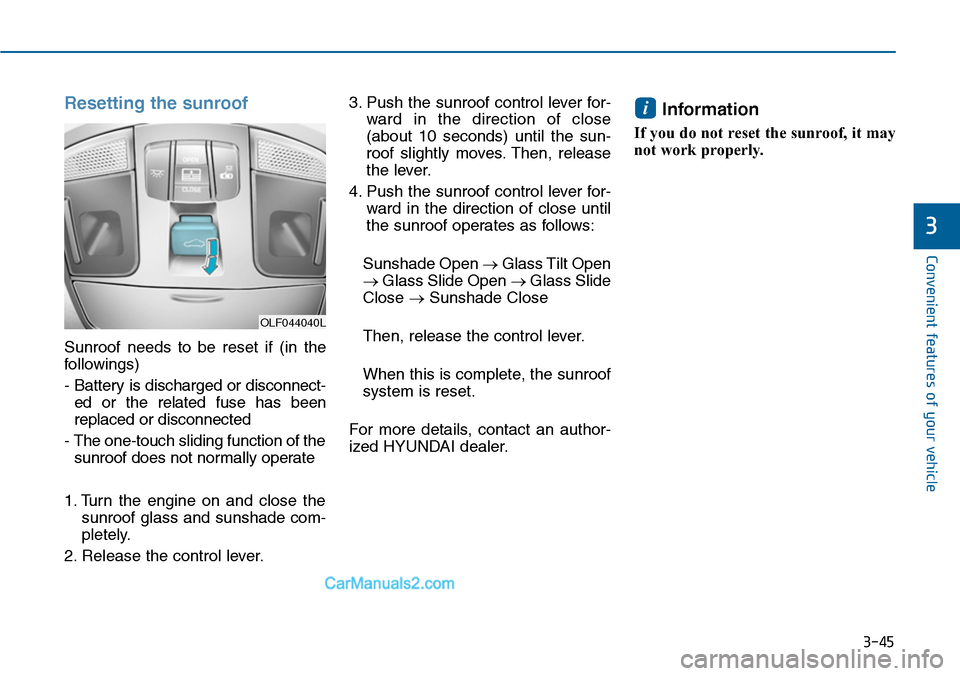
Resetting the sunroof
Sunroof needs to be reset if (in the
followings)
- Battery is discharged or disconnect-
ed or the related fuse has been
replaced or disconnected
- The one-touch sliding function of the
sunroof does not normally operate
1. Turn the engine on and close the
sunroof glass and sunshade com-
pletely.
2. Release the control lever.
3. Push the sunroof control lever for-
ward in the direction of close
(about 10 seconds) until the sun-
roof slightly moves. Then, release
the lever.
4. Push the sunroof control lever for-
ward in the direction of close until
the sunroof operates as follows:
Sunshade Open →Glass Tilt Open
→Glass Slide Open →Glass Slide
Close →Sunshade Close
Then, release the control lever.
When this is complete, the sunroof
system is reset.
For more details, contact an author-
ized HYUNDAI dealer.
Information
If you do not reset the sunroof, it may
not work properly.
i
OLF044040L
Page 165 of 665
3-69
Convenient features of your vehicle
3
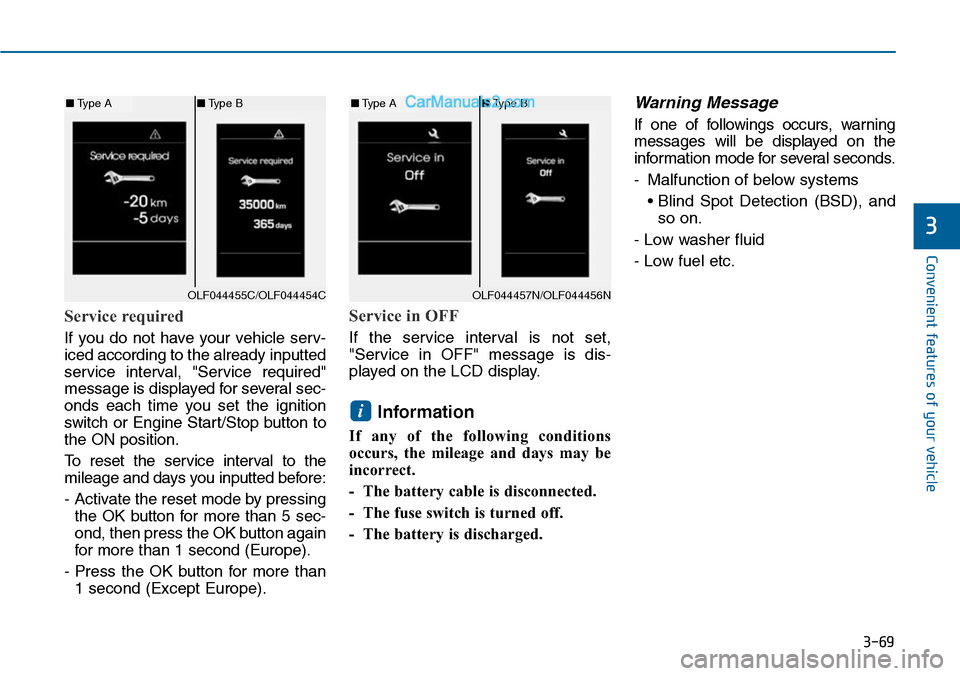
Service required
If you do not have your vehicle serv-
iced according to the already inputted
service interval, "Service required"
message is displayed for several sec-
onds each time you set the ignition
switch or Engine Star t/Stop button to
the ON position.
To r e s e t t h e s e r v i c e i n t e r v a l t o t h e
mileage and days you inputted before:
- Activate the reset mode by pressing
the OK button for more than 5 sec-
ond, then press the OK button again
for more than 1 second (Europe).
- Press the OK button for more than
1 second (Except Europe).
Service in OFF
If the service interval is not set,
"Service in OFF" message is dis-
played on the LCD display.
Information
If any of the following conditions
occurs, the mileage and days may be
incorrect.
- The battery cable is disconnected.
- The fuse switch is turned off.
- The battery is discharged.
Warning Message
If one of followings occurs, warning
messages will be displayed on the
information mode for several seconds.
-Malfunction of below systems
• Blind Spot Detection (BSD), and
so on.
- Low washer fluid
- Low fuel etc.
i
OLF044455C/OLF044454C
■Type A■Type B
OLF044457N/OLF044456N
■Type A■Type B
Page 171 of 665
3-75
Convenient features of your vehicle
3
Warning messages (if equipped)
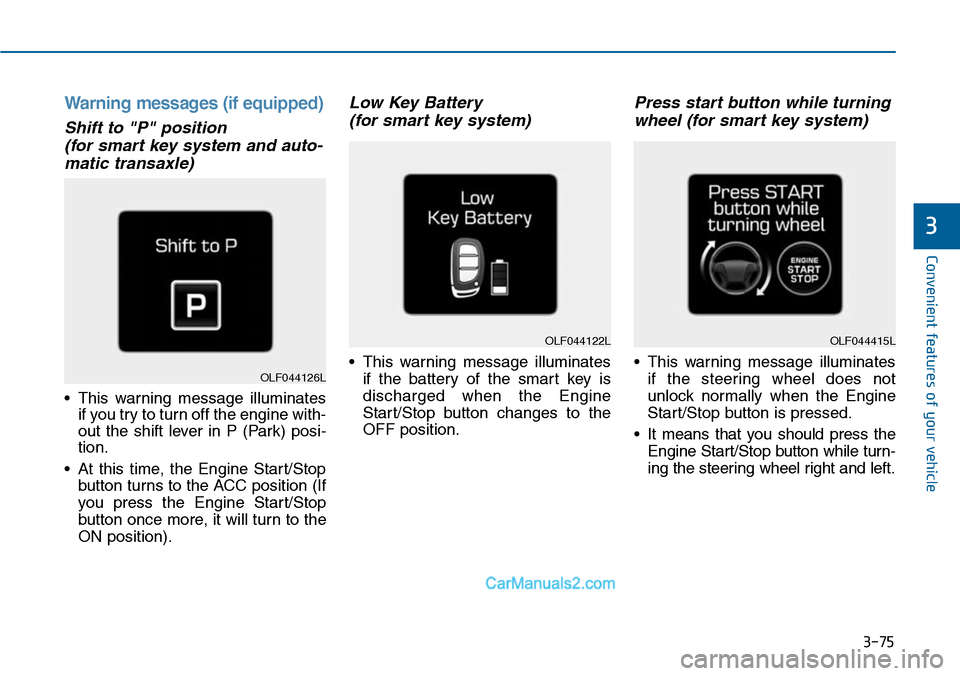
Shift to "P" position
(for smart key system and auto-
matic transaxle)
•This warning message illuminates
if you try to turn off the engine with-
out the shift lever in P (Park) posi-
tion.
•At this time, the Engine Start/Stop
button turns to the ACC position (If
you press the Engine Star t/Stop
button once more, it will turn to the
ON position).
Low Key Battery
(for smart key system)
•This warning message illuminates
if the battery of the smart key is
discharged when the Engine
Start/Stop button changes to the
OFF position.
Press start button while turning
wheel (for smart key system)
•This warning message illuminates
if the steering wheel does not
unlock normally when the Engine
Start/Stop button is pressed.
•It means that you should press the
Engine Start/Stop button while turn-
ing the steering wheel right and left.
OLF044122L
OLF044126L
OLF044415L
Page 179 of 665
3-83
Convenient features of your vehicle
3
Overview
Description
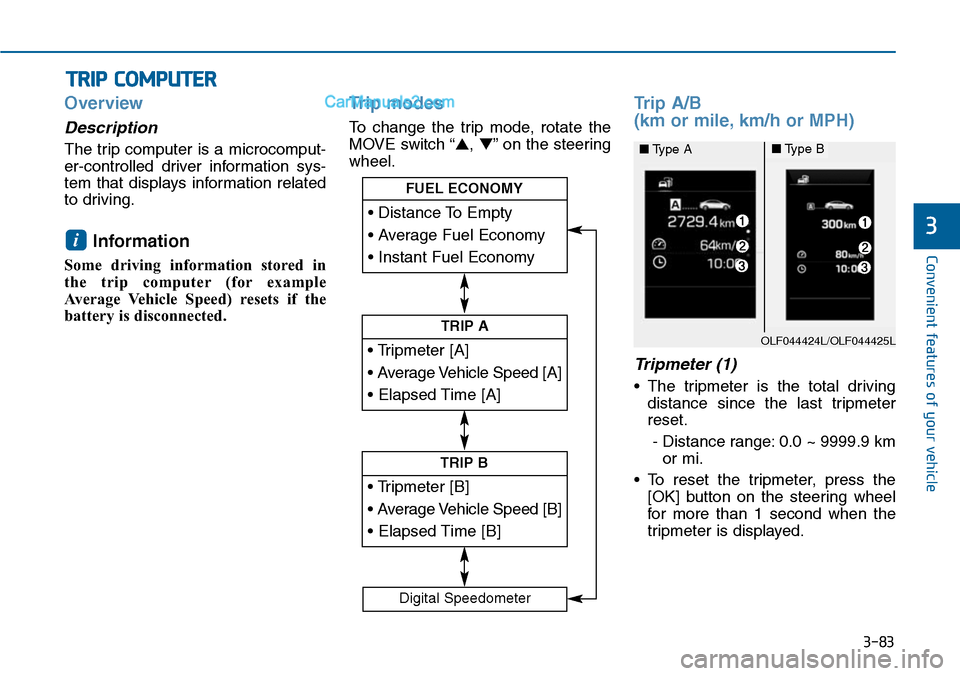
The trip computer is a microcomput-
er-controlled driver information sys-
tem that displays information related
to driving.
Information
Some driving information stored in
the trip computer (for example
Average Vehicle Speed) resets if the
battery is disconnected.
Trip modes
To change the trip mode, rotate the
MOVE switch “▲,▼”on the steering
wheel.
Trip A/B
(km or mile, km/h or MPH)
Tripmeter (1)
•The tripmeter is the total driving
distance since the last tripmeter
reset.
- Distance range: 0.0 ~ 9999.9 km
or mi.
•To reset the tripmeter, press the
[OK] button on the steering wheel
for more than 1 second when the
tripmeter is displayed.
i
TRIP COMPUTER
• Tripmeter [A]
• Average Vehicle Speed [A]
• Elapsed Time [A]
TRIP A
• Tripmeter [B]
• Average Vehicle Speed [B]
• Elapsed Time [B]
TRIP B
• Distance To Empty
• Average Fuel Economy
• Instant Fuel Economy
FUEL ECONOMY
Digital Speedometer
OLF044424L/OLF044425L
■Type A■Type B
Page 181 of 665
3-85
Convenient features of your vehicle
3
Information
• If the vehicle is not on level ground
or the battery power has been inter-
rupted, the distance to empty func-
tion may not operate correctly.
• The distance to empty may differ
from the actual driving distance as
it is an estimate of the available
driving distance.
• The trip computer may not register
additional fuel if less than 6 liters
(1.6 gallons) of fuel are added to the
vehicle.
• The fuel economy and distance to
empty may vary significantly based
on driving conditions, driving
habits, and condition of the vehicle.
Average Fuel Economy (2)
•The average fuel economy is calcu-
lated by the total driving distance
and fuel consumption since the last
average fuel economy reset.
- Fuel economy range: 0.0 ~ 99.9
L/100km, km/L or MPG
•The average fuel economy can be
reset both manually and automati-
cally.
Manual reset
To c l e a r t h e a v e r a g e f u e l e c o n o m y
manually, press the [OK] button on
the steering wheel for more than 1
second when the average fuel econo-
my is displayed.
Automatic reset
To m a k e t h e a v e r a g e f u e l e c o n o m y
be reset automatically whenever refu-
eling, select the “Auto Reset” mode in
User Setting menu of the LCD display
(Refer to “LCD Display”).
Under “Auto Reset” mode, the aver-
age fuel economy will be cleared to
zero (---) when the vehicle speed
exceeds 1 km/h after refueling more
than 6 liters (1.6 gallons).
Information
The average fuel economy is not dis-
played for more accurate calculation
if the vehicle does not drive more than
10 seconds or 300 meters (0.19 miles)
since the ignition switch or the Engine
Start/Stop button is turned to ON.
Instant Fuel Economy (3)
•This mode displays the instant fuel
economy during the last few sec-
onds when the vehicle speed is
more than 10 km/h (6.2 MPH).
- Fuel economy range: 0 ~ 30
L/100km, km/L or 0 ~ 50 MPG
i
i
Page 191 of 665

3-95
Convenient features of your vehicle
3
Immobilizer Indicator
Light (With Smart Key)
This indicator light illuminates for
up to 30 seconds:
•When the vehicle detects the
smart key in the vehicle properly
while the Engine Start/Stop button
is ACC or ON.
- At this time, you can start the
engine.
- The indicator light goes off after
starting the engine.
This indicator light blinks for a few
seconds:
•When the smart key is not in the
vehicle.
- At this time, you can not start the
engine.
This indicator light illuminates for
2 seconds and goes off:
•When the vehicle can not detect
the smart key which is in the vehi-
cle while the Engine Start/Stop
button is ON.
In this case, we recommend that
you have the vehicle inspected by
an authorized HYUNDAI dealer.
This indicator light blinks:
•When the battery of the smart key
is weak.
- At this time, you can not start the
engine. However, you can start
the engine if you press the
Engine Start/Stop button with the
smart key.(For more details,
refer to “Starting the Engine” in
section 5).
•When there is a malfunction with
the immobilizer system.
In this case, we recommend that
you have the vehicle inspected by
an authorized HYUNDAI dealer.
Turn Signal Indicator
Light
This indicator light blinks:
•When you turn the turn signal light
on.
If any of the following occurs, there
may a malfunction with the turn signal
system. In this case, we recommend
that you have the vehicle inspected by
an authorized HYUNDAI dealer.
- The indicator light does not blink
but illuminates.
- The indicator light blinks more
rapidly.
- The indicator light does not illumi-
nate at all.