Page 502 of 665
5-53
Driving your vehicle
5
When Active ECO is activated:
•The acceleration response may be
slightly reduced as the accelerator
pedal is depressed moderately.
•The air conditioner performance
may be limited.
•The shift pattern of the automatic
transaxle may change.
•The engine noise may get louder.
The above situations are normal
conditions when the Active ECO sys-
tem is activated to improve fuel effi-
ciency.
Limitation of Active ECO opera-
tion:
If the following conditions occur while
Active ECO is operating, the system
operation is limited even though
there is no change in the ECO indi-
cator.
•When the coolant temperature is
low:
The system will be limited until
engine performance becomes nor-
mal.
•When driving up a hill:
The system will be limited to gain
power when driving uphill because
engine torque is restricted.
•When using the automatic
transaxle Sports mode:
The system will be limited accord-
ing to the shift location.
•When the accelerator pedal is
deeply depressed for a few sec-
onds: The system will be limited,
judging that the driver wants to
speed up.
SPORT mode
SPORT mode focuses on
dynamic driving by auto-
matically controlling the
steering wheel, engine
and transaxle system.
•When the DRIVE MODE button is
pressed and the SPORT mode is
selected, the SPORT indicator
(yellow) will illuminate.
•When the SPORT mode is activat-
ed, and the engine is turned off
and on it will change to NORMAL
mode. To turn on the SPORT
mode, press the DRIVE MODE
button again.
•If the system is activated:
- After accelerating and releasing
the accelerator pedal, the gear
and engine speed RPM may not
drop as soon as in NORMAL
mode.
- Up-shifting is delayed.
Information
In SPORT mode, the fuel efficiency
may decrease.
i
SPORT
Page 503 of 665
5-54
Driving your vehicle
Cruise Control operation
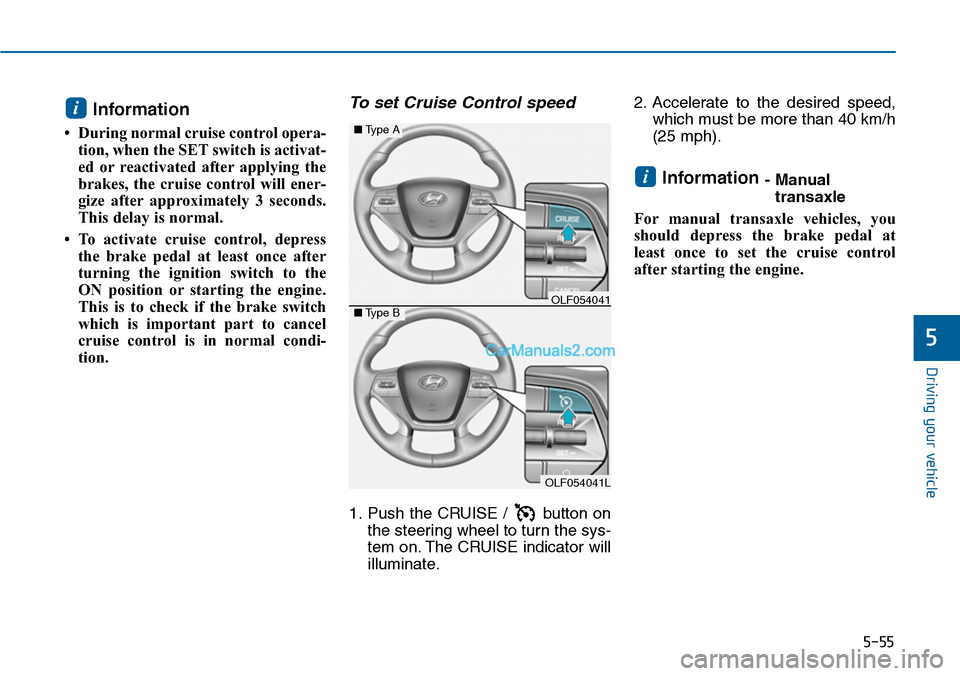
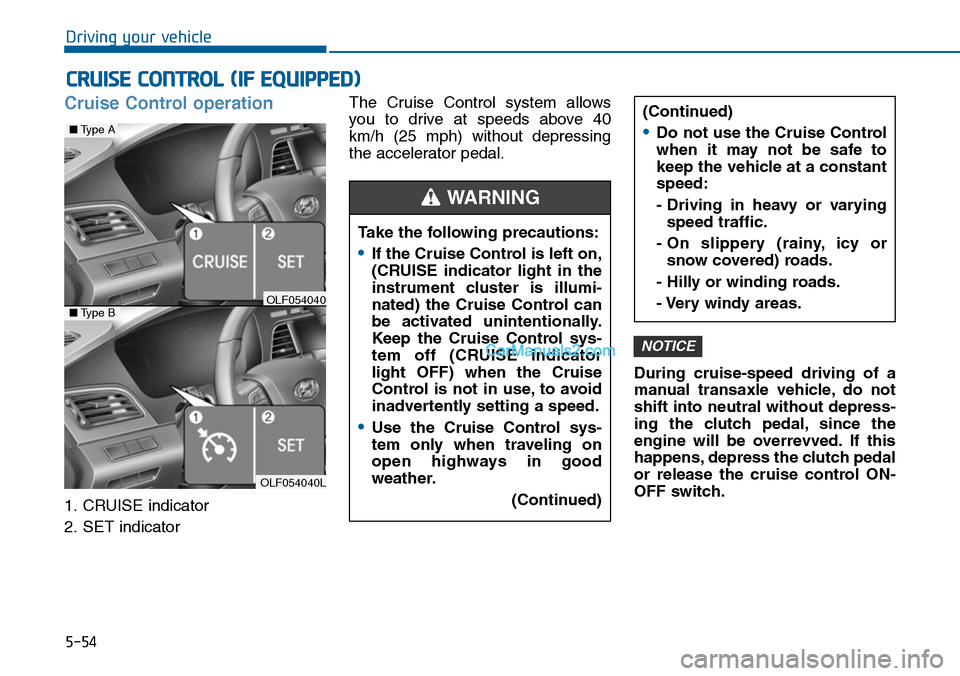
1. CRUISE indicator
2. SET indicator
The Cruise Control system allows
you to drive at speeds above 40
km/h (25 mph) without depressing
the accelerator pedal.
During cruise-speed driving of a
manual transaxle vehicle, do not
shift into neutral without depress-
ing the clutch pedal, since the
engine will be overrevved. If this
happens, depress the clutch pedal
or release the cruise control ON-
OFF switch.
NOTICE
CRUISE CONTROL (IF EQUIPPED)
Take the following precautions:
•If the Cruise Control is left on,
(CRUISE indicator light in the
instrument cluster is illumi-
nated) the Cruise Control can
be activated unintentionally.
Keep the Cruise Control sys-
tem off (CRUISE indicator
light OFF) when the Cruise
Control is not in use, to avoid
inadvertently setting a speed.
•Use the Cruise Control sys-
tem only when traveling on
open highways in good
weather.
(Continued)
(Continued)
•Do not use the Cruise Control
when it may not be safe to
keep the vehicle at a constant
speed:
- Driving in heavy or varying
speed traffic.
- On slippery (rainy, icy or
snow covered) roads.
- Hilly or winding roads.
- Very windy areas.
WARNING
OLF054040L
■Type A
■Type BOLF054040
Page 504 of 665
5-55
Driving your vehicle
5
Information
• During normal cruise control opera-
tion, when the SET switch is activat-
ed or reactivated after applying the
brakes, the cruise control will ener-
gize after approximately 3 seconds.
This delay is normal.
• To activate cruise control, depress
the brake pedal at least once after
turning the ignition switch to the
ON position or starting the engine.
This is to check if the brake switch
which is important part to cancel
cruise control is in normal condi-
tion.
To set Cruise Control speed
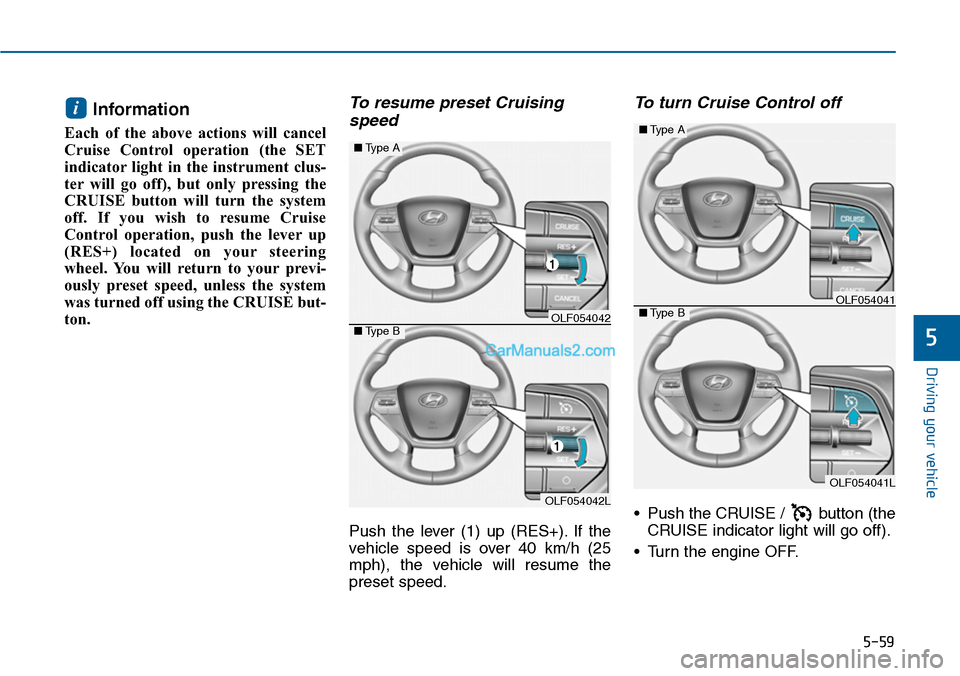
1. Push the CRUISE / button on
the steering wheel to turn the sys-
tem on. The CRUISE indicator will
illuminate.
2. Accelerate to the desired speed,
which must be more than 40 km/h
(25 mph).
Information - Manual
transaxle
For manual transaxle vehicles, you
should depress the brake pedal at
least once to set the cruise control
after starting the engine.
i
i
OLF054041L
■Type A
■Type BOLF054041
Page 508 of 665
5-59
Driving your vehicle
5
Information
Each of the above actions will cancel
Cruise Control operation (the SET
indicator light in the instrument clus-
ter will go off), but only pressing the
CRUISE button will turn the system
off. If you wish to resume Cruise
Control operation, push the lever up
(RES+) located on your steering
wheel. You will return to your previ-
ously preset speed, unless the system
was turned off using the CRUISE but-
ton.
To resume preset Cruising
speed
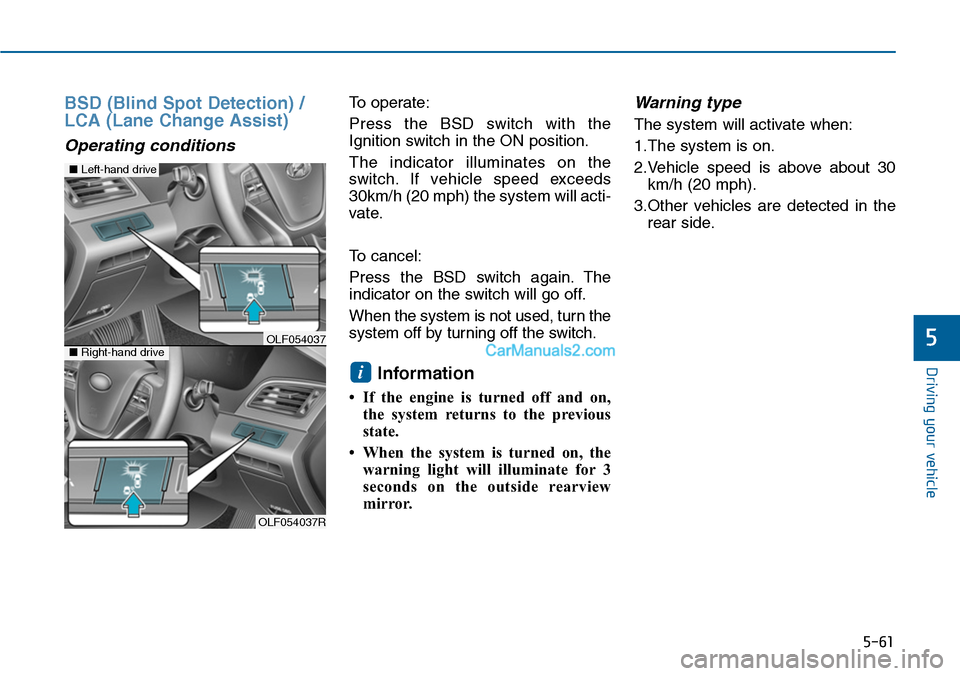
Push the lever (1) up (RES+). If the
vehicle speed is over 40 km/h (25
mph), the vehicle will resume the
preset speed.
To turn Cruise Control off
•Push the CRUISE / button (the
CRUISE indicator light will go off).
•Turn the engine OFF.
i
OLF054042L
■Type A
■Type BOLF054042
OLF054041L
■Type A
■Type BOLF054041
Page 510 of 665
5-61
Driving your vehicle
5
BSD (Blind Spot Detection) /
LCA (Lane Change Assist)
Operating conditions
To operate:
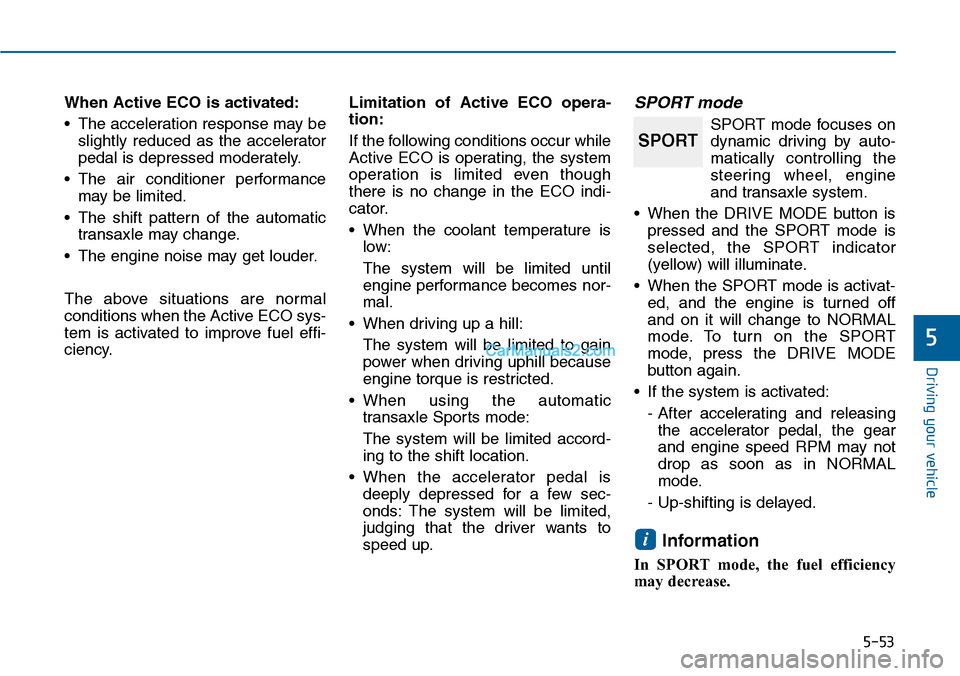
Press the BSD switch with the
Ignition switch in the ON position.
The indicator illuminates on the
switch. If vehicle speed exceeds
30km/h (20 mph) the system will acti-
vate.
To cancel:
Press the BSD switch again. The
indicator on the switch will go off.
When the system is not used, turn the
system off by turning off the switch.
Information
• If the engine is turned off and on,
the system returns to the previous
state.
• When the system is turned on, the
warning light will illuminate for 3
seconds on the outside rearview
mirror.
Warning type
The system will activate when:
1.The system is on.
2.Vehicle speed is above about 30
km/h (20 mph).
3.Other vehicles are detected in the
rear side.
i
OLF054037R
■Left-hand drive
■Right-hand driveOLF054037
Page 517 of 665
5-68
Driving your vehicle
Hazardous driving conditions
When hazardous driving conditions
are encountered such as water,
snow, ice, mud or sand:
Drive cautiously and allow extra dis-
tance for braking.
Avoid sudden movements in braking
or steering.
If stuck in snow, mud, or sand, use
second gear. Accelerate slowly to
avoid spinning the drive wheels.
Use sand, rock salt, or other non-slip
material under the drive wheels to
provide traction when stuck in ice,
snow, or mud.
Rocking the vehicle
If it is necessary to rock the vehicle
to free it from snow, sand, or mud,
first turn the steering wheel right and
left to clear the area around your
front wheels. Then, shift back and
forth between R (Reverse) and a for-
ward gear.
Try to avoid spinning the wheels, and
do not race the engine.
To prevent transaxle wear, wait until
the wheels stop spinning before
shifting gears. Release the accelera-
tor pedal while shifting, and press
lightly on the accelerator pedal while
the transaxle is in gear. Slowly spin-
ning the wheels in forward and
reverse directions causes a rocking
motion that may free the vehicle.
SPECIAL DRIVING CONDITIONS
Downshifting with an automatic
transaxle while driving on slip-
pery surfaces can cause an
accident. The sudden change in
tire speed could cause the tires
to skid. Be careful when down-
shifting on slippery surfaces.
WARNING
If the tires spin at high speed
the tires can explode, and you
or others may be injured. Do not
attempt this procedure if people
or objects are anywhere near
the vehicle.
The vehicle can overheat caus-
ing an engine compartment fire
or other damage. Spin the
wheels as little as possible and
avoid spinning the wheels at
speeds over 56 km/h (35 mph)
as indicated on the speedome-
ter.
WARNING
Page 518 of 665
5-69
Driving your vehicle
5
If you are still stuck after rocking
the vehicle a few times, have the
vehicle pulled out by a tow vehicle
to avoid engine overheating, pos-
sible damage to the transaxle, and
tire damage. See “Towing” in
chapter 6.
To p r e v e n t d a m a g e t o t h e
transaxle, turn OFF the ESC prior
to rocking the vehicle.
Smooth cornering
Avoid braking or gear changing in
corners, especially when roads are
wet. Ideally, corners should always
be taken under gentle acceleration.
Driving at night
Night driving presents more hazards
than driving in the daylight. Here are
some important tips to remember:
•Slow down and keep more dis-
tance between you and other vehi-
cles, as it may be more difficult to
see at night, especially in areas
where there may not be any street
lights.
•Adjust your mirrors to reduce the
glare from other driver's head-
lamps.
•Keep your headlamps clean and
properly aimed. Dirty or improperly
aimed headlamps will make it
much more difficult to see at night.
•Avoid staring directly at the head-
lamps of oncoming vehicles. You
could be temporarily blinded, and it
will take several seconds for your
eyes to readjust to the darkness.
NOTICE
Page 520 of 665

5-71
Driving your vehicle
5
Snow or icy conditions
Yo u n e e d t o k e e p s u f f i c i e n t d i s t a n c e
between your vehicle and the vehicle
in front of you.
Apply the brakes gently. Speeding,
rapid acceleration, sudden brake
applications, and sharp turns are
potentially very hazardous practices.
During deceleration, use engine
braking to the fullest extent. Sudden
brake applications on snowy or icy
roads may cause skids to occur.
To drive your vehicle in deep snow, it
may be necessary to use snow tires
or to install tire chains on your tires.
Always carry emergency equipment.
Some of the items you may want to
carry include tire chains, tow straps
or chains, a flashlight, emergency
flares, sand, a shovel, jumper cables,
a window scraper, gloves, ground
cloth, coveralls, a blanket, etc.
Snow tiresIf you mount snow tires on your vehi-
cle, make sure to use radial tires of
the same size and load range as the
original tires. Mount snow tires on all
four wheels to balance your vehicle’s
handling in all weather conditions.
The traction provided by snow tires
on dry roads may not be as high as
your vehicle's original equipment
tires. Check with the tire dealer for
maximum speed recommendations.
Information
Do not install studded tires without
first checking local and municipal reg-
ulations for possible restrictions
against their use.
i
WINTER DRIVING
Snow tires should be equivalent
in size and type to the vehicle's
standard tires. Otherwise, the
safety and handling of your
vehicle may be adversely affect-
ed.
WARNING