Page 162 of 1534

Features of your vehicle
90
4
Auto light position (if equipped)
When the light switch is in the AUTO light position, the taillights and headlights will
be turned ON or OFF automaticallydepending on the amount of light outside
the vehicle. High - beam operation
To turn on the high beam headlights,
push the lever away from you. Pull it back
for low beams. The high-beam indicator will light when
the headlight high beams are switchedon.
To prevent the battery from being dis-
charged, do not leave the lights on for aprolonged time whilst the engine is not
running.
CAUTION
Never place anything over the
sensor (1) located on the instru-
ment panel, this will ensure better auto-light system control.
Don’t clean the sensor using a window cleaner, the cleaner may
leave a light film which could interfere with sensor operation.
If your vehicle has window tint or other types of coating on thefront windscreen, the Auto light
system may not work properly.
WARNING
Do not use high beam when there
are other vehicles. Using highbeam could obstruct the other dri-ver's vision.
OAM049044R-1OLM049328R
EL(FL) Aust 4a.QXP 7/26/2013 2:36 PM Page 90
Page 165 of 1534
493
Features of your vehicle
Daytime running light (if equipped)
Daytime Running Lights (DRL) can make
it easier for others to see the front of your
vehicle during the day. DRL can be help-
ful in many different driving conditions,
and it is especially helpful after dawn and
before sunset.
The DRL system will make the head-
lights turn OFF when:
1. The headlight switch is ON.
2. The front fog light switch is ON.
3. The engine stops.Headlight levelling device (if equipped)
Manual type
To adjust the headlight beam level
according to the number of the passen-
gers and the loading weight in the lug-
gage area, turn the beam levelling
switch.
The higher the number of the switch
position, the lower the headlight beam
level. Always keep the headlight beam at
the proper levelling position, or head-
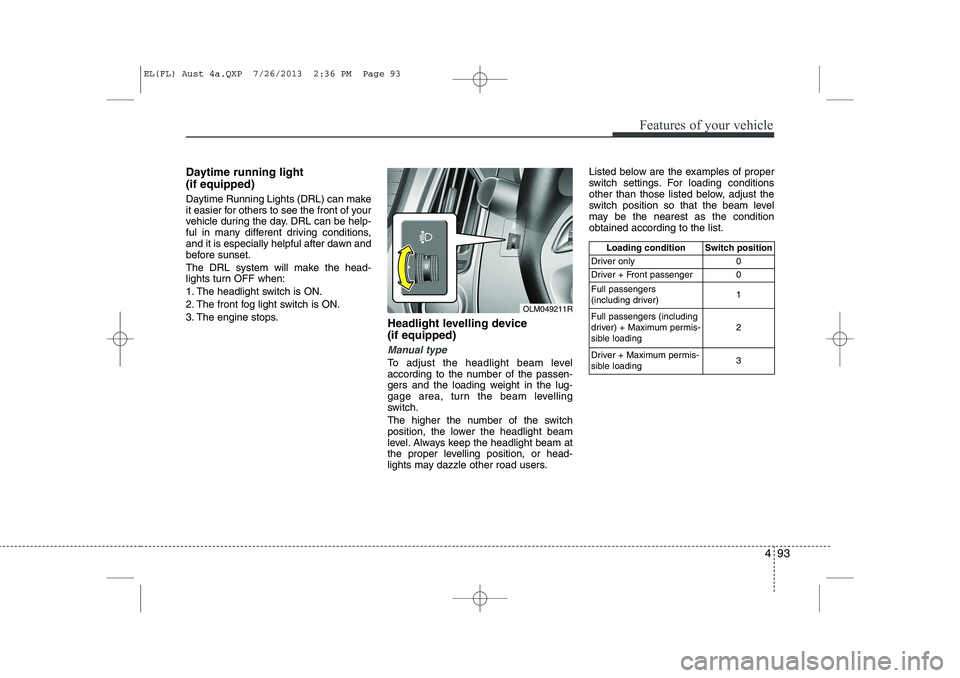
lights may dazzle other road users.Listed below are the examples of proper
switch settings. For loading conditions
other than those listed below, adjust the
switch position so that the beam level
may be the nearest as the conditionobtained according to the list.
Loading condition Switch position
Driver only 0
Driver + Front passenger 0 Full passengers
(including driver) 1
Full passengers (including
driver) + Maximum permis-
sible loading 2
Driver + Maximum permis-
sible loading 3
OLM049211R
EL(FL) Aust 4a.QXP 7/26/2013 2:36 PM Page 93
Page 169 of 1534

497
Features of your vehicle
Windscreen washers
In the OFF position, pull the lever gently
toward you to spray washer fluid on the
windscreen and to run the wipers 1-3
cycles. Use this function when the windscreen is
dirty.
The spray and wiper operation will con-
tinue until you release the lever.
If the washer does not work, check the
washer fluid level. If the fluid level is not
sufficient, you will need to add appropri-
ate non-abrasive windscreen washer
fluid to the washer reservoir.
The reservoir filler neck is located in the
front of the engine compartment on the
driver side.
CAUTION
To prevent possible damage tothe wipers or windscreen, do not
operate the wipers when thewindscreen is dry.
To prevent damage to the wiper blades, do not use petrol,
kerosene, paint thinner, or othersolvents on or near them.
To prevent damage to the wiper arms and other components, donot attempt to move the wipers
manually.
To prevent possible damage to the wipers and washer system,use anti-freezing washer fluids in
the winter.
CAUTION
To prevent possible damage to thewasher pump, do not operate the
washer when the fluid reservoir isempty.
WARNING
Do not use the washer in freezing
temperatures without first warming
the windscreen with the defrosters;
the washer solution could freeze on
the windscreen and obscure yourvision.
OXM049048R
EL(FL) Aust 4a.QXP 7/26/2013 2:36 PM Page 97
Page 170 of 1534
Features of your vehicle
98
4
Headlight washer (if equipped)
If your vehicle is equipped with the head-
light washer it will operate at the same
time when you operate the windscreen
washer. It will operate when the headlight
low beam is turned on and the ignition
switch or engine start/stop button is inthe ON position.
The washer fluid will be sprayed on to the
headlights.
✽✽
NOTICE
Page 171 of 1534

499
Features of your vehicle
Map lamp (if equipped)
Push the lens (1) to turn the map lamp on
or off.
: The light (with room lamp) stayson at all times.
: The light (with room lamp) comes on when any door (except tail- gate) is opened regardless of the
ignition switch position. When
doors (except tailgate) are
unlocked by the transmitter (or
smart key), the light (with room
lamp) comes on for approximate-
ly 30 seconds as long as any door
(except tailgate) is not opened. Also, the light (with room lamp)
goes out gradually after approxi-mately 30 seconds if the door
(except tailgate) is closed.
However, if the ignition switch is
ON or all doors (except tailgate)
are locked, the light will turn off
immediately.
If a door (except tailgate) is
opened with the ignition switch in
the ACC or LOCK position, the
light (with room lamp) stays on for
about 20 minutes. However, if a
door (except tailgate) is opened
with the ignition switch in the ONposition, the light (with room lamp)
stays on continuously.
: The lights turn off even if a door is opened.
❈ When the lamp is turned ON by
pressing the lens (1), the lamp
does not turn off even if the
switch (2) is in the OFF posi-tion.
INTERIOR LIGHT
CAUTION
Do not use the interior lights for
extended periods when the engine
is not running.
It may cause battery discharge.
OEL049100
WARNING
Do not use the interior lights when
driving in the dark. Accidents could
happen because the view may be
obscured by interior lights.
EL(FL) Aust 4a.QXP 7/26/2013 2:36 PM Page 99
Page 174 of 1534

Features of your vehicle
102
4
✽✽
NOTICE
If you want to defrost and defog on the
front windscreen, refer to “Windscreen
Defrosting and Defogging” in this sec-tion.
Rear window defroster
The defroster heats the window to
remove frost, fog and thin ice from the
interior and exterior of the rear window,
whilst engine is running. To activate the rear window defroster,
press the rear window defroster button
located in the centre facia switch panel.
The indicator on the rear window
defroster button illuminates when thedefroster is ON.
If there is heavy accumulation of snow on
the rear window, brush it off before oper-
ating the rear defroster.
The rear window defroster automatically
turns off after approximately 20 minutes
or when the ignition switch is turned off.
To turn off the defroster, press the rear
window defroster button again.
DEFROSTER
CAUTION
To prevent damage to the conduc-
tors bonded to the inside surface of
the rear window, never use sharpinstruments or window cleanerscontaining abrasives to clean the window.
OLM049109
■ Type BOLM049110
■Type A
EL(FL) Aust 4a.QXP 7/26/2013 2:37 PM Page 102
Page 175 of 1534
4 103
Features of your vehicle
Outside mirror defroster (if equipped)
If your vehicle is equipped with the out-
side mirror defrosters, they will operate at
the same time you turn on the rear win-
dow defroster.
Wiper deicer (if equipped)
Without smart key
The engine must be running to enable
this feature. To activate the front wiper
deicer, press the front wiper deicer but-
ton. The indicator on the button illumi-nates when the deicer is ON. The front wiper deicer automatically
turns off after 20 minutes or when the
ignition switch is turned off. To turn off the
deicer, press the front wiper deicer but-ton again. With smart key
If your vehicle is equipped with the wiper
deicer, it will operate at the same time
you turn on the rear window defroster.
OLM049104R
EL(FL) Aust 4a.QXP 7/26/2013 2:37 PM Page 103
Page 177 of 1534
4 105
Features of your vehicle
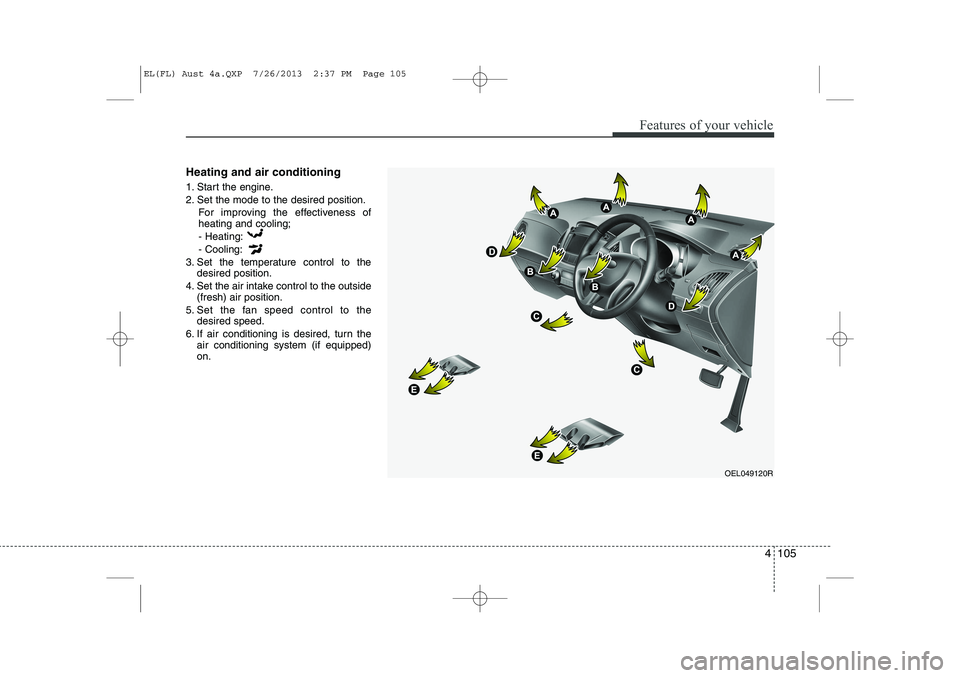
Heating and air conditioning
1. Start the engine.
2. Set the mode to the desired position.For improving the effectiveness of heating and cooling;- Heating: - Cooling:
3. Set the temperature control to the desired position.
4. Set the air intake control to the outside (fresh) air position.
5. Set the fan speed control to the desired speed.
6. If air conditioning is desired, turn the air conditioning system (if equipped) on.
OEL049120R
EL(FL) Aust 4a.QXP 7/26/2013 2:37 PM Page 105