2014 HYUNDAI I30 back up light
[x] Cancel search: back up lightPage 220 of 635

Features of your vehicle
142
4
1. FM Selection Button
Turns to FM mode and toggles FM1 and
FM2 when the button is pressed each
time.
2. AM Selection Button
Turns to AM mode, and toggles in the order of AM1 ➟AM2 ➟AM1··· when the
button is pressed each time.
3. CD Selection Button
If there is a cd in the CDP DECK it plays
the CD.
Press CD button to automatically insert CD when the disc is ejected from the
deck by pressing CD EJECT.
4. AUX Selection Button
If the auxiliary device is connected, it
turns to AUX MODE to play the sound
from the auxiliary player.
If no Disc and auxiliary device is connected,
it displays “NO Media” for 5 seconds and
returns to the previous mode. 5. Automatic Channel Selection
Button
When the [SEEK ]button is pressed, it reduces the band frequency by 100khz to automatically select chan-
nel. Stops at the previous frequency if
no channel is found.
When the [SEEK ]button is pressed, it increases the band frequency by100khz to automatically select channel.
Stops at the previous frequency if no
channel is found.
6. Power ON/OFF & Volume Control Button
Turns on/off the set when the IGNI- TION SWITCH is on ACC or ON. If the
button is turned to the right, it increas-
es the volume and left, decreases the
volume.
In AUX mode, the volume and tone (BASS, MID, TRE) are adjusted in a
separate way.
If you pull out AUX from a jack and
insert it again, then only volume goes
back to 10-step. 7. AUTO STORE Button
When the button is pressed, it automati-
cally selects and saves channels with
high reception rate to PRESET buttons
(1~6) and plays the channel saved inPRESET1.
If no channel is saved after AST, it will
play the previous channel.
8. Screen ON/ OFF Button
Turns off/on the displayed data and light
on LCD.
The screen and light will be turned on by
pressing any button except DARK button
when the screen is turned off.
9. Information Display Button
Displays the information of the channel
currently played.
FDE ENG 4C (AUDIO).QXP 9/3/2010 4:49 PM Page 142
Page 223 of 635

4 145
Features of your vehicle
1. CD loading slot
Please face printed side upward and
gently push in. When the ignition switch
is on ACC or ON and power is off, power
is automatically turned on if the CD is
loaded. This CDP supports both 8cm and
12 cm CDs. But if VCD, Data CD, MP3CD are loaded, "Er-6" message willappear and CD will be ejected.
2. CD Indicator
When car ignition switch is ACC or ON and if the CD is loaded, this indicator is
lighted. If the CD is ejected the light is
turned off.
3. CD eject Button
Push button to eject the CD during CD
playback. This button is enabled when
ignition switch is off.
4. AUX Selection Button
If the auxiliary device is connected, it
turns to AUX MODE to play the sound
from the auxiliary player.
If no Disc and auxiliary device is connected,
it displays "NO Media" for 5 seconds and
returns to the previous mode.5. Automatic Track Selection
Button
Push [SEEK ] button for less than 0.8 second to play from the beginning of current song.
Push [SEEK ] button for less than 0.8 second and press again within 1
second to play the previous song.
Push [SEEK ] button for 0.8 second or longer to initiate reverse directionhigh speed sound search of currentsong.
Push [SEEK ] button for less than 0.8 second to play the next song.
Push [SEEK ] button for 0.8 second or longer to initiate high speed soundsearch of current song.
6. INFO Button
Displays the information of the current
CD TRACK in the order of DISCTITLE ➟DISC ARTIST ➟TRACK TITLE ➟
TRACK ARTIST ➟TOTAL TRACK ➟Play
Screen ➟DISC TITLE ➟···.(not displayed if
the information is not available on the
DISC.) 7. TUNE/ENTER Button
Turn this button clockwise to display songs after current song.
Also, turn this button counterclockwise to
display songs before current song.
To listen to the displayed song, press the
button to skip to the song and play.
8. REPEAT Button
Repeats current song when the button is
pressed for less than 0.8 second.
Repeats the entire DISC when the button
is pressed for 0.8 second or longer.
9. RANDOM Play Button
Turns on/off the randomization of the
play list of files in the currently played
DISC.
To cancel the mode, press the key once again.
10. SCAN Play Button
Plays first 10 seconds of each song in
the DISC.
To cancel the mode, press the key once again.
FDE ENG 4C (AUDIO).QXP 9/3/2010 4:49 PM Page 145
Page 232 of 635

Features of your vehicle
154
4
1. FM Selection Button
Turns to FM mode and toggles FM1 and
FM2 when the button is pressed each
time.
2. AM Selection Button
Turns to AM mode, and toggles in the order of AM1 ➟AM2 ➟AM1··· when the
button is pressed each time.
3. CD Selection Button
If there is a cd in the CDP DECK it plays
the CD.
Press CD button to automatically insert CD when the disc is ejected from the
deck by pressing CD EJECT.
4. AUX Selection Button
If the auxiliary device is connected, it
turns to AUX MODE to play the sound
from the auxiliary player.
If no Disc and auxiliary device is connected,
it displays “NO Media” for 5 seconds and
returns to the previous mode. 5. Automatic Channel Selection
Button
When the [SEEK ]button is pressed, it reduces the band frequency by 100khz to automatically select channel.
Stops at the previous frequency if no
channel is found.
When the [SEEK ]button is pressed, it increases the band frequency by100khz to automatically select channel.
Stops at the previous frequency if no
channel is found.
6. Power ON/OFF & Volume Control Button
Turns on/off the set when the IGNI- TION SWITCH is on ACC or ON. If the
button is turned to the right, it increas-
es the volume and left, decreases the
volume.
In AUX mode, the volume and tone (BASS, MID, TRE) are adjusted in a
separate way.
If you pull out AUX from a jack and
insert it again, then only volume goes
back to 10-step. 7. AUTO STORE Button
When the button is pressed, it automati-
cally selects and saves channels with
high reception rate to PRESET buttons
(1~6) and plays the channel saved inPRESET1.
If no channel is saved after AST, it will
play the previous channel.
8. Screen ON/ OFF Button
Turns off/on the displayed data and light
on LCD.
The screen and light will be turned on by
pressing any button except DARK button
when the screen is turned off.
9. Information Display Button
Displays the information of the channel
currently played.
FDE ENG 4C (AUDIO).QXP 9/3/2010 4:49 PM Page 154
Page 235 of 635

4 157
Features of your vehicle
1. CD loading slot
Please face printed side upward and
gently push in. When the ignition switch
is on ACC or ON and power is off, power
is automatically turned on if the CD is
loaded. This CDP supports both 8cm and
12 cm CDs. But if VCD, Data CD, MP3CD are loaded, "Er-6" message willappear and CD will be ejected.
2. CD Indicator
When car ignition switch is ACC or ON and if the CD is loaded, this indicator is
lighted. If the CD is ejected the light is
turned off.
3. CD eject Button
Push button to eject the CD during
CD playback. This button is enabled
when ignition switch is off.
4. CD LOAD Button
Push [LOAD] button to load CDs to avail-
able CDC deck (from 1~6). Push [LOAD]
button for more than 2 seconds to load
into all available decks.
The last CD will play. 10 seconds idle sta-
tus will disable loading process.5. AUX Selection Button
If the auxiliary device is connected, it
turns to AUX MODE to play the sound
from the auxiliary player.
If no auxiliary device is connected, it dis-
plays "NO CONNECT" for 3 seconds and
returns to the previous mode.
6. Automatic Track Selection
Button
Push [SEEK ] button for less than 0.8 second to play from the beginning of current song.
Push [SEEK ] button for less than 0.8 second and press again within 3
seconds to play the previous song.
Push [SEEK ] button for 0.8 second or longer to initiate reverse directionhigh speed sound search of currentsong.
Push [SEEK ] button for less than 0.8 second to play the next song.
Push [SEEK ] button for 0.8 second or longer to initiate high speed soundsearch of current song. 7. INFO Button
Displays the information of the current
CD TRACK in the order of DISCTITLE
➟DISC ARTIST ➟TRACK TITLE ➟
TRACK ARTIST ➟TOTAL TRACK ➟Play
Screen ➟DISC TITLE ➟···.(not displayed if
the information is not available on the
DISC.)
8. TUNE/ENTER Button
Turn this button clockwise to display songs after current song.
Also, turn this button counterclockwise to
display songs before current song.
To listen to the displayed song, press the
button to skip to the song and play.
9. REPEAT Button
Repeats current song when the button is
pressed for less than 0.8 second.
Repeats the entire DISC when the button
is pressed for 0.8 second or longer.
10. RANDOM Play Button
Turns on/off the randomization of the play
list of files in the currently played DISC.
To cancel the mode, press the key once again.
FDE ENG 4C (AUDIO).QXP 9/3/2010 4:49 PM Page 157
Page 246 of 635
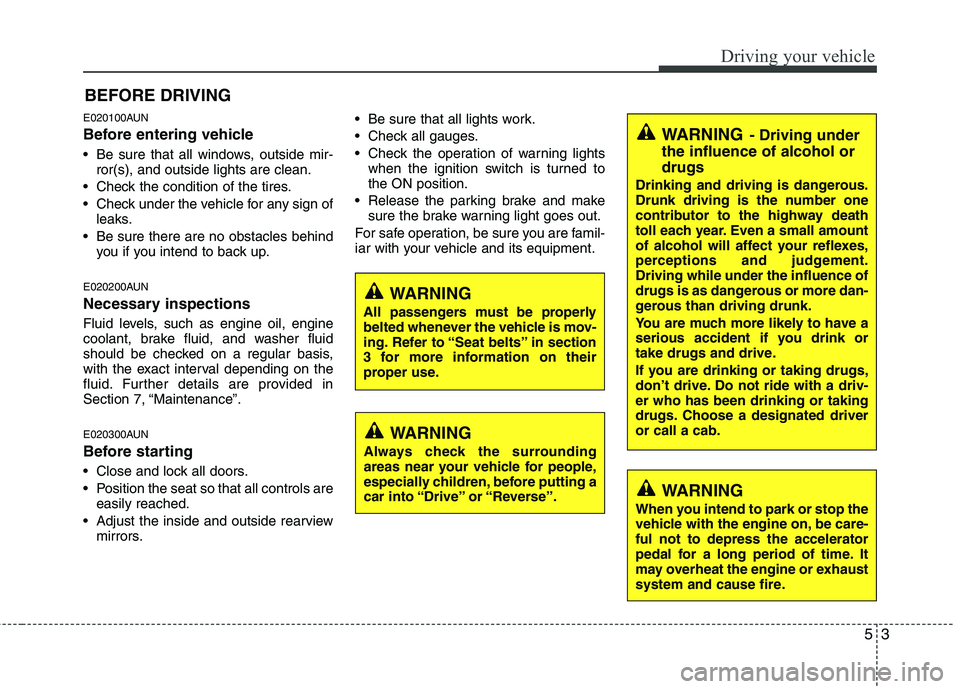
E020100AUN
Before entering vehicle
• Be sure that all windows, outside mir-ror(s), and outside lights are clean.
Check the condition of the tires.
Check under the vehicle for any sign of leaks.
Be sure there are no obstacles behind you if you intend to back up.
E020200AUN
Necessary inspections
Fluid levels, such as engine oil, engine
coolant, brake fluid, and washer fluid
should be checked on a regular basis,
with the exact interval depending on the
fluid. Further details are provided in
Section 7, “Maintenance”.
E020300AUN
Before starting
Close and lock all doors.
Position the seat so that all controls are easily reached.
Adjust the inside and outside rearview mirrors. Be sure that all lights work.
Check all gauges.
Check the operation of warning lights
when the ignition switch is turned to the ON position.
Release the parking brake and make sure the brake warning light goes out.
For safe operation, be sure you are famil-
iar with your vehicle and its equipment.
53
Driving your vehicle
BEFORE DRIVING
WARNING
All passengers must be properly
belted whenever the vehicle is mov-
ing. Refer to “Seat belts” in section
3 for more information on their
proper use.
WARNING
Always check the surrounding
areas near your vehicle for people,
especially children, before putting a
car into “Drive” or “Reverse”.
WARNING
When you intend to park or stop the
vehicle with the engine on, be care-ful not to depress the accelerator
pedal for a long period of time. It
may overheat the engine or exhaust
system and cause fire.
WARNING - Driving under
the influence of alcohol or drugs
Drinking and driving is dangerous.
Drunk driving is the number one
contributor to the highway death
toll each year. Even a small amount
of alcohol will affect your reflexes,
perceptions and judgement.Driving while under the influence of
drugs is as dangerous or more dan-
gerous than driving drunk.
You are much more likely to have a
serious accident if you drink or
take drugs and drive.
If you are drinking or taking drugs,
don’t drive. Do not ride with a driv-er who has been drinking or taking
drugs. Choose a designated driveror call a cab.
Page 252 of 635

59
Driving your vehicle
During cold weather, shifting may bedifficult until the transaxle lubricant has
warmed up. This is normal and not
harmful to the transaxle.
If you've come to a complete stop and it's hard to shift into 1st or R(Reverse),
put the shift lever in N(Neutral) position
and release the clutch. Press the
clutch pedal back down, and then shift
into 1st or R(Reverse) gear position. E050101AUNUsing the clutch
The clutch should be pressed all the way
to the floor before shifting, then released
slowly. The clutch pedal should always be
fully released while driving. Do not rest
your foot on the clutch pedal while driv-
ing. This can cause unnecessary wear.
Do not partially engage the clutch to hold
the car on an incline. This causes unnec-
essary wear. Use the foot brake or park-
ing brake to hold the car on an incline. Do
not operate the clutch pedal rapidly and
repeatedly.
E050102AUN
Downshifting
When you must slow down in heavy traf-
fic or while driving up steep hills, down-
shift before the engine starts to labor.
Downshifting reduces the chance of
stalling and gives better acceleration
when you again need to increase your
speed. When the vehicle is traveling
down steep hills, downshifting helps
maintain safe speed and prolongs brake
life.
CAUTION
To avoid premature clutch wear
and damage, do not drive with
your foot resting on the clutch pedal. Also, don’t use the clutchto hold the vehicle stopped on anuphill grade, while waiting for a
traffic light, etc.
Do not use the shift lever as a handrest during driving, as thiscan result in premature wear of the transaxle shift forks.
WARNING
Before leaving the driver’s seat, always set the parking brake fully
and shut the engine off. Thenmake sure the transaxle is shifted
into 1st gear when the vehicle is
parked on a level or uphill grade,
and shifted into R (Reverse) on a
downhill grade. Unexpected and
sudden vehicle movement canoccur if these precautions are not
followed in the order identified.
If your vehicle has a manual transaxle not equipped with a
ignition lock switch, it may moveand cause a serious accident
when starting the engine without
depressing the clutch pedal whilethe parking brake is released and
the shift lever not in theN(Neutral) position.
Page 256 of 635

513
Driving your vehicle
R (Reverse)
Use this position to drive the vehicle
backward.N (Neutral)
The wheels and transaxle are not locked.
The vehicle will roll freely even on the
slightest incline unless the parking brake
or service brakes are applied.
D (Drive)
This is the normal forward driving posi-
tion. The transaxle will automatically shift
through a 4-gear sequence, providing the
best fuel economy and power.
Bring the car to a complete stop before
shifting the selector to “D” position.
For extra power when passing another
vehicle or climbing grades, depress the
accelerator fully, at which time the
transaxle will automatically downshift to
the next lower gear.
WARNING
Shifting into P (Park) while the vehicle is in motion will cause the
drive wheels to lock which will
cause you to lose control of the
vehicle.
Do not use the P (Park) position in place of the parking brake.
Always make sure the shift lever
is latched in the P (Park) position
and set the parking brake fully.
Before leaving the driver’s seat, always make sure the shift lever
is in the P (Park) position. Set the
parking brake fully, shut the
engine off and take the key with
you. Unexpected and sudden
vehicle movement can occur if
you do not follow these precau-
tions in the order specified.
Never leave a child unattended in a vehicle.
CAUTION
The transaxle may be damaged if
you shift into P (Park) while thevehicle is in motion.
CAUTION
Always come to a complete stopbefore shifting into or out of R
(Reverse); you may damage the transaxle if you shift into R whilethe vehicle is in motion, except asexplained in “Rocking the Vehicle”,
in this manual.
Page 276 of 635

533
Driving your vehicle
E110100AUN
Hazardous driving conditions
When hazardous driving conditions are
encountered such as water, snow, ice,
mud, sand, or similar hazards, followthese suggestions:
Drive cautiously and allow extra dis-tance for braking.
Avoid sudden movements in braking or steering.
When braking with non-ABS brakes pump the brake pedal with a light up-
and-down motion until the vehicle isstopped.
If stalled in snow, mud, or sand, use second gear. Accelerate slowly to
avoid spinning the drive wheels.
Use sand, rock salt, tire chains, or other non-slip material under the drive
wheels to provide traction when stalled
in ice, snow, or mud. E110200AEN
Rocking the vehicle
If it is necessary to rock the vehicle to
free it from snow, sand, or mud, first turn
the steering wheel right and left to clear
the area around your front wheels. Then,
shift back and forth between R (Reverse)
and any forward gear in vehicles
equipped with an automatic transaxle. Do
not race the engine, and spin the wheels
as little as possible. If you are still stuck
after a few tries, have the vehicle pulled
out by a tow vehicle to avoid engine over-
heating and possible damage to the
transaxle.
✽✽
NOTICE
The ESP system (if equipped) should be
turned OFF prior to rocking the vehicle.
SPECIAL DRIVING CONDITIONS
WARNING - Downshifting
Downshifting with an automatic
transaxle, while driving on slipperysurfaces can cause an accident.
The sudden change in tire speed
could cause the tires to skid. Be
careful when downshifting on slip-
pery surfaces.
WARNING - ABS
Do not pump the brake pedal on a
vehicle equipped with ABS.
CAUTION
Prolonged rocking may cause engine over-heating, transaxle dam-age or failure, and tire damage.
WARNING - Spinning tires
Do not spin the wheels, especially at speeds more than 56 km/h (35
mph). Spinning the wheels at high
speeds when the vehicle is station-
ary could cause a tire to overheat
which could result in tire damage
that may injure bystanders.
WARNING
If your vehicle becomes stuck in
snow, mud, sand, etc., then you
may attempt to rock the vehicle free
by moving it forward and backward.
Do not attempt this procedure if
people or objects are anywhere
near the vehicle. During the rocking
operation the vehicle may suddenly
move forward or backward as it
becomes unstuck, causing injury
or damage to nearby people orobjects.