Page 153 of 546
3-62
Convenient features of your vehicle
ItemsExplanation
Head-Up Display• On : Activate the Head Up Display.
• Off : Deactivate the Head Up Display.
Display HeightAdjust the height of the HUD image on the windshield glass.
BrightnessAdjust the intensity of the HUD illumination.
Content Select
Activate or deactivate each contents of the HUD.
• Tu r n b y Tu r n
• Traffic Information
• Smart Cruise control
• Lane Keep Assist System/ Lane Departure Warning System
• Blind Spot Detection
Speedometer SizeChoose the speedometer font size of the HUD. (Large, Medium, Small)
Speedometer ColorChoose the speedometer font color of the HUD. (White, Orange, Green)
User Settings Mode
On this mode, you can change setting of the Head Up display, the instrument cluster, doors, lamps, and so on.
Head Up display (if equipped)
Page 155 of 546
3-64
Convenient features of your vehicle
Door/Trunk
ItemsExplanation
Automatically Lock
• Off: The auto door lock operation will be deactivated.
• Speed: All doors will be automatically locked when the vehicle speed exceeds 15km/h (9.3mph).
• Shift Lever: All doors will be automatically locked if the automatic transmission shift lever is shift-
ed from the P (Park) position to the R (Reverse), N (Neutral), or D (Drive) position.
Automatically Unlock
• Off: The auto door unlock operation will be canceled.
• Power Off: All doors will be automatically unlocked when the Engine Start/Stop button is set to the
OFF position.
• Driver Door Unlock: All doors will be automatically unlocked if the driver's door is unlocked.
• Shift Lever: All doors will be automatically unlocked if the automatic transmission shift lever is
shifted to the P (Park) position.
Smart TrunkTo activate or deactivate the Smart Trunk system.
For more details, refer to "Smart Trunk" in this chapter.
Page 156 of 546
3-65
Convenient features of your vehicle
3
Light
ItemsExplanation
One Touch Turn Signal
• Off: The one touch turn signal function will be deactivated.
• 3, 5, 7 Flashing : The lane change signals will blink 3, 5, or 7 times when the turn signal lever is
moved slightly.
For more details, refer to “Light” in this chapter.
Ambient Light
• Off : The ambient light of interior will turn off.
• Auto : The ambient light of interior will turn automatically on or off.
• On : The ambient light of interior will turn on.
Head Lamp Delay
• On: The head lamp delay function will be activated.
• Off: The headlamp delay function will be deactivated.
For more details, refer to “Light” in this chapter.
Welcome Light
• On: The welcome light function will be activated.
• Off: The welcome light function will be deactivated.
For more details, refer to “Welcome System” in this chapter.
Page 158 of 546

3-67
Convenient features of your vehicle
3
Seat/Steering
ItemsExplanation
Seat Easy Access
• Off: The seat easy access function will be deactivated.
• Normal/Extended:
- When you turn off the engine, the driver’s seat will automatically move rearward short (Normal)
or long (Extended) for you to enter or exit the vehicle more comfortably.
- If you change the Engine Start/Stop button from OFF position to the ACC, ON, or START posi-
tion, the driver’s seat will return to the original position.
For more details, refer to “Driver Position Memory System” in this chapter.
Steering Easy Access
• On: The steering wheel will automatically move forward or rearward for the driver to enter or exit
the vehicle comfortably.
• Off: The steering easy access function will be deactivated.
For more details, refer to “Driver Position Memory System” in this chapter.
Steering Position• Off : The steering position function will be deactivated.
• On : The steering position function will be activated.
ItemsExplanation
Service Interval
(Except Europe)
On this mode, you can activate the service interval function with mileage (km or mi.) and period
(months).
• Off : The service interval function will be deactivated.
• On :You can set the service interval (mileage and months).
Service interval
Page 159 of 546
3-68
Convenient features of your vehicle
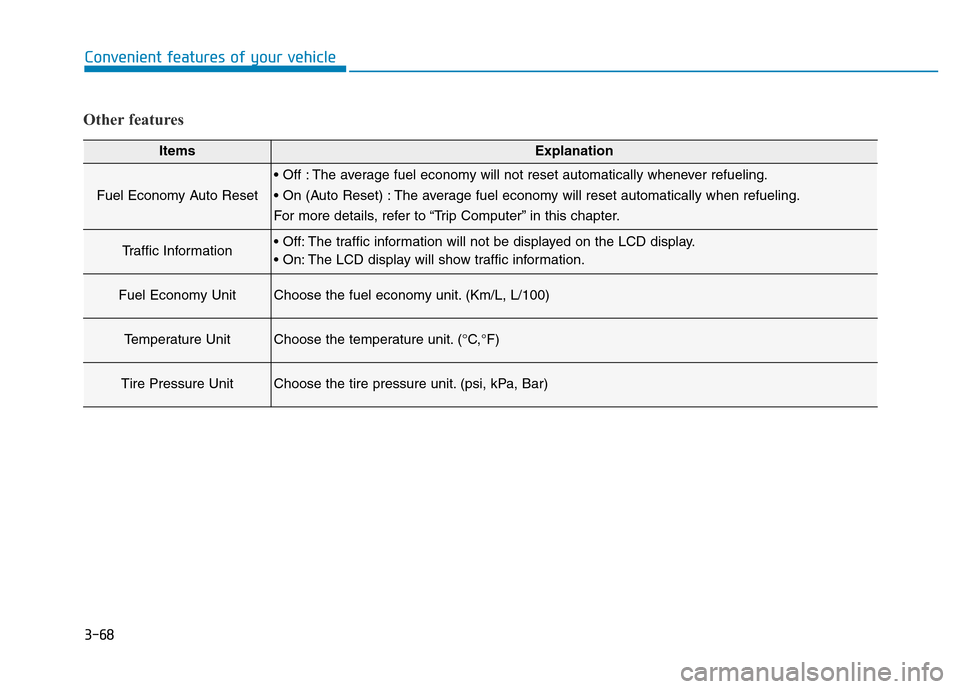
Other features
ItemsExplanation
Fuel Economy Auto Reset
• Off : The average fuel economy will not reset automatically whenever refueling.
• On (Auto Reset) : The average fuel economy will reset automatically when refueling.
For more details, refer to “Trip Computer” in this chapter.
Traffic Information• Off: The traffic information will not be displayed on the LCD display.
• On: The LCD display will show traffic information.
Fuel Economy UnitChoose the fuel economy unit. (Km/L, L/100)
Temperature UnitChoose the temperature unit. (°C,°F)
Tire Pressure UnitChoose the tire pressure unit. (psi, kPa, Bar)
Page 160 of 546
3-69
Convenient features of your vehicle
3
Warning Messages (if equipped)
Shift to "P" position
• This warning message illuminates
if you try to turn off the engine with-
out the shift lever in P (Park) posi-
tion.
• At this time, the Engine Start/Stop
button turns to the ACC position (If
you press the Engine Start/Stop
button once more, it will turn to the
ON position).
Low Key Battery
• This warning message illuminates
if the battery of the smart key is
discharged when the Engine
Start/Stop button changes to the
OFF position.
Press start button while turn
steering
• This warning message illuminates
if the steering wheel does not
unlock normally when the Engine
Start/Stop button is pressed.
• It means that you should press the
Engine Start/Stop button while turn-
ing the steering wheel right and left.
ODH043206L
ODH043210LODH043400L
Page 161 of 546
3-70
Convenient features of your vehicle
Steering wheel unlocked
• This warning message illuminates
if the steering wheel does not lock
when the Engine Start/Stop button
changes to the OFF position.
Check steering wheel lock
system
• This warning message illuminates if
the steering wheel does not lock nor-
mally when the Engine Start/Stop
button changes to the OFF position.
Press brake pedal to start engine
• This warning message illuminates
if the Engine Start/Stop button
changes to the ACC position twice
by pressing the button repeatedly
without depressing the brake pedal.
• It means that you should depress
the brake pedal to start the engine.
ODH043401L
ODH043402L
ODH043208L
Page 167 of 546
3-76
Convenient features of your vehicle
Low Washer Fluid
• This warning message illuminates
on the service reminder mode if
the washer fluid level in the reser-
voir is nearly empty.
• It means that you should refill the
washer fluid.
Check BSD System (if equipped)
• This warning message illuminates
if there is a malfunction with the
Blind Spot Detection (BSD) sys-
tem. And the BSD system will be
automatically deactivated. We rec-
ommend that the vehicle be
inspected by an authorized
HYUNDAI dealer.
For more details, refer to "Blind Spot
Detection (BSD) System" in chapter 5.
Check PSB
• This warning message illuminates
if there is a malfunction with the
Pre-safe Seat Belt (PSB) system.
We recommend that the vehicle be
inspected by an authorized
HYUNDAI dealer.
For more details, refer to "Seat Belt"
in chapter 2.
ODH043246LODH053127LODH043254L