Page 303 of 479

Driving your vehicle
46 5
ECS controls the vehicle suspension
automatically to maximize passenger
comfort by using the air spring in the
suspension.
You can also control the vehicle sus-
pension manually in NORMAL mode
or HIGH mode.
To control the vehicle height
• Push the vehicle height control but-
ton to select the HIGH mode that
makes the vehicle height be higher
than the NORMAL mode and the
indicator light on the vehicle height
control button will illuminate. It is
useful in a rough road.
• Push the vehicle height control but-
ton again to select the NORMAL
mode that makes the vehicle
height lower than the HIGH mode.
The indicator light in the vehicle
height control button will go off.
• When the vehicle stops with the
shift lever in P(Park) or N(Neutral),
you may change the vehicle height.
• When you drive under 70km/h, you
may select the HIGH mode.
• If the vehicle speed exceeds
70km/h while driving in the HIGH
mode, the NORMAL mode will be
selected automatically.• If the vehicle speed exceeds
120km/h while driving in NORMAL
mode, the LOW mode that is lower
than NORMAL mode will be select-
ed automatically. LOW mode can
not be selected manually.
• When you drive under 80km/h in
the LOW mode, the NORMAL
mode will be selected automatical-
ly.
• When the engine start/stop button
is turned off with the HIGH mode
selected, the HIGH mode will be
maintained.
It is to prevent damage under the
vehicle when parked in rough
roads.
• The height of the vehicle may be
adjusted after the engine start/stop
button is turned off for 2 hours/
5 hours/10 hours.
It is to compensate vehicle height
affected by outside temperature.
ELECTRONIC CONTROLLED SUSPENSION (ECS) (IF EQUIPPED)
OVI053116
Page 311 of 479
Driving your vehicle
54 5
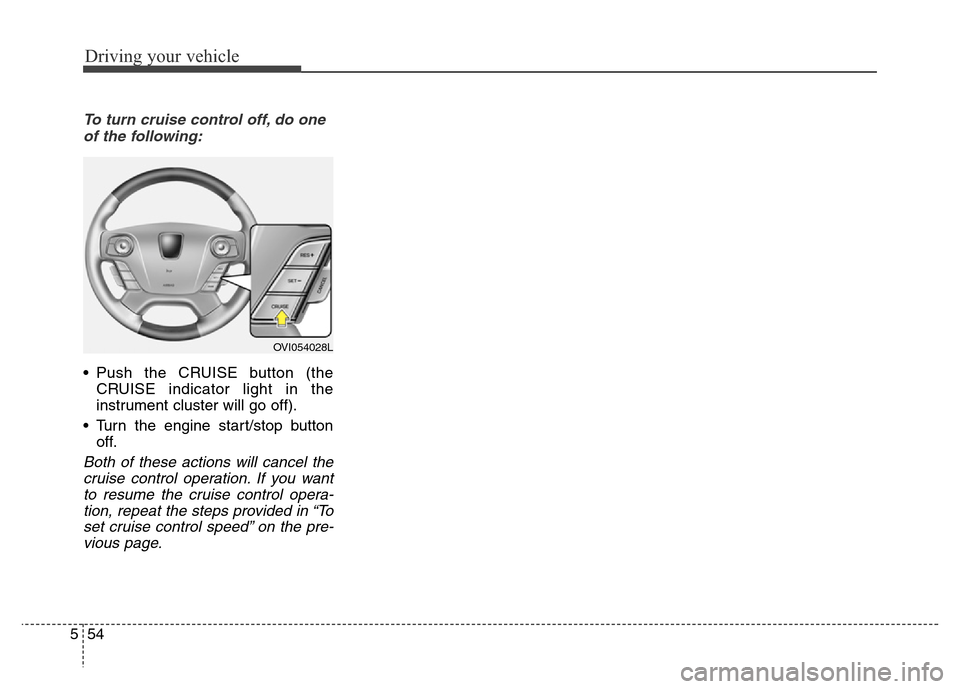
To turn cruise control off, do one
of the following:
• Push the CRUISE button (the
CRUISE indicator light in the
instrument cluster will go off).
• Turn the engine start/stop button
off.
Both of these actions will cancel the
cruise control operation. If you want
to resume the cruise control opera-
tion, repeat the steps provided in “To
set cruise control speed” on the pre-
vious page.
OVI054028L
Page 315 of 479

Driving your vehicle
58 5
Smart Cruise control will be tem-
porarily canceled when:
Cancelled manually
• While driving
- The brake pedal is depressed.
- Pull the lever (to CANCEL) locat-
ed on the steering wheel.
• While stopping with operating sys-
tem
- Depress the brake pedal and pull
the lever (to CANCEL)
The advanced smart cruise control
turns off temporarily when the indica-
tor on the LCD display turns off.
The CRUISE indicator is illuminated
continuously.Cancelled automatically
• The driver's door is opened.
• The shift lever is shifted to N
(Neutral), R (Reverse) or P (Park).
• The EPB (electric parking brake) is
applied.
• The vehicle speed is over 190
km/h (120 mph).
• The vehicle stops on a steep
incline.
• The ESC, ABS or TCS is operat-
ing.
• The ESC is turned off.
• The sensor or the cover is dirty or
blocked with foreign matters.
• When the vehicle is stopped for
over 5 minutes.
• The vehicle stops and go repeat-
edly for a long period of time.
• The driver starts driving by
depressing the accelerator pedal
or pressing the RES+ button, if a
vehicle stops far away ahead of
your vehicle.• The accelerator pedal is continu-
ously depressed for more than 1
minute.
Each of these actions will cancel
the smart cruise control operation.
(the SET indicator, set speed and
vehicle to vehicle distance on the
LCD display will go off.)
In a condition the smart cruise con-
trol is cancelled automatically, the
smart cruise control will not
resume even though the RES+ or
SET- button is pressed. Also, the
EPB (electric parking brake) will be
applied when the vehicle is
stopped.
OVI053031N
CAUTION
If the smart cruise control is
cancelled by other than the rea-
sons mentioned, we recom-
mend have the system checked
by an authorized HYUNDAI deal-
er.
Page 317 of 479

Driving your vehicle
60 5
To turn cruise control off:
• While driving
- Push the CRUISE button
• While stopping with operating sys-
tem
- Depress the brake pedal and
push the CRUISE button
Both of these actions cancel smart
cruise control operation. If you want
to resume smart cruise control oper-
ation, repeat the steps provided in
“To set cruise control speed” on the
previous page.
Smart cruise control vehicle to
vehicle distance
To set vehicle to vehicle distance:
This function allows you to program
the vehicle to maintain relative dis-
tance to the vehicle ahead without
depressing the accelerator pedal or
brake pedal.The vehicle to vehicle distance will
automatically activate when the
smart cruise control system is on.
Select the appropriate distance
according to road conditions and
vehicle speed.
Each time the button is pulled, the
vehicle to vehicle distance changes
as follows:
For example, if you drive at 90 km/h
(56 mph), the distance maintain as
follows;
Distance 4 - approximately 52 m
Distance 3 - approximately 40 m
Distance 2 - approximately 32.5 m
Distance 1 - approximately 25 m
✽NOTICE
The 'Distance 4' is always set when
the system is used for the first time
after starting the engine.
OVI053028N
OVI053118N
Distance 4 Distance 3 Distance 2
Distance 1
Page 319 of 479
Driving your vehicle
62 5
In traffic situation
In traffic, your vehicle will stop if the
vehicle ahead of you stops. Also, if
the vehicle ahead of you starts mov-
ing, your vehicle will start as well.
However, if the vehicle stops for
more than 3 seconds, you must
depress the accelerator pedal or
push the RES+ switch to start driv-
ing.
Distance to distance vehicle
sensor
The sensor detects the distance to
the vehicle ahead.
If the sensor is covered with dirt or
other foreign matter, the vehicle to
vehicle distance control may not
operate correctly.
Always keep the area in front of the
sensor clean.
CAUTION
If the vehicle ahead (vehicle
speed: less than 30km/h (18.6
mph)) disappears to the next
lane, the warning chime will
sound and a message will
appear. Adjust your vehicle
speed for vehicles or objects
that can suddenly appear in
front of you by depressing the
brake pedal according to the
road condition ahead and driv-
ing condition.
OVIEDR2921
OVIEDR2922
OVI053058
Page 324 of 479
567
Driving your vehicle
A vehicle ahead cannot be recog-
nized correctly by the sensor if any of
following occurs:
- When the vehicle is pointing
upwards due to overloading in the
trunk
- While making turns by steering
- When driving to one side of the lane
- When driving on narrow lanes or on
curves
Adjust your vehicle speed by
depressing the brake pedal accord-
ing to the road condition ahead and
driving condition.• When vehicles are at a standstill
and the vehicle in front of you
changes to the next lane, be care-
ful when your vehicle starts to
move because it may not recog-
nize the stopped vehicle in front of
you.• Always look out for pedestrians
when your vehicle is maintaining a
distance with the vehicle ahead.
OHG050075OHG050076
Page 328 of 479
571
Driving your vehicle
LDWS operation
To operate the LDWS, pull
the switch with the engine
start/stop button in the
ON position. The indicator
(green) illuminates on the
cluster. To cancel the
LDWS, pull the switch
again.
LDWS indicator light illuminates:
• [Green] - When the system operat-
ing conditions are satisfied.
• [White]
- When system operating condi-
tions are not satisfied (When the
vehicle speed is below 60 km/h).
- When the sensor does not detect
the lane line.
• [Yellow] - When there is a malfunc-
tion with the lane departure warn-
ing system. In this case, we recom-
mend that the vehicle be inspected
by an authorized HYUNDAI dealer.
If your vehicle leaves the lane when
the LDWS is operating and vehicle
speed exceeds 60km/h, the warning
operates as follows:
OVIDDR2919
OVIDDR2920
• When the sensor detects the lane line
• When the sensor doesn’t detect the lane line
Page 334 of 479

577
Driving your vehicle
Malfunction indicator
• The VSM OFF indicator will illumi-
nate when the engine start/stop
button is turned ON, but should go
off after approximately 3 seconds.
If the indicator does not come on,
or continuously remains on after
coming on for about 3 seconds
when you turn the engine
start/stop button to the ON posi-
tion, or if the indicator comes on
while driving, the AVSM is not
working properly. We recommend
that the system be checked by an
authorized HYUNDAI dealer.
• The VSM OFF indicator may illumi-
nate when the ESC indicator or
SCC indicator comes on, but it
does not indicate malfunction of
the AVSM.
WARNING
The AVSM is not a substitute for
safe driving practices but a sup-
plementary function only. It is
the responsibility of the driver
to always check the speed and
the distance to the vehicle
ahead.
WARNING
• Even if there is a malfunction
to the brake operating of the
AVSM, when you depress the
brake pedal, the brake is oper-
ating normally. But, the AVSM
brake operating does not
operate even in certain haz-
ardous situations.
• The AVSM is designed to
function above approximately
15 km/h (9.3 mph) and below
approximately 180 km/h (111.8
mph).
• The AVSM does not react to
- Persons or animals.
- Oncoming vehicles in the
opposite lane or the vehicle
in the intersection.
- Stopped objects.
• The AVSM can not detect the
objects certainly, when:
- The sensors are stained with
dirt or covered.
(Continued)
(Continued)
- There is heavy rain or heavy
snow.
- There is interference by elec-
tromagnetic waves.
- There are strong radar
reflections.
- Driving in curve.
- Driving uphill or downhill.
- Driving in areas under con-
struction.
- The object ahead is very nar-
row such as motorcycles or
bicycles.
- The vehicle cuts in suddenly.
• The AVSM brake operating
does not operates, if the driv-
er does not release the accel-
erator pedal or does not oper-
ate the brake pedal.