Page 188 of 476
4103
Features of your vehicle
System operation
Ventilation
1. Set the mode to the position.
2. Set the air intake control to the
outside (fresh) air position.
3. Set the temperature control to the
desired position.
4. Set the fan speed control to the
desired speed.
Heating
1. Set the mode to the position.
2. Set the air intake control to the
outside (fresh) air position.
3. Set the temperature control to the
desired position.
4. Set the fan speed control to the
desired speed.
5. If dehumidified heating is desired,
turn the air conditioning system (if
equipped) on.
If the windshield fogs up, set the
mode to the or position.Operation Tips
To prevent dust or unpleasant
fumes from entering the vehicle
through the ventilation system,
temporarily set the air intake con-
trol to the recirculated air position.
Be sure to return the control to the
fresh air position when the irritation
has passed to keep fresh air in the
vehicle. This will help keep the driv-
er alert and comfortable.
Air for the heating/cooling system
is drawn in through the grilles just
ahead of the windshield. Care
should be taken that these are not
blocked by leaves, snow, ice or
other obstructions.
To prevent interior fog on the wind-
shield, set the air intake control to
the fresh air position and fan speed
to the desired position, turn on the
air conditioning system, and adjust
the temperature control to desired
temperature.
Air conditioning
All HYUNDAI Air Conditioning
Systems are filled with environmen-
tally friendly R-134a refrigerant which
does not damage the ozone layer.
1. Start the engine. Push the air con-
ditioning button.
2. Set the mode to the position.
3. Set the air intake control to the
recirculated air position. However,
prolonged operation of the recircu-
lated air position will excessively
dry the air. In this case, change the
air position.
4. Adjust the fan speed control and
temperature control to maintain
maximum comfort.
When maximum cooling is desired,
set the temperature control to the
extreme left position then set the
fan speed control to the highest
speed.
Page 190 of 476
4105
Features of your vehicle
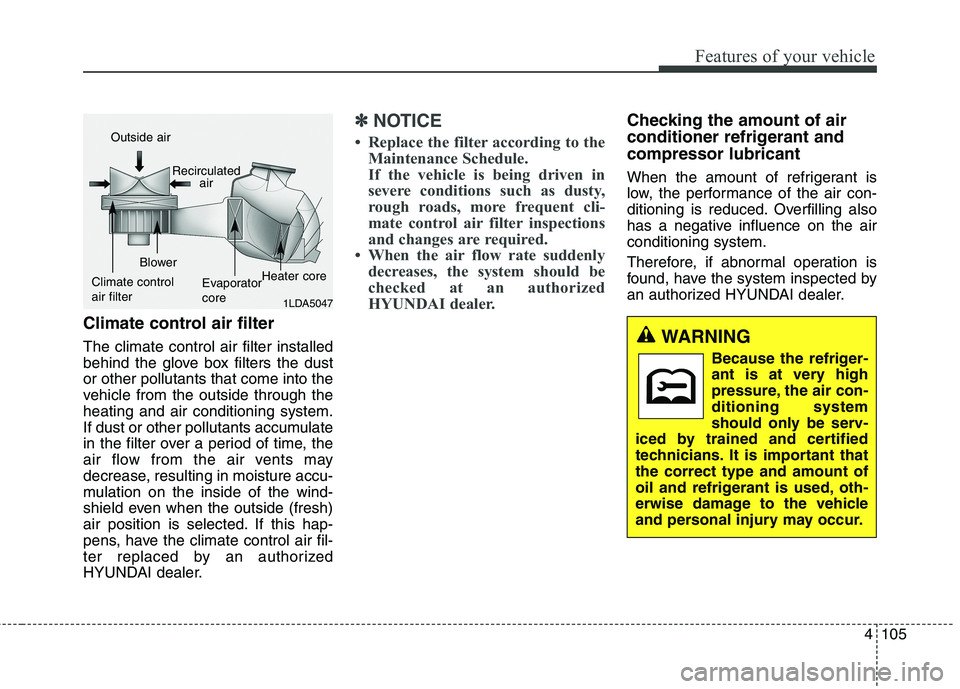
Climate control air filter
The climate control air filter installed
behind the glove box filters the dust
or other pollutants that come into the
vehicle from the outside through the
heating and air conditioning system.
If dust or other pollutants accumulate
in the filter over a period of time, the
air flow from the air vents may
decrease, resulting in moisture accu-
mulation on the inside of the wind-
shield even when the outside (fresh)
air position is selected. If this hap-
pens, have the climate control air fil-
ter replaced by an authorized
HYUNDAI dealer.
✽ ✽
NOTICE
• Replace the filter according to the
Maintenance Schedule.
If the vehicle is being driven in
severe conditions such as dusty,
rough roads, more frequent cli-
mate control air filter inspections
and changes are required.
• When the air flow rate suddenly
decreases, the system should be
checked at an authorized
HYUNDAI dealer.
Checking the amount of air
conditioner refrigerant and
compressor lubricant
When the amount of refrigerant is
low, the performance of the air con-
ditioning is reduced. Overfilling also
has a negative influence on the air
conditioning system.
Therefore, if abnormal operation is
found, have the system inspected by
an authorized HYUNDAI dealer.
1LDA5047
Outside air
Recirculated
air
Climate control
air filterBlower
Evaporator
coreHeater core
WARNING
Because the refriger-
ant is at very high
pressure, the air con-
ditioning system
should only be serv-
iced by trained and certified
technicians. It is important that
the correct type and amount of
oil and refrigerant is used, oth-
erwise damage to the vehicle
and personal injury may occur.
Page 193 of 476
Features of your vehicle
108 4
Manual heating and air condi-
tioning
The heating and cooling system can
be controlled manually by pressing
buttons or turning knob(s) other than
the AUTO button. In this case, the
system works sequentially according
to the order of buttons or knob(s)
selected.
1. Start the engine.
2. Set the mode to the desired posi-
tion.
For improving the effectiveness of
heating and cooling;
- Heating:
- Cooling:
3. Set the temperature control to the
desired position.
4. Set the air intake control to the
outside (fresh) air position.
5. Set the fan speed control to the
desired speed.
6. If air conditioning is desired, turn
the air conditioning system on.
Press the AUTO button in order to
convert to full automatic control of
the system.
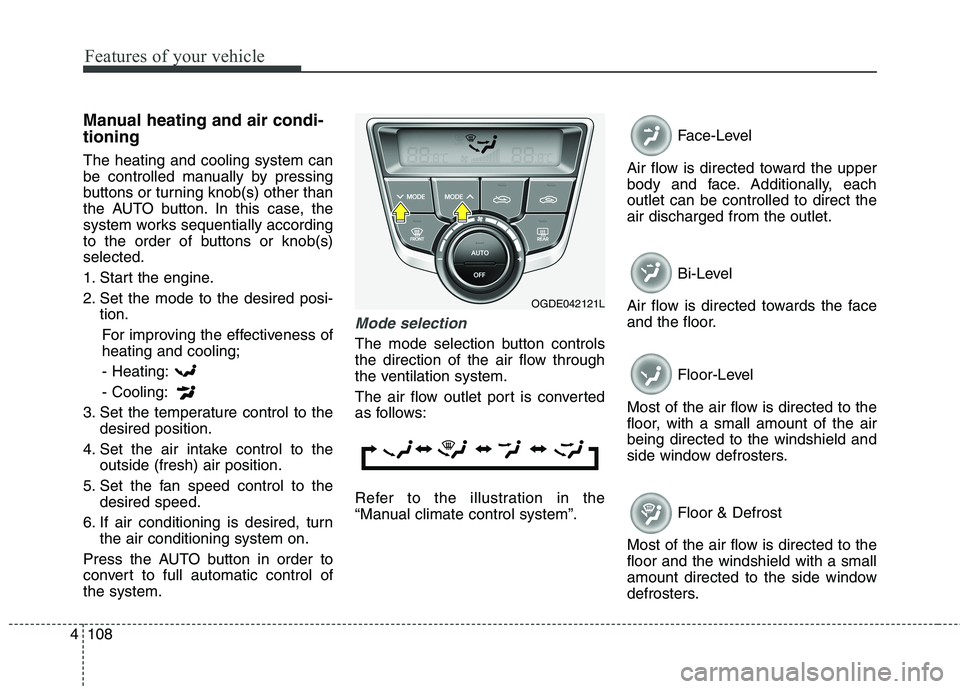
Mode selection
The mode selection button controls
the direction of the air flow through
the ventilation system.
The air flow outlet port is converted
as follows:
Refer to the illustration in the
“Manual climate control system”.Face-Level
Air flow is directed toward the upper
body and face. Additionally, each
outlet can be controlled to direct the
air discharged from the outlet.
Bi-Level
Air flow is directed towards the face
and the floor.
Floor-Level
Most of the air flow is directed to the
floor, with a small amount of the air
being directed to the windshield and
side window defrosters.
Floor & Defrost
Most of the air flow is directed to the
floor and the windshield with a small
amount directed to the side window
defrosters.
OGDE042121L
Page 194 of 476
4109
Features of your vehicle
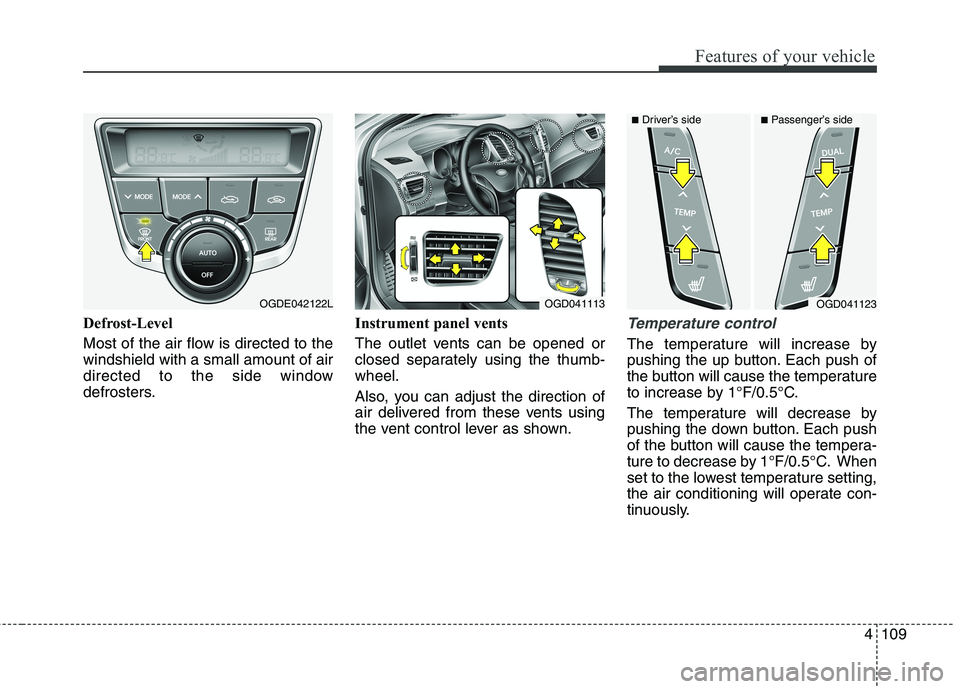
Defrost-Level
Most of the air flow is directed to the
windshield with a small amount of air
directed to the side window
defrosters.Instrument panel vents
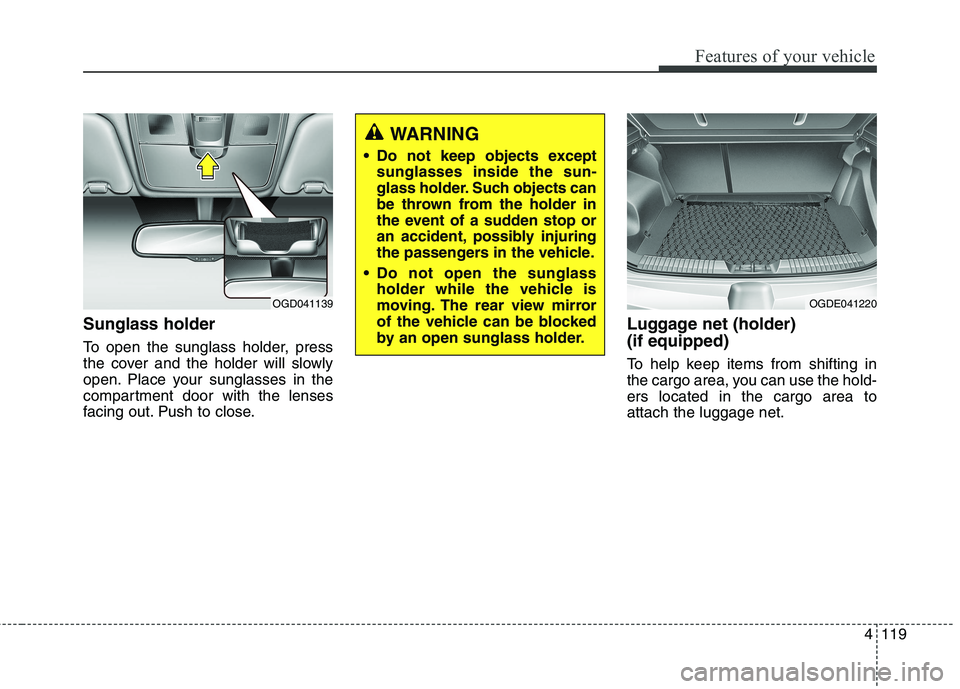
The outlet vents can be opened or
closed separately using the thumb-
wheel.
Also, you can adjust the direction of
air delivered from these vents using
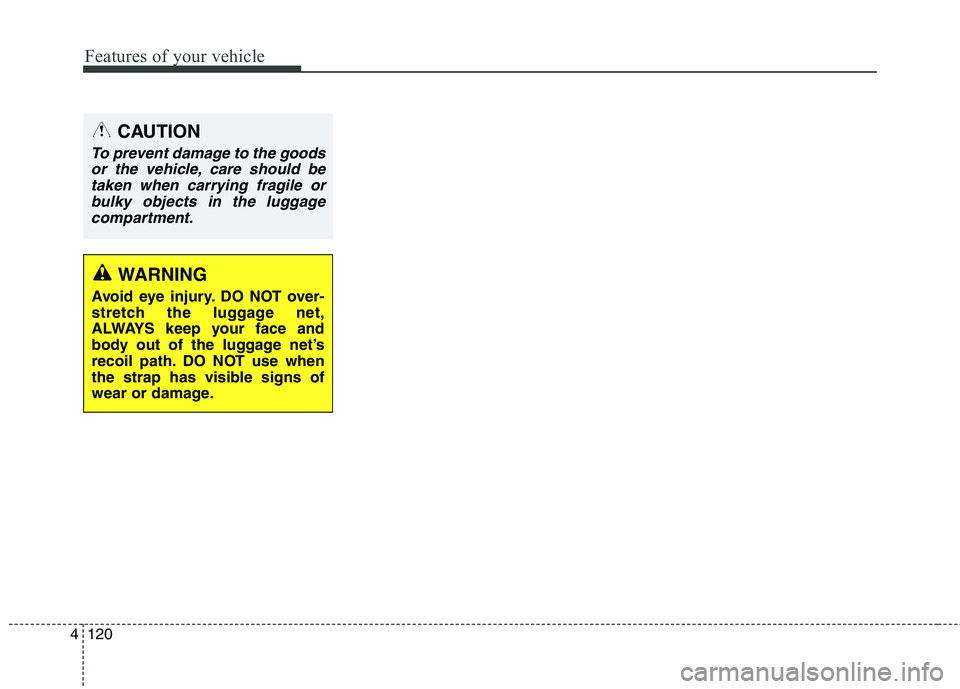
the vent control lever as shown.Temperature control
The temperature will increase by
pushing the up button. Each push of
the button will cause the temperature
to increase by 1°F/0.5°C.
The temperature will decrease by
pushing the down button. Each push
of the button will cause the tempera-
ture to decrease by 1°F/0.5°C. When
set to the lowest temperature setting,
the air conditioning will operate con-
tinuously.
OGDE042122LOGD041113OGD041123
■Driver’s side■Passenger’s side
Page 203 of 476
Features of your vehicle
118 4
Glove box
To open the glove box, push the but-
ton and the glove box will open.
Close the glove box after use.
✽ ✽
NOTICE
Do not keep food in the glove box for
an extended time.
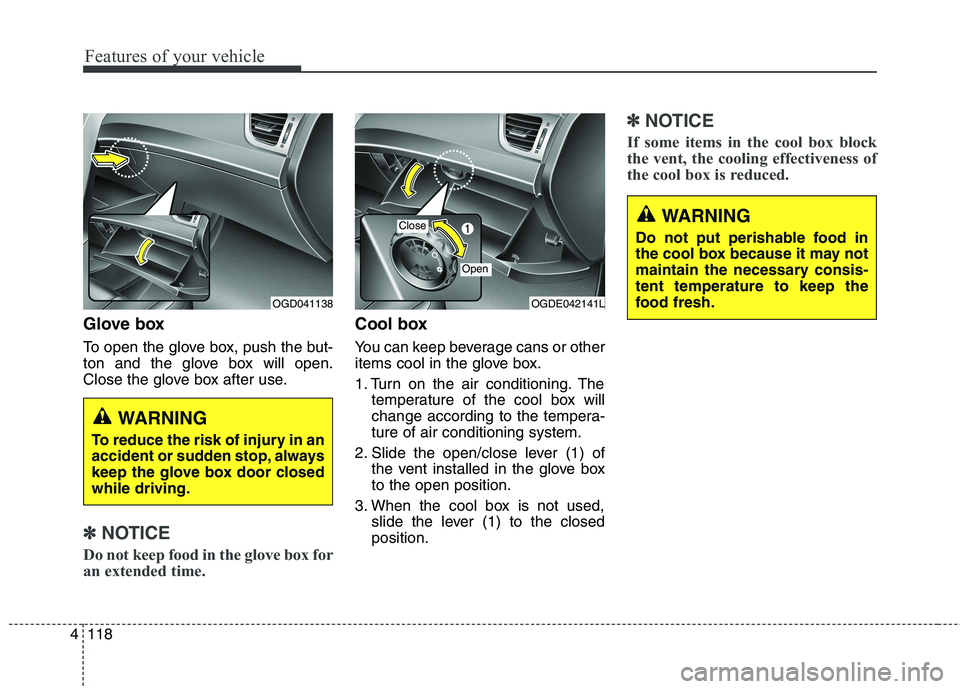
Cool box
You can keep beverage cans or other
items cool in the glove box.
1. Turn on the air conditioning. The
temperature of the cool box will
change according to the tempera-
ture of air conditioning system.
2. Slide the open/close lever (1) of
the vent installed in the glove box
to the open position.
3. When the cool box is not used,
slide the lever (1) to the closed
position.
✽ ✽
NOTICE
If some items in the cool box block
the vent, the cooling effectiveness of
the cool box is reduced.
WARNING
To reduce the risk of injury in an
accident or sudden stop, always
keep the glove box door closed
while driving.
OGDE042141LOGD041138
Close
Open
WARNING
Do not put perishable food in
the cool box because it may not
maintain the necessary consis-
tent temperature to keep the
food fresh.
Page 204 of 476
4119
Features of your vehicle
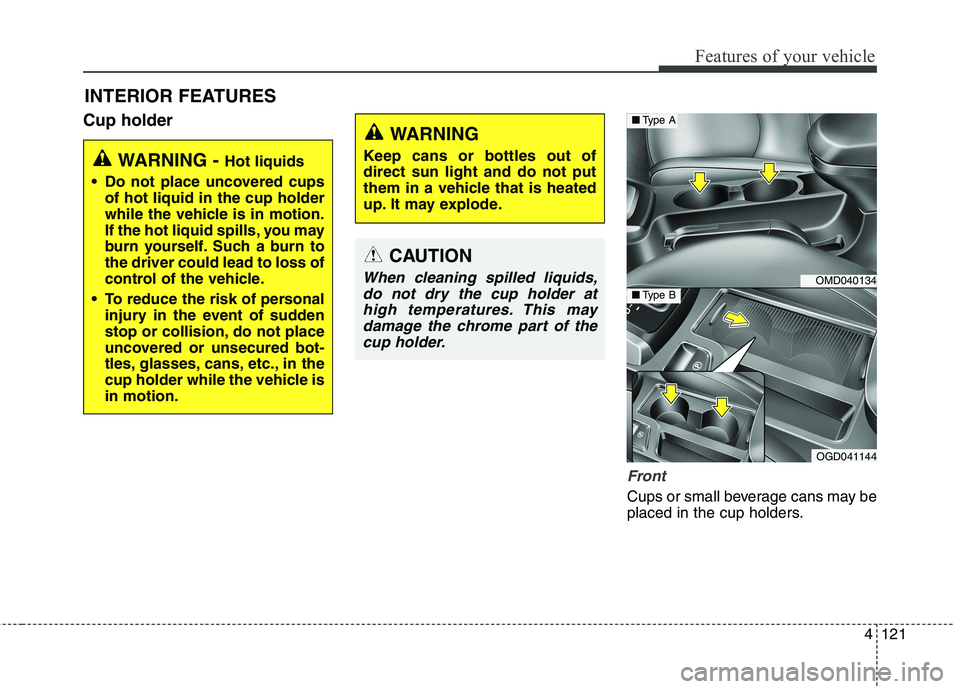
Sunglass holder
To open the sunglass holder, press
the cover and the holder will slowly
open. Place your sunglasses in the
compartment door with the lenses
facing out. Push to close.
Luggage net (holder)
(if equipped)
To help keep items from shifting in
the cargo area, you can use the hold-
ers located in the cargo area to
attach the luggage net.
WARNING
Do not keep objects except
sunglasses inside the sun-
glass holder. Such objects can
be thrown from the holder in
the event of a sudden stop or
an accident, possibly injuring
the passengers in the vehicle.
Do not open the sunglass
holder while the vehicle is
moving. The rear view mirror
of the vehicle can be blocked
by an open sunglass holder.
OGD041139OGDE041220
Page 205 of 476
Features of your vehicle
120 4
CAUTION
To prevent damage to the goods
or the vehicle, care should be
taken when carrying fragile or
bulky objects in the luggage
compartment.
WARNING
Avoid eye injury. DO NOT over-
stretch the luggage net,
ALWAYS keep your face and
body out of the luggage net’s
recoil path. DO NOT use when
the strap has visible signs of
wear or damage.
Page 206 of 476
4121
Features of your vehicle
Cup holder
Front
Cups or small beverage cans may be
placed in the cup holders.
INTERIOR FEATURES
WARNING - Hot liquids
Do not place uncovered cups
of hot liquid in the cup holder
while the vehicle is in motion.
If the hot liquid spills, you may
burn yourself. Such a burn to
the driver could lead to loss of
control of the vehicle.
To reduce the risk of personal
injury in the event of sudden
stop or collision, do not place
uncovered or unsecured bot-
tles, glasses, cans, etc., in the
cup holder while the vehicle is
in motion.
WARNING
Keep cans or bottles out of
direct sun light and do not put
them in a vehicle that is heated
up. It may explode.
CAUTION
When cleaning spilled liquids,
do not dry the cup holder at
high temperatures. This may
damage the chrome part of the
cup holder.OMD040134
OGD041144
■Type A
■Type B