2014 HYUNDAI COUPE ESP
[x] Cancel search: ESPPage 61 of 546

2-43
Safety system of your vehicle
2
Both rear outboard seats are
equipped with a pair of ISOFIX lower
anchorages as well as a correspon-
ding top-tether anchorage on the
back side of the rear seats.
(CRS with universal approval to ECE-
R44 need to be fixed additionally with
a top-tether strap connected to the
corresponding top-tether anchorage
point on the back side of the rear
seats.)
ISOFIX lower anchorages are locat-
ed between the seatback and the
seat cushion of the rear seat left and
right outboard seating positions.Securing a child restraint with
the “ISOFIX Anchorages System”
To install a ISOFIX-compatible child
restraint in either of the rear outboard
seating positions:
1. Move the seat belt buckle away
from the ISOFIX lower anchorages.
2. Move any other objects away from
the anchors that could prevent a
secure connection between the
child restraint and the ISOFIX lower
anchorages.
3. Place the child restraint on the vehi-
cle seat, then attach the seat to the
ISOFIX lower anchorages accord-
ing to the instructions provided by
the child restraint manufacturer.
4. Follow the child restraint instruc-
tions for properly adjusting and
tightening the lower attachments on
the child restraint to the ISOFIX
lower anchorages.Take the following precautions
when using the ISOFIX system:
•Read and follow all installation
instructions provided with
your child restraint system.
•To prevent the child from
reaching and taking hold of
unretracted seat belts, buckle
all unused rear seat belts and
retract the seat belt webbing
behind the child. Children can
be strangled if a shoulder belt
becomes wrapped around
their neck and the seat belt
tightens.
•NEVER attach more than one
child restraint to a single
anchorage. This could cause
the anchor or attachment to
come loose or break.
•Always have the ISOFIX sys-
tem inspected by your dealer
after an accident. An accident
can damage the ISOFIX sys-
tem and may not properly
secure the child restraint.
WARNING
ProCarManuals.com
Page 75 of 546
2-57
Safety system of your vehicle
2
During a moderate to severe frontal
collision, sensors will detect the vehi-
cle’s rapid deceleration. If the rate of
deceleration is high enough, the con-
trol unit will inflate the front air bags, at
the time and with the force needed.
The front air bags help protect the
driver and front passenger by
responding to frontal impacts in
which seat belts alone cannot provide
adequate restraint. When needed,
the side air bags help provide protec-
tion in the event of a side impact or
rollover by supporting the side upper
body area.
• Air bags are activated (able to
inflate if necessary) only when the
Engine Start/Stop button is in the
ON position.
• Air bags inflate in the event of a
severe frontal or side collision to
help protect the occupants from
serious physical injury.
• There is no single speed at which
the air bags will inflate. Generally,
air bags are designed to inflate
based upon the severity of a colli-
sion and its direction. These two
factors determine whether the sen-
sors produce an electronic deploy-
ment/inflation signal.• Air bag deployment depends on a
number of factors including vehicle
speed, angles of impact and the
density and stiffness of the vehicles
or objects which your vehicle
impacts during a collision. The
determining factors are not limited
to those mentioned above.
• The front air bags will completely
inflate and deflate in an instant. It is
virtually impossible for you to see
the air bags inflate during an acci-
dent. It is much more likely that you
will simply see the deflated air bags
hanging out of their storage com-
partments after the collision.
• In addition to inflating in serious
side collisions, vehicles equipped
with a rollover sensor, side and/or
curtain air bags will inflate if the
sensing system detects a rollover.
When a rollover is detected, curtain
air bags will remain inflated longer
to help provide protection from
ejection, especially when used in
conjunction with the seat belts. (if
equipped with a rollover sensor)• To help provide protection, the air
bags must inflate rapidly. The
speed of air bag inflation is a con-
sequence of extremely short time
in which to inflate the air bag
between the occupant and the
vehicle structures before the occu-
pant impacts those structures. This
speed of inflation reduces the risk
of serious or life-threatening
injuries and is thus a necessary
part of air bag design.
However, the rapid air bag inflation
can also cause injuries which can
include facial abrasions, bruises
and broken bones because the
inflation speed also causes the air
bags to expand with a great deal of
force.
• There are even circumstances
under which contact with the air
bag can cause fatal injuries, espe-
cially if the occupant is positioned
excessively close to the air bag.
ProCarManuals.com
Page 98 of 546
3-7
Convenient features of your vehicle
Loss of a smart key
A maximum of three Smart Keys
including Card Type Smart Key can
be registered to a single vehicle. If you
happen to lose your smart key, it is
recommended that you should imme-
diately take the vehicle and remaining
keys to your authorized HYUNDAI
dealer or tow the vehicle, if necessary.
Smart key precautions
The smart key will not work if any of
the following occur:
• The smart key is close to a radio
transmitter such as a radio station
or an airport which can interfere
with normal operation of the trans-
mitter.
• The smart key is near a mobile two
way radio system or a cellular
phone.
• Another vehicle’s smart key is being
operated close to your vehicle.
When the smart key does not work
correctly, open and close the door
with the mechanical key. If you have
a problem with the smart key, it is
recommended that you contact an
authorized HYUNDAI dealer.If the smart key is in close proximity
to your mobile phone, the signal
could be blocked by your mobile
phones normal operational signals.
This is especially important when the
phone is active such as making and
receiving calls, text messaging,
and/or sending/receiving emails.
Avoid placing the smart key and your
mobile phone in the same pants or
jacket pocket and always try to main-
tain an adequate distance between
the two devices.
3
ProCarManuals.com
Page 99 of 546
3-8
✽NOTICE
Changes or modifications not
expressly approved by the party
responsible for compliance could void
the user’s authority to operate the
equipment. If the keyless entry sys-
tem is inoperative due to changes or
modifications not expressly approved
by the party responsible for compli-
ance, it will not be covered by your
manufacturer’s vehicle warranty.
Restrictions in Handling Keys
When leaving keys with parking lot
and valet attendants, the following
procedures will ensure your vehicle’s
trunk and glove box compartment
can only be opened with the
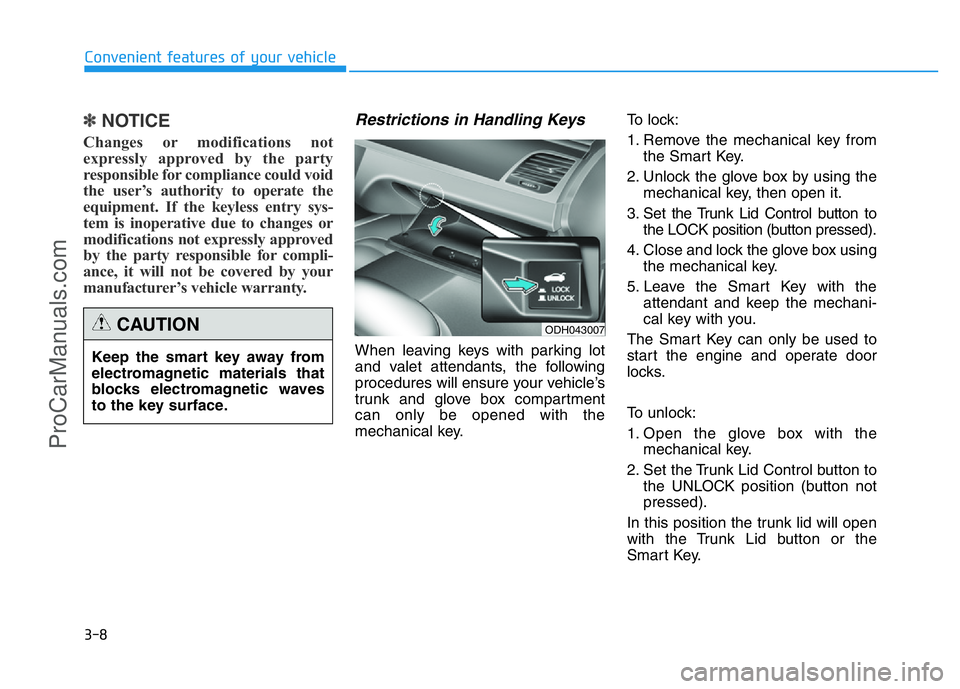
mechanical key.To lock:
1. Remove the mechanical key from
the Smart Key.
2. Unlock the glove box by using the
mechanical key, then open it.
3. Set the Trunk Lid Control button to
the LOCK position (button pressed).
4. Close and lock the glove box using
the mechanical key.
5. Leave the Smart Key with the
attendant and keep the mechani-
cal key with you.
The Smart Key can only be used to
start the engine and operate door
locks.
To unlock:
1. Open the glove box with the
mechanical key.
2. Set the Trunk Lid Control button to
the UNLOCK position (button not
pressed).
In this position the trunk lid will open
with the Trunk Lid button or the
Smart Key.
Convenient features of your vehicle
Keep the smart key away from
electromagnetic materials that
blocks electromagnetic waves
to the key surface.
CAUTIONODH043007
ProCarManuals.com
Page 139 of 546
3-48
Convenient features of your vehicle
(Continued)
•Do not use cellular phones
while refueling. Electric cur-
rent and/or electronic interfer-
ence from cellular phones can
potentially ignite fuel vapors
and cause a fire.
•Do not get back into a vehicle
once you have begun refuel-
ing. You can generate a build-
up of static electricity by touch-
ing, rubbing or sliding against
any item or fabric capable of
producing static electricity.
Static electricity discharge can
ignite fuel vapors causing a
fire. If you must re-enter the
vehicle, you should once again
eliminate potentially danger-
ous static electricity discharge
by touching a metal part of the
vehicle, away from the fuel filler
neck, nozzle or other gasoline
source, with your bare hand.
(Continued)
(Continued)
•When using an approved
portable fuel container, be
sure to place the container on
the ground prior to refueling.
Static electricity discharge
from the container can ignite
fuel vapors causing a fire.
Once refueling has begun,
contact between your bare
hand and the vehicle should
be maintained until the filling
is complete.
•Use only approved portable
plastic fuel containers designed
to carry and store gasoline.
(Continued)
(Continued)
•When refueling, always move
the shift lever to the P (Park)
position, set the parking
brake, and place the Engine
Start/Stop button to the OFF
position. Sparks produced by
electrical components related
to the engine can ignite fuel
vapors causing a fire.
•Do not use matches or a
lighter and do not smoke or
leave a lit cigarette in your
vehicle while at a gas station,
especially during refueling.
•Do not over-fill or top-off your
vehicle tank, which can cause
gasoline spillage.
(Continued)
ProCarManuals.com
Page 199 of 546
3-108
Convenient features of your vehicle
Daytime running light (DRL)
(if equipped)
The Daytime Running Lights (DRL)
can make it easier for others to see
the front of your vehicle during the
day, especially after dawn and before
sunset.
The DRL system will turn the dedi-
cated lamp OFF when:
1. The light switch is in the front fog
lamp or headlamp position, includ-
ing the operation that the head-
lamp is turned on automatically in
the AUTO light position.
2. The engine is turned off.
3. The hazard warning flasher is on.
4. You turn the turn signal light on.
- If you turn on the turn signal light,
only the corresponding daytime
running lights will turn off.
- If you turn on turn signal light with
the position light turned on, the
daytime running lights will turn off
but the position light remains on.
Headlamp leveling device
(if equipped)
It automatically adjusts the headlamp
beam level according to the number
of passengers and loading weight in
the luggage area.
And it offers proper headlamp beam
under various conditions. If the driver gets out of the vehi-
cle through other doors (except
driver's door), the battery saver
function does not operate and
the headlamp delay function
does not turn off automatically.
Therefore, It causes the battery
to be discharged. In this case,
make sure to turn off the lamp
before getting out of the vehicle.
CAUTION
If it does not work properly even
though your car is inclined
backward according to passen-
ger's posture, or the headlight
beam is irradiated to the high or
low position, we recommend
that the system be inspected by
an authorized HYUNDAI dealer.
Do not attempt to inspect or
replace the wiring yourself.
WARNING
ProCarManuals.com
Page 210 of 546

3-119
Convenient features of your vehicle
3
DRIVER ASSIST SYSTEM
Rear view camera
(if equipped)
The Rear View Camera will activate
when the engine is running and the
shift lever is in the R (Reverse) posi-
tion.Whenever the vehicle ignition is
cycled off and on, the rear view cam-
era will turn on when the shift lever is
put into R (Reverse).
This is a supplemental system that
shows behind the vehicle through the
navigation display while backing-up.
✽NOTICE
Always keep the camera lens clean.
The camera may not work normally
if the lens is covered with foreign
material.
ODH043072L
ODH043071L
The rear camera display is not a
safety device. It only serves to
assist the driver in identifying
objects directly behind the mid-
dle of the vehicle. The camera
does NOT cover the complete
area behind the vehicle.
WARNING
•Never rely solely on the rear
camera display when backing-
up.
•ALWAYS look around your
vehicle to make sure there are
no objects or obstacles before
moving the vehicle in any
direction to prevent a collision.
•Always pay close attention
when the vehicle is driven
close to objects, particularly
pedestrians, and especially
children.
WARNING
ProCarManuals.com
Page 211 of 546
3-120
Convenient features of your vehicle
Parking Assist System
(if equipped)
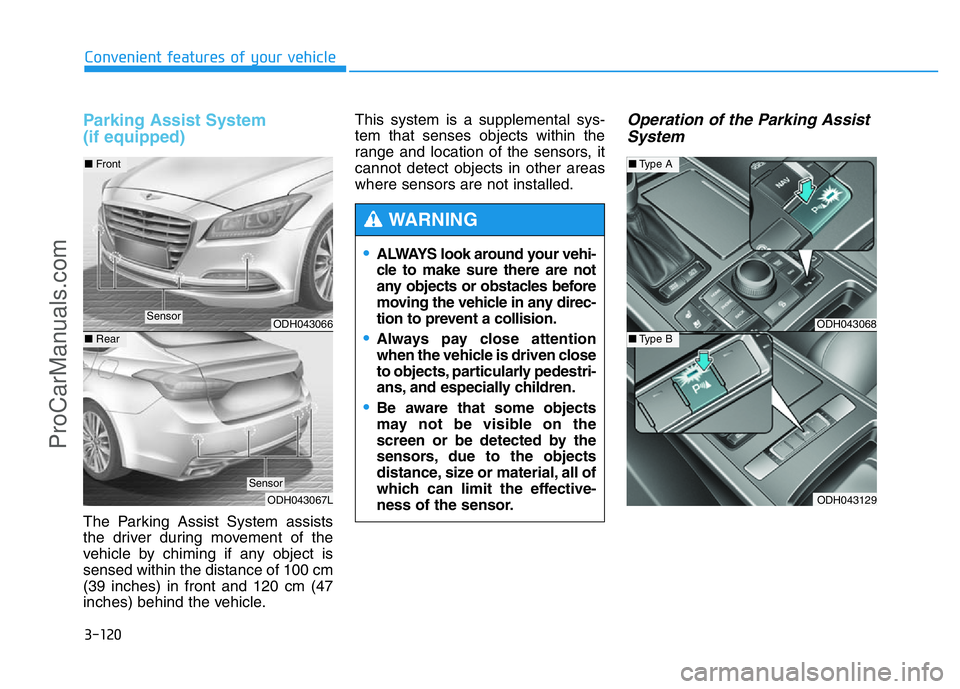
The Parking Assist System assists
the driver during movement of the
vehicle by chiming if any object is
sensed within the distance of 100 cm
(39 inches) in front and 120 cm (47
inches) behind the vehicle.This system is a supplemental sys-
tem that senses objects within the
range and location of the sensors, it
cannot detect objects in other areas
where sensors are not installed.
Operation of the Parking Assist
System
•ALWAYS look around your vehi-
cle to make sure there are not
any objects or obstacles before
moving the vehicle in any direc-
tion to prevent a collision.
•Always pay close attention
when the vehicle is driven close
to objects, particularly pedestri-
ans, and especially children.
•Be aware that some objects
may not be visible on the
screen or be detected by the
sensors, due to the objects
distance, size or material, all of
which can limit the effective-
ness of the sensor.
WARNING
ODH043068
ODH043129
■Type A
■Type BODH043066
ODH043067L
■Front
■Rear
Sensor
Sensor
ProCarManuals.com