Page 266 of 422

Your vehicle can carry a large
amount of cargo in the pickup bed.
However, the pickup bed is not
intended f or carrying passengers.
Peoplewhorideinthepickupbed
can be very seriously injured or
killed in a crash (see page ).
Make sure your cargo is properly
loaded and all items are secured so
they will not shif t or f all out while
driving.When loading and unloading cargo,
make sure all passengers or any
objects are clear of the tailgate
bef ore opening or closing it. The
tailgate should be closed securely
bef ore driving when it is not used
as the extended pickup bed.
The maximum allowable loading
weight on the pickup bed is 1,100
lbs (500 kg). Do not exceed the
load limit (see page ).
Distribute cargo evenly on the
pickup bed. Place the heaviest
items on the bottom and as f ar
f orward as possible of the rear
axle. Tie down and secure all
items that could be thrown out of
the vehicle during a crash or
sudden stop.If you stack items higher than the
bed sides, tailgate, or back window,
secure them with a net or cover.
This will reduce the risk of items
beingthrownoutof thepickup
bed during a crash or sudden stop.
When the tailgate is dropped open,
itcanbeusedasanextended
pickup bed. The maximum
allowable weight on the tailgate
while driving is 300 lbs (136 kg).
Exceeding this limit could damage
the tailgate.
Carrying heavy cargo in the
pickup bed will raise your vehicle’s
center of gravity. This can affect
handling and perf ormance. Drive
more slowly and cautiously, and
allow extra time and distance f or
braking.
8
258
CONT INUED
Carrying Cargo in the Pickup Bed
Carrying Cargo
261
Allowing passengers to ride in
the pickup bed or on the tailgate
can result in death or serious
injury in a crash.
Make sure all passengers ride
in a seat and wear a seat belt
properly.
12/08/09 16:33:59 31SJC670_268
Bef ore Driving
Page 272 of 422

Youshoulddothefollowingchecks
and adjustments bef ore you drive
your vehicle.Make sure all windows, mirrors,
and outside lights are clean and
unobstructed. Remove f rost, snow,
or ice.
Check that the hood is f ully closed.
Check that the tailgate is f ully
closed when it is not used as an
extended pickup bed.
Visually check the tires. If a tire
looks low, use a gauge to check
its pressure.
Check that any items you may be
carrying are stored properly or
f astened down securely. Check the adjustment of the
inside and outside mirrors (see
page ).
Check the steering wheel
adjustment (see page ).
Make sure the doors and In-
Bed Trunk are securely
closed and locked.
Fasten your seat belt. Check that
your passengers have f astened
their seat belts (see page ).
Check the seat adjustment (see
pages and ). When you start the engine, check
the gauges and indicators in the
instrument panel, and the
messages on the information
display or multi-information
display (depending on the model)
(see pages , ,
,
).
1.
2.
3.
4.
5.
6. 8. 7.
9.
10.
11.
121 133
99
16
61 76 77
119
Preparing to Drive
Driving
267
12/08/09 16:34:35 31SJC670_274
and 89
Page 290 of 422
Make sure the parking brake is
f ully released bef ore driving away.
Driving with the parking brake
partially set can overheat or
damage the rear brakes.
Make sure the moonroof (if
equipped) and the
windows are closed.
Turn of f the lights.
Place any packages, valuables, etc.
in the cargo area in your vehicle or
the In-Bed Trunk, or take them
with you.
Lock the doors.
Check the indicator on the driver’s
door to verify that the security
system is set.
Never park over dry leaves, tall
grass, or other f lammable
materials. The hot three way
catalytic converter could cause
these materials to catch on fire.If the vehicle is facing uphill,
turn the front wheels away
from the curb.
If the vehicle is facing downhill,
turn the front wheels toward
the curb.
On vehicles with security system
Parking
Parking T ips
285
12/08/09 16:36:43 31SJC670_292
Driving
Page 350 of 422

Slide the new wiper blade into the
holder until the tabs lock.
Slide the wiper blade assembly
onto the wiper arm. Make sure it
locks in place.
Lower the wiper arm against
the window.
Turn the ignition switch to the ON
(II) position, and turn the wiper
switch of f to return the wiper arms
to the parked position.Clean the wheels as you would the
rest of the exterior. Wash them
with the same solution, and rinse
them thoroughly.
Aluminum alloy wheels have a
protective clear-coat that keeps
the aluminum f rom corroding and
tarnishing. Cleaning the wheels
with harsh chemicals (including
some commercial wheel cleaners)
or a stif f brush can damage the
clear-coat. To clean the wheels,
use a mild detergent and a sof t
brush or sponge. To saf ely operate your vehicle, your
tires must be the proper type and
size, in good condition with adequate
tread, and correctly inf lated.
The f ollowing pages give more
detailed inf ormation on how to take
care of your tires and what to do
when they need to be replaced.
6.
7.
8.
9.
If equipped
Wheels
T ires
Wiper Blades, Wheels, Tires
345
Using tires that are excessively
worn or improperly inflated can
cause a crash in which you can
be seriously hurt or killed.
Follow all instructions in this
owner’s manual regarding tire
inflation and maintenance.
12/08/09 16:44:40 31SJC670_352
Maint enance
Page 358 of 422
�µ
If you need to connect the battery to
a charger, disconnect both cables to
prevent damaging your vehicle’s
electrical system. Always disconnect
the negative ( ) cable first, and
reconnect it last.
Check the terminals f or corrosion (a
white or yellowish powder). To
remove it, cover the terminals with a
solution of baking soda and water. It
will bubble up and turn brown. When
this stops, wash it of f with plain
water. Dry off the battery with a
cloth or paper towel. Coat the
terminals with grease to help prevent
f uture corrosion.
If additional battery maintenance is
needed, see your dealer or a
qualif ied technician.
Battery posts,
terminals, and related accessories
contain lead and lead compounds.
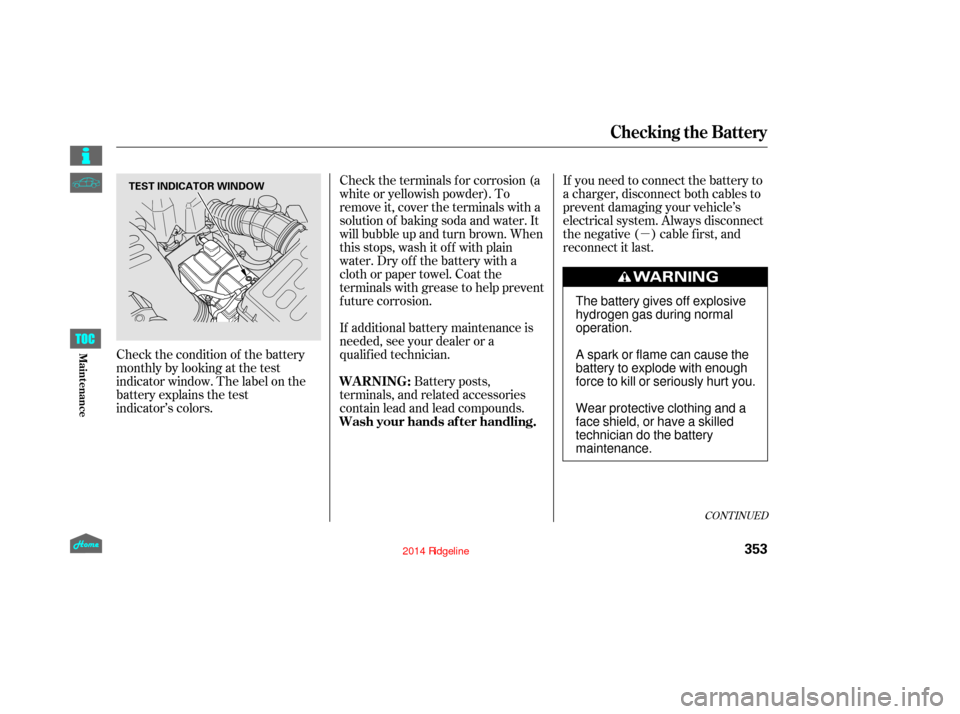
Check the condition of the battery
monthly by looking at the test
indicator window. The label on the
battery explains the test
indicator’s colors.
CONT INUED
WARNING:
Wash your hands af ter handling.
Checking the Battery
353
TEST INDICATOR WINDOW
The battery gives off explosive
hydrogen gas during normal
operation.
A spark or flame can cause the
battery to explode with enough
force to kill or seriously hurt you.
Wear protective clothing and a
face shield, or have a skilled
technician do the battery
maintenance.
12/08/09 16:45:51 31SJC670_360
Maint enance
Page 359 of 422

Block the rear wheels.
If the vehicle is to be stored f or a
longer period, it should be
supported on jackstands so the
tires are of f the ground.
Leave one window open slightly (if
the vehicle is being stored
indoors).
Disconnect the battery.
Support the f ront wiper blade
arms with a f olded towel or rag so
they do not touch the windshield.
To minimize sticking, apply a
silicone spray lubricant to all door,
In-Bed Trunk lid, and tailgate seals.
Also, apply a vehicle body wax to
the painted surfaces that mate
with the door, In-Bed Trunk lid
and tailgate seals.
If your vehicle’s battery is
disconnected, or goes dead, the time
setting may be lost. To reset the time,
see page .
If your vehicle’s battery is
disconnected or goes dead, the audio
system may disable itself . The next
timeyouturnontheradioyouwill
see ‘‘CODE’’ in the f requency display.
Use the preset bars to enter the code
(see page ).
The navigation system will also
disableitself.Thenexttimeyouturn
on the ignition switch, the system
will require you to enter a PIN
bef ore it can be used. Ref er to the
navigation system manual.
If you need to park your vehicle f or
an extended period (more than 1
month), there are several things you
should do to prepare it f or storage.
Proper preparation helps prevent
deterioration and makes it easier to
get your vehicle back on the road. If
possible, store your vehicle indoors.
Leave the parking brake off. Put
the transmission in Park. Cleantheinterior.Makesurethe
carpeting, floor mats, etc., are
completely dry. Wash and dry the exterior
completely. Fill the f uel tank.
207
205On models without navigation system
On models with navigation systemVehicle Storage
Checking the Battery, Vehicle Storage
354
12/08/09 16:46:02 31SJC670_361
Maint enance
Page 377 of 422

Saf ely pull of f the road, and shut
of f the engine. Turn on the hazard
warning indicators.
Let the vehicle sit f or a minute.
Open the hood, and check the oil
level (see page ). An engine
very low on oil can lose pressure
during cornering and other driving
maneuvers.
If necessary, add oil to bring the
level back to the full mark on the
dipstick (see page ).
Start the engine, and watch the oil
pressure indicator. If it does not go
out within 10 seconds, turn of f the
engine. There is a mechanical
problem that needs to be repaired
bef ore you can continue driving
(seeon
).
This indicator should never come on
when the engine is running. If it
starts flashing or stays on, the oil
pressure has dropped very low or
lost pressure. Serious engine
damage is possible, and you should
take immediate action.
If the charging system indicator
comes on brightly when the
engine is running, the battery
is not being charged.
You will also see a ‘‘CHECK
CHARGING SYSTEM’’ message on
the multi-information display (see
page ).
Immediately turn of f all electrical
accessories. Try not to use other
electrically operated controls such as
the power windows. Keep the engine
running; starting the engine will
discharge the battery rapidly.
Go to a service station or garage
where you can get technical
assistance.
You will also see a ‘‘CHECK
ENGINE OIL LEVEL’’ message on
the multi-information display when
this indicator comes on.
The indicator notif ies you of low oil
pressure and does not measure the
oil level. Check your vehicle’s oil
level at each ref ueling. 1.
2.
3.
4.
90
251
324
On models with navigation system On models with navigation system
Emergency Towing
L ow Oil Pressure
Indicator
Charging System
Indicator
L ow Oil Pressure Indicator, Charging System Indicator
372
Running the engine with low oil
pressure can cause serious mechanical
damage almost immediately. Turn of f
the engine as soon as you can saf ely get
the vehicle stopped.
12/08/09 16:48:10 31SJC670_379
T aking Care of t he Unexpect ed
page 381
Page 382 of 422
Check the smaller f uses in the
under-hood f use boxes and all the
fuses in the interior fuse box by
pulling out each one with the f use
puller provided in the primary
under-hood f use box.
Turn the ignition switch to the
LOCK (0) position. Make sure the
headlights and all other
accessories are of f .
Check each of the large f uses in
the primary under-hood f use box
by looking through the side
window at the wire inside.
Removing these f uses requires a
Phillips-head screwdriver.
R emove the cover f rom
the fusebox. 4.
3.
1.
2.
CONT INUED
Fuses
377
BLOWN
FUSE PULLER
BLOWN
FUSE
12/08/09 16:48:45 31SJC670_384
T aking Care of t he Unexpect ed