Page 101 of 422

�µIf you remove the key f rom the
ignition switch with the headlight
control dial on, but do not open the
door, the lights will turn of f af ter 10
minutes.
Turning the dial to
the ‘‘ ’’ position turns on the
parking lights, taillights, instrument
panel lights, and license plate lights.
Turning the dial to the ‘‘ ’’
position turns on the headlights. If
you leave the lights on and remove
the key from the ignition switch, you
will hear a reminder chime when you
open the driver’s door.
When the dial is in the ‘‘ ’’ or
‘‘ ’’ position, the lights on
indicator comes on as a reminder.
This indicator stays on if you leave
the lights on and turn the ignition
switch to the ACCESSORY (I) or
LOCK (0) position. The automatic lighting of f f eature
turns off the headlights, all other
exterior lights, and the instrument
panel lights within 15 seconds of
removing the key from the ignition
switch and closing the driver’s door. The lights will turn on again when
you unlock or open the driver’s
door. If you unlock the door, but
This feature activates if you leave
the headlight control dial in the
‘‘ ’’ or ‘‘ ’’ position, remove
the key, then open and close the
driver’s door. do not open it within 15 seconds,
the lights go off. With the
driver’s door open, you will hear a
lights-on reminder chime.
Automatic Lighting Of f Feature
Headlights
Headlights
96
12/08/09 16:11:56 31SJC670_103
Inst rument s and Cont rols
Page 103 of 422
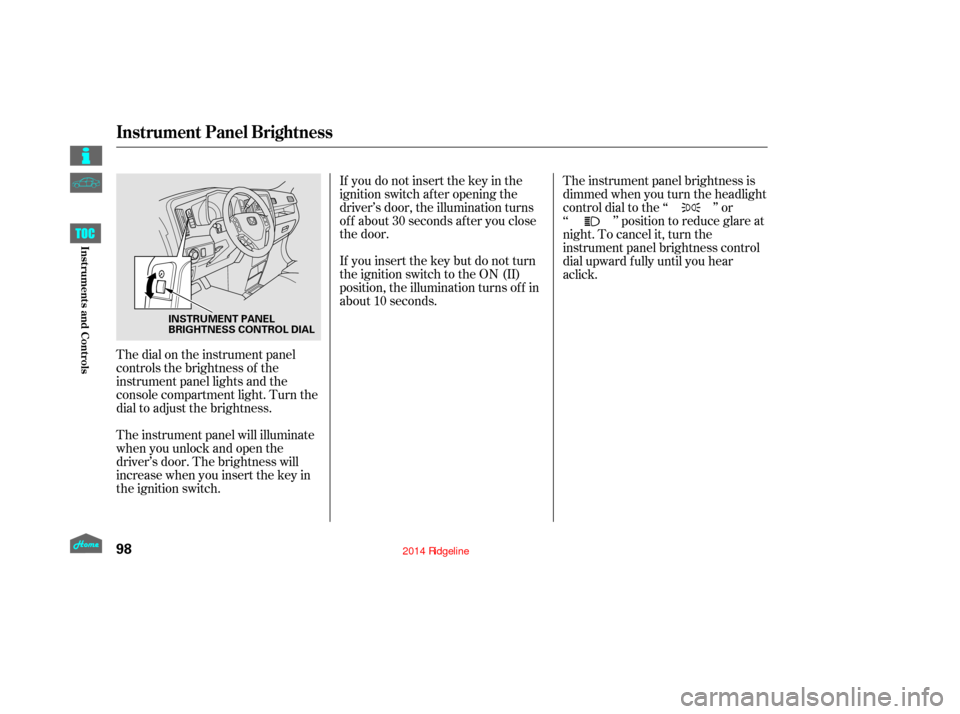
The dial on the instrument panel
controls the brightness of the
instrument panel lights and the
console compartment light. Turn the
dial to adjust the brightness.
The instrument panel will illuminate
when you unlock and open the
driver’s door. The brightness will
increase when you insert the key in
the ignition switch.If you do not insert the key in the
ignition switch af ter opening the
driver’s door, the illumination turns
of f about 30 seconds af ter you close
the door.
If you insert the key but do not turn
the ignition switch to the ON (II)
position, the illumination turns of f in
about 10 seconds.
The instrument panel brightness is
dimmedwhenyouturntheheadlight
controldialtothe‘‘ ’’or
‘‘ ’’ position to reduce glare at
night. To cancel it, turn the
instrument panel brightness control
dial upward fully until you hear
Instrument Panel Brightness
98
INSTRUMENT PANEL
BRIGHTNESS CONTROL DIAL
12/08/09 16:12:08 31SJC670_105
Inst rument s and Cont rols
a click.
Page 105 of 422
These keys contain electronic
circuits that are activated by the
immobilizer system. They will not
work to start the engine if the
circuits are damaged.Protect the keys f rom direct
sunlight, high temperature, and
high humidity.
Donotdropthekeysorsetheavy
objects on them.
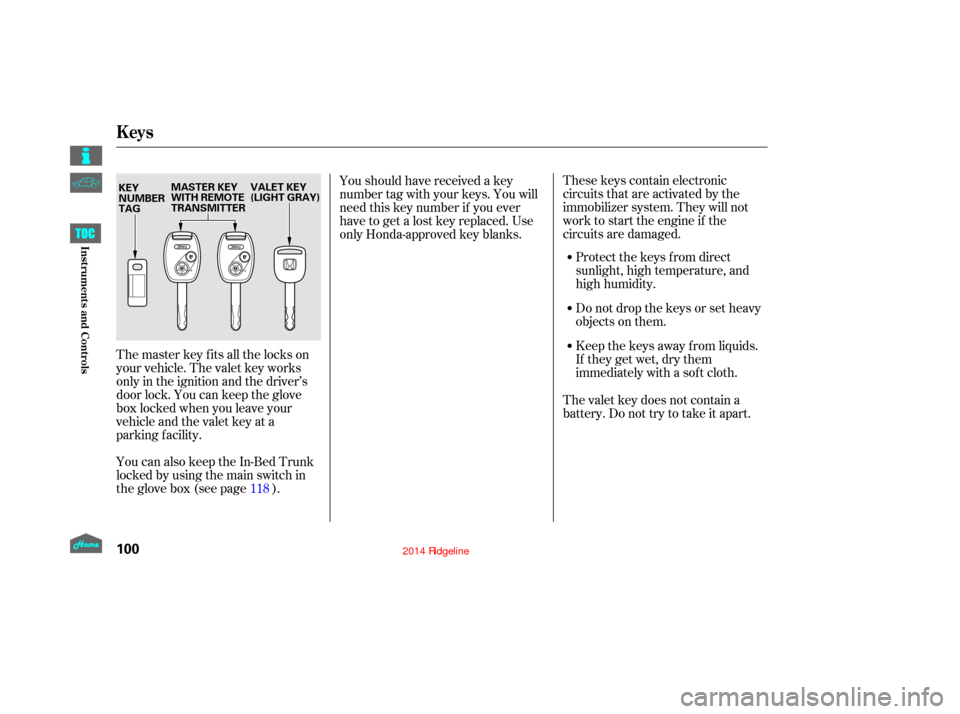
The master key fits all the locks on
your vehicle. The valet key works
only in the ignition and the driver’s
door lock. You can keep the glove
box locked when you leave your
vehicle and the valet key at a
parking facility.
You can also keep the In-Bed Trunk
locked by using the main switch in
theglovebox(seepage ). Youshouldhavereceivedakey
number tag with your keys. You will
need this key number if you ever
have to get a lost key replaced. Use
only Honda-approved key blanks.
Keep the keys away f rom liquids.
If they get wet, dry them
immediately with a sof t cloth.
The valet key does not contain a
battery. Do not try to take it apart.
118
Keys
100
VALET KEY
(LIGHT GRAY)
MASTER KEY
WITH REMOTE
TRANSMITTER
KEY
NUMBER
TAG
12/08/09 16:12:24 31SJC670_107
Inst rument s and Cont rols
Page 106 of 422

When you turn the ignition switch to
the ON (II) position, the immobilizer
system indicator should come on f or
a f ew seconds, then go of f . If the
indicator starts to blink, it means the
system does not recognize the
coding of the key. Turn the ignition
switch to the LOCK (0) position,
remove the key, reinsert it, and turn
the ignition switch to the ON (II)
position again.Do not attempt to alter this system
or add other devices to it. Electrical
problems could result that may make
your vehicle inoperable. If the system repeatedly does not
recognize the coding of your key,
contact your dealer.
The immobilizer system protects
your vehicle f rom thef t. If an
improperly coded key (or other
device) is used, the engine’s f uel
system is disabled.
If you have lost your key and cannot
start the engine, contact your dealer. The system may not recognize your
key’s coding if another immobilizer
key or other metal object (i.e. key
chain) is near the ignition switch
when you insert the key.This device complies with the
appropriate requirements or the
required standards. See page f or
more inf ormation.
400
Immobilizer System
101
Always take the ignition key with you
whenever you leave the vehicle alone.
12/08/09 16:12:31 31SJC670_108
Inst rument s and Cont rols
Page 107 of 422
�µ�µ
�µ �µ
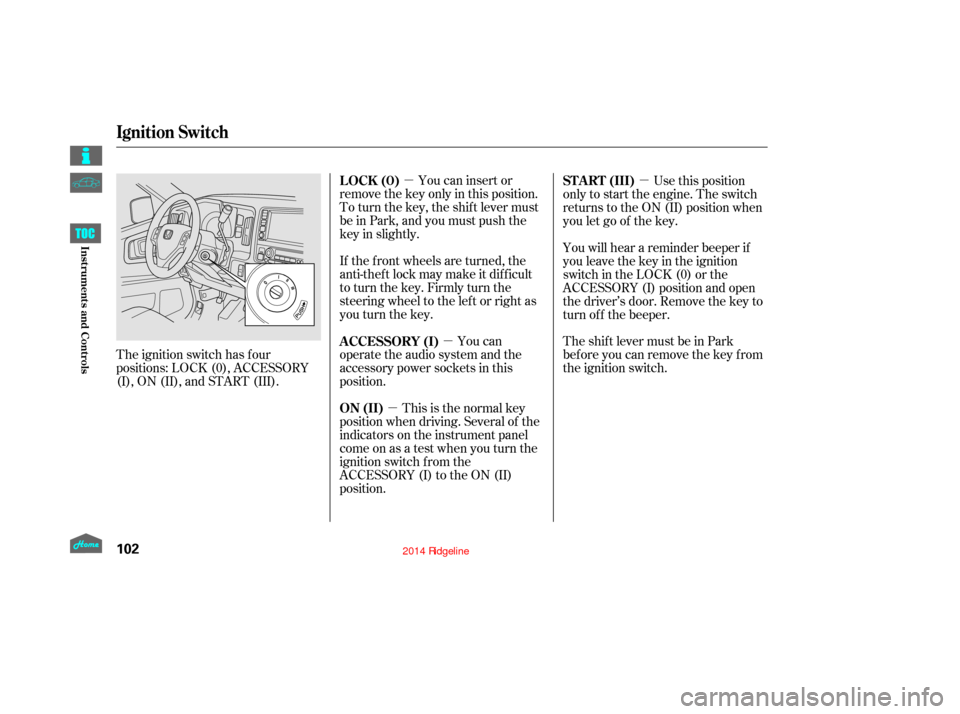
The ignition switch has f our
positions: LOCK (0), ACCESSORY
(I), ON (II), and START (III). You can insert or
remove the key only in this position.
To turn the key, the shift lever must
be in Park, and you must push the
key in slightly.
If the f ront wheels are turned, the
anti-theft lock may make it difficult
to turn the key. Firmly turn the
steering wheel to the lef t or right as
you turn the key.
You can
operate the audio system and the
accessory power sockets in this
position.
This is the normal key
position when driving. Several of the
indicators on the instrument panel
come on as a test when you turn the
ignition switch f rom the
ACCESSORY (I) to the ON (II)
position. Use this position
only to start the engine. The switch
returns to the ON (II) position when
you let go of the key.
You will hear a reminder beeper if
you leave the key in the ignition
switch in the LOCK (0) or the
ACCESSORY (I) position and open
the driver’s door. Remove the key to
turn of f the beeper.
TheshiftlevermustbeinPark
bef ore you can remove the key f rom
the ignition switch.
LOCK (0)
A CCESSORY (I)
ON (II) ST A RT (III)
Ignition Switch
102
12/08/09 16:12:39 31SJC670_109
Inst rument s and Cont rols
Page 108 of 422
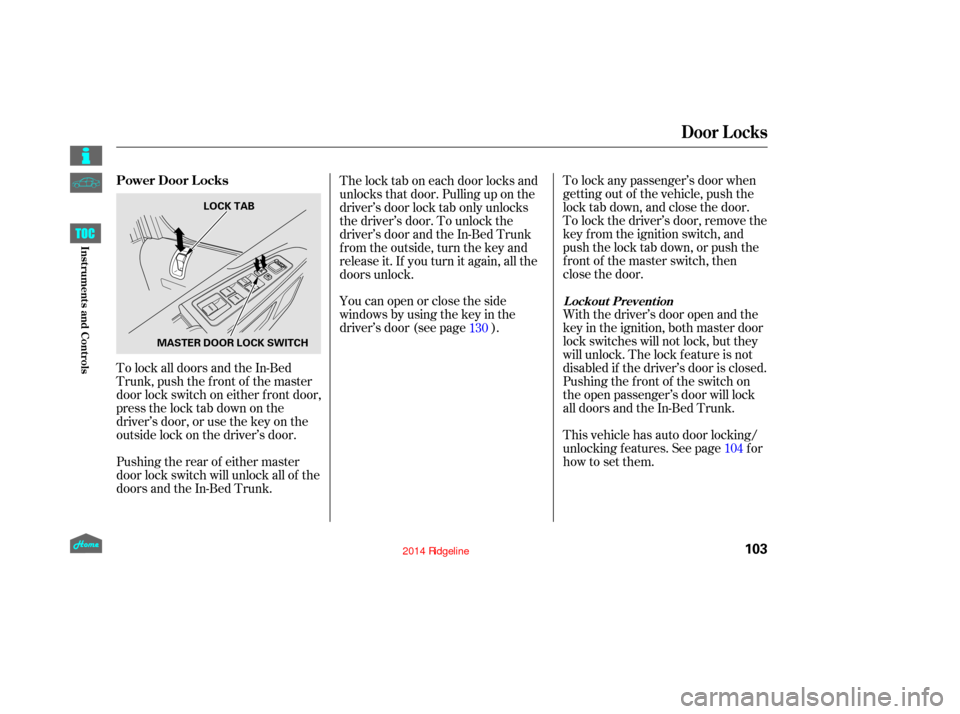
To lock any passenger’s door when
getting out of the vehicle, push the
lock tab down, and close the door.
To lock the driver’s door, remove the
key f rom the ignition switch, and
push the lock tab down, or push the
f ront of the master switch, then
close the door.
With the driver’s door open and the
key in the ignition, both master door
lock switches will not lock, but they
will unlock. The lock f eature is not
disabled if the driver’s door is closed.
Pushing the f ront of the switch on
the open passenger’s door will lock
all doors and the In-Bed Trunk.
The lock tab on each door locks and
unlocks that door. Pulling up on the
driver’s door lock tab only unlocks
the driver’s door. To unlock the
driver’s door and the In-Bed Trunk
f rom the outside, turn the key and
release it. If you turn it again, all the
doors unlock.
Youcanopenorclosetheside
windows by using the key in the
driver’s door (see page ).
To lock all doors and the In-Bed
Trunk, push the f ront of the master
door lock switch on either f ront door,
pressthelocktabdownonthe
driver’s door, or use the key on the
outside lock on the driver’s door. This vehicle has auto door locking/
unlocking f eatures. See page f or
how to set them.
Pushing the rear of either master
door lock switch will unlock all of the
doors and the In-Bed Trunk. 130
104
L ockout Prevent ion
Power Door L ocks
Door L ocks
103
MASTER DOOR LOCK SWITCHLOCK TAB
12/08/09 16:12:47 31SJC670_110
Inst rument s and Cont rols
Page 115 of 422
�µ
�µ �µ
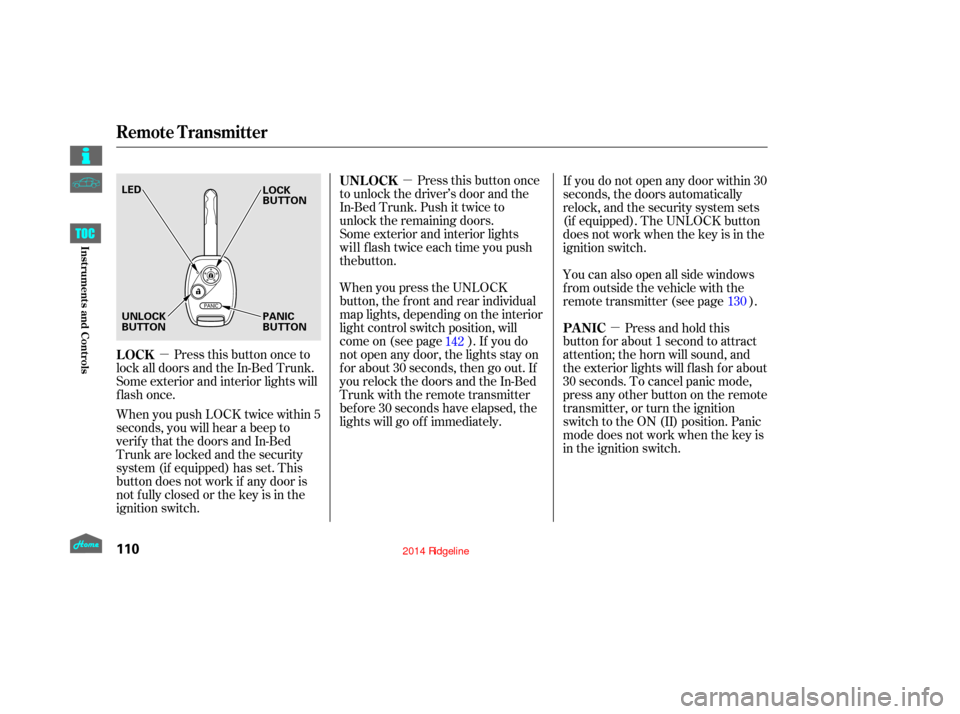
Press this button once
to unlock the driver’s door and the
In-Bed Trunk. Push it twice to
unlock the remaining doors.
Some exterior and interior lights
When you press the UNLOCK
button, the f ront and rear individual
map lights, depending on the interior
light control switch position, will
come on (see page ). If you do
not open any door, the lights stay on
f or about 30 seconds, then go out. If
you relock the doors and the In-Bed
Trunk with the remote transmitter
bef ore 30 seconds have elapsed, the
lights will go of f immediately.
Press this button once to
lock all doors and the In-Bed Trunk.
Some exterior and interior lights will
flash once.
When you push LOCK twice within 5
seconds, you will hear a beep to
verify that the doors and In-Bed
Trunk are locked and the security
system (if equipped) has set. This
button does not work if any door is
not f ully closed or the key is in the
ignition switch. Press and hold this
button for about 1 second to attract
attention; the horn will sound, and
the exterior lights will f lash f or about
30 seconds. To cancel panic mode,
press any other button on the remote
transmitter, or turn the ignition
switch to the ON (II) position. Panic
mode does not work when the key is
in the ignition switch. If you do not open any door within 30
seconds, the doors automatically
relock, and the security system sets
(if equipped). The UNLOCK button
does not work when the key is in the
ignition switch.
You can also open all side windows
f rom outside the vehicle with the
remote transmitter (see page ).
142 130
UNL OCK
LOCK PA NIC
Remote Transmitter
110
LED
UNLOCK
BUTTON
PANIC
BUTTON LOCK
BUTTON
12/08/09 16:13:50 31SJC670_117
Inst rument s and Cont rols
the button. will flash twice each time you push
Page 117 of 422
�´
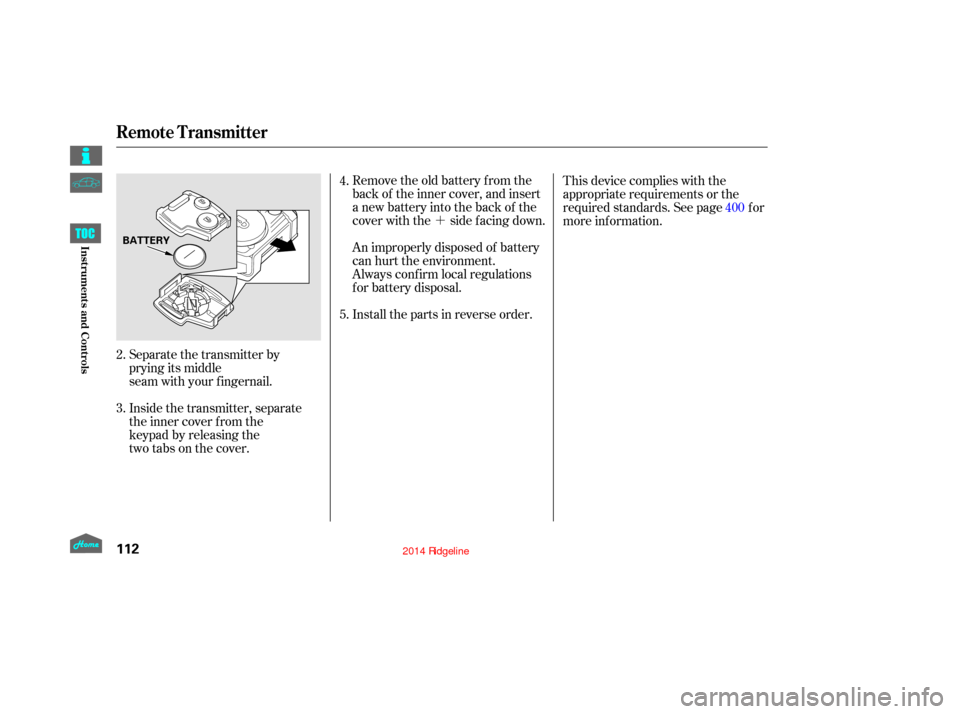
Remove the old battery from the
back of the inner cover, and insert
a new battery into the back of the
cover with the side f acing down.
An improperly disposed of battery
can hurt the environment.
Always conf irm local regulations
for battery disposal.
Install the parts in reverse order.
Separate the transmitter by
prying its middle
seam with your fingernail.
Inside the transmitter, separate
the inner cover from the
keypad by releasing the
two tabs on the cover. This device complies with the
appropriate requirements or the
required standards. See page f or
more inf ormation.
4.
5.
2.
3. 400
Remote Transmitter
112
BATTERY
12/08/09 16:14:07 31SJC670_119
Inst rument s and Cont rols