Page 98 of 488
97
Controls
This chapter explains how to operate the various controls necessary for driving.
Setting the Clock................................ 98
Locking and Unlocking the Doors
Key Types and Functions .................... 99
Locking/Unlocking the Doors from the Outside .......................................... 101
Locking/Unlocking the Doors from the Inside ............................................. 103
Childproof Door Locks ..................... 104
Auto Door Locking/Unlocking .......... 105
Opening and Closing the Tailgate ...
110
Security System ...... .......................... 118
Immobilizer System .......................... 118
Security System Alarm
*....................118Opening and Closing the Windows ..... 120
Opening and Closing the Moonroof *......123Operating the Switches Around the
Steering Wheel Ignition Switch ................................. 124
Turn Signals ..................................... 125
Light Switches.................................. 125
Fog Lights
*......................................127
Daytime Running Lights ................... 127
Wipers and Washers ........................ 128
Brightness Control ........................... 130
Rear Defogger/Heat ed Doo
r Mirror *
Button ........................................... 131
Driving Position Me
mory System *....132
Adjusting the Steering Wheel........... 134 Adjusting the Mirrors
..........
............. 135
Interior Rearview Mirror ................... 135
Power Door Mirrors ......................... 136
Adjusting the Seats .............
............. 137
Adjusting the Seat Positions ............. 137
Interior Lights/Interior Convenience Items ..............
.................................. 150
Interior Lights .................................. 150
Interior Convenience Items .............. 152
Climate Control System ......
............. 165
Using Automatic Climate Control .... 165
Automatic Climate Control Sensors ...... 170
* Not available on all models
Page 102 of 488

101
uu Locking and Unlocking the Doors u Locking/Unlocking the Doors from the Outside
Continued
Controls
Locking/Unlocking the Doors from the Outside
■Locking the doors
Press the lock button.
Once: u So
me exterior lights flash, all the doors
and tailgate lock, and the security system
sets.
Twice (within five se conds afte
r the first
push): u A beeper sounds and verifies
the security
system is set.
■Unlocking the doors
Press the unlock button.
Once: u S
ome exterior lights flash twice, and the
driver's door unlocks.
Twice:
u Th
e remaining doors and tailgate unlock.
■Using the Remote Transmitter1Using the Remote Transmitter
If you do not open a door within 30 seconds of
unlocking the vehicle with the remote transmitter,
the doors will automatically relock.
You can change the relock timer setting.
2 Customized Features P. 90
If the interior light switch is in the door activated
position, the interior light s come on when you press
the unlock button.
No doors opened: The li ghts fade out after 30
seconds.
Doors relocked with the remote: The lights go off
immediately. 2 Interior Lights P. 150
The remote transmitter us es low-power signals, so
the operating range may vary depending on the
surroundings.
The remote will not lock th e vehicle when a door or
the tailgate is open.
If the distance at which it works varies, the battery is
probably low.
If the LED does not come on when you press a
button, the battery is dead. 2 Replacing the Button Battery P. 424
You can customize the door unlock mode setting. 2 Customized Features P. 90
Models with multi-information display
Models with multi-information display
LED
Unlock
Button Lock
Button
Page 119 of 488
118
Controls
Security System
Immobilizer System
The immobilizer system prevents a key that has not been pre-registered from
starting the engine. Each key contains el ectronic transmitters that use electronic
signals to verify the key.
Pay attention to the following when inserting
the key into the ignition switch:
• Do
not allow objects that emit strong radio waves near the ignition switch.
•Make sure the k
ey is not covered by or touching a metal object.
• Do
not bring a key from anot her vehicle's immobilizer system near the ignition
switch.
Security System Alarm *
The security system alarm activates when th e doors, tailgate, glass hatch, or hood is
opened without the key, or remote transmitter.
■When the security sy stem alarm activates
The horn sounds intermittently, and all the exterior lights flash.
■To deactivate the security system alarm
Unlock the vehicle using the key
or remote transmitter. The system, along with the
horn and flashing lights, is deactivated.
1 Immobilizer System
NOTICE
Leaving the ignition key in the vehicle can result in
theft or accidental move ment of the vehicle.
Always take the ignition key with you whenever you
leave the vehicle unattended.
Do not alter the system or add other devices to it.
Doing so may damage the system and make your
vehicle inoperable.
1 Security System Alarm *
The security alarm continues for a maximum of two
minutes until the security system alarm deactivates.
* Not available on all models
Page 120 of 488
119
uu Security System u Security System Alarm *
Controls
■Setting the security system alarm
The security system alarm automatically s
ets when the following conditions have
been met:
• The ign
ition switch is in LOCK (0
, and the key has been removed from the
ignition switch.
• The hoo
d and tailgate are closed.
•All d
oors, the tailgate, and the glass hatc h are locked with the key or the remote
transmitter.
■When the security system alarm sets
The security system alarm indicator in
the instrument panel blinks. When the
blinking interval changes after about 15 se conds, the security system alarm is set.
■To cancel the security system alarm
The security system alarm is canceled when the
vehicle is unlocked using the key or
remote transmitter. The security system al arm indicator goes off at the same time.
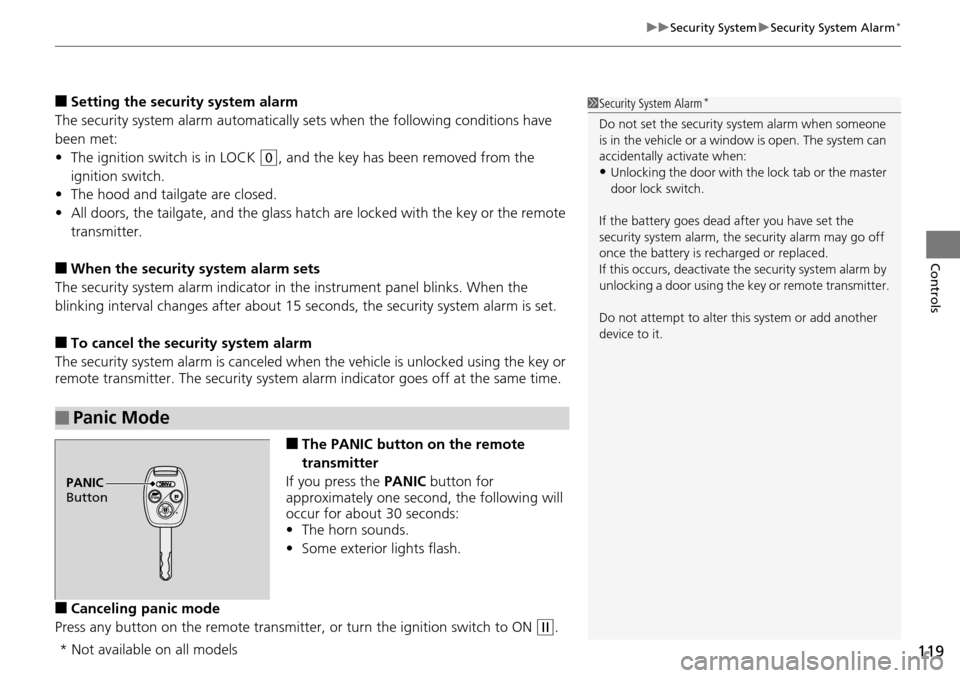
■The PANIC button on the remote
transmitter
If you press the PA
NIC button for
approximately one second, the following will
occur for about 30 seconds:
• The horn so
unds.
• Some
exterior lights flash.
■Canceling panic mode
Press any button on the remote transmitter, or t
urn the ignition switch to ON (w
.
■Panic Mode
1Security System Alarm *
Do not set the security system alarm when someone
is in the vehicle or a window is open. The system can
accidentally activate when:
•Unlocking the door with th e lock tab or the master
door lock switch.
If the battery goes dead after you have set the
security system alarm, the security alarm may go off
once the battery is re charged or replaced.
If this occurs, deactivate the security system alarm by
unlocking a door using the ke y or remote transmitter.
Do not attempt to alter th is system or add another
device to it.
PANIC
Button
* Not available on all models
Page 276 of 488
275
uu General Information on the Audio System u Compatible iPod ® and USB Flash Drives
Features
Compatible iPod ® and USB Flash Drives
• Use a recommended USB flash drive of 256 MB or higher.
• Some digi
tal audio players may not be compatible.
• Some U
SB flash drives (e.g., a device with security lockout) may not work.
• Some software files may not allo
w for audio play or text data display.
• Some versio
ns of MP3, WMA, or AAC formats may be unsupported.
■iPod® Model Compatibility
Model
iPod classic ® 80GB/160GB
iPod classic ® 120GB
iPod classic ® 160GB (launch in 2009)
iPod ® (5th generation)
iPod nano ®
iPod touch ®
■USB Flash Drives
1iPod ® Model Compatibility
This system may not work with all software versions
of these devices.
1 USB Flash Drives
Files on the USB flash drive are played in their stored
order. This order may be different from the order
displayed on your PC or device.
Page 277 of 488
276
Features
HomeLink® Universal Transceiver *
The HomeLink ® Universal Transceiver can be pr ogrammed to operate up to three
remote controlled devices around your home , such as garage doors, lighting, or
home security systems.
Refer to the safety information that comes wi th you
r garage door opener to test that
the safety features are functioning properly. If you do not have the safety
information, contac t the manufacturer.
Before programming HomeLink, make sure th at
people and objects are out of the
way of the garage or gate to prevent potential injury or damage.
When programming a garage door opener, park
just outside the garage door’s
path.
Training HomeLink
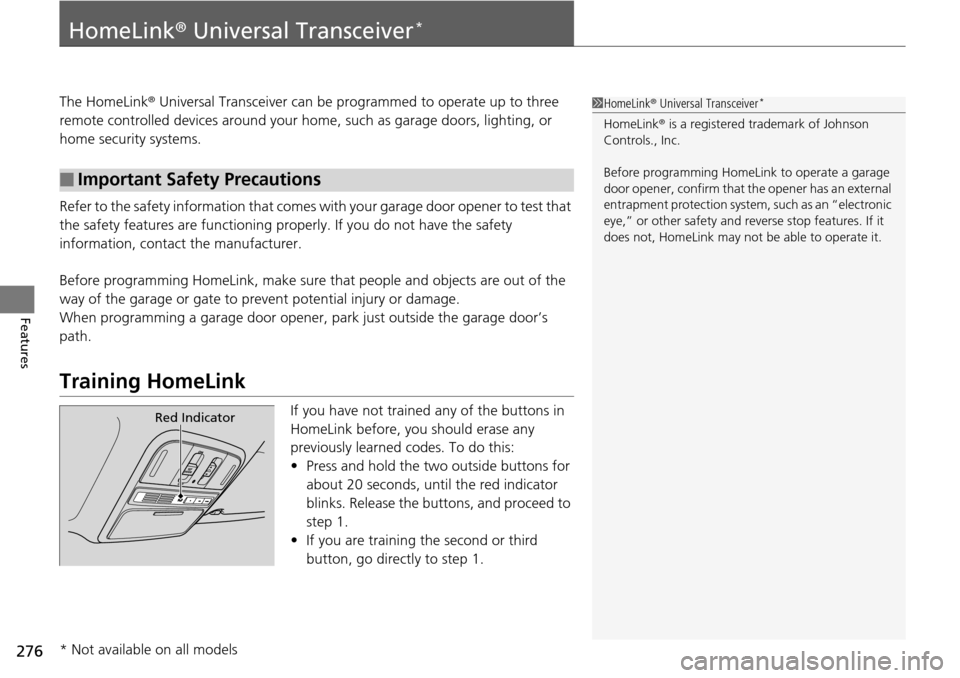
If you have not trained any of the buttons in
HomeLink before, you should erase any
previously learned codes. To do this:
• Press and
hold the two outside buttons for
about 20 seconds, until the red indicator
blinks. Release the bu ttons, and proceed to
step 1.
• If y
ou are training the second or third
button, go directly to step 1.
■Important Safety Precautions
1HomeLink ® Universal Transceiver *
HomeLink® is a registered tra demark of Johnson
Controls., Inc.
Before programming HomeLi nk to operate a garage
door opener, confirm that the opener has an external
entrapment protection system, such as an “electronic
eye,” or other safety and reverse stop features. If it
does not, HomeLink may not be able to operate it.
Red Indicator
* Not available on all models
Page 283 of 488
282
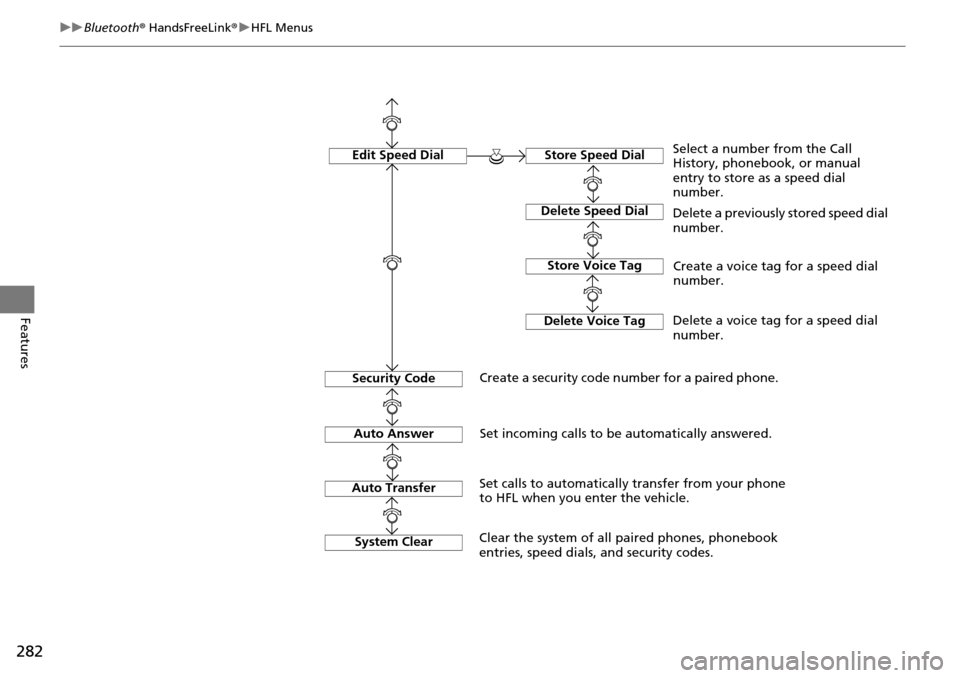
uu Bluetooth ® HandsFreeLink ® u HFL Menus
Features
Edit Speed DialStore Speed Dial
Delete Speed Dial
Store Voice Tag
Delete Voice Tag
Select a number from the Call
History, phonebook, or manual
entry to store as a speed dial
number.
Delete a previously stored speed dial
number.
Create a voice tag for a speed dial
number.
Delete a voice tag for a speed dial
number.
Security Code
Create a security code number for a paired phone.
Auto Answer
Auto Transfer
Set incoming calls to be automatically answered.
Set calls to automatically transfer from your phone
to HFL when you enter the vehicle.
System Clear
Clear the system of all paired phones, phonebook
entries, speed dials, and security codes.
Page 289 of 488
uu Bluetooth ® HandsFreeLink ® u HFL Menus
288
Features
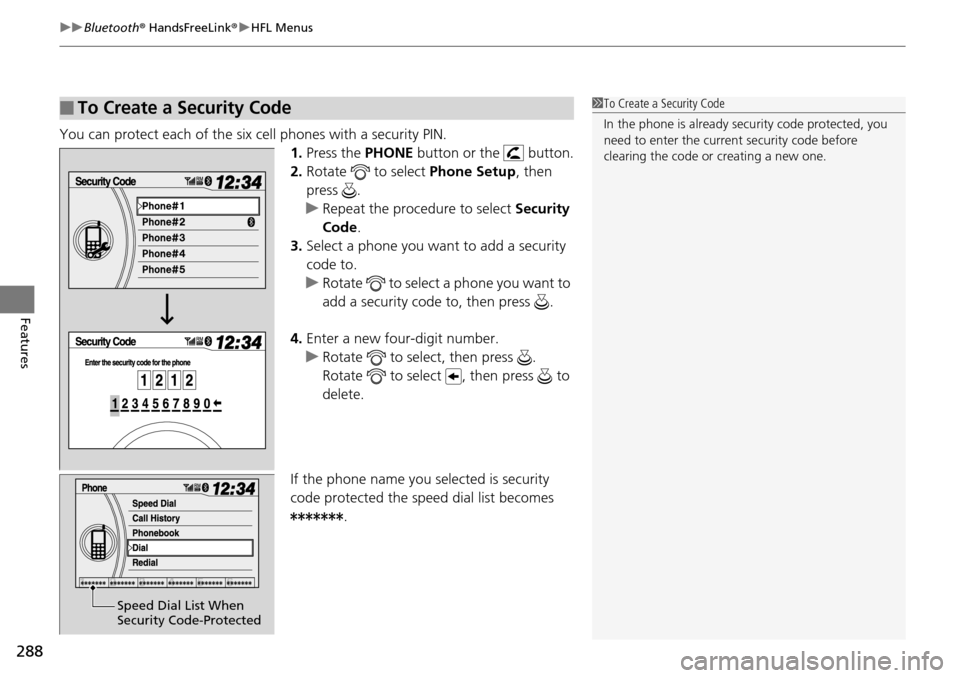
You can protect each of the six cell phones with a security PIN.
1. Press the PHONE button or the button.
2. Ro
tate to select Phone Se tup, then
press .
u Repeat
the procedure to select Security
Code .
3. Select a
phone you want to add a security
code to.
u Rotate to select a phone you want to
add a security code to, then press .
4. Enter a
new four-digit number.
u Rotate to select, then press .
Rotate to select , then press to
delete.
If the phone name you selected is security
co
de protected the speed dial list becomes .
■To Create a Security Code1To Create a Security Code
In the phone is already security code protected, you
need to enter the current security code before
clearing the code or creating a new one.
Speed Dial List When
Security Code-Protected