Page 302 of 573
301
uuCustomized Features
*u
Continued
Features
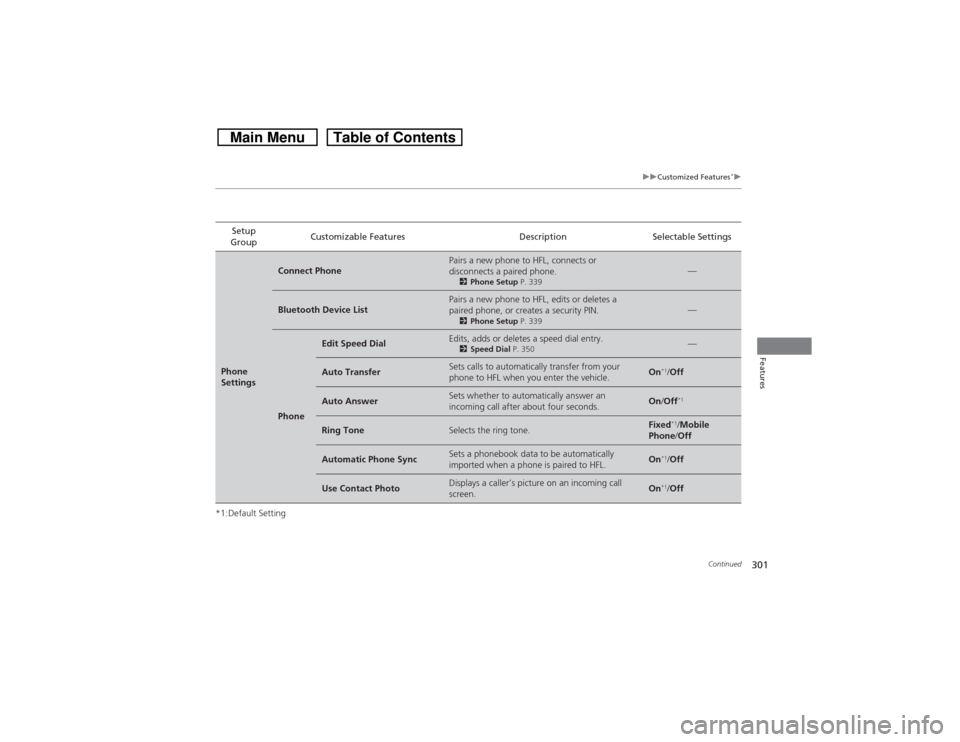
*1:Default SettingSetup
GroupCustomizable Features Description Selectable SettingsPhone
Settings
Connect Phone
Pairs a new phone to HFL, connects or
disconnects a paired phone.2Phone Setup P. 339
—
Bluetooth Device List
Pairs a new phone to HFL, edits or deletes a
paired phone, or creates a security PIN.2Phone Setup P. 339
—
Phone
Edit Speed Dial
Edits, adds or deletes a speed dial entry.2Speed Dial P. 350
—
Auto Transfer
Sets calls to automatically transfer from your
phone to HFL when you enter the vehicle.
On
*1/Off
Auto Answer
Sets whether to automatically answer an
incoming call after about four seconds.
On/Off
*1
Ring Tone
Selects the ring tone.
Fixed
*1/Mobile
Phone/Off
Automatic Phone Sync
Sets a phonebook data to be automatically
imported when a phone is paired to HFL.
On
*1/Off
Use Contact Photo
Displays a caller’s picture on an incoming call
screen.
On
*1/Off
Page 303 of 573
302
uuCustomized Features
*u
Features
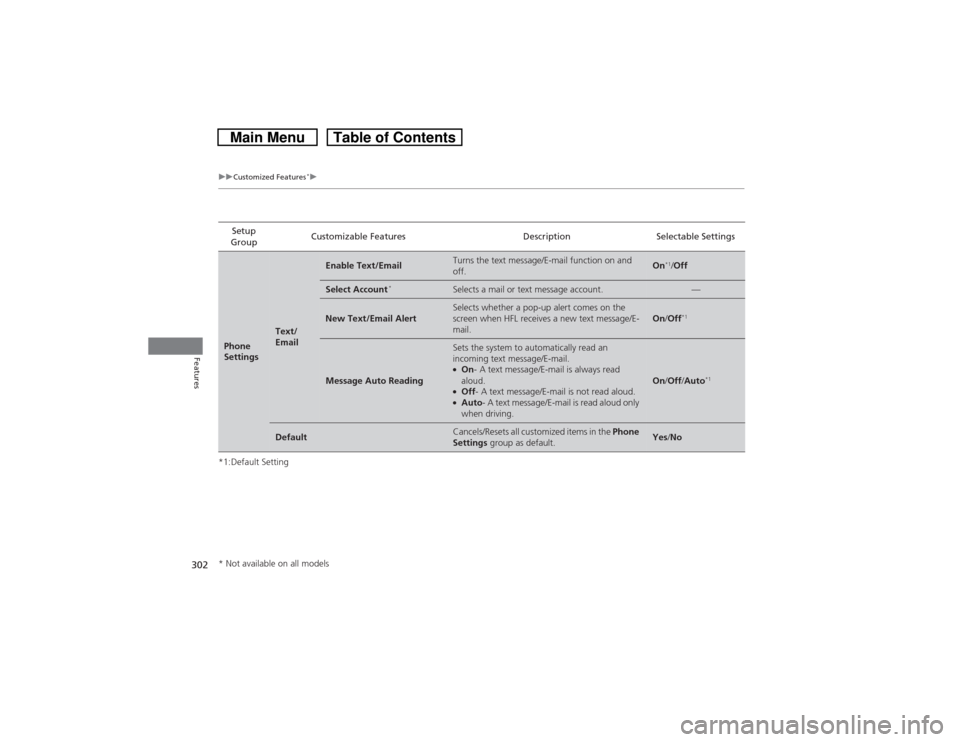
*1:Default SettingSetup
GroupCustomizable Features Description Selectable SettingsPhone
Settings
Text/
Email
Enable Text/Email
Turns the text message/E-mail function on and
off.
On
*1/Off
Select Account
*
Selects a mail or text message account.
—
New Text/Email Alert
Selects whether a pop-up alert comes on the
screen when HFL receives a new text message/E-
mail.
On/Off
*1
Message Auto Reading
Sets the system to automatically read an
incoming text message/E-mail.●On- A text message/E-mail is always read
aloud.●Off- A text message/E-mail is not read aloud.●Auto- A text message/E-mail is read aloud only
when driving.
On/Off/Auto
*1
Default
Cancels/Resets all customized items in the Phone
Settings group as default.
Yes/No
* Not available on all models
Page 305 of 573
304
uuCustomized Features
*u
Features
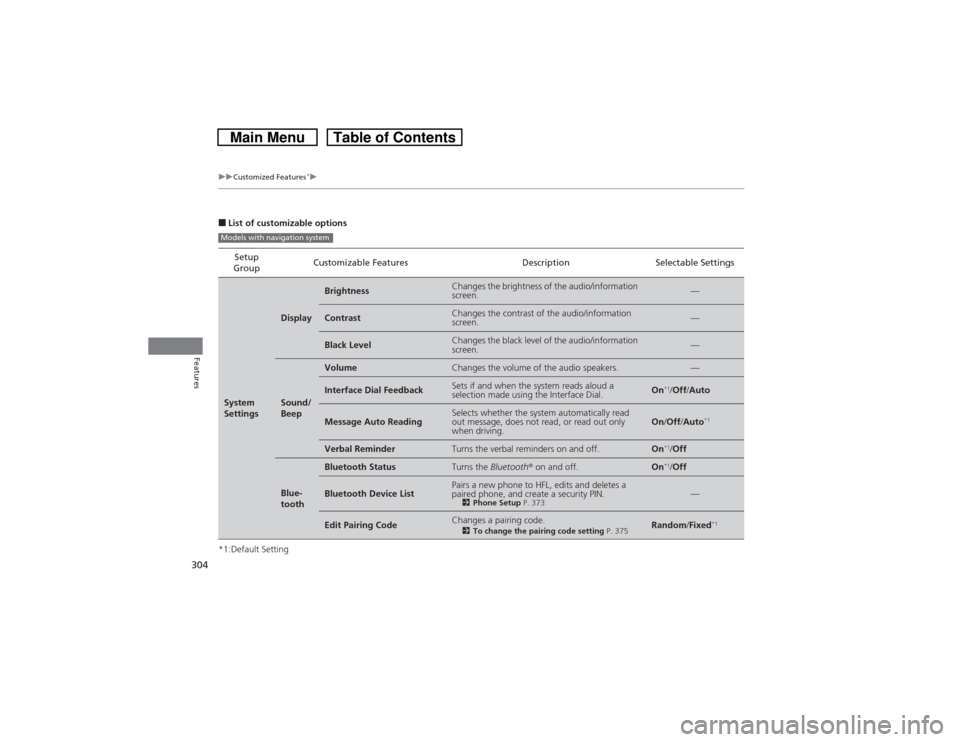
■List of customizable options
*1:Default SettingSetup
GroupCustomizable Features Description Selectable SettingsSystem
Settings
Display
Brightness
Changes the brightness of the audio/information
screen.
—
Contrast
Changes the contrast of the audio/information
screen.
—
Black Level
Changes the black level of the audio/information
screen.
—
Sound/
Beep
Volume
Changes the volume of the audio speakers.
—
Interface Dial Feedback
Sets if and when the system reads aloud a
selection made using the Interface Dial.
On
*1/Off/Auto
Message Auto Reading
Selects whether the system automatically read
out message, does not read, or read out only
when driving.
On/Off/Auto
*1
Verbal Reminder
Turns the verbal reminders on and off.
On
*1/Off
Blue-
tooth
Bluetooth Status
Turns the Bluetooth® on and off.
On
*1/Off
Bluetooth Device List
Pairs a new phone to HFL, edits and deletes a
paired phone, and create a security PIN.2Phone Setup P. 373
—
Edit Pairing Code
Changes a pairing code.2To change the pairing code setting P. 375
Random/Fixed
*1
Models with navigation system
Page 306 of 573
305
uuCustomized Features
*u
Continued
Features
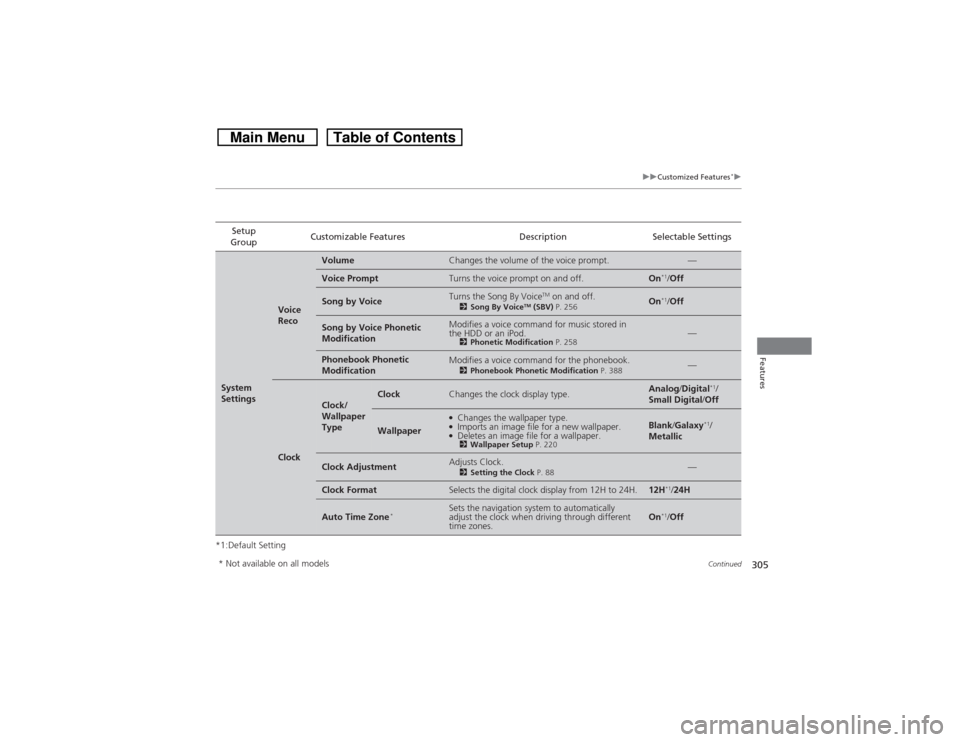
*1:Default SettingSetup
GroupCustomizable Features Description Selectable SettingsSystem
Settings
Voice
Reco
Volume
Changes the volume of the voice prompt.
—
Voice Prompt
Turns the voice prompt on and off.
On
*1/Off
Song by Voice
Turns the Song By Voice
TM on and off.
2Song By Voice
TM (SBV) P. 256
On
*1/Off
Song by Voice Phonetic
Modification
Modifies a voice command for music stored in
the HDD or an iPod.2Phonetic Modification P. 258
—
Phonebook Phonetic
Modification
Modifies a voice command for the phonebook.2Phonebook Phonetic Modification P. 388
—
Clock
Clock/
Wallpaper
Type
Clock
Changes the clock display type.
Analog/Digital
*1/
Small Digital/Off
Wallpaper
●Changes the wallpaper type.●Imports an image file for a new wallpaper.●Deletes an image file for a wallpaper.2Wallpaper Setup P. 220
Blank/Galaxy
*1/
Metallic
Clock Adjustment
Adjusts Clock.2Setting the Clock P. 88
—
Clock Format
Selects the digital clock display from 12H to 24H.
12H
*1/24H
Auto Time Zone
*
Sets the navigation system to automatically
adjust the clock when driving through different
time zones.
On
*1/Off
* Not available on all models
Page 313 of 573
312
uuCustomized Features
*u
Features
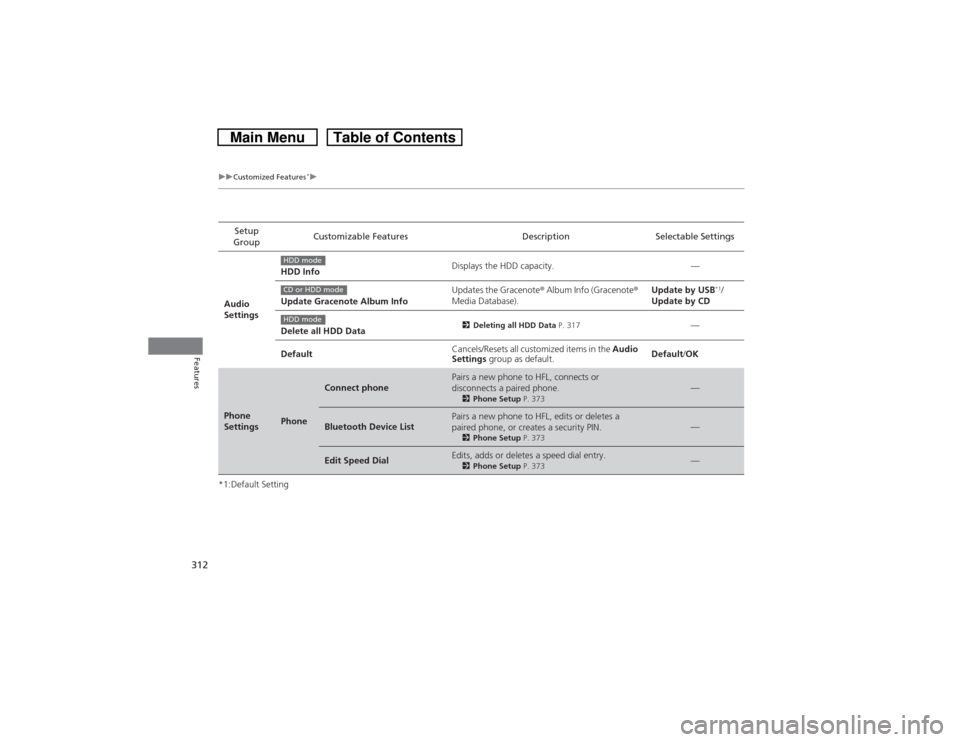
*1:Default SettingSetup
GroupCustomizable Features Description Selectable Settings
Audio
SettingsHDD InfoDisplays the HDD capacity. —
Update Gracenote Album InfoUpdates the Gracenote® Album Info (Gracenote®
Media Database).Update by USB
*1/
Update by CD
Delete all HDD Data
2Deleting all HDD Data P. 317
—
DefaultCancels/Resets all customized items in the Audio
Settings group as default.Default/OK
Phone
Settings
Phone
Connect phone
Pairs a new phone to HFL, connects or
disconnects a paired phone.2Phone Setup P. 373
—
Bluetooth Device List
Pairs a new phone to HFL, edits or deletes a
paired phone, or creates a security PIN.2Phone Setup P. 373
—
Edit Speed Dial
Edits, adds or deletes a speed dial entry.2Phone Setup P. 373
—
HDD modeCD or HDD modeHDD mode
Page 314 of 573
313
uuCustomized Features
*u
Continued
Features
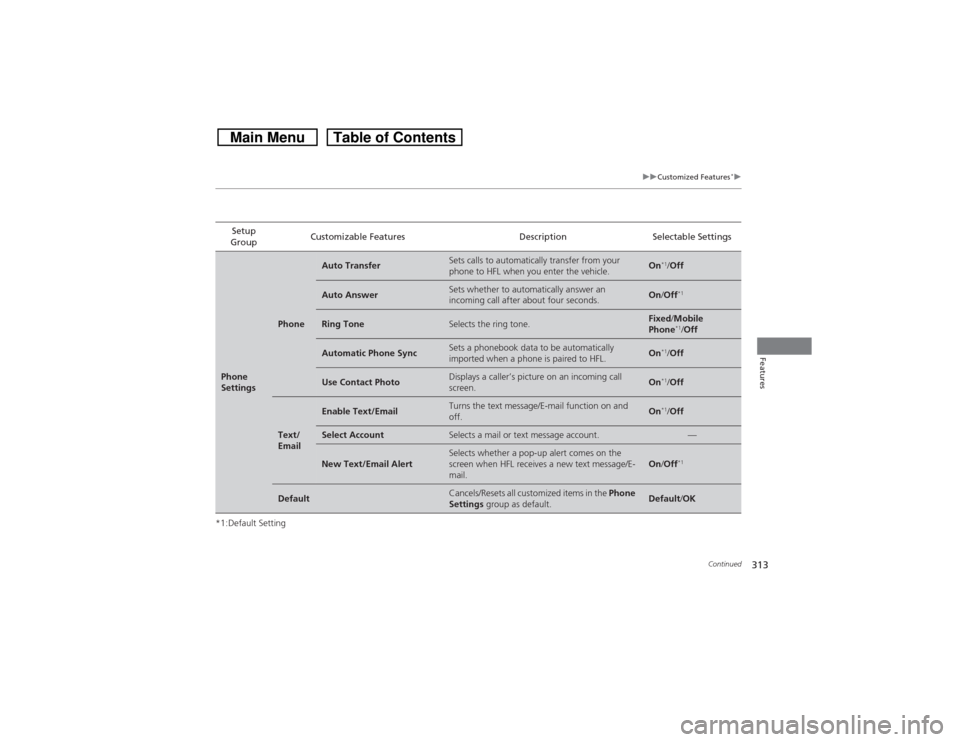
*1:Default SettingSetup
GroupCustomizable Features Description Selectable SettingsPhone
Settings
Phone
Auto Transfer
Sets calls to automatically transfer from your
phone to HFL when you enter the vehicle.
On
*1/Off
Auto Answer
Sets whether to automatically answer an
incoming call after about four seconds.
On/Off
*1
Ring Tone
Selects the ring tone.
Fixed/Mobile
Phone
*1/Off
Automatic Phone Sync
Sets a phonebook data to be automatically
imported when a phone is paired to HFL.
On
*1/Off
Use Contact Photo
Displays a caller’s picture on an incoming call
screen.
On
*1/Off
Text/
Email
Enable Text/Email
Turns the text message/E-mail function on and
off.
On
*1/Off
Select Account
Selects a mail or text message account.
—
New Text/Email Alert
Selects whether a pop-up alert comes on the
screen when HFL receives a new text message/E-
mail.
On/Off
*1
Default
Cancels/Resets all customized items in the Phone
Settings group as default.
Default/OK
Page 316 of 573
315
uuCustomized Features
*uDefaulting All the Settings
Features
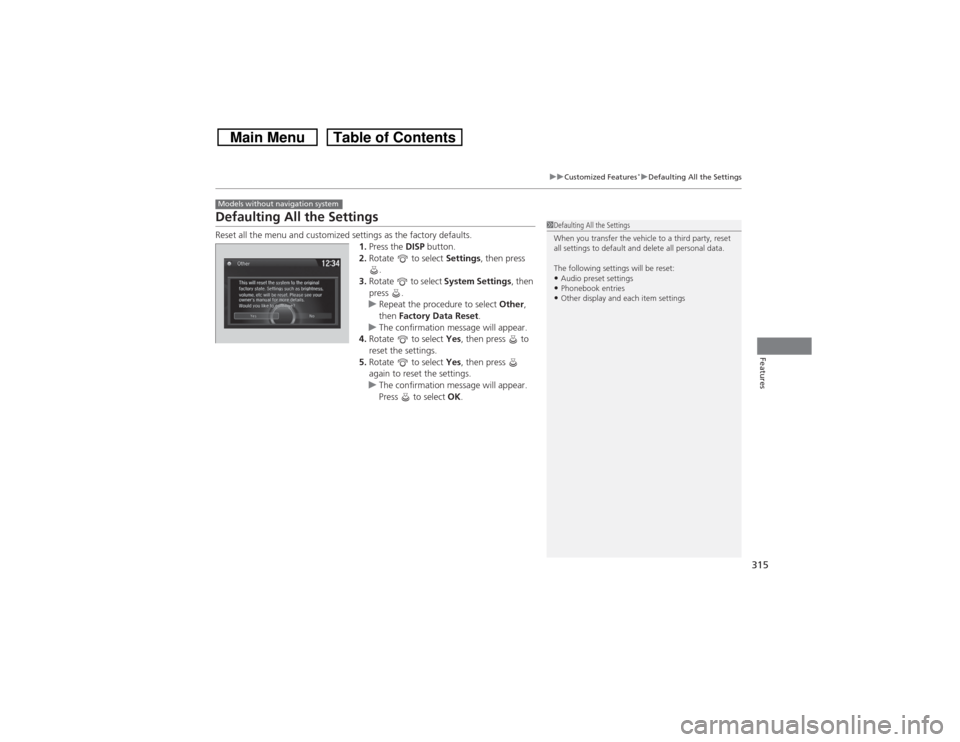
Defaulting All the SettingsReset all the menu and customized settings as the factory defaults.
1.Press the DISP button.
2.Rotate to select Settings, then press
.
3.Rotate to select System Settings, then
press .
uRepeat the procedure to select Other,
then Factory Data Reset.
uThe confirmation message will appear.
4.Rotate to select Yes, then press to
reset the settings.
5.Rotate to select Yes, then press
again to reset the settings.
uThe confirmation message will appear.
Press to select OK.Models without navigation system
1Defaulting All the Settings
When you transfer the vehicle to a third party, reset
all settings to default and delete all personal data.
The following settings will be reset:•Audio preset settings•Phonebook entries•Other display and each item settings
Page 317 of 573

316
uuCustomized Features
*uDefaulting All the Settings
Features
Defaulting All the SettingsReset all the menu and customized settings as the factory defaults.
1.Press the SETTINGS button.
2.Rotate to select System Settings, then
press .
3.Rotate to select Others, then press .
4.Rotate to select Factory Data Reset,
then press .
uThe pop-up menu appears on the screen.
5.Rotate to select Yes, then press .
uThe confirmation message will appear.
6.Rotate to select Yes, then press
again to reset the settings.
uThe confirmation message will appear.
Press to select OK.Models with navigation system
1Defaulting All the Settings
When you transfer the vehicle to a third party, reset
all settings to default and delete all personal data.
The following settings will be reset:•Routing & Guidance: Rerouting, Unverified Area
Routing, Traffic Rerouting, Edit Waypoint Search
Area, Guidance Mode, Street Name Guidance•Route Preference•Audio preset settings•Phonebook entries•Other display and each item settings