Page 117 of 573
uuOperating the Switches Around the Steering WheeluENGINE START/STOP Button
*
116Controls
If you leave the vehicle for 30 to 60 minutes with the shift lever in
(P and the power
mode in ACCESSORY, the vehicle automatically goes into the mode similar to
VEHICLE OFF (LOCK) to avoid the battery drain.
When in this mode:
The steering wheel does not lock.
You cannot lock or unlock doors with the remote transmitter or the smart entry
system.
Press the ENGINE START/STOP button to switch the mode to VEHICLE OFF (LOCK).
■Automatic Power Off
1ENGINE START/STOP Button
*
If the power mode does not change from VEHICLE
OFF to ACCESSORY, press the ENGINE START/STOP
button while moving the steering wheel left and
right. The steering wheel will unlock, allowing the
mode to change.
* Not available on all models
Page 118 of 573

117
uuOperating the Switches Around the Steering WheeluENGINE START/STOP Button
*
Controls
If you open the driver’s door when the power mode is set to ACCESSORY, a warning
beep sounds.
Warning buzzers may sound from inside or/
and outside the vehicle to remind you that the
smart entry remote is out of the vehicle. If the
buzzer continues even after the remote is put
back inside, place it to be within its
operational range.
■When the power mode is in ON
If the smart entry remote is taken out of the
vehicle, and the driver’s door is closed,
warning buzzers sound from both inside and
outside the vehicle. A warning message on
the information display notifies the driver
inside that the remote is out.■When the power mode is in
ACCESSORY
If the smart entry remote is taken out of the
vehicle, and all the doors are closed, a
warning buzzer sounds from outside the
vehicle.
■Power Mode Reminder■Smart Entry Remote Reminder
1Smart Entry Remote Reminder
When the smart entry remote is within the system’s
operational range, and the driver’s door is closed, the
warning function cancels.
If the smart entry remote is taken out of the vehicle
after the engine has been started, you can no longer
change the ENGINE START/STOP button mode or
restart the engine. Always make sure if the remote is
in your vehicle when you operate the ENGINE
START/STOP button.
Removing the smart entry remote from the vehicle
through a window does not activate the warning
buzzer.
Do not put the smart entry remote on the dashboard
or in the glove box. It may cause the warning buzzer
to go off. Under some other conditions that can
prevent the vehicle from locating the remote, the
warning buzzer may also go off even if the remote is
within the system’s operational range.
Page 122 of 573
121
uuOperating the Switches Around the Steering WheeluLight Switches
Controls
The headlights, all other exterior lights, and the instrument panel lights turn off 15
seconds after you remove the key or set the power mode to VEHICLE OFF (LOCK),
take the remote with you, and close the driver’s door.
If you turn the ignition switch to LOCK
(0*1 with the headlight switch on, but do
not open the door, the lights turn off after 10 minutes (three minutes, if the switch
is in the AUTO position).
The lights turn on again when you unlock or open the driver’s door. If you unlock
the door, but do not open it within 15 seconds, the lights go off. If you open the
driver’s door, you will hear a lights on reminder chime.
*1: Models with the smart entry system have an ENGINE START/STOP button instead of an
ignition switch.■Automatic Lighting Off Feature
1Automatic Lighting Off Feature
You can change the headlight auto off timer setting.
2Customized Features
* P. 281
Models with smart entry system
* Not available on all models
Page 128 of 573
127
uuOperating the Switches Around the Steering WheeluDriving Position Memory System
*
Continued
Controls
Driving Position Memory System
*
You can store two driver’s seat and door mirror positions with the driving position
memory system.
When you unlock and open the driver’s door with a remote, the seat and door
mirrors adjust automatically to one of the two preset positions.
Select either remote you use to unlock the vehicle when you enter.
•DRIVER 1 transmitter is linked to memory button 1.
•DRIVER 2 transmitter is linked to memory button 2.
1Driving Position Memory System
*
Using the audio/information screen, you can disable
the automatic seat adjustment function.
2Customized Features
* P. 281
Models with audio/information screen
DRIVER 1
DRIVER 2
Models with smart entry systemModels without smart entry system
* Not available on all models
Page 164 of 573
163
Features
This chapter describes how to operate technology features.
Audio System
About Your Audio System................ 164
USB Adapter Cable .......................... 165
Auxiliary Input Jack .......................... 165
Audio System Theft Protection ......... 166
Region Setting
*............................... 167
Audio Remote Controls.................... 168
Audio System Basic Operation........ 169
Audio System Basic Operation........ 182
Models without navigation systemAudio system without touch screenAudio system with touch screen
Audio System Basic Operation........ 215
Audio Error Messages...................... 268
General Information on the Audio
System............................................. 276
Customized Features
*...................... 281
HomeLink® Universal Transceiver
*.. 318
Bluetooth
® HandsFreeLink
®....320
, 332, 367
Compass
*.................................. 405, 407
Models with navigation system
* Not available on all models
Page 165 of 573
164Features
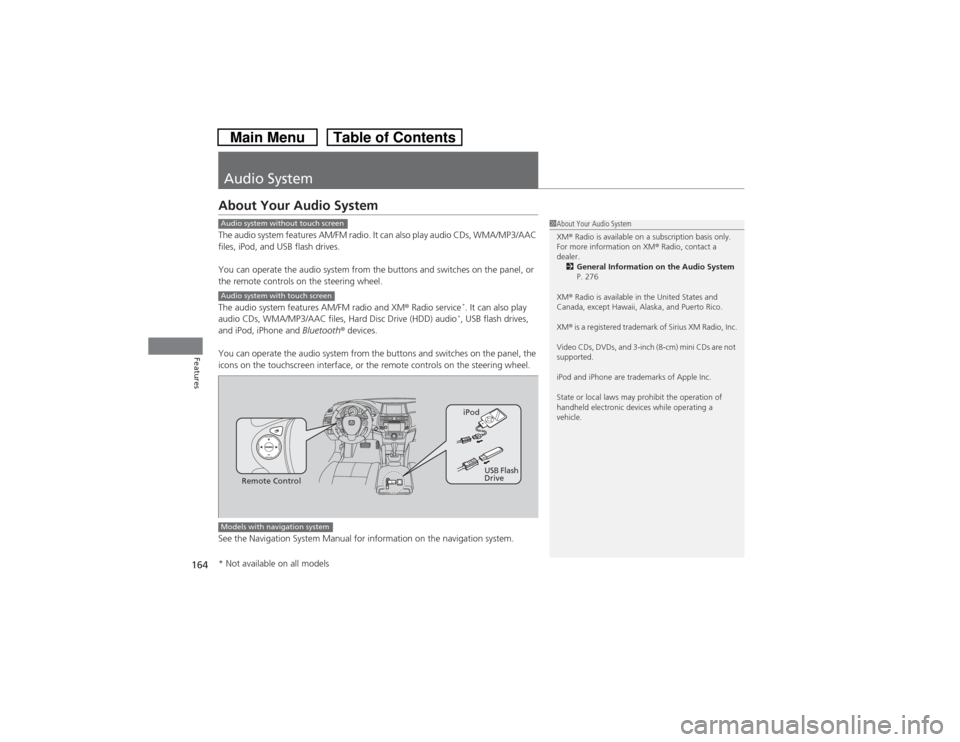
Audio SystemAbout Your Audio SystemThe audio system features AM/FM radio. It can also play audio CDs, WMA/MP3/AAC
files, iPod, and USB flash drives.
You can operate the audio system from the buttons and switches on the panel, or
the remote controls on the steering wheel.
The audio system features AM/FM radio and XM® Radio service
*. It can also play
audio CDs, WMA/MP3/AAC files, Hard Disc Drive (HDD) audio*, USB flash drives,
and iPod, iPhone and Bluetooth® devices.
You can operate the audio system from the buttons and switches on the panel, the
icons on the touchscreen interface, or the remote controls on the steering wheel.
See the Navigation System Manual for information on the navigation system.
1About Your Audio System
XM® Radio is available on a subscription basis only.
For more information on XM® Radio, contact a
dealer.
2General Information on the Audio System
P. 276
XM® Radio is available in the United States and
Canada, except Hawaii, Alaska, and Puerto Rico.
XM® is a registered trademark of Sirius XM Radio, Inc.
Video CDs, DVDs, and 3-inch (8-cm) mini CDs are not
supported.
iPod and iPhone are trademarks of Apple Inc.
State or local laws may prohibit the operation of
handheld electronic devices while operating a
vehicle.
Audio system without touch screenAudio system with touch screen
Remote ControliPod
USB Flash
Drive
Models with navigation system* Not available on all models
Page 169 of 573
168
uuAudio SystemuAudio Remote Controls
Features
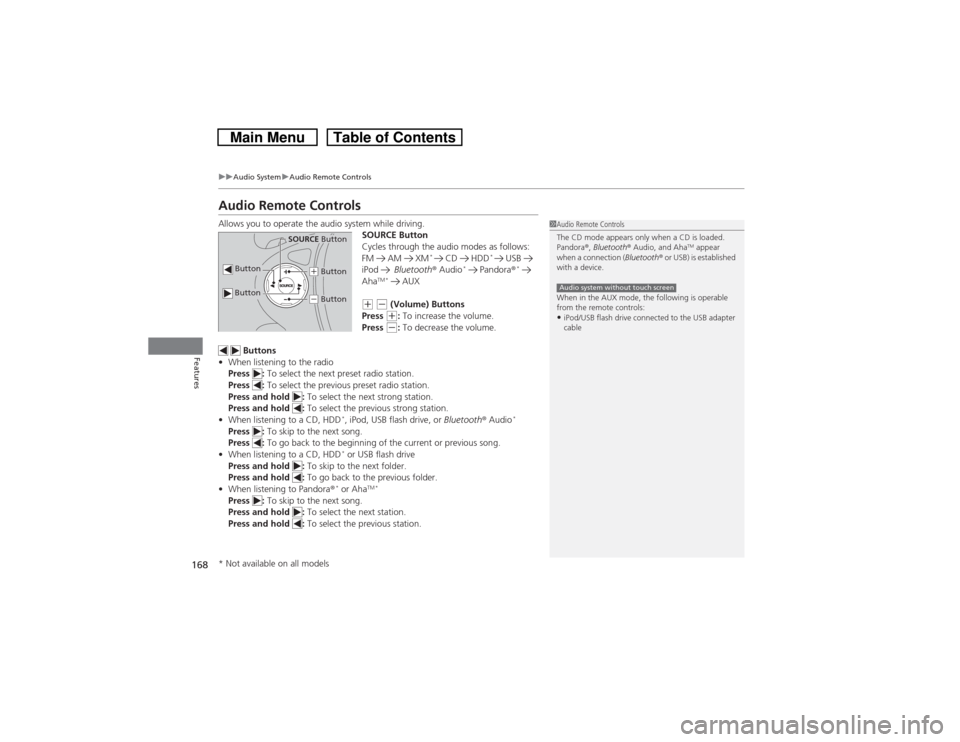
Audio Remote ControlsAllows you to operate the audio system while driving.
SOURCE Button
Cycles through the audio modes as follows:
FM AM XM
*
CD HDD
*
USB
iPod Bluetooth® Audio
* Pandora®
*
Aha
TM * AUX
(+ (- (Volume) Buttons
Press (+: To increase the volume.
Press (-: To decrease the volume.
Buttons
•When listening to the radio
Press : To select the next preset radio station.
Press : To select the previous preset radio station.
Press and hold : To select the next strong station.
Press and hold : To select the previous strong station.
•When listening to a CD, HDD
*, iPod, USB flash drive, or Bluetooth® Audio
*
Press : To skip to the next song.
Press : To go back to the beginning of the current or previous song.
•When listening to a CD, HDD
* or USB flash drive
Press and hold : To skip to the next folder.
Press and hold : To go back to the previous folder.
•When listening to Pandora®* or Aha
TM *
Press : To skip to the next song.
Press and hold : To select the next station.
Press and hold : To select the previous station.
1Audio Remote Controls
The CD mode appears only when a CD is loaded.
Pandora®, Bluetooth® Audio, and Aha
TM appear
when a connection (Bluetooth® or USB) is established
with a device.
When in the AUX mode, the following is operable
from the remote controls:
•iPod/USB flash drive connected to the USB adapter
cableAudio system without touch screen
Button
SOURCE Button
Button
(+ Button(- Button
* Not available on all models
Page 170 of 573

169Features
Audio System Basic OperationTo use the audio system function, the ignition switch must be in ACCESSORY
(q or
ON
(w.
Use the selector knob or MENU button to
access some audio functions.
Press to switch between the normal and
extended display for some functions. The
extended display has three segments to
display detailed information.
Selector knob: Rotate left or right to scroll
through the available choices. Press to set
your selection.
MENU button: Press to select any setting
such as the clock, sound control, or the
compass
*. Press this button again to cancel
the menu display mode.
RETURN button: Press to go back to the
previous display.
Audio system without touch screen
1Audio System Basic Operation
These indications are used to show how to operate
the selector knob.
Rotate to select.
Press to enter.
Press the SOURCE,
(+, (-, or button on the
steering wheel to change any audio setting.
2Audio Remote Controls P. 168
RETURN
ButtonSelector
Knob
MENU
Button
Menu Display
* Not available on all models