Page 14 of 573
13Quick Reference Guide
Climate Control System
* (P157)
●Press the AUTO button to activate the climate control system.
●Press the button to turn the system on or off.
●Press the button to defrost the windshield.
The climate control system is voice operable. (P 226)
Models with audio touch screen
Driver’s Side Temperature
Control Switch (Rear Window Defogger/Heated Mirror)
Button
(Windshield Defroster) Button
SYNC (Synchronized) Button
Air flows from floor and windshield
defroster vents. Air flows from floor vents. Air flows from floor and dashboard
vents, and back of the center console. Air flows from dashboard vents and
back of the center console.
AUTO Button
(On/Off) Button
(Recirculation) Button
MODE Control Button
/ (Fan Control)
Buttons
A/C (Air Conditioning) ButtonPassenger’s Side Temperature Control Switch
Models with navigation system
* Not available on all models
Page 15 of 573
14Quick Reference Guide
●Press the AUTO button to activate the climate control system.
●Press the button to turn the system on or off.
●Press the button to defrost the windshield.Models without audio touch screen
Driver’s Side Temperature
Control Switch / (Fan Control) Buttons
(Windshield Defroster) ButtonA/C (Air Conditioning) Button SYNC (Synchronized) Button
(Recirculation) Button
AUTO ButtonPassenger’s Side Temperature
Control Switch
(Rear Window Defogger/
Heated Mirror) Button
MODE Control Button (On/Off) Button
Air flows from floor and
dashboard vents, and back of the
center console. Air flows from dashboard vents,
and back of the center console.
Air flows from floor and
windshield defroster vents. Air flows from floor vents.
Page 88 of 573

87
Controls
This chapter explains how to operate the various controls necessary for driving.
Setting the Clock................................ 88
Locking and Unlocking the Doors
Key Types and Functions .................... 91Low Smart Entry Remote Signal Strength
*.. 93
Locking/Unlocking the Doors from the
Outside ............................................ 94
Locking/Unlocking the Doors from the
Inside ............................................... 99
Childproof Door Locks ..................... 100
Auto Door Locking/Unlocking .......... 101
Opening and Closing the Tailgate... 105
Security System................................ 107
Immobilizer System .......................... 107
Security System Alarm ...................... 107Opening and Closing the Windows..... 110
Opening and Closing the Moonroof
.. 113
Operating the Switches Around the
Steering Wheel
Ignition Switch
*............................... 114
ENGINE START/STOP Button
*........... 115
Ignition Switch and Power Mode
Comparison ................................... 118
Turn Signals ..................................... 119
Light Switches.................................. 119
Fog Lights ........................................ 122
Daytime Running Lights ................... 122
Wipers and Washers ........................ 123
Brightness Control ........................... 125
Rear Defogger/Heated Door Mirror Button.. 126Driving Position Memory System
*.... 127Adjusting the Steering Wheel .......... 129
Adjusting the Mirrors....................... 130
Interior Rearview Mirror ................... 130
Power Door Mirrors ......................... 131
Adjusting the Seats.......................... 133
Adjusting the Seat Positions ............. 133
Interior Lights/Interior Convenience
Items................................................ 142
Interior Lights .................................. 142
Interior Convenience Items .............. 144
Heating and Cooling System
*......... 154
Using Vents, Heating and A/C.......... 154
Climate Control System
*.................. 157
Using Automatic Climate Control .... 157
Automatic Climate Control Sensors ... 162
* Not available on all models
Page 127 of 573

126
uuOperating the Switches Around the Steering WheeluRear Defogger/Heated Door Mirror Button
Controls
Rear Defogger/Heated Door Mirror ButtonPress the rear defogger and heated door mirror button to defog the rear window
and mirrors when the ignition switch is in ON
(w*1.
The rear defogger and heated door mirrors
automatically switch off after 20 minutes.
However, if the outside temperature is 18°F
(−8°C) or below, they do not automatically
switch off.
The rear defogger and heated door mirrors
automatically switch off after 10-30 minutes
depending on the outside temperature.
However, if the outside temperature is 32°F
(0°C) or below, they do not automatically
switch off.
*1: Models with the smart entry system have an
ENGINE START/STOP button instead of an ignition
switch.
1Rear Defogger/Heated Door Mirror ButtonNOTICEWhen cleaning the inside of the rear window, be
careful not to damage the heating wires.
It is critical to wipe the window from side to side
along the defogger heating wires.
This system consumes a lot of power, so turn it off
when the window has been defogged.
Also, do not use the system for a long period when
the engine is idling. This may weaken the battery,
making it difficult to start the engine.
Models with heating and cooling system
Models with audio
touch screen
Models with climate control system
Models without
audio touch screen
Page 128 of 573
127
uuOperating the Switches Around the Steering WheeluDriving Position Memory System
*
Continued
Controls
Driving Position Memory System
*
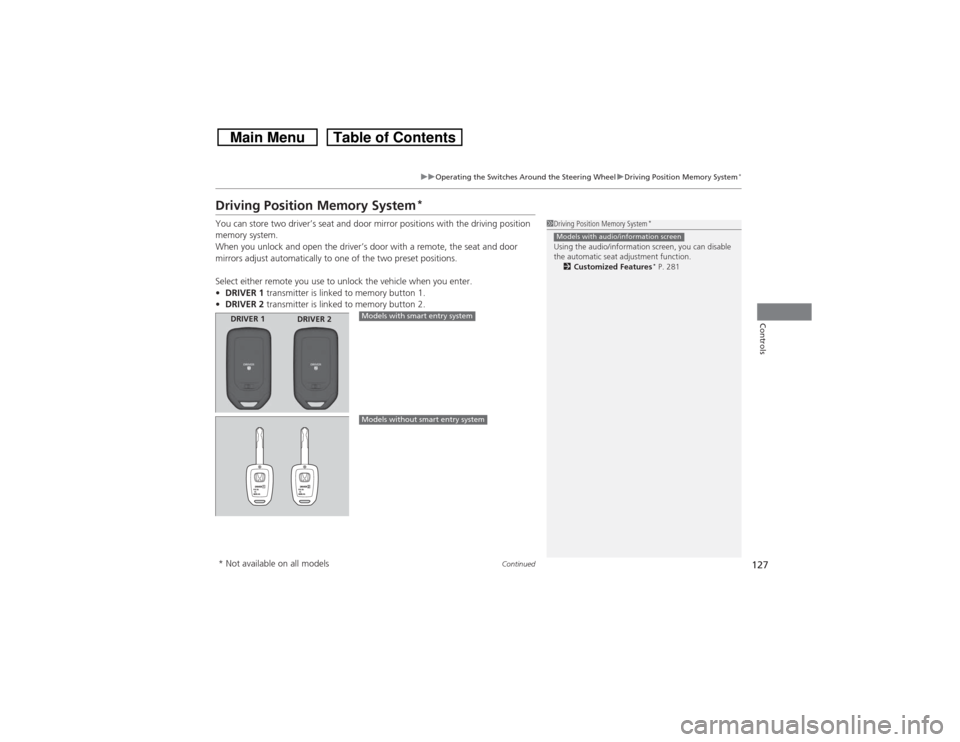
You can store two driver’s seat and door mirror positions with the driving position
memory system.
When you unlock and open the driver’s door with a remote, the seat and door
mirrors adjust automatically to one of the two preset positions.
Select either remote you use to unlock the vehicle when you enter.
•DRIVER 1 transmitter is linked to memory button 1.
•DRIVER 2 transmitter is linked to memory button 2.
1Driving Position Memory System
*
Using the audio/information screen, you can disable
the automatic seat adjustment function.
2Customized Features
* P. 281
Models with audio/information screen
DRIVER 1
DRIVER 2
Models with smart entry systemModels without smart entry system
* Not available on all models
Page 129 of 573
uuOperating the Switches Around the Steering WheeluDriving Position Memory System
*
128Controls
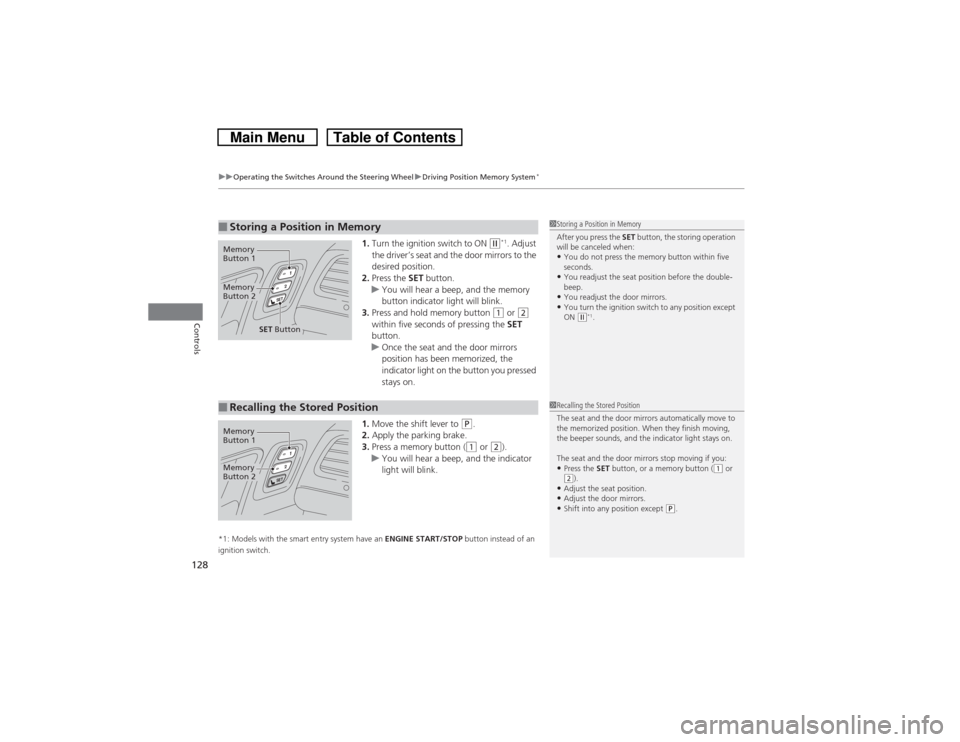
1.Turn the ignition switch to ON
(w*1. Adjust
the driver’s seat and the door mirrors to the
desired position.
2.Press the SET button.
uYou will hear a beep, and the memory
button indicator light will blink.
3.Press and hold memory button
(1 or
(2
within five seconds of pressing the SET
button.
uOnce the seat and the door mirrors
position has been memorized, the
indicator light on the button you pressed
stays on.
1.Move the shift lever to
(P.
2.Apply the parking brake.
3.Press a memory button ((1 or
(2).
uYou will hear a beep, and the indicator
light will blink.
*1: Models with the smart entry system have an ENGINE START/STOP button instead of an
ignition switch.■Storing a Position in Memory
1Storing a Position in Memory
After you press the SET button, the storing operation
will be canceled when: •You do not press the memory button within five
seconds.•You readjust the seat position before the double-
beep.•You readjust the door mirrors.•You turn the ignition switch to any position except
ON
(w*1.
Memory
Button 1Memory
Button 2
SET Button
■Recalling the Stored Position
1Recalling the Stored Position
The seat and the door mirrors automatically move to
the memorized position. When they finish moving,
the beeper sounds, and the indicator light stays on.
The seat and the door mirrors stop moving if you: •Press the SET button, or a memory button (
(1 or
(2).
•Adjust the seat position.•Adjust the door mirrors.•Shift into any position except
(P.
Memory
Button 1Memory
Button 2
Page 131 of 573
130Controls
Adjusting the MirrorsInterior Rearview MirrorAdjust the angle of the rearview mirror when you are sitting in the correct driving
position.
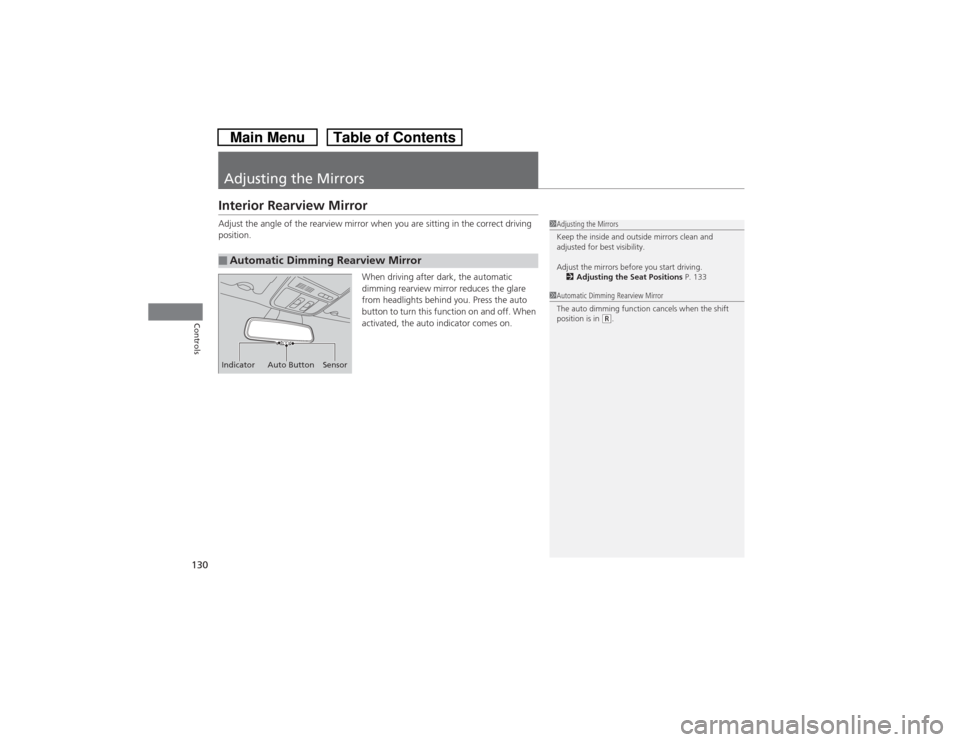
When driving after dark, the automatic
dimming rearview mirror reduces the glare
from headlights behind you. Press the auto
button to turn this function on and off. When
activated, the auto indicator comes on.■Automatic Dimming Rearview Mirror
1Adjusting the Mirrors
Keep the inside and outside mirrors clean and
adjusted for best visibility.
Adjust the mirrors before you start driving.
2Adjusting the Seat Positions P. 133
Indicator Auto Button Sensor
1Automatic Dimming Rearview Mirror
The auto dimming function cancels when the shift
position is in
(R.
Page 132 of 573
131
uuAdjusting the MirrorsuPower Door Mirrors
Continued
Controls
Power Door Mirrors
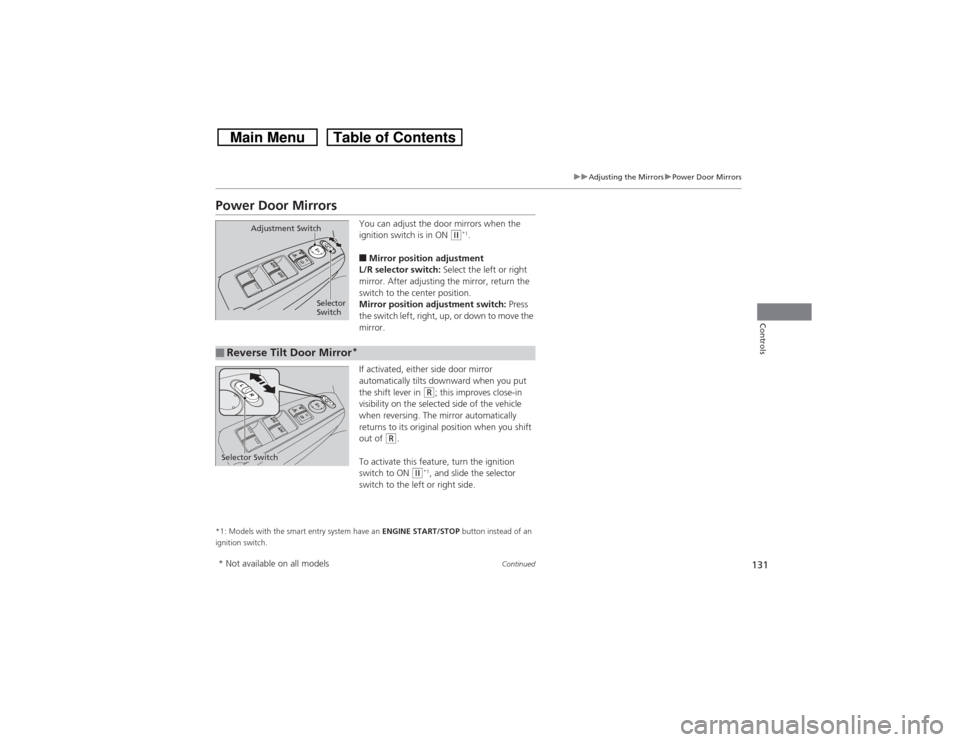
You can adjust the door mirrors when the
ignition switch is in ON
(w*1.
■Mirror position adjustment
L/R selector switch: Select the left or right
mirror. After adjusting the mirror, return the
switch to the center position.
Mirror position adjustment switch: Press
the switch left, right, up, or down to move the
mirror.
If activated, either side door mirror
automatically tilts downward when you put
the shift lever in
(R; this improves close-in
visibility on the selected side of the vehicle
when reversing. The mirror automatically
returns to its original position when you shift
out of
(R.
To activate this feature, turn the ignition
switch to ON
(w*1, and slide the selector
switch to the left or right side.
*1: Models with the smart entry system have an ENGINE START/STOP button instead of an
ignition switch.
Selector
Switch Adjustment Switch
■Reverse Tilt Door Mirror
*
Selector Switch* Not available on all models