Page 175 of 365

174
Features
Rear Entertainment System*
Allows the rear seat passengers to enjoy a different entertainment source, such as a
DVD or CD, than the front passengers.
The rear seat passenger can listen to audi o from the rear entertainment system with
a set of wireless headphones that comes with your vehicle. To turn on the headphones: Pivot the left
earpiece outward.
To adjust the volume: Turn the dial at the
bottom of the right earpiece.
If you want to listen to audio from the rear
entertainment system on the speakers, press
the AUX button until AUX mode is displayed.
■Wireless Headphones
Optional for U.S.1Rear Entertainment System*
The system also allows for auxiliary inputs from
standard video game consol es. The jacks are in the
console compartment.
V = Video jack
L = Left audio jack
R = Right audio jack
VL R
Auxiliary Input Jacks
1 Wireless Headphones
Wear the headphones co rrectly with the L earpiece
on your left ear and the R earpiece on y our right ear.
Wearing the headphones backward may affect the
audio reception.
* Not available on all models
14 CR-V-31T0A6200.book 174 ページ 2014年2月10日 月曜日 午後7時1分
Page 177 of 365
176
uuRear Entertainment System*uOperating the System
Features
■Control Panel in the Console Compartment
Play/Pause Button
Press to pause the CD/DVD.
Press again to resume. REAR CTRL OFF Button
Press to cancel the operation from
the rear seat.
CD/DVD Slot AUX VIDEO Jack
You can connect other audio or
videos. SOURCE Button
Press to change the source DVD or
AUX. The indicator comes on for
the selected source.
REAR POWER Button
Press to turn the rear
entertainment system on and
off.
(CD/DVD Eject) Button
Press to eject a CD/DVD.
14 CR-V-31T0A6200.book 176 ページ 2014年2月10日 月曜日 午後7時1分
Page 178 of 365

177
uuRear Entertainment System*uOperating the System
Continued
Features
■System Controls and Menus for DVD
TITLE Button
Press to display the status of the
DVD that is currently playing.
Use , , , or to highlight
a menu item, and press the ENT
button to make a selection.
(Power) Button
Press to turn on the system.
CANCEL Button
Press to go back to the previous
display or operation.
Skip Buttons
Press or to change
chapters.
Stop Button
Press to stop a DVD. DVD Button
Press to
watch a DVD.
AUX Button
Press to access AUX mode.
The following options appear when you play a
DVD and press the
MENU button.
Top Menu
Menu
Play Mode
Search Subtitle Audio
Angle
Chapter Title
OFF
NumInput
Repeat
Chapter
Title
Return
The following options
appear when you play a
DVD and press the SETUP
button: Disp Adjust
Aspect Ratio
LanguageBrightness
Contrast
Black Level
Color Tint
Normal
Wide
Zoom
Full
Rewind Button
Press and hold to reverse to
chapters.
Fast-forward Button
Press and hold to fast forward to
chapters.
Play/Pause Button
Press to pause the DVD. Press
again to resume.
Reset
MENU Button
SETUP Button
14 CR-V-31T0A6200.book 177 ページ 2014年2月10日 月曜日 午後7時1分
Page 179 of 365
uuRear Entertainment System*uOperating the System
178
Features
■Playing a DVD
• Insert a DVD into the slot in the console compartment.
u The system automatically starts the DVD.
• To fast forward, press and hold the fa st-forward button. To rewind, press and
hold the rewind button on the remote.
• To go to the next chapter, press the (skip) button. To go to the beginning of
the current chapter, press the butt on on the remote. Quickly press the
button twice to go to the previous chapter.
■TITLE button on the remote
Press the TITLE button while the DVD is playing to se e the current status of the title,
chapter, elapsed time, angle, subtitle, audio, and sound characteristics.
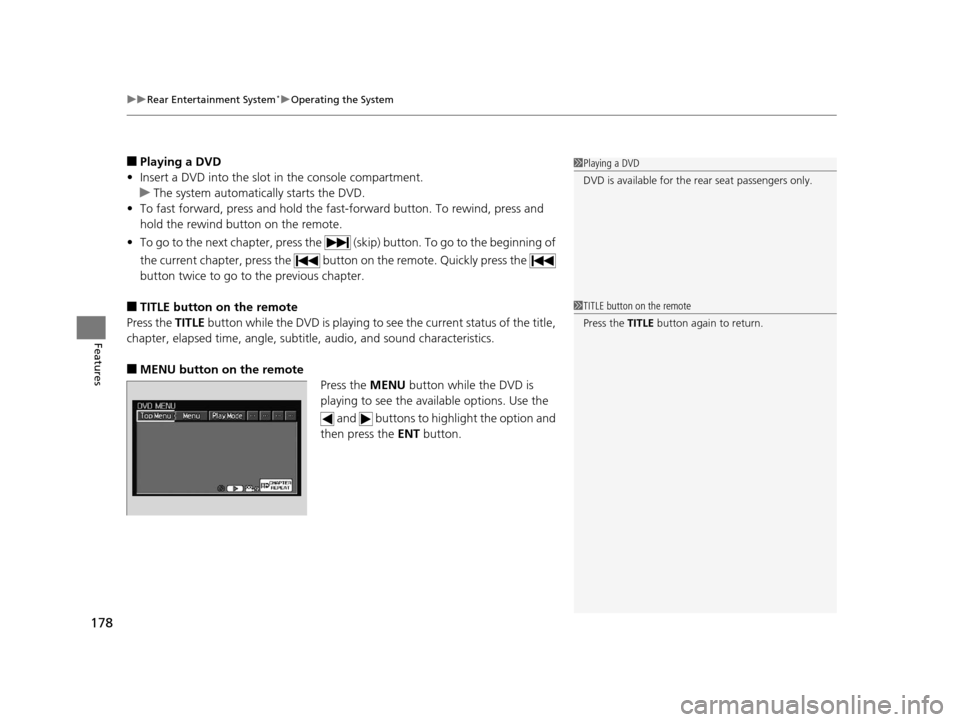
■MENU button on the remote Press the MENU button while the DVD is
playing to see the ava ilable options. Use the
and buttons to highlight the option and
then press the ENT button.
1Playing a DVD
DVD is available for the re ar seat passengers only.
1TITLE button on the remote
Press the TITLE button again to return.
14 CR-V-31T0A6200.book 178 ページ 2014年2月10日 月曜日 午後7時1分
Page 180 of 365
179
uuRear Entertainment System*uOperating the System
Continued
Features
Top Menu:
The top page of the DVD’s title menu appears. The title menu also appears when
you press the MENU button while the DVD is in the slot not playing. Press the
CANCEL or MENU button to return.
Menu:
The DVD’s title menu appears.
Play Mode:
You can change the following three settings:
Audio - Select a language for audio that is available on the DVD. The sound
characteristics (Dolby Digita l, LPCM, MPEG Audio, etc) of that audio is also
displayed.
Subtitle - Select a subtitle that is available on the DVD.
Angle - Select a view angle that is availabl e on the DVD. If the DVD currently playing
does not carry multiple angles, only one option Angle 1 comes on. Press the
CANCEL or MENU button to return.
14 CR-V-31T0A6200.book 179 ページ 2014年2月10日 月曜日 午後7時1分
Page 183 of 365

uuRear Entertainment System*uOperating the System
182
Features
Initial Settings -
Press the SETUP button to configure the initial Language, Dynamic Range, and
Angle Mark settings before playing a DVD.
Language Settings:
Select the language for the DVD’s displa yed menus (Menu Language), the DVD’s
audio (Audio Language), and the DVD’s subtitle (Subtitle Language).
1. Select the language setting.
2. Select the language from English, French, Spanish, Arabic, German, Italian,
Dutch, Chinese, Kor ean, Thai, Japanese, and other.
3. If you select other, you need to enter the four di git language code to configure
the language that is not listed. Select Yes to go to the number input screen.
u To return to the Language Settings screen, select No.
4. Press the ENT button each time you input a digit.
u If you want to delete a number, select DEL.
5. The cursor automatically goes to ENT after you input four digits. Press the ENT
button to command.
Dynamic Range:
This feature reduces the difference between the loud and quiet sound levels. Select
ON or OFF .
Angle Mark:
You can select whether to display the angle mark appearing in the upper right
corner of the screen when you change the view angle while the DVD is playing.
Select ON or OFF .
When the DVD is not playing1SETUP button on the remote
Initial Settings:
The prior language varies by disc. You may not be
able to configure your selected language setting.
14 CR-V-31T0A6200.book 182 ページ 2014年2月10日 月曜日 午後7時1分
Page 184 of 365
183
uuRear Entertainment System*uOperating the System
Continued
Features
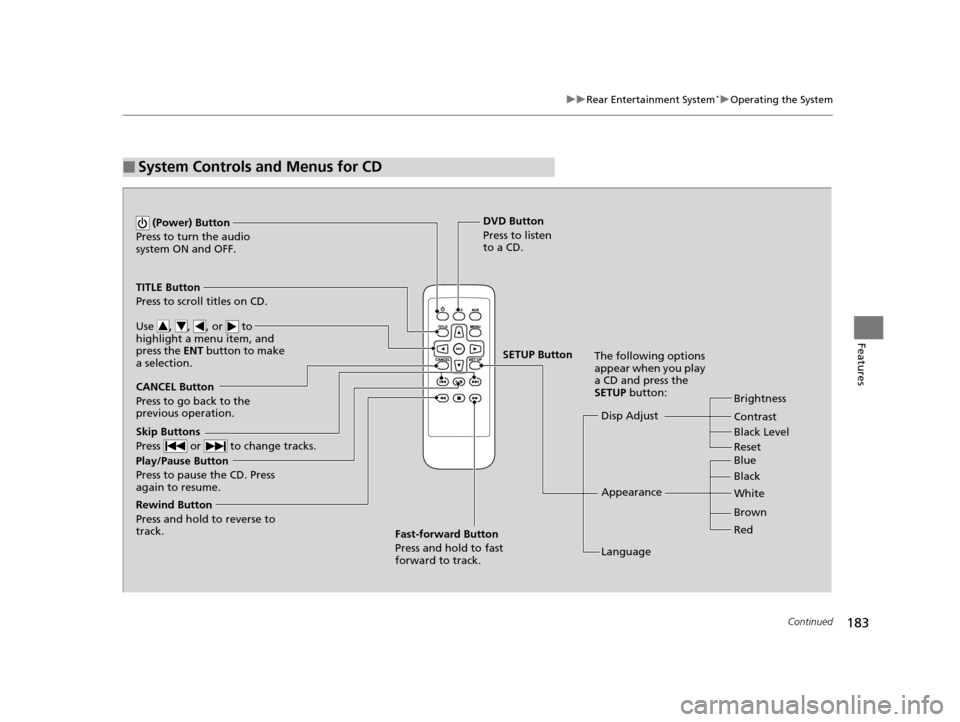
■System Controls and Menus for CD
Play/Pause Button
Press to pause the CD. Press
again to resume. (Power) Button
Press to turn the audio
system ON and OFF.
DVD Button
Press to listen
to a CD.
TITLE Button
Press to scroll titles on CD.
Use , , , or to
highlight a menu item, and
press the ENT button to make
a selection.
CANCEL Button
Press to go back to the
previous operation. Disp Adjust
LanguageBrightness
Contrast
Black Level
Appearance Black Blue
Brown White
Red
The following options
appear when you play
a CD and press the
SETUP button:
Skip Buttons
Press or to change tracks.
Rewind Button
Press and hold to reverse to
track. Fast-forward Button
Press and hold to fast
forward to track.
SETUP Button
Reset
14 CR-V-31T0A6200.book 183 ページ 2014年2月10日 月曜日 午後7時1分
Page 185 of 365

uuRear Entertainment System*uOperating the System
184
Features
■Playing a CD
Press the DVD button.
The available options that appear on the overhead screen are Repeat, Random, and Scan.
The fast-forward, rewind, , and buttons work similarly to operation a DVD.
2Playing a DVD P. 178
To scroll the audio data title, press the TITLE button for five seconds.
■SETUP button on the remote
Press the SETUP button while the CD is
playing to see the ava ilable options. Use the
and buttons to highlight the option,
then press ENT.
Disp Adjust:
You can adjust the overhead screen’s Brightness, Contrast, and Black Level . To
return to the default display setting, select Reset.
After you make adjustments, the screen goes back to the top SETUP screen, or press
the CANCEL button to return.
Appearance:
You can select the screen color from blue, black, white, brown, and red.
Language:
You can select the display language from English, French, and Spanish.
1System Controls and Menus for CD
You can insert an audio CD compatible with the
system, or recorded in MP3/WMA/AAC formats into
the slot and play.
2 Playable Discs P. 185
14 CR-V-31T0A6200.book 184 ページ 2014年2月10日 月曜日 午後7時1分