2014 HONDA CIVIC clock
[x] Cancel search: clockPage 242 of 469
241
uuCustomized Features
*u
Continued
Features
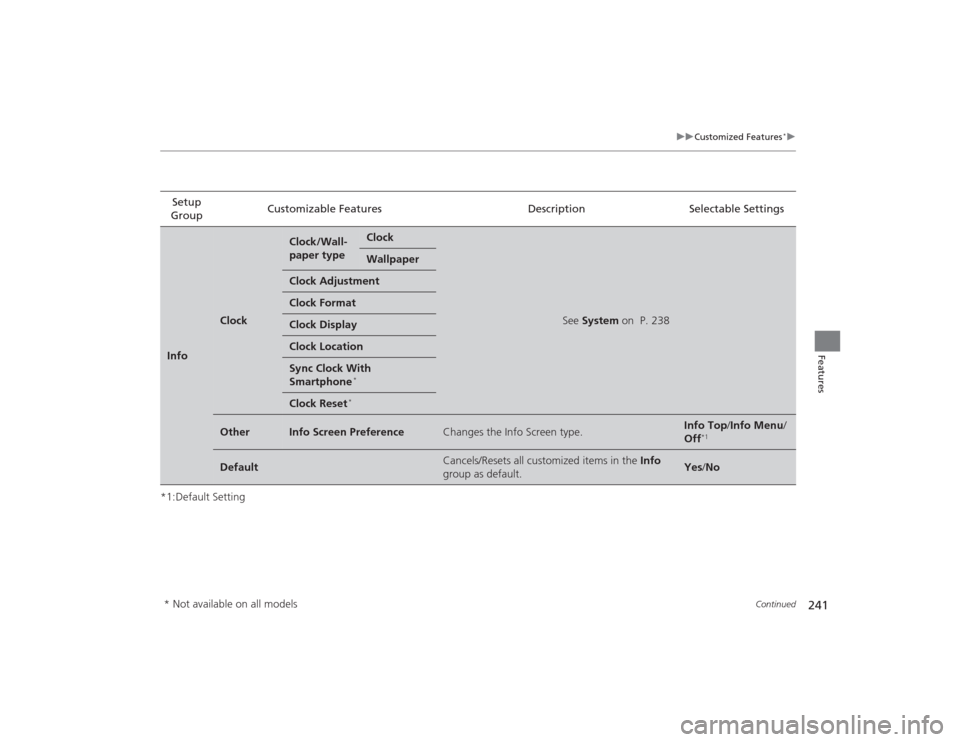
*1:Default SettingSetup
Group Customizable Features Description Selectable SettingsInfo
Clock
Clock/Wall-
paper type
Clock
See
System on P. 238
Wallpaper
Clock AdjustmentClock FormatClock DisplayClock LocationSync Clock With
Smartphone
*
Clock Reset
*
Other
Info Screen Preference
Changes the Info Screen type.
Info Top /Info Menu/
Off
*1
Default
Cancels/Resets all customized items in the Info
group as default.
Yes /No
* Not available on all models
Page 373 of 469
uuMaintenance Under the Hood uEngine Coolant
372Maintenance
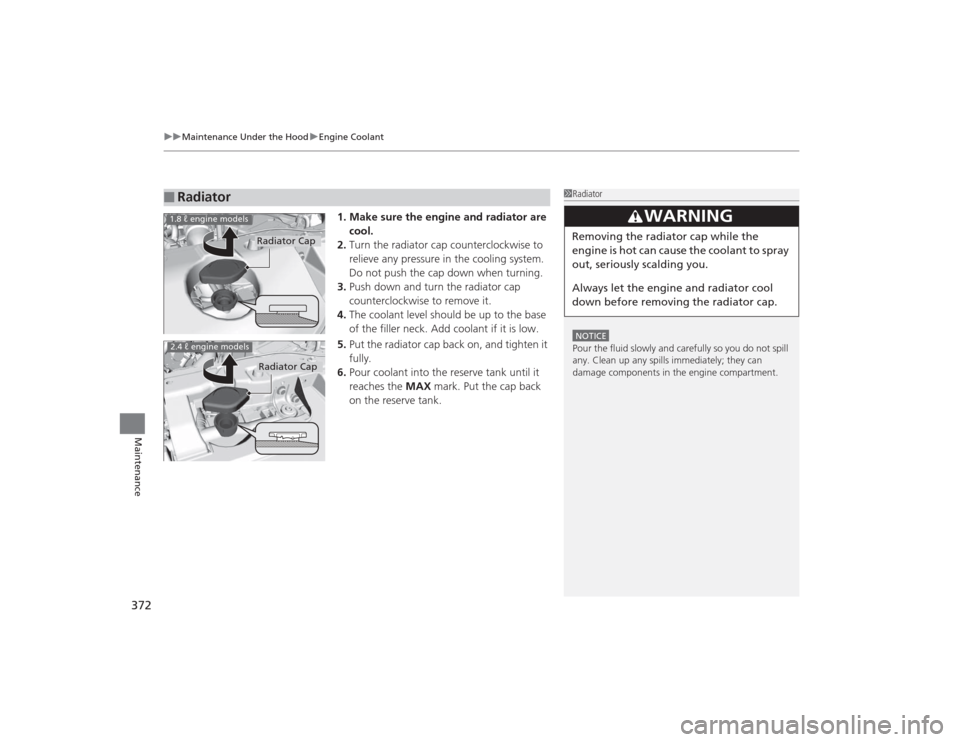
1. Make sure the engine and radiator are
cool.
2. Turn the radiator cap counterclockwise to
relieve any pressure in the cooling system.
Do not push the cap down when turning.
3. Push down and turn the radiator cap
counterclockwise to remove it.
4. The coolant level should be up to the base
of the filler neck. Add coolant if it is low.
5. Put the radiator cap back on, and tighten it
fully.
6. Pour coolant into the reserve tank until it
reaches the MAX mark. Put the cap back
on the reserve tank.
■
Radiator
1 RadiatorNOTICEPour the fluid slowly and carefully so you do not spill
any. Clean up any spills immediately; they can
damage components in the engine compartment.
3
WARNING
Removing the radiator cap while the
engine is hot can cause the coolant to spray
out, seriously scalding you.
Always let the engine and radiator cool
down before removing the radiator cap.
Radiator Cap
1.8 ℓ engine models2.4 ℓ engine models
Radiator Cap
Page 401 of 469
400Maintenance
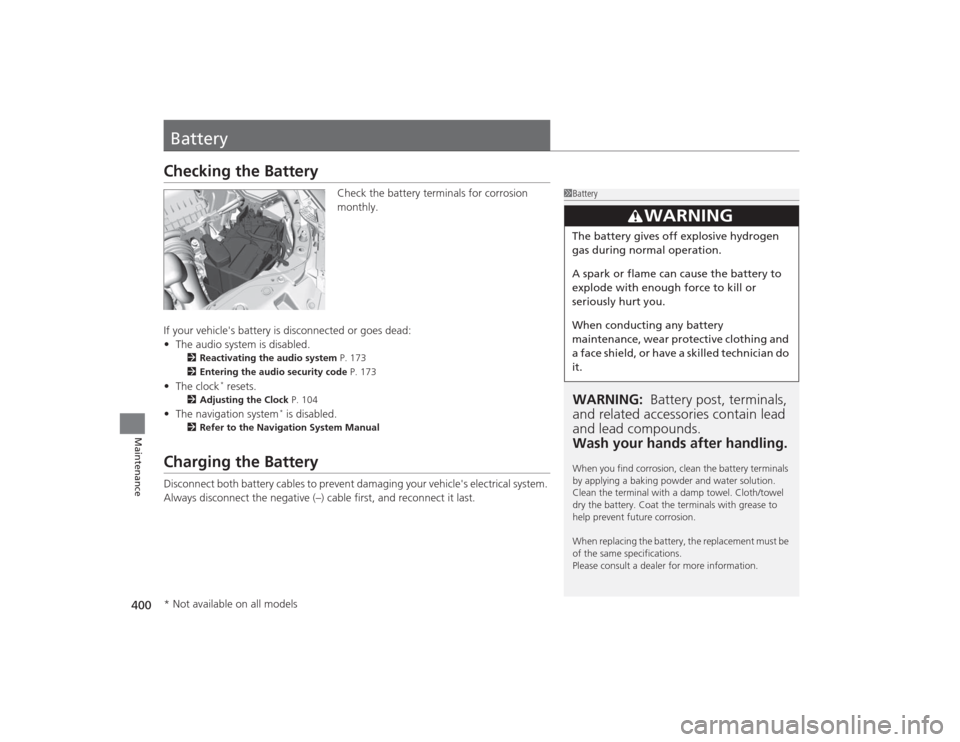
BatteryChecking the Battery
Check the battery terminals for corrosion
monthly.
If your vehicle's battery is disconnected or goes dead:
• The audio system is disabled.
2 Reactivating the audio system P. 173
2 Entering the audio security code P. 173
•The clock
* resets.
2 Adjusting the Clock P. 104
•The navigation system
* is disabled.
2 Refer to the Navigation System Manual
Charging the BatteryDisconnect both battery cables to prevent damaging your vehicle's electrical system.
Always disconnect the negative (–) cable first, and reconnect it last.
1BatteryWARNING: Battery post, terminals,
and related accessori es contain lead
and lead compounds.
Wash your hands after handling.When you find corrosion, clean the battery terminals
by applying a baking powder and water solution.
Clean the terminal with a damp towel. Cloth/towel
dry the battery. Coat the terminals with grease to
help prevent future corrosion.
When replacing the battery, the replacement must be
of the same specifications.
Please consult a dealer for more information.
3
WARNING
The battery gives off explosive hydrogen
gas during normal operation.
A spark or flame can cause the battery to
explode with enough force to kill or
seriously hurt you.
When conducting any battery
maintenance, wear protective clothing and
a face shield, or have a skilled technician do
it.
* Not available on all models
Page 415 of 469

uuIf a Tire Goes Flat uChanging a Flat Tire
414Handling the Unexpected
1. Place the jack under the jacking point
closest to the tire to be changed.
2. Turn the end bracket clockwise as shown in
the image until the top of the jack contacts
the jacking point.
u Make sure that the jacking point tab is
resting in the jack notch.
3. Raise the vehicle, using the jack handle bar
and the jack handle, until the tire is off the
ground.
■
How to Set Up the Jack
1How to Set Up the Jack
Do not use the jack with people or luggage in the
vehicle.
Use the jack provided in your vehicle.
Other jacks may not support the weight (“load”) or
may not fit the jacking point.
The following instructions must be followed to use
the jack safely:•Do not use while the engine is running.•Use only where the ground is firm and level.•Use only at the jacking points.•Do not get in the vehicle while using the jack.•Do not put anything on top of or underneath the
jack.
3
WARNING
The vehicle can easily roll off the jack,
seriously injuring anyone underneath.
Follow the directions for changing a tire
exactly, and never get under the vehicle
when it is supported only by the jack.
Jack
Handle
Bar Wheel Nut
Wrench as Jack Handle
Page 458 of 469

Index
457Index
Index
AABS (Anti-lock Brake System).................. 339
Accessories and Modifications ................ 347
Accessory Power Socket ........................... 159
Additives
Coolant .................................................. 371
Engine Oil ............................................... 364
Washer ................................................... 375
Additives, Engine Oil ............................... 364
Adjusting Armrest .................................................. 153
Clock ...................................................... 104
Front Seats.............................................. 146
Head Restraints ....................................... 149
Mirrors.................................................... 144
Rear Seats ............................................... 152
Steering Wheel ....................................... 143
Temperature ............................................. 89
Adjusting the Clock ................................. 104
Air Conditioning System (Climate Control System) .................................................... 165
Changing the Mode................................ 166
Defrosting the Windshield and Windows .............................................. 166
Dust and Pollen Filter .............................. 403
Recirculation/Fresh Air Mode................... 166
Sensor .................................................... 167
Using Automatic Climate Control............ 165 Air Conditioning System (Heating and
Cooling System) ...................................... 161
Cooling ................................................... 163
Defrosting the Windshield and Windows ............................................... 164
Dust and Pollen Filter ............................... 403
Heating ................................................... 162
Air Pressure ............................... 392, 445, 447
Airbags ........................................................ 39
Advanced Airbags ..................................... 45
After a Collision ......................................... 42
Airbag Care ............................................... 51
Event Data Recorder .................................. 24
Front Airbags (SRS) .................................... 42
Indicator .............................................. 49, 71
Passenger Airbag Off Indicator .................. 50
Sensors ...................................................... 39
Side Airbags .............................................. 46
Side Curtain Airbags .................................. 48
AM/FM Radio ............................ 177, 181, 204
Anti-lock Brake System (ABS) .................. 339
Indicator .................................................... 71
Armrest ..................................................... 153
Audio Remote Controls ............................ 174
Audio System ............................................ 170
Adjusting the Sound ................ 176, 180, 202
Auxiliary Input Jack .................................. 172
Error Messages ........................................ 224 General Information ................................ 230
Internet Radio ................................. 190, 213
iPod ........................................................ 210
MP3/WMA ...................................... 178, 184
MP3/WMA/AAC ...................... 192, 215, 220
Reactivating ............................................ 173
Recommended CDs ................................. 230
Recommended Devices............................ 232
Remote Controls ..................................... 174
Security Code .......................................... 173
Theft Protection ...................................... 173
USB Adapter Cable.......................... 171, 172
USB Flash Drives ...................................... 232
USB/HDMI
® Port ...................................... 171
Authorized Manuals ................................ 455
Auto Door Locking/Unlocking ................. 117
Customize ......................................... 97, 118
Automatic Lighting .................................. 137
Automatic Transmission
Creeping ................................................. 319
Kickdown ................................................ 319
Operating the Shift Lever........................... 17
Shift Lever Does Not Move ...................... 432
Automatic Transmission (CVT) ................. 319
Fluid ........................................................ 373
Operating the Shift Lever......................... 321
Shifting ................................................... 320
Auxiliary Input Jack .................................. 172
Average Fuel Economy ........................ 85, 88
Average Speed .......................
.................... 88
Page 464 of 469

463Index
Remote Transmitter................................. 109
Replacement
Battery .................................................... 401
Bulbs ...................................................... 376
Fuses .............................................. 439, 440
Tires........................................................ 397
Wiper Blade Rubber ................................ 389
Reporting Safety Defects ......................... 450
Resetting a Trip Meter ......................... 84, 87SSafe Driving................................................ 27
Safety Check ............................................... 31
Safety Labels .............................................. 65
Safety Message .......................................... 25
Seat Belts .................................................... 32
Adjusting the Shoulder Anchor ................. 36
Automatic Seat Belt Tensioners ................. 34
Checking .................................................. 38
Fastening .................................................. 35
Installing a Child Seat with a Lap/Shoulder Seat Belt ......................................................... 59
Pregnant Women...................................... 37
Reminder .................................................. 33
Warning Indicator ............................... 33, 70
Seat Heaters ............................................. 160
Seats .......................................................... 146
Adjusting ................................................ 146
Front Seats.............................................. 146 Rear Seats ............................................... 152
Seat Heaters ............................................ 160
Security System ......................................... 125
Immobilizer System Indicator ..................... 75
Security System Alarm Indicator ................. 75
Select Lever ................................. 17, 320, 322
Operation .................................. 17, 321, 322
Releasing ................................................. 432
Won’t Move ............................................ 432
Select/Reset Knob ................................. 84, 87
Selecting a Child Seat ................................. 56
Selector Knob (Audio) .............................. 179
Setting the Clock ...................................... 104
Shift Lever ................................... 17, 320, 322
Shift Lever Position Indicator ..................... 70
Shift Position Indicator ............................. 321
Shifting (Transmission) ..................... 320, 322
Shoulder Anchor ......................................... 36
Side Airbags ................................................ 46
Side Curtain Airbags ................................... 48
Smart Entry System Indicator .................................................... 75
Smart Entry with Push Button Start System ..................................................... 111
SMS Text Message ............ 258, 272, 287, 296
Snow Tires ................................................. 399
Spare Tire .................................. 411, 445, 447
Spark Plugs ........................................ 444, 446
Specifications ............................................ 444 Specified Fuel
........................... 343, 444, 446
Speedometer .............................................. 82
SRS Airbags (Airbags) ................................. 42
Starting the Engine .......................... 313, 315
Does Not Start......................................... 426
Engine Switch Buzzer .............................. 131
Jump Starting .......................................... 429
Steering Wheel
Adjusting ................................................ 143
Stopping ................................................... 341
Summer Tires ............................................ 399
Supplemental Restraint System (SRS) ........ 42
Switches (Around the Steering Wheel) ............................................. 2, 3, 131
System Message Indicator .......................... 74
TTachometer................................................. 82
Temperature High Temperature Indicator ....................... 72
Low Temperature Indicator........................ 75
Outside Temperature Display ..................... 89
Temperature Sensor ................................... 89
Text Message .................... 258, 272, 287, 296
Time (Setting) ........................................... 104
Tire Pressure Monitoring System
(TPMS) ..................................................... 333
Indicator............................................ 73, 438