Page 145 of 469
144Controls
Adjusting the MirrorsInterior Rearview MirrorAdjust the angle of the rearview mirror when you are sitting in the correct driving
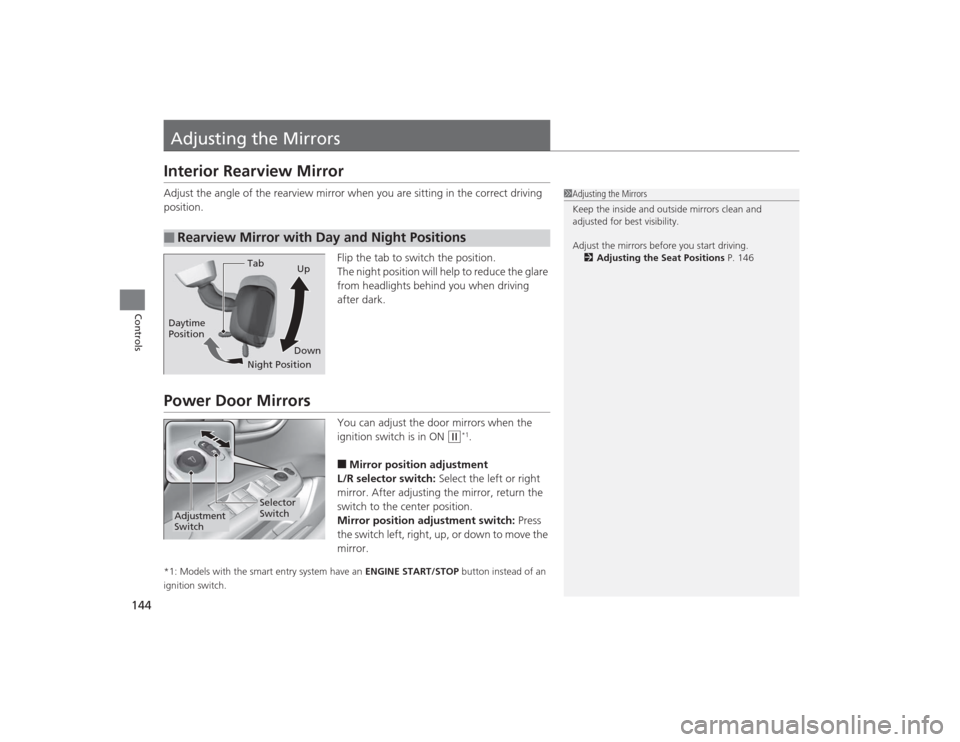
position.Flip the tab to switch the position.
The night position will help to reduce the glare
from headlights behind you when driving
after dark.Power Door Mirrors
You can adjust the door mirrors when the
ignition switch is in ON
(w
*1.
■Mirror position adjustment
L/R selector switch: Select the left or right
mirror. After adjusting the mirror, return the
switch to the center position.
Mirror position adjustment switch: Press
the switch left, right, up, or down to move the
mirror.
*1: Models with the smart entry system have an ENGINE START/STOP button instead of an
ignition switch.■
Rearview Mirror with Day and Night Positions
1 Adjusting the Mirrors
Keep the inside and outside mirrors clean and
adjusted for best visibility.
Adjust the mirrors before you start driving.
2 Adjusting the Seat Positions P. 146
Tab
Daytime
Position
Night PositionUp
Down
Selector
Switch
Adjustment
Switch
Page 332 of 469
331
uuWhen Driving uLaneWatch
TM*
Continued
Driving
LaneWatch
TM
*
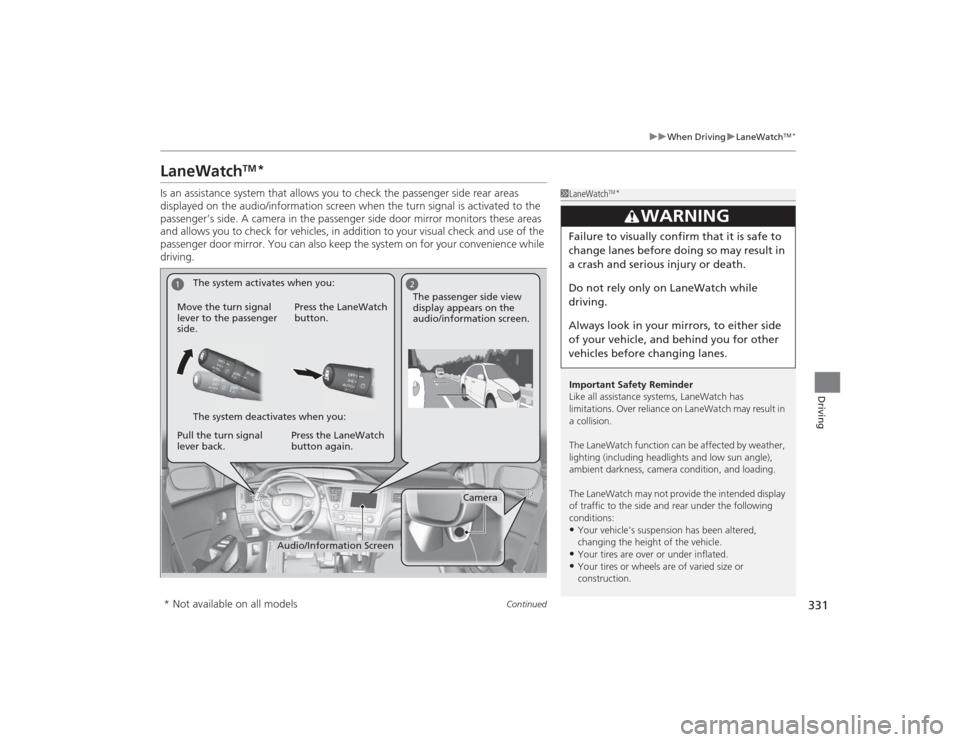
Is an assistance system that allows you to check the passenger side rear areas
displayed on the audio/information screen when the turn signal is activated to the
passenger’s side. A camera in the passenger side door mirror monitors these areas
and allows you to check for vehicles, in addition to your visual check and use of the
passenger door mirror. You can also keep the system on for your convenience while
driving.
1LaneWatch
TM*
Important Safety Reminder
Like all assistance systems, LaneWatch has
limitations. Over reliance on LaneWatch may result in
a collision.
The LaneWatch function can be af fected by weather,
lighting (including headlights and low sun angle),
ambient darkness, camera condition, and loading.
The LaneWatch may not provide the intended display
of traffic to the side and rear under the following
conditions:•Your vehicle’s suspension has been altered,
changing the height of the vehicle.•Your tires are over or under inflated.•Your tires or wheels are of varied size or
construction.
3
WARNING
Failure to visually confirm that it is safe to
change lanes before doing so may result in
a crash and serious injury or death.
Do not rely only on LaneWatch while
driving.
Always look in your mirrors, to either side
of your vehicle, and behind you for other
vehicles before changing lanes.
1
2
Camera
Audio/Information Screen
Move the turn signal
lever to the passenger
side.
Press the LaneWatch
button.
Pull the turn signal
lever back. Press the LaneWatch
button again. The passenger side view
display appears on the
audio/information screen.
The system activates when you:
The system deactivates when you:
* Not available on all models
Page 378 of 469
Continued
377
uuReplacing Light Bulbs uHeadlight Bulbs
Maintenance
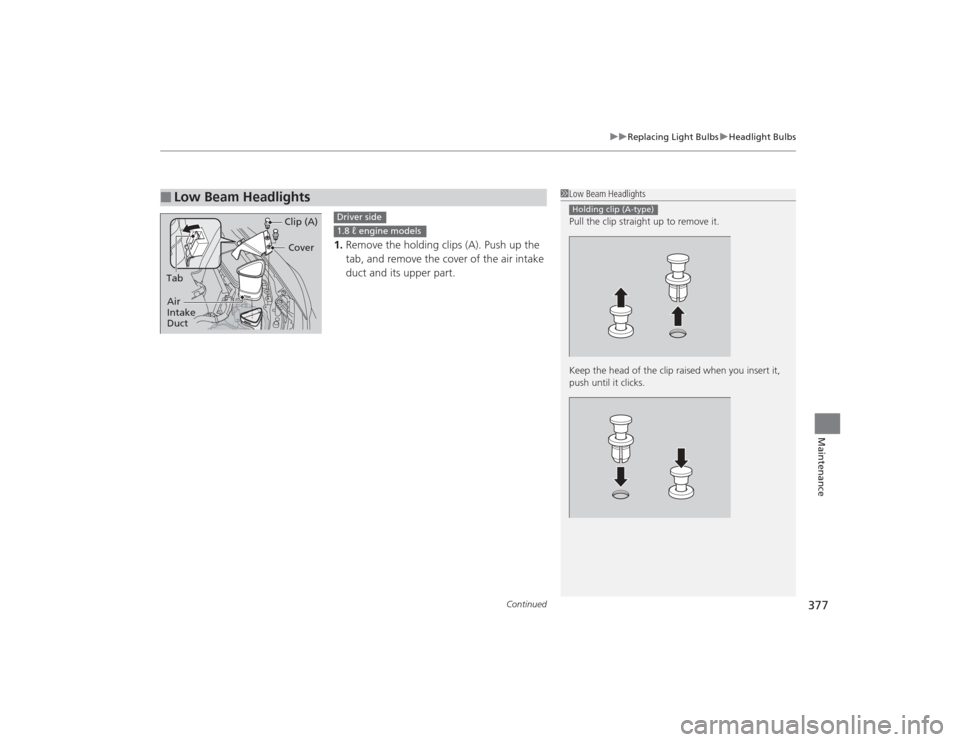
1. Remove the holding clips (A). Push up the
tab, and remove the cover of the air intake
duct and its upper part.
■
Low Beam Headlights
1Low Beam Headlights
Pull the clip straight up to remove it.
Keep the head of the clip raised when you insert it,
push until it clicks.Holding clip (A-type)
Cover
Tab Clip (A)
Air
Intake
Duct
Driver side1.8 ℓ engine models
Page 379 of 469
uuReplacing Light Bulbs uHeadlight Bulbs
378Maintenance
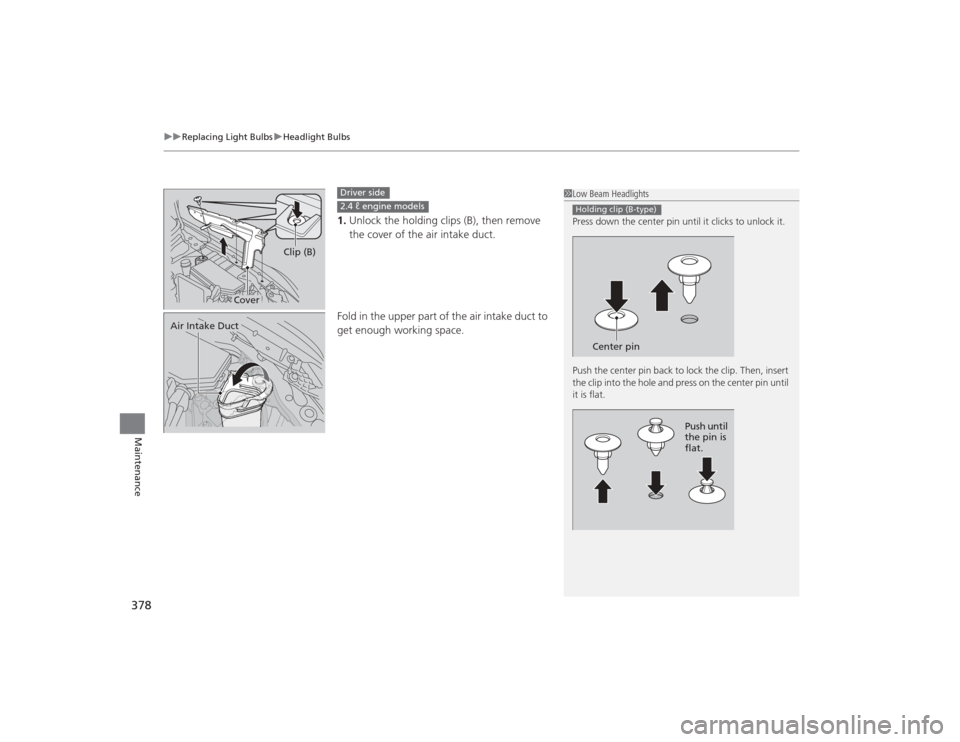
1. Unlock the holding clips (B), then remove
the cover of the air intake duct.
Fold in the upper part of the air intake duct to
get enough working space.
1 Low Beam Headlights
Press down the center pin until it clicks to unlock it.
Push the center pin back to lock the clip. Then, insert
the clip into the hole and press on the center pin until
it is flat.Holding clip (B-type)
Center pin
Push until
the pin is
flat.
Cover Clip (B)
Driver side2.4 ℓ engine models
Air Intake Duct
Page 380 of 469
379
uuReplacing Light Bulbs uHeadlight Bulbs
Maintenance
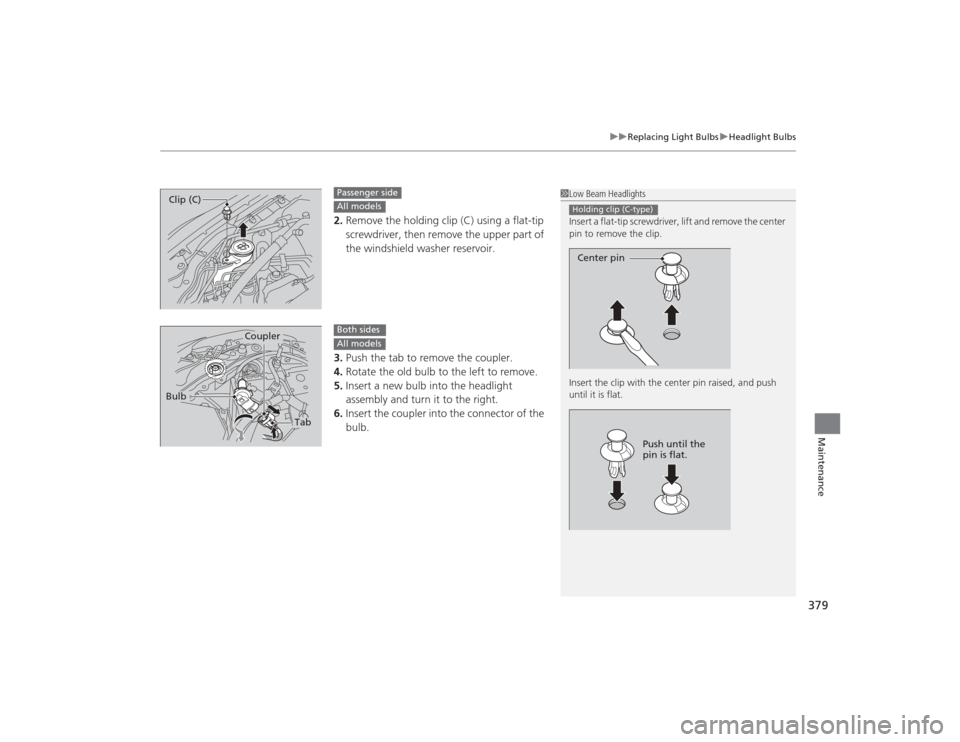
2. Remove the holding clip (C) using a flat-tip
screwdriver, then remove the upper part of
the windshield washer reservoir.
3. Push the tab to remove the coupler.
4. Rotate the old bulb to the left to remove.
5. Insert a new bulb into the headlight
assembly and turn it to the right.
6. Insert the coupler into the connector of the
bulb.
1Low Beam Headlights
Insert a flat-tip screwdriver, lift and remove the center
pin to remove the clip.
Insert the clip with the center pin raised, and push
until it is flat.Holding clip (C-type)Center pin
Push until the
pin is flat.
Clip (C)
Passenger sideAll models
Tab
Coupler
Bulb
Both sidesAll models
Page 384 of 469
383
uuReplacing Light Bulbs uFront Turn Signal/Parking/Side Marker Light Bulbs
Continued
Maintenance
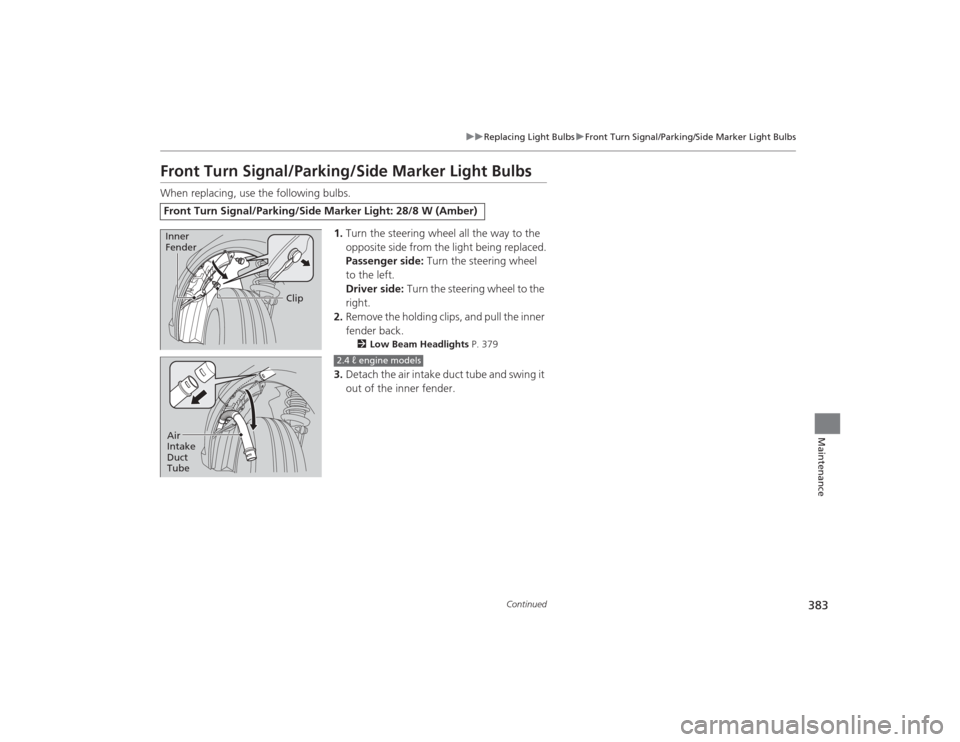
Front Turn Signal/Parking/Side Marker Light BulbsWhen replacing, use the following bulbs.
1.Turn the steering wheel all the way to the
opposite side from the light being replaced.
Passenger side: Turn the steering wheel
to the left.
Driver side: Turn the steering wheel to the
right.
2. Remove the holding clips, and pull the inner
fender back.
2 Low Beam Headlights P. 379
3.Detach the air intake duct tube and swing it
out of the inner fender.
Front Turn Signal/Parking/Side Marker Light: 28/8 W (Amber)
Clip
Inner
Fender
Air
Intake
Duct
Tube
2.4 ℓ engine models
Page 409 of 469
408
uuCleaning uExterior Care
Maintenance
The inside lenses of exterior lights (headlights, brake lights, etc.) may fog temporarily
if you have driven in the rain, or after the vehicle has been run through a car wash.
Dew condensation also may build up inside the lenses when there is a significant
enough difference between the ambient and inside lens temperatures (similar to
vehicle windows fogging up in rainy conditions). These conditions are natural
processes, not structural design problems in the exterior lights.
Lens design characteristics may result in moisture developing on the light lens frame
surfaces. This also is not a malfunction.
However, if you see large amounts of water accumulation, or large water drops
building up inside the lenses, have your vehicle inspected by a dealer.■
Fogged Exterior Light Lenses
Page 442 of 469

441
uuFuses uInspecting and Changing Fuses
Handling the Unexpected
Inspecting and Changing Fuses
1. Turn the ignition switch to LOCK
(0
*1. Turn
headlights and all accessories off.
2. Remove the fuse box cover.
3. Check the large fuse in the engine
compartment.
u If the fuse is blown, use a Phillips-head
screwdriver to remove the screw and
replace it with a new one.
4. Inspect the small fuses in the engine
compartment and the vehicle interior.
u If there is a burned out fuse, remove it
with the fuse puller and replace it with a
new one.
*1: Models with the smart entry system have an ENGINE START/STOP button instead of an
ignition switch.
1 Inspecting and Changing FusesNOTICEReplacing a fuse with one that has a higher rating
greatly increases the chances of damaging the
electrical system.
Replace fuse with a spare fuse of the same specified
amperage.
Confirm the specified amperage using the charts on
P. 439 to 440.
There is a fuse puller on the back of the engine
compartment fuse box cover.
Combined
Fuse Blown FuseFuse Puller