Page 102 of 441
101
uuClock uAdjusting the Clock
Controls
■Using the Settings menu on the audio/
information screen
1. Select Settings .
2. Select System.
3. Select Clock.
4. Select Clock Adjustment .
5. Select or to change hour.
6. Select or to change minute, then
select OK.
1Adjusting the Clock
You can customize the clock display to show the 12
hour clock or 24 hour clock.
2 Customized Features
* P. 220
The clock display is set to off by factory default.
You can turn the clock display on and off. 2 Customized Features
* P. 220
The clock is automatica lly updated when your
smartphone is connected to the audio system.
Models with display audio
Models with display audio
34
34
* Not available on all models
14 CIVIC 2D_SI-31TS86210.book 101 ページ 2014年1月29日 水曜日 午後8時9分
Page 123 of 441
122
Controls
Operating the Switches Around the Steering Wheel
Ignition Switch*
1Ignition Switch*
You cannot take the key out unless the shift lever is
in
( P.
If you open the driver's door when the key is in LOCK
(0 or ACCESSORY ( q, a warning buzzer will sound
to remind you to take the key out.
When this happens, the following messages appear
on the i-MID:
•In LOCK ( 0: REMOVE KEY .
•In ACCESSORY (q: RETURN IGNITION SWITCH
TO LOCK (0) POSITION The buzzer will stop when
you take the key out.
If the key won't turn from LOCK
( 0 to ACCESSORY
(q, turn the key while moving the steering wheel left
and right. The steering wh eel will unlock, allowing
the key to turn.
3WARNING
Removing the key from the ignition switch
while driving locks the steering. This can
cause you to lose control of the vehicle.
Remove the key from the ignition switch
only when parked.
Manual transmission models
Automatic transmission (CVT) models
All models
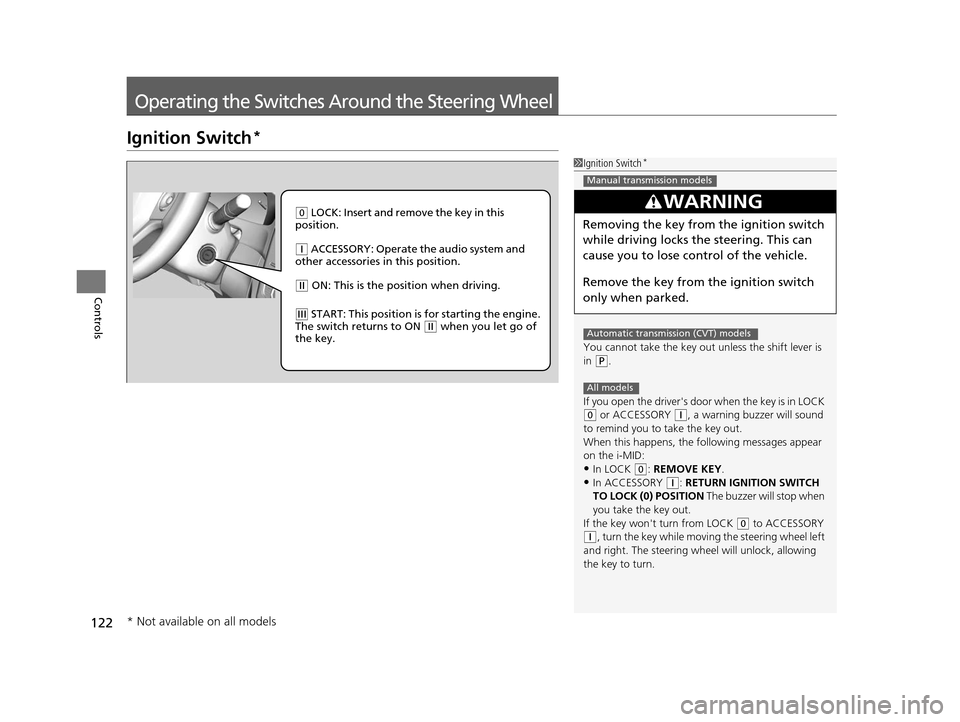
( 0 LOCK: Insert and remove the key in this
position.
( q ACCESSORY: Operate the audio system and
other accessories in this position.
( w ON: This is the position when driving.
(e START: This position is for starting the engine.
The switch returns to ON ( w when you let go of
the key.
* Not available on all models
14 CIVIC 2D_SI-31TS86210.book 122 ページ 2014年1月29日 水曜日 午後8時9分
Page 124 of 441

123
uuOperating the Switches Around the Steering Wheel uENGINE START/STOP Button*
Continued
Controls
ENGINE START/STOP Button*
*1: Except U.S. models with automatic transmission (CVT)
■Changing the Power Mode1ENGINE START/STOP Button*
ENGINE START/STOP Button Operating Range
You can start the engine when the smart entry
remote is inside the vehicle.
The engine may also run if the smart entry remote is
close to the door or window, ev en if it is outside the
vehicle.
ON mode:
Indicator in the button is of f, if the engine is running.
If the smart entry remote battery is weak, the beeper
sounds and the TO START, HOLD REMOTE NEAR
START BUTTON message appears on the i-MID.
2 If the Smart Entry Remote Battery is Weak
P. 401
Do not leave the power mode in ACCESSORY or ON
when you get out.
Operating RangeAutomatic Transmission (CVT) Manual Transmission
VEHICLE OFF (LOCK)
Indicator in th e button is off.
The steering wheel is locked
*1.
The power to all electrical
components is turned off.
Press the button without the shift
lever in
( P.
Shift to
( P then press the button. Press the button.Without pressing
the clutch pedal
Without pressing
the brake pedal ACCESSORY
Indicator in the button is on.
Indicator in th
e button blinks
(from ON to ACCESSORY).
Operate the audio system and
other accessories in this position.
ON
Indicator in the button is on.
All electrical components can be
used.
Indicator
Indicator
Shift to (
P.
U.S. models
* Not available on all models
14 CIVIC 2D_SI-31TS86210.book 123 ページ 2014年1月29日 水曜日 午後8時9分
Page 127 of 441

126
uuOperating the Switches Around the Steering Wheel uIgnition Switch and Power Mode Comparison
Controls
Ignition Switch and Power Mode Comparison
*1:Except U.S. models with automatic transmission (CVT)
Ignition Switch
PositionLOCK (0)
(with/without
the key)ACCESSORY (I)ON (II)START (III)
Without Smart Entry
System●Engine is turned off and
power is shut down.
●The steering wheel is
locked*1.●No electrical
components can be
used.
●Engine is turned off.●Some electrical
components such as the
audio system and the
accessory power socket
can be operated.
●Normal key position
while driving.
●All electrical components
can be used.
●Use this position to start
the engine.
●The ignition switch
returns to the ON (II)
position when you
release the key.
Power ModeVEHICLE OFF
(LOCK)ACCESSORYONSTART
With Smart Entry
System and ENGINE
START/STOP
ButtonIndicator-Off●Engine is turned off and
power is shut down.
●The steering wheel is
locked*1.●No electrical
components can be
used.
Indicator-On or blinking●Engine is turned off.●Some electrical
components such as the
audio system and the
accessory power socket
can be operated.
Indicator-
On (engine is turned off)
Off (engine is running)
●All electrical components
can be used.
Indicator-Off●The mode automatically
returns to ON after the
engine starts.
Indicator is: On Off
14 CIVIC 2D_SI-31TS86210.book 126 ページ 2014年1月29日 水曜日 午後8時9分
Page 160 of 441

159
Features
This chapter describes how to operate technology features.
Audio SystemAbout Your Audio System ................ 160
USB/HDMI ® Port
*............................. 161
USB Adapter Cable .......................... 162
Auxiliary Input Jack
*........................ 162
Audio System Theft Protection*....... 163
Audio Remote Controls .................... 164
Audio System Basic Operation ........ 166
Adjusting the Sound ........................ 167
Playing AM/FM Radio ....................... 168
Playing a CD .................................... 171
Models with one display
Playing an iPod ................................ 174
Playing Internet Radio ...................... 177
Playing a USB Flash Drive ................. 179
Playing Bluetooth ® Audio................. 182
Audio System Basic Operation ........ 184
Audio/Information Screen ................ 185
Adjusting the Sound ........................ 189
Display Setup ................................... 190
Playing AM/FM Radio ....................... 191
Playing a CD .................................... 194
Playing an iPod ................................ 197
Models with display audio system
Playing Internet Radio ...................... 200
Playing a USB Flash Drive ................. 202
Playing Bluetooth ® Audio ................ 205
Playing a Video Using the HDMI ®..... 207
Smartphone Apps ............................ 209
Siri Eyes Free .................................... 210
Audio Error Messages ...................... 211
General Information on the Audio System ............................................. 217
Customized Features
*...................... 220
Bluetooth® HandsFreeLink® ..... 233, 264
* Not available on all models
14 CIVIC 2D_SI-31TS86210.book 159 ページ 2014年1月29日 水曜日 午後8時9分
Page 161 of 441
160
Features
Audio System
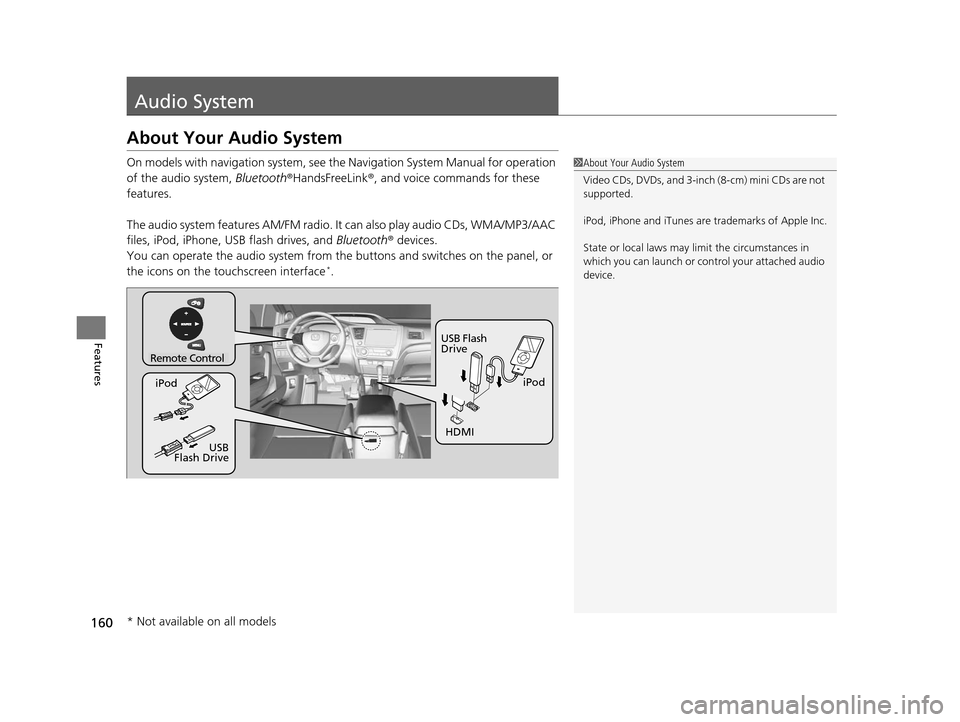
About Your Audio System
On models with navigation system, see the Navigation System Manual for operation
of the audio system, Bluetooth ®HandsFreeLink®, and voice commands for these
features.
The audio system features AM/FM radio. It can also play audio CDs, WMA/MP3/AAC
files, iPod, iPhone, USB flash drives, and Bluetooth® devices.
You can operate the audio system from the buttons and switches on the panel, or
the icons on the touchscreen interface
*.
1 About Your Audio System
Video CDs, DVDs, and 3-inch (8-cm) mini CDs are not
supported.
iPod, iPhone and iTunes are trademarks of Apple Inc.
State or local laws may li mit the circumstances in
which you can launch or cont rol your attached audio
device.
Remote Control
iPod
USB Flash
Drive
iPod
HDMI
USB
Flash Drive
* Not available on all models
14 CIVIC 2D_SI-31TS86210.book 160 ページ 2014年1月29日 水曜日 午後8時9分
Page 162 of 441
161
uuAudio System uUSB/HDMI ® Port*
Features
USB/HDMI ® Port*
1. Open the cover.
2. Install the iPod dock connector or the USB
flash drive to the USB port.
3. Install the HDMI ® cable to the HDMI ® port.1USB/HDMI ® Port*
•Do not leave the iPod or USB flash drive in the
vehicle. Direct sunlight and high temperatures may
damage it.
•Do not connect the iPod or USB flash drive using a
hub.
•Do not use a device such as a card reader or hard
disk drive, as the device or your files may be
damaged.
•We recommend backing up yo ur data before using
the device in your vehicle.
•Displayed messages may vary depending on the
device model and software version.
If the audio system does not recognize the iPod, try
reconnecting it a few times or reboot the device. To
reboot, follow the manufac turer's instructions
provided with the iPod or visit www.apple.com/ipod.
* Not available on all models
14 CIVIC 2D_SI-31TS86210.book 161 ページ 2014年1月29日 水曜日 午後8時9分
Page 163 of 441

162
uuAudio System uUSB Adapter Cable
Features
USB Adapter Cable
1. Lift the armrest and unclip the USB
connector cable.
2. Install the iPod dock connector or the USB
flash drive to the USB connector.
Auxiliary Input Jack*
Use the jack to connect standard audio devices.
1.Open the AUX cover.
2. Connect a standard audio device to the
input jack using a 1/8 inch (3.5 mm) stereo
miniplug.
u The audio system automatically switches
to the AUX mode.
1USB Adapter Cable
•Do not leave the iPod or USB flash drive in the
vehicle. Direct sunlight and high temperatures may
damage it.
•Do not use an extension cable with the USB
adapter cable.
•Do not connect the iPod or USB flash drive using a
hub.
•Do not use a device such as a card reader or hard
disk drive, as the device or your files may be
damaged.
•We recommend backing up yo ur data before using
the device in your vehicle.
•Displayed messages may vary depending on the
device model and software version.
If the audio system does not recognize the iPod, try
reconnecting it a few times or reboot the device. To
reboot, follow the manufac turer's instructions
provided with the iPod or visit www.apple.com/ipod.
1Auxiliary Input Jack*
To switch the mode, pres s any of the audio mode
buttons. You can return to the AUX mode by
pressing the AUX button.
* Not available on all models
14 CIVIC 2D_SI-31TS86210.book 162 ページ 2014年1月29日 水曜日 午後8時9分