Page 17 of 561

16
Quick Reference Guide
Instrument Panel (P 71)
CanadaU.S.
Low Fuel Indicator
Anti-lock Brake
System ( ABS)
Indicator
Parking Brake
and Brake System
Indicator (Red)
Canada U.S.
READY Indicator
System Indicators
Malfunction
Indicator Lamp
Low Oil Pressure
Indicator
12-Volt Battery
Charging System
Indicator
Vehicle Stability
Assist (VSA ®) System
Indicator VSA ® OFF Indicator
Low Tire Pressure/
TPMS Indicator
Electric Power
Steering (EPS) System
Indicator
Lights IndicatorsLights On Indicator
High Beam Indicator
Immobilizer System
Indicator
Seat Belt Reminder
Indicator EV Indicator
POWER
/CHARGE
Gauge Speedometer
Fuel Gauge
Security System
Alarm Indicator
Shift Lever Position
Indicator
Gauges
(P 92)/Multi-Information Display (P 94)/System Indicators (P 72)
Turn Signal and
Hazard Warning
Indicators
System Indicators High Voltage Battery
Charge Level Gauge
POWER SYSTEM
Indicator
Smart Entry System
Indicator System Message
Indicator
ECON mode
Indicator
Forward Collision
Warning (FCW) Indicator*
Lane Departure Warning (LDW) Indicator* Brake System
Indicator (Amber)
Supplemental
Restraint System
IndicatorEV
Mode Indicator
System Indicators
Multi-Information Display
Main Menu
Page 18 of 561
17
Quick Reference Guide
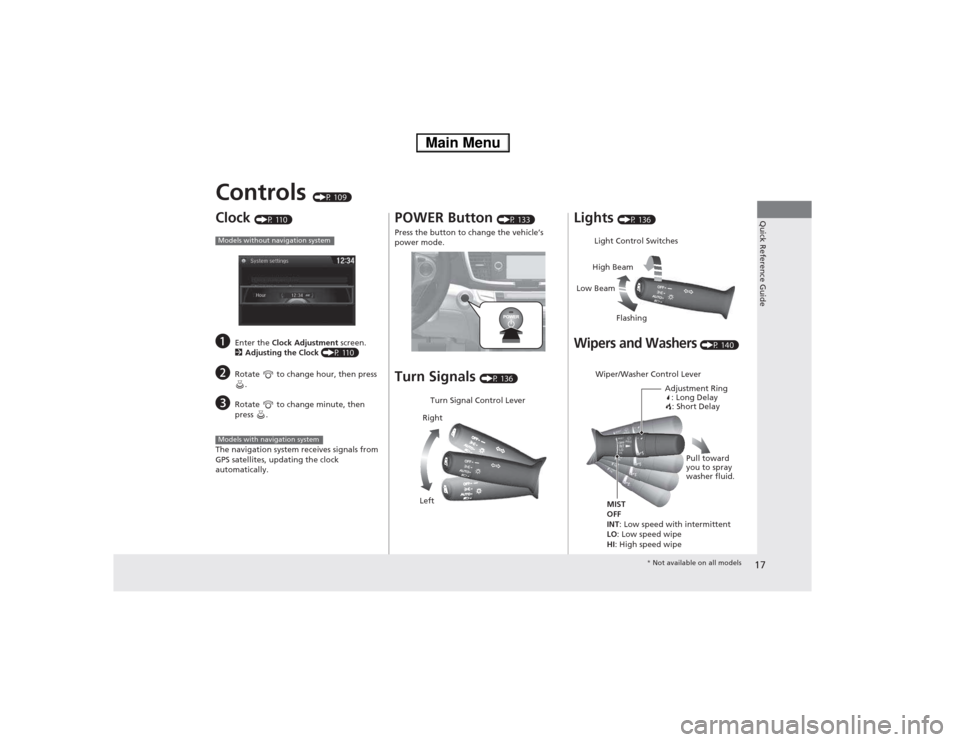
Controls (P 109)
Clock (P 110)
a Enter the Clock Adjustment screen.
2 Adjusting the Clock (P 110)
b Rotate to change hour, then press
.
c Rotate to change minute, then
press .
The navigation system receives signals from
GPS satellites, updating the clock automatically.
Models without navigation system
Models with navigation system
POWER Button (P 133)
Press the button to change the vehicle’s
power mode. Turn Signals (P 136)
Turn Signal Control Lever
Right
Left Lights
(P 136)
Wipers and Washers (P 140)
Light Control Switches
Low Beam High Beam
Flashing
Wiper/Washer Control Lever Adjustment Ring: Long Delay: Short Delay
MIST OFF
INT : Low speed with intermittent
LO : Low speed wipe
HI : High speed wipe Pull toward
you to spray
washer fluid.
*
Not available on all models
Main Menu
Page 80 of 561

79
uuIndicatorsu
Continued
Instrument Panel
IndicatorNameOn/BlinkingExplanationMessage
System
Message
Indicator
●Comes on for a few seconds when you set
the power mode to ON, then goes off.
● Comes on along with a beep when a
problem is detected. A system message on
the multi-information display appears at
the same time.●While the indicator is on, press the
(information) button to see the
message again.
● Refer to the Indicators information in
this chapter when a system message
appears on the multi-information
display. Take the appropriate action for the message.
● The multi-information display does not return
to the normal screen unless the warning is
canceled, or the button is pressed.
—
Turn Signal and Hazard
Warning
Indicators●The turn signal indicators blink when you
operate the turn signal lever.
● If you press the hazard warning button,
both indicators and all turn signals blink at
the same time.●Does not blink or blinks rapidly - A
turn signal light bulb has blown.
Change the bulb immediately. 2Replacing Light Bulbs P. 487, 488
—
High Beam
Indicator●
Comes on when the high beam headlights are on.——
Lights On
Indicator
●Comes on whenever the light switch is on,
or in AUTO when the exterior lights are
on.● If you set the power mode to VEHICLE
OFF (LOCK) while the exterior lights are
on, a chime sounds when the driver's
door is opened.
—
Main MenuTable of Contents
Page 86 of 561

85
uuIndicatorsuMulti-Information Display Warning and Information Messages
Continued
Instrument Panel
MessageConditionExplanation
●Appears if there is a problem with the automatic
lighting control system.● Appears while driving - Manually turn the lights on,
and have your vehicle checked by a dealer.
● Appears if there is a problem with the low beam
headlights.● Have your vehicle checked by a dealer.
●
Appears if there is a problem with the acoustic
vehicle alerting system.● Have your vehicle checked by a dealer.
●Appears while you are customizing the settings and
the shift lever is moved out of
(P .2 Customized Features P. 101
●
Appears if you try to go to Vehicle Settings from
the multi-information display while the audio/
information screen shows the same menu.● Select either display to customize a setting. You cannot have Vehicle Settings displayed on the multi-
information display and audio/information screen
simultaneously. 2Customized Features P. 101, 293
Models with LED
low beam
headlights
Main MenuTable of Contents
Page 137 of 561

136
uuOperating the Switches Around the Steering WheeluTurn Signals
Controls
Turn SignalsThe turn signals can be used when the power
mode is in ON. ■One-touch turn signal
When you lightly push up or down and release
the turn signal lever, the exterior turn signals
and turn signal indicator blink three times.
This feature can be used when signaling for a lane change.
Light Switches
Rotating the light switch turns the lights on
and off, regardless of the power mode setting.■High beams
Push the lever forward until you hear a click.■ Low beams
When in high beams, pull the lever back to
return to low beams. ■ Flashing the high beams
Pull the lever back, and release it.
Right Turn
Left Turn
■Manual Operation
1Light Switches
If you leave the power mode in VEHICLE OFF (LOCK)
while the lights are on, a chime sounds when the
driver’s door is opened.
When the lights are on, the lights on indicator in the
instrument panel will be on. 2 Lights On Indicator P. 79
If you sense that the level of the headlights is
abnormal, have your vehicle inspected by a dealer.
Do not leave the lights on when the power system is
off because it will cause the 12-volt battery to
discharge.
High Beams
Flashing the high beams
Low Beams
Turns on parking, side marker,
tail, and rear license plate lights
Turns on headlights, parking, side
marker, tail, and rear license plate
lights
Main MenuTable of Contents
Page 485 of 561
484
Maintenance
Replacing Light Bulbs
Headlight Bulbs
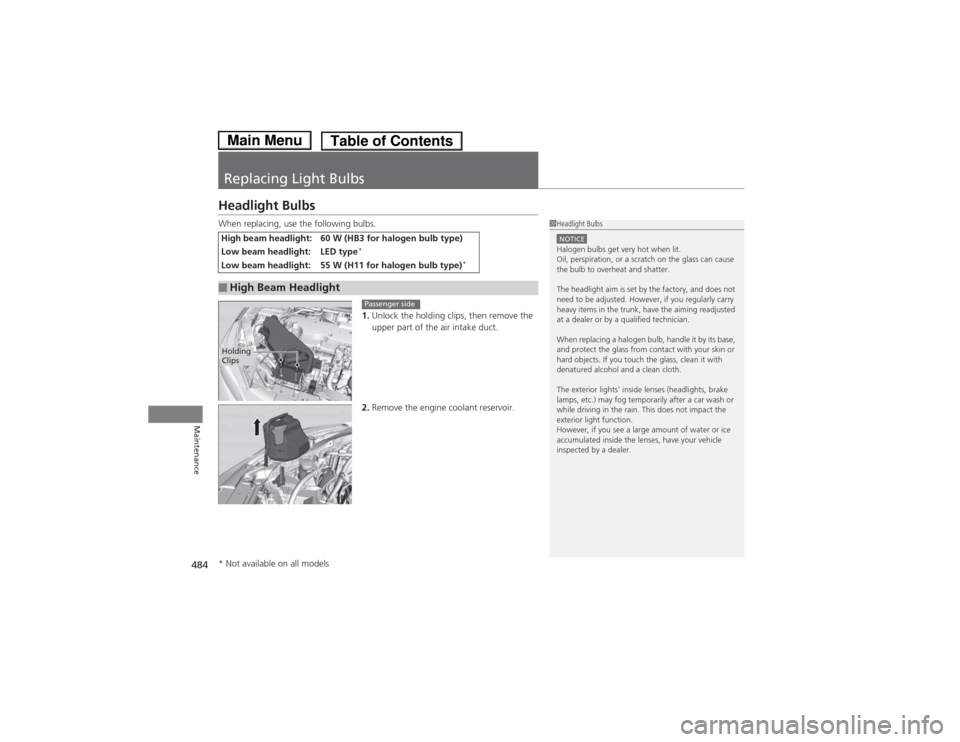
When replacing, use the following bulbs.1.Unlock the holding clips, then remove the
upper part of the air intake duct.
2. Remove the engine coolant reservoir.
High beam headlight: 60 W (HB3 for halogen bulb type)
Low beam headlight: LED type *
Low beam headlight: 55 W (H11 for halogen bulb type) *
■High Beam Headlight
1Headlight Bulbs
NOTICEHalogen bulbs get very hot when lit.
Oil, perspiration, or a scratch on the glass can cause
the bulb to overheat and shatter.
The headlight aim is set by the factory, and does not
need to be adjusted. However, if you regularly carry
heavy items in the trunk, have the aiming readjusted
at a dealer or by a qualified technician.
When replacing a halogen bulb, handle it by its base,
and protect the glass from contact with your skin or
hard objects. If you touch the glass, clean it with
denatured alcohol and a clean cloth.
The exterior lights' inside lenses (headlights, brake
lamps, etc.) may fog temporarily after a car wash or
while driving in the rain. This does not impact the
exterior light function.
However, if you see a large amount of water or ice
accumulated inside the lenses, have your vehicle
inspected by a dealer.
Holding
Clips
Passenger side
* Not available on all models
Main MenuTable of Contents
Page 487 of 561
uuReplacing Light BulbsuHeadlight Bulbs
486
Maintenance
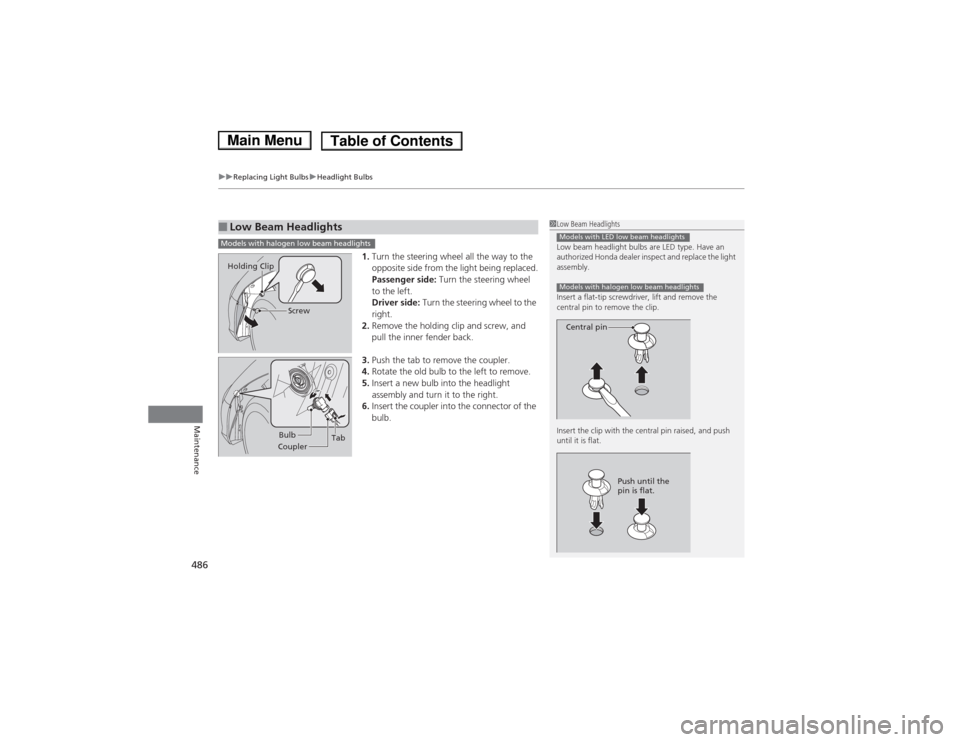
1. Turn the steering wheel all the way to the
opposite side from the light being replaced.
Passenger side: Turn the steering wheel
to the left.
Driver side: Turn the steering wheel to the
right.
2. Remove the holding clip and screw, and
pull the inner fender back.
3. Push the tab to remove the coupler.
4. Rotate the old bulb to the left to remove.
5. Insert a new bulb into the headlight
assembly and turn it to the right.
6. Insert the coupler into the connector of the
bulb.
■Low Beam Headlights1Low Beam Headlights
Low beam headlight bulbs are LED type. Have an
authorized Honda dealer inspect and replace the light
assembly.
Insert a flat-tip screwdriver, lift and remove the
central pin to remove the clip.
Insert the clip with the central pin raised, and push until it is flat.
Models with LED low beam headlights
Models with halogen low beam headlights
Central pin
Push until the
pin is flat.
Models with halogen low beam headlights
Screw
Holding Clip
Bulb
Coupler Tab
Main MenuTable of Contents
Page 488 of 561
487
uuReplacing Light BulbsuFront Turn Signal/Side Marker Light Bulbs
Maintenance
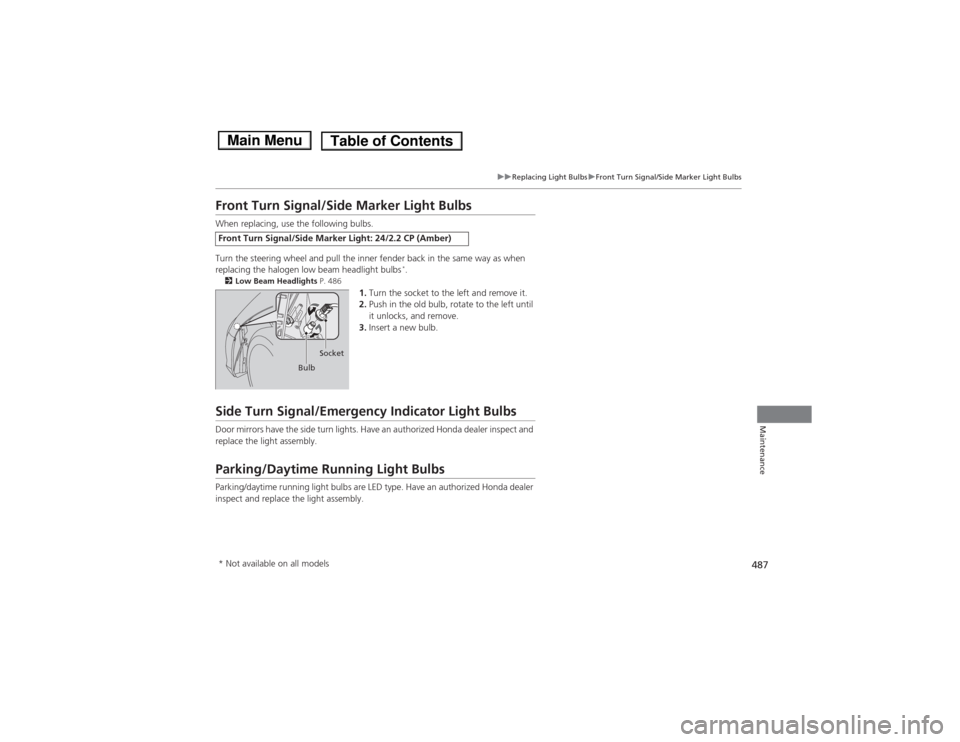
Front Turn Signal/Side Marker Light Bulbs
When replacing, use the following bulbs.
Turn the steering wheel and pull the inner fender back in the same way as when
replacing the halogen low beam headlight bulbs*
.
2 Low Beam Headlights P. 486
1.Turn the socket to the left and remove it.
2. Push in the old bulb, rotate to the left until
it unlocks, and remove.
3. Insert a new bulb.
Side Turn Signal/Emergency Indicator Light Bulbs
Door mirrors have the side turn lights. Have an authorized Honda dealer inspect and
replace the light assembly.
Parking/Daytime Running Light Bulbs
Parking/daytime running light bulbs are LED type. Have an authorized Honda dealer
inspect and replace the light assembly.
Front Turn Signal/Side Marker Light: 24/2.2 CP (Amber)
Bulb Socket
* Not available on all models
Main MenuTable of Contents