2014 HONDA ACCORD COUPE mirror
[x] Cancel search: mirrorPage 459 of 593

uuWhen Driving uForward Collision Warning (FCW)*
458
Driving
■Automatic shutoff
FCW may automatically shut itself off and the FCW indicator comes and stays on when:
• The temperature inside the system is high.
• The windshield is blocked by di rt, mud, leaves, wet snow, etc.
• You drive off-road or on a mountain ro ad, or curved and winding road for an
extended period.
• You drive in bad weather (rain, fog, snow, etc.).
• The radar sensor cover is blocked by dirt, mud, leaves, wet snow, etc.
• An abnormal tire condition is detected (wrong tire size, flat tire, etc.).
Once the conditions that caused FCW to shut off improve or are addressed (e.g.,
cleaning), the system comes back on.
1 Automatic shutoff
To help reduce the likel ihood that high interior
temperatures will cause the camera system to shut
off, when parking, find a sh ady area or face the front
of the vehicle away from the sun. If you use a
reflective sun shade, do not allow it to cover the
camera housing. Covering the camera can
concentrate heat on the camera.
If the CAMERA HOT message appears:
•Use the climate control system to cool down the
interior and, if necessary , the defroster mode when
windows are fogged.
•Start driving the vehicle to lower the windshield
temperature, which cool s down the area around
the FCW system.
Models with information display
Beep
Camera-based system
Models with information display
The camera is located
behind the rearview mirror.
The beeper sounds and
the FCW
indicator
blinks until a possible
collision is avoided.Heads-up Warning Lights
Flash twice.
Models with info rmation display
Models with multi- information display
All models
Page 462 of 593
Continued461
uuWhen Driving uLane Departure Warning (LDW)*
Driving
The system begins to search for lane mark ings when all the following conditions are
met:
• The vehicle is traveling betw een 40-90 mph (64-145 km/h).
• The vehicle is on a straight or slightly curved road.
• The turn signals are off.
• The brake pedal is not depressed.
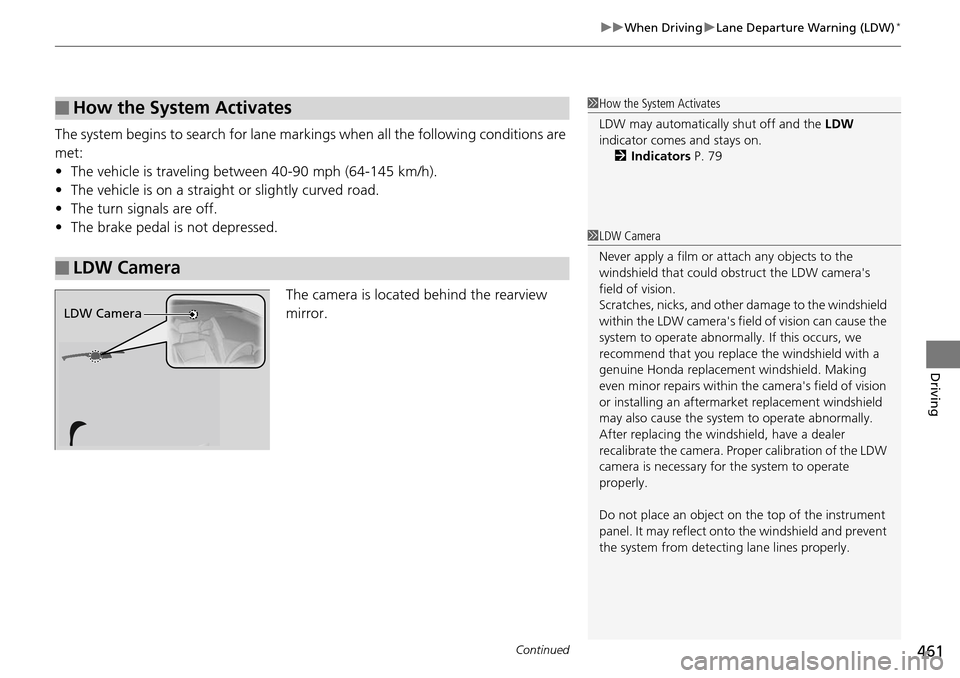
The camera is located behind the rearview
mirror.
■How the System Activates
■LDW Camera
1How the System Activates
LDW may automaticall y shut off and the LDW
indicator comes and stays on.
2 Indicators P. 79
1LDW Camera
Never apply a film or attach any objects to the
windshield that could obs truct the LDW camera's
field of vision.
Scratches, nicks, and othe r damage to the windshield
within the LDW camera's fi eld of vision can cause the
system to operate abnormall y. If this occurs, we
recommend that you replac e the windshield with a
genuine Honda replacem ent windshield. Making
even minor repairs within th e camera's field of vision
or installing an aftermarket replacement windshield
may also cause the system to operate abnormally.
After replacing the winds hield, have a dealer
recalibrate the camera. Prop er calibration of the LDW
camera is necessary for the system to operate
properly.
Do not place an object on the top of the instrument
panel. It may reflect onto the windshield and prevent
the system from detecting lane lines properly.
LDW Camera
Page 467 of 593
466
uuWhen Driving uLaneWatchTM*
Driving
LaneWatchTM*
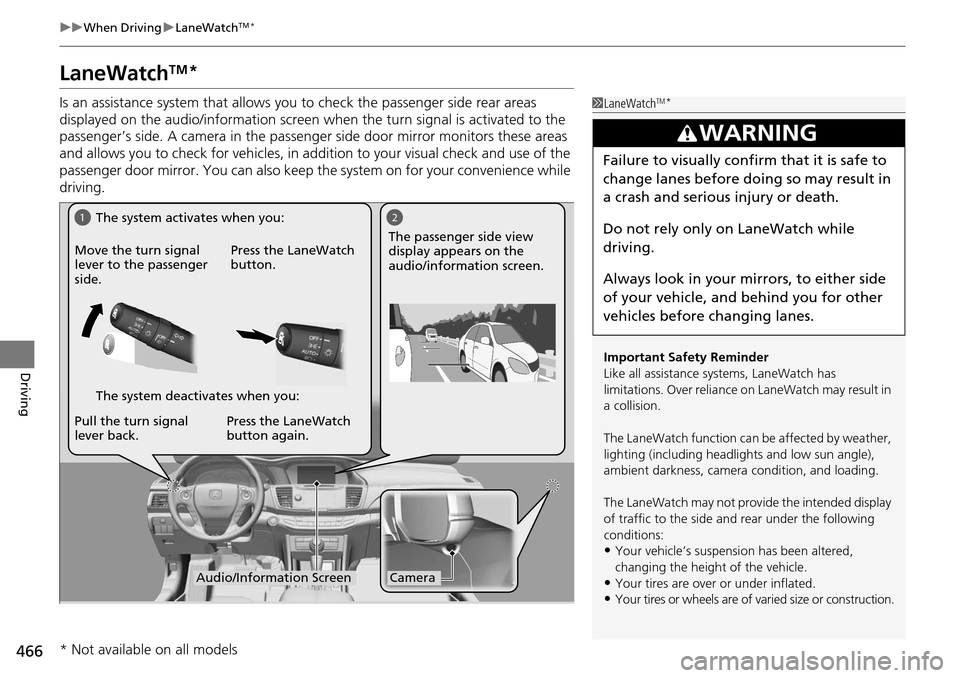
Is an assistance system that allows y ou to check the passenger side rear areas
displayed on the audio/information screen when the turn signal is activated to the
passenger’s side. A camera in the passenger side door mirror monitors these areas
and allows you to check for vehicles, in addition to your visual check and use of the
passenger door mirror. You can also keep th e system on for your convenience while
driving.1 LaneWatchTM*
Important Safety Reminder
Like all assistance systems, LaneWatch has
limitations. Over reliance on LaneWatch may result in
a collision.
The LaneWatch function can be affected by weather,
lighting (including headli ghts and low sun angle),
ambient darkness, camera condition, and loading.
The LaneWatch may not prov ide the intended display
of traffic to the side and rear under the following
conditions:
•Your vehicle’s suspensi on has been altered,
changing the height of the vehicle.
•Your tires are over or under inflated.
•Your tires or wheels are of varied size or construction.
3WARNING
Failure to visually confirm that it is safe to
change lanes before doing so may result in
a crash and serious injury or death.
Do not rely only on LaneWatch while
driving.
Always look in your mi rrors, to either side
of your vehicle, and behind you for other
vehicles before changing lanes.
12
CameraAudio/Information Screen
Move the turn signal
lever to the passenger
side.
Press the LaneWatch
button.
Pull the turn signal
lever back. Press the LaneWatch
button again. The passenger side view
display appears on the
audio/information screen.
The system activates when you:
The system deactivates when you:
* Not available on all models
Page 468 of 593

467
uuWhen Driving uLaneWatchTM*
Driving
■Customizing the La neWatch settings
You can customize the following items using the audio/information screen.
• Show with Turn Signal : Selects whether LaneWatch monitor comes on when
you operate the turn signal light lever.
• Reference Lines : Selects whether the reference lines appear on the LaneWatch
monitor.
• Next Maneuver Pop up
*: Selects whether a turn direction screen of the
navigation system interr upts the LaneWatch display.
• Display : Adjusts display settings.
2Customized Features P. 298
■Reference Lines
Three lines that appear on the screen can give
an idea of how far the vehicles or objects on
the screen are from your vehicle, respectively.
If an object is near line 1 (in red), it indicates
that it is close to your vehicle whereas an
object near line 3 farther away.
1LaneWatchTM*
The LaneWatch camera view is restricted. Its unique
lens makes objects on the screen look slightly
different from what they are.
LaneWatch display does not come on when the shift
lever is in
( R.
For proper LaneWatch operation:
•The camera is located in the passenger side door
mirror. Always keep this area clean. If the camera
lens is covered with dirt or moisture, use a soft,
moist cloth to keep the lens clean and free of debris.
•Do not cover the camera lens with labels or stickers
of any kind.
•Do not touch the camera lens.
23
1
1Reference Lines
The area around the reference line 1 (red) is very close to
your vehicle. As always, m ake sure to visually confirm
the safety of a lane chan ge before changing lanes.
The distance betwee n your vehicle and lines 1, 2 and
3 on the screen vary depending on road conditions
and vehicle loading. For ex ample, the reference lines
on the screen may seem to appear closer than the
actual distances when the rear of your vehicle is more
heavily loaded.
Consult a dealer if:
•The passenger side door mirr or, or area around it is
severely impacted, resulting in changing the
camera angle.
•The LaneWatch display doe s not come on at all.
* Not available on all models
Page 517 of 593
516
uuReplacing Light Bulbs uFront Turn Signal/Side Marker Light Bulbs
Maintenance
Front Turn Signal/Side Marker Light Bulbs
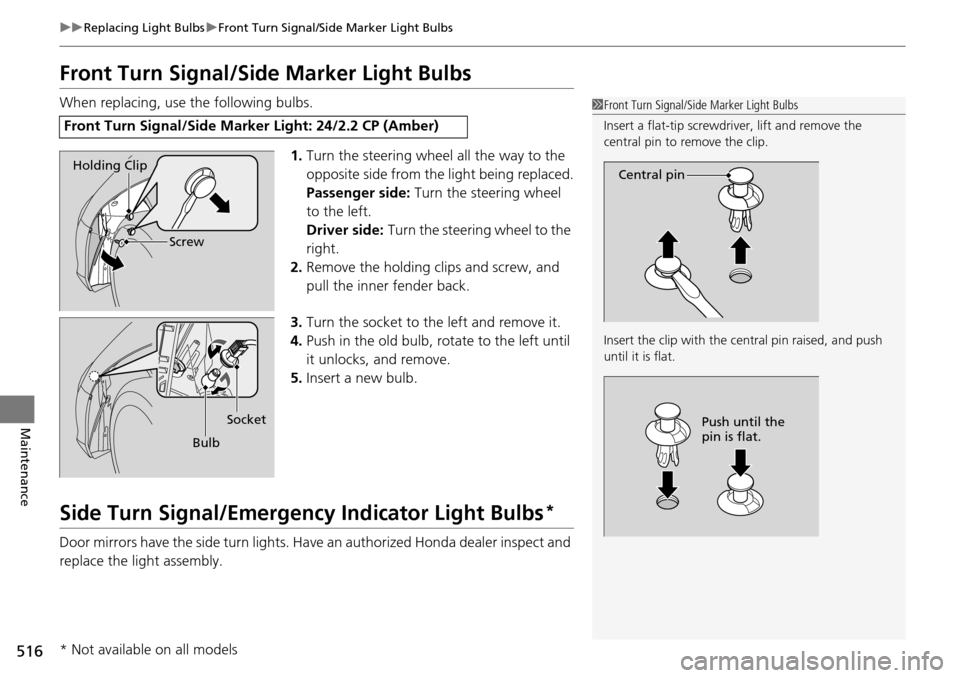
When replacing, use the following bulbs.
1.Turn the steering wheel all the way to the
opposite side from the light being replaced.
Passenger side: Turn the steering wheel
to the left.
Driver side: Turn the steering wheel to the
right.
2. Remove the holding clips and screw, and
pull the inner fender back.
3. Turn the socket to the left and remove it.
4. Push in the old bulb, rotate to the left until
it unlocks, and remove.
5. Insert a new bulb.
Side Turn Signal/Emergency Indicator Light Bulbs*
Door mirrors have the side turn lights. Ha ve an authorized Honda dealer inspect and
replace the light assembly.
Front Turn Signal/Side Mark er Light: 24/2.2 CP (Amber)
1Front Turn Signal/Side Marker Light Bulbs
Insert a flat-tip screwdriver, lift and remove the
central pin to remove the clip.
Insert the clip with the central pin raised, and push
until it is flat.
Central pin
Push until the
pin is flat.
Holding Clip
Screw
BulbSocket
* Not available on all models
Page 539 of 593
538
uuCleaning uExterior Care
Maintenance
Exterior Care
Dust off the vehicle body after you drive.
Regularly inspect your vehi cle for scratches on painted surfaces. A scratch on a
painted surface can result in body rust. If you find a scratch, promptly repair it.
Wash the vehicle regularly. Wash more frequently when driving in the following
conditions:
• If driving on roads with road salt.
• If driving in coastal areas.
• If tar, soot, bird droppings, insects, or tree sap are stuck to painted surfaces.
Fold in the door mirrors. Make sure to fo llow the instructions indicated on the
automated car wash.
• Keep sufficient distance between the cleaning nozzl e and the vehicle body.
• Take particular care around the windows. St anding too close may cause water to
enter the vehicle interior. Do not spra y water into the engine compartment.
• Do not spray high pressure water directly into the engine compartment. Instead,
use low pressure water and a mild detergent.
■Washing the Vehicle
■Using an Automated Car Wash
■Using High Pressure Cleaners
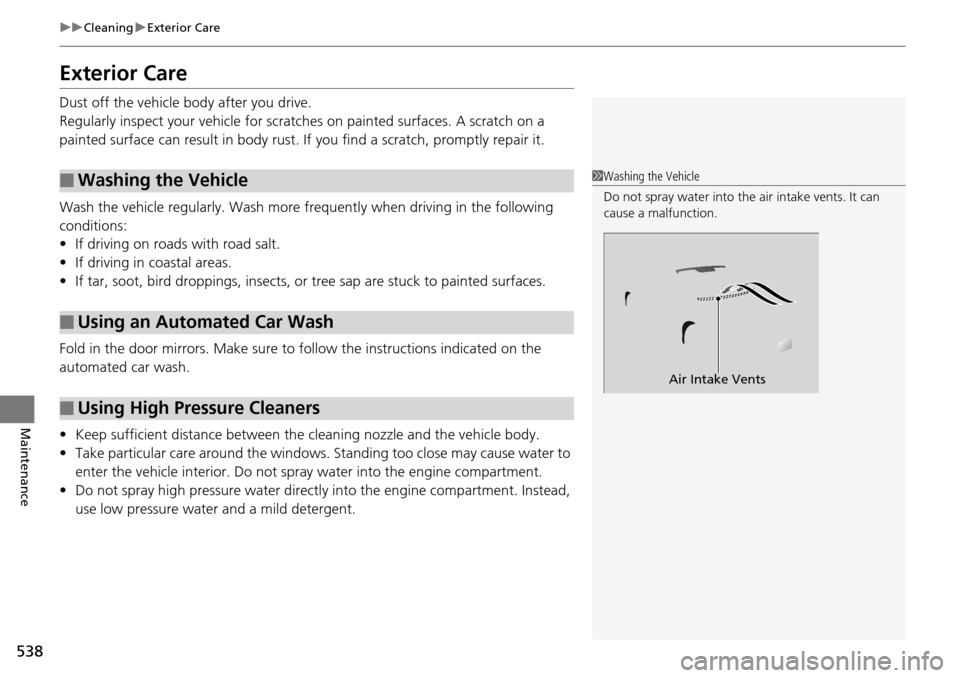
1 Washing the Vehicle
Do not spray water into the air intake vents. It can
cause a malfunction.
Air Intake Vents
Page 563 of 593

562
Handling the Unexpected
Fuses
Fuse Locations
If any electrical devices are not working,
turn the ignition switch to LOCK
(0*1 and
check to see if any appl icable fuse is blown.
Located near the brake fluid reservoir. Push
the tabs to open the box.
Fuse locations are shown on the fuse box
cover. Locate the fuse in question by the
fuse number and box cover number.
■Circuit protected and fuse rating
■Engine Compartment Fuse Box
Circuit ProtectedAmps
1Battery125 A
2
EPS70 A
Fuse Box Main 1 (60 A)
Fuse Box Option 1(40 A)
−−
−−
ABS/VSA FSR 40 A
ABS/VSA Motor 30 A
3
−−
−−
−−
−−
4 Front Fog Light*(15 A)
5Horn10 A
6 Stop Light 10 A
7FI Sub15 A
8 DRL (7.5 A)
9IG Coil15 A
10 Injector*220 A
11Hazard15 A
12 Fuse Box Main 2 60 A
Fuse Box Option 2 (40 A)
IG Main 1 50 A
30 A
*4
IG Main 2*430 A
Sub Fan Motor 20 A*2
30 A*3
Headlight Low Beam Main 30 A
Fuse Box 30 A
Wiper Motor 30 A
Main Fan Motor 30 A Starter Motor
*430 A
13Rear Defogger40 A
14 Heater Motor 40 A
15FI Main15 A
Circuit ProtectedAmps
*1:Models with the smart entry system have an
ENGINE START/STOP button instead of an
ignition switch.
*2:4-cylinder models
*3:6-cylinder models
*4:Models with smart entry system 16 Heated Door Mirror
*(10 A)
17MG Clutch7.5 A
18 DBW 15 A
19Small Light20 A
20 Interior Light 7.5 A
21Back Up10 A
22 Audio 10 A
23Fan Timer7.5 A
24 Right Headlight Low Beam 10 A
25Left Headlight Low Beam10 A
26 − −
Circuit ProtectedAmps
* Not available on all models
Page 569 of 593
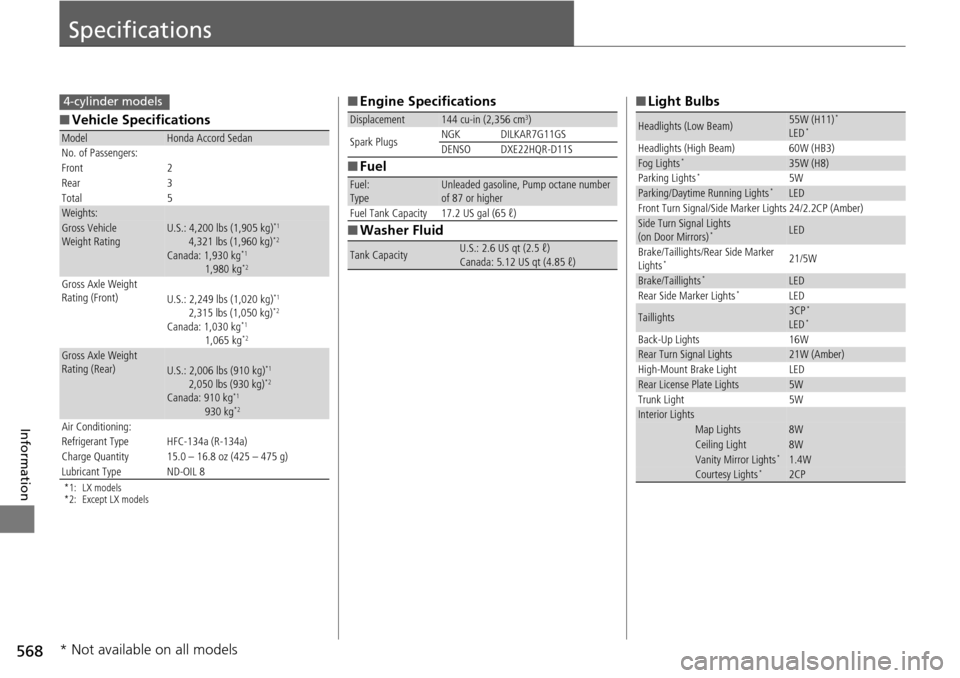
568
Information
Specifications
■Vehicle Specifications
*1: LX models
*2: Except LX models
ModelHonda Accord Sedan
No. of Passengers:
Front 2
Rear 3
Total 5
Weights:Gross Vehicle
Weight Rating U.S.: 4,200 lbs (1,905 kg)*1
4,321 lbs (1,960 kg)*2
Canada: 1,930 kg*1
1,980 kg*2
Gross Axle Weight
Rating (Front)U.S.: 2,249 lbs (1,020 kg)*1
2,315 lbs (1,050 kg)*2
Canada: 1,030 kg*1
1,065 kg*2
Gross Axle Weight
Rating (Rear)U.S.: 2,006 lbs (910 kg)*1
2,050 lbs (930 kg)*2
Canada: 910 kg*1
930 kg*2
Air Conditioning:
Refrigerant Type HFC-134a (R-134a)
Charge Quantity 15.0 – 16.8 oz (425 – 475 g)
Lubricant Type ND-OIL 8
4-cylinder models■ Engine Specifications
■ Fuel
■ Washer Fluid
Displacement144 cu-in (2,356 cm3)
Spark Plugs NGK DILKAR7G11GS
DENSO DXE22HQR-D11S
Fuel:
TypeUnleaded gasoline, Pump octane number
of 87 or higher
Fuel Tank Capacity 17.2 US gal (65 ℓ)
Tank CapacityU.S.: 2.6 US qt (2.5 ℓ)
Canada: 5.12 US qt (4.85 ℓ)
■ Light Bulbs
Headlights (Low Beam)55W (H11)*
LED*
Headlights (High Beam) 60W (HB3)Fog Lights*35W (H8)
Parking Lights*5WParking/Daytime Running Lights*LED
Front Turn Signal/Side Marker Lights 24/2.2CP (Amber)
Side Turn Signal Lights
(on Door Mirrors)*LED
Brake/Taillights/Rear Side Marker
Lights
*21/5W
Brake/Taillights*LED
Rear Side Marker Lights*LED
Taillights3CP*
LED*
Back-Up Lights 16WRear Turn Signal Lights21W (Amber)
High-Mount Brake Light LED
Rear License Plate Lights5W
Trunk Light 5W
Interior LightsMap Lights8WCeiling Light8WVanity Mirror Lights*1.4WCourtesy Lights*2CP
* Not available on all models