Page 99 of 593
98
uuGauges and Displays uMulti-Information Display*
Instrument Panel
■Customization flow
Press the button.
SEL/RESETVehicle Settings
“Trip A” Reset Timing
Language Selection
Adjust Outside Temp. Display
Memory Position Link
Door Unlock Mode
Keyless Access Light Flash
4
4
4
4
TPMS Calibration
Driver Assist System Setup
Meter Setup
Position Setup
Keyless Access Setup
SEL/RESET
SEL/RESET
SEL/RESET
SEL/RESET
“Trip B” Reset Timing
Fuel Efficiency Backlight
4
ACC Pre-Running Car Detect Beep
ACC Display Speed Unit
4Keyless Start Guidance Screens
SEL/RESET
Keyless Access Beep
Forward Collision Warning Distance
4
4
4
Page 101 of 593

100
uuGauges and Displays uMulti-Information Display*
Instrument Panel
■List of customizable options
*1:Default Setting Setup Group Customizable Features Description Selectable Settings
TPMS
Calibration—Calibrates the TPMS.Cancel
/Calibrate
Driver Assist
System
Setup
Forward Collision
Warning DistanceChanges at which distance FCW alerts, or turns FCW
on and off.Long /Normal*1/Short /Off
ACC Pre-Running Car
Detect BeepCauses the system to beep when the system detects a
vehicle, or when the vehi cle goes out of ACC range.On*1/Off
ACC Display Speed UnitChanges the ACC display speed unit.mph*1/km/h
Meter Setup
Language SelectionChanges the displayed language.English*1/French /Spanish
Adjust Outside Temp.
DisplayAdjusts the temperature reading by a few degrees.-5°F ~ ±0°F*1 ~ +5°F
“Trip A” Reset Timing
Changes the setting of how to reset trip meter A,
average fuel economy A, average speed A, and
elapsed time A.With Refuel /IGN Off /
Manually Reset*1
“Trip B” Reset Timing
Changes the setting of how to reset trip meter B,
average fuel economy B, average speed B, and
elapsed time B.With Refuel /IGN Off /
Manually Reset*1
Fuel Efficien cy BacklightTurns the ambient meter feature on and off.On*1/Off
Keyless Start Guidance
ScreensDisplays the push button start guidance when
conditions are met to change power mode.On*1/ Off
Page 104 of 593
103
uuGauges and Displays uMulti-Information Display*
Continued
Instrument Panel
■Example of customization settings
The steps for changing the “Trip A” Reset Timing setting to With Refuel are
shown below. The default setting for “Trip A” Reset Timing is Manually Reset .
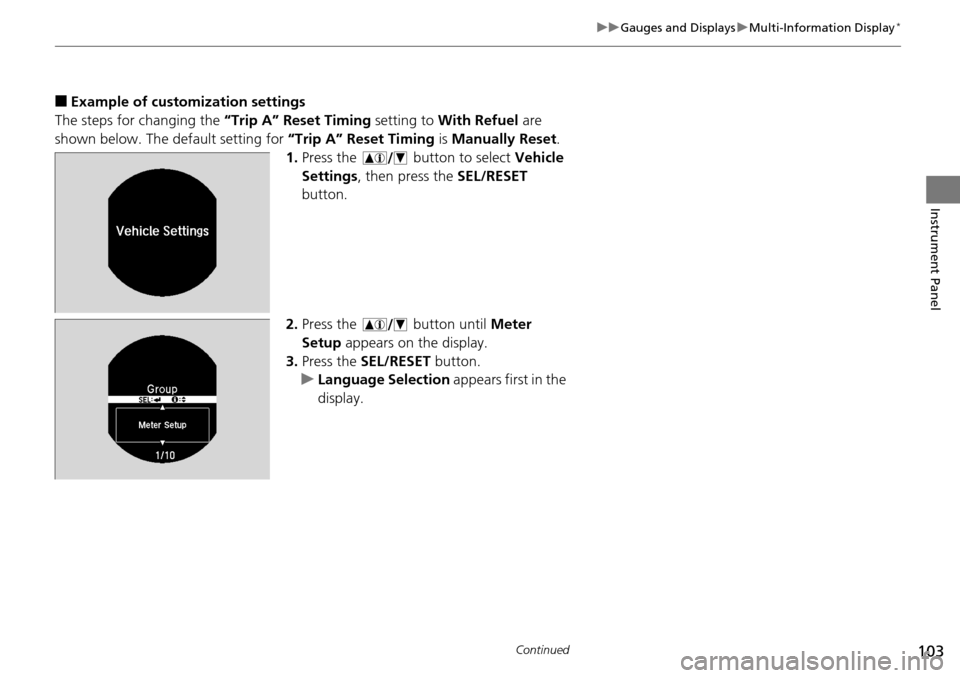
1. Press the button to select Vehicle
Settings , then press the SEL/RESET
button.
2. Press the button until Meter
Setup appears on the display.
3. Press the SEL/RESET button.
u Language Selection appears first in the
display.
Page 105 of 593
104
uuGauges and Displays uMulti-Information Display*
Instrument Panel
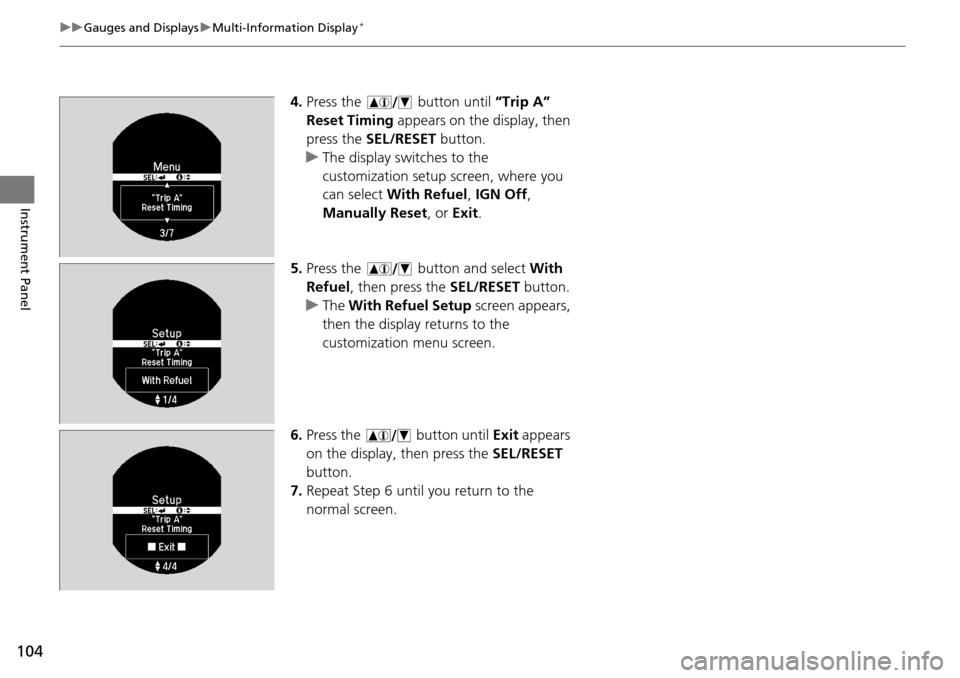
4. Press the button until “Trip A”
Reset Timing appears on the display, then
press the SEL/RESET button.
u The display switches to the
customization setup screen, where you
can select With Refuel , IGN Off ,
Manually Reset , or Exit .
5. Press the button and select With
Refuel , then press the SEL/RESET button.
u The With Refuel Setup screen appears,
then the display returns to the
customization menu screen.
6. Press the button until Exit appears
on the display, then press the SEL/RESET
button.
7. Repeat Step 6 until you return to the
normal screen.
Page 183 of 593
182
uuAudio System Basic Operation uAudio/Information Screen
Features
■Audio
Shows the current audio information.
■Trip computer (Current Drive)
Shows the range, and instant and average fu el economy of the current trip, as well
as the average fuel economy from your last trip.
■Trip computer (History of Trip A)
Shows the range, average fuel economy an d distance traveled for the current trip,
as well as the average fuel economy and distances traveled during the last three
driving cycles.
Each time you reset the trip meter A, th e information on the display updates. The
history of the previous th ree driving cycles is kept.
■Clock/Wallpaper
Shows a clock screen or an image you import.
Page 209 of 593
208
uuAudio System Basic Operation uAudio/Information Screen
Features
■Info
Shows the Trip Computer or Clock/Wallpaper information.
Press , rotate to select an item, then press .
■Trip computer (Current Drive)
Shows the range, and instant and average fu el economy of the current trip, as well
as the average fuel economy from your last trip.
■Trip computer (History of Trip A)
Shows the range, average fuel economy an d distance traveled for the current trip,
as well as the average fuel economy and distances traveled during the last three
driving cycles.
Each time you reset the trip meter A, th e information on the display updates. The
history of the previous th ree driving cycles is kept.
■Deleting the history manually
1. Press on the History of Trip A screen.
2. Rotate to select Delete History, then press .
3. You will receive a confirmation message on the screen. Rotate to select Yes,
then press .
■Clock/Wallpaper
Shows a clock screen or an image you import.
Page 240 of 593

239
uuAudio System Basic Operation uAudio/Information Screen
Continued
Features
■Audio
Shows the current audio information.
■Navigation
Shows the navigation screen.
2 Refer to the Navigation System Manual
■Phone
Shows the HFL information.
2 Bluetooth® HandsFreeLink® P. 375
■Info
Shows the Trip Computer or Clock/Wallpaper and other information. Rotate
to select an item, then press .
■Trip computer (Current Drive)
Shows the range, and instant and average fuel economy of the current trip, as well
as the average fuel economy from your last trip.
■Trip computer (History of Trip A)
Shows the range, average fuel economy and dist ances traveled for the current trip, as well
as the average fuel economy and distances traveled during the last three driving cycles.
Each time you reset the trip meter A, th e information on the display updates. The
history of the previous three driving cycles is kept.
■Deleting the history manually
1. Move on the History of Trip A screen to select Delete History , then press .
2. You will receive a confirmation message on the screen. Rotate to select Yes,
then press .
■Clock/Wallpaper
Shows a clock screen or an image you import.
Page 302 of 593
301
uuCustomized Features u
Continued
Features
“Trip B” Reset Timing
Adjust Outside Temp. Display
“Trip A” Reset Timing
Keyless Access Light Flash
Auto Light Sensitivity
Auto Door Lock
Auto Door Unlock
Fuel Efficiency Backlight
Forward Collision Warning
Distance*
Door Unlock Mode
Interior Light Dimming Time
Headlight Auto Off Timer
Memory Position Link
Keyless Start Guidance Screens*
Key And Remote Unlock Mode
Keyless Lock Answer Back
Security Relock Timer
Maintenance Reset
Default
Vehicle
Settings
Driver Assist System Setup*
Meter
Setup
TPMS Calibration
Driving Position Setup*
Keyless Access
Setup
*
Lighting Setup
Door
Setup
Maintenance Info.
Keyless Access Beep
* Not available on all models