2014 HONDA ACCORD COUPE air condition
[x] Cancel search: air conditionPage 169 of 593
uuHeating and Cooling*uUsing Vents, Heating and A/C
168
Controls
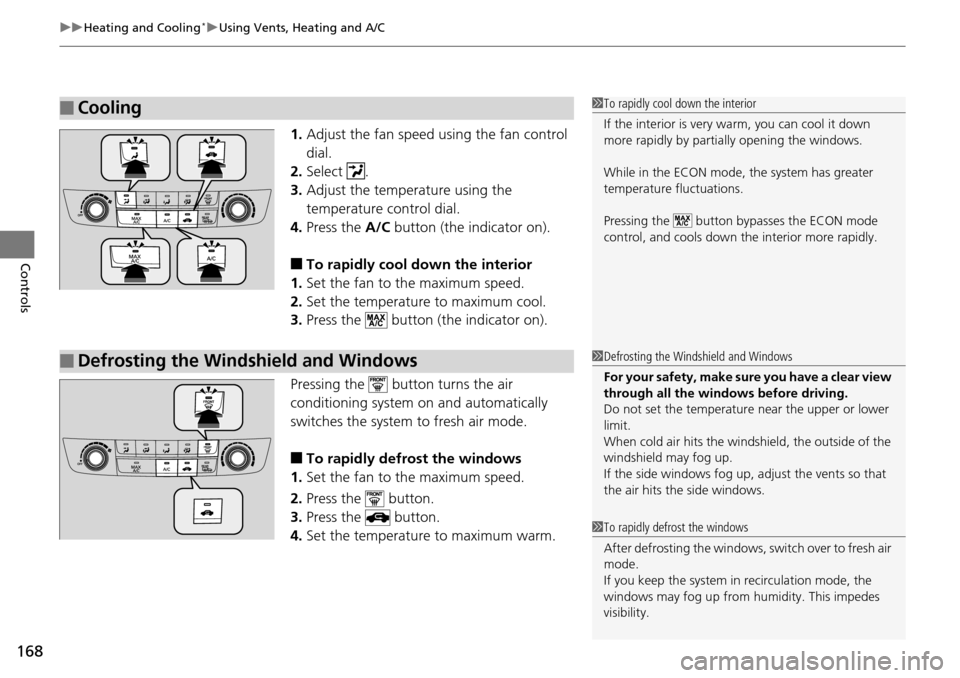
1. Adjust the fan speed using the fan control
dial.
2. Select .
3. Adjust the temperature using the
temperature control dial.
4. Press the A/C button (the indicator on).
■To rapidly cool down the interior
1. Set the fan to the maximum speed.
2. Set the temperature to maximum cool.
3. Press the button (the indicator on).
Pressing the button turns the air
conditioning system on and automatically
switches the system to fresh air mode.
■To rapidly defrost the windows
1. Set the fan to the maximum speed.
2. Press the button.
3. Press the button.
4. Set the temperature to maximum warm.
■Cooling1To rapidly cool down the interior
If the interior is very warm, you can cool it down
more rapidly by parti ally opening the windows.
While in the ECON mode, the system has greater
temperature fluctuations.
Pressing the button bypasses the ECON mode
control, and cools down the interior more rapidly.
■Defrosting the Windshield and Windows1 Defrosting the Windshield and Windows
For your safety, make sure you have a clear view
through all the windows before driving.
Do not set the temperatur e near the upper or lower
limit.
When cold air hits the windshield, the outside of the
windshield may fog up.
If the side windows fog up, adjust the vents so that
the air hits th e side windows.
1To rapidly defrost the windows
After defrosting the windows, switch over to fresh air
mode.
If you keep the system in recirculation mode, the
windows may fog up from humidity. This impedes
visibility.
Page 170 of 593

169Continued
Controls
Climate Control System*
Using Automatic Climate Control
The automatic climate control system maintains the interior temperature you select.
The system also selects the proper mix of heat ed or cooled air that raises or lowers
the interior temperature to your pr eference as quickly as possible.
Use the system when the engine is running.
1. Press the AUTO button.
2. Adjust the interior temperature using the dr iver’s side or passenger’s side control
buttons.
3. Press the (on/off) button to cancel.
■Switching between the recirc ulation and fresh air modes
Press the (recirculation) button and switch the mode depending on
environmental conditions.
Recirculation mode (indicator on): Recirculat es air from the vehicle’s interior through
the system.
Fresh air mode (indicator off): Maintains outside ventilation. Keep the system in
fresh air mode in normal situations.
1 Using Automatic Climate Control
If any buttons are presse d while using the climate
control system in auto, the function of the button
that was pressed will take priority.
The AUTO indicator will go off, but functions
unrelated to the button th at was pressed will be
controlled automatically.
To prevent cold air from bl owing in from outside, the
fan may not start i mmediately when the AUTO
button is pressed.
If the interior is very warm, you can cool it down
more rapidly by partial ly opening the windows,
turning the system on auto, and setting the
temperature to low. Change the fresh mode to
recirculation mode until the temperature cools down.
When you set the temperat ure to the lower or upper
limit, Lo or Hi is displayed.
Pressing the button switches the climate
control system between on and off. When turned on,
the system returns to your last selection.
Floor and
defroster
vents
Floor vents
Dashboard and floor
vents, and back of
the center console
*
Dashboard vents
and back of the
center console
*
AUTO Button
Driver’s Side
Temperature
Control Buttons (Recirculation) Button
/ (Fan Control) ButtonsA/C
(Air Conditioning)
Button Passenger’s Side
Temperature
Control Buttons
* Not available on all models
Page 171 of 593
uuClimate Control System*uUsing Automatic Climate Control
170
Controls
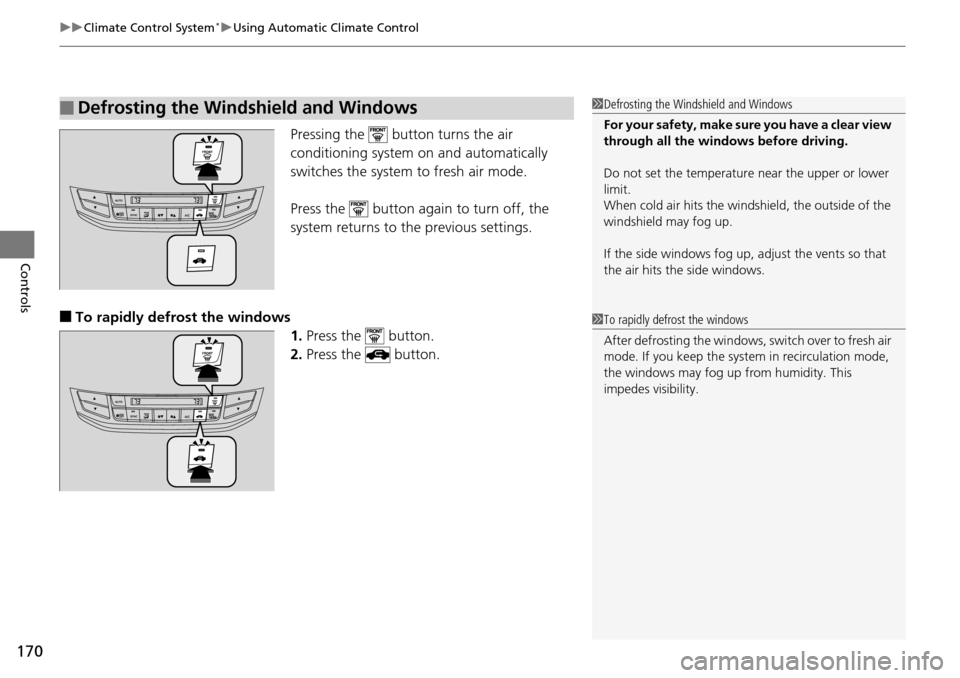
Pressing the button turns the air
conditioning system on and automatically
switches the system to fresh air mode.
Press the button again to turn off, the
system returns to the previous settings.
■To rapidly defrost the windows 1.Press the button.
2. Press the button.
■Defrosting the Windshield and Windows1Defrosting the Windshield and Windows
For your safety, make sure you have a clear view
through all the windows before driving.
Do not set the temperatur e near the upper or lower
limit.
When cold air hits the windshield, the outside of the
windshield may fog up.
If the side windows fog up, adjust the vents so that
the air hits th e side windows.
1To rapidly defrost the windows
After defrosting the windows, switch over to fresh air
mode. If you keep the syst em in recirculation mode,
the windows may fog up from humidity. This
impedes visibility.
Page 247 of 593
246
uuAudio System Basic Operation uVoice Control Operation
Features
The system accepts these commands on
most screens.
• Climate control automatic
*1
•Climate control off*1
•Air conditioner on*1
•Air conditioner off*1
•Climate control defrost on*1
•Climate control defrost off*1
•Rear defrost on*1
•Rear defrost off*1
•Climate control fresh air
• Climate control recirculate
• Climate control vent
• Climate control bi-level
• Climate control floor
• Climate control floor and defrost
• Fan speed up
• Fan speed down
• Fan speed # (#: 1 to 7)
• Temperature # degrees (#: 57 to 87°F, 15
to 29°C)
• Driver temperature # degrees (#: 57 to
87°F, 15 to 29°C)
• Passenger temperature # degrees (#: 57
to 87°F, 15 to 29°C)
• Temperature up
• Temperature down
■Climate Control Commands• Driver temperature up
• Driver temperature down
• Passenger temperature up
• Passenger temperature down
• Temperature max heat
• Temperature max cool
• Driver temperature max heat
• Driver temperature max cool
• Passenger temperature max heat
• Passenger temperature max cool
• Climate control sync on
*1
•Climate control sync off*1
*1: These commands t oggle the function
on and off, so the command may not match
your intended action.
The system accepts these commands on
most screens.
■Using Song By VoiceTM
Song By VoiceTM is a feature that allows you
to select music from your Hard Disc Drive or
iPod device using your voice.
To activate this mode, you must press the (Talk) button on the Voice Portal screen
and say: “Music search.”
■Audio Commands
■Song By VoiceTM commands
• Music search
• List album (specify album)
• List artist (specify artist)
• List composer (specify composer)
• List genre (specify genre)
• List playlist (specify playlist)
• Play album (specify album)
• Play artist (specify artist)
• Play composer (specify composer)
• Play genre (specify genre)
• Play playlist (specify playlist)
• Play song (specify song)
• What am I listening to?
• Who am I listening to?
• Who is this?
• What’s playing?
• Who’s playing?
• What album is this?
Page 417 of 593

416
Driving
Before Driving
Driving Preparation
Check the following items before you start driving.
• Make sure there are no obstructions on the windows, door mirrors, exterior
lights, or other parts of the vehicle.
u Remove any frost, snow, or ice.
u Remove any snow on the roof, as this can slip down and obstruct your field of
vision while driving. If frozen solid , remove ice once it has softened.
u When removing ice from around the wheels, be sure not to damage the wheel
or wheel components.
• Make sure the hood is securely closed.
u If the hood opens while driving, your front view will be blocked.
• Make sure the tires are in good condition.
u Check air pressure, check for damage and excessive wear.
2 Checking and Maintaining Tires P. 523
•Make sure there are no people or ob jects behind or around the vehicle.
u There are blind spots from the inside.
■Exterior Checks1Exterior Checks
NOTICE
When doors are frozen s hut, use warm water around
the door edges to melt any ice. Do not try to force
them open, as this can damage the rubber trim
around the doors. When done, wipe dry to avoid
further freezing.
Do not pour warm water into the key cylinder.
You will be unable to insert the key if the water
freezes in the hole.
Heat from the engine and exhaust can ignite
flammable material s left under the hood, causing a
fire. If you've parked y our vehicle for an extended
period, inspect and remove any debris that may have
collected, such as dried grass and leaves that have
fallen or have been carried in for use as a nest by a
small animal.
Also check under the hood fo r leftover flammable
materials after you or so meone else has performed
maintenance on your vehicle.
Page 462 of 593
Continued461
uuWhen Driving uLane Departure Warning (LDW)*
Driving
The system begins to search for lane mark ings when all the following conditions are
met:
• The vehicle is traveling betw een 40-90 mph (64-145 km/h).
• The vehicle is on a straight or slightly curved road.
• The turn signals are off.
• The brake pedal is not depressed.
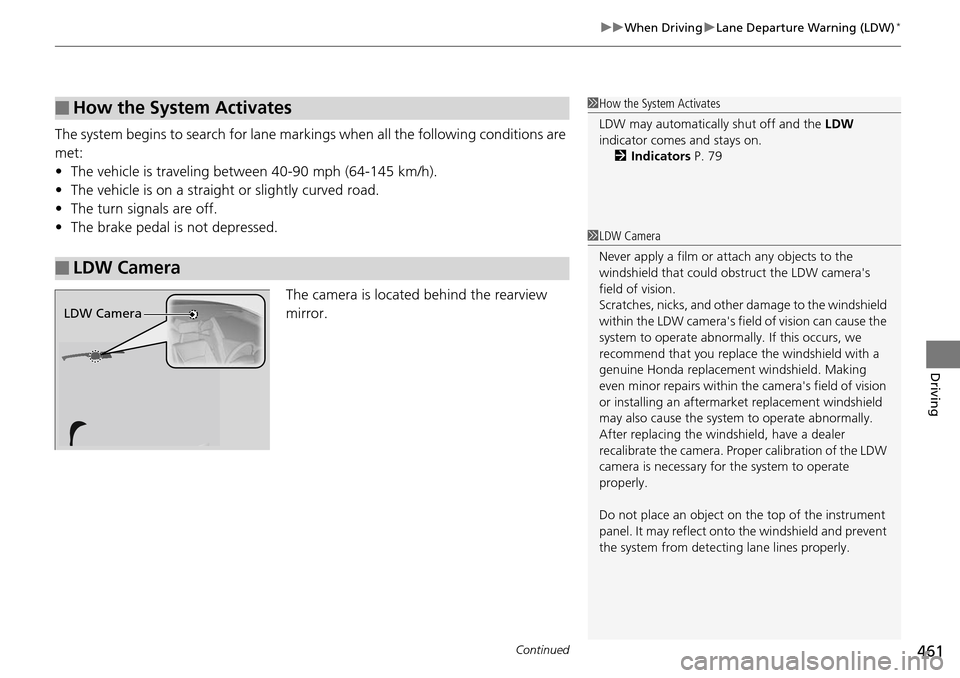
The camera is located behind the rearview
mirror.
■How the System Activates
■LDW Camera
1How the System Activates
LDW may automaticall y shut off and the LDW
indicator comes and stays on.
2 Indicators P. 79
1LDW Camera
Never apply a film or attach any objects to the
windshield that could obs truct the LDW camera's
field of vision.
Scratches, nicks, and othe r damage to the windshield
within the LDW camera's fi eld of vision can cause the
system to operate abnormall y. If this occurs, we
recommend that you replac e the windshield with a
genuine Honda replacem ent windshield. Making
even minor repairs within th e camera's field of vision
or installing an aftermarket replacement windshield
may also cause the system to operate abnormally.
After replacing the winds hield, have a dealer
recalibrate the camera. Prop er calibration of the LDW
camera is necessary for the system to operate
properly.
Do not place an object on the top of the instrument
panel. It may reflect onto the windshield and prevent
the system from detecting lane lines properly.
LDW Camera
Page 464 of 593
463
uuWhen Driving uLane Departure Warning (LDW)*
Driving
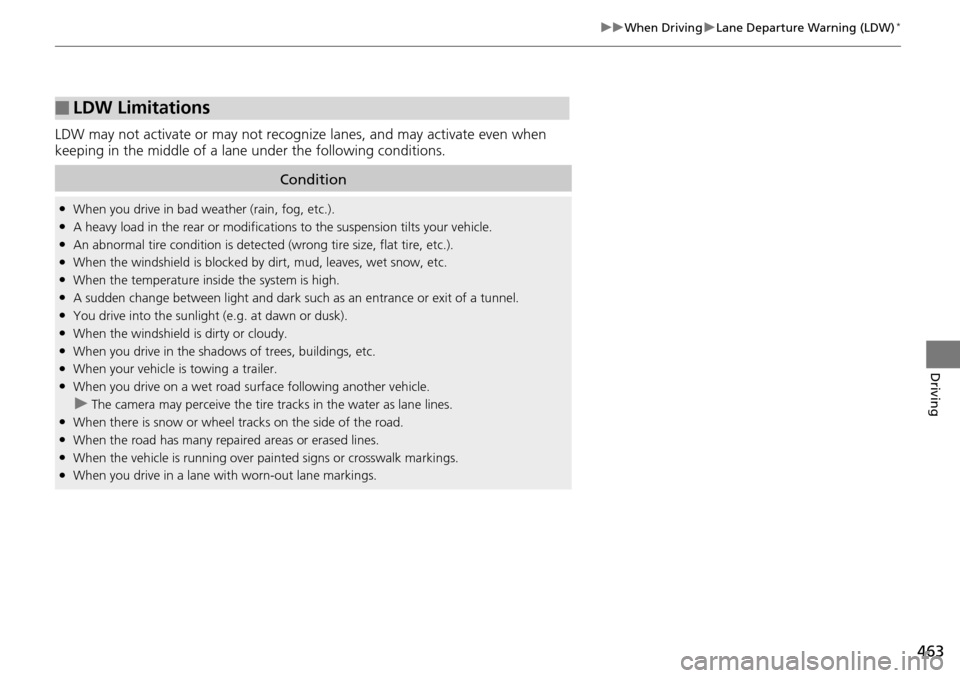
LDW may not activate or may not recognize lanes, and may activate even when
keeping in the middle of a lane under the following conditions.
■LDW Limitations
Condition
●When you drive in bad weather (rain, fog, etc.).●A heavy load in the rear or modificati ons to the suspension tilts your vehicle.●An abnormal tire condition is detected (wrong tire size, flat tire, etc.).●When the windshield is blocked by dirt, mud, leaves, wet snow, etc.●When the temperature inside the system is high.●A sudden change between light and dark such as an entr ance or exit of a tunnel.●You drive into the sunlight (e.g. at dawn or dusk).●When the windshield is dirty or cloudy.●When you drive in the shadows of trees, buildings, etc.●When your vehicle is towing a trailer.●When you drive on a wet road su rface following another vehicle.
uThe camera may perceive the tire tracks in the water as lane lines.●When there is snow or wheel tracks on the side of the road.●When the road has many repaired areas or erased lines.●When the vehicle is running over pa inted signs or crosswalk markings.●When you drive in a lane with worn-out lane markings.
Page 465 of 593

464
uuWhen Driving uVehicle Stability Assist (VSA® ), aka Electronic Stability Control (ESC), System
Driving
Vehicle Stability Assist (VSA®), aka Electronic
Stability Control (ESC), System
VSA ® helps to stabilize the vehicle during cornering if the vehicle turns more or less
than what was intended. It also assists in maintaining traction on slippery surfaces.
It does so by regulating engine output and select ively applying the brakes.
When VSA ® activates, you may notice that the
engine does not respond to the accelerator.
You may also notice some noise from the
hydraulic system. You will also see the
indicator blink.
■VSA ® Operation
1 Vehicle Stability Assist (VSA ®), aka Electronic Stability Control
(ESC), System
The VSA ® may not function properl y if tire type and
size are mixed. Make sure to use the same size and
type of tire, and the air pressures as specified.
When the VSA ® indicator comes on and stays on
while driving, there may be a problem with the
system. While this may not interfere with normal
driving, have your vehi cle checked by a dealer
immediately.
VSA ® cannot enhance stability in all driving situations
and does not control the entire braking system. You
still need to drive and corner at speeds appropriate
for the conditions and always leave a sufficient
margin of safety.
The main function of the VSA ® system is generally
known as Electronic Stability Control (ESC). The
system also includes a traction control function.
VSA® System
Indicator