2014 GMC SIERRA rear end
[x] Cancel search: rear endPage 27 of 544

Black plate (21,1)GMC Sierra Owner Manual (GMNA-Localizing-U.S./Canada/Mexico-
5853626) - 2014 - 3rd crc - 6/6/14
In Brief 1-21
Automatic Transfer Case
This transfer case knob is to the left
of the steering column.
The different drive options that may
be available are described following.
2
m(Two-Wheel Drive High):This
setting is used for driving in most
street and highway situations.
AUTO (Automatic Four-Wheel
Drive): This setting is ideal for use
when road surface traction
conditions are variable. Do not use AUTO mode to park on
a steep grade with poor traction
such as ice, snow, mud or gravel. In
AUTO mode only the rear wheels
will hold the vehicle from sliding
when parked. If parking on a steep
grade, use 4
mto keep all four
wheels engaged.
4
m(Four-Wheel Drive High): Use
this setting when extra traction is
needed, such as on snowy or icy
roads or in most off-road situations.
N (Neutral): Shift to this setting
only when towing the vehicle. See
Recreational Vehicle Towing on
page 10-94 orTrailer Towing on
page 9-77.
4
n(Four-Wheel Drive Low): This
setting sends maximum power to all
four wheels. Choose Four-Wheel
Drive Low when driving in deep
sand, mud, or snow, and while
climbing or descending steep hills.
See Four-Wheel Drive on
page 9-39.
Vehicle Features
Radio(s)
O
: Press to turn the system on.
Press and hold to turn it off. When
on, press to mute; press again to
unmute. Turn to increase or
decrease the volume.
RADIO: Press to choose between
FM, AM, and SiriusXM
®,
if equipped.
MEDIA: Press to change the audio
source between CD, USB, SD card,
AUX, and Bluetooth
®Audio,
if equipped.
{: Press to go to the Home Page.
MENU: Press to select a menu.
g:Press to seek the previous
station or track.
l: Press to seek the next station
or track.
See Overview on page 7-2 about
these and other radio features.
Page 31 of 544

Black plate (25,1)GMC Sierra Owner Manual (GMNA-Localizing-U.S./Canada/Mexico-
5853626) - 2014 - 3rd crc - 6/6/14
In Brief 1-25
V:Press to open a menu or select
a menu item. Press and hold to
reset values on certain screens.
See Driver Information Center (DIC)
(Base Level) on page 5-30 orDriver
Information Center (DIC) (Uplevel)
on page 5-32.
Forward Collision Alert
(FCA) System
If equipped, FCA may help avoid or
reduce the harm caused by
front-end crashes. FCA provides a
green indicator when a vehicle is
detected directly ahead. This
indicator displays amber if you
follow another vehicle much too
closely. When approaching a vehicle
ahead too quickly, FCA provides a
red flashing alert on the windshield
and rapidly beeps or pulses the
driver seat.
See Forward Collision Alert (FCA)
System on page 9-64.
Lane Departure
Warning (LDW)
If equipped, LDW is intended to help
avoid unintentional lane departures
at speeds of 56 km/h (35 mph) or
greater. LDW uses a camera sensor
to detect the lane markings. The
LDW indicator,
@, appears green if
a lane marking is detected. If the
vehicle departs the lane, the
indicator will change to amber and
flash. In addition, the driver seat will
pulse or beeps will sound.
See Lane Departure Warning (LDW)
on page 9-66.
Rear Vision
Camera (RVC)
If equipped, the RVC displays a
view of the area behind the vehicle,
on the center stack display, when
the vehicle is shifted into
R (Reverse).
See Assistance Systems for Parking
or Backing on page 9-61.
Ultrasonic Parking Assist
If equipped, Ultrasonic Rear Parking
Assist (URPA) uses sensors on the
rear bumper to assist with parking
and avoiding objects while in
R (Reverse). It operates at speeds
less than 8 km/h (5 mph). URPA
may display a warning triangle on
the Rear Vision Camera screen and
a graphic on the instrument cluster
to provide the object distance. In
addition, multiple beeps or seat
pulses may occur if very close to an
object.
The vehicle may also have the Front
Parking Assist system.
See Assistance Systems for Parking
or Backing on page 9-61.
Page 42 of 544

Black plate (6,1)GMC Sierra Owner Manual (GMNA-Localizing-U.S./Canada/Mexico-
5853626) - 2014 - 3rd crc - 6/6/14
2-6 Keys, Doors, and Windows
Remote Vehicle Start
If equipped, this feature starts the
engine from outside of the vehicle.
It may also start up the vehicle's
heating or air conditioning systems
and rear window defogger. Normal
operation of the system will return
after the key is turned to the ON/
RUN position.
The climate control system will use
the previous settings during a
remote start. The rear defog may
come on during remote start based
on cold ambient conditions. The
rear fog indicator light does not
come on during remote start.
If the vehicle has heated seats and
the feature is turned on in vehicle
personalization, the heated seats
will turn on during colder outside
temperatures and will shut off when
the key is turned to ON/RUN. See
Heated and Cooled Front Seats on
page 3-8.Laws in some communities may
restrict the use of remote starters.
For example, some laws may
require a person using the remote
start to have the vehicle in view
when doing so. Check local
regulations for any requirements on
remote starting of vehicles.
Do not use the remote start feature
if the vehicle is low on fuel. The
vehicle may run out of fuel.
The RKE transmitter range may be
less while the vehicle is running.
Other conditions can affect the
performance of the transmitter. See
Remote Keyless Entry (RKE)
System on page 2-3
orVehicle
Personalization on page 5-45.
/(Remote Vehicle Start): This
button will be on the RKE
transmitter if the vehicle has remote
start. Starting the Engine Using Remote
Start
1. Aim the RKE transmitter at the
vehicle and press and
release
Q.
2. Immediately press and hold
/
until the turn signal lamps flash
or for at least four seconds.
When the vehicle starts, the
parking lamps will turn on. The
doors will be locked and the
climate control system may
come on.
The engine will continue to run
for 10 minutes. Repeat the steps
for a 10-minute time extension.
Remote start can be extended
only once.
After entering the vehicle during a
remote start, insert and turn the key
to ON/RUN to drive the vehicle.
Page 58 of 544

Black plate (22,1)GMC Sierra Owner Manual (GMNA-Localizing-U.S./Canada/Mexico-
5853626) - 2014 - 3rd crc - 6/6/14
2-22 Keys, Doors, and Windows
Window Lockout
Crew/Double Cab Premium
Shown, Other Models Similar
Z(Window Lockout): The driver
door power window switch has a
lockout feature. This feature
prevents the rear windows from
operating, except from the driver
position. Press the switch to engage
or disengage the lockout feature. An
indicator light on the switch will
come on when the lockout feature is
engaged, and will go off when
disengaged.
Rear Windows
Power Sliding Rear Window
If equipped, the power sliding rear
window works when the ignition has
been turned to ACC/ACCESSORY
or ON/RUN, or when Retained
Accessory Power (RAP) is active.
See Retained Accessory Power
(RAP) on page 9-28.
.Press the switch to open the
window.
.Pull the switch to close the
window. The power sliding rear window
cannot be operated manually.
Sun Visors
Pull the sun visor down to block
glare. If equipped, detach the sun
visor from the center mount to pivot
to the side window or to extend
along the rod.
Page 61 of 544
Black plate (1,1)GMC Sierra Owner Manual (GMNA-Localizing-U.S./Canada/Mexico-
5853626) - 2014 - 3rd crc - 6/6/14
Seats and Restraints 3-1
Seats and
Restraints
Head Restraints
Head Restraints . . . . . . . . . . . . . . . 3-2
Front Seats
Seat Adjustment . . . . . . . . . . . . . . 3-3
Center Seat . . . . . . . . . . . . . . . . . . . 3-3
Power Seat Adjustment . . . . . . . 3-4
Lumbar Adjustment . . . . . . . . . . . 3-4
Reclining Seatbacks . . . . . . . . . . 3-5
Memory Seats . . . . . . . . . . . . . . . . 3-6
Heated and Cooled FrontSeats . . . . . . . . . . . . . . . . . . . . . . . . 3-8
Rear Seats
Rear Seats (Extended CabFull Bench) . . . . . . . . . . . . . . . . . 3-10
Rear Seats (Split Bench) . . . . . 3-11
Safety Belts
Safety Belts . . . . . . . . . . . . . . . . . . 3-12
How to Wear Safety Belts Properly . . . . . . . . . . . . . . . . . . . . 3-13 Lap-Shoulder Belt . . . . . . . . . . . 3-14
Safety Belt Use During
Pregnancy . . . . . . . . . . . . . . . . . . 3-19
Lap Belt . . . . . . . . . . . . . . . . . . . . . 3-19
Safety Belt Extender . . . . . . . . . 3-20
Safety System Check . . . . . . . . 3-20
Safety Belt Care . . . . . . . . . . . . . 3-20
Replacing Safety Belt System Parts after a Crash . . . . . . . . . 3-21
Airbag System
Airbag System . . . . . . . . . . . . . . . 3-21
Where Are the Airbags? . . . . . 3-23
When Should an AirbagInflate? . . . . . . . . . . . . . . . . . . . . . 3-25
What Makes an Airbag Inflate? . . . . . . . . . . . . . . . . . . . . . 3-26
How Does an Airbag Restrain? . . . . . . . . . . . . . . . . . . . 3-27
What Will You See after an Airbag Inflates? . . . . . . . . . . . . 3-27
Airbag On-Off Switch . . . . . . . . 3-28
Passenger Sensing System . . . . . . . . . . . . . . . . . . . . . 3-31
Servicing the Airbag-Equipped Vehicle . . . . . . . . . . . . . . . . . . . . . 3-35 Adding Equipment to the
Airbag-Equipped Vehicle . . . 3-36
Airbag System Check . . . . . . . . 3-37
Replacing Airbag System Parts after a Crash . . . . . . . . . 3-37
Child Restraints
Older Children . . . . . . . . . . . . . . . 3-38
Infants and Young
Children . . . . . . . . . . . . . . . . . . . . 3-40
Child Restraint Systems . . . . . 3-42
Where to Put the Restraint . . . 3-44
Lower Anchors and Tethers for Children (LATCH
System) . . . . . . . . . . . . . . . . . . . . 3-46
Replacing LATCH System Parts After a Crash . . . . . . . . . 3-58
Securing Child Restraints (Center Front Seat) . . . . . . . . . 3-58
Securing Child Restraints (Front Outboard
Passenger Seat) . . . . . . . . . . . 3-58
Securing Child Restraints (Rear Seat) . . . . . . . . . . . . . . . . . 3-68
Page 70 of 544
Black plate (10,1)GMC Sierra Owner Manual (GMNA-Localizing-U.S./Canada/Mexico-
5853626) - 2014 - 3rd crc - 6/6/14
3-10 Seats and Restraints
Rear Seats
Rear Seats (Extended
Cab Full Bench)
Folding the Rear Seat
{Caution
Folding a rear seat with the safety
belts still fastened may cause
damage to the seat or the safety
belts. Always unbuckle the safety
belts and return them to their
normal stowed position before
folding a rear seat.
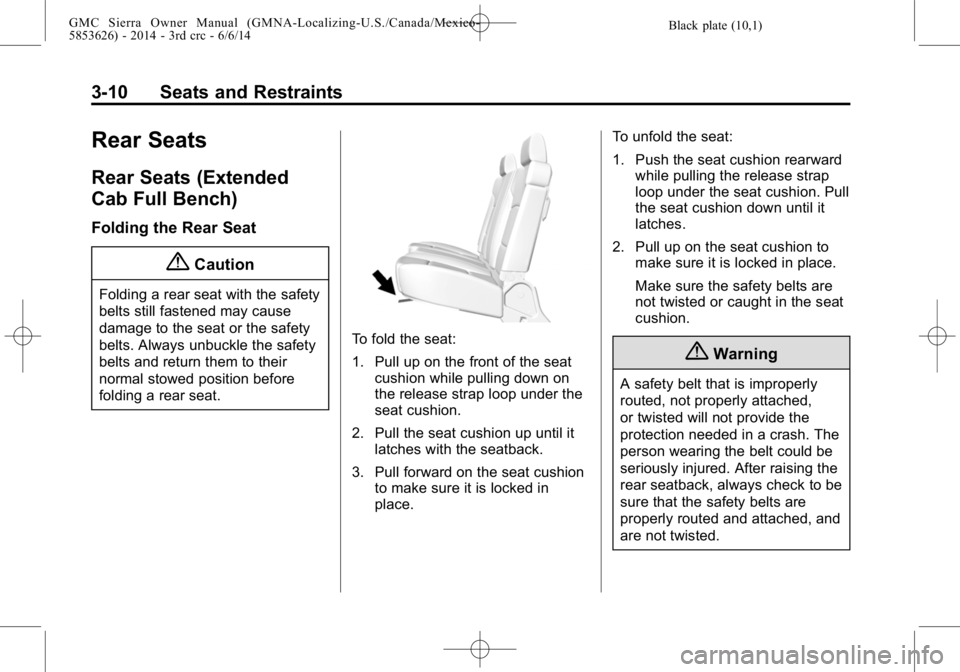
To fold the seat:
1. Pull up on the front of the seatcushion while pulling down on
the release strap loop under the
seat cushion.
2. Pull the seat cushion up until it latches with the seatback.
3. Pull forward on the seat cushion to make sure it is locked in
place. To unfold the seat:
1. Push the seat cushion rearward
while pulling the release strap
loop under the seat cushion. Pull
the seat cushion down until it
latches.
2. Pull up on the seat cushion to make sure it is locked in place.
Make sure the safety belts are
not twisted or caught in the seat
cushion.
{Warning
A safety belt that is improperly
routed, not properly attached,
or twisted will not provide the
protection needed in a crash. The
person wearing the belt could be
seriously injured. After raising the
rear seatback, always check to be
sure that the safety belts are
properly routed and attached, and
are not twisted.
Page 85 of 544

Black plate (25,1)GMC Sierra Owner Manual (GMNA-Localizing-U.S./Canada/Mexico-
5853626) - 2014 - 3rd crc - 6/6/14
Seats and Restraints 3-25
When Should an Airbag
Inflate?
This vehicle is equipped with
airbags. SeeAirbag System on
page 3-21. Airbags are designed to
inflate if the impact exceeds the
specific airbag system's deployment
threshold. Deployment thresholds
are used to predict how severe a
crash is likely to be in time for the
airbags to inflate and help restrain
the occupants. The vehicle has
electronic sensors which help the
airbag system determine the
severity of the impact. Deployment
thresholds can vary with specific
vehicle design.
Frontal airbags are designed to
inflate in moderate to severe frontal
or near frontal crashes to help
reduce the potential for severe
injuries, mainly to the driver's or
front outboard passenger's head
and chest.
Whether the frontal airbags will or
should inflate is not based primarily
on how fast the vehicle is traveling. It depends on what is hit, the
direction of the impact, and how
quickly the vehicle slows down.
Frontal airbags may inflate at
different crash speeds depending on
whether the vehicle hits an object
straight on or at an angle, and
whether the object is fixed or
moving, rigid or deformable, narrow
or wide.
Frontal airbags are not intended to
inflate during vehicle rollovers, in
rear impacts, or in many side
impacts.
In addition, if the GVWR (Gross
Vehicle Weight Rating) is at or
below 3 855 kg (8,500 lb), the
vehicle has advanced technology
frontal airbags. You can find the
GVWR on the Certification/Tire label
on the center pillar of the vehicle.
See
Vehicle Load Limits on
page 9-15 for more information.
Advanced technology frontal airbags
adjust the restraint according to
crash severity. Vehicles with
advanced technology frontal airbags have a seat position sensor that
enables the sensing system to
monitor the position of the driver
seat. The seat position sensor
provides information that is used to
adjust the deployment of the driver
frontal airbag.
If the GVWR is at or below 4 536 kg
(10,000 lb), the vehicle has
seat-mounted side impact airbags.
Vehicles with a GVWR above
4 536 kg (10,000 lb) may or may not
have seat-mounted side impact
airbags. Seat-mounted side impact
airbags, if equipped, are designed
to inflate in moderate to severe side
crashes depending on the location
of the impact. Seat-mounted side
impact airbags are not designed to
inflate in frontal impacts, near frontal
impacts, rollovers, or rear impacts.
A seat-mounted side impact airbag
is designed to inflate on the side of
the vehicle that is struck.
Vehicles with a GVWR at or below
3 855 kg (8,500 lb) have roof-rail
airbags. These roof-rail airbags are
designed to inflate in moderate to
Page 86 of 544

Black plate (26,1)GMC Sierra Owner Manual (GMNA-Localizing-U.S./Canada/Mexico-
5853626) - 2014 - 3rd crc - 6/6/14
3-26 Seats and Restraints
severe side crashes depending on
the location of the impact. In
addition, these roof-rail airbags are
designed to inflate during a rollover
or in a severe frontal impact. The
roof-rail airbags are not designed to
inflate in rear impacts. Both roof-rail
airbags will inflate when either side
of the vehicle is struck or if the
sensing system predicts that the
vehicle is about to roll over on its
side, or in a severe frontal impact.
Vehicles with a GVWR above
3 855 kg (8,500 lb) up to and
including 4 536 kg (10,000 lb) also
have roof-rail airbags. These
roof-rail airbags are designed to
inflate in moderate to severe side
crashes depending on the location
of the impact. Both roof-rail airbags
will inflate when either side of the
vehicle is struck. In addition, these
roof-rail airbags are designed to
inflate in a severe frontal impact.
The roof-rail airbags are also
rollover capable except on models
sold as an incomplete vehicle with
the pickup box removed. If theroof-rail airbags are rollover
capable, both roof-rail airbags will
also inflate if the sensing system
predicts that the vehicle is about to
roll over on its side. The roof-rail
airbags are not designed to inflate in
rear impacts.
Vehicles with a GVWR above
4 536 kg (10,000 lb) may or may not
be equipped with roof-rail airbags.
These roof-rail airbags, if equipped,
are designed to inflate in moderate
to severe side crashes depending
on the location of the impact. Both
roof-rail airbags will inflate when
either side of the vehicle is struck.
In addition, these roof-rail airbags
are designed to inflate in a severe
frontal impact. If the vehicle has
single rear wheels and has a
factory-installed pickup box and
roof-rail airbags, the roof-rail airbags
are rollover capable. If the vehicle
has dual rear wheels, or is sold as
an incomplete vehicle, as a chassis
cab, or with the pickup box
removed, and has roof-rail airbags,
the roof-rail airbags are not rollovercapable. If the airbags are rollover
capable, both roof-rail airbags will
also inflate if the sensing system
predicts that the vehicle is about to
roll over on its side. The roof-rail
airbags are not designed to inflate in
rear impacts.
In any particular crash, no one can
say whether an airbag should have
inflated simply because of the
vehicle damage or repair costs.
What Makes an Airbag
Inflate?
In a deployment event, the sensing
system sends an electrical signal
triggering a release of gas from the
inflator. Gas from the inflator fills the
airbag causing the bag to break out
of the cover. The inflator, the airbag,
and related hardware are all part of
the airbag module.
For airbag locations, see
Where Are
the Airbags? on page 3-23.