2014 GMC ACADIA power steering
[x] Cancel search: power steeringPage 232 of 414

Black plate (16,1)GMC Acadia/Acadia Denali Owner Manual (GMNA-Localizing-U.S./Canada/
Mexico-6014315) - 2014 - crc - 8/15/13
9-16 Driving and Operating
If the vehicle cannot be pulled over,
and must be shut off while driving,
turn the ignition to ACC/
ACCESSORY.
ACC (ACC/ACCESSORY):This is
the position in which you can
operate the electrical accessories or
items plugged into the accessory
power outlets. This position unlocks
the ignition and steering wheel. Use
this position if the vehicle must be
pushed or towed.
R(ON/RUN): This position can be
used to operate the electrical
accessories and to display some
instrument panel warning and
indicator lights. This position can
also be used for service and
diagnostics, and to verify the proper
operation of the malfunction
indicator lamp as may be required
for emission inspection purposes.
The switch stays in this position
when the engine is running. The
transmission is also unlocked in this
position. If you leave the key in the
ACC/ACCESSORY or ON/RUN
position with the engine off, the battery could be drained. You may
not be able to start the vehicle if the
battery is allowed to drain for an
extended period of time.
/(START):
This is the position
that starts the engine. When the
engine starts, release the key. The
ignition switch will return to ON/RUN
for driving.
Key Lock Release
The vehicle has an electronic key
lock release system. This system is
to prevent ignition key removal
unless the shift lever is in P (Park).
The key lock release will not work if
the battery is charged less than
9-volts, or uncharged. Try charging
or jump starting the battery. See
Jump Starting on page 10-68
Starting the Engine
Move the shift lever to P (Park) or
N (Neutral). The engine will not start
in any other position. To restart the
engine when the vehicle is already
moving, use N (Neutral) only.
{Caution
Do not try to shift to P (Park) if the
vehicle is moving. If you do, you
could damage the transmission.
Shift to P (Park) only when the
vehicle is stopped.
{Caution
If you add electrical parts or
accessories, you could change
the way the engine operates. Any
resulting damage would not be
covered by the vehicle warranty.
See Add-On Electrical Equipment
on page 9-53.
Page 233 of 414

Black plate (17,1)GMC Acadia/Acadia Denali Owner Manual (GMNA-Localizing-U.S./Canada/
Mexico-6014315) - 2014 - crc - 8/15/13
Driving and Operating 9-17
{Caution
If the steering wheel is turned
until it reaches the end of its
travel, and is held in that position
while starting the vehicle, damage
may occur to the hydraulic power
steering system and there may be
loss of power steering assist.
Starting Procedure
1. With your foot off the accelerator pedal, turn the ignition to START.
When the engine starts, let go of
the key. The idle speed will slow
down as the engine warms. Do
not race the engine immediately
after starting it. Operate the
engine and transmission gently
to allow the oil to warm up and
lubricate all moving parts.
The vehicle has a
Computer-Controlled Cranking
System. This feature assists in
starting the engine and protects
components. If the ignition key is turned to the START position,
and then released when the
engine begins cranking, the
engine will continue cranking for
a few seconds or until the
vehicle starts. If the engine does
not start and the key is held in
START, cranking will be stopped
after 15 seconds to prevent
cranking motor damage. To
prevent gear damage, this
system also prevents cranking if
the engine is already running.
Engine cranking can be stopped
by turning the ignition switch to
the ACC/ACCESSORY or
LOCK/OFF position.
{Caution
Cranking the engine for long
periods of time, by returning the
ignition to the START position
immediately after cranking has
ended, can overheat and damage
the cranking motor, and drain the
(Continued)
Caution (Continued)
battery. Wait at least 15 seconds
between each try, to let the
cranking motor cool down.
2. If the engine does not start after five to 10 seconds, especially in
very cold weather (below −18°C
or 0°F), it could be flooded with
too much gasoline. Try pushing
the accelerator pedal all the way
to the floor and holding it there
as you hold the key in START
for up to a maximum of
15 seconds. Wait at least
15 seconds between each try, to
allow the cranking motor to cool
down. When the engine starts,
let go of the key and accelerator.
If the vehicle starts briefly but
then stops again, repeat these
steps. This clears the extra
gasoline from the engine. Do not
race the engine immediately
after starting it. Operate the
Page 271 of 414

Black plate (1,1)GMC Acadia/Acadia Denali Owner Manual (GMNA-Localizing-U.S./Canada/
Mexico-6014315) - 2014 - crc - 8/15/13
Vehicle Care 10-1
Vehicle Care
General Information
General Information . . . . . . . . . . 10-2
California Proposition65 Warning . . . . . . . . . . . . . . . . . 10-2
California Perchlorate Materials Requirements . . . . 10-2
Accessories and Modifications . . . . . . . . . . . . . . . 10-2
Vehicle Checks
Doing Your OwnService Work . . . . . . . . . . . . . . . 10-3
Hood . . . . . . . . . . . . . . . . . . . . . . . . 10-4
Engine Compartment Overview . . . . . . . . . . . . . . . . . . . 10-5
Engine Cover . . . . . . . . . . . . . . . . 10-6
Engine Oil . . . . . . . . . . . . . . . . . . . 10-7
Engine Oil Life System . . . . . . 10-9
Automatic Transmission Fluid . . . . . . . . . . . . . . . . . . . . . . 10-10
Engine Air Cleaner/Filter . . . . 10-10
Cooling System . . . . . . . . . . . . . 10-11
Engine Coolant . . . . . . . . . . . . . 10-12
Engine Overheating . . . . . . . . 10-16 Overheated Engine
Protection
Operating Mode . . . . . . . . . . . 10-18
Power Steering Fluid . . . . . . . 10-18
Washer Fluid . . . . . . . . . . . . . . . 10-19
Brakes . . . . . . . . . . . . . . . . . . . . . 10-20
Brake Fluid . . . . . . . . . . . . . . . . . 10-21
Battery . . . . . . . . . . . . . . . . . . . . . 10-22
All-Wheel Drive . . . . . . . . . . . . . 10-23
Starter Switch Check . . . . . . . 10-23
Automatic Transmission Shift Lock Control Function
Check . . . . . . . . . . . . . . . . . . . . . 10-23
Ignition Transmission Lock Check . . . . . . . . . . . . . . . . . . . . . 10-23
Park Brake and P (Park) Mechanism Check . . . . . . . . 10-24
Wiper Blade Replacement . . . . . . . . . . . . . . 10-24
Windshield Replacement . . . 10-25
Headlamp Aiming
Headlamp Aiming . . . . . . . . . . 10-26
Bulb Replacement
Bulb Replacement . . . . . . . . . . 10-26
LED Lighting . . . . . . . . . . . . . . . 10-26
License Plate Lamp . . . . . . . . 10-26
Replacement Bulbs . . . . . . . . . 10-27
Electrical System
High Voltage Devices and Wiring . . . . . . . . . . . . . . . . . . . . . 10-27
Electrical System Overload . . . . . . . . . . . . . . . . . . 10-27
Fuses and Circuit
Breakers . . . . . . . . . . . . . . . . . . 10-28
Engine Compartment Fuse Block . . . . . . . . . . . . . . . . . . . . . 10-28
Instrument Panel Fuse Block . . . . . . . . . . . . . . . . . . . . . 10-34
Wheels and Tires
Tires . . . . . . . . . . . . . . . . . . . . . . . . 10-37
All-Season Tires . . . . . . . . . . . . 10-38
Winter Tires . . . . . . . . . . . . . . . . 10-38
Summer Tires . . . . . . . . . . . . . . 10-39
Tire Sidewall Labeling . . . . . . 10-39
Tire Designations . . . . . . . . . . . 10-41
Tire Terminology andDefinitions . . . . . . . . . . . . . . . . 10-42
Tire Pressure . . . . . . . . . . . . . . . 10-44
Tire Pressure Monitor System . . . . . . . . . . . . . . . . . . . 10-46
Tire Pressure Monitor Operation . . . . . . . . . . . . . . . . . 10-47
Tire Inspection . . . . . . . . . . . . . . 10-50
Tire Rotation . . . . . . . . . . . . . . . 10-50
Page 276 of 414

Black plate (6,1)GMC Acadia/Acadia Denali Owner Manual (GMNA-Localizing-U.S./Canada/
Mexico-6014315) - 2014 - crc - 8/15/13
10-6 Vehicle Care
1. Remote Negative (−) Terminal.See Jump Starting on
page 10-68.
2. Engine Compartment Fuse
Block on page 10-28.
3. Radiator Pressure Cap (Out of View). See Cooling System on
page 10-11.
4. Engine Coolant Recovery Cap. See Cooling System on
page 10-11.
5. Remote Positive (+) Terminal. See Jump Starting on
page 10-68.
6. Power Steering Reservoir and Cap (Under Engine Cover). See
Power Steering Fluid on
page 10-18.
7. Engine Oil Fill Cap. See “When
to Add Engine Oil” underEngine
Oil on page 10-7.
8. Engine Oil Dipstick (Out of View). See “Checking Engine
Oil” under Engine Oil on
page 10-7. 9. Engine Cooling Fans (Out of
View). See Cooling System on
page 10-11.
10. Engine Cover on page 10-6.
11. Brake Fluid Reservoir. See “Brake Fluid” underBrakes on
page 10-20.
12. Windshield Washer Fluid Reservoir. See “Adding Washer
Fluid” under Washer Fluid on
page 10-19.
13. Engine Air Cleaner/Filter on
page 10-10.Engine Cover
1. Oil Fill Cap
2. Engine Cover
To remove:
1. Remove the oil fill cap (1).
2. Raise the engine cover (2) to
release it from the retainers.
3. Lift and remove the engine cover.
4. Reverse Steps 1–3 to reinstall engine cover.
Page 288 of 414
Black plate (18,1)GMC Acadia/Acadia Denali Owner Manual (GMNA-Localizing-U.S./Canada/
Mexico-6014315) - 2014 - crc - 8/15/13
10-18 Vehicle Care
If there is no sign of steam, idle the
engine for three minutes while
parked. If the warning is still
displayed, turn off the engine until it
cools down. Also, see“Overheated
Engine Protection Operating Mode”
next in this section.
Overheated Engine
Protection
Operating Mode
This emergency operating mode lets
the vehicle be driven to a safe place
in an emergency situation. If an
overheated engine condition exists,
an overheat protection mode which
alternates firing groups of cylinders
helps prevent engine damage. In
this mode, there is a significant loss
in power and engine performance.
The temperature gauge indicates an
overheat condition exists. Driving
extended distances and/or towing a
trailer in the overheat protection
mode should be avoided.
{Caution
After driving in the overheated
engine protection operating
mode, the engine oil will be
severely degraded. Any repairs
performed before the engine is
cool may cause engine damage.
Allow the engine to cool before
attempting any repair. Repair the
cause of coolant loss, change the
oil, and reset the oil life system.
See Engine Oil on page 10-7.
Power Steering Fluid
The power steering fluid reservoir is
under the engine cover on the
passenger side of the vehicle. See
Engine Compartment Overview on
page 10-5 for reservoir location.
When to Check Power Steering
Fluid
It is not necessary to regularly
check power steering fluid unless
you suspect there is a leak in the
system or you hear an unusual
noise. A fluid loss in this system
could indicate a problem. Have the
system inspected and repaired.
How to Check Power Steering
Fluid
To check the power steering fluid:
1. Turn the key off and let the
engine compartment cool down.
2. Remove the engine cover. See Engine Cover on page 10-6.
3. Wipe the cap and the top of the reservoir clean.
Page 306 of 414
Black plate (36,1)GMC Acadia/Acadia Denali Owner Manual (GMNA-Localizing-U.S./Canada/
Mexico-6014315) - 2014 - crc - 8/15/13
10-36 Vehicle Care
FusesUsage
Collision Alert/
Universal Remote
System
PDM Power Mirrors, Liftgate Release
PWR MODE Power Mode PWR MIR Power Mirrors RDO Radio
REAR WPR Rear Wiper
RT TRN SIG Passenger Side Turn Signal
STR WHL ILLUM Steering Wheel
Illumination
USB CHRG USB Charging
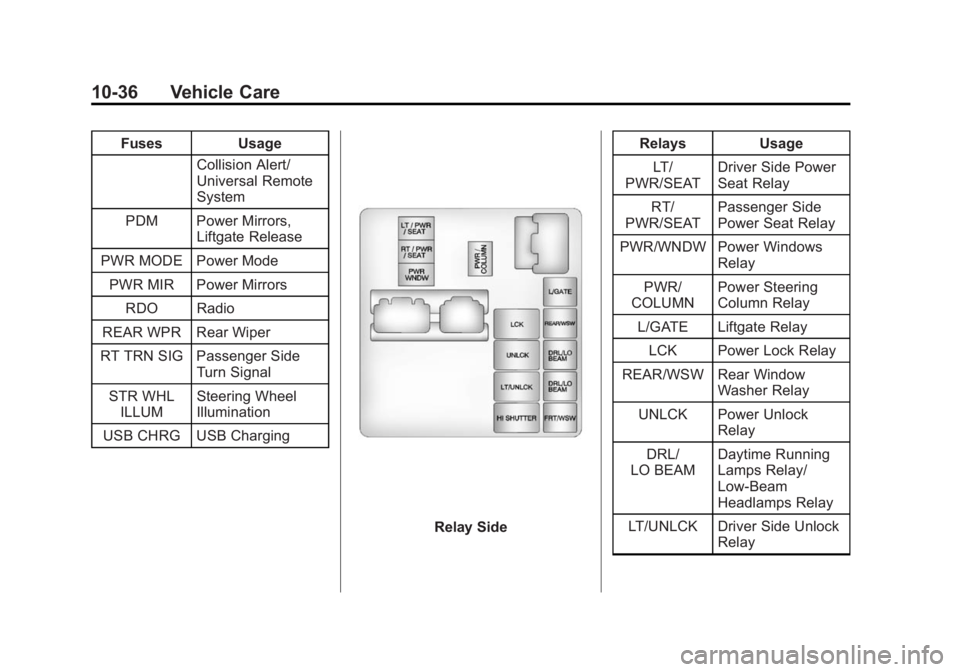
Relay Side Relays Usage
LT/
PWR/SEAT Driver Side Power
Seat Relay
RT/
PWR/SEAT Passenger Side
Power Seat Relay
PWR/WNDW Power Windows Relay
PWR/
COLUMN Power Steering
Column Relay
L/GATE Liftgate Relay
LCK Power Lock Relay
REAR/WSW Rear Window Washer Relay
UNLCK Power Unlock Relay
DRL/
LO BEAM Daytime Running
Lamps Relay/
Low-Beam
Headlamps Relay
LT/UNLCK Driver Side Unlock Relay
Page 349 of 414

Black plate (79,1)GMC Acadia/Acadia Denali Owner Manual (GMNA-Localizing-U.S./Canada/
Mexico-6014315) - 2014 - crc - 8/15/13
Vehicle Care 10-79
Wheels and Trim—Aluminum
or Chrome
Use a soft, clean cloth with mild
soap and water to clean the wheels.
After rinsing thoroughly with clean
water, dry with a soft, clean towel.
A wax may then be applied.
{Caution
Chrome wheels and other chrome
trim may be damaged if the
vehicle is not washed after driving
on roads that have been sprayed
with magnesium, calcium,
or sodium chloride. These
chlorides are used on roads for
conditions such as ice and dust.
Always wash the chrome with
soap and water after exposure.
{Caution
To avoid surface damage, do not
use strong soaps, chemicals,
abrasive polishes, cleaners,
brushes, or cleaners that contain
acid on aluminum or
chrome-plated wheels. Use only
approved cleaners. Also, never
drive a vehicle with aluminum or
chrome-plated wheels through an
automatic car wash that uses
silicone carbide tire cleaning
brushes. Damage could occur
and the repairs would not be
covered by the vehicle warranty.
Steering, Suspension, and
Chassis Components
Visually inspect steering,
suspension, and chassis
components for damaged, loose or
missing parts or signs of wear at
least once a year. Inspect the power
steering for proper hook-up, binding,
leaks, cracks, chafing, etc. Visually check constant velocity joints,
rubber boots, and axle seals for
leaks.
Body Component Lubrication
Lubricate all key lock cylinders,
hood hinges, liftgate hinges, and the
fuel door hinge unless the
components are plastic. Applying
silicone grease on weatherstrips
with a clean cloth will make them
last longer, seal better, and not stick
or squeak.
Underbody Maintenance
At least twice a year, Spring and
Fall, use plain water to flush dirt and
debris from the vehicle's underbody.
Your dealer or an underbody car
washing system can do this. If not
removed, rust and corrosion can
develop.
Sheet Metal Damage
If the vehicle is damaged and
requires sheet metal repair or
replacement, make sure the body
repair shop applies anti-corrosion
Page 368 of 414

Black plate (12,1)GMC Acadia/Acadia Denali Owner Manual (GMNA-Localizing-U.S./Canada/
Mexico-6014315) - 2014 - crc - 8/15/13
11-12 Service and Maintenance
Recommended Fluids, Lubricants, and Parts
Recommended Fluids and Lubricants
UsageFluid/Lubricant
Engine Oil Use only engine oil licensed to the dexos1 specification of the proper SAE
viscosity grade. ACDelco dexos1 Synthetic Blend is recommended. See
Engine Oil on page 10-7.
Engine Coolant 50/50 mixture of clean, drinkable water and use only DEX-COOL Coolant.
See Engine Coolant on page 10-12.
Hydraulic Brake System DOT 3 Hydraulic Brake Fluid (GM Part No. 19299818, in Canada 19299819).
Windshield Washer Automotive windshield washer fluid that meets regional freeze protection requirements.
Hydraulic Power Steering System DEXRON
®-VI Automatic Transmission Fluid.
Automatic Transmission DEXRON
®-VI Automatic Transmission Fluid.
Carrier Assembly –Differential (Rear
Drive Module) and Transfer Case (Power Transfer Unit) SAE 75W-90 Synthetic Axle Lubricant (GM Part No. 88900401, in
Canada 89021678).
Key Lock Cylinders Multi-Purpose Lubricant, Superlube (GM Part No. 12346241, in Canada 10953474).