2014 FORD TAURUS door lock
[x] Cancel search: door lockPage 80 of 550

Wait 20 seconds and then repeat this procedure from Step 1 to program
an additional key.
Programming a Spare Intelligent Access Key (If Equipped)
Note:A maximum of four intelligent access keys can be programmed to
your vehicle. You must take your vehicle and all access keys to your
authorized dealer to be erased and reprogrammed if you would like to
replace a previously programmed access key with a new access key, or if
you already have four access keys programmed to your vehicle.
You must have two previously programmed intelligent access keys
inside your vehicle and the new unprogrammed intelligent access keys
readily accessible. See your authorized dealer to have the spare key
programmed if two previously programmed keys are not available.
Make sure that your vehicle is off before beginning this procedure. Make
sure that all doors are closed before beginning and that they remain
closed throughout the procedure. Perform all steps within 30 seconds
of starting the sequence. Stop and wait for at least one minute before
starting again if any steps are performed out of sequence.
Read and understand the entire procedure before you begin.
1. Place the new unprogrammed intelligent
access key in the pocket inside of the
center console with the buttons facing out
and with key ring up.
2. Press the driver or passenger power
door unlock control three times.
3. Press and release the brake pedal one
time.
4. Press the driver or passenger power
door lock control three times.
5. Press and release the brake pedal one time. The indicator on the
START/STOPbutton should begin to rapidly flash, indicating the
programming mode has been entered and two programmed intelligent
access keys have been detected in your vehicle.
6. Press theSTART/STOPbutton within one minute. A message will
appear in the information display indicating that the new intelligent
access key was programmed.
7. Remove the intelligent access key from the center console pocket and
press the unlock button on the newly programmed intelligent access key
to exit programming mode.
Security79
2014 Taurus
Owners Guide gf, 1st Printing, April 2013
USA(fus)
Page 81 of 550

8. Verify that the remote entry functions operate (press lock then
unlock, making sure you end in unlock) and that your vehicle starts with
new intelligent access key.
ANTI-THEFT ALARM (IF EQUIPPED)
The system will warn you of unauthorized entry to your vehicle.
The turn signal lamps will flash and sound the horn up to a total of 10
times when:
•any door, the hood or the luggage compartment is opened without
using the keypad, the remote control or the intelligent access
transmitter (if equipped)
•the ignition is turned on with an invalid key.
Take all keys and remote controls to an authorized dealer if there is any
potential alarm problem with your vehicle.
Arming the Alarm
The system is ready to arm whenever the ignition is off. Lock the vehicle
to arm the alarm.
The turn signal lamps will flash once after locking the vehicle to indicate
the alarm is in the pre-armed mode. It will become fully armed in
20 seconds.
Disarming the Alarm
To disarm the alarm, do any of the following:
•Press the power door unlock button within the 20-second pre-armed
mode.
•Press the unlock button on the remote control.
•Unlock the doors with the keyless entry pad.
•Enter the vehicle using intelligent access (if equipped).
•Turn the ignition on with a valid key (if equipped with an integrated
keyhead transmitter only).
•Press the panic button on the remote control. The alarm system will
still be armed, but this shuts off the horn and turn lamps when the
alarm is sounding.
Note:If the driver door is unlocked with a key, a tone will sound when
you open the door and a message will appear in the information display.
You will have 12 seconds to disarm the alarm using any of the actions
above, otherwise the alarm will trigger.
80Security
2014 Taurus
Owners Guide gf, 1st Printing, April 2013
USA(fus)
Page 98 of 550

Bounce-Back (One-Touch Up or Down Windows Only)
The window will stop automatically while closing and reverse some
distance if there is an obstacle in the way.
Overriding the Bounce-Back Feature
WARNING:When you override the bounce-back feature the
window will not reverse if it detects an obstacle. Take care when
closing the windows to avoid personal injury or damage to your vehicle.
Pull up the window switch and hold within two seconds of the window
reaching the bounce-back position. The window will travel up with no
bounce-back protection. The window will stop if you release the switch
before the window is fully closed.
Window Lock
Press the control to lock or unlock
the rear window controls.
Accessory Delay
You can use the window switches for several minutes after you switch
the ignition off, or until you open either front door.
Windows and Mirrors97
2014 Taurus
Owners Guide gf, 1st Printing, April 2013
USA(fus)
Page 114 of 550

Settings
Convenience Auto Engine Off — check enabled (default) /
uncheck disabled
Auto Highbeam — check enabled (default) / uncheck
disabled
Autolamp Delay Off or number of seconds
Compass Display — check enabled
(default) / uncheck disabled
DTE Calculation Normal or Towing
Easy Entry/Exit — check enabled (default) /
uncheck disabled
Locks Autolock — check enabled
(default) / uncheck disabled
Autounlock — check enabled
(default) / uncheck disabled
Remote Unlock All Doors or
Driver First
Oil life Reset Set XXX% — Hold OK to Reset
Remote Start Climate Control Auto or Last
Setting
Seats and Wheel
or Front SeatsAutomatic or
Off
Duration (5, 10 or
15 minutes)
System — check enabled
(default) / uncheck disabled
Windows Remote Open or Close
Wipers Courtesy Wipe — check enabled
(default) / uncheck disabled
Rain Sensing — check enabled
(default) / uncheck disabled
Information Displays11 3
2014 Taurus
Owners Guide gf, 1st Printing, April 2013
USA(fus)
Page 120 of 550

Settings
Vehicle Auto Engine Off — check enabled / uncheck disabled
DTE Calculation Normal / Towing
Easy Entry/Exit — check enabled / uncheck disabled
Lighting Auto highbeam — check enabled
(default) / uncheck disabled
Autolamp Delay Off or number
of seconds
Locks Autolock — check enabled
(default) / uncheck disabled
Autounlock — check enabled
(default) / uncheck disabled
Remote
UnlockingAll doors /
Driver’s door
Oil Life ResetSet to XXX % — Hold OK to
Reset
Remote StartClimate Control
(using this
feature allows
you to select
different climate
control modes
when the vehicle
is started using
the remote start
feature)Auto / Last
Setting
Seats & Wheel
or Front SeatsAuto / Off
Duration5/10
/15 minutes
System — check enabled (default)
/ uncheck disabled
Windows Remote Open or Close
WipersCourtesy Wipe — check enabled
(default) / uncheck disabled
Rain Sensing — check enabled
(default) / uncheck disabled
Information Displays11 9
2014 Taurus
Owners Guide gf, 1st Printing, April 2013
USA(fus)
Page 126 of 550

Collision Warning
System MessagesAction / Description
Collision Warning Not
AvailableDisplayed when there is a system malfunction
with the collision warning system. The system
will be disabled. Contact your authorized
dealer as soon as possible.
Collision Warning Not
Available Sensor
Blocked See ManualDisplayed when the collision warning system
radar is blocked because of poor radar
visibility due to bad weather or ice/mud/water
in front of the radar. Driver can typically clean
the sensor to resolve. Contact your authorized
dealer as soon as possible.
Collision Warning
MalfunctionDisplayed when there is a system malfunction
with the collision warning system. The system
will be disabled. Contact your authorized
dealer as soon as possible.
Door Messages Action / Description
X Door Ajar Displayed when a door is not completely
closed.
Trunk Ajar Displayed when the trunk is not completely
closed.
Fuel Messages Action / Description
Check Fuel Fill Inlet Displayed when the fuel fill inlet may not be
properly closed.
Fuel Level LOW Displayed as an early reminder of a low fuel
condition.
Information Displays125
2014 Taurus
Owners Guide gf, 1st Printing, April 2013
USA(fus)
Page 130 of 550
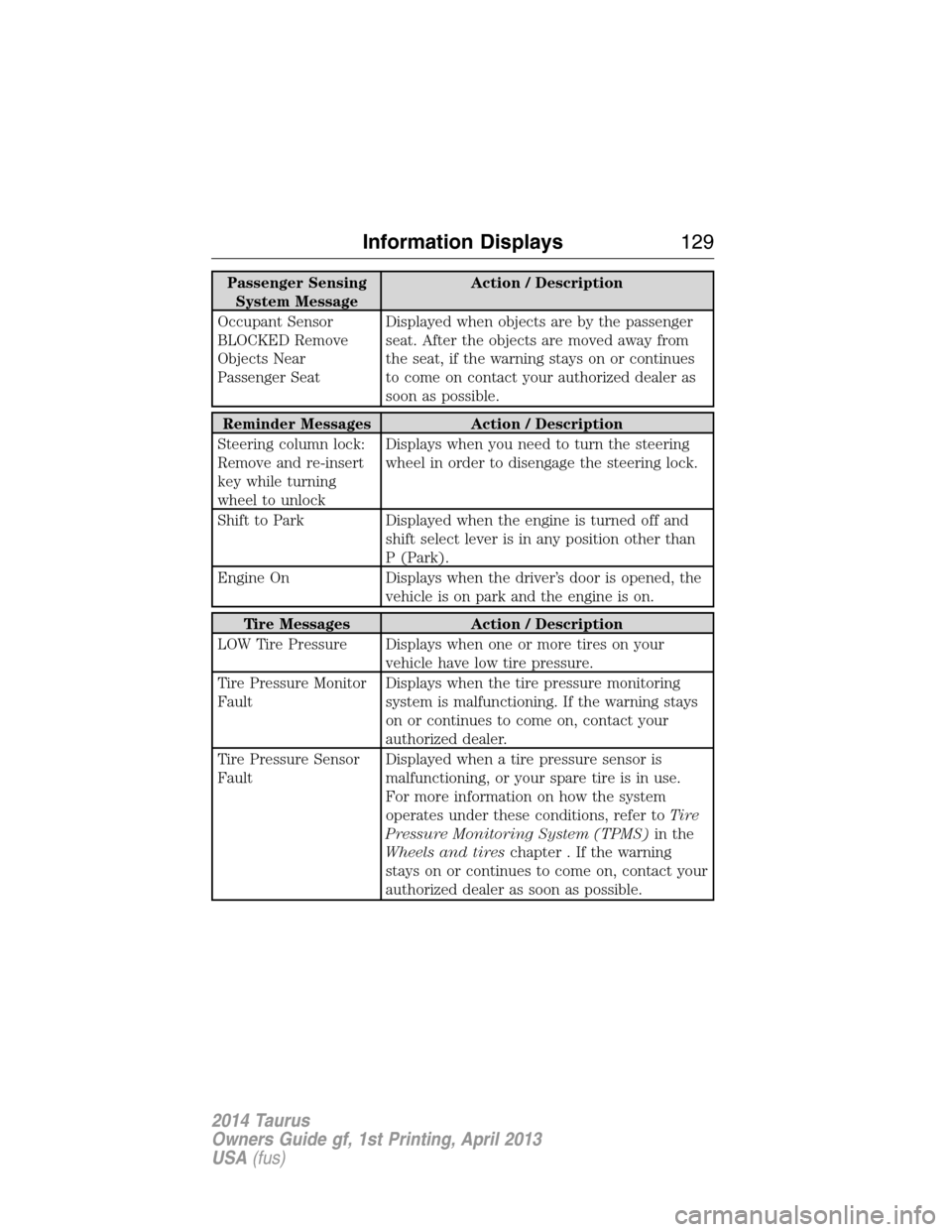
Passenger Sensing
System MessageAction / Description
Occupant Sensor
BLOCKED Remove
Objects Near
Passenger SeatDisplayed when objects are by the passenger
seat. After the objects are moved away from
the seat, if the warning stays on or continues
to come on contact your authorized dealer as
soon as possible.
Reminder Messages Action / Description
Steering column lock:
Remove and re-insert
key while turning
wheel to unlockDisplays when you need to turn the steering
wheel in order to disengage the steering lock.
Shift to Park Displayed when the engine is turned off and
shift select lever is in any position other than
P (Park).
Engine On Displays when the driver’s door is opened, the
vehicle is on park and the engine is on.
Tire Messages Action / Description
LOW Tire Pressure Displays when one or more tires on your
vehicle have low tire pressure.
Tire Pressure Monitor
FaultDisplays when the tire pressure monitoring
system is malfunctioning. If the warning stays
on or continues to come on, contact your
authorized dealer.
Tire Pressure Sensor
FaultDisplayed when a tire pressure sensor is
malfunctioning, or your spare tire is in use.
For more information on how the system
operates under these conditions, refer toTi r e
Pressure Monitoring System (TPMS)in the
Wheels and tireschapter . If the warning
stays on or continues to come on, contact your
authorized dealer as soon as possible.
Information Displays129
2014 Taurus
Owners Guide gf, 1st Printing, April 2013
USA(fus)
Page 156 of 550

HOMELINK® WIRELESS CONTROL SYSTEM (IF EQUIPPED)
WARNING:Make sure that the garage door and security device
are free from obstruction when you are programming. Do not
program the system with the vehicle in the garage.
WARNING:Do not use the system with any garage door opener
that does not have the safety stop and reverse feature as
required by U.S. Federal Safety Standards (this includes any garage
door opener manufactured before April 1, 1982).
Note:Make sure you keep the original remote control transmitter for
use in other vehicles as well as for future system programming.
Note:We recommend that upon the sale or lease termination of your
vehicle, you erase the programmed function buttons for security reasons.
SeeErasing the function button codeslater in this section.
Note:You can program a maximum of three devices. To change or
replace any of the three devices after it has been initially programmed,
you must first erase the current settings. SeeErasing the function
button codeslater in this section.
The universal garage door opener
replaces the common hand-held garage
door opener with a three-button
transmitter that is integrated into the
driver’s sun visor.
The system includes two primary features, a garage door opener and a
platform for remote activation of devices with the home. As well as
being programmed for garage doors, the system transmitter can be
programmed to operate entry gate operators, security systems, entry
door locks, and home or office lighting.
Additional system information can be found online at www.homelink.com
or by calling the toll-free help line on 1-800-355-3515.
Programming
Note:Put a new battery in the hand-held transmitter. This will ensure
quicker training and accurate transmission of the radio-frequency signal.
Universal Garage Door Opener (If Equipped)155
2014 Taurus
Owners Guide gf, 1st Printing, April 2013
USA(fus)