2014 FORD TAURUS climate settings
[x] Cancel search: climate settingsPage 430 of 550

This system uses a four-corner strategy to provide quick access several
vehicle features and settings. The touchscreen provides easy interaction
with your cellular phone, multimedia, climate control and navigation
system. The corners display any active modes within those menus, such
as phone status or the climate temperature.
Note:Some features are not available while your vehicle is moving.
Note:Your system is equipped with a feature that allows you to access
and control audio features for 30 minutes after you switch the ignition
off (and no doors open).
PHONE
Press to select any of the following:
•Making and Receiving Calls
•Quick Dial
•Phonebook
•Call History
•Text Messaging
•Settings
NAVIGATION
Press to select any of the following:
•My Home
•Favorites
•Previous Destinations
•Point of Interest
•Emergency
•Street Address
•Intersection
•City Center
•Map
•Edit Route Cancel Route
CLIMATE
Press to select any of the following:
•Driver Settings
•Recirculated Air
•Auto
•Dual
•Passenger Settings
•A/C
•Defrost
MyFord Touch® (If Equipped)429
2014 Taurus
Owners Guide gf, 1st Printing, April 2013
USA(fus)
Page 432 of 550

Using the Touch-sensitive Controls on Your System
To turn a feature on and off, just touch the graphic with your finger.
To get the best performance from the touch-sensitive controls:
•Do not press hard on the controls. They are sensitive to light touch.
•Use your bare finger to touch the center of a touch-control graphic.
Touching off-center of the graphic may affect operation of a nearby
control.
•Make sure your hands are clean and dry.
•Keep metal and other conductive material away from the surface of
the touchscreen as this may cause electronic interference (for
example, inadvertently turning on a feature other than the one you
meant to turn on).
Depending on your vehicle and option package, you may also have these
controls on your bezel:
•Power: Switch the media or climate features off and on.
•VOL:Control the volume of playing media.
•Fan: Control the speed of the climate system fan.
•Seek and Tune buttons: Use as you normally would in media modes.
•Eject: Eject a CD from the entertainment system.
•SOURCE:Touch the word repeatedly to see all available media
modes. The screen does not change, but you see the media change in
the lower left status bar.
•SOUND:Touch the word to access the Sound menu where you can
adjust settings such as: Bass, Treble, Midrange, Balance and Fade,
THX Deep Note Demo, DSP (Digital Signal Processing), Occupancy
Mode and Speed Compensated Volume. (Your vehicle may not have
all of these sound options.)
•Hazard flasher: Switch the hazard flashers off and on.
Cleaning the Touchscreen Display
Use a clean, soft cloth such as one used for cleaning glasses. If dirt or
fingerprints are still visible, apply a small amount of alcohol to the cloth.
Do not pour or spray alcohol onto the display. Do not use detergent or
any type of solvent to clean the display.
Support
The SYNC support team is available to help you with any questions you
cannot answer on your own.
Monday-Saturday, 8:30am-8:00pm EST.
In the United States, call: 1–888–270–1055.
In Canada, call: 1–800–565–3673.
Times are subject to change due to holidays.
MyFord Touch® (If Equipped)431
2014 Taurus
Owners Guide gf, 1st Printing, April 2013
USA(fus)
Page 438 of 550
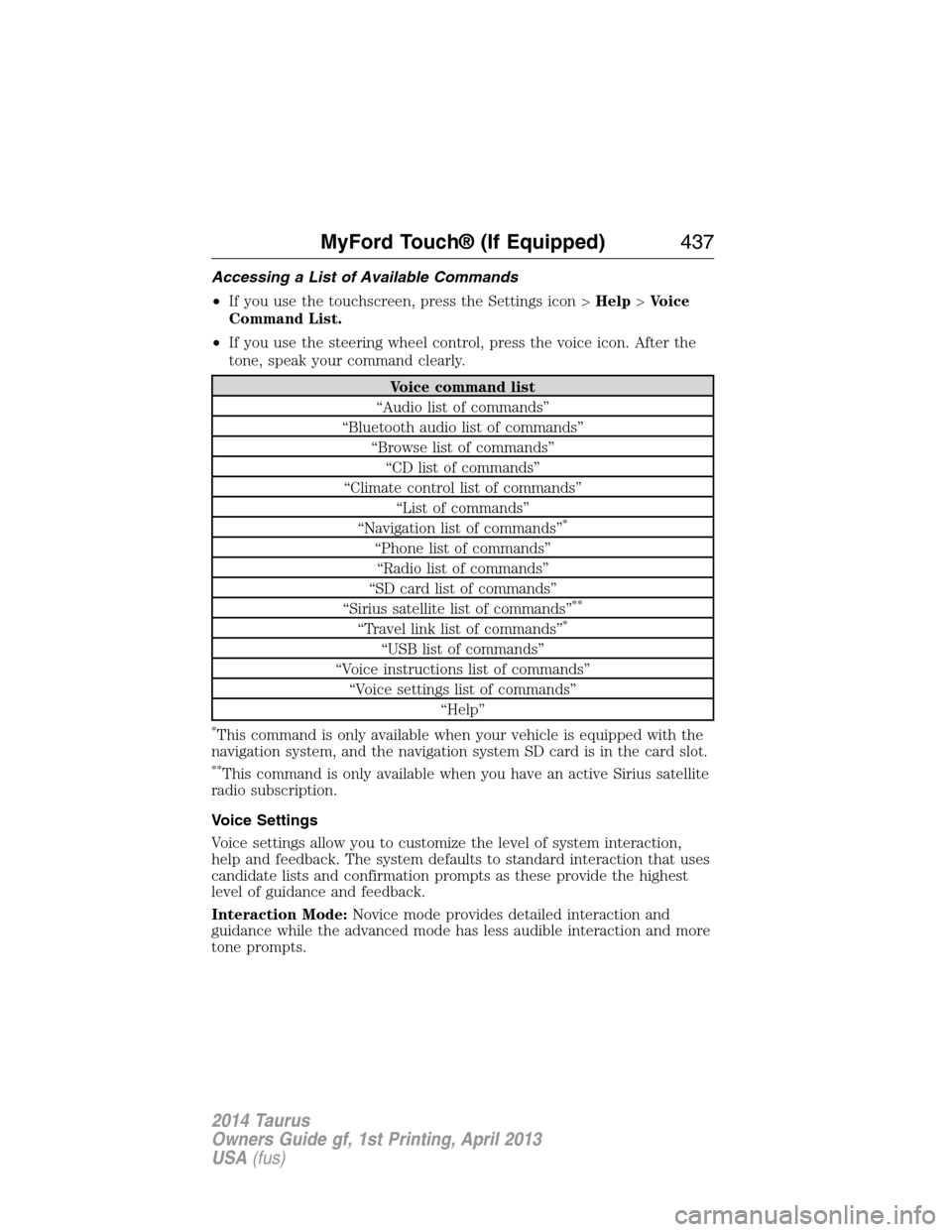
Accessing a List of Available Commands
•If you use the touchscreen, press the Settings icon >Help>Voice
Command List.
•If you use the steering wheel control, press the voice icon. After the
tone, speak your command clearly.
Voice command list
“Audio list of commands”
“Bluetooth audio list of commands”
“Browse list of commands”
“CD list of commands”
“Climate control list of commands”
“List of commands”
“Navigation list of commands”
*
“Phone list of commands”
“Radio list of commands”
“SD card list of commands”
“Sirius satellite list of commands”
**
“Travel link list of commands”*
“USB list of commands”
“Voice instructions list of commands”
“Voice settings list of commands”
“Help”
*This command is only available when your vehicle is equipped with the
navigation system, and the navigation system SD card is in the card slot.
**This command is only available when you have an active Sirius satellite
radio subscription.
Voice Settings
Voice settings allow you to customize the level of system interaction,
help and feedback. The system defaults to standard interaction that uses
candidate lists and confirmation prompts as these provide the highest
level of guidance and feedback.
Interaction Mode:Novice mode provides detailed interaction and
guidance while the advanced mode has less audible interaction and more
tone prompts.
MyFord Touch® (If Equipped)437
2014 Taurus
Owners Guide gf, 1st Printing, April 2013
USA(fus)
Page 484 of 550

Rear View Camera
This menu allows you to access settings for your rear view camera.
Press the Settings icon >Vehicle>Rear View Camera,then select
from the following settings:
•Rear Camera Delay
•Visual Park Aid Alert
•Guidelines.
Enable Valet Mode
Note:If the system locks, and you need to reset the PIN, enter 3681 and
the system unlocks.
Valet mode allows you to lock the system. No information is accessible
until the system is unlocked with the correct PIN.
1. Press the Settings icon >Vehicle>Enable Valet Mode.
2. When prompted, enter a four-digit PIN.
After you press Continue, the system locks until you enter the PIN again.
Settings
Access and adjust system settings, voice features, as well as phone,
navigation and wireless settings.
System
Press the Settings icon >Settings>System,then select from
the following:
System
LanguageSelect to have the touchscreen display in
English, Spanish or French.
DistanceSelect to display units in kilometers or miles.
TemperatureSelect to display units in Celsius or
Fahrenheit.
System Prompt
VolumeAdjust the volume of voice prompts from the
system.
Touch Screen Button
BeepSelect to have the system beep to confirm
choices made through the touchscreen.
Touch Panel Button
BeepSelect to have the system beep to confirm
button choices made through the climate or
audio system.
MyFord Touch® (If Equipped)483
2014 Taurus
Owners Guide gf, 1st Printing, April 2013
USA(fus)
Page 492 of 550

To access Help using the voice commands, press the voice button, then,
after the tone, say “Help”. The system provides allowable voice
commands for the current mode.
CLIMATE
Press the lower right corner on the touchscreen to access your climate
control features. Depending on your vehicle line and option package,
your climate screen may look different from the screen shown here.
A.Power:Touch to switch the system off and on. Outside air cannot
enter your vehicle when you switch off the system.
B.Passenger settings:
•TouchDUALto switch on the passenger temperature control.
•Touch+or–to adjust the temperature.
•Touch the heated seat icon to control the heated seat.
•Touch the cooled seat icon to control the cooled seat.
C.Fan speed:Touch+or–to adjust fan speed.
D.Recirculated air:Touch to turn the recirculated air on or off which:
•May reduce the amount of time needed to cool down the interior.
•May help reduce odors from reaching the interior.
•Engages automatically when MAX A/C is selected.
•May be engaged manually in any airflow mode except defrost.
•May turn off in all airflow modes except MAX A/C to reduce fog
potential.
A
KB
JC
IHGFED
MyFord Touch® (If Equipped)491
2014 Taurus
Owners Guide gf, 1st Printing, April 2013
USA(fus)
Page 548 of 550

R
Radio ..........................366, 370, 372
AM/FM .....................................441
Single CD ................366, 370, 372
Radio reception .........................364
Radio voice commands .............446
Rear heated seats .....................154
Rear view camera
display ................................205, 483
Rear window
defroster ............130–131, 133, 135
Receiving a text
message .............................394, 465
Recommendations for
attaching safety restraints for
children ........................................24
Relays ................................267–268
Remote entry system
illuminated entry ......................71
locking/unlocking doors ...........68
opening the trunk .....................69
replacing the batteries .............58
Reverse sensing system ...........200
Roadside assistance ..................254
Route preferences ....................498
S
Safety Belt Maintenance ............41
Safety belts (see Safety
restraints) ..............................35, 38
Safety defects, reporting ..........266
Safety information ............383, 432
Safety restraints ..............35–36, 38
Belt-Minder® ............................38
extension assembly ..................37for adults .............................35–36
for children ...............................24
Occupant Classification
Sensor ........................................47
safety belt maintenance ...........41
seat belt maintenance ..............41
warning light and chime ..........38
Safety restraints - LATCH
anchors ........................................28
Safety seats for children ............24
Safety Compliance
Certification Label ....................358
Satellite Radio ...................366, 447
Scheduled Maintenance Guide
Normal Scheduled
Maintenance and Log .............530
SD card ......................381, 453, 494
Seat belts
(see Safety restraints) ...............35
Seats
child safety seats ......................24
climate control ........................151
easy access/easyout feature ..149
front seats ...............145–146, 150
heated ..............................149, 154
memory seat .....................59, 148
SecuriCode keyless entry
system ..........................................72
SecuriLock passive anti-theft
system ..........................................77
Selecting your media source
(USB, Line in, BT audio) .........412
Sending new text messages .....464
Setting a destination ................494
Setting a destination by
voice ...........................................495
Settings ......................................480
Index547
2014 Taurus
Owners Guide gf, 1st Printing, April 2013
USA(fus)
Page 549 of 550

Setting the clock ...............366, 480
Side air curtain ...........................52
Side-curtain airbags system .......52
SIRIUS® satellite radio ....366, 447
SIRIUS satellite radio voice
commands .................................448
SIRIUS Travel Link ...................472
SIRIUS Travel Link voice
commands .................................474
SOS Post Crash Alert .................44
Spark plugs,
specifications .....................350, 356
Specification chart,
lubricants ...................................352
Stability system .........................197
Starting your vehicle ................165
jump starting ..........................256
push button start system .......164
Steering wheel ............................81
controls ......................................83
tilting .........................................81
Sunshade ...................................101
Supplemental Restraint System
(SRS) (see airbags) ....................45
Supported media file types ......457
Supported player, media
formats and metadata
information ................................457
SYNC® customer
support ..............................383, 431
SYNC® Services ................406, 468
System settings .........................483T
Temperature control
(see Climate control) .....130–131,
133, 135, 491
Temporary mobility kit .............341
Text messaging .................394, 464
Text messaging (sending,
downloading, deleting) .....394, 396
Tilt steering wheel ......................81
Tires ...........................314–315, 335
alignment ................................328
care ..........................................314
changing ..........................335, 337
checking the pressure ............324
inflating ...................................322
label .........................................321
replacing ..................................326
rotating ....................................328
safety practices .......................327
sidewall information ...............316
snow tires and chains ............329
spare tire .................................335
Temporary mobility kit ..........341
terminology .............................315
tire grades ...............................315
treadwear ........................314, 324
Touchscreen features
(climate) ....................................491
Towing .......................243, 247–248
recreational towing .................248
trailer towing ..........................243
wrecker ....................................247
Traction control ........................195
Traffic, Directions and
Information ................................406
Traffic preferences ...................498
548Index
2014 Taurus
Owners Guide gf, 1st Printing, April 2013
USA(fus)