2014 FORD SUPER DUTY rear view mirror
[x] Cancel search: rear view mirrorPage 74 of 458

Telescoping Mirrors (If Equipped)
This feature lets you extend the mirror
about 3 inches (75 millimeters). It is useful
when towing a trailer. You can manually
pull out or push in the mirrors to the desired
position.
PowerScope
™ Power Telescoping
Mirrors (If Equipped)
This feature lets you position both mirrors
at the same time. The switch is on the door
trim panel. Telescope Out
A
Telescope In
B
Press and hold the switch to move the
mirrors.
When you fully extend the mirrors, you will
hear the motors running as long as you
hold the switch. INTERIOR MIRROR WARNING
Do not adjust the mirror when your
vehicle is moving.
Note:
Do not clean the housing or glass of
any mirror with harsh abrasives, fuel or other
petroleum or ammonia-based cleaning
products.
You can adjust the interior mirror to your
preference. Some mirrors also have a
second pivot point. This lets you move the
mirror head up or down and from side to
side.
Pull the tab below the mirror toward you
to reduce glare at night.
Auto-Dimming Mirror
(If Equipped)
Note: Do not block the sensors on the front
and back of the mirror. Mirror performance
may be affected. A rear center passenger or
raised rear center head restraint may also
block light from reaching the sensor.
The mirror will dim automatically to reduce
glare when bright lights are detected from
behind your vehicle. It will automatically
return to normal reflection when you select
reverse gear to make sure you have a clear
view when backing up.
71
Super Duty (TFA) Windows and MirrorsE163061 E163062BA
Page 172 of 458
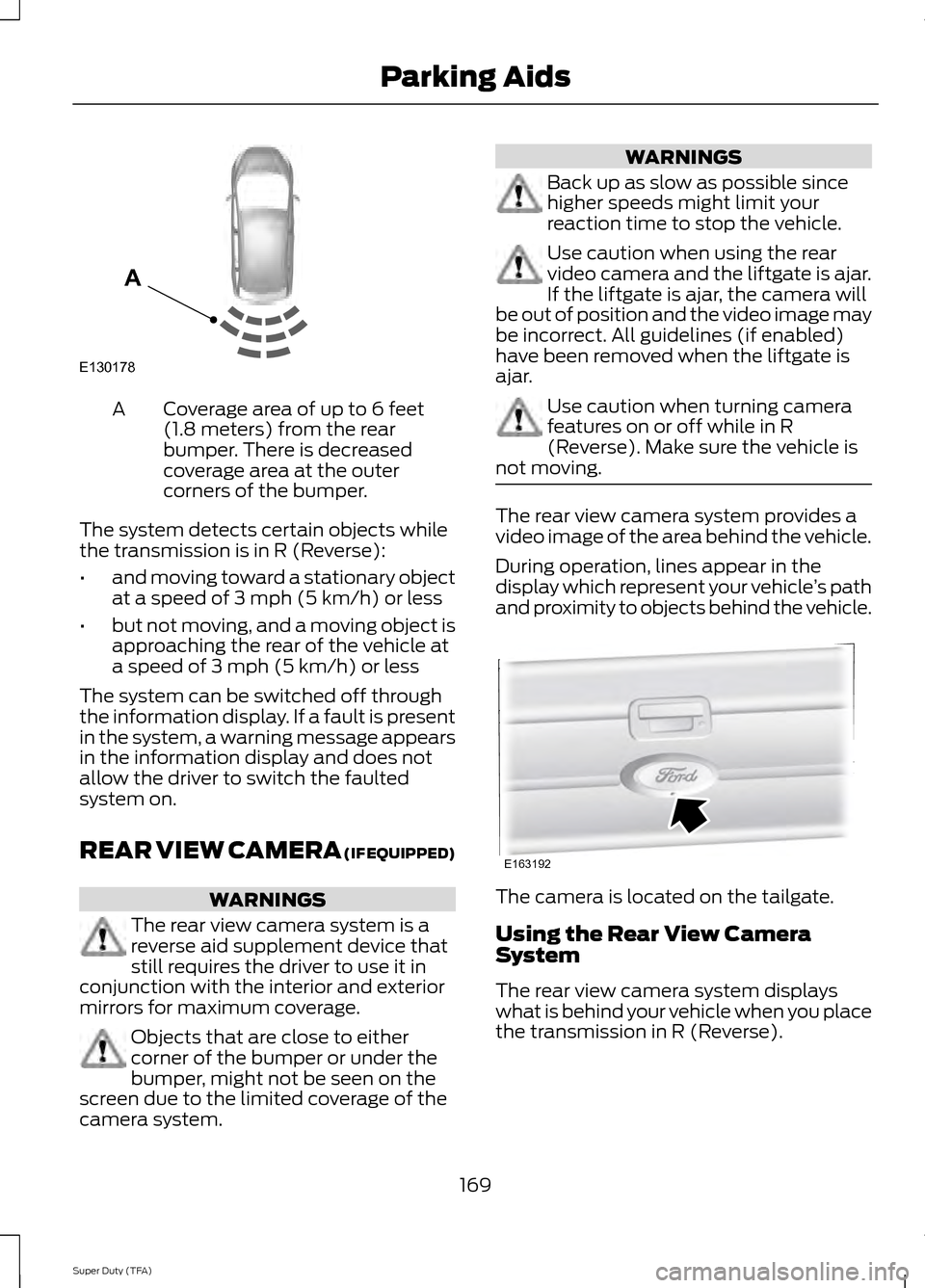
Coverage area of up to 6 feet
(1.8 meters) from the rear
bumper. There is decreased
coverage area at the outer
corners of the bumper.
A
The system detects certain objects while
the transmission is in R (Reverse):
• and moving toward a stationary object
at a speed of 3 mph (5 km/h) or less
• but not moving, and a moving object is
approaching the rear of the vehicle at
a speed of 3 mph (5 km/h) or less
The system can be switched off through
the information display. If a fault is present
in the system, a warning message appears
in the information display and does not
allow the driver to switch the faulted
system on.
REAR VIEW CAMERA (IF EQUIPPED) WARNINGS
The rear view camera system is a
reverse aid supplement device that
still requires the driver to use it in
conjunction with the interior and exterior
mirrors for maximum coverage. Objects that are close to either
corner of the bumper or under the
bumper, might not be seen on the
screen due to the limited coverage of the
camera system. WARNINGS
Back up as slow as possible since
higher speeds might limit your
reaction time to stop the vehicle.
Use caution when using the rear
video camera and the liftgate is ajar.
If the liftgate is ajar, the camera will
be out of position and the video image may
be incorrect. All guidelines (if enabled)
have been removed when the liftgate is
ajar. Use caution when turning camera
features on or off while in R
(Reverse). Make sure the vehicle is
not moving. The rear view camera system provides a
video image of the area behind the vehicle.
During operation, lines appear in the
display which represent your vehicle
’s path
and proximity to objects behind the vehicle. The camera is located on the tailgate.
Using the Rear View Camera
System
The rear view camera system displays
what is behind your vehicle when you place
the transmission in R (Reverse).
169
Super Duty (TFA) Parking AidsE130178
A E163192
Page 173 of 458
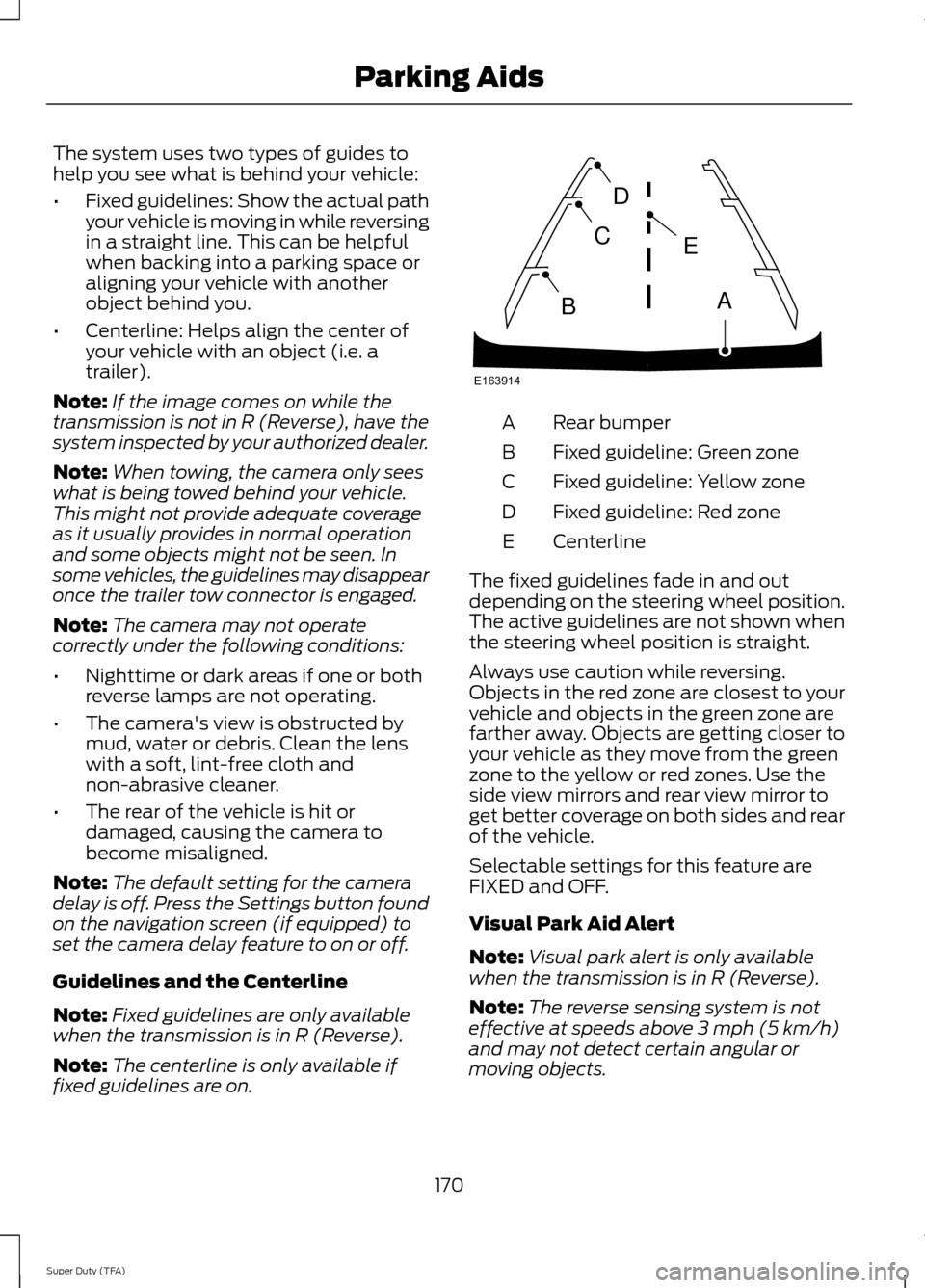
The system uses two types of guides to
help you see what is behind your vehicle:
•
Fixed guidelines: Show the actual path
your vehicle is moving in while reversing
in a straight line. This can be helpful
when backing into a parking space or
aligning your vehicle with another
object behind you.
• Centerline: Helps align the center of
your vehicle with an object (i.e. a
trailer).
Note: If the image comes on while the
transmission is not in R (Reverse), have the
system inspected by your authorized dealer.
Note: When towing, the camera only sees
what is being towed behind your vehicle.
This might not provide adequate coverage
as it usually provides in normal operation
and some objects might not be seen. In
some vehicles, the guidelines may disappear
once the trailer tow connector is engaged.
Note: The camera may not operate
correctly under the following conditions:
• Nighttime or dark areas if one or both
reverse lamps are not operating.
• The camera's view is obstructed by
mud, water or debris. Clean the lens
with a soft, lint-free cloth and
non-abrasive cleaner.
• The rear of the vehicle is hit or
damaged, causing the camera to
become misaligned.
Note: The default setting for the camera
delay is off. Press the Settings button found
on the navigation screen (if equipped) to
set the camera delay feature to on or off.
Guidelines and the Centerline
Note: Fixed guidelines are only available
when the transmission is in R (Reverse).
Note: The centerline is only available if
fixed guidelines are on. Rear bumper
A
Fixed guideline: Green zone
B
Fixed guideline: Yellow zone
C
Fixed guideline: Red zone
D
Centerline
E
The fixed guidelines fade in and out
depending on the steering wheel position.
The active guidelines are not shown when
the steering wheel position is straight.
Always use caution while reversing.
Objects in the red zone are closest to your
vehicle and objects in the green zone are
farther away. Objects are getting closer to
your vehicle as they move from the green
zone to the yellow or red zones. Use the
side view mirrors and rear view mirror to
get better coverage on both sides and rear
of the vehicle.
Selectable settings for this feature are
FIXED and OFF.
Visual Park Aid Alert
Note: Visual park alert is only available
when the transmission is in R (Reverse).
Note: The reverse sensing system is not
effective at speeds above 3 mph (5 km/h)
and may not detect certain angular or
moving objects.
170
Super Duty (TFA) Parking AidsE163914
A
E
D
C
B
Page 349 of 458
Voice command issues
Possible solution(s)
Possible cause(s)
Issue
· Review the phone voice
commands and the media
voice commands at the
beginning of their respective
sections.
· You may be using the
wrong voice commands.
· You may be speaking too
soon or at the wrong time.
SYNC does not understand
what I am saying.
· Be aware that SYNC's
microphone is either in your
rear view mirror or in the
headliner just above the
windshield.
· Review the media voice
commands at the beginning
of the media section.
· You may be using the
wrong voice commands.
· You may be saying the
name differently than the
way you saved it.
SYNC does not understand
the name of a song or artist.
· Say the song or artist
exactly as listed. If you say
"Play Artist Prince", the
system does not play music
by Prince and the Revolution
or Prince and the New
Power Generation.
· The system may not be
reading the name the same
way you are saying it.
· Make sure you are saying
the complete title, such as
"California remix featuring
Jennifer Nettles".
· If the song titles are in all
CAPS, you have to spell
them. LOLA requires you to
say "L-O-L-A".
· Do not use special charac-
ters in the title. The system
does not recognize them.
· Review the Phone voice
commands at the beginning
of the phone section.
· You may be using the
wrong voice commands.
· You may be saying the
name differently than the
way you saved it.
SYNC does not understand
or is calling the wrong
contact when I want to
make a call.
· Make sure you are saying
the contacts exactly as they
are listed. For example, if
you save a contact as Joe
Wilson, say "Call Joe
Wilson".
· Contacts in your phone-
book may be very short and
similar, or they may contain
special characters.
346
Super Duty (TFA) SYNC™
Page 453 of 458
Mirrors
See: Heated Windows and Mirrors..............105
See: Windows and Mirrors............................... 68
Mobile Communications Equipment.......13
Moonroof...........................................................72 Bounce-Back.......................................................... 73
Opening and Closing the Moonroof..............72
Venting the Moonroof......................................... 73
Motorcraft Parts...........................................293
MyFord Touch ™...........................................348
General Information......................................... 348
MyKey Troubleshooting
...............................52
MyKey ™.............................................................49
Principle of Operation........................................ 49
N
Navigation......................................................399 cityseekr............................................................... 400
Map Mode............................................................ 402
Navigation Map Updates............................... 405
Navigation Voice Commands....................... 405
Point of Interest (POI) Categories.............400
Quick-touch Buttons....................................... 404
Setting a Destination....................................... 399
Setting Your Navigation Preferences..........401
Normal Scheduled Maintenance
...........431
6.2L and 6.8L Gasoline Engines.................... 431
6.7L Diesel Engine.............................................. 432
O
Oil Check See: Engine Oil Check...................................... 225
Opening and Closing the Hood..............222
Ordering Additional Owner's Literature........................................................211
Obtaining a French Owner ’s Manual............211
Overhead Console
........................................128
P
Parking Aid......................................................168 Rear Sensing System........................................ 168
Parking Aids
...................................................168
Parking Brake.................................................159
Passive Anti-Theft System.........................57 SecuriLock ™........................................................... 57PATS
See: Passive Anti-Theft System..................... 57
Pedals.................................................................62
Perchlorate.........................................................11
Phone................................................................381 Making Calls........................................................ 383
Pairing Subsequent Phones.......................... 383
Pairing Your Phone for the First Time........382
Phone Menu Options....................................... 383
Phone Settings................................................... 385
Phone Voice Commands............................... 386
Receiving Calls.................................................... 383
Text Messaging.................................................. 384
Post-Crash Alert System
..........................206
Power Door Locks See: Locking and Unlocking............................. 53
Power Seats
....................................................110
Power Lumbar...................................................... 110
Power Recline....................................................... 110
Power Steering Fluid Check.....................233
Power Take-Off
.............................................146
Power Windows.............................................68
Accessory Delay................................................... 69
Bounce-Back......................................................... 68
One-Touch Up or Down.................................... 68
Power Sliding Back Window........................... 69
Window Lock......................................................... 69
R
Rear Axle
..........................................................156
Rear Seat Armrest.........................................117
Rear Seats.........................................................111 Folding the Rear Seat Back (Crew Cab)
........................................................................\
........ 112
Folding up the Rear Seat Cushion.................112
Rear Heated Seats .............................................. 113
Rear Under Seat Storage (Crew Cab)..........113
Returning the Seat to the Seating Position............................................................... 112
Rear View Camera.......................................169 Using the Rear View Camera System.........169
Rear View Camera See: Rear View Camera................................... 169
Recommended Towing Weights
............186
Calculating the Maximum Loaded Trailer
Weight for Your Vehicle............................... 187
450
Super Duty (TFA) Index