2014 FORD SUPER DUTY brake fluid
[x] Cancel search: brake fluidPage 7 of 458

Fuse Specification Chart...........................214
Maintenance
General Information....................................222
Opening and Closing the Hood..............222
Under Hood Overview - 6.2L...................223
Under Hood Overview - 6.8L...................224
Engine Oil Dipstick.......................................225
Engine Oil Check..........................................225
Engine Coolant Check
...............................226
Automatic Transmission Fluid Check...........................................................230
Transfer Case Fluid Check........................233
Brake Fluid Check
........................................233
Power Steering Fluid Check.....................233
Washer Fluid Check....................................234
Fuel Filter
........................................................234
Changing the 12V Battery.........................234
Checking the Wiper Blades
.....................236
Changing the Wiper Blades.....................236
Adjusting the Headlamps.........................237
Removing a Headlamp..............................238
Changing a Bulb..........................................240
Bulb Specification Chart...........................242
Changing the Engine Air Filter................244
Vehicle Care
General Information
...................................246
Cleaning Products
.......................................246
Cleaning the Exterior..................................246
Waxing.............................................................247
Cleaning the Engine
....................................247
Cleaning the Exhaust.................................248
Cleaning the Windows and Wiper Blades..........................................................248
Cleaning the Interior...................................249
Cleaning the Instrument Panel and Instrument Cluster Lens.......................249
Cleaning Leather Seats
.............................250
Repairing Minor Paint Damage................251 Cleaning the Alloy Wheels
........................251
Vehicle Storage
..............................................251
Wheels and Tires
General Information
...................................254
Tire Care
..........................................................256
Using Snow Chains
......................................273
Tire Pressure Monitoring System
...........273
Changing a Road Wheel
............................279
Technical Specifications
..........................290
Capacities and Specific- ations
Engine Specifications
................................292
Motorcraft Parts
...........................................293
Vehicle Identification Number................294
Vehicle Certification Label.......................294
Transmission Code Designation............295
Technical Specifications..........................296
Audio System
General Information
..................................300
Audio unit - Vehicles With: AM/FM.......301
Audio unit - Vehicles With: AM/FM/CD/SYNC...................................302
Audio unit - Vehicles With: Sony AM/FM/CD................................................304
Digital Audio..................................................305
Satellite Radio
..............................................308
Auxiliary Input Jack......................................310
USB Port
............................................................311
Media Hub
........................................................311
SYNC™
General Information
....................................312
Using Voice Recognition............................314
Using SYNC™ With Your Phone.............316
SYNC™ Applications and Services
.......327
Using SYNC™ With Your Media Player...........................................................334
4
Super Duty (TFA) Table of Contents
Page 11 of 458
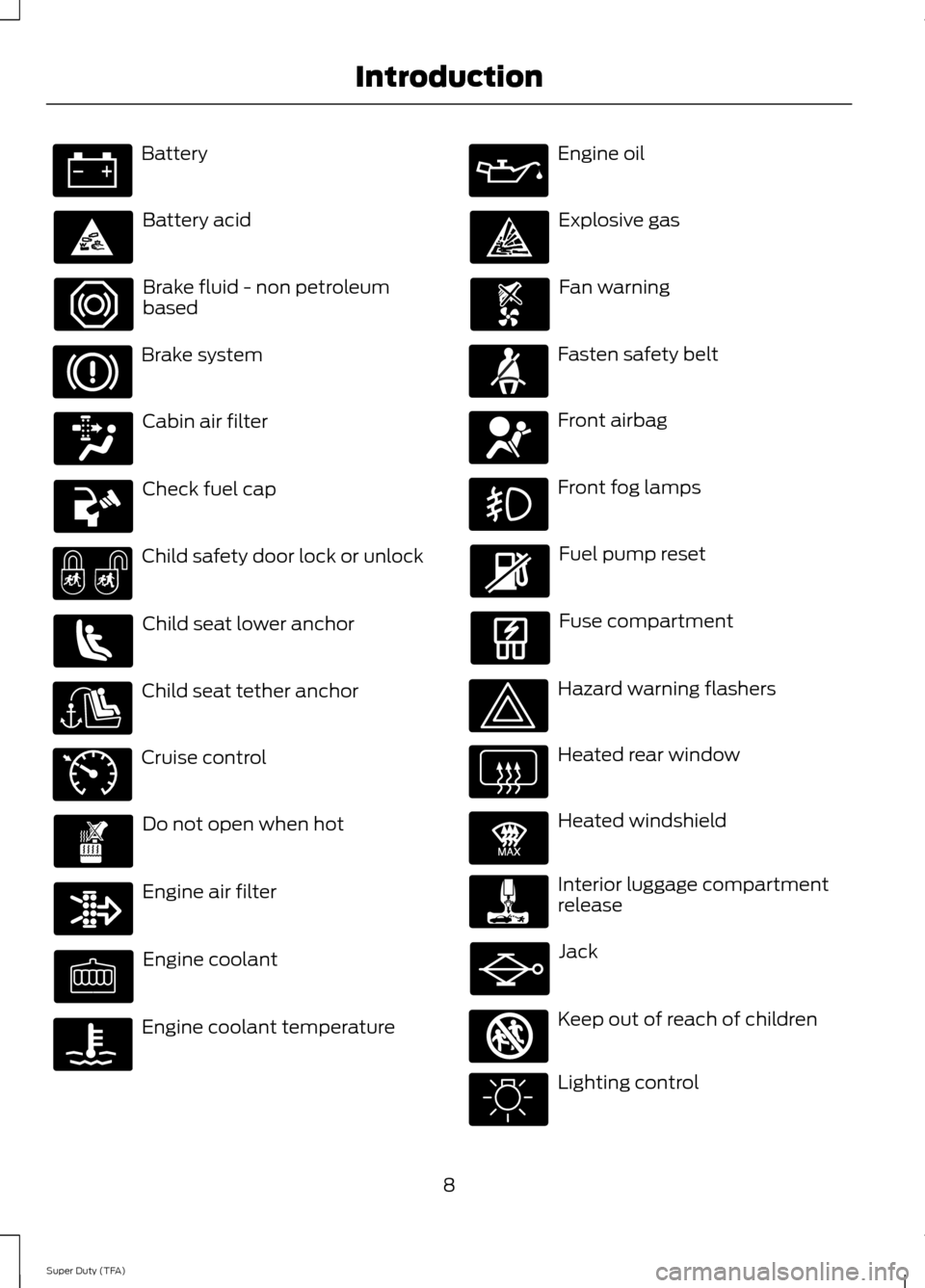
Battery
Battery acid
Brake fluid - non petroleum
based
Brake system
Cabin air filter
Check fuel cap
Child safety door lock or unlock
Child seat lower anchor
Child seat tether anchor
Cruise control
Do not open when hot
Engine air filter
Engine coolant
Engine coolant temperature Engine oil
Explosive gas
Fan warning
Fasten safety belt
Front airbag
Front fog lamps
Fuel pump reset
Fuse compartment
Hazard warning flashers
Heated rear window
Heated windshield
Interior luggage compartment
release
Jack
Keep out of reach of children
Lighting control
8
Super Duty (TFA) Introduction E71340 E91392 E161353
Page 12 of 458
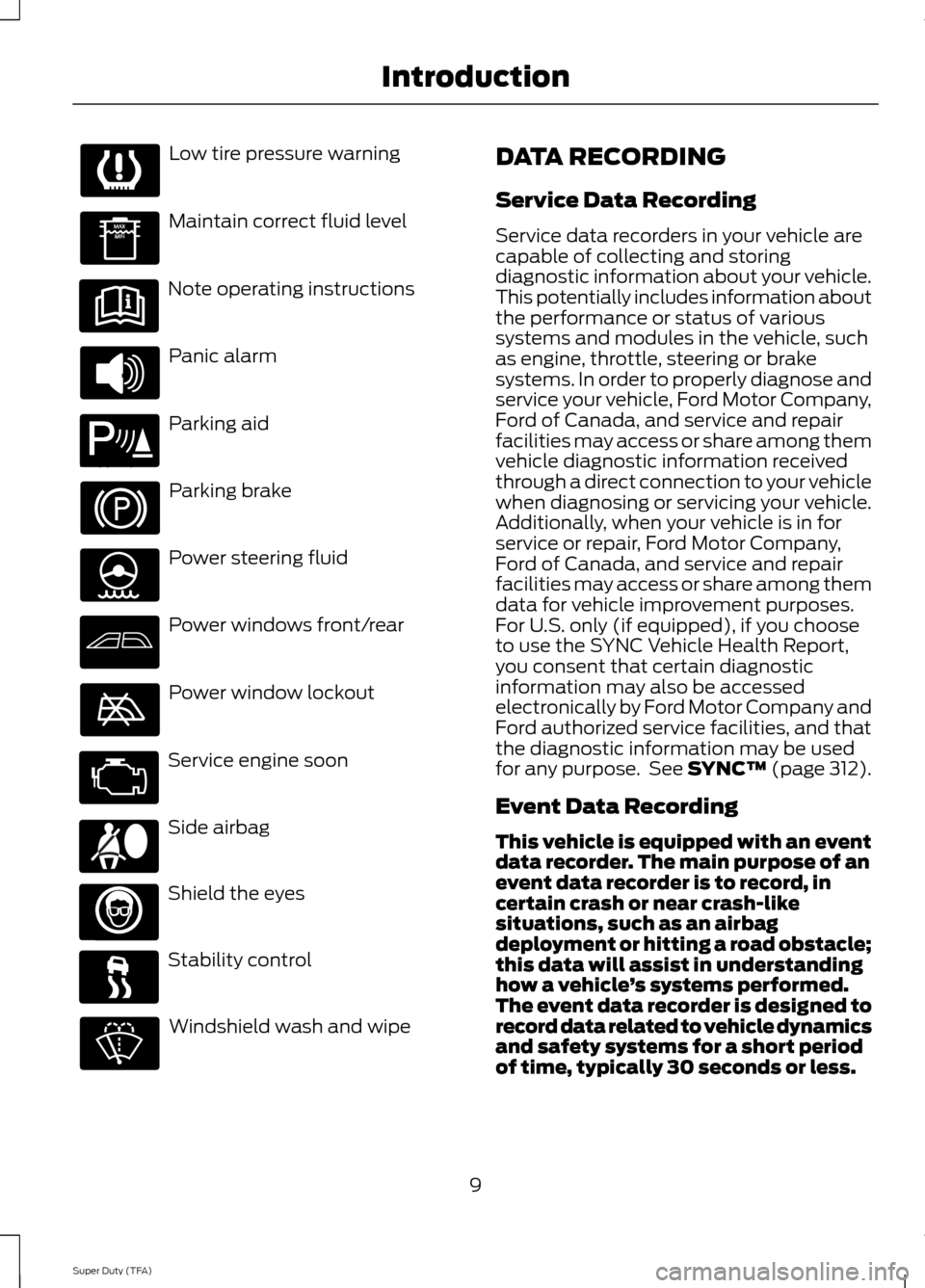
Low tire pressure warning
Maintain correct fluid level
Note operating instructions
Panic alarm
Parking aid
Parking brake
Power steering fluid
Power windows front/rear
Power window lockout
Service engine soon
Side airbag
Shield the eyes
Stability control
Windshield wash and wipe DATA RECORDING
Service Data Recording
Service data recorders in your vehicle are
capable of collecting and storing
diagnostic information about your vehicle.
This potentially includes information about
the performance or status of various
systems and modules in the vehicle, such
as engine, throttle, steering or brake
systems. In order to properly diagnose and
service your vehicle, Ford Motor Company,
Ford of Canada, and service and repair
facilities may access or share among them
vehicle diagnostic information received
through a direct connection to your vehicle
when diagnosing or servicing your vehicle.
Additionally, when your vehicle is in for
service or repair, Ford Motor Company,
Ford of Canada, and service and repair
facilities may access or share among them
data for vehicle improvement purposes.
For U.S. only (if equipped), if you choose
to use the SYNC Vehicle Health Report,
you consent that certain diagnostic
information may also be accessed
electronically by Ford Motor Company and
Ford authorized service facilities, and that
the diagnostic information may be used
for any purpose. See SYNC™ (page 312).
Event Data Recording
This vehicle is equipped with an event
data recorder. The main purpose of an
event data recorder is to record, in
certain crash or near crash-like
situations, such as an airbag
deployment or hitting a road obstacle;
this data will assist in understanding
how a vehicle ’s systems performed.
The event data recorder is designed to
record data related to vehicle dynamics
and safety systems for a short period
of time, typically 30 seconds or less.
9
Super Duty (TFA) Introduction E139213 E167012
Page 79 of 458

Anti-Lock Braking System
If it illuminates when you are
driving, this indicates a
malfunction. You will continue
to have the normal braking system
(without ABS) unless the brake system
warning lamp is also illuminated. Have the
system checked by your authorized dealer.
Battery If it illuminates while driving, it
indicates a malfunction. Switch
off all unnecessary electrical
equipment and have the system checked
by your authorized dealer immediately.
Brake System Illuminates when you engage the
parking brake with the ignition
on.
If it illuminates when you are driving, check
that the parking brake is not engaged. If
the parking brake is not engaged, this
indicates low brake fluid level or a brake
system malfunction. Have the system
checked immediately by your authorized
dealer. WARNING
Driving your vehicle with the warning
lamp on is dangerous. A significant
decrease in braking performance
may occur. It will take you longer to stop
your vehicle. Have your vehicle checked by
your authorized dealer immediately. Driving
extended distances with the parking brake
engaged can cause brake failure and the
risk of personal injury. Check Fuel Cap (If Equipped)
Illuminates when the fuel cap
may not be properly installed.
Continued driving with this light
on may cause the Service engine
soon warning indicator to come on.
Cruise Control
(If Equipped) Illuminates when you switch this
feature on. See
Using Cruise
Control (page 172).
Direction Indicator Illuminates when the left or right
turn signal or the hazard warning
flasher is turned on. If the
indicators stay on or flash faster, check for
a burned out bulb.
Door Ajar Displays when the ignition is on
and any door is not completely
closed.
Electronic Locking Differential Illuminates when using the
electronic locking differential.
Engine Coolant Temperature Illuminates when the engine
coolant temperature is high.
Stop the vehicle as soon as
possible, switch off the engine and let cool.
76
Super Duty (TFA) Instrument Cluster E144522 E71340 E163170
Page 85 of 458
EXHAUST FILTER
For more information, refer to the Diesel
supplement.
System check and vehicle feature
customization
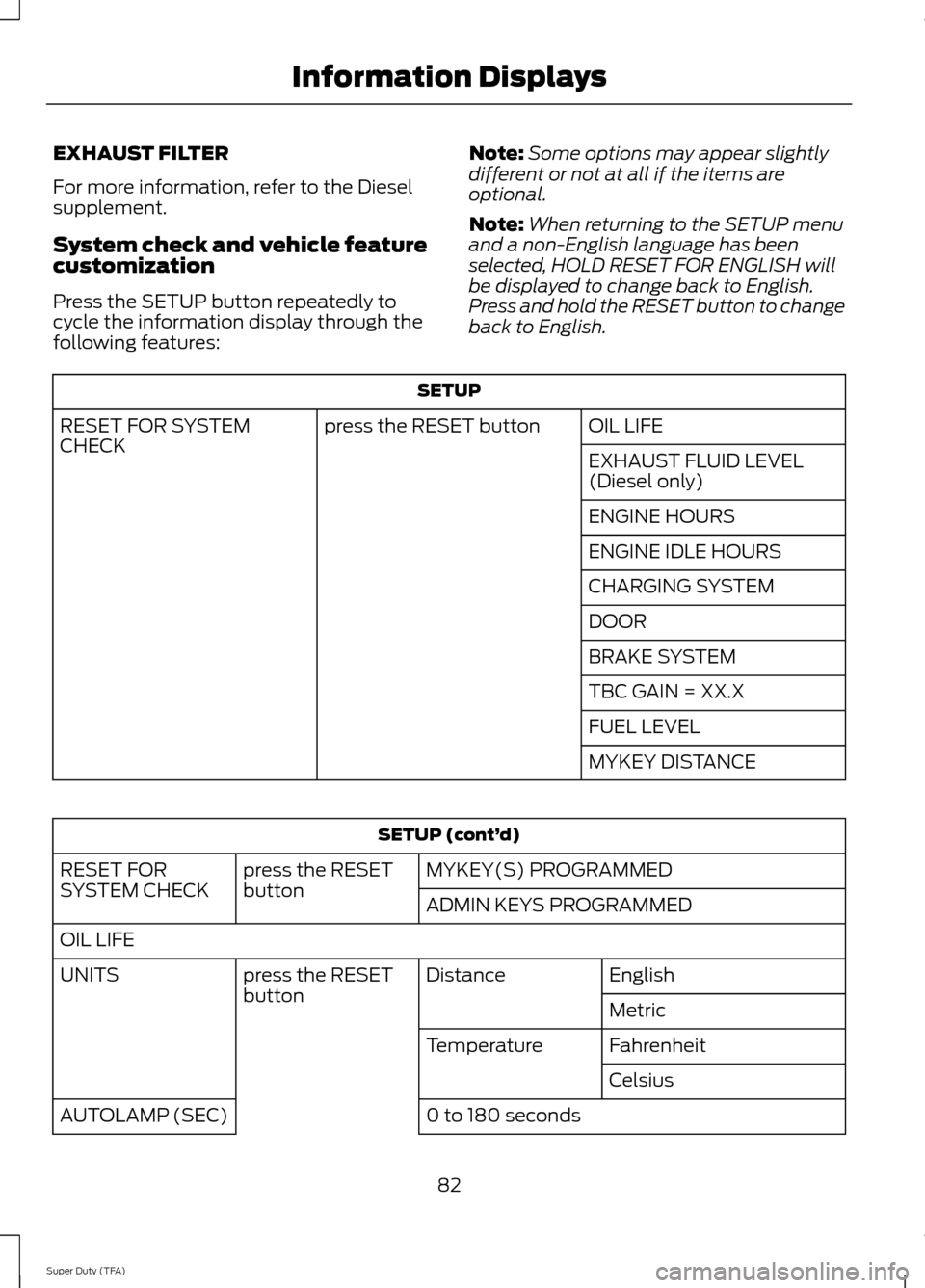
Press the SETUP button repeatedly to
cycle the information display through the
following features:
Note:
Some options may appear slightly
different or not at all if the items are
optional.
Note: When returning to the SETUP menu
and a non-English language has been
selected, HOLD RESET FOR ENGLISH will
be displayed to change back to English.
Press and hold the RESET button to change
back to English. SETUP
OIL LIFE
press the RESET button
RESET FOR SYSTEM
CHECK
EXHAUST FLUID LEVEL
(Diesel only)
ENGINE HOURS
ENGINE IDLE HOURS
CHARGING SYSTEM
DOOR
BRAKE SYSTEM
TBC GAIN = XX.X
FUEL LEVEL
MYKEY DISTANCESETUP (cont’
d)
MYKEY(S) PROGRAMMED
press the RESET
button
RESET FOR
SYSTEM CHECK
ADMIN KEYS PROGRAMMED
OIL LIFE English
Distance
press the RESET
button
UNITS
Metric
Fahrenheit
Temperature
Celsius
0 to 180 seconds
AUTOLAMP (SEC)
82
Super Duty (TFA) Information Displays
Page 100 of 458
Key
Action
Message
You have attempted to program a fifth integrated key. SeeReplacing a Lost Key or Remote Control (page 48).
COULD NOT PROGRAM
INTEGRATED KEY
The factory equipped remote start is active. Turn your key to on to drive.
TO DRIVE: TURN KEY
TO ON
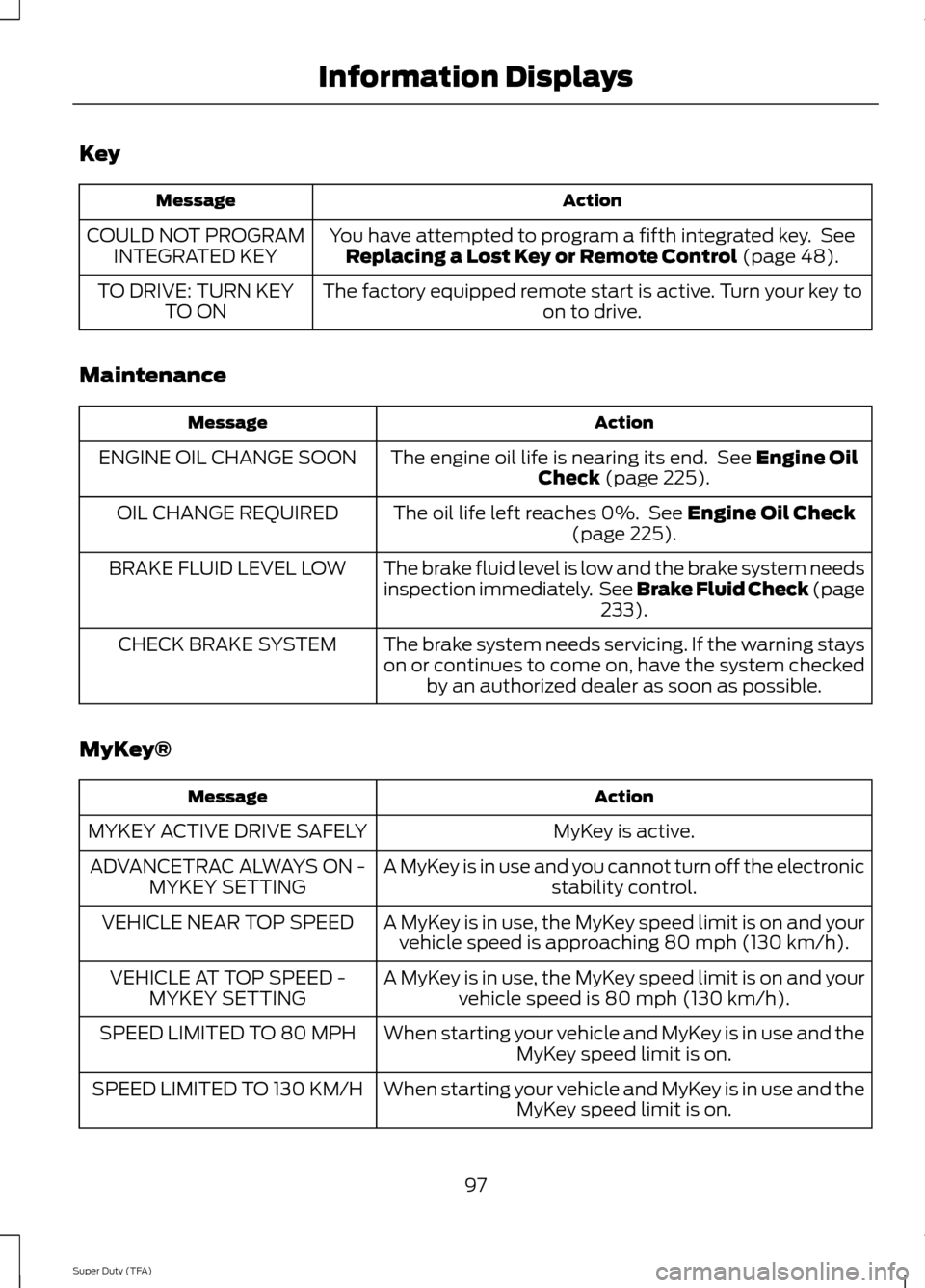
Maintenance Action
Message
The engine oil life is nearing its end. See
Engine Oil
Check (page 225).
ENGINE OIL CHANGE SOON
The oil life left reaches 0%. See
Engine Oil Check
(page 225).
OIL CHANGE REQUIRED
The brake fluid level is low and the brake system needs
inspection immediately. See Brake Fluid Check (page233
).
BRAKE FLUID LEVEL LOW
The brake system needs servicing. If the warning stays
on or continues to come on, have the system checkedby an authorized dealer as soon as possible.
CHECK BRAKE SYSTEM
MyKey® Action
Message
MyKey is active.
MYKEY ACTIVE DRIVE SAFELY
A MyKey is in use and you cannot turn off the electronicstability control.
ADVANCETRAC ALWAYS ON -
MYKEY SETTING
A MyKey is in use, the MyKey speed limit is on and yourvehicle speed is approaching 80 mph (130 km/h).
VEHICLE NEAR TOP SPEED
A MyKey is in use, the MyKey speed limit is on and yourvehicle speed is 80 mph (130 km/h).
VEHICLE AT TOP SPEED -
MYKEY SETTING
When starting your vehicle and MyKey is in use and theMyKey speed limit is on.
SPEED LIMITED TO 80 MPH
When starting your vehicle and MyKey is in use and theMyKey speed limit is on.
SPEED LIMITED TO 130 KM/H
97
Super Duty (TFA) Information Displays
Page 225 of 458
GENERAL INFORMATION
Have your vehicle serviced regularly to help
maintain its roadworthiness and resale
value. There is a large network of Ford
authorized dealers that are there to help
you with their professional servicing
expertise. We believe that their specially
trained technicians are best qualified to
service your vehicle properly and expertly.
They are supported by a wide range of
highly specialized tools developed
specifically for servicing your vehicle.
To help you service your vehicle, we
provide scheduled maintenance
information which makes tracking routine
service easy. See Scheduled
Maintenance (page 428).
If your vehicle requires professional service,
your authorized dealer can provide the
necessary parts and service. Check your
warranty information to find out which
parts and services are covered.
Use only recommended fuels, lubricants,
fluids and service parts conforming to
specifications. Motorcraft® parts are
designed and built to provide the best
performance in your vehicle.
Precautions
• Do not work on a hot engine.
• Make sure that nothing gets caught in
moving parts.
• Do not work on a vehicle with the
engine running in an enclosed space,
unless you are sure you have enough
ventilation.
• Keep all open flames and other burning
material (such as cigarettes) away
from the battery and all fuel related
parts. Working with the Engine Off
1. Set the parking brake and shift to
P
(Park).
2. Turn off the engine and remove the key
(if equipped).
3. Block the wheels.
Working with the Engine On WARNING
To reduce the risk of vehicle damage
and/or personal burn injuries, do not
start your engine with the air cleaner
removed and do not remove it while the
engine is running. 1. Set the parking brake and shift to
P
(Park).
2. Block the wheels
OPENING AND CLOSING THE
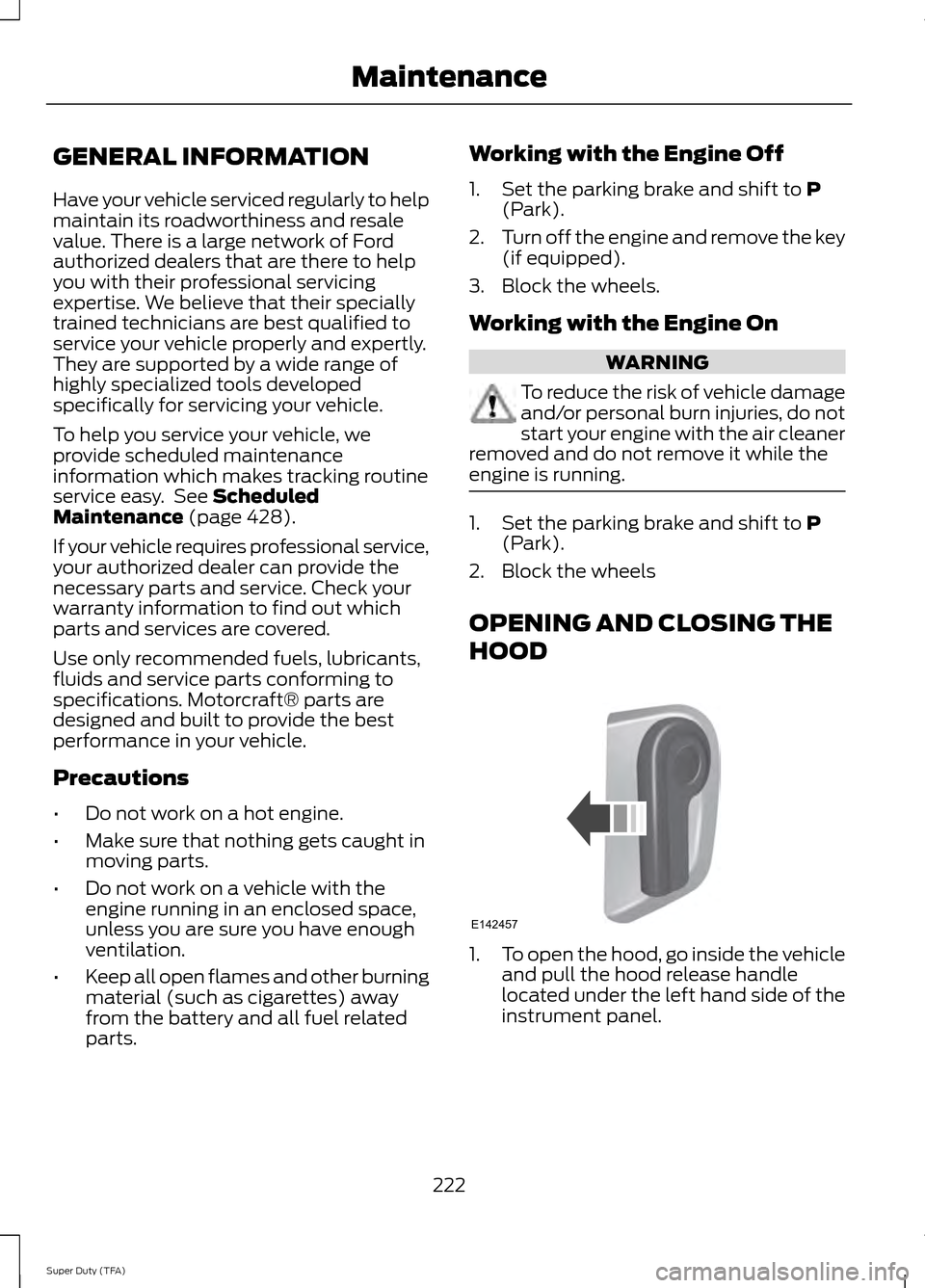
HOOD 1.
To open the hood, go inside the vehicle
and pull the hood release handle
located under the left hand side of the
instrument panel.
222
Super Duty (TFA) MaintenanceE142457
Page 226 of 458
2. Go to the front of the vehicle and
locate the secondary release lever,
which is located under the front of the
hood, to your right of the center of the
vehicle (driver's side), toward the
headlight.
3. Release the hood latch by pushing the secondary release lever to your left,
toward the center of the vehicle.
4. Raise the hood. 5.
To close the hood, lower the hood and
allow it to drop the last 8 to 11 inches
(20 to 30 centimeters).
Note: Make sure that the hood is closed
properly.
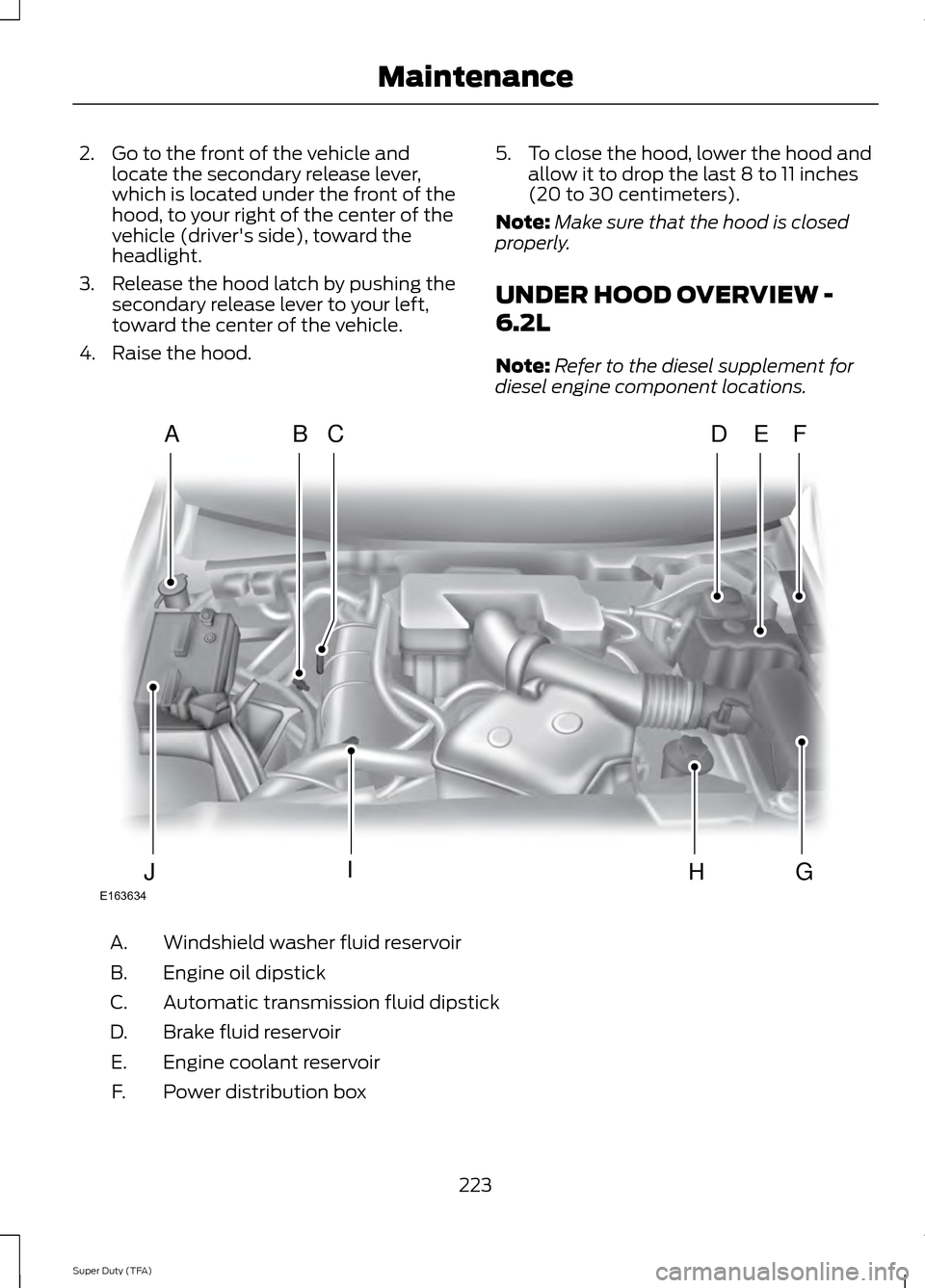
UNDER HOOD OVERVIEW -
6.2L
Note: Refer to the diesel supplement for
diesel engine component locations. Windshield washer fluid reservoir
A.
Engine oil dipstick
B.
Automatic transmission fluid dipstick
C.
Brake fluid reservoir
D.
Engine coolant reservoir
E.
Power distribution box
F.
223
Super Duty (TFA) MaintenanceE163634
ADFEBC
GHIJ