2014 FORD SUPER DUTY tow bar
[x] Cancel search: tow barPage 218 of 458
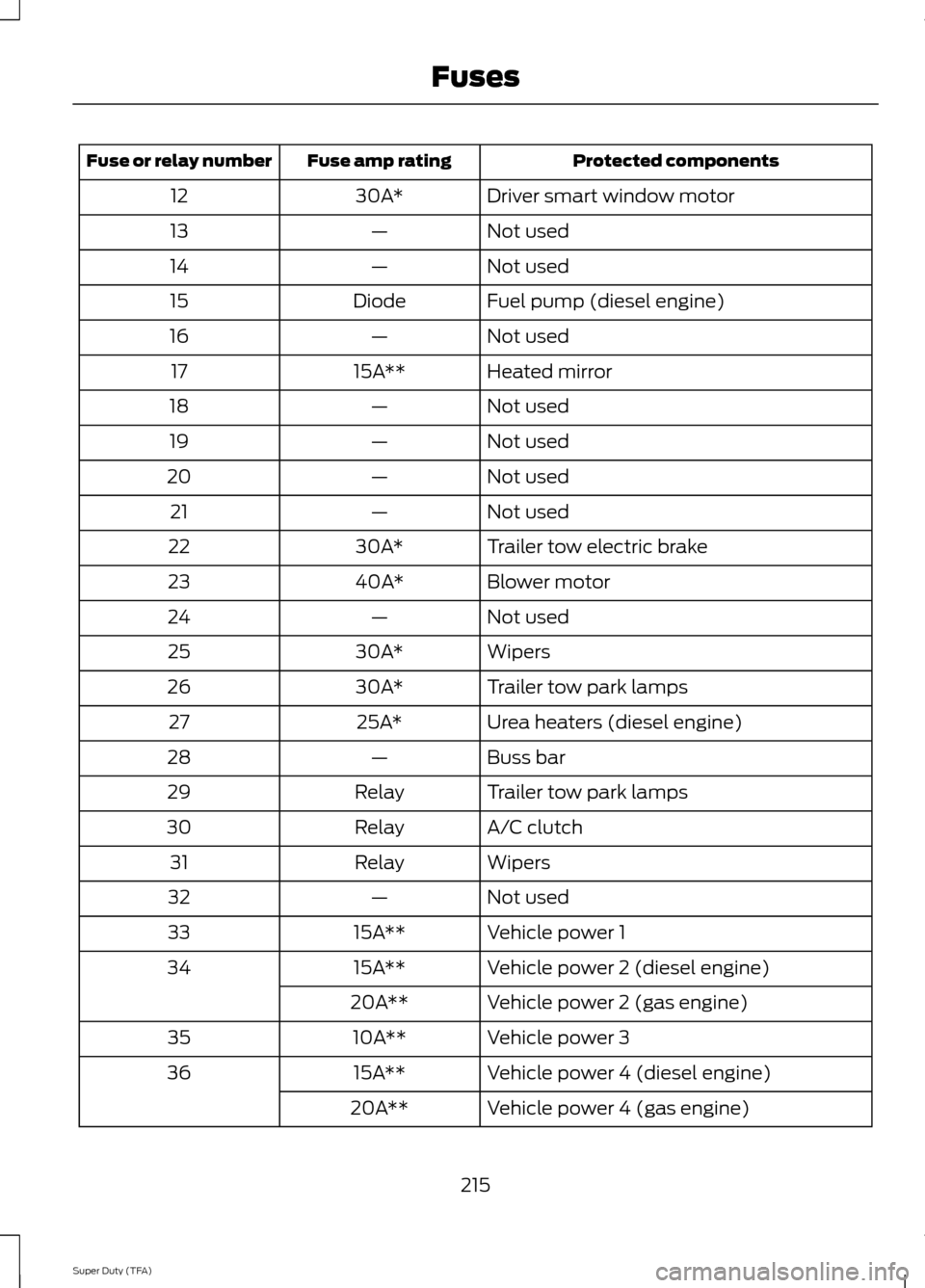
Protected components
Fuse amp rating
Fuse or relay number
Driver smart window motor
30A*
12
Not used
—
13
Not used
—
14
Fuel pump (diesel engine)
Diode
15
Not used
—
16
Heated mirror
15A**
17
Not used
—
18
Not used
—
19
Not used
—
20
Not used
—
21
Trailer tow electric brake
30A*
22
Blower motor
40A*
23
Not used
—
24
Wipers
30A*
25
Trailer tow park lamps
30A*
26
Urea heaters (diesel engine)
25A*
27
Buss bar
—
28
Trailer tow park lamps
Relay
29
A/C clutch
Relay
30
Wipers
Relay
31
Not used
—
32
Vehicle power 1
15A**
33
Vehicle power 2 (diesel engine)
15A**
34
Vehicle power 2 (gas engine)
20A**
Vehicle power 3
10A**
35
Vehicle power 4 (diesel engine)
15A**
36
Vehicle power 4 (gas engine)
20A**
215
Super Duty (TFA) Fuses
Page 222 of 458
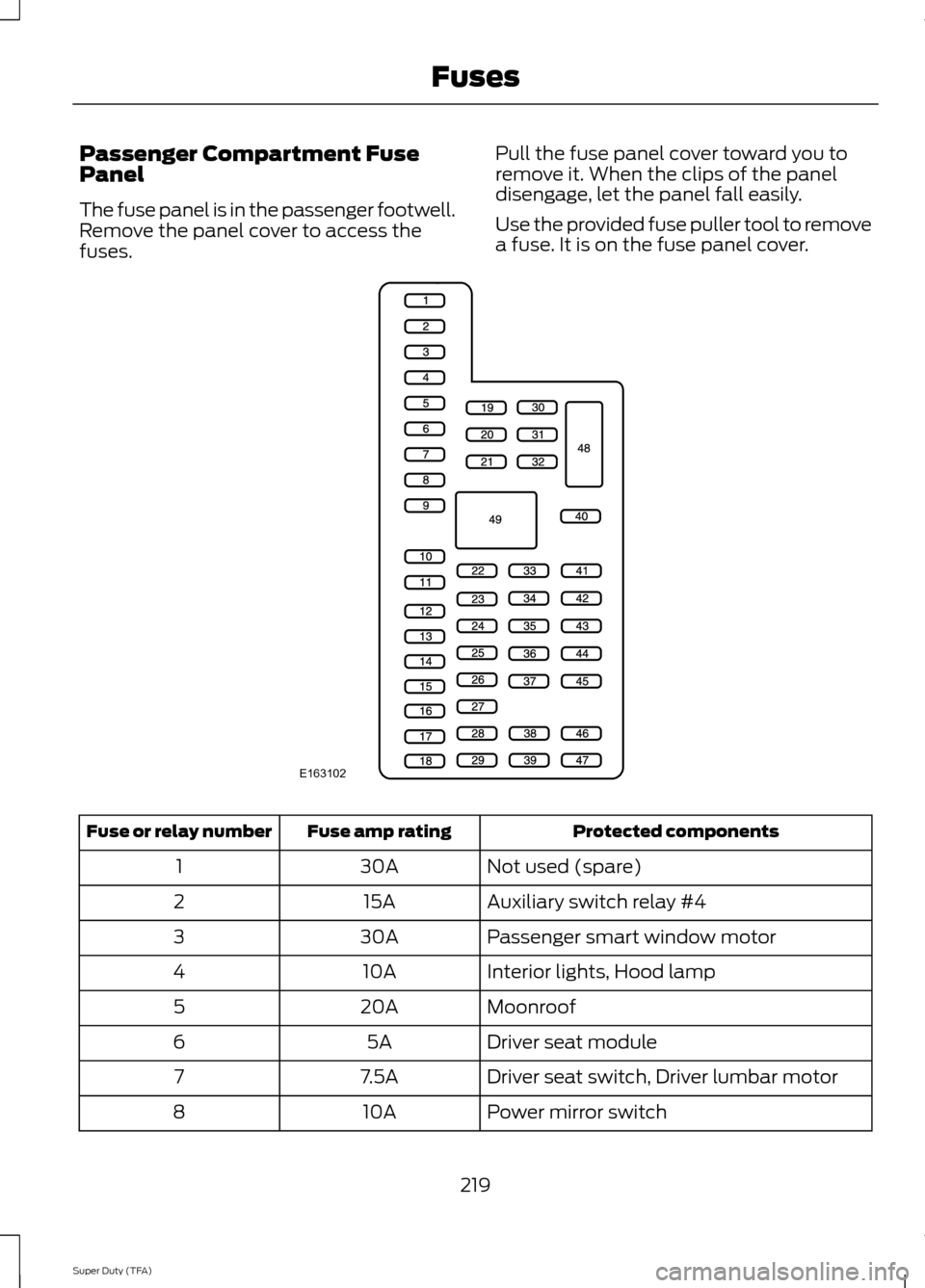
Passenger Compartment Fuse
Panel
The fuse panel is in the passenger footwell.
Remove the panel cover to access the
fuses.
Pull the fuse panel cover toward you to
remove it. When the clips of the panel
disengage, let the panel fall easily.
Use the provided fuse puller tool to remove
a fuse. It is on the fuse panel cover. Protected components
Fuse amp rating
Fuse or relay number
Not used (spare)
30A
1
Auxiliary switch relay #4
15A
2
Passenger smart window motor
30A
3
Interior lights, Hood lamp
10A
4
Moonroof
20A
5
Driver seat module
5A
6
Driver seat switch, Driver lumbar motor
7.5A
7
Power mirror switch
10A
8
219
Super Duty (TFA) FusesE163102
Page 406 of 458
2D city maps show detailed outlines of
buildings, visible land use and land
elements and detailed railway
infrastructure for the most essential cities
around the globe. These maps also contain
features, such as town blocks, building
footprints, and railways.
3D landmarks appear as clear, visible
objects that are typically recognizable and
have a certain tourist value. The 3D
landmarks appear in 3D map mode only.
Coverage varies, and improves with
updated map releases.
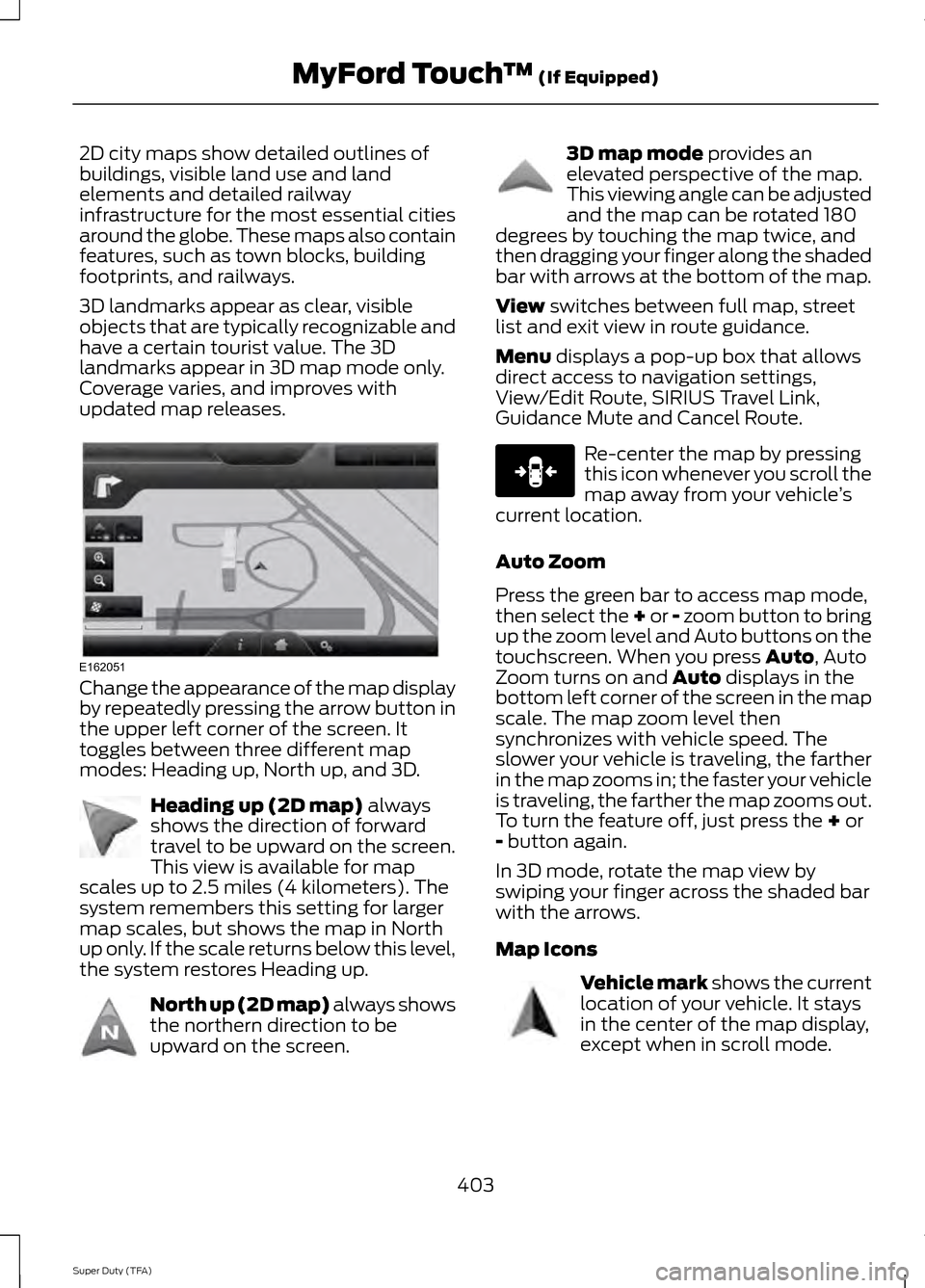
Change the appearance of the map display
by repeatedly pressing the arrow button in
the upper left corner of the screen. It
toggles between three different map
modes: Heading up, North up, and 3D.
Heading up (2D map) always
shows the direction of forward
travel to be upward on the screen.
This view is available for map
scales up to 2.5 miles (4 kilometers). The
system remembers this setting for larger
map scales, but shows the map in North
up only. If the scale returns below this level,
the system restores Heading up. North up (2D map) always shows
the northern direction to be
upward on the screen. 3D map mode
provides an
elevated perspective of the map.
This viewing angle can be adjusted
and the map can be rotated 180
degrees by touching the map twice, and
then dragging your finger along the shaded
bar with arrows at the bottom of the map.
View
switches between full map, street
list and exit view in route guidance.
Menu
displays a pop-up box that allows
direct access to navigation settings,
View/Edit Route, SIRIUS Travel Link,
Guidance Mute and Cancel Route. Re-center the map by pressing
this icon whenever you scroll the
map away from your vehicle
’s
current location.
Auto Zoom
Press the green bar to access map mode,
then select the + or - zoom button to bring
up the zoom level and Auto buttons on the
touchscreen. When you press
Auto, Auto
Zoom turns on and Auto displays in the
bottom left corner of the screen in the map
scale. The map zoom level then
synchronizes with vehicle speed. The
slower your vehicle is traveling, the farther
in the map zooms in; the faster your vehicle
is traveling, the farther the map zooms out.
To turn the feature off, just press the
+ or
- button again.
In 3D mode, rotate the map view by
swiping your finger across the shaded bar
with the arrows.
Map Icons Vehicle mark
shows the current
location of your vehicle. It stays
in the center of the map display,
except when in scroll mode.
403
Super Duty (TFA) MyFord Touch
™
(If Equipped)E162051 E142642 E142643 E142644 E146188 E142646
Page 453 of 458
Mirrors
See: Heated Windows and Mirrors..............105
See: Windows and Mirrors............................... 68
Mobile Communications Equipment.......13
Moonroof...........................................................72 Bounce-Back.......................................................... 73
Opening and Closing the Moonroof..............72
Venting the Moonroof......................................... 73
Motorcraft Parts...........................................293
MyFord Touch ™...........................................348
General Information......................................... 348
MyKey Troubleshooting
...............................52
MyKey ™.............................................................49
Principle of Operation........................................ 49
N
Navigation......................................................399 cityseekr............................................................... 400
Map Mode............................................................ 402
Navigation Map Updates............................... 405
Navigation Voice Commands....................... 405
Point of Interest (POI) Categories.............400
Quick-touch Buttons....................................... 404
Setting a Destination....................................... 399
Setting Your Navigation Preferences..........401
Normal Scheduled Maintenance
...........431
6.2L and 6.8L Gasoline Engines.................... 431
6.7L Diesel Engine.............................................. 432
O
Oil Check See: Engine Oil Check...................................... 225
Opening and Closing the Hood..............222
Ordering Additional Owner's Literature........................................................211
Obtaining a French Owner ’s Manual............211
Overhead Console
........................................128
P
Parking Aid......................................................168 Rear Sensing System........................................ 168
Parking Aids
...................................................168
Parking Brake.................................................159
Passive Anti-Theft System.........................57 SecuriLock ™........................................................... 57PATS
See: Passive Anti-Theft System..................... 57
Pedals.................................................................62
Perchlorate.........................................................11
Phone................................................................381 Making Calls........................................................ 383
Pairing Subsequent Phones.......................... 383
Pairing Your Phone for the First Time........382
Phone Menu Options....................................... 383
Phone Settings................................................... 385
Phone Voice Commands............................... 386
Receiving Calls.................................................... 383
Text Messaging.................................................. 384
Post-Crash Alert System
..........................206
Power Door Locks See: Locking and Unlocking............................. 53
Power Seats
....................................................110
Power Lumbar...................................................... 110
Power Recline....................................................... 110
Power Steering Fluid Check.....................233
Power Take-Off
.............................................146
Power Windows.............................................68
Accessory Delay................................................... 69
Bounce-Back......................................................... 68
One-Touch Up or Down.................................... 68
Power Sliding Back Window........................... 69
Window Lock......................................................... 69
R
Rear Axle
..........................................................156
Rear Seat Armrest.........................................117
Rear Seats.........................................................111 Folding the Rear Seat Back (Crew Cab)
........................................................................\
........ 112
Folding up the Rear Seat Cushion.................112
Rear Heated Seats .............................................. 113
Rear Under Seat Storage (Crew Cab)..........113
Returning the Seat to the Seating Position............................................................... 112
Rear View Camera.......................................169 Using the Rear View Camera System.........169
Rear View Camera See: Rear View Camera................................... 169
Recommended Towing Weights
............186
Calculating the Maximum Loaded Trailer
Weight for Your Vehicle............................... 187
450
Super Duty (TFA) Index