2014 FORD MONDEO display
[x] Cancel search: displayPage 158 of 446
Downloaded from www.Manualslib.com manuals search engine In this position, power is not transmittedto the driven wheels and the transmissionis locked. You can start the engine with thegearshift lever in this position.
Note:A warning tone sounds if you openthe driver door and you have not shifted thegearshift lever to park (P).
Reverse (R)
WARNINGS
Shift the gearshift lever to reverse(R) only when your vehicle isstationary and the engine is at idlespeed.
Always come to a complete stopbefore shifting the gearshift lever outof reverse (R).
Shift the gearshift lever to reverse (R) toallow your vehicle to move backward.
Neutral (N)
In this position, power is not transmittedto the driven wheels but the transmissionis not locked. You can start the engine withthe gearshift lever in this position.
Drive (D)
Shift the gearshift lever to drive (D) toallow your vehicle to move forward andshift automatically through the forwardgears.
The transmission will shift to theappropriate gear for optimum performancebased on ambient temperature, roadgradient, vehicle load and your input.
Grade Assist
To activate Grade Assist, pressthe button on the gearshift lever.The grade assist indicator lightwill illuminate in the instrument display.
The grade assist feature:
•Provides additional grade braking witha combination of engine motoring andhigh-voltage battery charging to helpmaintain vehicle speed whendescending a grade.
•As your vehicle determines the amountof engine motoring and high-voltagebattery charging, you may notice theengine speed increasing and/ordecreasing to help maintain yourvehicle speed while descending agrade.
To deactivate Grade Assist, press thebutton on the gearshift lever when GradeAssist is active. The grade assist light willdeactivate.
Sport Mode (S)
Switch on sport mode by shifting thegearshift lever to Sport (S).
Note:In sport mode the transmissionoperates as normal but gears are selectedmore quickly and at higher engine speeds.
SelectShift Automatic™Transmission (If Equipped)
Your vehicle is equipped with a SelectShiftAutomatic transmission gearshift lever.The SelectShift Automatic transmissiongives you the ability to change gears up ordown (without a clutch) as desired.
In order to prevent the engine from runningat too low an RPM, which may cause it tostall, SelectShift still automatically makessome downshifts if it has determined thatyou have not downshifted in time.Although SelectShift makes somedownshifts for you, it still allows you todownshift at any time as long as theSelectShift determines that damage willnot be caused to the engine fromover-revving.
156Mondeo (CNG) Vehicles Built From: 08-09-2014 Vehicles Built Up To: 19-04-2015, CG3633en enGBR, Edition date: 10/2014, First PrintingTransmission
Page 159 of 446
Downloaded from www.Manualslib.com manuals search engine Note:Engine damage may occur if youmaintain excessive engine revving withoutshifting.
SelectShift does not automatically upshift,even if the engine is approaching the RPMlimit. It must be shifted manually bypressing the + button.
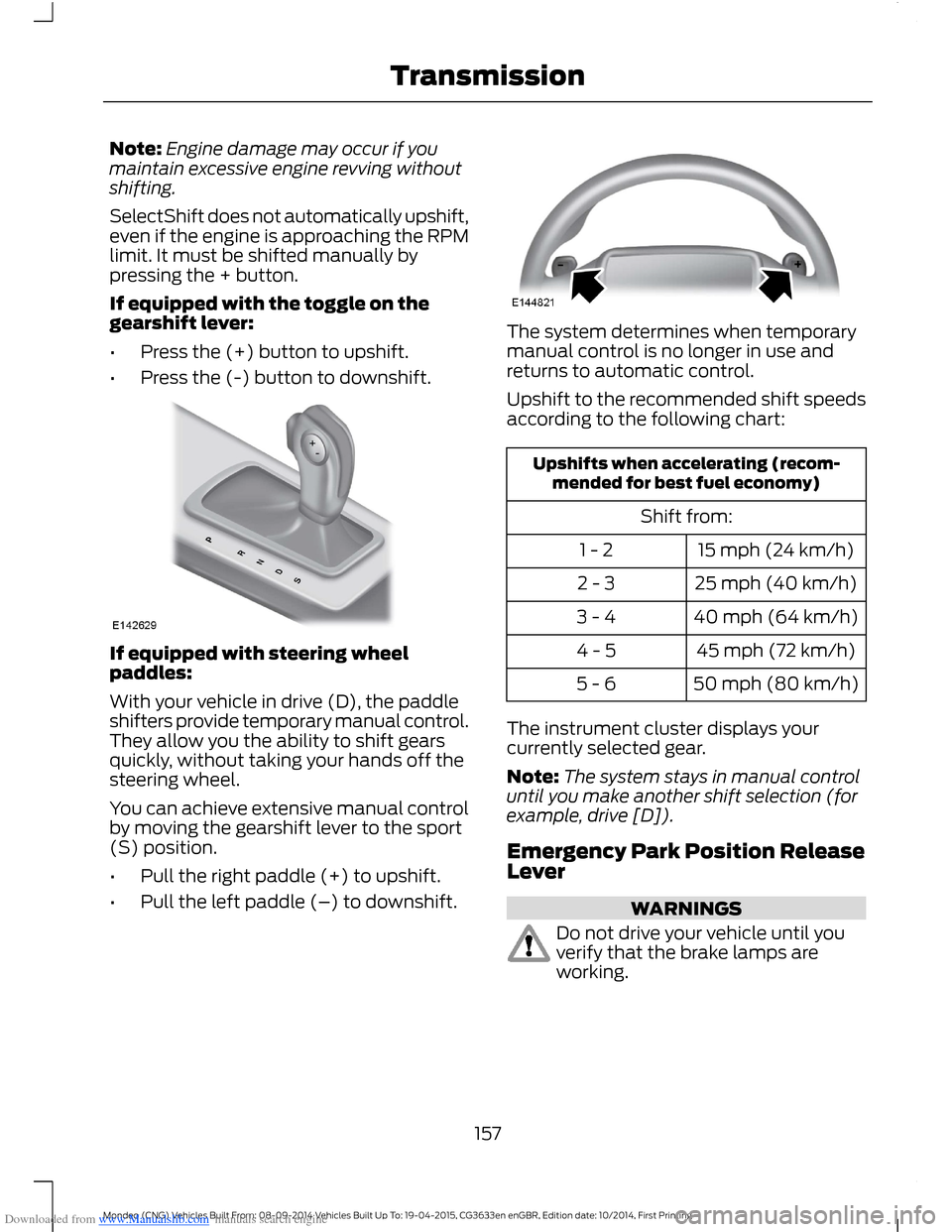
If equipped with the toggle on thegearshift lever:
•Press the (+) button to upshift.
•Press the (-) button to downshift.
If equipped with steering wheelpaddles:
With your vehicle in drive (D), the paddleshifters provide temporary manual control.They allow you the ability to shift gearsquickly, without taking your hands off thesteering wheel.
You can achieve extensive manual controlby moving the gearshift lever to the sport(S) position.
•Pull the right paddle (+) to upshift.
•Pull the left paddle (–) to downshift.
The system determines when temporarymanual control is no longer in use andreturns to automatic control.
Upshift to the recommended shift speedsaccording to the following chart:
Upshifts when accelerating (recom-mended for best fuel economy)
Shift from:
15 mph (24 km/h)1 - 2
25 mph (40 km/h)2 - 3
40 mph (64 km/h)3 - 4
45 mph (72 km/h)4 - 5
50 mph (80 km/h)5 - 6
The instrument cluster displays yourcurrently selected gear.
Note:The system stays in manual controluntil you make another shift selection (forexample, drive [D]).
Emergency Park Position ReleaseLever
WARNINGS
Do not drive your vehicle until youverify that the brake lamps areworking.
157Mondeo (CNG) Vehicles Built From: 08-09-2014 Vehicles Built Up To: 19-04-2015, CG3633en enGBR, Edition date: 10/2014, First PrintingTransmission
Page 163 of 446

Downloaded from www.Manualslib.com manuals search engine Note:When you apply the electric parkingbrake in certain conditions, for example, ona steep hill, the electric parking brake mayreapply the brakes within three to tenminutes.
Note:You may notice various noises whenyou apply and release the electric parkingbrake. This is normal and no cause forconcern.
Parking On a Hill (Vehicles With aManual Transmission)
If you park your vehicle facing uphill, movethe transmission to first gear (1) and turnthe steering wheel away from the curb. Ifyou park your vehicle facing downhill, movethe transmission to reverse (R) and turnthe steering wheel toward the curb.
Applying the Electric Parkingbrake
WARNING
If the brake system warning lampflashes, there could be a problemwith your electric parking brake. Havethe system checked by an authorizeddealer as soon as possible.
Note:The brake system warning lamp willilluminate for ten seconds, if the ignition isturned off after the electric parking brakehas been applied, or the electric parkingbrake has been applied after the ignition hasbeen turned off.
Note:The electric parking brake will notautomatically apply. You must apply theelectric parking brake using the electricparking brake switch.
Pull the switch up to apply the electricparking brake.
The brake system warning lamp willilluminate to confirm that the electricparking brake has been applied. SeeInformation Displays (page 86).
Apply the electric parking brake whenthe vehicle is moving
WARNINGS
Applying the electric parking brakewhile moving will result in use of theanti-lock braking system. Do not usethe electric parking brake system when thevehicle is moving unless the normal brakesystem is unable to stop the vehicle.
With the exception of emergencyconditions (for example, the brakepedal does not work or is blocked),do not apply the electric parking brakewhile the vehicle is moving. On bends, orpoor road surfaces or weather conditions,emergency braking can cause the vehicleto skid out of control or off the road.
If you apply the electric parking brake whenyour vehicle is moving, the brake systemwarning lamp will illuminate and a warningchime will sound. See InformationDisplays (page 86).
161Mondeo (CNG) Vehicles Built From: 08-09-2014 Vehicles Built Up To: 19-04-2015, CG3633en enGBR, Edition date: 10/2014, First PrintingBrakes
Page 166 of 446
Downloaded from www.Manualslib.com manuals search engine Switching the System On and Off
When you switch the ignition on, thesystem automatically turns on.
You can switch the system on or off in theinformation display. See (page 86).
The system remains off until you switchthe ignition off.
Note:For vehicles with a manualtransmission, the system can be switchedon or off.
Note:For vehicles with an automatictransmission, the system cannot beswitched off.
164Mondeo (CNG) Vehicles Built From: 08-09-2014 Vehicles Built Up To: 19-04-2015, CG3633en enGBR, Edition date: 10/2014, First PrintingBrakes
Page 167 of 446
Downloaded from www.Manualslib.com manuals search engine PRINCIPLE OF OPERATION
The traction control system helps avoiddrive wheel spin and loss of traction.
If your vehicle begins to slide, the systemapplies the brakes to individual wheelsand, when needed, reduces engine powerat the same time. If the wheels spin whenaccelerating on slippery or loose surfaces,the system reduces engine power in orderto increase traction.
USING TRACTION CONTROL
The system automatically turns on eachtime you switch the ignition on.
Note:In some situations for example if yourvehicle is stuck in snow or mud, turning thesystem off may be beneficial as this allowsthe wheels to spin with full engine power.
Switching the System Off and OnUsing the Information DisplayControls
Your vehicle comes with this featurealready enabled. If required, you can switchthis feature off using the informationdisplay controls. See GeneralInformation (page 86).
Stability control will remain on even whenyou have switched the traction control off.
Switching the System Off and OnUsing the Button (If Equipped)
The button is located in the instrumentpanel.
Press the button. You will see a messagein conjunction with an illuminated icon inthe display. Press the button again toreturn the system to normal mode.
Stability control will remain on even whenyou have switched the traction control off.
165Mondeo (CNG) Vehicles Built From: 08-09-2014 Vehicles Built Up To: 19-04-2015, CG3633en enGBR, Edition date: 10/2014, First PrintingTraction Control
Page 168 of 446
Downloaded from www.Manualslib.com manuals search engine PRINCIPLE OF OPERATION
Electronic Stability Program
WARNING
The system does not relieve you ofyour responsibility to drive with duecare and attention. Failure to do socould result in loss of vehicle control,personal injury or death.
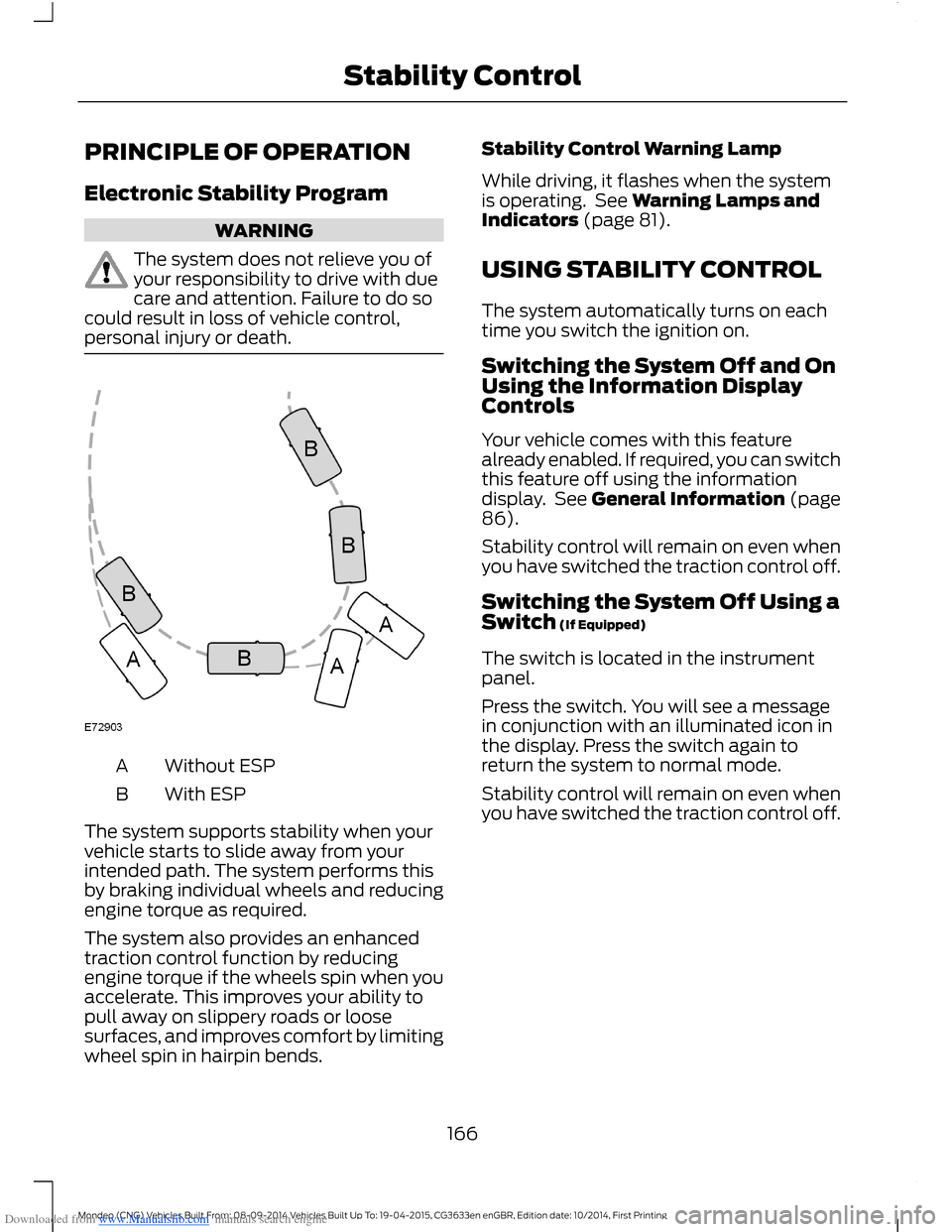
Without ESPA
With ESPB
The system supports stability when yourvehicle starts to slide away from yourintended path. The system performs thisby braking individual wheels and reducingengine torque as required.
The system also provides an enhancedtraction control function by reducingengine torque if the wheels spin when youaccelerate. This improves your ability topull away on slippery roads or loosesurfaces, and improves comfort by limitingwheel spin in hairpin bends.
Stability Control Warning Lamp
While driving, it flashes when the systemis operating. See Warning Lamps andIndicators (page 81).
USING STABILITY CONTROL
The system automatically turns on eachtime you switch the ignition on.
Switching the System Off and OnUsing the Information DisplayControls
Your vehicle comes with this featurealready enabled. If required, you can switchthis feature off using the informationdisplay. See General Information (page86).
Stability control will remain on even whenyou have switched the traction control off.
Switching the System Off Using aSwitch (If Equipped)
The switch is located in the instrumentpanel.
Press the switch. You will see a messagein conjunction with an illuminated icon inthe display. Press the switch again toreturn the system to normal mode.
Stability control will remain on even whenyou have switched the traction control off.
166Mondeo (CNG) Vehicles Built From: 08-09-2014 Vehicles Built Up To: 19-04-2015, CG3633en enGBR, Edition date: 10/2014, First PrintingStability Control
Page 170 of 446
Downloaded from www.Manualslib.com manuals search engine Note:If the parking aid sensors aremisaligned due to vehicle bumper damageit will cause reduced performance or falseactivation.
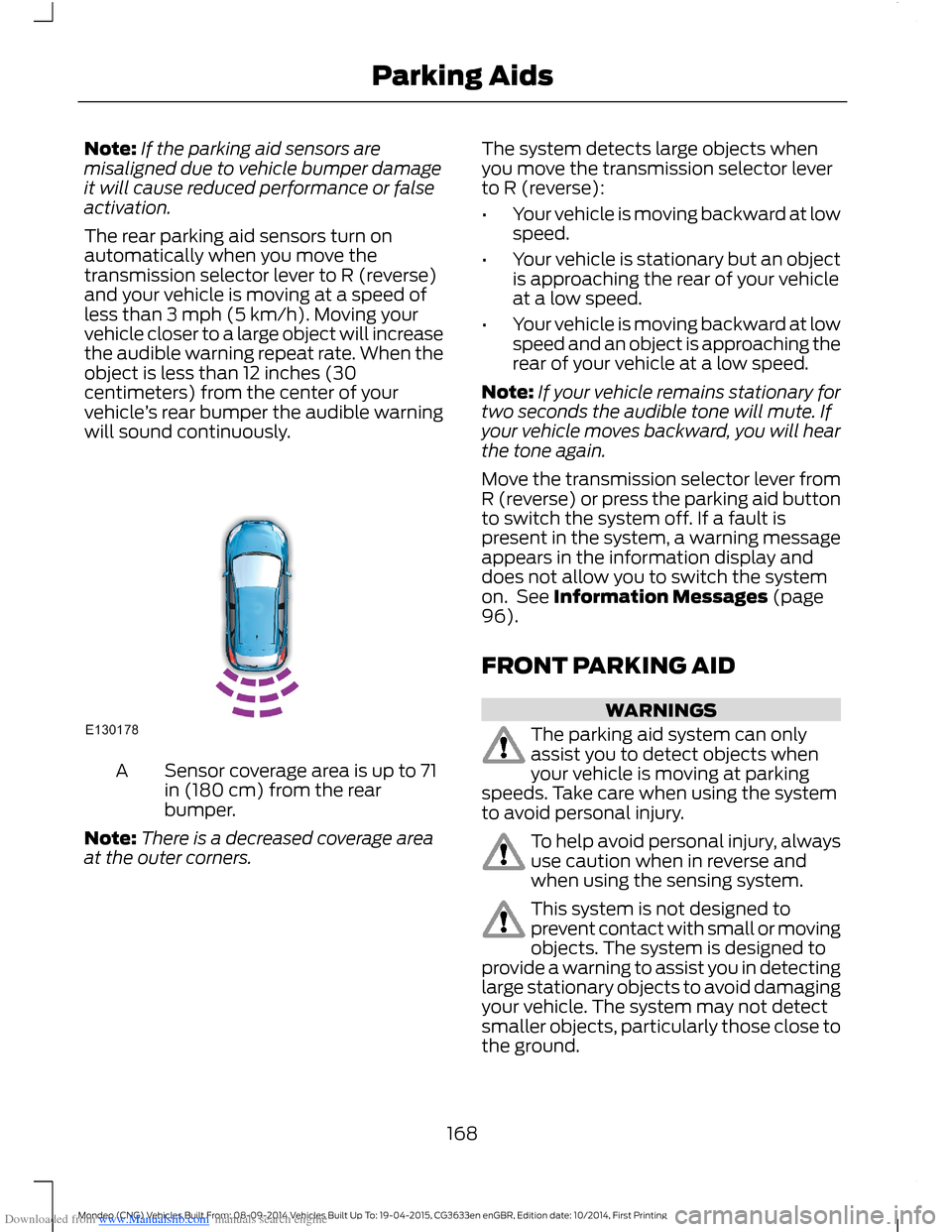
The rear parking aid sensors turn onautomatically when you move thetransmission selector lever to R (reverse)and your vehicle is moving at a speed ofless than 3 mph (5 km/h). Moving yourvehicle closer to a large object will increasethe audible warning repeat rate. When theobject is less than 12 inches (30centimeters) from the center of yourvehicle’s rear bumper the audible warningwill sound continuously.
Sensor coverage area is up to 71in (180 cm) from the rearbumper.
A
Note:There is a decreased coverage areaat the outer corners.
The system detects large objects whenyou move the transmission selector leverto R (reverse):
•Your vehicle is moving backward at lowspeed.
•Your vehicle is stationary but an objectis approaching the rear of your vehicleat a low speed.
•Your vehicle is moving backward at lowspeed and an object is approaching therear of your vehicle at a low speed.
Note:If your vehicle remains stationary fortwo seconds the audible tone will mute. Ifyour vehicle moves backward, you will hearthe tone again.
Move the transmission selector lever fromR (reverse) or press the parking aid buttonto switch the system off. If a fault ispresent in the system, a warning messageappears in the information display anddoes not allow you to switch the systemon. See Information Messages (page96).
FRONT PARKING AID
WARNINGS
The parking aid system can onlyassist you to detect objects whenyour vehicle is moving at parkingspeeds. Take care when using the systemto avoid personal injury.
To help avoid personal injury, alwaysuse caution when in reverse andwhen using the sensing system.
This system is not designed toprevent contact with small or movingobjects. The system is designed toprovide a warning to assist you in detectinglarge stationary objects to avoid damagingyour vehicle. The system may not detectsmaller objects, particularly those close tothe ground.
168Mondeo (CNG) Vehicles Built From: 08-09-2014 Vehicles Built Up To: 19-04-2015, CG3633en enGBR, Edition date: 10/2014, First PrintingParking Aids
Page 171 of 446

Downloaded from www.Manualslib.com manuals search engine WARNINGS
Traffic control systems, inclementweather, air brakes and externalmotors and fans may affect correctoperation of the sensing system; this mayinclude reduced performance or a falsealerts.
Front Sensing System
The front sensors are active when thetransmission is in any position other thanpark (P).
You can also press the parking aid buttonto switch the front parking aid system onwithout selecting reverse (R).
Note:Keep the sensors located on thebumper or fascia free from snow, ice andlarge accumulations of dirt. If the sensorsare covered, the system’s accuracy can beaffected. Do not clean the sensors withsharp objects.
Note:If your vehicle sustains damage tothe bumper or fascia, leaving it misalignedor bent, the sensing zone may be alteredcausing inaccurate measurement ofobstacles or false beeps.
When the parking aid system produces anaudible warning, the audio system mayreduce the set volume to a predeterminedlevel.
Sensor coverage area is up to 28in (70 cm) from the frontbumper and 6-14 inches (15-35centimeters) to the side of thefront bumper.
A
When your vehicle approaches an object,a warning tone sounds. When your vehiclemoves closer to an object, the warningtone repeat rate increases. The warningtone sounds continuously when an objectis 12 in (30 cm) or less from the frontbumper.
The system automatically turns off whenyour vehicle speed reaches 7 mph(12 km/h).
The system detects objects when:
•Your vehicle is moving forward at lowspeed.
•Your vehicle is moving forward at lowspeed and an object is approaching thefront of your vehicle at a low speed.
Press the parking aid button to switch thesystem off. If a fault is present in thesystem, a warning message appears in theinformation display and does not allow youto switch the system on. See InformationMessages (page 96).
169Mondeo (CNG) Vehicles Built From: 08-09-2014 Vehicles Built Up To: 19-04-2015, CG3633en enGBR, Edition date: 10/2014, First PrintingParking Aids