2014 FORD MONDEO automatic transmission
[x] Cancel search: automatic transmissionPage 272 of 446
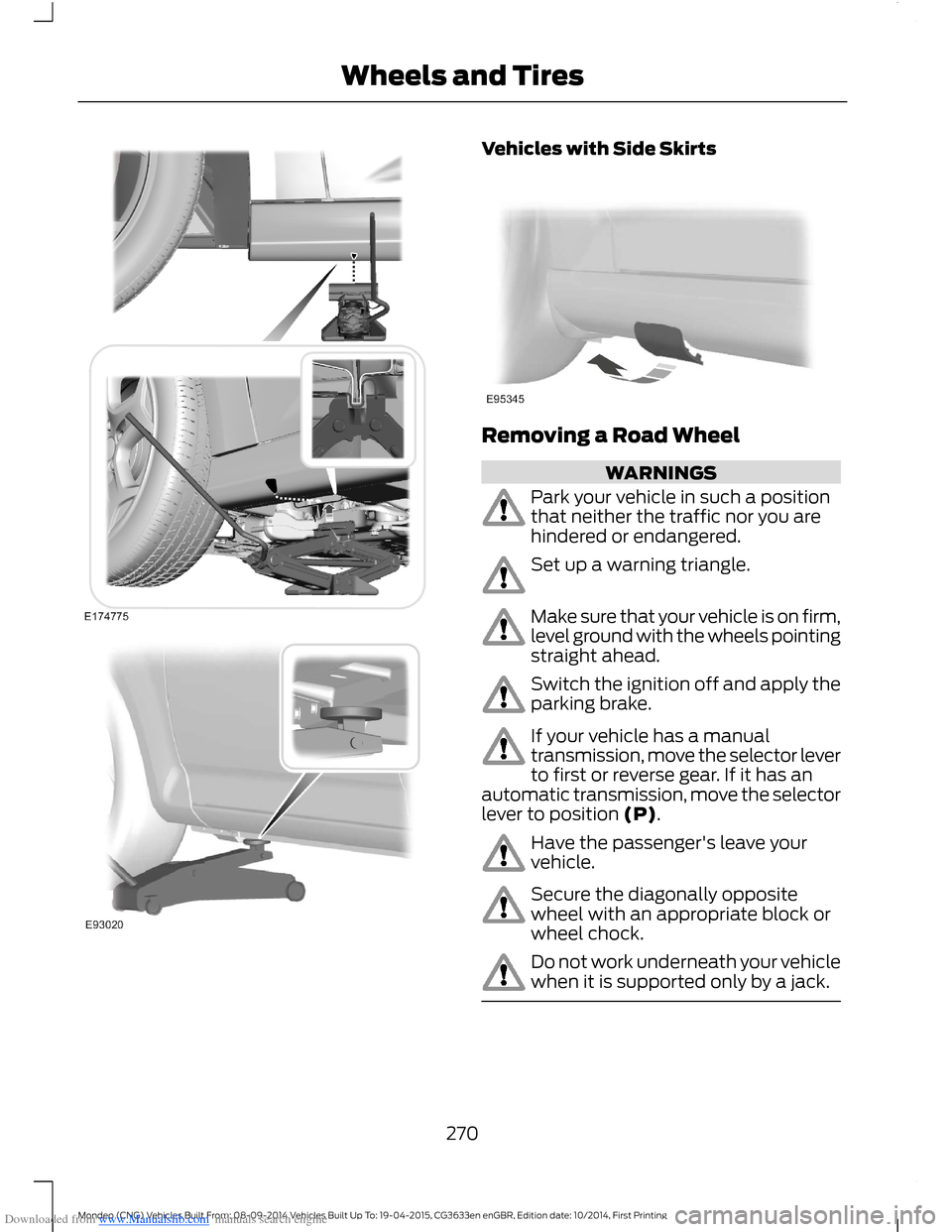
Downloaded from www.Manualslib.com manuals search engine Vehicles with Side Skirts
Removing a Road Wheel
WARNINGS
Park your vehicle in such a positionthat neither the traffic nor you arehindered or endangered.
Set up a warning triangle.
Make sure that your vehicle is on firm,level ground with the wheels pointingstraight ahead.
Switch the ignition off and apply theparking brake.
If your vehicle has a manualtransmission, move the selector leverto first or reverse gear. If it has anautomatic transmission, move the selectorlever to position (P).
Have the passenger's leave yourvehicle.
Secure the diagonally oppositewheel with an appropriate block orwheel chock.
Do not work underneath your vehiclewhen it is supported only by a jack.
270Mondeo (CNG) Vehicles Built From: 08-09-2014 Vehicles Built Up To: 19-04-2015, CG3633en enGBR, Edition date: 10/2014, First PrintingWheels and Tires
Page 305 of 446
Downloaded from www.Manualslib.com manuals search engine 2.Press and hold one of the presetbuttons. A message appears when theradio station has been stored. Thesystem mutes momentarily asconfirmation.
Once stored, press a preset button at anytime to select a favorite radio station.
Note:Radio stations stored on the presetbuttons may not always be available if youhave left the coverage area. The system willmute when this happens.
Radio Text
You can display extra information. Forexample; artist name. To switch this optionon select Options > Radio Text On.
Note:Extra information may not always beavailable.
AUDIO INPUT JACK
WARNINGS
Driving while distracted can result inloss of vehicle control, crash andinjury. We strongly recommend thatyou use extreme caution when using anydevice that may take your focus off theroad. Your primary responsibility is the safeoperation of your vehicle. We recommendagainst the use of any hand-held devicewhile driving and encourage the use ofvoice-operated systems when possible.Make sure you are aware of all applicablelocal laws that may affect the use ofelectronic devices while driving.
For safety reasons, do not connector adjust the settings on yourportable music player while yourvehicle is moving.
WARNINGS
Store the portable music player in asecure location, such as the centerconsole or the glove box, when yourvehicle is moving. Hard objects maybecome projectiles in a collision or suddenstop, which may increase the risk of seriousinjury. The audio extension cable must belong enough to allow the portable musicplayer to be safely stored while yourvehicle is moving.
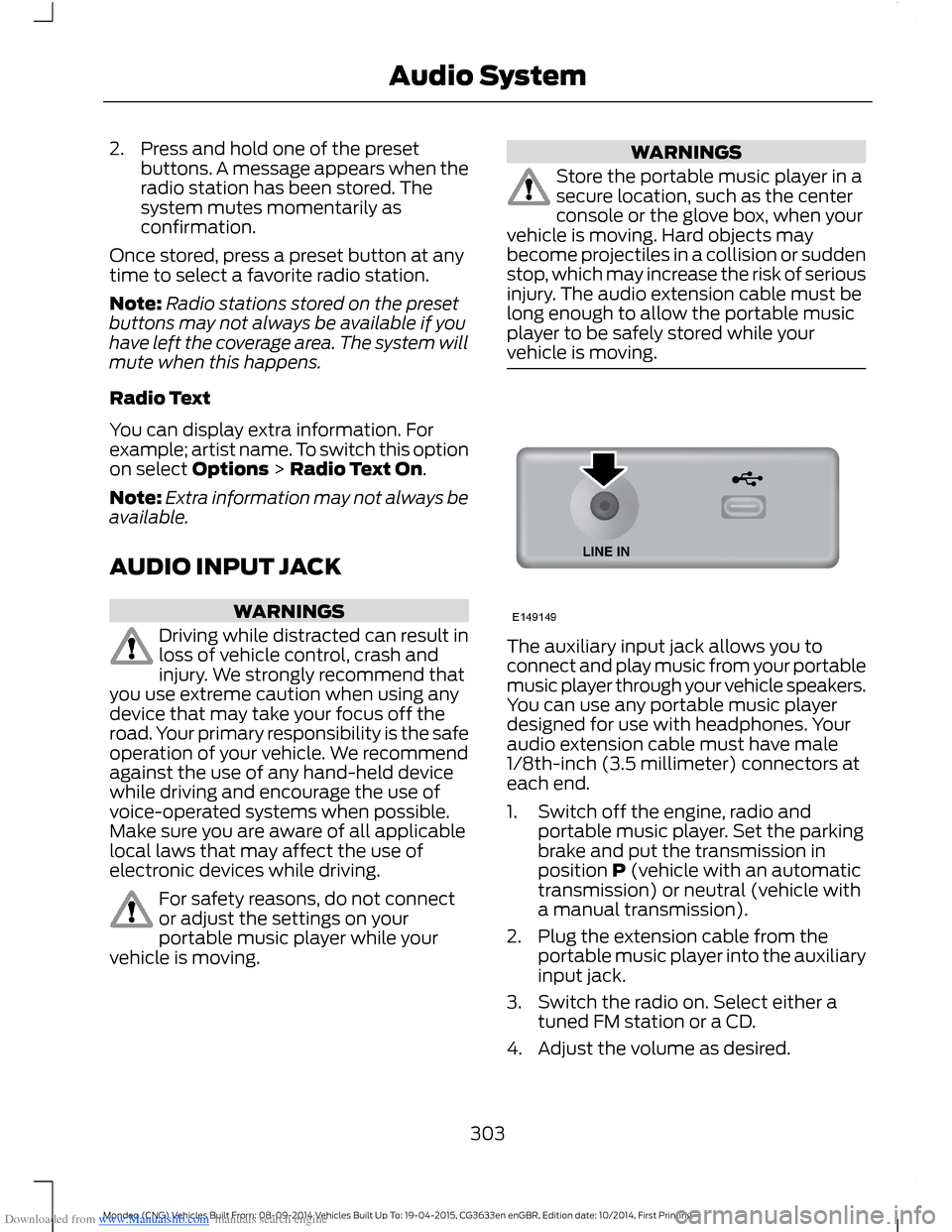
The auxiliary input jack allows you toconnect and play music from your portablemusic player through your vehicle speakers.You can use any portable music playerdesigned for use with headphones. Youraudio extension cable must have male1/8th-inch (3.5 millimeter) connectors ateach end.
1.Switch off the engine, radio andportable music player. Set the parkingbrake and put the transmission inposition P (vehicle with an automatictransmission) or neutral (vehicle witha manual transmission).
2.Plug the extension cable from theportable music player into the auxiliaryinput jack.
3.Switch the radio on. Select either atuned FM station or a CD.
4.Adjust the volume as desired.
303Mondeo (CNG) Vehicles Built From: 08-09-2014 Vehicles Built Up To: 19-04-2015, CG3633en enGBR, Edition date: 10/2014, First PrintingAudio System
Page 414 of 446
Downloaded from www.Manualslib.com manuals search engine •Internet-Based ServicesComponents: The SOFTWARE maycontain components that enable andfacilitate the use of certainInternet-based services. Youacknowledge and agree that MS,Microsoft Corporation, FORD MOTORCOMPANY, third party software andservice suppliers, their affiliates and/ortheir designated agent mayautomatically check the version of theSOFTWARE and/or its componentsthat you are utilizing and may provideupgrades or supplements to theSOFTWARE that may be automaticallydownloaded to your DEVICE.
•Additional Software/Services: TheSOFTWARE may permit FORD MOTORCOMPANY, third party software andservice suppliers, MS, MicrosoftCorporation, their affiliates and/or theirdesignated agent to provide or makeavailable to you SOFTWARE updates,supplements, add-on components, orInternet-based services componentsof the SOFTWARE after the date youobtain your initial copy of theSOFTWARE ("SupplementalComponents").
If FORD MOTOR COMPANY or third partysoftware and services suppliers provide ormake available to you SupplementalComponents and no other EULA terms areprovided along with the SupplementalComponents, then the terms of this EULAshall apply.
If MS, Microsoft Corporation, their affiliatesand/or their designated agent makeavailable Supplemental Components, andno other EULA terms are provided, thenthe terms of this EULA shall apply, exceptthat the MS, Microsoft Corporation oraffiliate entity providing the SupplementalComponent(s) shall be the licensor of theSupplemental Component(s).
FORD MOTOR COMPANY, MS, MicrosoftCorporation, their affiliates and/or theirdesignated agent reserve the right todiscontinue without liability anyInternet-based services provided to you ormade available to you through the use ofthe SOFTWARE.
•Links to Third Party Sites: The MSSOFTWARE may provide you with theability to link to third party sites throughthe use of the SOFTWARE. The thirdparty sites are not under the control ofMS, Microsoft Corporation, theiraffiliates and/or their designatedagent. Neither MS nor MicrosoftCorporation nor their affiliates nor theirdesignated agent are responsible for(i) the contents of any third party sites,any links contained in third party sites,or any changes or updates to thirdparty sites, or (ii) webcasting or anyother form of transmission receivedfrom any third party sites. If theSOFTWARE provides links to thirdparty sites, those links are provided toyou only as a convenience, and theinclusion of any link does not imply anendorsement of the third party site byMS, Microsoft Corporation, theiraffiliates and/or their designatedagent.
•Obligation to Drive Responsibly:You recognize your obligation to driveresponsibly and keep attention on theroad. You will read and abide with theDEVICE operating instructionsparticularly as they pertain to safetyand assumes any risk associated withthe use of the DEVICE.
UPGRADES AND RECOVERY MEDIA:If the SOFTWARE is provided by FORDMOTOR COMPANY separate from theDEVICE on media such as a ROM chip, CDROM disk(s) or via web download or othermeans, and is labeled "For UpgradePurposes Only" or "For Recovery PurposesOnly" you may install one (1) copy of such
412Mondeo (CNG) Vehicles Built From: 08-09-2014 Vehicles Built Up To: 19-04-2015, CG3633en enGBR, Edition date: 10/2014, First PrintingAppendices
Page 434 of 446
Downloaded from www.Manualslib.com manuals search engine Automatic Transmission............................155Automatic Transmission AdaptiveLearning.............................................................159Emergency Park Position ReleaseLever....................................................................157If Your Vehicle Gets Stuck In Mud orSnow..................................................................159Selector Lever Positions...................................155SelectShift Automatic™Transmission...................................................156Automatic Transmission FluidCheck............................................................248Auto-Start-Stop...........................................146Switching the System Off and On................147Using Start-Stop (AutomaticTransmissions)...............................................146Using Start-Stop (ManualTransmissions)...............................................146Autowipers.......................................................60Auxiliary Heater.............................................122Fuel Operated Heater........................................125Fuel Operated Parking Heater........................122Auxiliary Power Points................................13512 Volt DC Power Point.....................................135230 Volt Power Point........................................135
B
Blind Spot Information System..............194Blind Spot Information System (BLIS™)with Cross Traffic Alert................................194Bonnet LockSee: Opening and Closing the Hood...........237Brake and Clutch Fluid Check.................248Brakes...............................................................160General Information..........................................160Breaking-In......................................................221Brakes and Clutch...............................................221Engine......................................................................221Tires..........................................................................221Bulb Specification Chart...........................255
C
Capacities and Specifications - 1.0LEcoBoost™..................................................281Capacities..............................................................281Specifications.....................................................282
Capacities and Specifications - 1.5LDuratorq-TDCi Diesel..............................287Capacities.............................................................287Specifications......................................................287Capacities and Specifications - 1.5LEcoBoost™.................................................283Capacities.............................................................283Specifications.....................................................283Capacities and Specifications - 1.6LDiesel............................................................288Capacities............................................................288Specifications.....................................................288Capacities and Specifications - 2.0LDiesel............................................................289Capacities............................................................289Specifications.....................................................290Capacities and Specifications - 2.0LEcoBoost™.................................................284Capacities............................................................284Specifications.....................................................284Capacities and Specifications -2.5L................................................................285Capacities.............................................................285Specifications.....................................................286Capacities and Specifications.................277Cargo Nets.....................................................208Luggage retention net.....................................208Car WashSee: Cleaning the Exterior...............................257Catalytic Converter......................................152Driving with a Catalytic Converter................152Center Console...............................................137Rear Seat Armrest...............................................137Changing a Bulb...........................................252Headlamp.............................................................252LED Lamps...........................................................253Replacing the License Plate LampBulb....................................................................255Reverse Lamp.....................................................253Changing a Fuse..........................................236Fuses......................................................................236Changing a Road Wheel...........................268Installing a Road Wheel....................................271Jacking and Lifting Points..............................268Lug Nuts................................................................268Removing a Road Wheel................................270Vehicle Jack.........................................................268Vehicles with a Spare Wheel........................268
432Mondeo (CNG) Vehicles Built From: 08-09-2014 Vehicles Built Up To: 19-04-2015, CG3633en enGBR, Edition date: 10/2014, First PrintingIndex
Page 438 of 446

Downloaded from www.Manualslib.com manuals search engine Information Messages.................................96Active City Stop....................................................96Active Park..............................................................96Adaptive Cruise Control.....................................97Airbag........................................................................97Alarm........................................................................98All-Wheel Drive....................................................98Automatic Engine Shutdown..........................98Automatic High Beam Control.......................99Auto Start-Stop....................................................99Blind Spot Information and Cross TrafficAlert System...................................................100Climate Control..................................................100Diesel Messages.................................................100Doors and Locks..................................................101Driver Alert.............................................................101Electronic Stability Control.............................102Engine.....................................................................102Fuel..........................................................................102Hill Start Assist....................................................103Keys and Keyless Entry.....................................103Lane Keeping System.......................................104Maintenance........................................................104MyKey.....................................................................105Park Aid..................................................................106Park Brake.............................................................106Power Steering....................................................107Pre-Collision Warning System.......................107Seats........................................................................107Starting System .................................................108Tire Pressure Monitoring System.................108Towing....................................................................108Traction Control..................................................109Transmission........................................................109Installing Child Seats......................................17Attaching a Child Seat with TopTethers................................................................20Booster Seats.........................................................18Child Seats for Different Mass Groups..........17ISOFIX Anchor Points..........................................19Top Tether Anchor Points..................................19Instrument Cluster.........................................78Instrument Lighting Dimmer.....................65Instrument Panel Overview - LHD............14Instrument Panel Overview - RHD...........15Interior Lamps.................................................70Front Interior Lamp..............................................70Rear Interior Lamp.................................................71
Interior Mirror....................................................75Auto-Dimming Mirror..........................................75Introduction.........................................................7
J
Jump Starting the Vehicle........................225To Connect the Booster Cables....................225To Start the Engine...........................................226
K
Keyless Entry...................................................48Disabled Passive Keys........................................50General Information...........................................48Locking and Unlocking the Doors with theKey Blade...........................................................50Locking Your Vehicle...........................................49Passive Key.............................................................49Unlocking Your Vehicle......................................49Keyless Starting............................................138Starting Your Vehicle.........................................139Switching the Ignition On................................139Keys and Remote Controls.........................32
L
Lane Keeping System..................................191Lane Keeping Aid................................................193Lane Keeping Alert..............................................191Lighting Control..............................................63Headlamp Flasher...............................................64High Beams............................................................63Lighting..............................................................63General Information............................................63Load CarriersSee: Roof Racks and Load Carriers.............210Load Carrying................................................207General Information..........................................207Load Retaining Fixtures...............................211Installing the Load Bracket..............................211Installing the Load Retaining Fixtures..........211
436Mondeo (CNG) Vehicles Built From: 08-09-2014 Vehicles Built Up To: 19-04-2015, CG3633en enGBR, Edition date: 10/2014, First PrintingIndex
Page 442 of 446
Downloaded from www.Manualslib.com manuals search engine Towing a Trailer..............................................215When towing a trailer:.......................................215Towing Points.................................................217Front Towing Eye................................................218Rear Towing Eye..................................................218Towing Eye Locations.......................................218Towing the Vehicle on Four Wheels -Automatic Transmission.........................219Emergency Towing............................................220Towing the Vehicle on Four Wheels -Manual Transmission...............................219Towing...............................................................215Traction Control............................................165Principle of Operation.......................................165Traffic Sign Recognition............................198Principle of Operation......................................198Using the System...............................................199Trailer Sway Control....................................216Transmission..................................................155TransmissionSee: Transmission..............................................155
U
Under Hood Overview - 1.0LEcoBoost™.................................................239Under Hood Overview - 1.5LDuratorq-TDCi Diesel/1.6LDiesel.............................................................243Under Hood Overview - 1.5LEcoBoost™.................................................240Under Hood Overview - 2.0LDiesel.............................................................244Under Hood Overview - 2.0LEcoBoost™..................................................241Under Hood Overview - 2.5L...................242Unique Driving Characteristics................146USB Port.........................................................304
Using Adaptive Cruise Control................182Automatic Switch Off.......................................186Blocked Sensor....................................................187Canceling the Set Speed.................................183Changing the Set Speed..................................183Detection Beam Issues....................................186Following a Vehicle............................................184Hilly Condition Usage.......................................186Overriding the System......................................186Resuming the Set Speed.................................184Setting a Speed...................................................183Setting the Gap...................................................185Switching the System Off...............................184Switching the System On................................183Switching to Normal Cruise Control...........188System Not Available........................................187Using Cruise Control.....................................181Switching Cruise Control Off..........................181Switching Cruise Control On...........................181Using MyKey With Remote StartSystems..........................................................42Using Snow Chains.....................................264Vehicles with Stability Control.....................264Using Stability Control...............................166Switching the System Off and On Using theInformation Display Controls....................166Switching the System Off Using aSwitch................................................................166Using SYNC™ With Your MediaPlayer.............................................................327Accessing Your USB Song Library................331Bluetooth Devices and SystemSettings.............................................................333Connecting Your Media Player to the USBPort.....................................................................327Media Menu Features........................................331Media Voice Commands.................................328What's Playing?.................................................328
440Mondeo (CNG) Vehicles Built From: 08-09-2014 Vehicles Built Up To: 19-04-2015, CG3633en enGBR, Edition date: 10/2014, First PrintingIndex