2014 FORD MONDEO brakes
[x] Cancel search: brakesPage 165 of 446
Downloaded from www.Manualslib.com manuals search engine 1.Pull the switch up and hold it in thisposition.
2.Drive your vehicle, then release theswitch when you notice that the enginehas developed sufficient driving force.
Battery With No Charge
WARNING
You will not be able to apply orrelease the electric parking brake ifthe battery is low or has no charge.
If the battery is low or has no charge, usejumper cables and a booster battery.
HILL START ASSIST
WARNINGS
The system does not replace theparking brake. When you leave yourvehicle, always apply the parkingbrake. Failure to leave your vehicle securelyparked may lead to a crash or injury. SeeElectric Parking Brake (page 160).
You must remain in your vehiclewhen the system turns on. At alltimes, you are responsible forcontrolling your vehicle, supervising thesystem and intervening, if required. Failureto take care may result in the loss ofcontrol of your vehicle, serious personalinjury or death.
The system will turn off if amalfunction is apparent or if you revthe engine excessively. Failure totake care may result in the loss of controlof your vehicle, serious personal injury ordeath.
The system makes it easier to pull awaywhen your vehicle is on a slope without theneed to use the parking brake.
When the system is active, your vehicleremains stationary on the slope for two tothree seconds after you release the brakepedal. This allows time to move your footfrom the brake to the accelerator pedal.The system releases the brakesautomatically once the engine hasdeveloped sufficient drive to prevent yourvehicle from rolling down the slope. Thisis an advantage when pulling away on aslope, for example from a car park ramp,traffic lights or when reversing uphill intoa parking space.
Note:The system only functions when youbring your vehicle to a complete standstill.Shift the gearshift lever to reverse (R) whenfacing downhill and first gear (1) whenfacing uphill.
Note:There is no warning light to indicatethe system is either on or off.
Using Hill Start Assist
1.Press the brake pedal to bring yourvehicle to a complete standstill. Keepthe brake pedal pressed.
2.If the sensors detect that your vehicleis on a slope, the system activatesautomatically.
3.When you remove your foot from thebrake pedal, your vehicle remains onthe slope without rolling away forabout two to three seconds. This holdtime automatically extends if you arein the process of driving off.
4.Drive off in the normal manner. Thesystem releases the brakesautomatically.
Note:When you remove your foot from thebrake pedal and press the pedal again whenthe system is active, you will experiencesignificantly reduced brake pedal travel. Thisis normal.
163Mondeo (CNG) Vehicles Built From: 08-09-2014 Vehicles Built Up To: 19-04-2015, CG3633en enGBR, Edition date: 10/2014, First PrintingBrakes
Page 166 of 446
Downloaded from www.Manualslib.com manuals search engine Switching the System On and Off
When you switch the ignition on, thesystem automatically turns on.
You can switch the system on or off in theinformation display. See (page 86).
The system remains off until you switchthe ignition off.
Note:For vehicles with a manualtransmission, the system can be switchedon or off.
Note:For vehicles with an automatictransmission, the system cannot beswitched off.
164Mondeo (CNG) Vehicles Built From: 08-09-2014 Vehicles Built Up To: 19-04-2015, CG3633en enGBR, Edition date: 10/2014, First PrintingBrakes
Page 167 of 446
Downloaded from www.Manualslib.com manuals search engine PRINCIPLE OF OPERATION
The traction control system helps avoiddrive wheel spin and loss of traction.
If your vehicle begins to slide, the systemapplies the brakes to individual wheelsand, when needed, reduces engine powerat the same time. If the wheels spin whenaccelerating on slippery or loose surfaces,the system reduces engine power in orderto increase traction.
USING TRACTION CONTROL
The system automatically turns on eachtime you switch the ignition on.
Note:In some situations for example if yourvehicle is stuck in snow or mud, turning thesystem off may be beneficial as this allowsthe wheels to spin with full engine power.
Switching the System Off and OnUsing the Information DisplayControls
Your vehicle comes with this featurealready enabled. If required, you can switchthis feature off using the informationdisplay controls. See GeneralInformation (page 86).
Stability control will remain on even whenyou have switched the traction control off.
Switching the System Off and OnUsing the Button (If Equipped)
The button is located in the instrumentpanel.
Press the button. You will see a messagein conjunction with an illuminated icon inthe display. Press the button again toreturn the system to normal mode.
Stability control will remain on even whenyou have switched the traction control off.
165Mondeo (CNG) Vehicles Built From: 08-09-2014 Vehicles Built Up To: 19-04-2015, CG3633en enGBR, Edition date: 10/2014, First PrintingTraction Control
Page 171 of 446

Downloaded from www.Manualslib.com manuals search engine WARNINGS
Traffic control systems, inclementweather, air brakes and externalmotors and fans may affect correctoperation of the sensing system; this mayinclude reduced performance or a falsealerts.
Front Sensing System
The front sensors are active when thetransmission is in any position other thanpark (P).
You can also press the parking aid buttonto switch the front parking aid system onwithout selecting reverse (R).
Note:Keep the sensors located on thebumper or fascia free from snow, ice andlarge accumulations of dirt. If the sensorsare covered, the system’s accuracy can beaffected. Do not clean the sensors withsharp objects.
Note:If your vehicle sustains damage tothe bumper or fascia, leaving it misalignedor bent, the sensing zone may be alteredcausing inaccurate measurement ofobstacles or false beeps.
When the parking aid system produces anaudible warning, the audio system mayreduce the set volume to a predeterminedlevel.
Sensor coverage area is up to 28in (70 cm) from the frontbumper and 6-14 inches (15-35centimeters) to the side of thefront bumper.
A
When your vehicle approaches an object,a warning tone sounds. When your vehiclemoves closer to an object, the warningtone repeat rate increases. The warningtone sounds continuously when an objectis 12 in (30 cm) or less from the frontbumper.
The system automatically turns off whenyour vehicle speed reaches 7 mph(12 km/h).
The system detects objects when:
•Your vehicle is moving forward at lowspeed.
•Your vehicle is moving forward at lowspeed and an object is approaching thefront of your vehicle at a low speed.
Press the parking aid button to switch thesystem off. If a fault is present in thesystem, a warning message appears in theinformation display and does not allow youto switch the system on. See InformationMessages (page 96).
169Mondeo (CNG) Vehicles Built From: 08-09-2014 Vehicles Built Up To: 19-04-2015, CG3633en enGBR, Edition date: 10/2014, First PrintingParking Aids
Page 174 of 446
Downloaded from www.Manualslib.com manuals search engine ACTIVE PARK ASSIST
Parallel Parking, PerpendicularParking, Park Out Assist
WARNINGS
You must remain in your vehiclewhen the system turns on. At alltimes, you are responsible forcontrolling your vehicle, supervising thesystem and intervening if required. Failureto take care may result in the loss ofcontrol of your vehicle, serious personalinjury or death.
The sensors may not detect objectsin heavy rain or other conditions thatcause disruptive reflections.
The system scans the area adjacent toboth sides of your vehicle to locate asuitable parking space.
The system informs you when it locates asuitable parking space. When you stopyour vehicle, the system takes control ofthe steering to guide your vehicle into theparking space.
Park Out Assist automatically steers yourvehicle out of a parallel parking space(hands-free) while you control theaccelerator, gearshift and brakes. Thesystem visually and audibly instructs youto enter traffic.
The system may not correctly operate inany of the following conditions:
•a spare tire or a significantly worn tiremore than the other tires is used
•you use a tire size not recommendedby us
•you try to park on a tight curve
•if the edge of the neighboring parkedvehicle is high off the ground (forexample, a bus, tow truck or flatbedtruck)
•the weather conditions are poor (heavyrain, snow, fog, etc).
Note:Keep the sensors, located on thebumper or fascia, free from snow, ice andlarge accumulations of dirt. Covered sensorscan affect the system's accuracy. Do notclean the sensors with sharp objects.
Do not use the system if:
•You have attached a foreign object(bike rack or trailer) to the front or rearof your vehicle or close to the sensors.
•You have attached an overhangingobject (surfboard) to the roof.
•A foreign object damages or obstructsthe front or rear bumper or sidesensors.
•The correct tire size is not in use on yourvehicle (for example, a mini-spare tire).
Using Active Park Assist - ParallelParking
Press the button located on thecenter console near the gearshiftlever once.
When driving at a speed less than 19 mph(30 km/h) the system automatically scansboth sides of your vehicle for an availableparking space. The system displays amessage and a corresponding graphic toindicate it is searching for a parking space.Use the direction indicator to selectsearching either to the left-hand side orright-hand side of your vehicle.
Note:If you do not make a selection thesystem will default to the passenger's side.
172Mondeo (CNG) Vehicles Built From: 08-09-2014 Vehicles Built Up To: 19-04-2015, CG3633en enGBR, Edition date: 10/2014, First PrintingParking Aids
Page 177 of 446
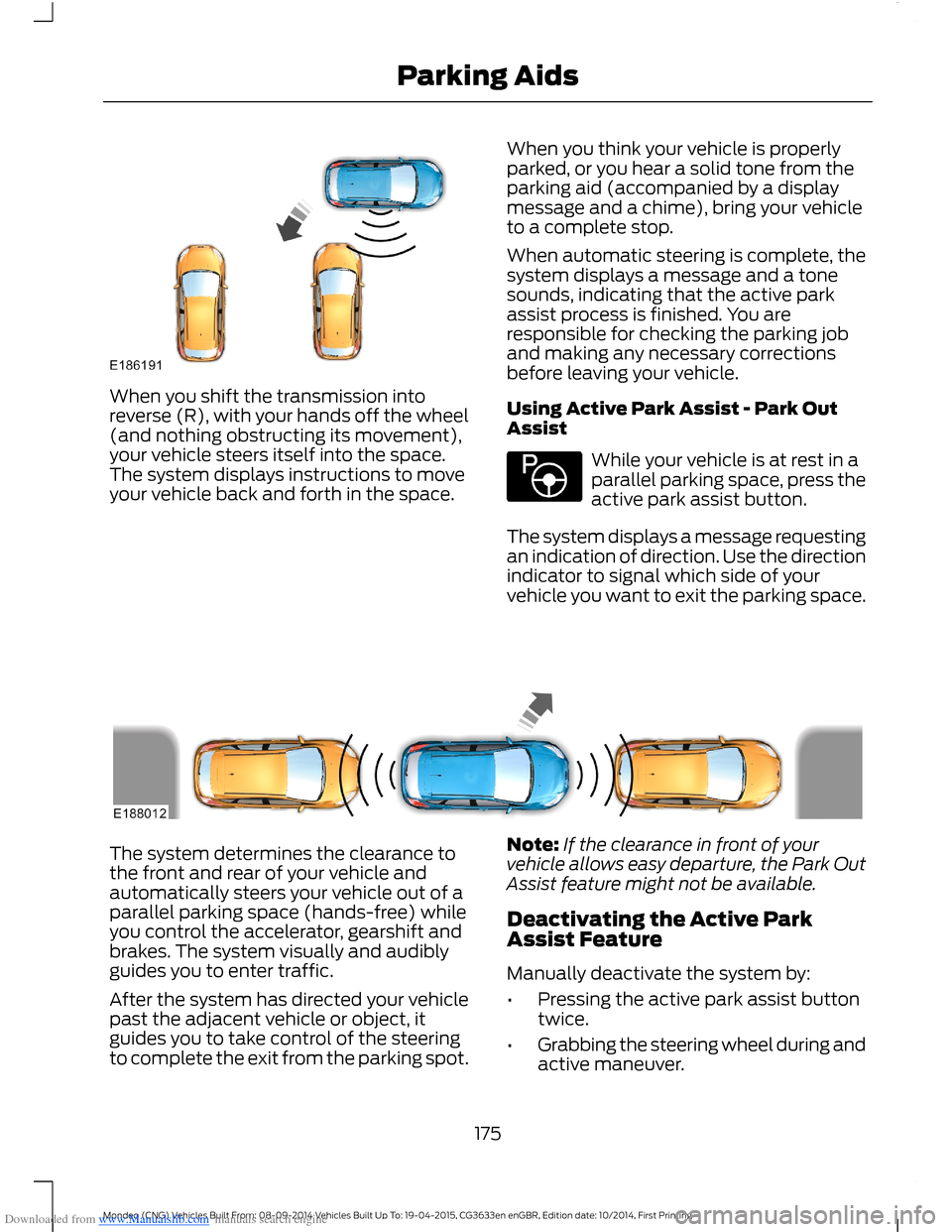
Downloaded from www.Manualslib.com manuals search engine When you shift the transmission intoreverse (R), with your hands off the wheel(and nothing obstructing its movement),your vehicle steers itself into the space.The system displays instructions to moveyour vehicle back and forth in the space.
When you think your vehicle is properlyparked, or you hear a solid tone from theparking aid (accompanied by a displaymessage and a chime), bring your vehicleto a complete stop.
When automatic steering is complete, thesystem displays a message and a tonesounds, indicating that the active parkassist process is finished. You areresponsible for checking the parking joband making any necessary correctionsbefore leaving your vehicle.
Using Active Park Assist - Park OutAssist
While your vehicle is at rest in aparallel parking space, press theactive park assist button.
The system displays a message requestingan indication of direction. Use the directionindicator to signal which side of yourvehicle you want to exit the parking space.
The system determines the clearance tothe front and rear of your vehicle andautomatically steers your vehicle out of aparallel parking space (hands-free) whileyou control the accelerator, gearshift andbrakes. The system visually and audiblyguides you to enter traffic.
After the system has directed your vehiclepast the adjacent vehicle or object, itguides you to take control of the steeringto complete the exit from the parking spot.
Note:If the clearance in front of yourvehicle allows easy departure, the Park OutAssist feature might not be available.
Deactivating the Active ParkAssist Feature
Manually deactivate the system by:
•Pressing the active park assist buttontwice.
•Grabbing the steering wheel during andactive maneuver.
175Mondeo (CNG) Vehicles Built From: 08-09-2014 Vehicles Built Up To: 19-04-2015, CG3633en enGBR, Edition date: 10/2014, First PrintingParking Aids
Page 183 of 446
Downloaded from www.Manualslib.com manuals search engine PRINCIPLE OF OPERATION
Cruise control lets you maintain a setspeed without keeping your foot on theaccelerator pedal. You can use cruisecontrol when your vehicle speed is greaterthan 20 mph (30 km/h).
USING CRUISE CONTROL
WARNINGS
Do not use cruise control on windingroads, in heavy traffic or, when theroad surface is slippery. This couldresult in loss of vehicle control, seriousinjury or death.
When you are going downhill, yourvehicle speed may increase abovethe set speed. The system will notapply the brakes but a warning displays.
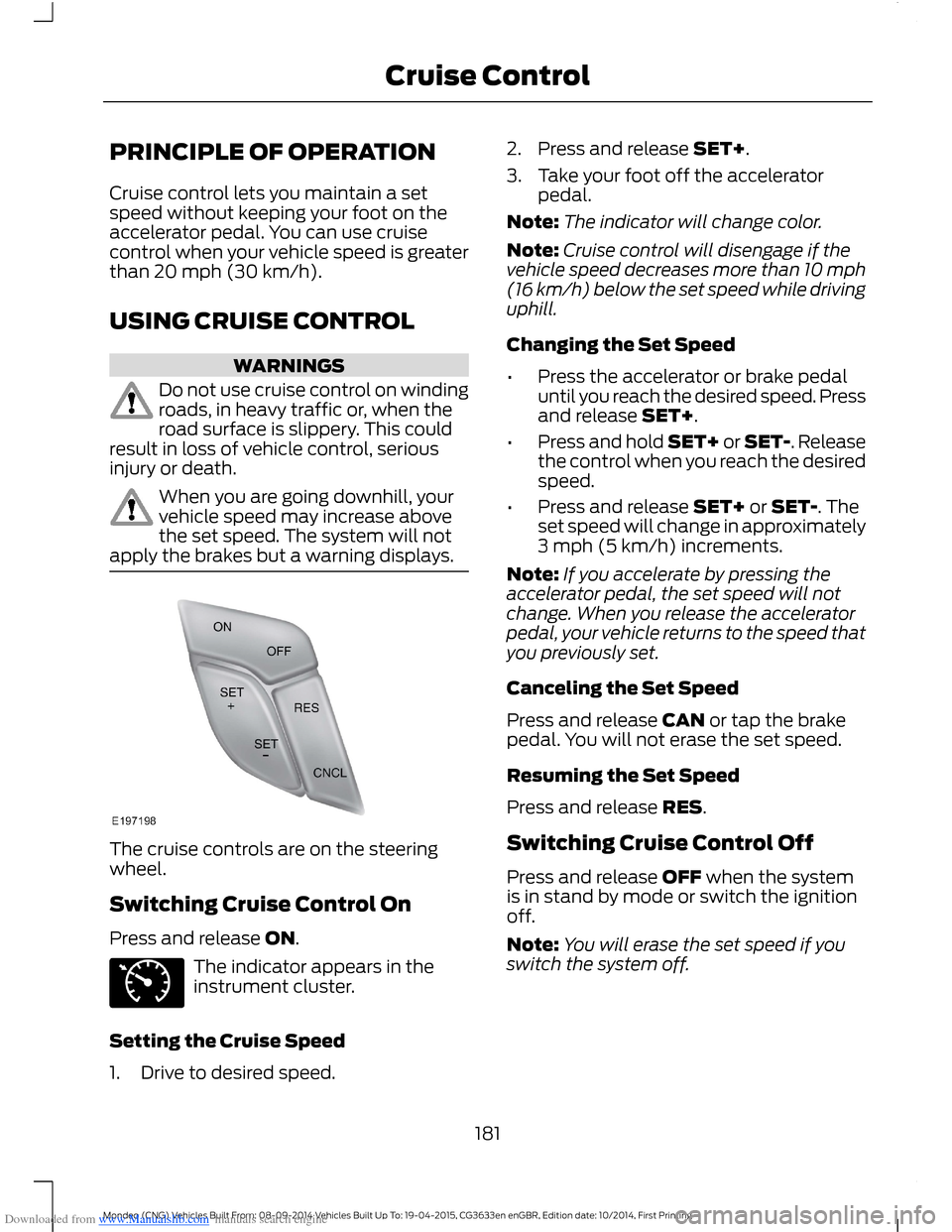
The cruise controls are on the steeringwheel.
Switching Cruise Control On
Press and release ON.
The indicator appears in theinstrument cluster.
Setting the Cruise Speed
1.Drive to desired speed.
2.Press and release SET+.
3.Take your foot off the acceleratorpedal.
Note:The indicator will change color.
Note:Cruise control will disengage if thevehicle speed decreases more than 10 mph(16 km/h) below the set speed while drivinguphill.
Changing the Set Speed
•Press the accelerator or brake pedaluntil you reach the desired speed. Pressand release SET+.
•Press and hold SET+ or SET-. Releasethe control when you reach the desiredspeed.
•Press and release SET+ or SET-. Theset speed will change in approximately3 mph (5 km/h) increments.
Note:If you accelerate by pressing theaccelerator pedal, the set speed will notchange. When you release the acceleratorpedal, your vehicle returns to the speed thatyou previously set.
Canceling the Set Speed
Press and release CAN or tap the brakepedal. You will not erase the set speed.
Resuming the Set Speed
Press and release RES.
Switching Cruise Control Off
Press and release OFF when the systemis in stand by mode or switch the ignitionoff.
Note:You will erase the set speed if youswitch the system off.
181Mondeo (CNG) Vehicles Built From: 08-09-2014 Vehicles Built Up To: 19-04-2015, CG3633en enGBR, Edition date: 10/2014, First PrintingCruise Control
Page 184 of 446
Downloaded from www.Manualslib.com manuals search engine USING ADAPTIVE CRUISE
CONTROL (If Equipped)
WARNINGS
Always pay close attention tochanging road conditions, especiallywhen using adaptive cruise control.Adaptive cruise control cannot replaceattentive driving. Failing to follow any ofthe warnings below or failing to payattention to the road may result in a crash,serious injury or death.
The system is not a crash warning oravoidance system. You mustintervene if the system does notdetect a vehicle in front of you.
Adaptive cruise control does notdetect stationary or slow movingvehicles below 6 mph (10 km/h).
The system does not brake for slowor stationary vehicles, pedestrians,objects in the road, oncoming andcrossing vehicles.
Do not use the system when enteringor leaving a freeway.
Do not use adaptive cruise controlon winding roads, in heavy traffic orwhen the road surface is slippery.This could result in loss of vehicle control,serious injury or death.
Do not use the system in poorvisibility, specifically fog, heavy rain,spray or snow.
WARNINGS
Do not use the system when towinga trailer with electronic aftermarkettrailer brake controls. Electronicaftermarket trailer brakes do not functionproperly when you switch on the systembecause the brakes are electronicallycontrolled. Failing to do so may result inloss of vehicle control, which could resultin serious injury. Overrun brakes, surgebrakes and other non-electronictrailer-brake controllers are not affected.
Do not use tire sizes other than thoserecommended because this canaffect the normal operation of thesystem. Failing to do so may result in a lossof vehicle control, which could result inserious injury.
The system is designed to help youmaintain a gap from the vehicle in front ofyou. If there is no vehicle in front of you thesystem will maintain a set speed. Thesystem is intended to provide enhancedoperation of your vehicle when followingother vehicles which are in the same laneand traveling in the same direction. Youcan select from one of five gap settings.
The system is based on the use of a radarsensor which projects a beam directlyforward of your vehicle. This beam willdetect any vehicle ahead within thesystem's range.
If there is no vehicle in front of you, thesystem maintains your set speed.
182Mondeo (CNG) Vehicles Built From: 08-09-2014 Vehicles Built Up To: 19-04-2015, CG3633en enGBR, Edition date: 10/2014, First PrintingCruise Control