2014 FORD MONDEO wheel
[x] Cancel search: wheelPage 278 of 446
Downloaded from www.Manualslib.com manuals search engine LUG NUTS
Lug Nut Torque
lb.ft (Nm)Wheel type
100 lb.ft (135 Nm)All
276Mondeo (CNG) Vehicles Built From: 08-09-2014 Vehicles Built Up To: 19-04-2015, CG3633en enGBR, Edition date: 10/2014, First PrintingWheels and Tires
Page 279 of 446

Downloaded from www.Manualslib.com manuals search engine VEHICLE DIMENSIONS
4-Door
in (mm)Dimension description
191.8 in (4,871 mm)Maximum length
83.5 in (2,121 mm)Overall width including exterior mirrors
57.6–58.6 in(1,464–1,488 mm)Overall height - EC curb weight
112.2 in (2,850 mm)Wheelbase
62.3–62.7 in(1,583–1,593 mm)Front track
62.0–62.4 in(1,576–1,586 mm)Rear track
5-Door
in (mm)Dimension description
191.8 (4,871)Maximum length
83.5 in (2,121 mm)Overall width including exterior mirrors
57.6–58.4 in(1,464–1,484 mm)Overall height - EC curb weight
112.2 in (2,850 mm)Wheelbase
62.3–62.7 in(1,583–1,593 mm)Front track
62.0–62.4 in(1,576–1,586 mm)Rear track
277Mondeo (CNG) Vehicles Built From: 08-09-2014 Vehicles Built Up To: 19-04-2015, CG3633en enGBR, Edition date: 10/2014, First PrintingCapacities and Specifications
Page 280 of 446
Downloaded from www.Manualslib.com manuals search engine Wagon
in (mm)Dimension description
191.6 (4,867)Maximum length
83.5 in (2,121 mm)Overall width including exterior mirrors
58.2–59.0 in(1,479–1,499 mm)Overall height - EC curb weight
112.2 in (2,850 mm)Wheelbase
62.3–62.7 in(1,583–1,593 mm)Front track
62.0–62.4 in(1,576–1,586 mm)Rear track
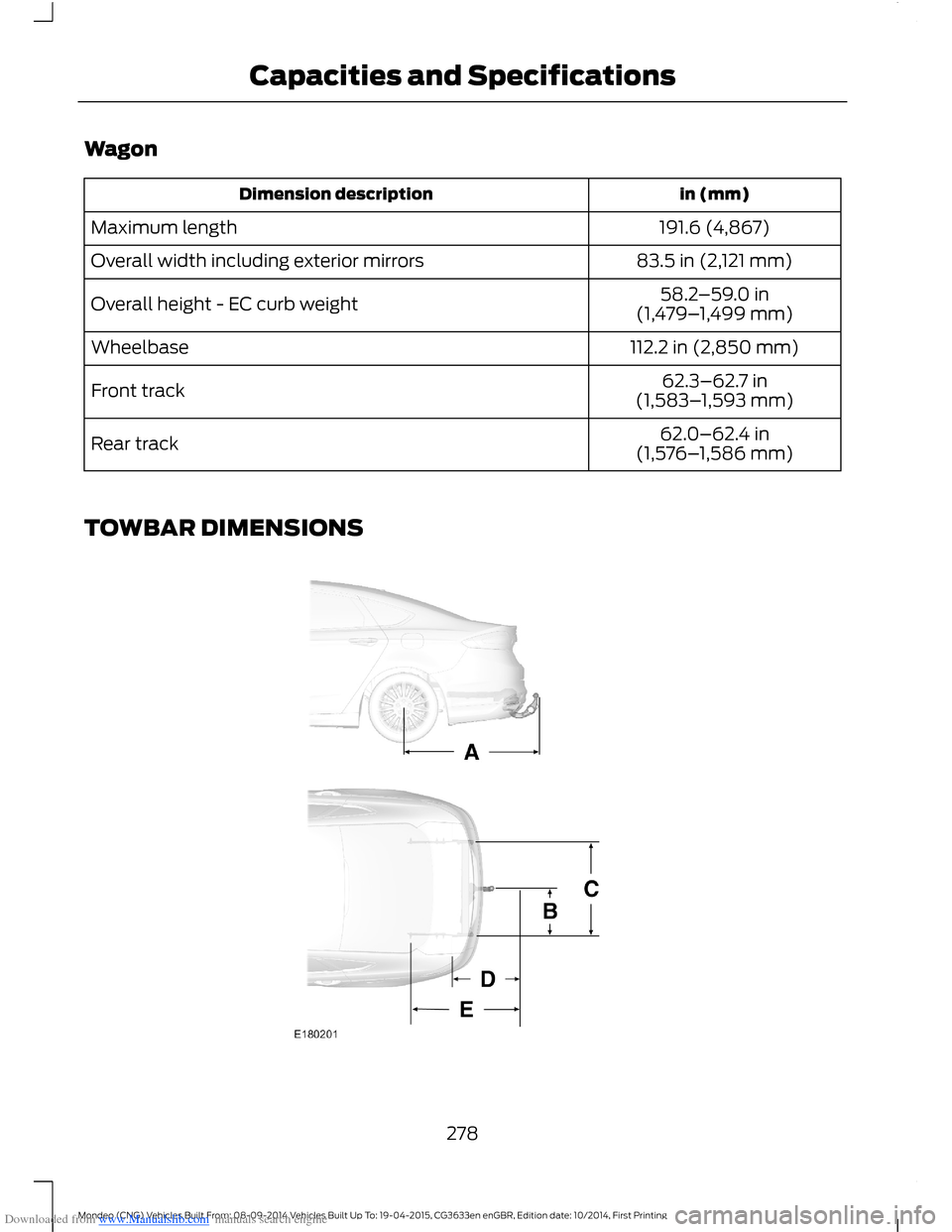
TOWBAR DIMENSIONS
278Mondeo (CNG) Vehicles Built From: 08-09-2014 Vehicles Built Up To: 19-04-2015, CG3633en enGBR, Edition date: 10/2014, First PrintingCapacities and Specifications
Page 281 of 446
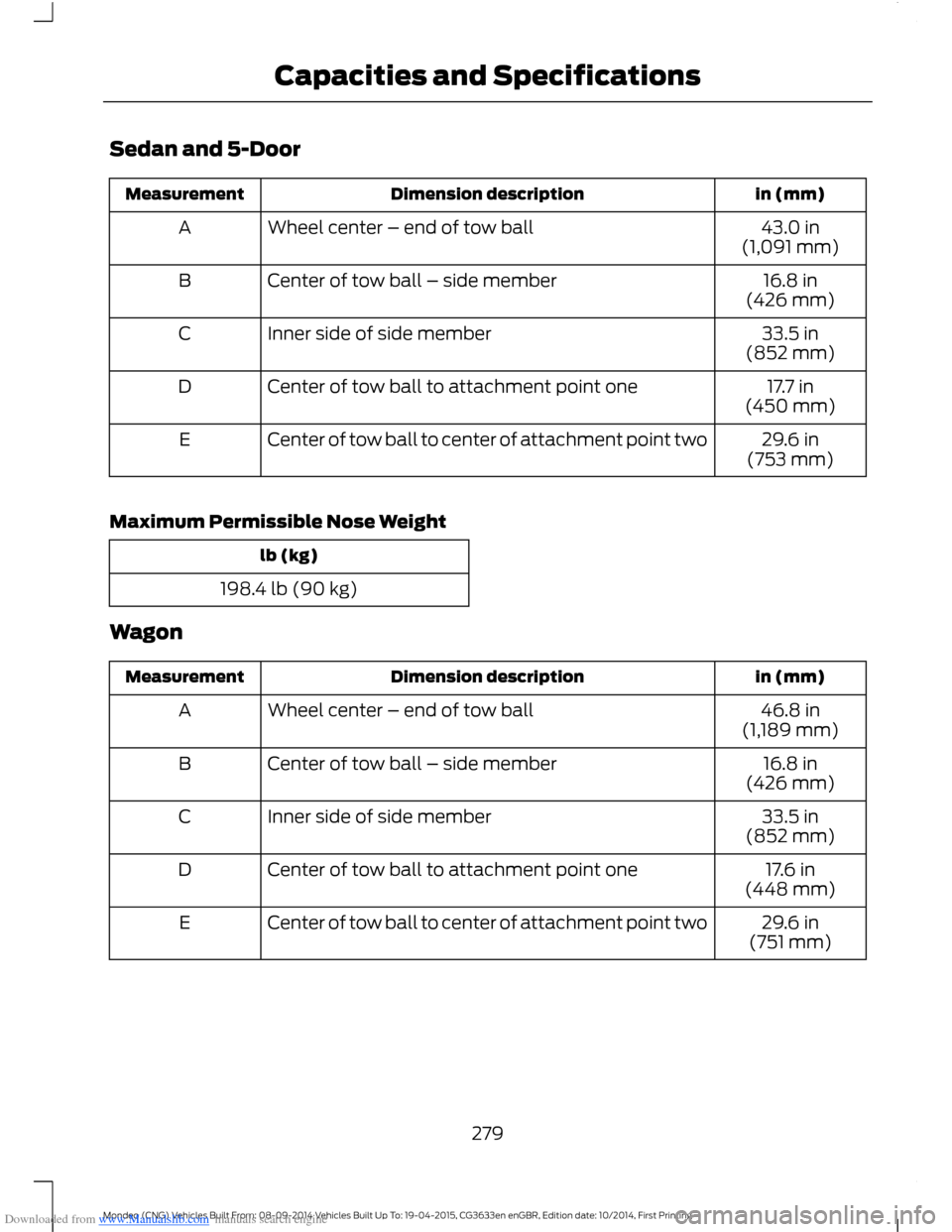
Downloaded from www.Manualslib.com manuals search engine Sedan and 5-Door
in (mm)Dimension descriptionMeasurement
43.0 in(1,091 mm)Wheel center – end of tow ballA
16.8 in(426 mm)Center of tow ball – side memberB
33.5 in(852 mm)Inner side of side memberC
17.7 in(450 mm)Center of tow ball to attachment point oneD
29.6 in(753 mm)Center of tow ball to center of attachment point twoE
Maximum Permissible Nose Weight
lb (kg)
198.4 lb (90 kg)
Wagon
in (mm)Dimension descriptionMeasurement
46.8 in(1,189 mm)Wheel center – end of tow ballA
16.8 in(426 mm)Center of tow ball – side memberB
33.5 in(852 mm)Inner side of side memberC
17.6 in(448 mm)Center of tow ball to attachment point oneD
29.6 in(751 mm)Center of tow ball to center of attachment point twoE
279Mondeo (CNG) Vehicles Built From: 08-09-2014 Vehicles Built Up To: 19-04-2015, CG3633en enGBR, Edition date: 10/2014, First PrintingCapacities and Specifications
Page 308 of 446
Downloaded from www.Manualslib.com manuals search engine Safety Information
WARNING
Driving while distracted can result inloss of vehicle control, crash andinjury. We strongly recommend thatyou use extreme caution when using anydevice that may take your focus off theroad. Your primary responsibility is the safeoperation of your vehicle. We recommendagainst the use of any hand-held devicewhile driving and encourage the use ofvoice-operated systems when possible.Make sure you are aware of all applicablelocal laws that may affect the use ofelectronic devices while driving.
When using SYNC:
•Do not operate playing devices if thepower cords or cables are broken, splitor damaged. Carefully place cords andcables where you cannot step on themor they do not interfere with theoperation of pedals, seats,compartments or safe driving abilities.
•Do not leave playing devices in yourvehicle during extreme conditions as itcould cause them damage. Refer toyour device's manual for furtherinformation.
•Do not attempt to service or repair thesystem. See an authorized dealer.
Privacy Information
When a cell phone is connected to SYNC,the system creates a profile that is linkedto that cell phone. The system creates theprofile to offer you more mobile featuresand to operate more efficiently. Amongother things, this profile may contain dataabout your phonebook, text messages(read and unread) and call history. Thiswill include the history of calls when yourcell phone was not connected to thesystem. If you connect a media player, thesystem creates and retains an index of
supported media content. The system alsorecords a short development log ofapproximately 10 minutes of all recentsystem activity. The log profile and othersystem data may be used to improve thesystem and help diagnose any problemsthat may occur.
The cell phone profile, media player indexand development log will remain in thesystem unless deleted. They are generallyaccessible in your vehicle only when youconnect your cell phone or media player.If you no longer plan to use the system oryour vehicle, we recommend you completea master reset to erase all storedinformation. See Information Displays(page 86).
Special equipment is required to accesssystem data. Access to your vehicle'sSYNC module is also required. We will notaccess the system data for any purposeother than as described without consent.Examples where system data can beaccessed are for a court order, whererequired by law enforcement, othergovernment authorities or other thirdparties acting with lawful authority. Otherparties may seek to access the informationindependently of us. Further privacyinformation is available. See SYNC™Applications and Services (page 320).
USING VOICE RECOGNITION
This system helps you control manyfeatures using voice commands. Thisallows you to keep your hands on thesteering wheel and focus on what is aroundyou.
Helpful Hints
Make sure the interior of your vehicle is asquiet as possible. Wind noise from openwindows and road vibrations may preventthe system from correctly recognizingspoken commands.
306Mondeo (CNG) Vehicles Built From: 08-09-2014 Vehicles Built Up To: 19-04-2015, CG3633en enGBR, Edition date: 10/2014, First PrintingSYNC™
Page 314 of 446
![FORD MONDEO 2014 4.G Owners Manual Downloaded from www.Manualslib.com manuals search engine Command
(turn ringer on | silent mode off)
(turn ringer off | silent mode [on])
Words in parentheses or brackets are optional and do not have t](/manual-img/11/5483/w960_5483-313.png "FORD MONDEO 2014 4.G Owners Manual Downloaded from www.Manualslib.com manuals search engine Command
(turn ringer on | silent mode off)
(turn ringer off | silent mode [on])
Words in parentheses or brackets are optional and do not have t")
Downloaded from www.Manualslib.com manuals search engine Command
(turn ringer on | silent mode off)
(turn ringer off | silent mode [on])
Words in parentheses or brackets are optional and do not have to be spoken for thesystem to understand the command.
Making a Call
Press the voice button and when promptedsay either:
ActionCommand
call (someone | [[a]name])
dial [[a]number]Followed by a number. When the systemconfirms the number say:dial [[a] number]
To erase the last spoken digit say:
ActionCommand
Or press the left arrow button on the audio unit.(delete | correct)
To erase all spoken digits say:
ActionCommand
Or press and hold the left arrow button on the audio unit.clear
To end the call, press the end call buttonon the steering wheel or select the end calloption in the audio display and press OK.
312Mondeo (CNG) Vehicles Built From: 08-09-2014 Vehicles Built Up To: 19-04-2015, CG3633en enGBR, Edition date: 10/2014, First PrintingSYNC™
Page 315 of 446
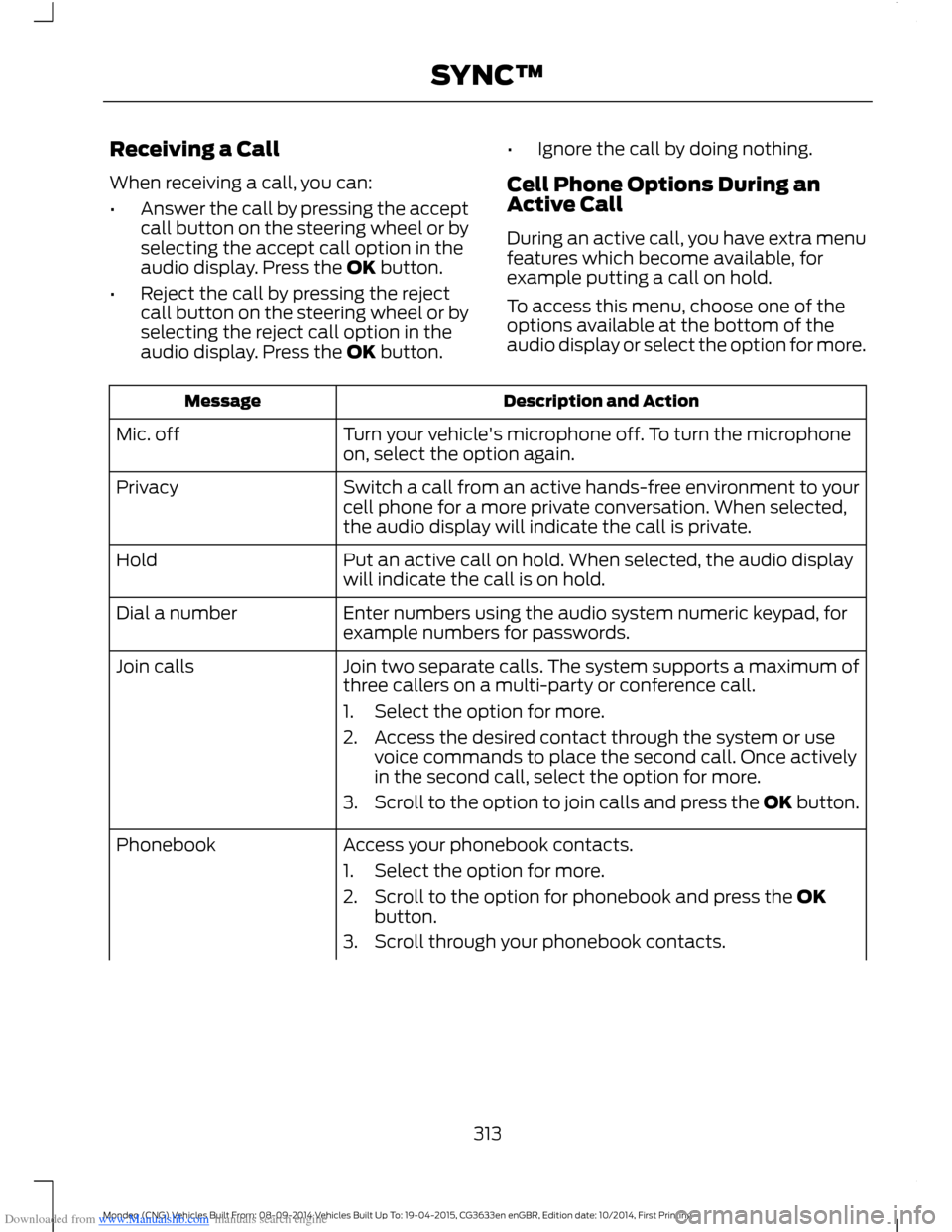
Downloaded from www.Manualslib.com manuals search engine Receiving a Call
When receiving a call, you can:
•Answer the call by pressing the acceptcall button on the steering wheel or byselecting the accept call option in theaudio display. Press the OK button.
•Reject the call by pressing the rejectcall button on the steering wheel or byselecting the reject call option in theaudio display. Press the OK button.
•Ignore the call by doing nothing.
Cell Phone Options During anActive Call
During an active call, you have extra menufeatures which become available, forexample putting a call on hold.
To access this menu, choose one of theoptions available at the bottom of theaudio display or select the option for more.
Description and ActionMessage
Turn your vehicle's microphone off. To turn the microphoneon, select the option again.Mic. off
Switch a call from an active hands-free environment to yourcell phone for a more private conversation. When selected,the audio display will indicate the call is private.
Privacy
Put an active call on hold. When selected, the audio displaywill indicate the call is on hold.Hold
Enter numbers using the audio system numeric keypad, forexample numbers for passwords.Dial a number
Join two separate calls. The system supports a maximum ofthree callers on a multi-party or conference call.Join calls
1.Select the option for more.
2.Access the desired contact through the system or usevoice commands to place the second call. Once activelyin the second call, select the option for more.
3.Scroll to the option to join calls and press the OK button.
Access your phonebook contacts.Phonebook
1.Select the option for more.
2.Scroll to the option for phonebook and press the OKbutton.
3.Scroll through your phonebook contacts.
313Mondeo (CNG) Vehicles Built From: 08-09-2014 Vehicles Built Up To: 19-04-2015, CG3633en enGBR, Edition date: 10/2014, First PrintingSYNC™
Page 324 of 446

Downloaded from www.Manualslib.com manuals search engine Display Options
If you switch on this feature, a confirmationmessage appears in the display.
If you switch off this feature, a dialog willappear in the display, which allows you toset a voice reminder.
Off with voice reminder provides a displayand voice reminder when your cell phoneconnects and your vehicle starts.
Off without voice reminder provides adisplay reminder only without a voicereminder when your cell phone connects.
To make sure that Emergency Assistanceworks correctly:
•The system must have power and beworking correctly at the time of thecrash and during feature activation anduse.
•You must switch on the feature beforea crash.
•You must have a cell phone connectedto the system.
•In certain countries, it may benecessary to have a valid andregistered SIM card with credit in orderto place and maintain an emergencycall.
•A connected cell phone must have theability to make and maintain anoutgoing call at the time of the crash.
•A connected cell phone must haveadequate network coverage, batterypower and signal strength.
•Your vehicle must have battery power.
Note:This feature only works in a Europeancountry or region where SYNC EmergencyAssistance can call the local emergencyservices. Visit the regional Ford website fordetails.
In the Event of a Crash
Note:Not every crash deploys an airbag ortriggers the fuel pump shut off (which mayturn on Emergency Assistance). However,if Emergency Assistance is triggered thesystem tries to contact the emergencyservices. If a connected cell phone sustainsdamage or loses connection to the system,it searches for and tries to connect to anyavailable previously paired cell phone. Thesystem attempts to dial 112.
Before making a call:
•If you do not cancel the call and SYNCmakes a successful call, anintroductory message plays for theemergency operator. After thismessage, there is hands-freecommunication between your vehicle'soccupants and the operator.
•The system provides a short windowof time (approximately 10 seconds) tocancel the call. If you do not cancel thecall, the system attempts to dial 112.
•The system plays a message lettingyou know when it attempts to make anemergency call. You can cancel the callby selecting the relevant functionbutton or by pressing the end callbutton on the steering wheel.
During a call:
•Emergency Assistance uses yourvehicle GPS or cellular networkinformation when available todetermine the most appropriatelanguage to use. It alerts theemergency operator of the crash anddelivers the introductory message. Thismay include your vehicle GPScoordinates.
•The language the system uses tointeract with the occupants of yourvehicle may differ from the languageused to deliver information to theemergency operator.
322Mondeo (CNG) Vehicles Built From: 08-09-2014 Vehicles Built Up To: 19-04-2015, CG3633en enGBR, Edition date: 10/2014, First PrintingSYNC™