Page 287 of 554

Fuse or relay
numberFuse amp
ratingProtected components
29 20A Radio, Global positioning system
module
30 15A Front park lamps, Trailer tow
relay for park lamps, Front side
markers
31 5A Trailer tow controller
32 15A Driver window switch and motor,
Power lock switches, Moonroof,
110V AC power point, Interior
rearview mirror
33 10A Not used (spare)
34 10A Blind spot monitor, 2nd row
heated seats, Reverse sensing
system, Rearview camera
35 5A Heads-up display, Climate control
humidity sensor
36 10A Not used (spare)
37 10A Refrigerator
38 10A Front passenger window switch
39 15A High beam headlamps
40 10A Rear park lamps, License plate
lamps
41 7.5A Occupant classification system,
Restraints control module
42 5A Not used (spare)
43 10A Not used (spare)
44 10A Not used (spare)
45 5A Not used (spare)
46 10A Climate control module
47 15A Fog lamps, Fog lamp indicator,
Front turn signals #2
48 30A Circuit
BreakerFront passenger power window,
Rear power windows
49 Delayed
accessory relayBody control module
286Fuses
2014 Flex(471)
Owners Guide gf, 1st Printing, April 2013
USA(fus)
Page 312 of 554
4. Remove the bulb socket by
turning it counterclockwise and
pulling it straight out.
Install the new bulb(s) in reverse order.
Replacing HID headlamp bulbs (if equipped)
The headlamps on your vehicle use a “high intensity discharge” source.
These lamps operate at a high voltage. When the bulb is burned out, the
bulb and starter capsule assembly must be replaced by your authorized
dealer.
Replacing front parking lamp/turn signal bulbs
1. Make sure headlamp switch is in the off position, then open the hood.
2. Reach behind the headlamp assembly to access the bulb sockets .
3. Remove the bulb socket by
turning it counterclockwise and
pulling it straight out.
4. To remove the bulb, pull it
straight out of the bulb socket.
Install the new bulb(s) in reverse
order.
Maintenance311
2014 Flex(471)
Owners Guide gf, 1st Printing, April 2013
USA(fus)
Page 314 of 554

A.Backup lamp
B.Stop/tail/turn signal lamp
C.Side marker lamp
D.Supplemental taillamp
1. Make sure the headlamp switch is
in the off position and open the
liftgate.
2. Remove the hex screws in the liftgate opening, then pull the lamp
assembly away from the vehicle. This will disengage two snap
attachments along the side of the vehicle.
3. Remove the bulb socket by rotating it counterclockwise, then pulling it
out of the lamp assembly.
4. Pull the bulb straight from the socket.
Install new bulb(s) in reverse order.
Replacing high-mount brake lamp bulbs
Your vehicle is equipped with an LED high-mount brake lamp. It is
designed to last the life of the vehicle. If replacement is required, it is
recommended that you see your authorized dealer.
Replacing license plate lamp bulbs
1. Make sure the headlamp switch is in the off position.
2. Remove the two screws and the
license plate lamp assembly from the
liftgate.
3. Carefully pull the bulb straight out
from the lamp assembly.
Install new bulb(s) in reverse order.
Maintenance313
2014 Flex(471)
Owners Guide gf, 1st Printing, April 2013
USA(fus)
Page 315 of 554
BULB SPECIFICATION CHART
Replacement bulbs are specified in the chart below. Headlamp bulbs
must be marked with an authorized “D.O.T.” for North America and an
“E” for Europe to ensure lamp performance, light brightness and pattern
and safe visibility. The correct bulbs will not damage the lamp assembly
or void the lamp assembly warranty and will provide quality bulb burn
time.
Function Number of bulbsTrade
number
Headlamp2 9008 H13
2D3 HID
(optional)
Front park/turn lamp 4 3157NA
*Front sidemarker lamp N/A LED
Fog lamp 2 H11
Map lamp 2 12V6W
Dome/reading lamps 6 578
Tail/brake/turn signal lamp2 3157K
N/A*LED
(optional)
Supplemental taillamp 2 194
Rear sidemarker2 194
N/A*LED
(optional)
Backup lamp 2 921
License plate lamp 2 C5WL
*High-mount brake lamp N/A LED
To replace all instrument panel lights - see your authorized dealer.
*To replace these lamps - see your authorized dealer.
314Maintenance
2014 Flex(471)
Owners Guide gf, 1st Printing, April 2013
USA(fus)
Page 378 of 554
When HD Radio broadcasts are active, you can access the following
functions:
When you select: You can:
ScanHear a brief sampling of all available stations.
This feature still works when HD Radio
reception is on, although it does not scan for
HD2-HD7 channels. You may see the HD logo
appear if the station has a digital broadcast.
To save a multicast
station as a presetWhen the channel is active on-screen, press
and hold a memory preset slot until the sound
returns. There is a brief mute while the radio
saves the station. Sound returns when
finished. When recalling a HD2 or HD3
memory preset, there is a mute before the
digital audio plays, as the system must once
again acquire the digital signal.
As with any saved radio station, you cannot
access the saved station if your vehicle is
outside the station’s reception area.
Audio System377
2014 Flex(471)
Owners Guide gf, 1st Printing, April 2013
USA(fus)
Page 383 of 554
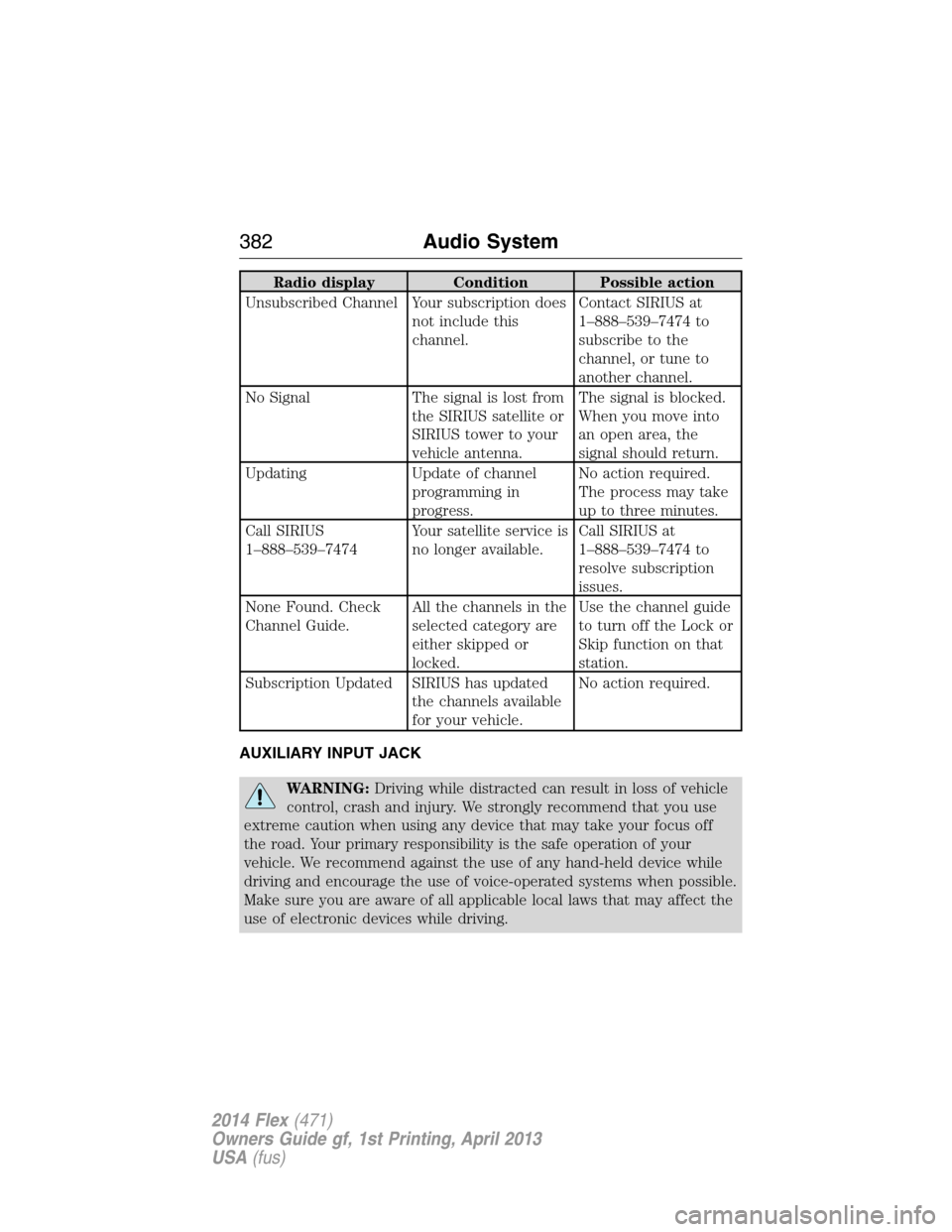
Radio display Condition Possible action
Unsubscribed Channel Your subscription does
not include this
channel.Contact SIRIUS at
1–888–539–7474 to
subscribe to the
channel, or tune to
another channel.
No Signal The signal is lost from
the SIRIUS satellite or
SIRIUS tower to your
vehicle antenna.The signal is blocked.
When you move into
an open area, the
signal should return.
Updating Update of channel
programming in
progress.No action required.
The process may take
up to three minutes.
Call SIRIUS
1–888–539–7474Your satellite service is
no longer available.Call SIRIUS at
1–888–539–7474 to
resolve subscription
issues.
None Found. Check
Channel Guide.All the channels in the
selected category are
either skipped or
locked.Use the channel guide
to turn off the Lock or
Skip function on that
station.
Subscription Updated SIRIUS has updated
the channels available
for your vehicle.No action required.
AUXILIARY INPUT JACK
WARNING:Driving while distracted can result in loss of vehicle
control, crash and injury. We strongly recommend that you use
extreme caution when using any device that may take your focus off
the road. Your primary responsibility is the safe operation of your
vehicle. We recommend against the use of any hand-held device while
driving and encourage the use of voice-operated systems when possible.
Make sure you are aware of all applicable local laws that may affect the
use of electronic devices while driving.
382Audio System
2014 Flex(471)
Owners Guide gf, 1st Printing, April 2013
USA(fus)
Page 401 of 554

Accessing Your Phone Settings
These are phone-dependent features. Your phone settings allow you to
access and adjust features such as your ring tone, text message
notification, modify your phone book and also set up automatic
download.
1. Press the phone button.
2. Scroll until Phone Settings appears, then press OK.
3. Scroll to select from the following options:
When you select: You can:
Phone StatusSee the provider, name, signal power, battery
power and roaming status of your connected
phone.
Press OK to select and scroll to view the
information. When done, press OK again to
return to the phone status menu.
Set RingerSelect which ring tone sounds during an
incoming call (one of the system’s or your
phone’s).
1. Press OK to select and scroll to hear
Ringer 1, Ringer 2, Ringer 3 and Phone
Ringer.
2. Press OK to select.
Note:If your phone supports in-band ringing,
your phone’s ringer sounds when Phone
Ringer is chosen.
Message NotificationHave the option of hearing an audible tone to
notify you when a text message arrives.
1. Press OK to select and scroll between
Message Notification On or Message
Notification Off.
2. Press OK to select.
400SYNC®
2014 Flex(471)
Owners Guide gf, 1st Printing, April 2013
USA(fus)
Page 430 of 554

Vehicle Health Report and SYNC Services (Traffic, Directions
and Information) issues
Issue Possible
cause(s)Possible solution(s)
I received a text
that the Vehicle
Health Report is
not activated.•Your account
may not be
activated on the
website, OR
•You may have
the wrong VIN
(vehicle
identification
number) listed.•This is a free feature, but you
must first register online to use
it.
•Make sure that your VIN is
correctly listed in your account.
I am unable to
retrieve the
report on the
website, or I
receive a system
error.The preferred
dealer
information did
not load correctly.When you register your account,
you must list a preferred dealer.
If one is already listed, try
selecting another dealer and
logging out. Log back in and
change it back to your preferred
dealer and retrieve the report.
I am unable to
submit a report.•This could be
due to your
phone’s
compatibility, OR
•Bad signal
strength, OR
•Your phone
may not be
activated on the
website.•Update your mobile number
in your account on the website.
•Make sure you have full signal
strength and that your
Bluetoothvolume level has been
turned up.
•Try deleting your phone and
performing a clean pairing.
I heard a
commercial when
I tried to use
Traffic, Directions
and Information.•The phone in
use is not
activated, OR
•Your phone has
ID blocker active.•This is a free feature, but you
must first register online to use
it.
•Turn off ID blocker on your
phone as the system recognizes
you by your phone number.
•Make sure the currently
connected phone is the same
one that is registered on your
SyncMyRide account.
SYNC®429
2014 Flex(471)
Owners Guide gf, 1st Printing, April 2013
USA(fus)


