2014 FORD FIESTA USB
[x] Cancel search: USBPage 314 of 396
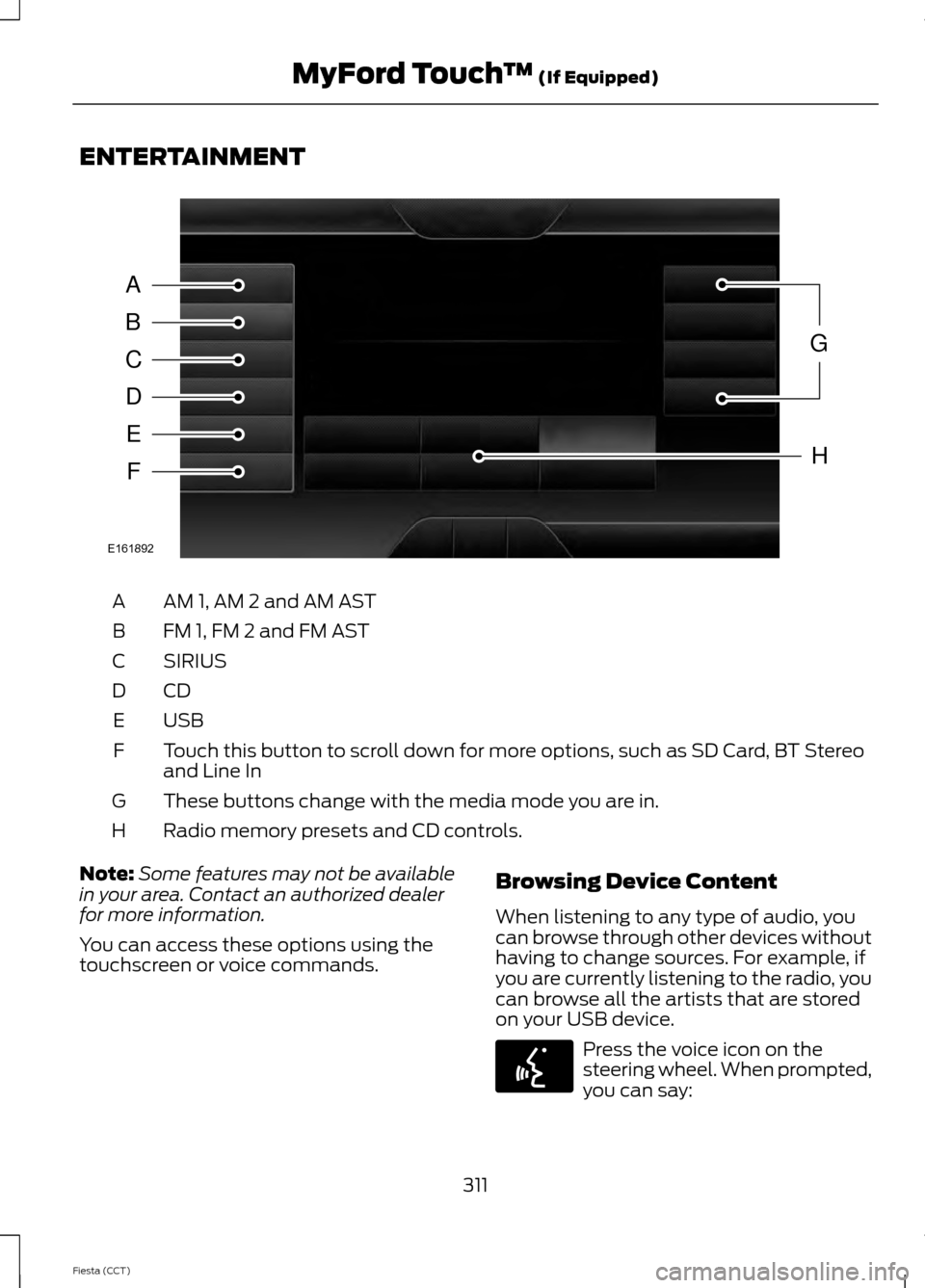
ENTERTAINMENT
AM 1, AM 2 and AM AST
A
FM 1, FM 2 and FM AST
B
SIRIUS
C
CDD
USBE
Touch this button to scroll down for more options, such as SD Card, BT Stereo
and Line In
F
These buttons change with the media mode you are in.
G
Radio memory presets and CD controls.
H
Note: Some features may not be available
in your area. Contact an authorized dealer
for more information.
You can access these options using the
touchscreen or voice commands. Browsing Device Content
When listening to any type of audio, you
can browse through other devices without
having to change sources. For example, if
you are currently listening to the radio, you
can browse all the artists that are stored
on your USB device. Press the voice icon on the
steering wheel. When prompted,
you can say:
311
Fiesta (CCT) MyFord Touch
™ (If Equipped)A
B
C
D
E
F
G
H
E161892 E142599
Page 315 of 396
"BROWSE" within devices
"Browse" *
"Browse
"Browse
"Browse SD card"
"Browse Sirius channel guide" **
"Browse USB" "Help"
* If you only say, "Browse", you can then say any commands in the following chart.
** This command is only usable if you have an active subscription to SIRIUS® satellite
radio. "BROWSE"
"
"
"SD card" *
"Sirius Channel Guide" *
"USB" **
"Help"
* This command is only usable if you have an active subscription to SIRIUS® satellite
radio.
** For more commands in SD card or USB mode, see the "SD Card and USB Port" section
of this chapter.
AM/FM Radio Touch the AM or FM tab to listen
to the radio.
To change between AM and FM presets,
just touch the AM or FM tab.
312
Fiesta (CCT) MyFord Touch
™
(If Equipped)E142611
Page 327 of 396
"CD"
"Repeat off"
"Repeat track" "Shuffle"
"Shuffle CD" *
"Shuffle folder" *
"Shuffle off" "Help"
* This applies to WMA or MP3 files only.
SD Card Slot and USB Port
SD Card
Note: Your SD card slot is spring-loaded.
To remove the SD card, press the card in
and the system ejects it. Do not attempt to
pull the card to remove it as this could cause
damage.
Note: The navigation system also uses this
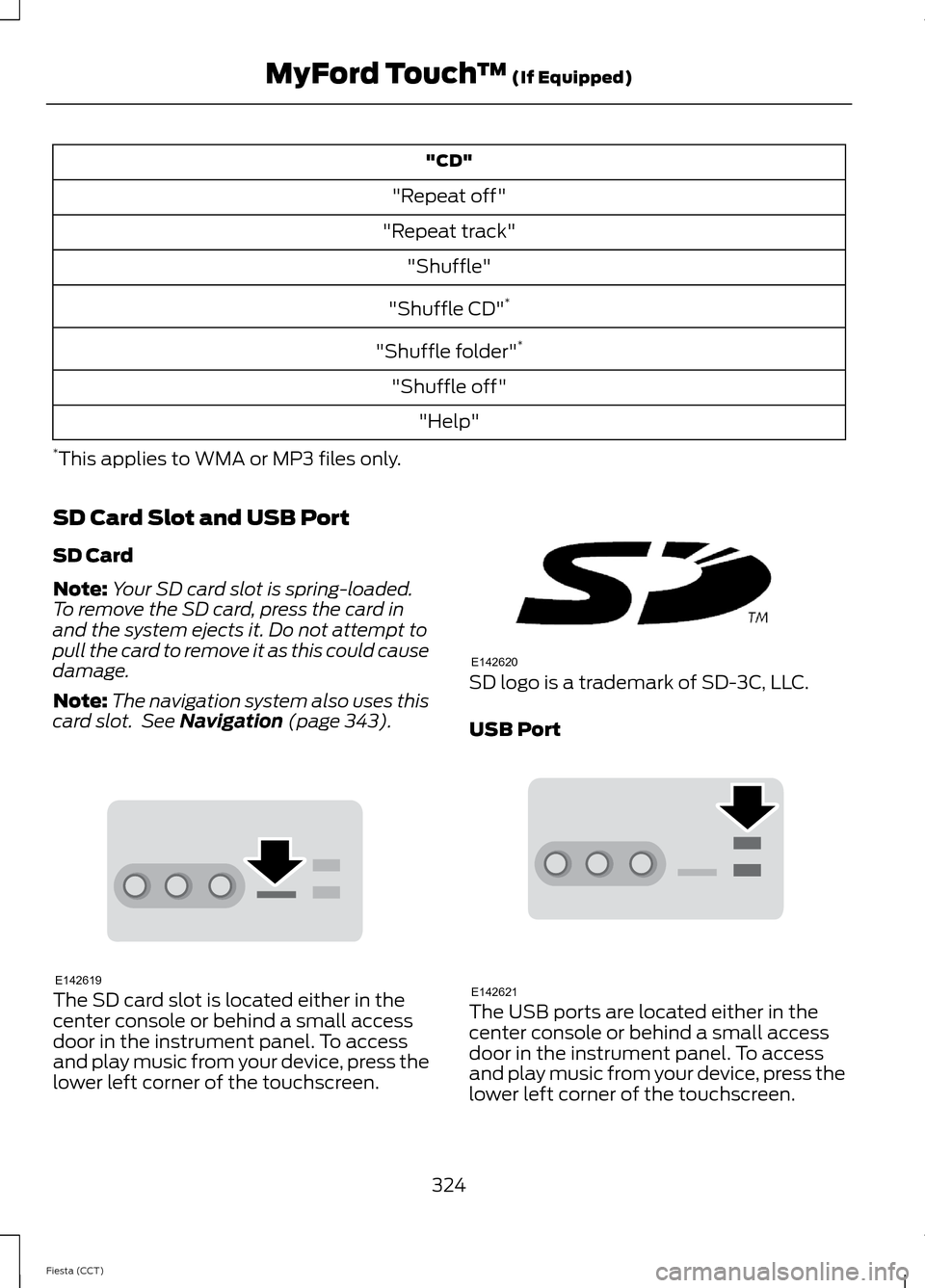
card slot. See Navigation (page 343). The SD card slot is located either in the
center console or behind a small access
door in the instrument panel. To access
and play music from your device, press the
lower left corner of the touchscreen. SD logo is a trademark of SD-3C, LLC.
USB Port
The USB ports are located either in the
center console or behind a small access
door in the instrument panel. To access
and play music from your device, press the
lower left corner of the touchscreen.
324
Fiesta (CCT) MyFord Touch
™
(If Equipped)E142619 E142620 E142621
Page 328 of 396
This feature allows you to plug in media
playing devices, memory sticks, flash drives
or thumb drives, and charge devices if they
support this feature.
In order to playback video from your iPod®
or iPhone®, you must have a special
combination USB/RCA composite video
cable (which you can buy from Apple®).
When the cable is connected to your iPod®
or iPhone®, plug the other end into both
the RCA jacks and the USB port.
Playing Music from Your Device
Insert your device and select the
SD Card or USB tab once the
system recognizes it. You can
then select from the following options:
Repeat
This feature replays the currently playing
song or album.
Shuffle
Touch this button to play music on the
selected album or folder in random order.
Similar Music
This feature allows you to choose music
similar to what is currently playing.
More Info
Touch this button to see disc information
such as current track, artist name, album
and genre.
Options
Touch this button to view and adjust
various media settings.
Sound Settings
allows you to adjust
settings for:
• Bass
• Midrange •
Treble
• Balance and Fade
• DSP (Digital Signal processing)
• Occupancy Mode
• Speed Compensated Volume.
Note: Your vehicle may not have all these
sound settings.
Media Player Settings
allows you to
select more settings, which is under Media
Player. See
Settings (page 301).
Device Information
displays software
and firmware information about the
currently connected media device.
Update Media Index indexes your device
each time you connect it to make sure you
have the latest voice commands available
for all media on the device.
Browse
This feature allows you to view the
contents of the device. It also allows you
to search by categories, such as genre,
artist or album.
If you want to view song information such
as Title, Artist, File, Folder, Album, and
Genre, touch the on-screen album art.
You can also touch
What’ s Playing to
hear how the system pronounces the
current band and song. This can be helpful
when using voice commands to make sure
the system correctly plays your request.
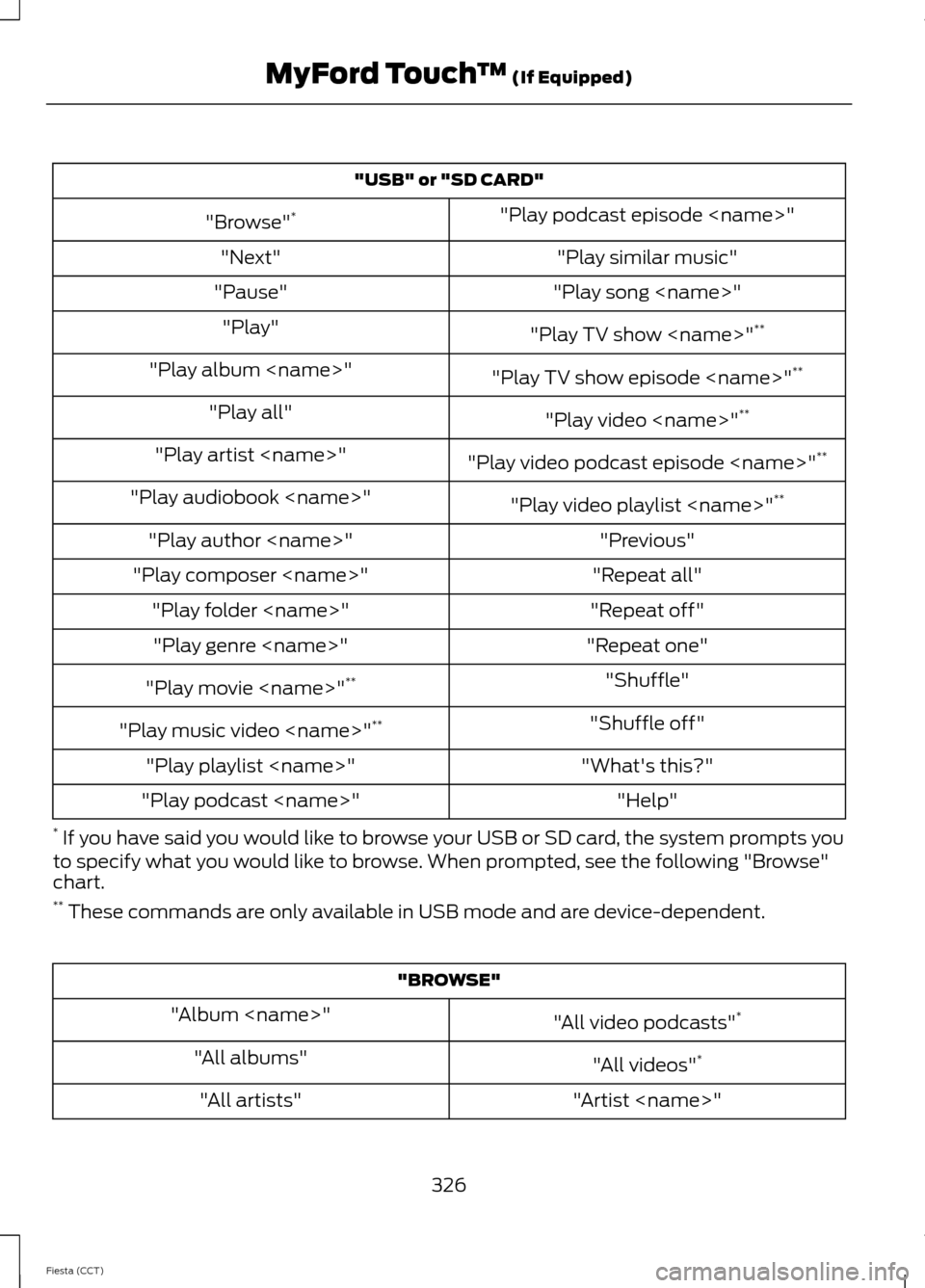
SD Card and USB Voice Commands If you are listening to a USB
device or an SD card, press the
voice button on the steering
wheel controls. When prompted, say any
of the following commands.
If you are not listening to a USB device or
an SD card, press the voice button and,
after the tone, say "USB" or "SD card",
then any of the following commands.
325
Fiesta (CCT) MyFord Touch
™
(If Equipped)E142611 E142599
Page 329 of 396
"USB" or "SD CARD"
"Play podcast episode
"Browse" *
"Play similar music"
"Next"
"Play song
"Pause"
"Play TV show
"Play"
"Play TV show episode
"Play album
"Play video
"Play all"
"Play video podcast episode
"Play artist
"Play video playlist
"Play audiobook
"Previous"
"Play author
"Repeat all"
"Play composer
"Repeat off"
"Play folder
"Repeat one"
"Play genre
"Shuffle"
"Play movie
"Shuffle off"
"Play music video
"What's this?"
"Play playlist
"Help"
"Play podcast
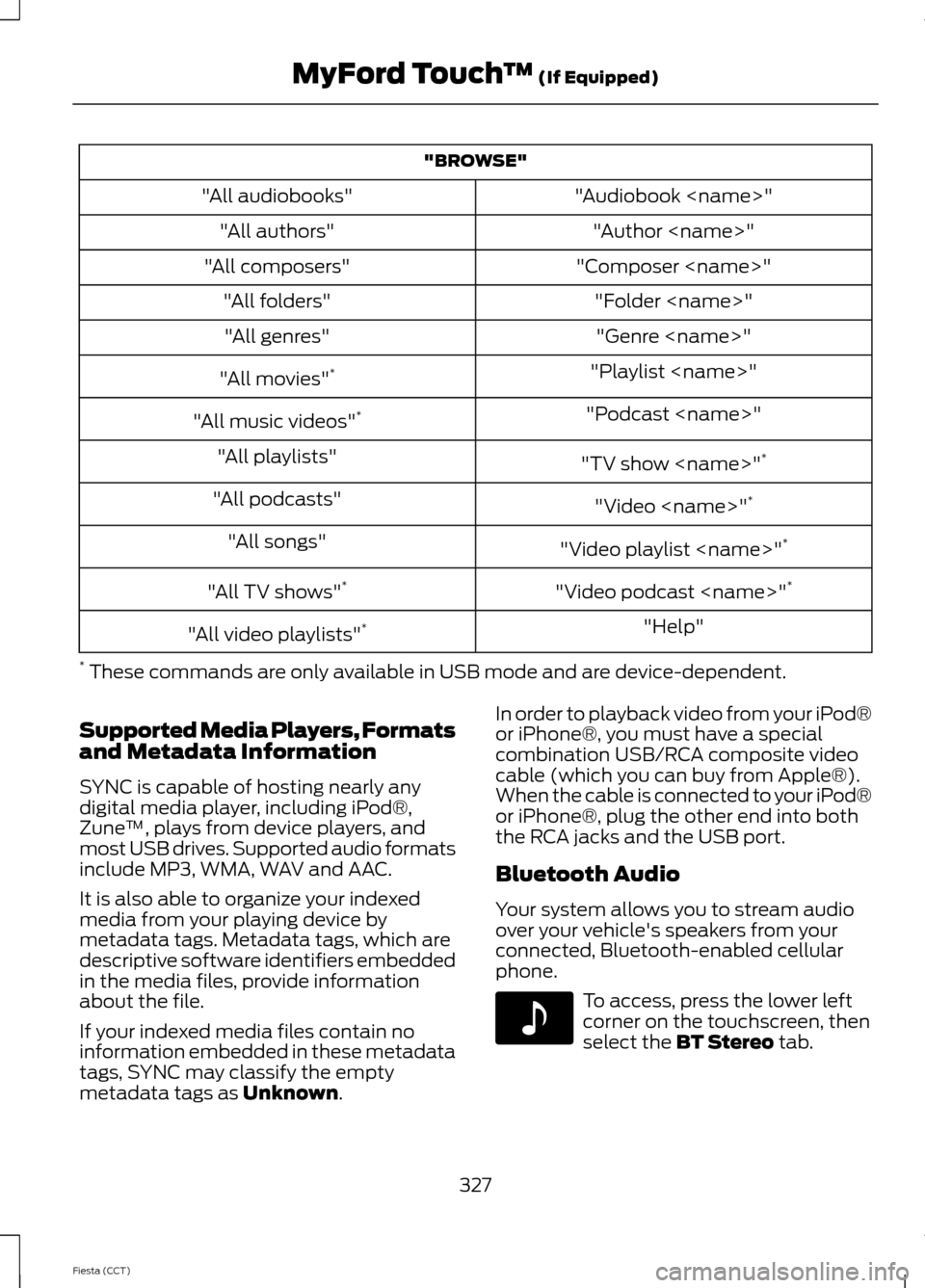
* If you have said you would like to browse your USB or SD card, the system prompts you
to specify what you would like to browse. When prompted, see the following "Browse"
chart.
** These commands are only available in USB mode and are device-dependent. "BROWSE"
"All video podcasts" *
"Album
"All videos"*
"All albums"
"Artist
"All artists"
326
Fiesta (CCT) MyFord Touch
™ (If Equipped)
Page 330 of 396
"BROWSE"
"Audiobook
"All audiobooks"
"Author
"All authors"
"Composer
"All composers"
"Folder
"All folders"
"Genre
"All genres"
"Playlist
"All movies" *
"Podcast
"All music videos" *
"TV show
"All playlists"
"Video
"All podcasts"
"Video playlist
"All songs"
"Video podcast
"All TV shows" *
"Help"
"All video playlists" *
* These commands are only available in USB mode and are device-dependent.
Supported Media Players, Formats
and Metadata Information
SYNC is capable of hosting nearly any
digital media player, including iPod®,
Zune ™, plays from device players, and
most USB drives. Supported audio formats
include MP3, WMA, WAV and AAC.
It is also able to organize your indexed
media from your playing device by
metadata tags. Metadata tags, which are
descriptive software identifiers embedded
in the media files, provide information
about the file.
If your indexed media files contain no
information embedded in these metadata
tags, SYNC may classify the empty
metadata tags as Unknown. In order to playback video from your iPod®
or iPhone®, you must have a special
combination USB/RCA composite video
cable (which you can buy from Apple®).
When the cable is connected to your iPod®
or iPhone®, plug the other end into both
the RCA jacks and the USB port.
Bluetooth Audio
Your system allows you to stream audio
over your vehicle's speakers from your
connected, Bluetooth-enabled cellular
phone.
To access, press the lower left
corner on the touchscreen, then
select the
BT Stereo tab.
327
Fiesta (CCT) MyFord Touch
™
(If Equipped)E142611
Page 334 of 396

Settings
Touch this button to access various phone
settings, such turning Bluetooth on and off,
managing your phonebook and more. See
Phone settings later in this section.
Text Messaging
Note: Downloading and sending text
messages using Bluetooth are
phone-dependent features.
Note: Certain features in text messaging
are speed-dependent and not available
when your vehicle is traveling at speeds over
3 mph (5 km/h).
Note: SYNC does not download read text
messages from your phone.
You can send and receive text messages
using Bluetooth, read them aloud and
translate text messaging acronyms, such
as LOL.
1. Touch the top left corner of the display
to access the
Phone menu.
2. Select
Messaging.
3. Choose from the following:
• Listen (speaker icon)
• Dial •
Send Text
• View
• Delete.
Composing a Text Message
Note: This is a speed-dependent feature.
It is unavailable when your vehicle is
traveling at speeds over 5 mph (8 km/h).
Note: Downloading and sending text
messages using Bluetooth are
phone-dependent features.
1. Press
Phone .
2. Messaging
.
3. Send Text
.
4. Enter a phone number or choose from
your phonebook.
You can select from the following options:
• Send
, which sends the message as it
is.
• Edit Text
, which allows you to
customize the pre-defined message or
create a message on your own.
You can then preview the message, verify
the recipient as well as update the
message list, and send it to a connected
device (such as a USB drive). Text message options
I’ll call you back in a few minutes. I just left, I’ll be there soon.Can you give me a call? I’m on my way.
I’m running a few minutes late.
I’m ahead of schedule, so I’ll be there early. I’m outside.
I’ll call you when I get there.
331
Fiesta (CCT) MyFord Touch
™
(If Equipped)
Page 388 of 396

Driving Hints....................................................157
Driving Through Water................................157
E
Economical Driving
.......................................157
Emission Control System...........................123 On-Board Diagnostics (OBD-II).................... 124
Readiness for Inspection/Maintenance (I/M) Testing.................................................... 125
End User License Agreement..................353 SYNC® End User License Agreement
(EULA).............................................................. 353
Engine Block Heater
......................................117
Using the Engine Block Heater....................... 118
Engine Coolant Check................................183 Adding Engine Coolant.................................... 184
Checking the Engine Coolant......................... 183
Recycled Engine Coolant................................. 185
Severe Climates.................................................. 185
Engine Oil Check...........................................182 Adding Engine Oil............................................... 182
Resetting the Oil Life Monitoring System............................................................... 183
Engine Oil Dipstick - 1.0L EcoBoost.......182
Engine Oil Dipstick - 1.6L Duratec-16V Ti-VCT (Sigma)
..........................................182
Engine Oil Dipstick - 1.6L EcoBoost™..................................................182
Engine Specifications.................................233 Drivebelt Routing............................................... 233
Entertainment.................................................311 AM/FM Radio....................................................... 312
Bluetooth Audio.................................................. 327
Browsing Device Content.................................. 311
CD........................................................................\
.... 323
SD Card Slot and USB Port............................ 324
SIRIUS® Satellite Radio (If Activated)......................................................... 318
Supported Media Players, Formats and Metadata Information................................. 327
Export Unique Options
..................................12
Exterior Mirrors.................................................75
Fold-Away Exterior Mirrors............................... 76
Integrated Blind Spot Mirrors........................... 76
Power Exterior Mirrors......................................... 75F
Fastening the Safety Belts..........................27
Restraint of Pregnant Women......................... 27
Safety Belt Extension Assembly.................... 29
Safety Belt Locking Modes............................... 28
Floor Mats
.......................................................158
Ford Credit.........................................................12
(U.S. Only)................................................................ 12
Ford Extended Service Plan (ESP)
.......239
SERVICE PLANS (CANADA ONLY).............241
SERVICE PLANS (U.S. Only)......................... 239
Front Fog Lamps............................................70
Front Passenger Sensing System............36
Fuel and Refueling
........................................119
Fuel Consumption........................................122
Calculating Fuel Economy............................... 123
Filling the Tank..................................................... 123
Fuel Filter.........................................................186
Fuel Quality - Gasoline...............................120 Choosing the Right Fuel................................... 120
Octane Recommendations............................ 120
Fuel Shutoff
....................................................167
Fuses.................................................................169
Fuse Specification Chart...........................169
Engine Compartment Fuse Box................... 169
Passenger Compartment Fuse Box.............172
G
Gauges...............................................................78 Engine Coolant Temperature Gauge............78
Fuel Gauge.............................................................. 78
General Information on Radio Frequencies...................................................43
Intelligent Access................................................. 43
Getting Assistance Outside the U.S. and Canada..........................................................163
Getting the Services You Need...............160 Away From Home.............................................. 160
Global Opening and Closing......................74 Global Closing........................................................ 75
Global Opening..................................................... 74
H
Hazard Warning Flashers...........................167
Headlamp Exit Delay....................................70
385
Fiesta (CCT) Index