2014 FORD EXPLORER clock
[x] Cancel search: clockPage 404 of 586

C.Memory presets:
•In radio mode, store your favorite radio stations. To store a radio
station, tune to the station, then press and hold a preset button until
sound returns.
•In CD mode, press one of these buttons to select a track.
D.Function buttons:Select different functions of the audio system
depending on which mode you are in (such as Radio mode or CD mode).
E.TUNE:
•In radio mode, turn the control to manually search the frequency
band.
•In satellite radio mode, turn the control to tune to the next or
previous channel.
F.Reverse and Fast Forward; AM/FM/CD Seek:
•In radio mode, select a frequency band and press one of these
buttons. The system stops at the first station it finds in that direction.
Press and hold one of these buttons to move quickly in that direction
to the next strong radio station or memory preset.
•In Sirius mode, press one of these buttons to select the previous or
next channel. If you select a specific category (such as Jazz, Rock or
News), use these buttons to find the previous or next channel in the
selected category. Press and hold one of these buttons to move
quickly in that direction to the next channel or category.
•In CD mode, press one of these buttons to select the previous or next
track. Press and hold one of these buttons to move quickly in that
direction within the current track.
G.OK and arrow buttons:
•Press the up and down or left and right arrow buttons to browse
menu selections.
•PressOKto confirm menu selections.
H.Eject:Press this button to eject a CD.
I.Power and Volume:
•Press this button to switch the system off and on.
•Turn it to adjust the volume.
J.CLOCK:Press this button to access the clock setting. Use the center
arrow controls to change the hours and minutes.
K.SOUND:Press this button to adjust settings for Treble, Middle, Bass,
Balance and Fade.
L.MENU:Press this button to access different audio system features.
SeeMenu structurelater in this section.
Audio System403
2014 Explorer(exp)
Owners Guide gf, 1st Printing, April 2013
USA(fus)
Page 407 of 586

CD Settings
Scan AllSelect to scan all disc selections.
Scan FolderSelect to scan all music in the current MP3
folder.
CD CompressionSelect to bring soft and loud passages together
for a more consistent listening level.
Clock Settings
Set TimeSelect to set the time.
Set DateSelect to set the calendar date.
24h ModeSelect to view clock time in a 12–hour mode or
24–hour mode.
Display Settings
DimmingSelect to change display brightness.
LanguageSelect to display the language in English,
French or Spanish.
Temp. SettingSelect to display the outside temperature in
Fahrenheit or Celsius.
AM/FM/CD PREMIUM AUDIO SYSTEM
A
ED
BC
406Audio System
2014 Explorer(exp)
Owners Guide gf, 1st Printing, April 2013
USA(fus)
Page 468 of 586

SETTINGS
Press to select any of the following:
•Clock
•Display
•Sound
•Vehicle
•Settings
•Help
HOME
Press to access your home screen. Depending on your vehicle’s option
package and software, your screens may vary in appearance from the
descriptions in this section. Your features may also be limited depending
on your market. Check with your authorized dealer for availability.
INFORMATION
Press to select any of the following:
•SYNC Services
•Sirius Travel Link
•Alerts
•Calendar
•SYNC Apps
If the icon is yellow, seeAlertsin theInformationsection of this
chapter.
ENTERTAINMENT
Press to select any of the following:
•AM
•FM
•SIRIUS
•CD
•USB
•BT Stereo
•SD Card
•A/V In
MyFord Touch® (If Equipped)467
2014 Explorer(exp)
Owners Guide gf, 1st Printing, April 2013
USA(fus)
Page 517 of 586
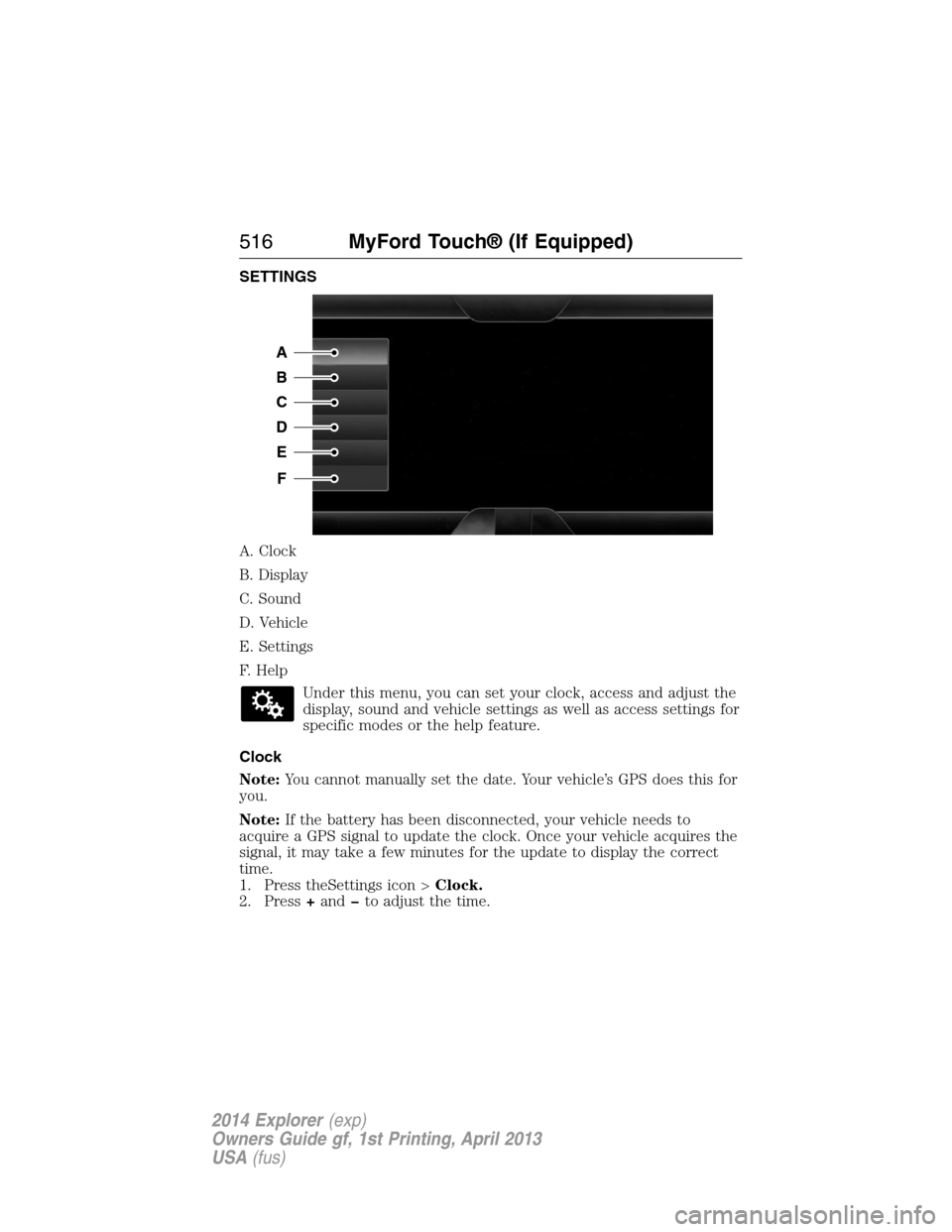
SETTINGS
A. Clock
B. Display
C. Sound
D. Vehicle
E. Settings
F. Help
Under this menu, you can set your clock, access and adjust the
display, sound and vehicle settings as well as access settings for
specific modes or the help feature.
Clock
Note:You cannot manually set the date. Your vehicle’s GPS does this for
you.
Note:If the battery has been disconnected, your vehicle needs to
acquire a GPS signal to update the clock. Once your vehicle acquires the
signal, it may take a few minutes for the update to display the correct
time.
1. Press theSettings icon >Clock.
2. Press+andto adjust the time.
A
B
C
D
E
F
516MyFord Touch® (If Equipped)
2014 Explorer(exp)
Owners Guide gf, 1st Printing, April 2013
USA(fus)
Page 580 of 586

replacement, specifications ...391
servicing ..................................329
Blind Spot Information
System .......................................256
Booster seats ...............................22
Brakes ........................................221
anti-lock ...................................222
anti-lock brake system (ABS)
warning light ...........................222
brake warning light ................222
fluid, checking and adding ....328
fluid, refill capacities ..............387
fluid, specifications .................387
lubricant specifications ..........387
parking ....................................222
shift interlock ..........................210
trailer .......................................280
C
Capacities for refilling fluids ....387
Cargo net ...................................266
CD ..............................402, 406, 408
CD player ..........................400, 489
CD voice commands .................490
Cell phone use ............................16
Changing a tire .........................376
Changing the air filter ..............334
Child safety restraints ..........30, 32
Child safety seats
attaching with tether straps ....32
automatic locking mode
(retractor) .................................40
LATCH .......................................30
Child safety seats - booster
seats .............................................22
Cleaning the touchscreen ........468Cleaning your vehicle ...............343
engine compartment ..............345
instrument panel ....................347
interior .....................................347
plastic parts ............................344
washing ....................................343
waxing .....................................345
wheels ......................................349
wiper blades ............................346
Climate control (see Air
conditioning or Heating) ..........144
Climate voice commands .........529
Clock ..................................402, 516
Collision Warning System .........261
Console ......................................186
overhead ..................................187
rear ..........................................186
Coolant ......................................318
checking and adding ..............318
refill capacities ........................387
specifications ..........................387
Cross Traffic Alert ....................256
Cruise control ...........................240
Customer Assistance ................289
Ford Extended Service
Plan ..........................................397
Getting roadside assistance ...289
Getting the service you
need .........................................294
Ordering additional owner’s
literature .................................300
Utilizing the
Mediation/Arbitration
Program ...................................298
D
Defrost .......................144, 146, 148
rear window ............................152
Index579
2014 Explorer(exp)
Owners Guide gf, 1st Printing, April 2013
USA(fus)
Page 585 of 586
Setting a destination ................530
Setting a destination by
voice ...........................................531
Settings ......................................516
Setting the clock ...............402, 516
Side air curtain ...........................57
Side-curtain airbags system .......57
SIRIUS® satellite radio ....402, 484
SIRIUS satellite radio voice
commands .................................486
SIRIUS Travel Link ...................508
SIRIUS Travel Link voice
commands .................................510
Snowplowing ...............................15
SOS Post Crash Alert .................50
Spark plugs,
specifications .....................385, 391
Special notice
ambulance conversions ............15
utility-type vehicles ..................15
Specification chart,
lubricants ...................................387
Stability system .........................225
Starting your vehicle ................190
jump starting ..........................291
push button start system .......189
Steering wheel ............................90
controls ......................................92
tilting .........................................90
Supplemental Restraint System
(SRS) (see airbags) ....................51
Supported media file types ......494
Supported player, media
formats and metadata
information ................................494SYNC® customer
support ..............................419, 468
SYNC® Services ................443, 505
System settings .........................519
T
Temperature control
(see Climate
control) ..............144, 146, 148, 527
Text messaging .................430, 500
Text messaging (sending,
downloading, deleting) .....431, 433
Third-row power fold seat .......176
Tilt steering wheel ......................90
Tires ...........................355–356, 376
alignment ................................369
care ..........................................354
changing ..........................376, 378
checking the pressure ............365
inflating ...................................363
label .........................................362
replacing ..................................367
rotating ....................................369
safety practices .......................368
sidewall information ...............358
snow tires and chains ............370
spare tire .................................376
terminology .............................357
tire grades ...............................356
treadwear ........................356, 365
Touchscreen features
(climate) ....................................527
Towing .......................275, 282–283
recreational towing .................283
trailer towing ..........................275
wrecker ....................................282
Traction control ........................223
584Index
2014 Explorer(exp)
Owners Guide gf, 1st Printing, April 2013
USA(fus)