Page 88 of 428

Anti-Lock Braking System
If it illuminates when you are
driving, this indicates a
malfunction. You will continue
to have the normal braking system
(without ABS) unless the brake system
warning lamp is also illuminated. Have the
system checked by your authorized dealer.
Battery
If it illuminates while driving, it
indicates a malfunction. Switch
off all unnecessary electrical
equipment and have the system checked
by your authorized dealer immediately.
Blind Spot Monitor (If Equipped)
E124823
It will illuminate when you switch
this feature off or in conjunction
with a message. See Blind Spot
Monitor (page 160). See Information
Messages (page 91).
Brake System
E138644
It will illuminate when you
engage the parking brake with
the ignition on.
If it illuminates when you are driving, check
that the parking brake is not engaged. If
the parking brake is not engaged, this
indicates low brake fluid level or a brake
system malfunction. Have the system
checked immediately by your authorized
dealer.
WARNING
Driving your vehicle with the warning
lamp on is dangerous. A significant
decrease in braking performance
may occur. It will take you longer to stop
your vehicle. Have your vehicle checked by
your authorized dealer immediately. Driving
extended distances with the parking brake
engaged can cause brake failure and the
risk of personal injury.
Cruise Control (If Equipped)
E71340
It will illuminate when you switch
this feature on. See Using
Cruise Control (page 159).
Direction Indicator
Illuminates when the left or right
turn signal or the hazard warning
flasher is turned on. If the
indicators stay on or flash faster, check for
a burned out bulb. See Changing a Bulb
(page 222).
Engine Oil
If it illuminates with the engine
running or when you are driving,
this indicates a malfunction.
Stop your vehicle as soon as it is safe to
do so and switch the engine off. Check the
engine oil level. See Engine Oil Check
(page 211).
Note:Do not resume your journey if it
illuminates despite the level being correct.
Have the system checked by your authorized
dealer immediately.
Fasten Safety Belt
It will illuminate and a chime will
sound to remind you to fasten
your safety belt. See Safety
Belt Minder (page 31).
85
Instrument Cluster
Page 90 of 428

Traction and Stability Control
It will flash when the system is
active. If it remains illuminated
or does not illuminate when you
switch the ignition on, this indicates a
malfunction. During a malfunction the
system will switch off. Have the system
checked by your authorized dealer
immediately.
Traction and Stability Control Off
It will illuminate when you switch
the system off. It will go out
when you switch the system
back on or when you switch the ignition
off.
AUDIBLE WARNINGS AND
INDICATORS
Key in Ignition Warning Chime
Sounds when you open the driver's door
and you have left the key in the ignition
with it in the off or accessory position.
Engine On Warning Chime
A warning chime will sound when any door
is opened if the vehicle exceeds a relatively
low speed.
Keyless Warning Alert (If Equipped)
Sounds the horn twice when you exit the
vehicle and the keyless vehicle is in RUN,
indicating the vehicle is still on.
Headlamps On Warning Chime
Sounds when you remove the key from the
ignition and open the driver's door and you
have left the headlamps or parking lamps
on.
Parking Brake On Warning Chime
Sounds when you have left the parking
brake on and drive your vehicle. If the
warning chime remains on after you have
released the parking brake, have the
system checked by your authorized dealer
immediately.
Automatic Transmission Warning
Chime
Sounds when you have not moved the
transmission selector lever to position P.
A message will be shown in the display.
87
Instrument Cluster
Page 98 of 428
Action Message
Indicator Message
Displayed as a reminder to press the brake
while starting the vehicle. - Press brake to start
Displayed when a valid key is not detected
within the vehicle. See Keyless Starting (page
123). Red Ford KeyFree Key not
inside car
Displays when the key battery is low. Change
the battery as soon as possible. See Remote
Control (page 44). - Key Battery low Replace
soon
Lighting
Action Message
Indicator Message
Displays when the brake lamp bulb has burned
out. Contact your authorized dealer. - Brake lamp Bulb fault
Displays when the low beam headlamp bulb
has burned out. Contact your authorized dealer. - Low beam Bulb fault
Displays when an electrical system problem
occurs with the headlamp system. Contact your
authorized dealer. Amber Headlamp fault Service
required
95
Information Displays
Page 99 of 428

Maintenance
Action Message
Indicator Message
Displays when the engine oil life is depleted and
requires a change. See Engine Oil Check (page
211). - Engine oil change due
Indicates the brake fluid level is low and the
brake system should be inspected immediately.
See Brake Fluid Check (page 215). Red Brake fluid level low
Service now
-
Displays when the fuel fill inlet was not properly
closed. See Refueling (page 130). Check fuel fill inlet
MyKey
Action Message
Indicator Message
Displays when MyKey is active. - MyKey active Drive
Safely
Displays when starting the vehicle and MyKey
is in use and the MyKey speed limit is on. - MyKey Speed Limited to
XX MPH/km/h
Displays when a MyKey is in use and the MyKey
speed limit is on and the vehicle speed is
approaching 80 mph (130 km/h). Amber MyKey Vehicle Near Top
Speed
Displays when a MyKey is in use and the MyKey
speed limit is reached. Amber MyKey Vehicle at Top
Speed
Displays when MyKey is active. - MyKey Check Speed
Drive Safely
Displays when a MyKey is in use and Belt-
Minder is activated. - MyKey Buckle Up to
Unmute Audio
Displays when a MyKey is in use and park aid is
activated. - MyKey Park aid cannot
be deactivated
96
Information Displays
Page 100 of 428
Action Message
Indicator Message
Displays when trying to create a MyKey with a
key already designated as a MyKey. - Key is Already a MyKey
Displays when programming a MyKey. - Hold key next to symbol
on steering column
Displays when programming a MyKey. - MyKey ESC cannot be
deactivated
Park Aid
Action Message
Indicator Message
Displays when the system has detected a
condition that requires service. Contact your
authorized dealer. See Parking Aid (page 150). Amber Parking aid malfunction
Service required
Park Brake
Action Message
Indicator Message
Displays when the parking brake is set, the
engine is running and the vehicle is driven more
than 3 mph (5 km/h). If the warning stays on
after the parking brake is released, contact your
authorized dealer. Red Park brake applied
97
Information Displays
Page 101 of 428

Power Steering
Action Message
Indicator Message
The power steering system is not working. Stop
the vehicle a safe place. Contact your author-
ized dealer. Red Steering loss Stop safely
The power steering system is not working. Stop
the vehicle a safe place. Contact your author-
ized dealer. Amber Steering assist fault
Service required
The power steering system has detected a
condition within the power steering system or
passive entry or passive start system requires
service. Contact your authorized dealer. Amber Steering fault Service
now
Starting System
Action Message
Indicator Message
Displays when starting the vehicle as a reminder
to apply the brake. - Press brake to start
Displays when the vehicle fails to start. - Cranking time exceeded
Transmission and Four-Wheel Drive
Action Message
Indicator Message
See your authorized dealer. - Transmission fault
Service now
The transmission is overheating and needs to
cool. Stop in a safe place as soon as it’s
possible. Amber Transmission overtem-
perature Stop safely
See your authorized dealer. Amber Transmission Service
required
Transmission is getting hot. Stop to let it cool
or speed up. - Transmission Hot Stop
or Speed Up
98
Information Displays
Page 102 of 428
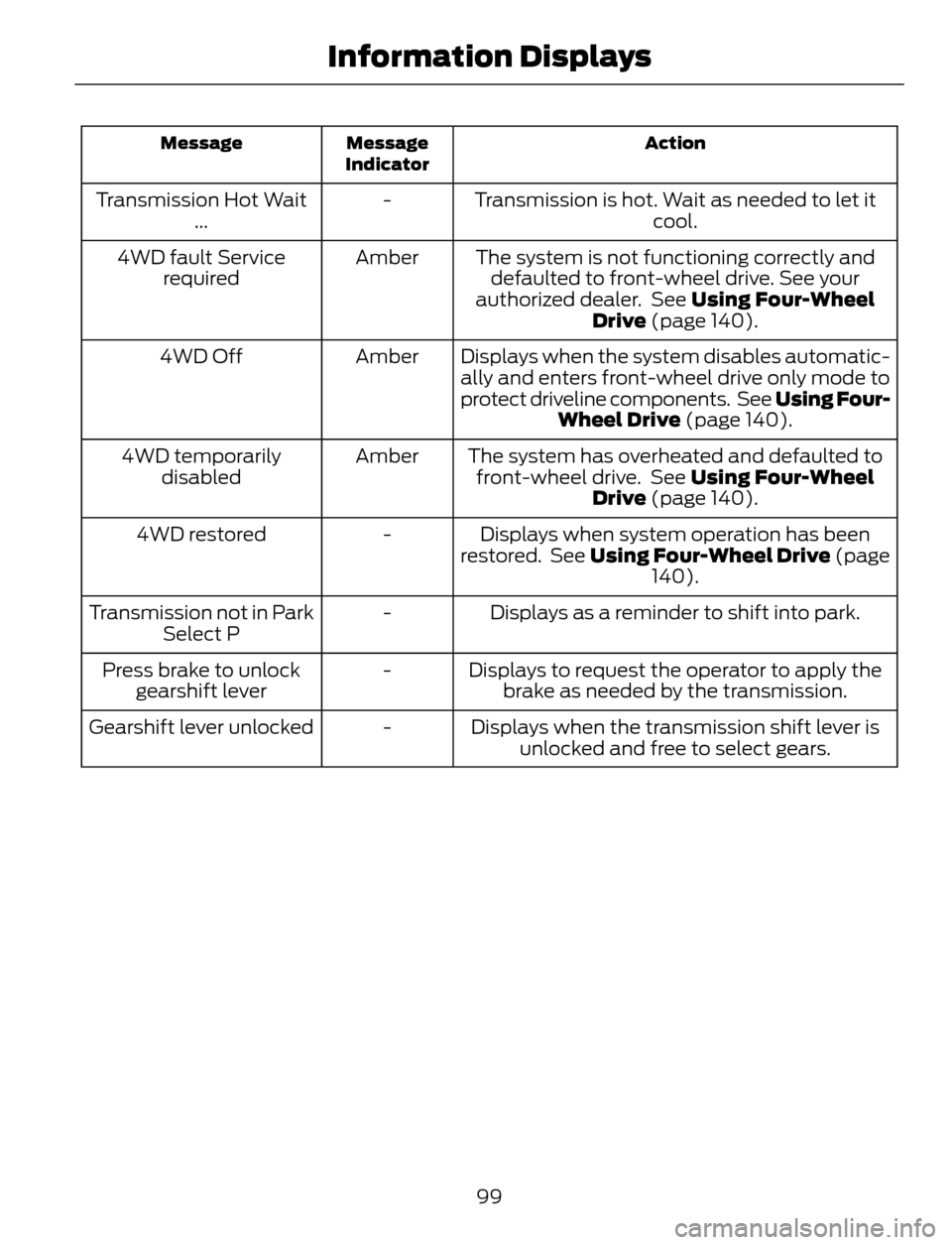
Action Message
Indicator Message
Transmission is hot. Wait as needed to let it
cool. - Transmission Hot Wait
...
The system is not functioning correctly and
defaulted to front-wheel drive. See your
authorized dealer. See Using Four-Wheel
Drive (page 140). Amber 4WD fault Service
required
Displays when the system disables automatic-
ally and enters front-wheel drive only mode to
protect driveline components. See Using Four-
Wheel Drive (page 140). Amber 4WD Off
The system has overheated and defaulted to
front-wheel drive. See Using Four-Wheel
Drive (page 140). Amber 4WD temporarily
disabled
Displays when system operation has been
restored. See Using Four-Wheel Drive (page
140). - 4WD restored
Displays as a reminder to shift into park. - Transmission not in Park
Select P
Displays to request the operator to apply the
brake as needed by the transmission. - Press brake to unlock
gearshift lever
Displays when the transmission shift lever is
unlocked and free to select gears. - Gearshift lever unlocked
99
Information Displays
Page 109 of 428

Vehicle Stationary for Extended Periods during Extreme High Ambient
Temperatures
Vehicle with automatic climate control Vehicle with manual climate control
Apply the parking brake. Apply the parking brake. 1
Move the transmission selector lever to
position P. Move the transmission selector lever to
position P. 2
Press the MAX A/C button. Adjust the temperature control to the
MAX A/C position. 3
Adjust the fan speed to the lowest speed
setting. 4
Side Window Defogging in Cold Weather
Vehicle with automatic climate control Vehicle with manual climate control
Press the windshield defrosting and
defogging button. Adjust the air distribution control to the
instrument panel and floor air vents
positions. 1
Adjust the temperature control to the
desired setting. Press the A/C button. 2
Adjust the temperature control to the
desired setting. 3
Adjust the fan speed to the highest
setting. 4
Direct the instrument panel side air vents
toward the side windows. 5
Close the instrument panel vents. 6
106
Climate Control

