2014 FORD E SERIES radio
[x] Cancel search: radioPage 367 of 438

Sirius® Satellite Radio Voice Commands
If you are listening to Sirius satellite radio, press the voice
button on the steering wheel control. When prompted, say any
of the commands in the following chart.
If you are not listening to Sirius satellite radio, press the voice button
and, after the tone, say “Sirius”, then any of the commands in the
following chart.
“Sirius”
“<0–233>” “Seek up”
“
“Preset <#>” “Sirius On”
“SAT 1” “Store”
*
“SAT 1 preset <#>” “Store preset <1–6>”
“SAT 2” “Store SAT1 preset <1–6>”
“SAT 2 preset <#>” “Store SAT2 preset <1–6>”
“SAT 3” “Store SAT3 preset <1–6>”
“SAT 3 preset <#>” “Tune”
**
“Seek down ” “Help”
*If you have said, “Store”, see the following “Store” chart.
**If you have said, “Tune”, see the following “Tune” chart.
“STORE”
“Preset <1–6>”
“SAT1 preset <1–6>”
“SAT2 preset <1–6>”
“SAT3 preset <1–6>”
“TUNE”
“<0–233>” “SAT 2”
“
“Preset <#>” “SAT 3”
“SAT 1” “SAT 3 preset <#>”
“SAT 1 preset <#>” “Help”
366Navigation System (If Equipped)
2014 Econoline(eco)
Owners Guide gf, 1st Printing, November 2012
USA(fus)
Page 368 of 438

Sirius® Information
Note:Sirius reserves the unrestricted right to change, rearrange, add or
delete programming including canceling, moving or adding particular
channels, and its prices, at any time, with or without notice to you. Ford
Motor Company shall not be responsible for any such programming
changes.
Sirius satellite radio is a
subscription-based satellite radio
service that broadcasts a variety of
music, sports, news, weather, traffic
and entertainment programming.
Your factory-installed Sirius satellite
radio system includes hardware and
a limited subscription term that begins on the date of sale or lease of
your vehicle. See an authorized dealer for availability.
For more information on extended subscription terms (a service fee is
required), the online media player and a list of Sirius satellite radio
channels, and other features, please visit www.siriusxm.com in the
United States, www.sirius.ca in Canada, or call Sirius at 1-888-539-7474.
Satellite radio electronic serial number (ESN):You need your ESN
to turn on, modify or track your satellite radio account. The ESN is on
the System Information Screen (SR ESN: XXXXXXXXXXXX). To access
your ESN, touch the I button on the navigation screen, and then select
the System Info tab.
Potential reception issues
Antenna
obstructionsFor optimal reception performance, keep the
antenna clear of snow and ice build-up and
keep luggage and other materials as far away
from the antenna as possible.
TerrainHills, mountains, tall buildings, bridges,
tunnels, freeway overpasses, parking garages,
dense tree foliage and thunderstorms can
interfere with your reception.
Navigation System (If Equipped)367
2014 Econoline(eco)
Owners Guide gf, 1st Printing, November 2012
USA(fus)
Page 369 of 438

Potential reception issues
Station overloadWhen you pass a ground-based
broadcast-repeating tower, a stronger signal
may overtake a weaker one and the audio
system may mute.
Satellite radio signal
interferenceYour display may show ACQUIRING... to
indicate the interference and the audio
system may mute.
Troubleshooting tips
Radio Display Condition Possible Action
Acquiring... Radio requires more
than two seconds to
produce audio for the
selected channel.No action required.
This message should
disappear shortly.
Sat Fault/Sirius
System FailureThere is an internal
module or system
failure present.If this message does
not clear shortly, or
with an ignition key
cycle, your receiver
may have a fault. See
an authorized dealer
for service.
Invalid Channel. The channel is no
longer available.Tune to another
channel or choose
another preset.
Unsubscribed Channel. Your subscription does
not include this
channel.Contact Sirius at
1-888-539-7474 to
subscribe to the
channel, or tune to
another channel.
No Signal. The signal is lost from
the Sirius satellite or
Sirius tower to your
vehicle antenna.The signal is blocked.
When you move into
an open area, the
signal should return.
368Navigation System (If Equipped)
2014 Econoline(eco)
Owners Guide gf, 1st Printing, November 2012
USA(fus)
Page 370 of 438
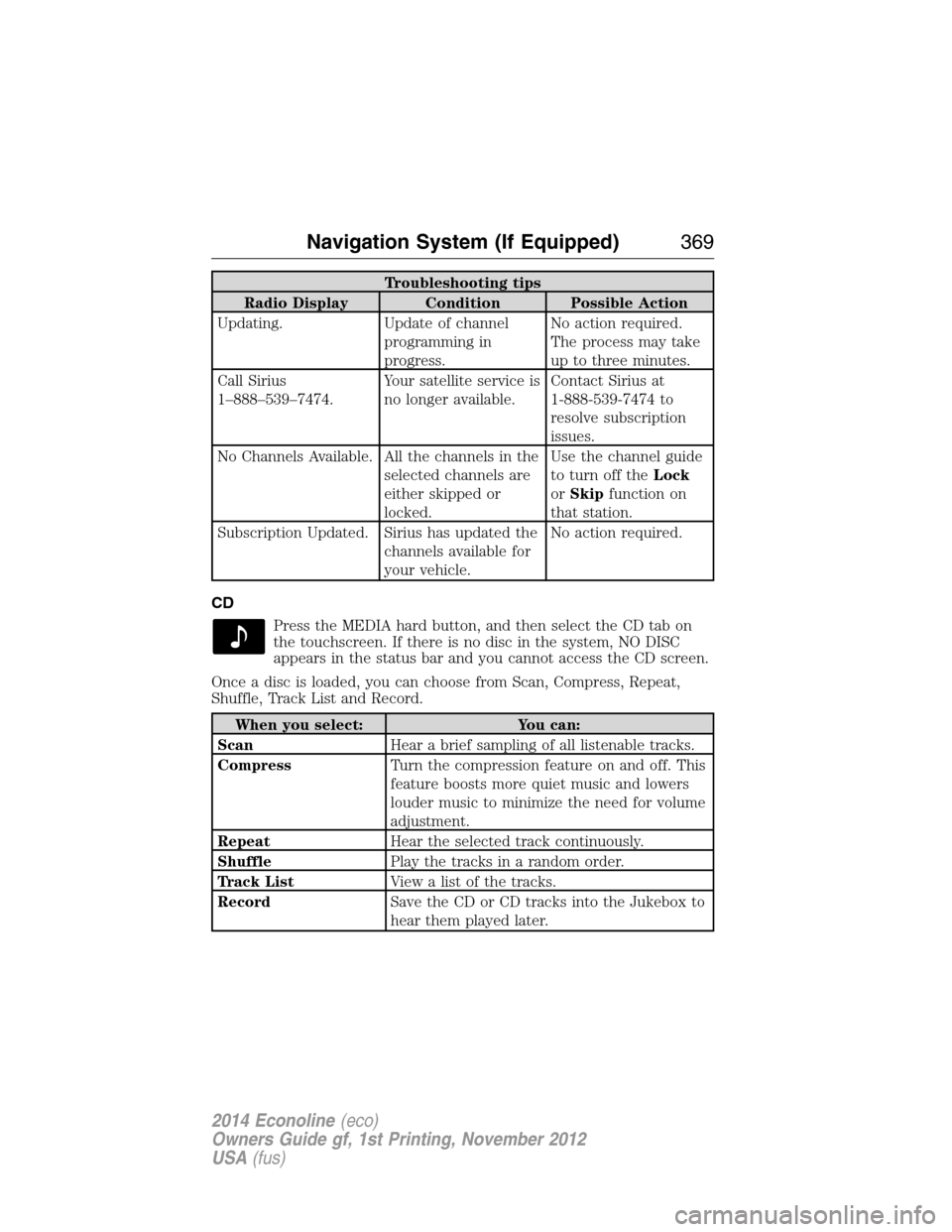
Troubleshooting tips
Radio Display Condition Possible Action
Updating. Update of channel
programming in
progress.No action required.
The process may take
up to three minutes.
Call Sirius
1–888–539–7474.Your satellite service is
no longer available.Contact Sirius at
1-888-539-7474 to
resolve subscription
issues.
No Channels Available. All the channels in the
selected channels are
either skipped or
locked.Use the channel guide
to turn off theLock
orSkipfunction on
that station.
Subscription Updated. Sirius has updated the
channels available for
your vehicle.No action required.
CD
Press the MEDIA hard button, and then select the CD tab on
the touchscreen. If there is no disc in the system, NO DISC
appears in the status bar and you cannot access the CD screen.
Once a disc is loaded, you can choose from Scan, Compress, Repeat,
Shuffle, Track List and Record.
When you select: You can:
ScanHear a brief sampling of all listenable tracks.
CompressTurn the compression feature on and off. This
feature boosts more quiet music and lowers
louder music to minimize the need for volume
adjustment.
RepeatHear the selected track continuously.
ShufflePlay the tracks in a random order.
Track ListView a list of the tracks.
RecordSave the CD or CD tracks into the Jukebox to
hear them played later.
Navigation System (If Equipped)369
2014 Econoline(eco)
Owners Guide gf, 1st Printing, November 2012
USA(fus)
Page 381 of 438

System Information
Press the I (information) button, then select System
Information.
In this screen, you can view the following options:
•Phone number for your Customer Service Center
•Current system versions installed
•Current Sirius Radio ESN
•Sirius Travel Link ESN.
Note:Not all tab selections may be available in all markets. Check with
an authorized dealer for availability.
Help
The Help screen allows you to view basic information about controls and
driving restrictions as well as traffic legend information and basic voice
commands available in various modes.
If you select: You can:
Basic OperationView hard buttons on your navigation system.
Press the desired icon to view the button
description.
Driving RestrictionView the system’s driving restriction.
Traffic LegendView the color code for the Speed and Flow
of roads on the navigation system. You can
also select Traffic Incidents to help you
differentiate between viewed and unviewed
incidents.
Voice CommandsView a brief listing of possible voice
commands in a specific mode.
380Navigation System (If Equipped)
2014 Econoline(eco)
Owners Guide gf, 1st Printing, November 2012
USA(fus)
Page 382 of 438

SOUND
The sound menu allows you to access and adjust settings, such as Bass,
Treble, Fade, Balance, Speed Compensated Volume (SCV) and the
visualizer. Press the SOUND hard button.
When you select: You can:
Bass/TrebleIncrease or decrease levels by pressing + or -.
Balance/FadeAdjust the sound between the left and right
speakers and front and rear speakers.
SCVHave the system automatically adjust radio
volume according to vehicle speed to
compensate for road and wind noise. Select a
level of compensation between 1 and 7 by
pressing the corresponding button.
VisualizerTurn the audio visualizer display on or off.
Note:Turning the visualizer setting to off
does not remove the visualizer on the home
screen. You need to select a different view in
order to remove the visualizer.
NAVIGATION SYSTEM
Your navigation system allows you to set a destination by using your
touchscreen or voice commands.
The navigation system contains map coverage for the United States,
Puerto Rico and U.S. Virgin Islands, Canada and Mexico.
Disclaimer
A disclaimer appears once per ignition cycle when theDESTbutton is
pressed. PressAcceptto agree to the terms and access navigation
functions. If you do not press Accept, you only have access to
non-navigation functions. The disclaimer has information similar to the
following:
•Always obey local traffic regulations.
•We recommend you program the system only when your vehicle is at
a stop.
•Some functions are unavailable while your vehicle is moving to help
minimize distraction.
•Periodic map updates are available at an additional cost.
Navigation System (If Equipped)381
2014 Econoline(eco)
Owners Guide gf, 1st Printing, November 2012
USA(fus)
Page 412 of 438

Export control:You agree not to export from anywhere any part of the
Data provided to you or any direct product thereof except in compliance
with, and with all licenses and approvals required under, applicable
export laws, rules and regulations.
Termination for Breach or Bankruptcy:(Licensee) and its licensors,
including NAVTEQ, may terminate this Agreement if you breach any of
its terms. Upon any such termination, you shall immediately cease your
use of the Data and return all copies thereof to LICENSEE or NAVTEQ,
as instructed. (Licensee) and its licensors also may terminate this
Agreement in the event that you (i) fail to pay license fees due for the
Data, or (ii) if any of the following events occur affecting you: (a)
voluntary bankruptcy or application for bankruptcy; (b) involuntary
bankruptcy or application for bankruptcy not discharged within sixty
(60) days; (c) appointment of receiver for all or a portion of your assets;
or (d) any assignment for the benefit of creditors.
Entire agreement:These terms and conditions constitute the entire
agreement between (Licensee) (and its licensors, including their
licensors and suppliers) and you pertaining to the subject matter hereof,
and supersedes in their entirety any and all written or oral agreements
previously existing between us with respect to such subject matter.
Governing law:The above terms and conditions shall be governed by
the laws of the Illinois, without giving effect to (i) its conflict of laws
provisions, or (ii) the United Nations Convention for Contracts for the
International Sale of Goods, which is explicitly excluded. You agree to
submit to the jurisdiction of Illinois for any and all disputes, claims and
actions arising from or in connection with the Data provided to you
hereunder.
FCC Compliance
Changes or modifications not approved by Ford could void user’s
authority to operate the equipment. This equipment has been tested and
found to comply with the limits with the Class B digital device, pursuant
to Part 15 of the FCC Rules. These limits are designed to provide
reasonable protection against harmful interference in a residential
installation. This equipment generates, uses and can radiate radio
frequency energy and, if not installed and used in accordance with the
instructions, may cause harmful interference to radio communications.
However, there is no guarantee that interference will not occur in a
particular installation. If this equipment does cause harmful interference
to radio or television reception, which can be determined by turning the
equipment off and on, the user is encouraged to consult the dealer or an
experienced radio/TV technician for help.
Appendices411
2014 Econoline(eco)
Owners Guide gf, 1st Printing, November 2012
USA(fus)
Page 432 of 438

911 Assist™ ..............................318
A
ABS (see Brakes) .....................128
Accessing call history/phone
book during active call .............307
Accessing the help screen .......380
Accessing the music in your
jukebox ......................................374
Accessing your media menu
features ......................................330
Accessing your phone menu
features ......................................309
Accessory delay ..........................71
Active call menu options .........307
Advanced menu options ...316, 337
Advanced menu options
(prompts, languages, defaults,
master reset, installing
applications) ..............................316
Airbag supplemental restraint
system ..........................................46
and child safety seats ..............47
description ................................46
disposal ......................................53
driver airbag ..............................46
passenger airbag .......................46
passenger deactivation
switch ........................................48
side airbag .................................46
Air cleaner filter ...............213, 279
Air conditioning ....................90–91
manual heating and air
conditioning system ...........90–91
Ambulance packages ..................15
AM/FM .......................................356Antifreeze
(see Engine coolant) ................197
Anti-lock brake system
(see Brakes) ..............................128
Anti-theft system ........................62
arming the system ....................62
AppLink™ .................................325
Audio system
Single CD ........................290–291
Audio system
(see Radio) ........................290–291
Automatic transmission
driving an automatic
overdrive .........................120, 122
fluid, adding ............................201
fluid, checking ........................201
fluid, refill capacities ..............272
fluid, specification ..................272
Auxiliary input jack (Line in) ..296
Auxiliary powerpoint ................102
Axle
lubricant specifications ..........272
refill capacities ........................272
traction lok ..............................127
B
Battery .......................................209
acid, treating emergencies .....209
jumping a disabled battery ....174
maintenance-free ....................209
replacement, specifications ...279
servicing ..................................209
Booster seats ...............................22
Brakes ........................................128
anti-lock ...................................128
anti-lock brake system (ABS)
warning light ...........................128
Index431
2014 Econoline(eco)
Owners Guide gf, 1st Printing, November 2012
USA(fus)