Page 173 of 284
FUSE SUMMARY TABLEEngine compartment fuse box FUSE AMPS
Body Computer Node F01 60
Passenger compartment fan F08 40
Fog lights F09 15
Horns F10 15
Main beam headlights F14 15
Heated windscreen F15 70
Air conditioning compressor F19 7,5
Front power socket (with or without cigar lighter) F20 15
Fuel pump F21 15
Blow-by F30 5
Sun roof motor F82 20
+15
(*)
reversing lights
F87 5
Mirrors demisting F88 7,5
Heated rear window F89 30
Battery charge status sensor F90 5
(*)+15 = ignition-operated positive terminal
169GETTING TO KNOW
YOUR CAR
SAFETY
STARTING AND
DRIVING
WARNING LIGHTS
AND MESSAGESIN AN
EMERGENCYSERVICING AND
MAINTENANCE
TECHNICAL
SPECIFICATIONS
INDEX
Page 174 of 284
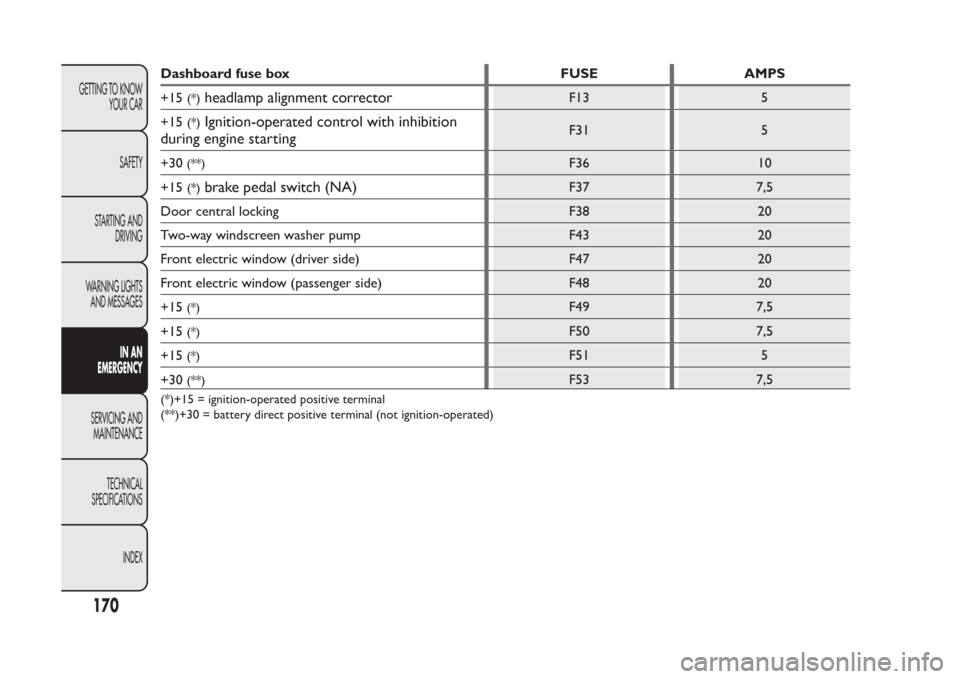
Dashboard fuse box FUSE AMPS
+15
(*)
headlamp alignment corrector
F13 5
+15
(*)
Ignition-operated control with inhibition
during engine starting
F31 5
+30
(**)
F36 10
+15
(*)
brake pedal switch (NA)
F37 7,5
Door central locking F38 20
Two-way windscreen washer pump F43 20
Front electric window (driver side) F47 20
Front electric window (passenger side) F48 20
+15
(*)
F49 7,5
+15
(*)
F50 7,5
+15
(*)
F51 5
+30
(**)
F53 7,5
(*)+15 = ignition-operated positive terminal
(**)+30 = battery direct positive terminal (not ignition-operated)
170
GETTING TO KNOW
YOUR CAR
SAFETY
STARTING AND
DRIVING
WARNING LIGHTS
AND MESSAGES
IN AN
EMERGENCY
SERVICING AND
MAINTENANCE
TECHNICAL
SPECIFICATIONS
INDEX
Page 177 of 284
TOWING THE CARThe tow hook, which is supplied with the car, is
housed in the tool box, under the carpet in the
luggage compartment.
ATTACHING THE TOW HOOK
Manually remove cap A fig. 148 (front bumper) or A
fig. 149 (rear bumper) pressing the lower part,
take the tow hook B fig. 148 fig. 149 from its housing
in the tool box and tighten it completely on the
front or rear threaded pin.
WARNING
Before towing, turn the ignition key to
MAR and then to STOP without
removing it .The steering column will
automatically lock when the key is removed and
the wheels cannot be steered.
WARNING
Before tightening the hook clean the
threaded housing thoroughly. Make sure
that the hook is fully fastened in the housing
before towing the car.
fig. 148
F0W0021
fig. 149
F0W0022
173GETTING TO KNOW
YOUR CAR
SAFETY
STARTING AND
DRIVING
WARNING LIGHTS
AND MESSAGESIN AN
EMERGENCYSERVICING AND
MAINTENANCE
TECHNICAL
SPECIFICATIONS
INDEX
Page 201 of 284

Avoid parking under trees as much as possible; the
resin from trees dulls the paintwork and increases
the possibility of corrosion.
IMPORTANT Bird droppings must be washed off
immediately and thoroughly as the acid they contain
is particularly aggressive.
Detergents pollute the environment . Only
wash your car in areas equipped to collect
and treat wastewater from this type of
activity.In order to preserve the aesthetic
appearance of the paint abrasive products
and/or polishes should not be used for
cleaning the car.
Windows
Use specific detergents and clean cloths to prevent
scratching or altering the transparency.
IMPORTANT Wipe the rear window inside gently
with a cloth in the direction of the filaments to avoid
damaging the heating device.
Front headlights
Use a soft, damp cloth soaked in water and
detergent for washing cars.
IMPORTANT Never use aromatic substances (e.g.
petrol) or ketones (e.g. acetone) for cleaning the
plastic lenses of the front headlights.Engine compartment
At the end of every winter, wash the engine
compartment thoroughly, taking care not to aim the
jet of water directly at the electronic control units or
at the windscreen wiper motors. Have this
operation performed at a specialised workshop.
IMPORTANT The washing should take place with the
engine cold and the ignition key in the STOP
position. After the washing operation, make sure
that the various protections (e.g. rubber caps and
guards) have not been removed or damaged.
197GETTING TO KNOW
YOUR CAR
SAFETY
STARTING AND
DRIVING
WARNING LIGHTS
AND MESSAGES
IN AN EMERGENCYSERVICING AND
MAINTENANCETECHNICAL
SPECIFICATIONS
INDEX
Page 246 of 284

Audio section
❒Mute/Pause function;
❒Soft-Mute function;
❒Loudness function;
❒7-band graphic equaliser;
❒Separate bass/treble adjustment;
❒Right/left channel balance.
Media Player section (only with Blue&Me™)
For the Media Player functions see, theBlue&Me™
supplement.
AUX section (only with Blue&Me™)
(for versions/markets, where provided)
❒AUX source selection;
❒AUX Offset function: alignment of the portable
device volume with that of the other sources;
❒Portable player playback.
FUNCTIONS AND ADJUSTMENTSSWITCHING ON THE CAR RADIO
The car radio comes on when the button/knob
(ON/OFF) is pressed briefly.
When the car radio is turned on, the volume is
limited to value 20 if it was set to a higher value
when previously used or to value 5 if it was
previously set to value 0 or to Mute/Pause. The
previously set value is maintained in all other cases.
When the radio is switched on with the key
extracted from the ignition, it switches off
automatically after about 20 minutes. After the radio
has switched itself off automatically it can be turned
on for a further 20 minutes by pressing the(ON/OFF) button/knob.
SWITCHING OFF THE CAR RADIO
Briefly press the
(ON/OFF) button/knob.
SELECTING THE RADIO FUNCTIONS
By pressing the FM AS button quickly and repeatedly,
the following audio sources can be selected cyclically:
❒TUNER (“FM1”, “FM2”, “FMA”).
By pressing the AM button briefly and repeatedly, the
following audio sources can be selected cyclically:
❒TUNER ("MW1", "MW2").
242
SOUND-SYSTEM
Page 255 of 284

NOTES
❒Using the Menu it is only possible to adjust the
activation/deactivation of the function and not the
minimum or maximum volume value.
❒If the "TA" or "TEL" functions or an external audio
source are activated when the radio is turned on,
the radio will come on at the volume set for these
sources. The volume can be adjusted between the
minimum and the maximum level, by deactivating
the external audio source.
❒If the battery charge is low, it will not be possible
to adjust the volume between the minimum and
maximum levels.
SPEECH VOLUME function
(telephone volume setting)
By turning the
(ON/OFF) button/knob or pressing
the
/
buttons, this function allows the volume to
be adjusted (settings from 1 to 40) or to be excluded
(OFF setting) for the Telephone andBlue&Me™
(except the Media Player function).
The display shows the current function status:
❒"Speech Off": function deactivated.
❒“Speech volume 23”: function active with volume
setting 23.AUX OFFSET function
(alignment of the portable device volume with
that of the other sources)
This function enables the alignment of the volume of
the AUX source, depending on its own portable
player, with that of the other sources.
To activate the function, press the MENU button and
select “AUX offset”.
Press the buttons
or
to decrease or increase the
volume value (set from–6to+6).
RADIO OFF function
(on and off mode)
This function is used to set the radio turning off
mode to one of two different settings. To turn the
function on, use the
or
buttons.
The chosen mode appears on the display:
❒"00 MIN": the radio turns off automatically in
connection with the ignition key; the radio turns
off automatically as soon as the key is turned to
the STOP position;
❒"20 MIN": the radio turns off independently of the
ignition key; the radio remains switched on for a
maximum period of 20 minutes after the key has
been turned to the STOP position.
251
SOUND-SYSTEM
Page 262 of 284

LOADING/EJECTING A CD
To load the CD, insert it gently into the slot to
activate the motorised loading system, which will
position it correctly.
The CD can be loaded with radio off and the ignition
key turned to MAR: in this case the radio will remain
off. When the radio is turned on, the last source
listened to before being switched off will be
activated.
When a CD is inserted the display will show the
symbol "CD-IN" and the text "CD Reading". They
will remain displayed for the entire time required for
the radio to read the CD tracks. When this time has
elapsed the radio automatically starts playing the first
track.
Press the
button (EJECT) with the radio on to
activate the motorised ejection of the CD. After
ejection, the last audio source listened to before
playing the CD will be heard.
WARNING
Do not inadvertently press the eject
button when inser ting a CD.If the CD is not removed from the radio, it will
automatically be reloaded about 20 seconds later and
the Tuner mode will be activated (Radio).
The CD cannot be ejected if the car radio is off.
If the ejected CD is reloaded without having removed
it completely from the slot, the radio will not switch
to the CD source.
Possible error messages
If the CD loaded cannot be read (e.g. a CD ROM has
been inserted or the CD is inserted the wrong way
round or there is a reading error) the display will
show the words "CD error".
The CD will then be ejected and the audio source
activated prior to the CD mode selection will be
heard.
With an external audio source activated ("TA",
"ALARM" and "Phone"), the CD that cannot be read
will not be ejected until these functions have ended.
At the end, with the CD mode activated, the display
will show the text "CD error" for a few seconds and
then the CD will be ejected.
If the CD player overheats CD playback could be
temporarily interrupted. The radio will automatically
switch to the Radio (Tuner) mode and the display will
show “CD hot” and then “CD error”.
258
SOUND-SYSTEM
Page 269 of 284
RIGHT HAND DRIVE VERSIONS
2
(RIGHT-HAND DRIVE VERSION)
The presence and position of the controls, instruments and indicators may vary according to the different
versions.1. Adjustable and directable air diffusers – 2. Exterior light control lever – 3. Driver front airbag – 4. Windscreen wiper/rear
window wiper/trip computer control lever – 5. Adjustable and directable centre air diffusers – 6. Passenger front airbag – 7.
Glove compartment (for versions/markets, where provided) – 8. Car radio (for versions/markets, where provided) – 9. Control
buttons – 10. Gear lever – 11. Heating/ventilation/climate control system controls – 12. Ignition device – 13. Instrument panel
– 14. Electric front windows – 15. ECO/ASR OFF buttons (for versions/markets, where provided)
TOTkmiC
fig. 1
F0W0292
65
DASHBOARD