2014 FIAT DUCATO button
[x] Cancel search: buttonPage 54 of 367

CRUISE CONTROL(for versions/markets, where provided)
IN BRIEF
This is an electronic driving aid that
allows you to drive at a speed of
above 30 km/h on long and straight
dry roads with few driving changes
(e.g. motorways) at a preset speed
without having to press the
accelerator pedal. It is therefore not
recommended to use this device
on extra-urban roads with traffic. Do
not use it in town.
Switching the device on
Turn ring nut A fig. 66 - fig. 67 to ON
or
(according to the version).The Cruise Control cannot be engaged
in 1st or reverse gear. It is advisable
to engage it in 4th or higher gears.
When travelling downhill with the device
engaged, the vehicle speed may
slightly exceed the stored one.
When the device is activated the
warning light
comes on together
with the relevant message on the
instrument panel.
Storing vehicle speed
Proceed as follows:
❒turn ring nut A fig. 66 - fig. 67 to ON
or
(according to the version) and
press the accelerator pedal so that
the vehicle reaches the desired
speed;❒move the stalk upwards (+) for at
least one second, then release it. The
vehicle speed is now stored and
you can therefore release the
accelerator pedal.
If necessary (e.g. when overtaking)
acceleration is possible by simply
pressing the accelerator pedal:
releasing the accelerator pedal the car
will return to the speed stored
previously.
Restoring the stored
speed
If the device has been deactivated, for
example by depressing the brake or
clutch pedal, the stored speed can be
restored as follows:
❒accelerate progressively until a speed
close to that stored is reached;
❒engage the gear selected at the time
that the speed was stored;
❒press button B fig. 66 - fig. 67.
Increasing the stored
speed
This can be done in two ways:
❒by pressing the accelerator and
storing the new speed reached
or
❒by moving the stalk upwards (+).
66 - Versions without Speed Limiter
F1A0364
67 - Versions with Speed Limiter
F1A0363
50
KNOW YOUR VEHICLE
Page 55 of 367

Each activation of the lever
corresponds to an increase in speed of
about 1 km/h, whilst keeping the lever
upwards varies the speed continuously.
Reducing the stored
speed
This can be done in two ways:
❒by switching off the device and then
storing the new speed;
or
❒by moving the stalk downwards (-)
until the new speed, which will be
stored automatically, is reached.
Each movement of the lever will
correspond to a slight reduction in
speed of about 1 km/h, while keeping
the lever held downwards will decrease
the speed continuously.
Deactivating the device
The device can be switched off by
the driver in the following ways:
❒turning ring nut A to OFF orO
(according to the version);
❒by stopping the engine;Deactivating the
function
The device can be switched off by the
driver in the following ways:
❒turning ring nut A to OFF orO
(according to the version);
❒pressing the button B, both with
symbolIIand symbol CANC/RES,
the system pauses;
❒by stopping the engine;
❒by pressing the brake pedal or
operating the handbrake;
❒by pressing the clutch pedal;
❒requesting a gear shift with an
automatic transmission in sequential
mode;
❒with the vehicle speed below the set
limit
❒by pressing the accelerator pedal; in
this case the system is not actually
turned off but the acceleration
request takes priority; the Cruise
Control remains activated, without
the need to press the CANC/RES
button to restore the previous
conditions once the acceleration is
over.
The device is automatically switched off
in the following cases:
❒if the ABS or ESP systems cut in;❒in the event of system failure.
27) 28)
SPEED LIMITER
This device allows the speed of the car
to be limited to values which can be
set by the driver.
The maximum speed can be set both
with vehicle stationary and in motion.
The minimum speed that can be set is
30 km/h.
When the device is active, the car
speed depends on the pressure at the
accelerator pedal, until the
programmed speed limit is reached
(see "Speed limit programming"
paragraph).
If necessary (in the event of overtaking
for example), the set speed limit can
be exceeded by fully depressing the
accelerator pedal.
By gradually reducing the pressure on
the accelerator pedal, the function
will be reactivated as soon as the car
speed drops below the set speed.
51
Page 56 of 367

Switching the device on
To activate the device, turn ring nut A
fig. 68 to position
.
Activation of the device is indicated by
the
warning light on the instrument
panel switching on and, on some
versions, by a message on the display
plus last programmed speed value.
Speed limit
programming
The speed limit can be programmed
without necessarily activating the
device.
To store a speed value higher than that
displayed, move stalk A upwards (+).
Each movement of the stalk
corresponds to an increase in speed of
about 1 km/h, while keeping the stalk
held upwards will increase the speed
with an increment of 5 km/h.To store a value lower than that
displayed, move stalk A downwards (–).
Each movement of the stalk
corresponds to a decrease in speed of
about 1 km/h, while keeping the stalk
held downwards a decrease of 5 km/h
is obtained.
Activating/deactivating
the device
Press the CANC RES button to
activate/deactivate the device.
The activation of the device is indicated
by the
warning light on the
instrument panel switching on.
The deactivation of the function is
instead indicated by the
symbol on
the display.
Exceeding the
programmed speed
By fully depressing the accelerator
pedal, the programmed speed can be
exceeded even with the device active.
IMPORTANT A slight hardening of
the accelerator pedal is perceived when
the end of travel is reached. This is to
intentionally signal to the driver that the
speed control system is being
deactivated.When the programmed speed limit is
reached by fully depressing the
accelerator pedal, it is normal to
perceive increased resistance on the
pedal itself.
In this case the device is deactivated
temporarily and the set speed flashes
on the display.
Reducing the speed below the
programmed value reactivates the
device automatically.
IMPORTANT With the device
deactivated, the car maximum speed is
reached before the end of travel with
the load hardening.
Flashing of programmed
speed
The programmed speed flashes in the
following cases:
❒when the accelerator pedal has been
fully depressed and the car speed
has exceeded programmed speed;
❒when the device cannot reduce the
speed of the car due to the gradient
of the road;
❒in the event of sharp acceleration.
68
F1A0363
52
KNOW YOUR VEHICLE
Page 59 of 367
Warning lights
and
are lit up in the
instrument panel when this device is
activated. Press switch A again to turn
the lights off.
IMPORTANT The use of hazard warning
lights is governed by the highway
code of the country you are in. Comply
with legal requirements.
Emergency braking
(for versions/markets, where provided)
In the event of emergency braking
the hazard warning lights come on
automatically, as do theand
warning lights in the panel. The
function switches off automatically
when the nature of the braking
changes. This function complies with
the relevant legislation currently in force.
FOG LIGHTS
(for versions/markets, where provided)
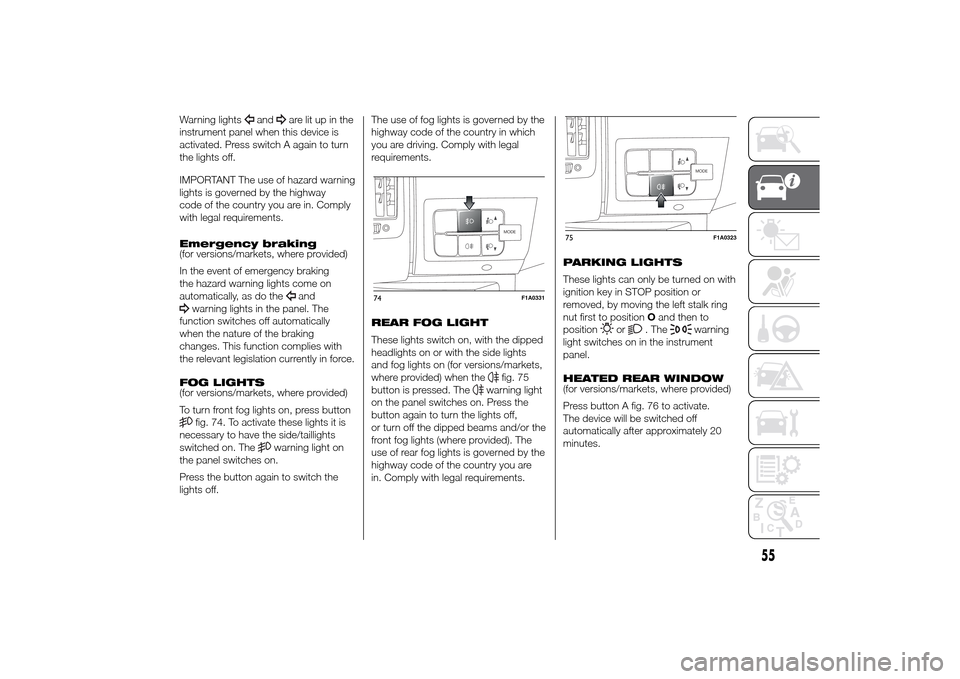
To turn front fog lights on, press buttonfig. 74. To activate these lights it is
necessary to have the side/taillights
switched on. The
warning light on
the panel switches on.
Press the button again to switch the
lights off.The use of fog lights is governed by the
highway code of the country in which
you are driving. Comply with legal
requirements.
REAR FOG LIGHT
These lights switch on, with the dipped
headlights on or with the side lights
and fog lights on (for versions/markets,
where provided) when the
fig. 75
button is pressed. The
warning light
on the panel switches on. Press the
button again to turn the lights off,
or turn off the dipped beams and/or the
front fog lights (where provided). The
use of rear fog lights is governed by the
highway code of the country you are
in. Comply with legal requirements.PARKING LIGHTS
These lights can only be turned on with
ignition key in STOP position or
removed, by moving the left stalk ring
nut first to positionOand then to
position
or
. The
warning
light switches on in the instrument
panel.
HEATED REAR WINDOW
(for versions/markets, where provided)
Press button A fig. 76 to activate.
The device will be switched off
automatically after approximately 20
minutes.
MODE
74
F1A0331
MODE
75
F1A0323
55
Page 60 of 367

BATTERY
DISCONNECTION
FUNCTION
(DISCONNECTOR)
(for versions/markets, where provided)
The battery disconnection function is
enabled with the ignition key in the
BATT position, as illustrated on the
dedicated plate located in the area
illustrated in fig. 77.To turn the ignition key to BATT
position, press button A (red) fig. 78.
The battery will be disconnected, by
interrupting the earth lead, about 45
seconds after the key is turned to the
BATT position.
This 45 second period is necessary to:
❒allow the driver to get out of the
vehicle and lock the doors using the
remote control;
❒guarantee that all the vehicle
electrical systems have been
deactivated.
With the battery disconnected, access
to the vehicle will only be possible by
unlocking the driver's door using the
mechanical lock.To restore the battery connection, insert
the ignition key and turn it to the
MAR-ON position, the vehicle can be
started normally at this point.
If the battery is disconnected, it may be
necessary to set certain electrical
devices again (e.g. clock, date, etc.).
CENTRAL LOCKING
To lock all doors at the same time,
press button A fig. 79, located on the
centre console control panel, regardless
of the position of the ignition key.
The LED on the button switches on
when the doors are locked.
The electric window panel features a
button D fig. 80 which independently
unlocks/locks the load compartment.76
F1A0330
77
F1A0082
78
F1A0083
79
F1A0303
56
KNOW YOUR VEHICLE
Page 61 of 367

FUEL CUT-OFF
SWITCHThe vehicle is fitted with a safety switch
that, in the event of a crash, comes
into operation by cutting off the fuel
supply and turning off the engine as a
consequence.When the inertia switch cuts in, it cuts
off the fuel supply and also activates
the hazard warning lights, side lights
and courtesy lights while releasing
all the doors and displaying the relevant
message; they are deactivated by
pressing button A. On some versions,
there is also a safety relay that activates
in the event of impact to cut off the
electrical supply. In this way, fuel is
prevented from escaping if the pipes
are broken and the formation of sparks
or electrical discharges following
damage to the vehicle electrical
components is avoided.
29) 30)
IMPORTANT After an accident,
remember to remove the key from the
ignition device to prevent the battery
from running down. If no fuel leaks
or damage to vehicle's electrical
devices (e.g. headlights) are detected
after the impact and the vehicle is
able to set off again, reactivate the
automatic fuel cut-off switch.Restoring the fuel
cut-off switch
Press button A fig. 81 to reactivate the
fuel cut off switch.
WARNING
29) If, after an impact, you smell fuel
or notice leaks from the fuel
system, do not reactivate the
switch to avoid the risk of fire.
30) Before reactivating the fuel
cut-off switch, carefully check for
fuel leaks or damage to the
vehicle's electrical devices (e.g.
headlights).
80
F1A0085
81
F1A0086
57
Page 64 of 367
CUP HOLDER - CAN
HOLDER
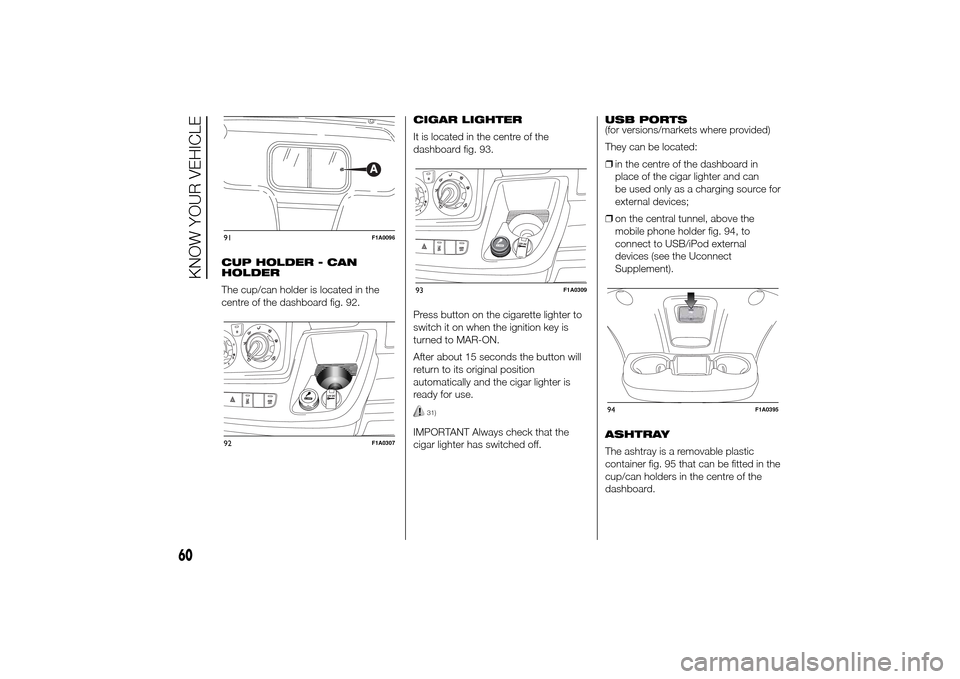
The cup/can holder is located in the
centre of the dashboard fig. 92.CIGAR LIGHTER
It is located in the centre of the
dashboard fig. 93.
Press button on the cigarette lighter to
switch it on when the ignition key is
turned to MAR-ON.
After about 15 seconds the button will
return to its original position
automatically and the cigar lighter is
ready for use.
31)
IMPORTANT Always check that the
cigar lighter has switched off.USB PORTS
(for versions/markets where provided)
They can be located:
❒in the centre of the dashboard in
place of the cigar lighter and can
be used only as a charging source for
external devices;
❒on the central tunnel, above the
mobile phone holder fig. 94, to
connect to USB/iPod external
devices (see the Uconnect
Supplement).
ASHTRAY
The ashtray is a removable plastic
container fig. 95 that can be fitted in the
cup/can holders in the centre of the
dashboard.
91
F1A0096
92
F1A0307
93
F1A0309
94
F1A0395
60
KNOW YOUR VEHICLE
Page 68 of 367
SPEED BLOCK(for versions/markets, where provided)
The vehicle is equipped with a speed
limitation function that can be set at the
user's request to one of 4 predefined
values: 90, 100, 110, 130 km/h.
To activate/deactivate this function,
contact a Fiat Dealership.
Following the operation, a sticker will be
applied to the windscreen showing the
maximum speed setting.
IMPORTANT The speedometer could
indicate a higher maximum speed than
the effective one, set by the Dealership,
in accordance with the regulations in
force.
SELF-LEVELLING AIR
SUSPENSIONGENERAL INFORMATION
The system only acts on the rear
wheels.
The system maintains the rear ride
setting for the vehicle constant in any
loading condition, while ensuring a
greater driving comfort. In addition, the
system allows the height of the vehicle
to be adjusted with the vehicle
stationary, by selecting from 7 different
positions to facilitate access to the
rear compartment.
HEIGHT ADJUSTMENT
There are 7 pre-defined levels for the
free height from the ground: from “ride
-3” to “ride 0” till “ride +3”.
The multifunction display, located in the
middle of the instrument panel, can
show the ride position.
Automatic adjustment
When moving, the system automatically
shows that the vehicle is in 'ride setting
0' and keeps it constant.
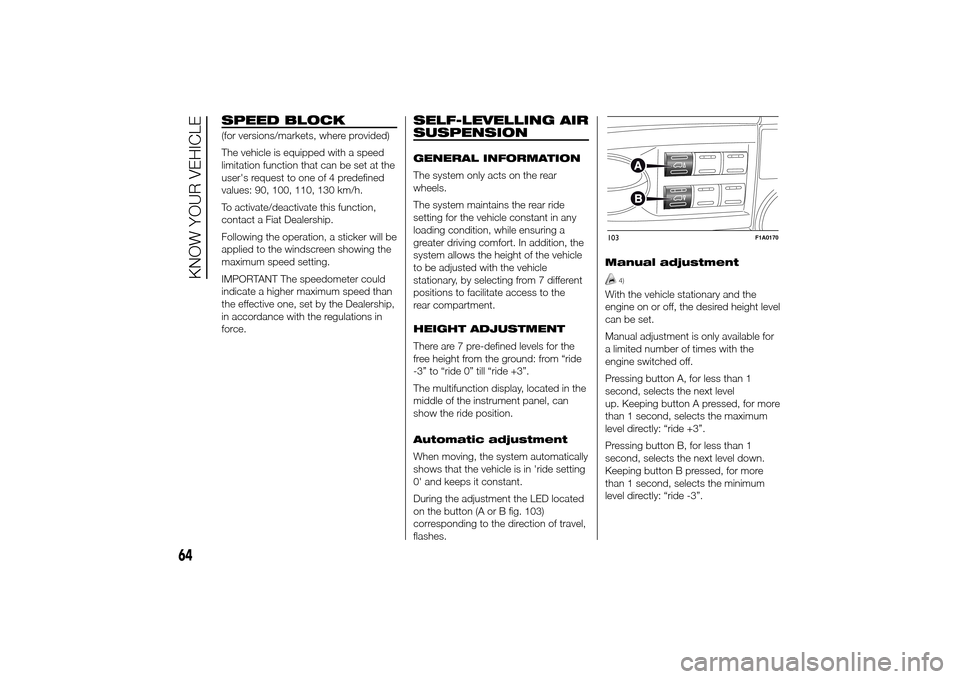
During the adjustment the LED located
on the button (A or B fig. 103)
corresponding to the direction of travel,
flashes.Manual adjustment
4)
With the vehicle stationary and the
engine on or off, the desired height level
can be set.
Manual adjustment is only available for
a limited number of times with the
engine switched off.
Pressing button A, for less than 1
second, selects the next level
up. Keeping button A pressed, for more
than 1 second, selects the maximum
level directly: “ride +3”.
Pressing button B, for less than 1
second, selects the next level down.
Keeping button B pressed, for more
than 1 second, selects the minimum
level directly: “ride -3”.103
F1A0170
64
KNOW YOUR VEHICLE