2014 FIAT BRAVO Side light
[x] Cancel search: Side lightPage 18 of 275

ALARM(for versions/markets, where provided)
The alarm, in addition to all the remote control
functions described previously, is controlled by the
receiver located under the dashboard near the
fuse box.
ALARM ACTIVATION
The alarm intervenes in the following instances:
❒when a door, the bonnet or the tailgate is opened
illegally (perimeter protection);
❒when the ignition system is started up (ignition key
turned to MAR-ON);
❒cutting of the battery leads;
❒movement inside the passenger compartment
(volume sensing protection);
❒anomalous lifting/tilting of the vehicle.
Depending on the market, the activation of the alarm
causes the activation of the siren and the direction
indicators (for about 26 seconds). Alarm tripping and
the number of cycles depend on the sales market.
There is a maximum number of acoustic/visual cycles.
When this is reached the system returns to normal
operation.
The volume sensing and anti-lift protection can be
excluded by adjusting the dedicated control on
the front roof light (see “Volume sensing/Anti-lift
protection”).IMPORTANT The engine stop function is guaranteed
by the Fiat CODE which is automatically activated
when the key is extracted from the ignition switch.
TURNING THE ALARM ON
With the doors, bonnet and tailgate closed and the
ignition key either turned to STOP or removed,
point the key with remote control towards the
vehicle and press and release button
.
Excluding some markets, the system produces an
acoustic signal (beep) and enables door locking.
The switching on of the alarm is preceded by a
self-diagnosis stage: if a fault is detected, the system
emits a new acoustic signal together with the display
of a message (see “Warning lights and messages”
chapter).
In this case switch off the alarm by pressing
, check
that all the doors, bonnet and tailgate are closed
correctly; then switch the alarm back on by pressing
the
button.
If a door, the bonnet and the tailgate are not
properly shut, they will be excluded from the check
by the alarm system.
If the alarm emits an acoustic signal even when the
doors, bonnet and tailgate are correctly closed, a
failure has occurred in system operation. Go to a Fiat
Dealership.
IMPORTANT The alarm does not come on when the
central locking is activated using the metal insert in
the key.
14GETTING TO
KNOW YOUR CAR
SAFETY
STARTING AND
DRIVING
WARNING LIGHTS
AND MESSAGES
IN AN EMERGENCY
SERVICING AND
MAINTENANCE
TECHNICAL
SPECIFICATIONS
INDEX
Page 19 of 275
IMPORTANT The alarm is adapted to meet
requirements in various countries.
TURNING THE ALARM OFF
Press button
on the key with remote control.
The following operations are performed (excluding
some versions for specific markets):
❒direction indicators flash twice;
❒there are two short acoustic signals (beeps);
❒doors are unlocked.
IMPORTANT The alarm does not switch off when
the central opening is activated using the metal insert
in the key.
VOLUME SENSING/ANTI-LIFT
PROTECTION
To guarantee the correct operation of the protection
system it is advisable to shut all the side windows
and the sun roof (for versions/markets, where
provided).
If necessary, the function can be turned off (if, for
example, you are leaving an animal in the car) by
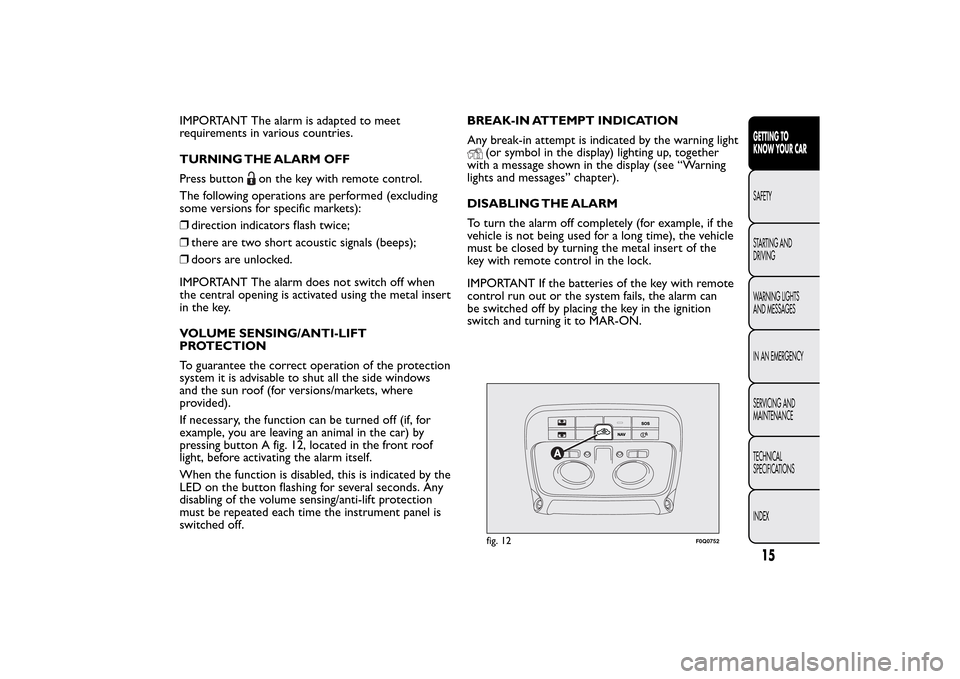
pressing button A fig. 12, located in the front roof
light, before activating the alarm itself.
When the function is disabled, this is indicated by the
LED on the button flashing for several seconds. Any
disabling of the volume sensing/anti-lift protection
must be repeated each time the instrument panel is
switched off.BREAK-IN ATTEMPT INDICATION
Any break-in attempt is indicated by the warning light
(or symbol in the display) lighting up, together
with a message shown in the display (see “Warning
lights and messages” chapter).
DISABLING THE ALARM
To turn the alarm off completely (for example, if the
vehicle is not being used for a long time), the vehicle
must be closed by turning the metal insert of the
key with remote control in the lock.
IMPORTANT If the batteries of the key with remote
control run out or the system fails, the alarm can
be switched off by placing the key in the ignition
switch and turning it to MAR-ON.fig. 12
F0Q0752
15GETTING TO
KNOW YOUR CARSAFETY
STARTING AND
DRIVING
WARNING LIGHTS
AND MESSAGES
IN AN EMERGENCY
SERVICING AND
MAINTENANCE
TECHNICAL
SPECIFICATIONS
INDEX
Page 21 of 275
WARNING
It is absolutely forbidden to carr y out
any aftermarket operation involving
steering system or steering column
modifications (e.g.: installation of anti-theft
device) that could badly affect performance and
safety, invalidate the warranty and also result
in non-compliance of the car with type-
approval requirements.
WARNING
Never remove the key while the car is
moving.The steering wheel will lock
as soon as it is turned.This holds true for cars
being towed as well.
DISPLAYThe car is equipped with a multifunction display that,
according to the previously applied settings, will
show useful driving information.
When one of the front doors is opened, the display
is activated, showing the time and mileage for a
few seconds.
NoteWith a low outside temperature (below 0°C)
it may take longer than normal for information to
appear on the display.
17GETTING TO
KNOW YOUR CARSAFETY
STARTING AND
DRIVING
WARNING LIGHTS
AND MESSAGES
IN AN EMERGENCY
SERVICING AND
MAINTENANCE
TECHNICAL
SPECIFICATIONS
INDEX
Page 22 of 275
MULTIFUNCTION DISPLAY “STANDARD”
SCREEN
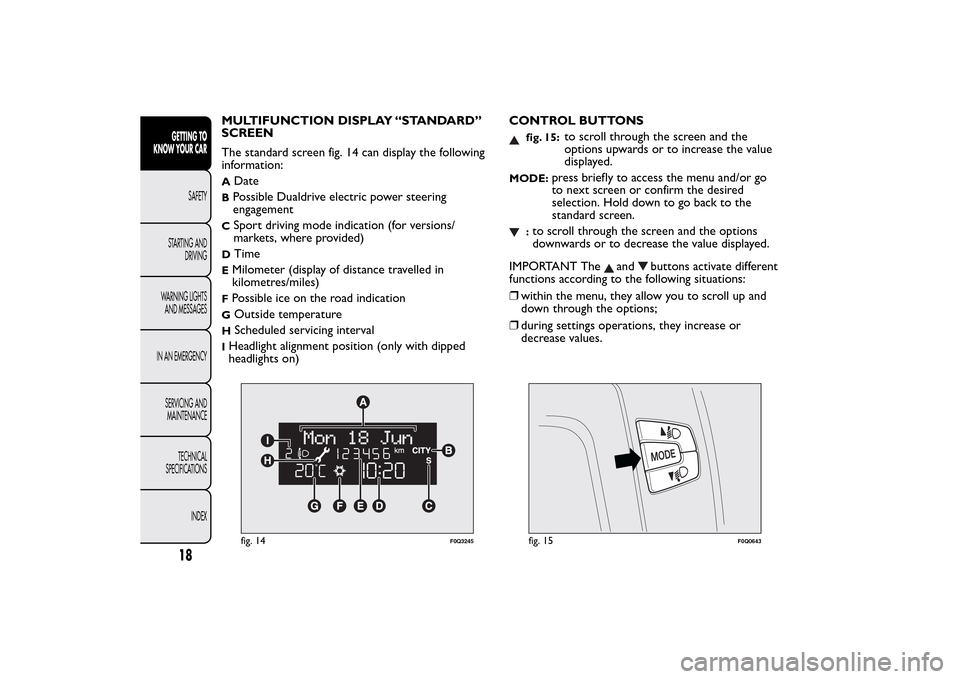
The standard screen fig. 14 can display the following
information:A
Date
BPossible Dualdrive electric power steering
engagementC
Sport driving mode indication (for versions/
markets, where provided)
D
Time
EMilometer (display of distance travelled in
kilometres/miles)FPossible ice on the road indicationG
Outside temperature
H
Scheduled servicing interval
IHeadlight alignment position (only with dipped
headlights on)CONTROL BUTTONS
fig. 15:
to scroll through the screen and the
options upwards or to increase the value
displayed.
MODE:
press briefly to access the menu and/or go
to next screen or confirm the desired
selection. Hold down to go back to the
standard screen.
:to scroll through the screen and the options
downwards or to decrease the value displayed.
IMPORTANT The
and
buttons activate different
functions according to the following situations:
❒within the menu, they allow you to scroll up and
down through the options;
❒during settings operations, they increase or
decrease values.
fig. 14
F0Q3245
fig. 15
F0Q0643
18GETTING TO
KNOW YOUR CAR
SAFETY
STARTING AND
DRIVING
WARNING LIGHTS
AND MESSAGES
IN AN EMERGENCY
SERVICING AND
MAINTENANCE
TECHNICAL
SPECIFICATIONS
INDEX
Page 24 of 275
Selecting an option from the main menu with
a submenu:
❒briefly press the MODE button to display the first
submenu option;
❒press buttons
or
(with single presses) to
scroll through all the submenu options;
❒briefly press the MODE button to select the
displayed submenu option and to open the
relevant settings menu;
❒press buttons
or
(with single presses) to
select the new setting for this submenu option;
❒briefly press the MODE button to store the new
setting and at the same time go back to the
previously selected submenu option.
MENU ITEMSLighting (Interior light adjustment)
With the side lights on, this function is used to set
the brightness of the instrument panel, radio
controls and dual zone automatic climate control
system controls (for versions/markets where
provided) to 8 levels.
Proceed as follows to adjust the brightness:
❒briefly press the MODE button: the previously set
level flashes on the display;
❒press button
or
to set the required brightness
level;
❒briefly press the MODE button to return to the
menu screen or hold the button down to return
to the standard screen without storing.
Speed Beep (Speed limit)
This function is used to set the car speed limit (km/h
or mph); the driver is immediately alerted when
this limit is exceeded (see section “Warning lights
and messages”).
To set the desired speed limit, proceed as follows:
❒press the MODE button briefly, the display shows
the dedicated message;
❒press the
or
button to select speed limit
activation (On) or deactivation (Off );
❒if the function has been activated (On), press the
or
buttons to select the desired speed limit
and then press MODE to confirm.
20GETTING TO
KNOW YOUR CAR
SAFETY
STARTING AND
DRIVING
WARNING LIGHTS
AND MESSAGES
IN AN EMERGENCY
SERVICING AND
MAINTENANCE
TECHNICAL
SPECIFICATIONS
INDEX
Page 31 of 275
Airbag/Passenger bag
This function is used to activate/deactivate the
passenger side airbag.
Proceed as follows:
❒press the MODE button and, after the message
"Bag pass: Off" (to deactivate) or "Bag pass: On"
(to activate) is displayed by pressing the
and
buttons, press the MODE button again;
❒a confirmation request message will appear on the
display;
❒by pressing the
or
buttons, select ("Yes") (to
confirm activation/deactivation) or ("No") (to
cancel);
❒press the MODE button briefly and a message
confirming the selection will be displayed, then you
will return to the menu screen, or hold the
button down to return to the standard screen
without storing.Exit menu
The last function closing the cycle of settings listed in
the menu screen.
Press the MODE button briefly to return to the
standard screen without storing.
Press the
button to go back to the first menu
option ("Speed Beep").
27GETTING TO
KNOW YOUR CARSAFETY
STARTING AND
DRIVING
WARNING LIGHTS
AND MESSAGES
IN AN EMERGENCY
SERVICING AND
MAINTENANCE
TECHNICAL
SPECIFICATIONS
INDEX
Page 34 of 275
SEATSFRONT SEATS WITH MANUAL
ADJUSTMENT
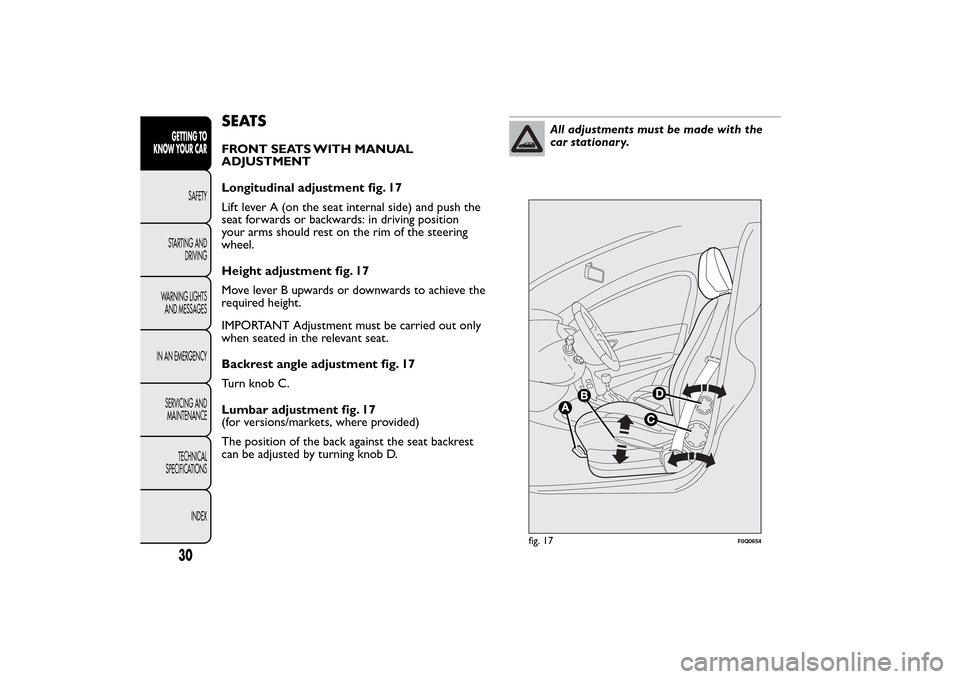
Longitudinal adjustment fig. 17
Lift lever A (on the seat internal side) and push the
seat forwards or backwards: in driving position
your arms should rest on the rim of the steering
wheel.
Height adjustment fig. 17
Move lever B upwards or downwards to achieve the
required height.
IMPORTANT Adjustment must be carried out only
when seated in the relevant seat.
Backrest angle adjustment fig. 17
Turn knob C.
Lumbar adjustment fig. 17
(for versions/markets, where provided)
The position of the back against the seat backrest
can be adjusted by turning knob D.
All adjustments must be made with the
car stationary.
fig. 17
F0Q0654
30GETTING TO
KNOW YOUR CAR
SAFETY
STARTING AND
DRIVING
WARNING LIGHTS
AND MESSAGES
IN AN EMERGENCY
SERVICING AND
MAINTENANCE
TECHNICAL
SPECIFICATIONS
INDEX
Page 35 of 275
The fabric upholstery of your car has
been designed to withstand wear deriving
from common use of the car.You are
however recommended to avoid strong and/or
continuous scratching with clothing accessories
such as metal buckles, studs,Velcro fastenings and
the like, as these items cause stress of the cover
fabric that could lead to yarn breaking and
damage the upholstery.Once you have released the adjustment
lever, always check that the seat is locked
on the guides by trying to move it back
and for th. If the seat is not locked into place, it
may unexpectedly slide and cause the driver
to lose control of the car.
HEAD RESTRAINTSFRONT
These are height-adjustable and lock into place
automatically.
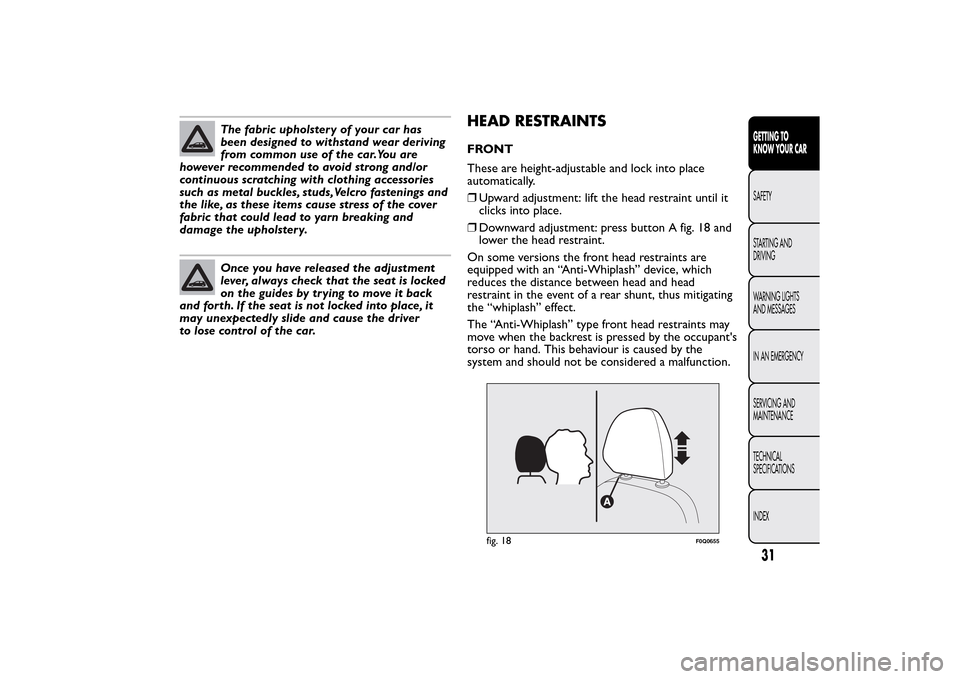
❒Upward adjustment: lift the head restraint until it
clicks into place.
❒Downward adjustment: press button A fig. 18 and
lower the head restraint.
On some versions the front head restraints are
equipped with an “Anti-Whiplash” device, which
reduces the distance between head and head
restraint in the event of a rear shunt, thus mitigating
the “whiplash” effect.
The “Anti-Whiplash” type front head restraints may
move when the backrest is pressed by the occupant's
torso or hand. This behaviour is caused by the
system and should not be considered a malfunction.
fig. 18
F0Q0655
31GETTING TO
KNOW YOUR CARSAFETY
STARTING AND
DRIVING
WARNING LIGHTS
AND MESSAGES
IN AN EMERGENCY
SERVICING AND
MAINTENANCE
TECHNICAL
SPECIFICATIONS
INDEX