Page 418 of 614

•Launch Control is intended to be used on dry, paved
road surfaces only. Use on slippery or loose surfaces
may cause damage to vehicle components.
Launch Control is only available when the following
procedure is followed:
1. Press the “ESC OFF” button to put the vehicle into ESC Partial mode. The “ESC OFF” lamp will illumi-
nate in the cluster.
2. Press the “ESC OFF” button a second time to put the vehicle into Launch Control. The “ESC OFF” lamp will
remain lit, and the cluster display will read “Launch
Control Enabled”.
3. Make sure the vehicle is not moving.
4. Make sure the steering wheel is pointing straight.
5. Hold the brake and make sure the vehicle is in “Drive”. 6. While holding the brake, rapidly apply the accelerator
pedal to wide open throttle. The engine speed will
hold at approximately 1825 RPM for the quickest
launch.
• Messages will appear in the cluster EVIC display to
inform the driver if one or more of the above
conditions (3 through 6) have not been met.
7. When conditions 3 through 6 have been met, the cluster EVIC display will read “Launch Ready Release
Brake”.
Release the brake and continue to hold wide open
throttle to launch.
8. Keep the vehicle pointed straight.
Launch control will be active until the vehicle reaches
62 mph (100 kph), at which point the ESC system
continues in ESC Full ON mode. Activating Launch
416 STARTING AND OPERATING
Page 423 of 614

NOTE:
•Increased noise levels at the end of the steering wheel
travel are considered normal and do not indicate that
there is a problem with the power steering system.
• Upon initial start-up in cold weather, the power steer-
ing pump may make noise for a short amount of time.
This is due to the cold, thick fluid in the steering
system. This noise should be considered normal, and it
does not in any way damage the steering system.
CAUTION!
Prolonged operation of the steering system at the end
of the steering wheel travel will increase the steering
fluid temperature and it should be avoided when
possible. Damage to the power steering pump may
occur.
Power Steering Fluid Check
Checking the power steering fluid level at a defined
service interval is not required. The fluid should only be
checked if a leak is suspected, abnormal noises are
apparent, and/or the system is not functioning as antici-
pated. Coordinate inspection efforts through an autho-
rized dealer.
CAUTION!
Do not use chemical flushes in your power steering
system as the chemicals can damage your power
steering components. Such damage is not covered by
the New Vehicle Limited Warranty.
5
STARTING AND OPERATING 421
Page 428 of 614

WARNING!
•The ABS contains sophisticated electronic equip-
ment that may be susceptible to interference
caused by improperly installed or high output
radio transmitting equipment. This interference
can cause possible loss of anti-lock braking capa-
bility. Installation of such equipment should be
performed by qualified professionals.
• Pumping of the Anti-Lock Brakes will diminish
their effectiveness and may lead to a collision.
Pumping makes the stopping distance longer. Just
press firmly on your brake pedal when you need to
slow down or stop.
• The ABS cannot prevent the natural laws of phys-
ics from acting on the vehicle, nor can it increase
braking or steering efficiency beyond that afforded
by the condition of the vehicle brakes and tires or
the traction afforded.
(Continued)
WARNING! (Continued)
•The ABS cannot prevent collisions, including those
resulting from excessive speed in turns, following
another vehicle too closely, or hydroplaning.
• The capabilities of an ABS equipped vehicle must
never be exploited in a reckless or dangerous
manner that could jeopardize the user’s safety or
the safety of others.
All vehicle wheels and tires must be the same size and
type and tires must be properly inflated to produce
accurate signals for the computer.
ELECTRONIC BRAKE CONTROL SYSTEM
Your vehicle is equipped with an advanced electronic
brake control system that include Anti-Lock Brake Sys-
tem (ABS), Traction Control System (TCS), Brake Assist
System (BAS), and the Electronic Stability Control (ESC).
426 STARTING AND OPERATING
Page 431 of 614

corrects for oversteering and understeering the vehicle
by applying the brake of the appropriate wheel. Engine
power may also be reduced to assist in counteracting the
condition of oversteer or understeer and help the vehicle
maintain the desired path.
The ESC uses sensors in the vehicle to determine the path
that the driver intends to steer the vehicle and compares
it to the actual path of the vehicle. When the actual path
does not match the intended path, the ESC applies the
brake of the appropriate wheel to assist in counteracting
the condition of oversteer or understeer.
•Oversteer - when the vehicle is turning more than
appropriate for the steering wheel position.
• Understeer - when the vehicle is turning less than
appropriate for the steering wheel position.WARNING!
The Electronic Stability Control System (ESC) cannot
prevent the natural laws of physics from acting on
the vehicle, nor can it increase the traction afforded
by prevailing road conditions. ESC cannot prevent
all accidents, including those resulting from exces-
sive speed in turns, driving on very slippery surfaces,
or hydroplaning. ESC also cannot prevent accidents
resulting from loss of vehicle control due to inappro-
priate driver input for the conditions. Only a safe,
attentive, and skillful driver can prevent accidents.
The capabilities of an ESC equipped vehicle must
never be exploited in a reckless or dangerous manner
which could jeopardize the user ’s safety or the safety
of others.
5
STARTING AND OPERATING 429
Page 438 of 614
Synchronizing ESC
If the power supply is interrupted (battery
disconnected or discharged), the “ESC
Activation/Malfunction Indicator Light” may
illuminate with the engine running. If this
should occur, turn the steering wheel completely to the
left and then to the right. The “ESC Activation/
Malfunction Indicator Light” should go out. However, if
the light remains on, have the ESC and BAS checked at
your authorized dealer as soon as possible.
TIRE SAFETY INFORMATION
Tire Markings
1 — U.S. DOT Safety Standards
Code (TIN) 4 — Maximum Load
2 — Size Designation 5 — Maximum Pressure
3 — Service Description 6 — Treadwear, Traction and Temperature Grades
436 STARTING AND OPERATING
Page 460 of 614

WARNING!
•Do not use a tire, wheel size or rating other than
that specified for your vehicle. Some combinations
of unapproved tires and wheels may change sus-
pension dimensions and performance characteris-
tics, resulting in changes to steering, handling, and
braking of your vehicle. This can cause unpredict-
able handling and stress to steering and suspen-
sion components. You could lose control and have
a collision resulting in serious injury or death. Use
only the tire and wheel sizes with load ratings
approved for your vehicle.
• Never use a tire with a smaller load index or
capacity, other than what was originally equipped
on your vehicle. Using a tire with a smaller load
index could result in tire overloading and failure.
You could lose control and have a collision.
(Continued)
WARNING! (Continued)
•Failure to equip your vehicle with tires having
adequate speed capability can result in sudden tire
failure and loss of vehicle control.
CAUTION!
Replacing original tires with tires of a different size
may result in false speedometer and odometer read-
ings.
TIRE CHAINS (TRACTION DEVICES)
If driving conditions require tire chains for your vehicle,
use only chains that meet SAE type “Class S” specifica-
tions. In addition, only install tire chains on 245/45ZR20
size tires. Contact you local authorized dealership or tire
dealer for these size tires.
458 STARTING AND OPERATING
Page 501 of 614

6. Once the engine is started, remove the jumper cablesin the reverse sequence:
Disconnecting The Jumper Cables
1. Disconnect the negative (-)end of the jumper cable
from the remote negative (-)post of the vehicle with
the discharged battery.
2. Disconnect the opposite end of the negative (-)jumper
cable from the negative (-)post of the booster battery.
3. Disconnect the positive (+)end of the jumper cable
from the positive (+)post of the booster battery.
4. Disconnect the opposite end of the positive (+)jumper
cable from the remote positive (+)post of the vehicle
with the discharged battery.
If frequent jump-starting is required to start your vehicle
you should have the battery and charging system in-
spected at your authorized dealer.CAUTION!
Accessories plugged into the vehicle power outlets
draw power from the vehicle’s battery, even when not
in use (i.e., cellular phones, etc.). Eventually, if
plugged in long enough without engine operation,
the vehicle’s battery will discharge sufficiently to
degrade battery life and/or prevent the engine from
starting.
FREEING A STUCK VEHICLE
If your vehicle becomes stuck in mud, sand, or snow, it
can often be moved using a rocking motion. Turn the
steering wheel right and left to clear the area around the
front wheels. Then shift back and forth between DRIVE
and REVERSE while gently pressing the accelerator. Use
the least amount of accelerator pedal pressure that will
6
WHAT TO DO IN EMERGENCIES 499
Page 545 of 614
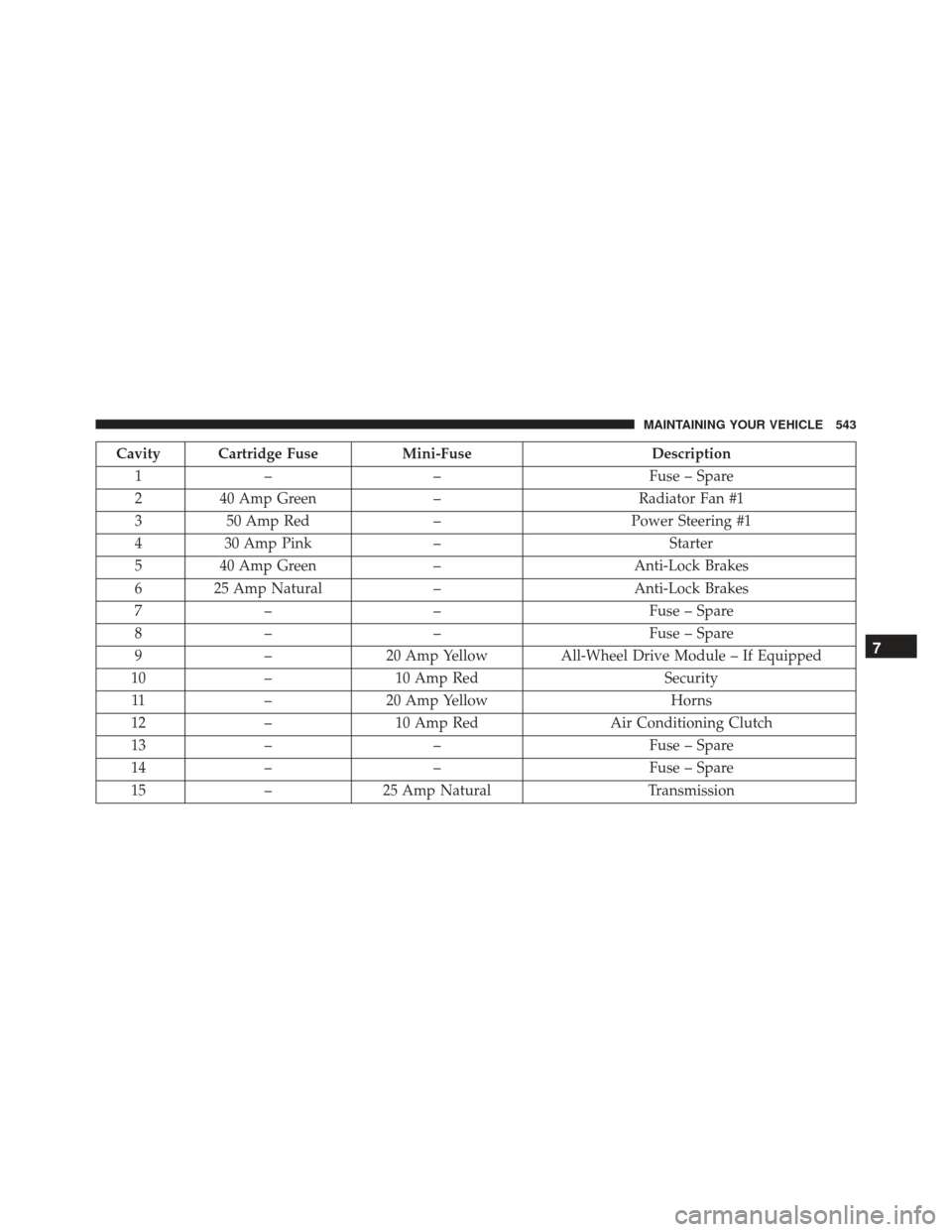
Cavity Cartridge FuseMini-FuseDescription
1 – – Fuse – Spare
2 40 Amp Green –Radiator Fan #1
3 50 Amp Red –Power Steering #1
4 30 Amp Pink – Starter
5 40 Amp Green –Anti-Lock Brakes
6 25 Amp Natural –Anti-Lock Brakes
7 – – Fuse – Spare
8 – – Fuse – Spare
9 –20 Amp Yellow All-Wheel Drive Module – If Equipped
10 –10 Amp Red Security
11 –20 Amp Yellow Horns
12 –10 Amp Red Air Conditioning Clutch
13 – – Fuse – Spare
14 – – Fuse – Spare
15 –25 Amp Natural Transmission
7
MAINTAINING YOUR VEHICLE 543